JUL 12, 2023

Picture this: It's the final week of your fiscal quarter. Your sales team is closing deals, and your finance team is preparing reports for the board. Your marketing team is analyzing campaign performance to set next quarter's budget. Then, at 4 p.m. on a Tuesday, your analytics platform goes dark due to a cloud provider outage.
For many organizations, this scenario isn't hypothetical — it's a recurring nightmare. As Snowflake CEO Sridhar Ramaswamy pointed out in his recent blog post, disaster recovery is a must for organizations navigating today’s interconnected, fast-moving digital economy. A single, seemingly isolated incident can cascade across thousands of apps and services, disrupting processes and delaying critical business decisions.
Yet when evaluating data + AI platforms, business continuity and disaster recovery (BCDR) often takes a back seat. And unfortunately, not all platforms are architected for true enterprise resilience. That means that when systems fail, business continuity becomes your problem to solve, with your reputation on the line.
Every business faces a choice: accept the risk of downtime or invest in resilience. The question isn't whether your business can afford a BCDR solution — it’s whether your business can afford not to have one.
When evaluating your current platform or assessing new solutions, three critical questions will reveal whether you're fully protected.
The stakes for downtime are much higher than most organizations realize. Unplanned downtime costs an average of $14,056 per minute, rising to $23,750 for large enterprises, according to 2024 research by Enterprise Management Associates (EMA).
Your business may have specific recovery objectives, such as recovery point objectives (RPOs) and recovery time objectives (RTOs). You need to ask whether the solution you're evaluating can deliver on them.
Platforms built for enterprise needs should be able to walk you through setting up disaster recovery procedures. Ask for specifics: "How can I easily re-ingest missing data in my DR account and achieve a 15-minute RTO?" If they can't show you how this works, you're looking at a platform that may leave your team flying blind.
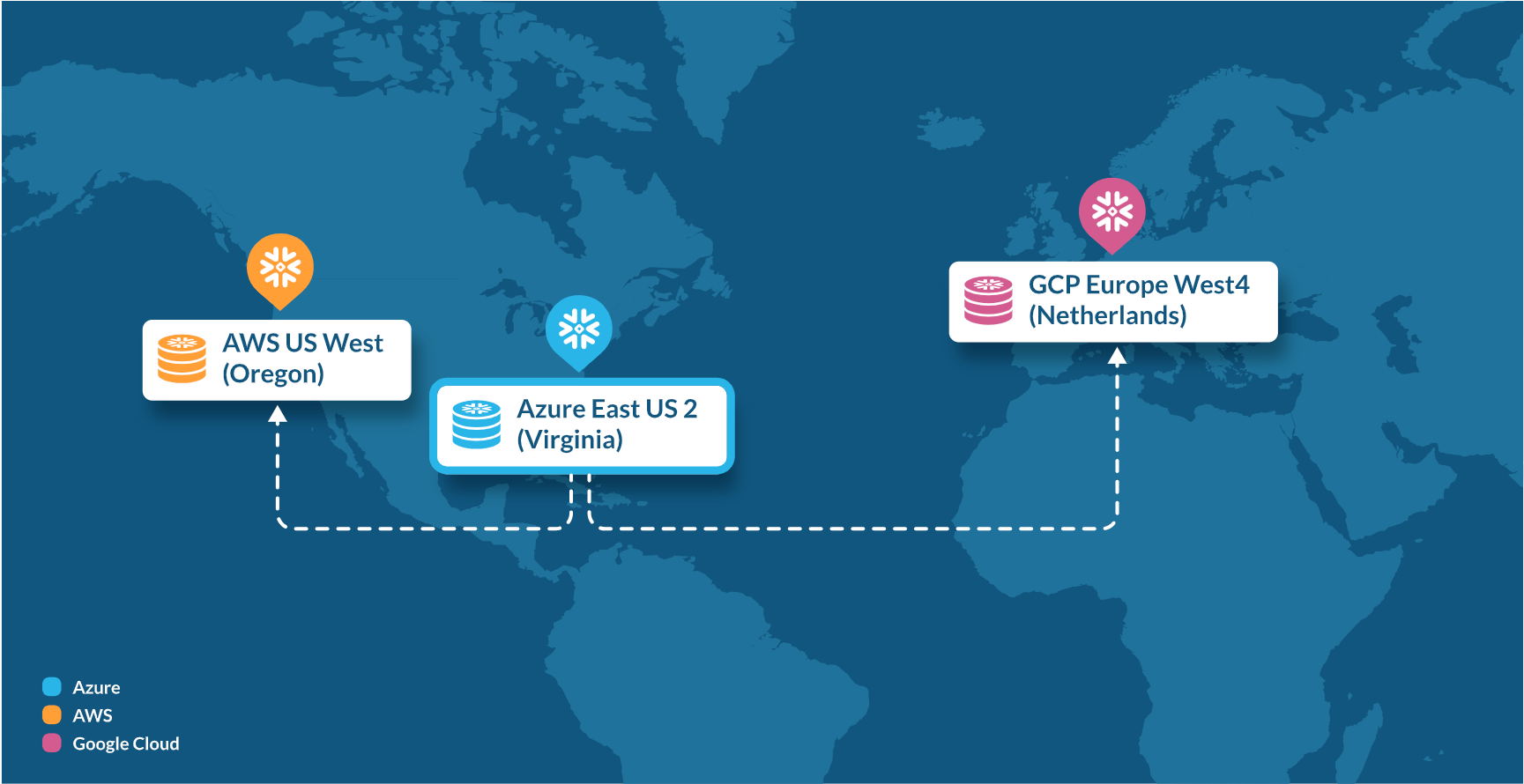
True enterprise-grade BCDR means seamless failover across regions and even between cloud providers, not just local redundancy. BCDR should work whether you're dealing with a data center outage, a regional service disruption or a migration across regions or cloud providers.
Third-party analysis also shows that Snowflake can handle cross-region and cross-cloud failover automatically, maintaining your data, processing capabilities and governance controls across multiple regions and clouds, while other platforms may require extensive manual intervention and custom engineering to achieve cross-region and cross-cloud failover.
Be sure to ask how long it takes to get up and running. Databricks, for instance, has acknowledged publicly that its BCDR “can take months, or even a year, to get up and running the first time.” Snowflake's BCDR can be set up in minutes, regardless of whether you need cross-region or cross-cloud protection.
Your data is only as valuable as your ability to govern it properly — even during a disaster.
With some platforms, policies such as row-level security, column masking rules and user permissions are not seamlessly restored, leaving you vulnerable to regulatory violations and hefty fines.
The most powerful platforms, such as Snowflake, replicate your entire account as a single, managed unit, which helps protect all your data, metadata and account information. This means your governance policies are also protected, helping to maintain compliance and security.
Our Snowflake Backups capability (now generally available) takes this protection a step further. You can set up backups to be immutable, allowing you to create point-in-time snapshots that cannot be modified or deleted, even by admins. In a disaster scenario, you can combine snapshots with Snowflake account replication so that all snapshot sets and policies can be replicated to a different region or cloud provider and recovered. Snowflake Backups supports customers’ regulatory compliance, bolsters cyberresilience against threats such as ransomware and preserves the long-term integrity of data for auditing or legal purposes.
When disaster strikes, you don't just need your data back. You need your entire data estate restored: pipelines, governance policies, user permissions and business logic.
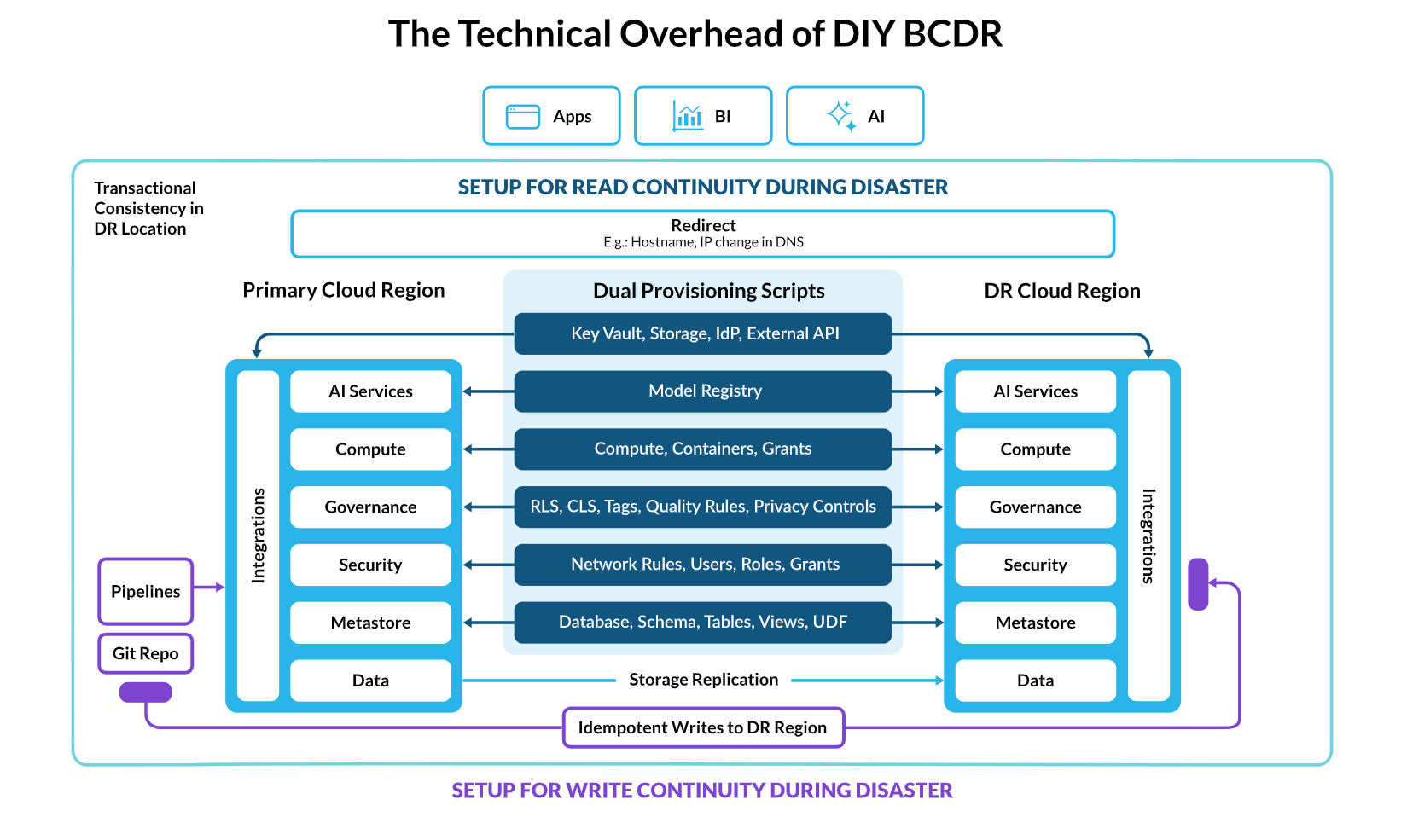
But some platforms treat BCDR like a DIY science experiment. They provide the raw building blocks and leave it up to your team to architect, implement and maintain disaster recovery procedures. On paper, this might sound like flexibility. In practice, it often means:
Thousands of lines of custom code to handle failover scenarios.
Multiple vendors stitched together to ensure critical data is replicated.
No guarantee that your custom solution will work when you need it most.
Responsibility for every failure mode, so if things break, that’s on you.
This represents a huge operational burden, costing you hundreds of hours of engineering time, exposing you to risk and forcing your team to waste cycles maintaining your BCDR solution rather than innovating.
With a DIY approach, your team isn’t just building your data and AI solutions. They're becoming disaster recovery specialists, writing intricate failover procedures and hoping they never have to find out if their code works under pressure.
A self-managed, complex solution requires your team to coordinate and provision every component to ensure read and write continuity during a disaster. This includes:
Data and metastore: You must handle storage replication and use dual provisioning scripts to manage databases, schemas, tables, views and other data objects.
Security and governance: You need separate scripts to maintain redundant security models (for example, users, roles and network rules) and governance policies (for example, row-level and column-level security as well as tags).
Compute and AI services: Compute resources, containers and even registered model artifacts for AI services must be manually provisioned in the secondary region.
Integrations and pipelines: External integrations with identity providers, key vaults and other APIs, as well as data pipelines and code repositories, must be made redundant to ensure the system functions correctly after a failover.
Redirect: To provide seamless access for end clients, such as apps, BI tools and AI services, you need a manual redirect. This often involves changes to DNS hostnames or IP addresses.
Compare this to a platform such as Snowflake, where BCDR is a turnkey solution that’s ready from day one. Your team can focus on business value while Snowflake enables continuous availability, leading to a 75% reduction in unplanned downtime and 30% direct cost savings on average, according to Snowflake research.
Modern BCDR isn't just about recovering from disasters. It's also about preventing them from impacting your business in the first place. This requires a platform designed for the following:
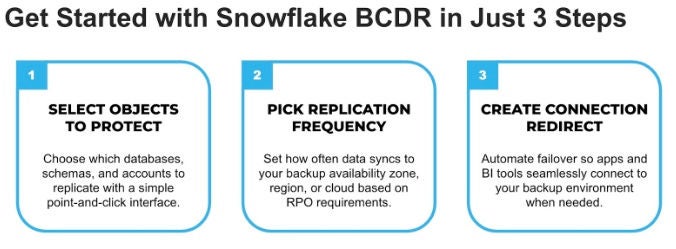
Effortless setup: Instead of building complex replication logic, you should be able to activate BCDR in a few clicks and have a solution that works across regions and clouds.
Near-zero downtime: Your platform should achieve minute-level RTO and near-zero data loss (RPO) with its approach to replication.
Full account synchronization: Governance rules, user permissions and security policies should be consistently applied and maintained across regions and clouds without custom code.
The reality: Only Snowflake delivers on all three of these requirements out of the box.
Not all platforms are enterprise-ready and require months of custom engineering to achieve basic failover, however Snowflake's account replication and failover can be configured in minutes by the customer. After that, Snowflake automatically maintains your entire data estate — including governance policies, user permissions, integrations and security rules — across supported regions and cloud providers. Watch our demo to learn more.
Other platforms treat BCDR as an expensive DIY project. Snowflake treats it as a core enterprise requirement that just works. The impact of this approach becomes visible when outages happen: with Snowgrid, our cross-cloud technology layer enabling collaboration, governance and business continuity, we are able to turn outages into a non-event for our customers.
As you evaluate your current platform or assess new solutions, you should make BCDR a first-class consideration. Here are the key evaluation criteria:
Make them prove it: Ask to see a platform’s disaster recovery process. Can they demonstrate cross-region and cross-cloud failover? How hard is it to set up? How long does it take?
Understand account continuity: Specifically ask about account policy restoration. If a region fails, how quickly are policies and permissions restored?
Assess the responsibility model: What happens in the event of a disaster, and who manages the recovery process?
Probe on cross-cloud: You may need cross-cloud disaster recovery, especially if you’re in a regulated industry. Can they fail over automatically between cloud providers?
Ask about real-world testing: How often do they test failover scenarios? Can you run your own failover tests without disrupting business?
If you're evaluating your existing platform's BCDR capabilities, consider scheduling a technical review focused on these questions:
"Can you show us how disaster recovery works, step by step?"
"Walk us through how governance policies are restored during failover."
"How do you handle cross-region and cross-cloud policy synchronization?"
"What's our actual RTO if our primary region becomes unavailable?"
“Does your BCDR solution allow for DR drills with zero data loss or impact to the business, so fault tolerance of our entire tech stack can be tested periodically?”
Don't accept theoretical answers. Ask for demonstrations and documented procedures. Because when your systems fail, the only thing that matters is getting back up quickly, completely and correctly. Your business depends on it.
Ready to evaluate your current BCDR strategy? Contact Snowflake for a comprehensive business continuity assessment and see how Snowflake's enterprise-grade disaster recovery capabilities can protect your critical data workloads. Or get hands-on with our quickstart guide and learn how to set up BCDR in minutes.