OCT 07, 2021|3 min read
Choosing Primary and Secondary Regions in Snowflake for Business Continuity

Natural disaster. Errant code. Regional downtime. In the event of such disruptions, it can be crucial to have a secondary region for recovery to ensure business continuity and data durability.
Snowflake Database Replication enables customers to replicate databases and keep them synchronized across multiple accounts in different regions and for different cloud providers. Customers can synchronize changes to a secondary region or cloud provider, ensuring data durability and availability at all times. Snowflake Database Failover comes into play in the event of a massive outage that disrupts the cloud services in a given region or for a specific cloud provider; it allows customers to fail over databases to an available region or cloud provider to continue business operations.
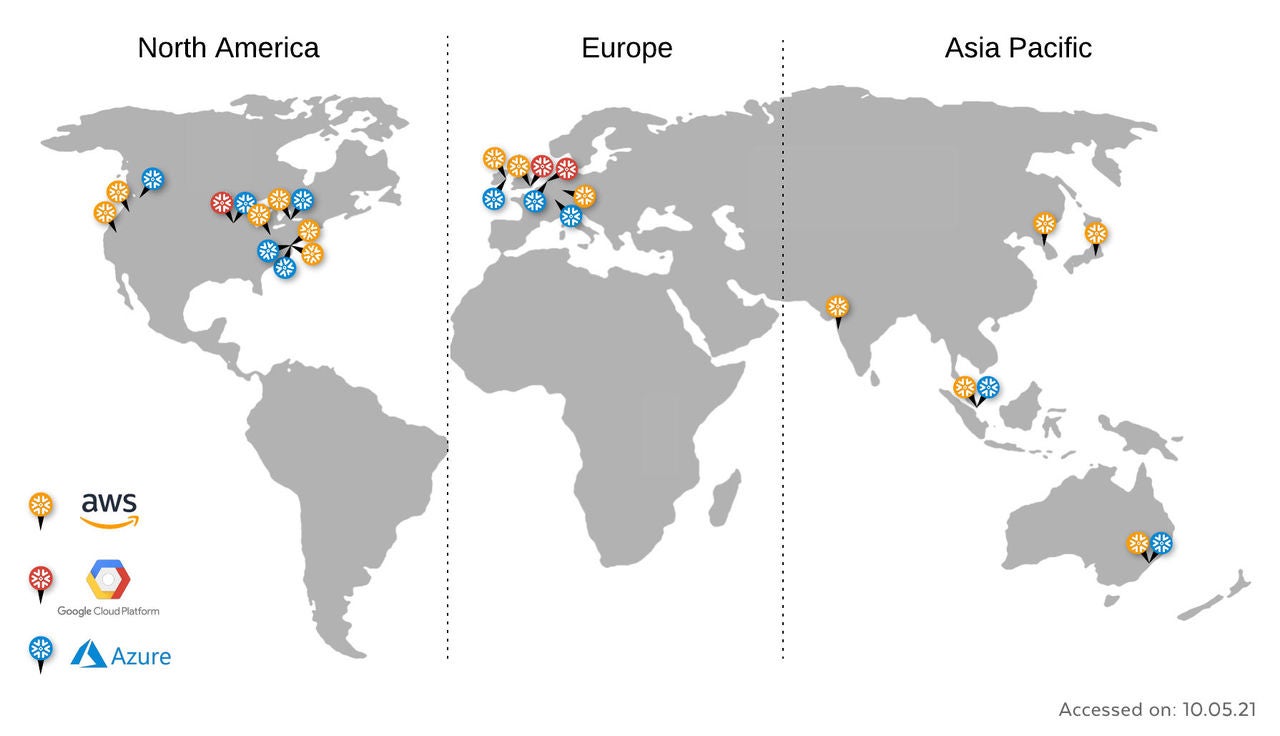
Figure 1: Supported cloud providers and regions available for Snowflake (more on regions are listed in the documentation)
Choosing Clouds and Regions in Snowflake for Business Continuity
When considering what regions on which clouds to use for your primary and secondary source, it’s important to select regions that complement your unique business continuity plan. Consider the following when you choose two regions for your primary and secondary storage:
- Multi-cloud versus single cloud: A multi-cloud strategy helps ensure availability and resiliency if a cloud provider experiences an outage in multiple regions. It can also ensure data portability in the event that an exit plan needs to be in place. If you choose a single cloud, consider taking advantage of functionality such as Azure Regional Pairs.
- Geographic isolation: Choose two regions that are far enough from each other that a natural disaster, civil unrest, or other regional event in one region won’t affect the other region. If it’s possible in your geographical area, choose a distance between the two of 250–300 miles (or 400–500 km), which is ideal.
- Data residency: Some data must stay within national borders to comply with regulations. When choosing your regions, consider what data you’re storing and whether any regulations apply.
- Cost: Consider how you might move consumption to cheaper regions and across cloud providers. With greater data portability built into your data strategy, you’re able to move production systems more easily and can take advantage of differentials in underlying cloud provider rates.
- Performance: Capitalize on regional footprints to leverage the best cloud provider by region based on its presence, capacity, and services for local teams. The secondary region can be used to help consumers in that region gain performance advantages.
See How It Works
Once you select which regions work best for your business, it’s easy to set up cross-cloud and cross-region replication and failover/failback within Snowflake. It’s as simple as going to a database and enabling replication and selecting regions. See the demo below.
Get Started
To learn more about how replication and failover/failback work, see the Snowflake documentation.
Author

Business Continuity in the Cloud Era: 5-Step Disaster Recovery Plan
As more data workloads move to the cloud, old playbooks need to be rethought. Here are five steps to build your disaster recovery and business continuity plan.
McKesson’s Cross-Cloud Data Journey
McKesson is one of the most relied on healthcare companies. But when it comes to a cross-cloud strategy, McKesson relies on Snowflake. Read more about their journey.
HD Supply Achieves Business Continuity and Savings with Snowflake
Learn how HD Supply used Snowgrid, Snowflake’s cross-cloud technology layer, to complete consolidation and cross-cloud migration.
Pfizer uses Snowgrid for cross-region collaboration and business continuity
We talked to Pfizer's team to learn how Snowflake’s cross-cloud technology layer called Snowgrid powers Pfizer’s cross-region collaboration and business continuity.
Is Your Business Continuity and Disaster Recovery Strategy Enterprise-Ready?
Learn the three critical BCDR questions every data leader must ask to ensure true enterprise resilience and avoid expensive downtime.
Magnite's seamless Petabyte scale migration with Snowgrid
Learn how Magnite leveraged Snowgrid to easily migrate across regions and achieve business continuity.
When Operations Fail, Your Data Platform Can’t: Why Snowflake Disaster Recovery Is a Must Have
If the continuity of your analytics and AI is important to your business, any natural disaster, power outage or a cloud disruption turns into a live-fire drill. As the AI Data Cloud, Snowflake gives you the disaster recovery tools that ensure business continuity.
Snowflake Accelerates Business Growth for Data, Apps and AI Products
Snowflake accelerates business growth for providers of data, apps and AI products with seamless integration, reduced procurement blockers and scalability.
%%title%%
Informatica’s Enterprise Data Integrator, a Snowflake Native App, helps companies speed up enterprise data replication into Snowflake.
