

Since Snowflake announced general availability on Azure in November 2018, increasing numbers of customers are deploying their Snowflake accounts on Azure, and with this, more customers are using Power BI as the data visualization and analysis layer. As a result of these trends, customers want to understand the best practices for a successful deployment of Power BI with Snowflake.
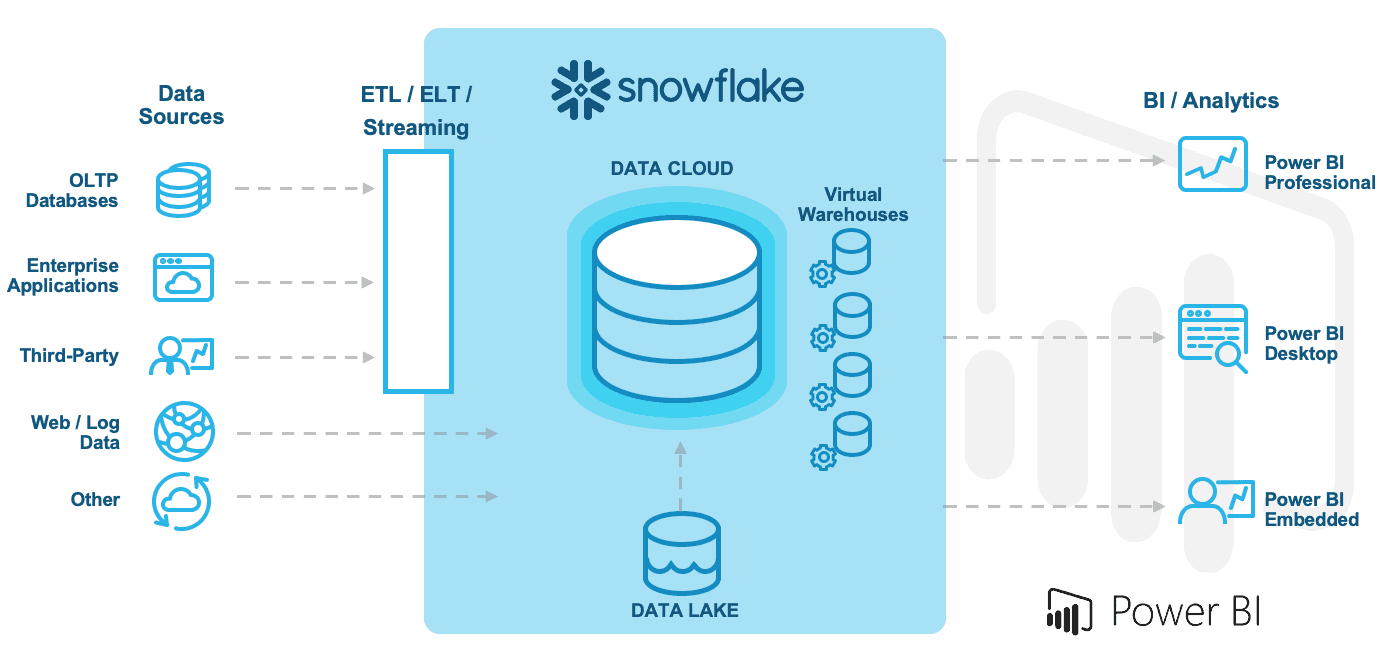
If you are a Power BI customer, you will be happy to know that Power BI features a native integration with Snowflake’s cloud data platform. In fact, the native Snowflake connector supports a wide range of access patterns, including the ability to leverage single sign-on (SSO).
BI workloads tend to be very spiky in nature, exhibiting extreme unpredictability in data access patterns and increased concurrency demands. However, with Snowflake’s multi-cluster, shared data architecture, customers can simply connect their BI platforms directly to Snowflake, and Snowflake will optimize the live connection experience via its patented multi-cluster virtual warehouses.
Snowflake usually prescribes leveraging direct query for BI tool data access. However, this may not be the correct strategy when it comes to Power BI. For example, your strategy might depend on your specific workload, data volume, and data and report modeling approach. Or, when leveraging data analysis expressions (DAX) for calculated measures, other strategies might be more effective. Customers should carefully test their specific workload to determine the best experience for their user communities.
While certainly not an exhaustive set of guiding principles, here are some of the best practices you need to create a successful workflow with Power BI and Snowflake:
- Model your data as a star schema
- Use composite models and aggregations appropriately
- Limit the number of visuals on a page
- Use Query Reduction to limit the number of queries generated
- Set the Assume Referential Integrity property on relationships
- Use bidirectional filters on relationships only when necessary
For more information, see the joint Snowflake/Microsoft webinar Building Scalable Solutions Using Power BI and Snowflake.
