DCM Projects for Tasks
Overview
In the Get Started with Snowflake DCM Projects, Build Data Pipelines with Snowflake DCM Projects, and DCM Projects for Dynamic Tables guides, you learned how DCM Projects manage Snowflake infrastructure declaratively — from a single project up to dynamic-table pipelines that evolve without full recomputation.
In this guide, you'll focus on Tasks and Task graphs — the orchestration layer that drives scheduled and event-driven work across your pipeline.
Task graphs (DAGs, or directed acyclic graphs, of Tasks — meaning dependencies flow in one direction and no task can loop back to itself) are how most production Snowflake pipelines coordinate sequences of work: a root task kicks off every run, child tasks depend on their predecessors, streams and return values can gate downstream execution, and a finalizer closes out the run. Managing that whole graph as code — with retries, schedules, warehouse bindings, and config values promoted across environments — becomes much easier to maintain as a DCM Project.
You'll define a fifteen-task demo graph that shows off every interesting Task feature in one place:
- Root task with retries, overlap policy, and graph-level config pushed into children via
SYSTEM$GET_TASK_GRAPH_CONFIG - Finalizer task that emails a plain-text JSON summary of every graph run — even when it failed mid-way
- Serverless task and multi-predecessor task patterns
- Stream-conditional and return-value-conditional child tasks
- Failing task with retries + dependent that gets skipped
- DCM-managed target state —
DEFINE TASK ... STARTEDlets you deploy tasks already running, no post-deployALTER TASK ... RESUMEneeded (or flip a task toSUSPENDEDdeclaratively from Git) - DMF quality gate that routes rows to a target or quarantine table based on data metric function results
- Overlap policy on the root task — the new
OVERLAP_POLICYparameter gives you granular control over concurrent graph execution
Along the way, you'll see two DCM features that make Tasks a first-class citizen of the DCM Project model:
DEFINE TASK ... STARTED | SUSPENDED— declare the target state of every task so you never need anALTER TASK ... RESUMEpost-scriptDEFINE PROCEDURE— manage SQL stored procedures through DCM Plan & Deploy alongside the tasks that call them
Prerequisites
- Basic knowledge of Snowflake concepts (databases, schemas, tables, roles)
- Familiarity with SQL and Snowflake Tasks
- Completion of Get Started with Snowflake DCM Projects is recommended
What You'll Learn
- How to define a range of Task features declaratively with
DEFINE TASK - How to use the new
STARTED | SUSPENDEDtarget-state property to control task state through DCM deployments - How to manage SQL procedures used by tasks with
DEFINE PROCEDURE - How to build a finalizer task that sends a plain-text JSON email summary for every graph run
- How to add a DMF-based quality gate that routes rows to target or quarantine tables
- How to monitor ongoing health with a serverless failed-task alert
What You'll Need
- A Snowflake account with ACCOUNTADMIN access (or a role with sufficient privileges)
- A verified email address on your Snowflake user so the finalizer and alerts can reach you
- (Optional) Snowflake CLI v3.16.0+ if you prefer CLI over the Snowsight UI
What You'll Build
- A fully deployed task graph — root, finalizer, fifteen demo tasks, and a DMF quality-gate branch — all defined as code in a single DCM Project
- A serverless alert that emails you when any task in the database fails
- A reusable pattern for getting your whole orchestration layer into DCM
Create a Workspace from Git
In this step, you'll create a Snowsight Workspace linked to the sample DCM Project repository on GitHub.
- Navigate to Projects > Workspaces in Snowsight.
- Click Create (+) and select Git repository.
- Enter the repository URL:
https://github.com/snowflake-labs/snowflake-dcm-projects - Select an API Integration for GitHub (create one if needed).
- Select Public repository.
Once the workspace is created, you'll see the repository files in the file explorer. Navigate to Quickstarts/dcm-projects-for-tasks to find two directories:
DCM_Projects_Tasks/— The DCM Project itself (manifest, definitions). This is what DCM reads during Plan & Deploy.scripts/— Numbered SQL files that you'll run in Snowsight worksheets at different stages of this guide. These live outside the DCM project directory so they don't interfere with it.
| File | When to Run |
|---|---|
scripts/01_pre_deploy.sql | Before the first DCM Plan & Deploy |
scripts/02_post_deploy.sql | After the first successful deployment |
scripts/03_cleanup.sql | When you're done and want to tear everything down |
Open scripts/01_pre_deploy.sql in a Snowsight worksheet — you'll use it in the next step.
Set Up Roles, Grants, and the Notification Integration
Before deploying the task graph, you need a dedicated DCM developer role, a DCM Project object, and an email notification integration that the finalizer and alerts will use.
Open scripts/01_pre_deploy.sql in a Snowsight worksheet and run each section in order. This script lives outside the DCM project directory, so it won't be picked up by Plan or Deploy.
1. Create a DCM Developer Role
USE ROLE ACCOUNTADMIN;

CREATE ROLE IF NOT EXISTS dcm_developer;
SET user_name = (SELECT CURRENT_USER());
GRANT ROLE dcm_developer TO USER IDENTIFIER($user_name);
2. Grant Infrastructure, Task, and Alert Privileges
GRANT CREATE WAREHOUSE ON ACCOUNT TO ROLE dcm_developer;
GRANT CREATE ROLE ON ACCOUNT TO ROLE dcm_developer;
GRANT CREATE DATABASE ON ACCOUNT TO ROLE dcm_developer;
GRANT CREATE INTEGRATION ON ACCOUNT TO ROLE dcm_developer;
GRANT EXECUTE MANAGED TASK ON ACCOUNT TO ROLE dcm_developer;
GRANT EXECUTE TASK ON ACCOUNT TO ROLE dcm_developer;
GRANT EXECUTE ALERT ON ACCOUNT TO ROLE dcm_developer;
GRANT EXECUTE MANAGED ALERT ON ACCOUNT TO ROLE dcm_developer;
GRANT MANAGE GRANTS ON ACCOUNT TO ROLE dcm_developer;
GRANT IMPORTED PRIVILEGES ON DATABASE SNOWFLAKE TO ROLE dcm_developer;
3. Grant Data Quality Privileges
The quality-gate branch uses system and custom DMFs, which require these grants:
GRANT APPLICATION ROLE SNOWFLAKE.DATA_QUALITY_MONITORING_VIEWER TO ROLE dcm_developer;
GRANT APPLICATION ROLE SNOWFLAKE.DATA_QUALITY_MONITORING_ADMIN  TO ROLE dcm_developer;
GRANT DATABASE ROLE SNOWFLAKE.DATA_METRIC_USER TO ROLE dcm_developer;
GRANT EXECUTE DATA METRIC FUNCTION ON ACCOUNT TO ROLE dcm_developer;
4. Create the DCM Project Object
USE ROLE dcm_developer;

CREATE DATABASE IF NOT EXISTS dcm_demo;
CREATE SCHEMA IF NOT EXISTS dcm_demo.projects;

CREATE OR REPLACE DCM PROJECT dcm_demo.projects.dcm_tasks_project_dev
    COMMENT = 'for testing DCM Projects with Tasks and task graphs';
5. Create the Email Notification Integration
Notification integrations are account-level objects — they live outside any DCM Project. The finalizer task and the failed-task alert both send through this integration:
USE ROLE ACCOUNTADMIN;

CREATE NOTIFICATION INTEGRATION IF NOT EXISTS dcm_demo_email_notifications
    TYPE = EMAIL
    ENABLED = TRUE
    COMMENT = 'Used by DCM Tasks quickstart finalizer and alerts';

GRANT USAGE ON INTEGRATION dcm_demo_email_notifications TO ROLE dcm_developer;
6. Get Your Account Identifier and Username
SELECT
    CURRENT_ORGANIZATION_NAME() || '-' || CURRENT_ACCOUNT_NAME() AS account_identifier,
    CURRENT_USER() AS user_name;
Keep these values — you'll paste them into manifest.yml and the notification_recipient field in the next section.
7. Verify Your Email Address
The finalizer task, quality-issue notification, and failed-task alert all send email through SYSTEM$SEND_SNOWFLAKE_NOTIFICATION. This only works if the recipient email is verified on the Snowflake account.
- Click your username (bottom-left circle) in Snowsight, then select Settings → Profile.
- Under Email, confirm your address shows a ✅ verified badge.
- If not, click Verify and follow the link sent to your inbox.
If you skip this step, any task or alert that sends a notification will fail with: "Email recipients at indexes [1] are not allowed."
Important: Before running Plan & Deploy, update three values in
DCM_Projects_Tasks/manifest.yml: setaccount_identifieron theDCM_DEVtarget to the identifier you just got, setuserundertemplating.configurations.DEVto your username, and setnotification_recipientto your verified Snowflake user email. The values with a# <-- Replace with ...comment flag where to change things.
Note: After running this script, refresh your browser so Snowsight picks up the newly created DCM Project object.
Explore the Project Files
Navigate into the DCM_Projects_Tasks/ directory. Unlike earlier guides which were centered on tables and dynamic tables, this project's definitions are almost all about orchestration: helper functions, procedures, and the task graph itself.
Manifest
Open DCM_Projects_Tasks/manifest.yml:
manifest_version: 2
type: DCM_PROJECT

default_target: DCM_DEV

targets:
  DCM_DEV:
    account_identifier: MYORG-MY_DEV_ACCOUNT        # <-- Replace with your account identifier
    project_name: DCM_DEMO.PROJECTS.DCM_TASKS_PROJECT_DEV
    project_owner: DCM_DEVELOPER
    templating_config: DEV

  DCM_PROD:
    account_identifier: MYORG-MY_PROD_ACCOUNT       # <-- Replace with your account identifier
    project_name: DCM_DEMO.PROJECTS.DCM_TASKS_PROJECT_PROD
    project_owner: DCM_PROD_DEPLOYER
    templating_config: PROD

templating:
  defaults:
    wh_size: "X-SMALL"
    runtime_multiplier: 5

  configurations:
    DEV:
      env_suffix: "_DEV"
      user: "INSERT_YOUR_USER"                      # <-- Replace with your Snowflake username
      project_owner_role: "DCM_DEVELOPER"
      notification_recipient: "INSERT_YOUR_EMAIL"   # <-- Replace with your verified email

    PROD:
      env_suffix: ""
      wh_size: "SMALL"
      project_owner_role: "DCM_PROD_DEPLOYER"
      user: "GITHUB_ACTIONS_SERVICE_USER"
      notification_recipient: "prod_alerts@example.com"
      runtime_multiplier: 10
Note how the root task sets OVERLAP_POLICY = 'NO_OVERLAP' (the default), which ensures each graph run completes before the next one starts. You can change this to ALLOW_CHILD_OVERLAP or ALLOW_ALL_OVERLAP if your pipeline benefits from concurrent runs.
Note how templating lets the same definitions produce a DEV graph with an X-SMALL warehouse and a short runtime_multiplier of 5, and a PROD graph with a SMALL warehouse and a multiplier of 10. Notification recipients differ per environment too.
Infrastructure — sources/definitions/infrastructure.sql
Warehouse, database, schema, and a read-only role — nothing task-specific yet, but this is the baseline that the rest of the project depends on:
DEFINE WAREHOUSE DCM_DEMO_4_WH{{env_suffix}}
WITH
    WAREHOUSE_SIZE = '{{wh_size}}'
    AUTO_SUSPEND = 60
    COMMENT = 'For Quickstart Demo of DCM Projects with Tasks';

DEFINE DATABASE DCM_DEMO_4{{env_suffix}}
    COMMENT = 'Quickstart Demo for DCM Projects with Tasks and task graphs';

DEFINE SCHEMA DCM_DEMO_4{{env_suffix}}.PIPELINE
    COMMENT = 'Task graph, helper functions, procedures, and DMFs';
Tables — sources/definitions/tables.sql
Five tables support the graph:
WEATHER_DATA_SOURCE— the source thatLOAD_RAW_DATAreads fromRAW_WEATHER_DATA— the landing table where DMF checks run (DATA_METRIC_SCHEDULE = 'TRIGGER_ON_CHANGES')CLEAN_WEATHER_DATA— target for rows that passedQUARANTINED_WEATHER_DATA— target for rows that failedTASK_DEMO_TABLE— used by the stream-conditional task
Procedures — sources/definitions/procedures.sql
This file uses DEFINE PROCEDURE, so procedure lifecycle is fully DCM-managed — you don't need separate CREATE OR ALTER PROCEDURE migrations for the demo procs.
DEFINE PROCEDURE DCM_DEMO_4{{env_suffix}}.PIPELINE.DEMO_PROCEDURE_1()
RETURNS VARCHAR(16777216)
LANGUAGE SQL
EXECUTE AS OWNER
AS
$$
    SELECT SYSTEM$WAIT(3);
$$;
DEMO_PROCEDURE_2 is similar but fails ~50% of the time, which drives the "failing task" demo later.
Functions — sources/definitions/functions.sql
Three helper functions, all managed by DCM:
RUNTIME_WITH_OUTLIERS— randomizes each task's duration so the graph feels realistic, with 1-in-10 outlier runsGET_TASK_GRAPH_RUN_SUMMARY— returns the current graph run as a JSON array (used by the finalizer)GET_ACTIVE_QUALITY_CHECKS— a UDTF listing every DMF currently attached to a given table
Expectations — sources/definitions/expectations.sql
DCM manages DMF attachments natively through ATTACH DATA METRIC FUNCTION, so the quality gate lives in the DCM Project using Snowflake's built-in system DMFs:
ATTACH DATA METRIC FUNCTION SNOWFLAKE.CORE.DUPLICATE_COUNT
    TO TABLE DCM_DEMO_4{{env_suffix}}.PIPELINE.RAW_WEATHER_DATA
    ON (ROW_ID)
    EXPECTATION NO_DUPLICATE_ROW_IDS (value = 0);

ATTACH DATA METRIC FUNCTION SNOWFLAKE.CORE.NULL_COUNT
    TO TABLE DCM_DEMO_4{{env_suffix}}.PIPELINE.RAW_WEATHER_DATA
    ON (DS)
    EXPECTATION NO_NULL_DATES (value = 0);

ATTACH DATA METRIC FUNCTION SNOWFLAKE.CORE.NULL_COUNT
    TO TABLE DCM_DEMO_4{{env_suffix}}.PIPELINE.RAW_WEATHER_DATA
    ON (ZIPCODE)
    EXPECTATION NO_NULL_ZIPCODES (value = 0);
Adding or removing an attachment here changes the CHECK_DATA_QUALITY task's behavior on the next deploy (it discovers attached DMFs at runtime via GET_ACTIVE_QUALITY_CHECKS) — no manual ALTER TABLE required.
Alerts — sources/definitions/alerts.sql
The failed-task alert is defined declaratively with DEFINE ALERT, so the alert lives alongside the tasks it monitors and evolves through the same Plan/Deploy cycle. The alert is created suspended — you'll resume it once in scripts/02_post_deploy.sql with ALTER ALERT ... RESUME. The recipient email comes from the same {{notification_recipient}} manifest value the finalizer uses, so you only configure it in one place.
DEFINE ALERT DCM_DEMO_4{{env_suffix}}.PIPELINE.FAILED_TASK_ALERT
    SCHEDULE = '60 MINUTE'
    IF (EXISTS (
        SELECT NAME, SCHEMA_NAME
        FROM TABLE(DCM_DEMO_4{{env_suffix}}.INFORMATION_SCHEMA.TASK_HISTORY(
            SCHEDULED_TIME_RANGE_START => (GREATEST(
                TIMEADD('DAY', -7, CURRENT_TIMESTAMP),
                SNOWFLAKE.ALERT.LAST_SUCCESSFUL_SCHEDULED_TIME())),
            SCHEDULED_TIME_RANGE_END   => SNOWFLAKE.ALERT.SCHEDULED_TIME(),
            ERROR_ONLY                 => TRUE))))
    THEN
        BEGIN
            LET task_names STRING := (
                SELECT LISTAGG(DISTINCT(SCHEMA_NAME || '.' || NAME), ', ')
                FROM TABLE(RESULT_SCAN(SNOWFLAKE.ALERT.GET_CONDITION_QUERY_UUID())));
            CALL SYSTEM$SEND_SNOWFLAKE_NOTIFICATION(
                SNOWFLAKE.NOTIFICATION.TEXT_HTML(
                    'Failed tasks detected: <b>' || :task_names || '</b>'),
                SNOWFLAKE.NOTIFICATION.EMAIL_INTEGRATION_CONFIG(
                    'dcm_demo_email_notifications',
                    'DCM Pipeline — Failed Task Alert',
                    ARRAY_CONSTRUCT('{{notification_recipient}}'),
                    NULL, NULL));
        END;
The alert runs serverless (no warehouse specified) and monitors every task in the database for failures in the last interval — a broader scope than the finalizer. Think of them as complementary rather than overlapping: the finalizer gives you a detailed per-run summary (even when the graph failed mid-way), while the alert is a lighter-weight, database-wide safety net that only fires when something fails. SNOWFLAKE.ALERT.GET_CONDITION_QUERY_UUID() lets you re-use the result of the condition query so you don't have to re-run it to build the message.
Tasks — sources/definitions/tasks.sql
This is the heart of the project. Every task uses the STARTED | SUSPENDED target-state property — a DCM-only extension to DEFINE TASK that has no equivalent in CREATE TASK. With plain DDL, a new task is always created in a suspended state and you have to follow up with ALTER TASK ... RESUME (or SYSTEM$TASK_DEPENDENTS_ENABLE for a whole graph) to bring it online. By declaring the desired state inline, DCM deploys the graph fully wired up — no post-scripts needed — and resolves the root-vs-child state ordering for you. It also means that suspending a task is a declarative change: flip STARTED to SUSPENDED in Git, deploy, and DCM handles the transition.
Here's the root:
DEFINE TASK DCM_DEMO_4{{env_suffix}}.PIPELINE.DEMO_TASK_1
    WAREHOUSE = 'DCM_DEMO_4_WH{{env_suffix}}'
    SCHEDULE = 'USING CRON 15 8-18 * * MON-FRI CET'
    SUSPEND_TASK_AFTER_NUM_FAILURES = 0
    TASK_AUTO_RETRY_ATTEMPTS = 2
    OVERLAP_POLICY = 'NO_OVERLAP'
    CONFIG = $${"RUNTIME_MULTIPLIER": {{runtime_multiplier}}}$$
    COMMENT = 'Root task with retries, overlap policy, and a runtime-multiplier config'
    STARTED
AS
    DECLARE
        RUNTIME_MULTIPLIER INTEGER := SYSTEM$GET_TASK_GRAPH_CONFIG('RUNTIME_MULTIPLIER');
        RANDOM_RUNTIME     VARCHAR := DCM_DEMO_4{{env_suffix}}.PIPELINE.RUNTIME_WITH_OUTLIERS(:RUNTIME_MULTIPLIER * 1000);
    BEGIN
        SELECT SYSTEM$WAIT(:RANDOM_RUNTIME, 'MILLISECONDS');
        CALL SYSTEM$SET_RETURN_VALUE('✅ All stage files scanned');
    END;
And the finalizer that closes out every run with a plain-text JSON email:
DEFINE TASK DCM_DEMO_4{{env_suffix}}.PIPELINE.DEMO_FINALIZER
    WAREHOUSE = 'DCM_DEMO_4_WH{{env_suffix}}'
    FINALIZE = DCM_DEMO_4{{env_suffix}}.PIPELINE.DEMO_TASK_1
    COMMENT = 'Sends a plain-text JSON email summary after every graph run'
    STARTED
AS
    DECLARE
        MY_ROOT_TASK_ID STRING;
        MY_START_TIME   TIMESTAMP_LTZ;
        SUMMARY_JSON    STRING;
    BEGIN
        MY_ROOT_TASK_ID := (CALL SYSTEM$TASK_RUNTIME_INFO('CURRENT_ROOT_TASK_UUID'));
        MY_START_TIME   := (CALL SYSTEM$TASK_RUNTIME_INFO('CURRENT_TASK_GRAPH_ORIGINAL_SCHEDULED_TIMESTAMP'));

        SUMMARY_JSON := (SELECT DCM_DEMO_4{{env_suffix}}.PIPELINE.GET_TASK_GRAPH_RUN_SUMMARY(:MY_ROOT_TASK_ID, :MY_START_TIME));

        CALL SYSTEM$SEND_SNOWFLAKE_NOTIFICATION(
            SNOWFLAKE.NOTIFICATION.TEXT_PLAIN(:SUMMARY_JSON),
            SNOWFLAKE.NOTIFICATION.EMAIL_INTEGRATION_CONFIG(
                'dcm_demo_email_notifications',
                'DCM Task Graph Run Summary ({{env_suffix}})',
                ARRAY_CONSTRUCT('{{notification_recipient}}'),
                NULL, NULL));

        CALL SYSTEM$SET_RETURN_VALUE('✅ Graph run summary email sent');
    END;
Feature tour of the remaining tasks:
| Task | What it demonstrates |
|---|---|
DEMO_TASK_2, DEMO_TASK_4 | Plain child tasks with a return value |
DEMO_TASK_3 | Calling a stored procedure (DEMO_PROCEDURE_1) |
DEMO_TASK_5 | Serverless task (no WAREHOUSE =) with two predecessors |
DEMO_TASK_6 | Returns a value chosen at random — used downstream as a condition |
DEMO_TASK_7 | Return value is a URL (clickable in Snowsight) |
DEMO_TASK_8 | WHEN SYSTEM$STREAM_HAS_DATA(...) — skipped when the stream is empty |
DEMO_TASK_9 | Calls a procedure that fails ~50% of the time; retries are inherited from the root task's TASK_AUTO_RETRY_ATTEMPTS. Watch this in Snowsight to see how retries and failures affect downstream tasks |
DEMO_TASK_10 | Does not run when its predecessor (DEMO_TASK_9) fails after exhausting retries |
DEMO_TASK_11 | WHEN SYSTEM$GET_PREDECESSOR_RETURN_VALUE(...) — runs conditionally on upstream return |
DEMO_TASK_12 | Self-cancels 1 in 10 runs via SYSTEM$USER_TASK_CANCEL_ONGOING_EXECUTIONS |
DEMO_TASK_13 | Two predecessors |
DEMO_TASK_14 | Deployed as SUSPENDED — target-state property in action |
DEMO_TASK_15 | Never runs because its predecessor is suspended |
Plus the quality-gate branch:
| Task | What it demonstrates |
|---|---|
LOAD_RAW_DATA | Pulls rows from source into the landing table, occasionally injecting duplicate ROW_IDs |
CHECK_DATA_QUALITY | Iterates through every DMF attached to the landing table and returns pass/fail as its return value |
TRANSFORM_DATA | Conditional on CHECK_DATA_QUALITY return = "passed" — copies rows into the target table |
ISOLATE_DATA_ISSUES | Conditional on the inverse — moves rows into quarantine |
NOTIFY_ABOUT_QUALITY_ISSUE | Sends a quality-issue email through the same notification integration |
Because every task is declared with its dependencies (AFTER ...), DCM knows the full DAG. You never have to call SYSTEM$TASK_DEPENDENTS_ENABLE after deployment — DCM handles state resolution, including the SUSPENDED branch rooted at DEMO_TASK_14.
Plan and Deploy
With the manifest updated (account identifier, user, notification recipient) and the pre-deploy script run, you're ready to deploy the task graph.
Option A: Snowsight Workspaces
- Open
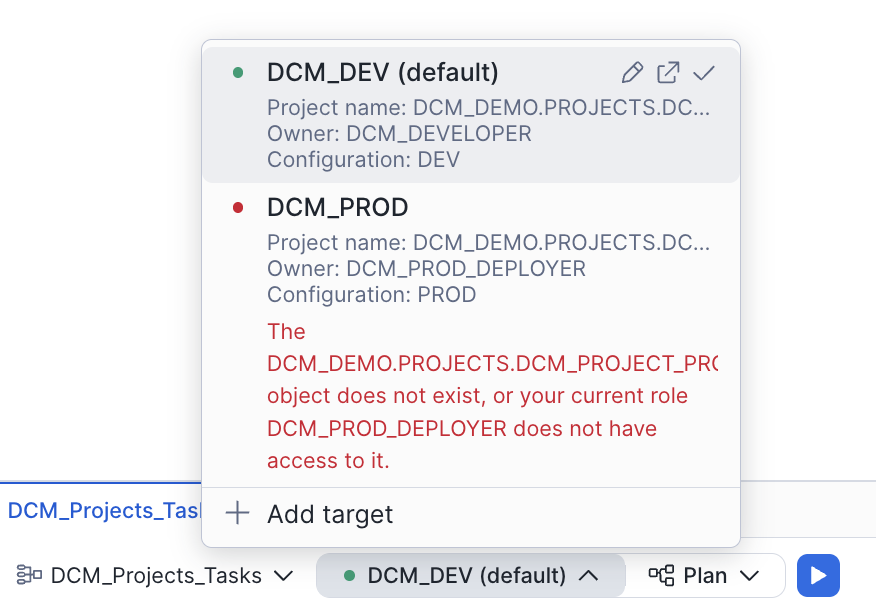
DCM_Projects_Tasks/manifest.ymlin the Workspaces file explorer. - At the bottom of the editor, confirm the project selector shows
DCM_DEMO.PROJECTS.DCM_TASKS_PROJECT_DEVand the target showsDCM_DEV.
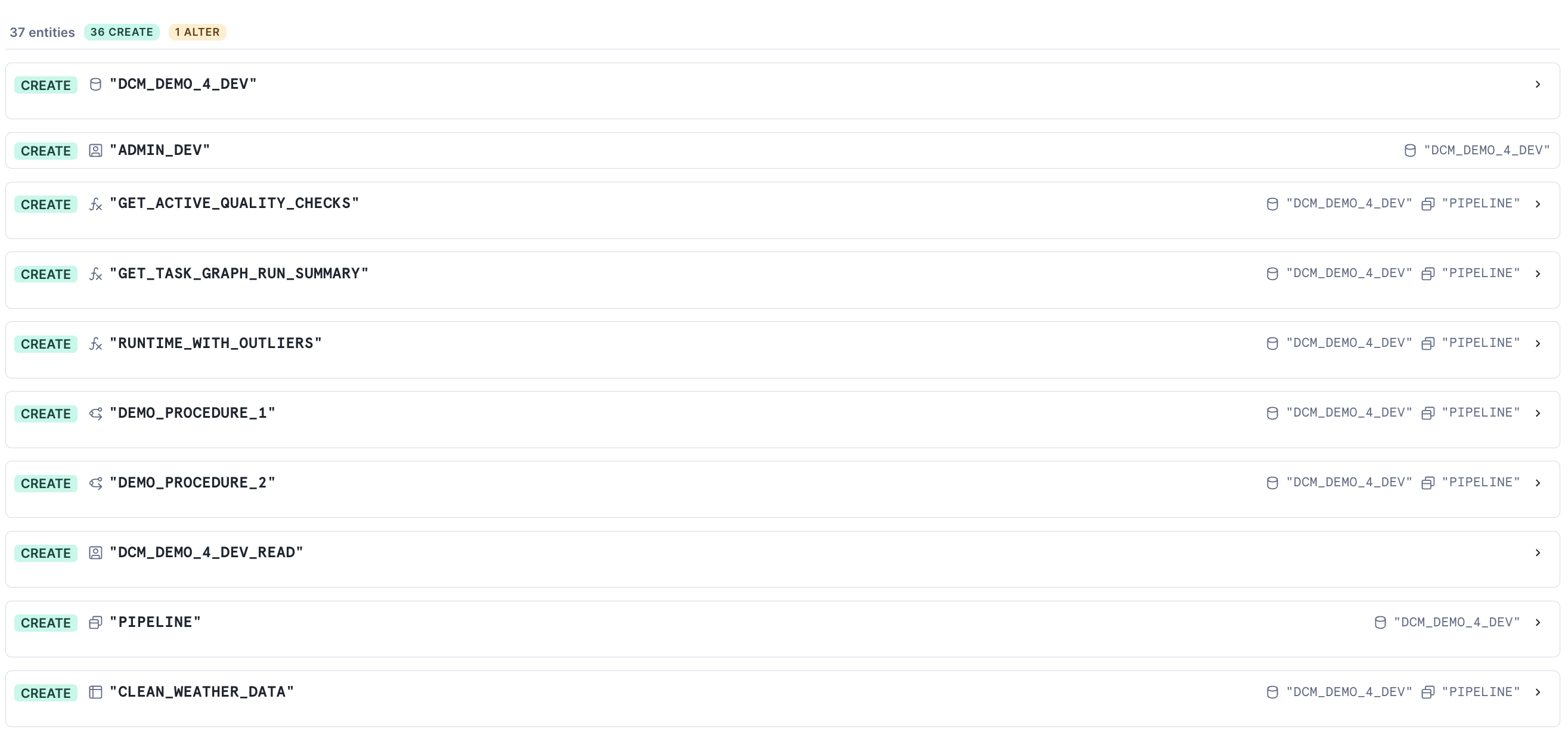
- Click Plan. Review the changeset — you should see the warehouse, database, schema, tables, procedures, functions, and every task listed as
CREATE.
- Click Deploy.
Option B: Snowflake CLI
cd Quickstarts/dcm-projects-for-tasks/DCM_Projects_Tasks
snow dcm plan --target DCM_DEV
snow dcm deploy --target DCM_DEV
Deployment takes about 30–60 seconds. When it succeeds, every STARTED task is already running state — the schedule on DEMO_TASK_1 will fire the root task at the next CRON slot, and DEMO_TASK_14 and DEMO_TASK_15 are correctly in SUSPENDED state.
Post-Deploy: Stream and a Manual Run
Streams are not yet supported as DCM DEFINE statements, so the stream setup still lives in scripts/02_post_deploy.sql. The script also resumes the DCM-managed failed-task alert (which deploys suspended) and triggers the first graph run. (The DMF attachments and the failed-task alert definition are already DCM-managed — see expectations.sql and alerts.sql above.)
Open that script in a Snowsight worksheet and walk through it section by section.
1. Create the Stream
CREATE OR REPLACE STREAM dcm_demo_4_dev.pipeline.demo_stream
    ON TABLE dcm_demo_4_dev.pipeline.task_demo_table
    COMMENT = 'Empty stream — DEMO_TASK_8 will be skipped unless this has data';
DEMO_TASK_8 has WHEN SYSTEM$STREAM_HAS_DATA('...DEMO_STREAM'), so without data it is skipped on every graph run — exactly the "conditional execution on a stream" scenario.
2. Resume the Failed-Task Alert
ALTER ALERT dcm_demo_4_dev.pipeline.failed_task_alert RESUME;
The alert was deployed by DCM but starts suspended — this one-time RESUME flips it to running. From here on it evaluates on its 60-minute schedule.
3. Seed the Source Table and Run the Graph
INSERT INTO dcm_demo_4_dev.pipeline.weather_data_source (...) VALUES (...);

EXECUTE TASK dcm_demo_4_dev.pipeline.demo_task_1;
The graph kicks off immediately — you don't have to wait for the CRON schedule.
Tip: You can dynamically override the graph config for a single run with the
USING CONFIGclause. For example, to speed up the demo tasks:EXECUTE TASK dcm_demo_4_dev.pipeline.demo_task_1 USING CONFIG = '{"RUNTIME_MULTIPLIER": 1}';This overrides
RUNTIME_MULTIPLIERfor that one execution without changing the task definition.
View the Task Graph
Navigate to Monitoring → Task History in Snowsight. Filter by database DCM_DEMO_4_DEV and you'll see the run you just triggered.
Click into the run to see the full graph:
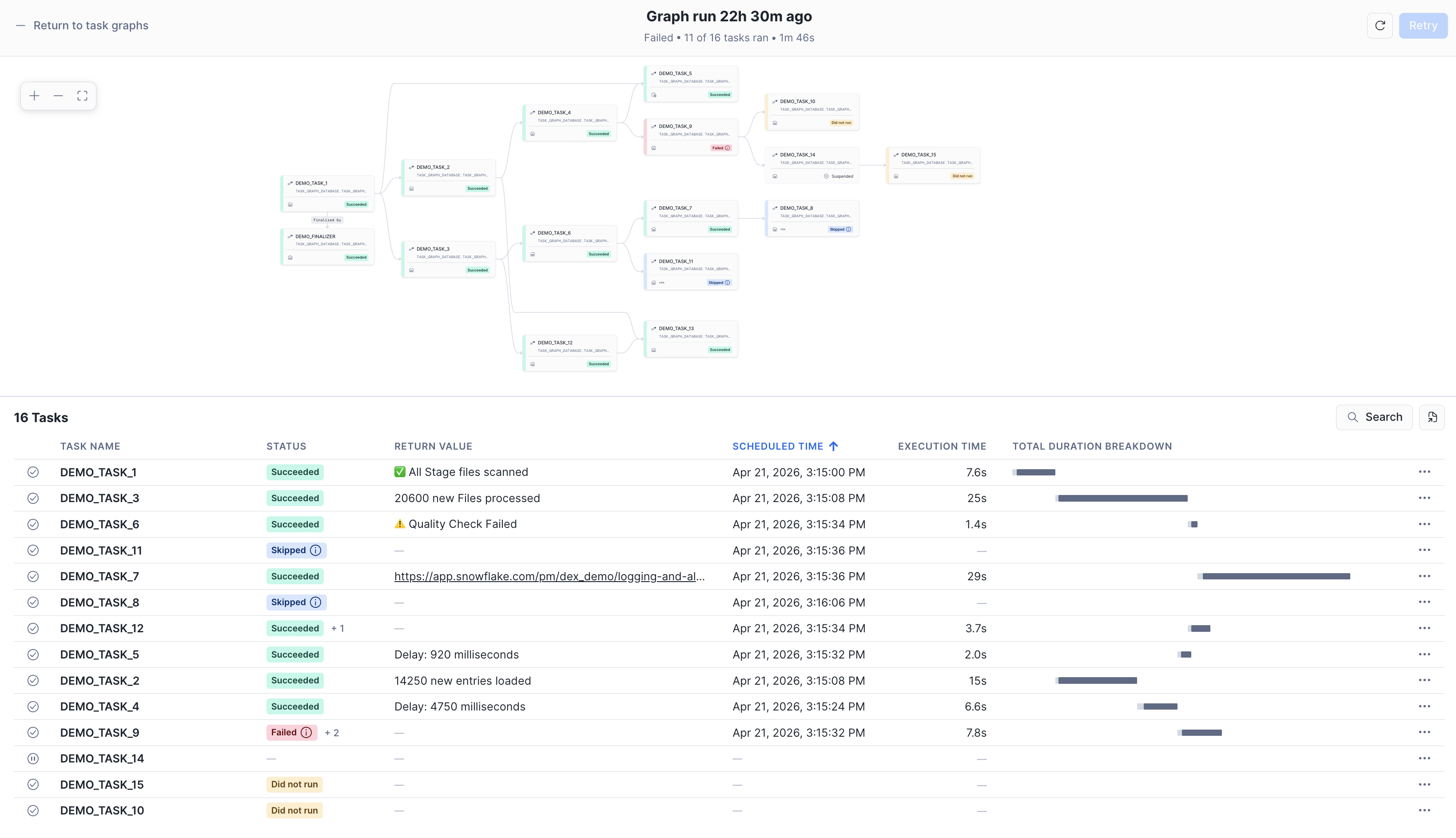
You should see:
DEMO_TASK_1(root) andDEMO_FINALIZERboth succeeded- Most child tasks green;
DEMO_TASK_8skipped (empty stream) andDEMO_TASK_11either ran or skipped depending onDEMO_TASK_6's random return - Occasionally
DEMO_TASK_9fails (its procedure errors ~50% of the time); because the root task hasTASK_AUTO_RETRY_ATTEMPTS = 2, Snowflake retries before marking it failed — if all attempts fail,DEMO_TASK_10is skipped DEMO_TASK_14andDEMO_TASK_15stay suspended — DCM deployed them that way on purpose- The quality-gate branch takes one of two paths:
CHECK_DATA_QUALITY→TRANSFORM_DATA(clean rows make it to the target)CHECK_DATA_QUALITY→ISOLATE_DATA_ISSUES→NOTIFY_ABOUT_QUALITY_ISSUE(bad rows quarantined + email sent)
Check your inbox — you should see two kinds of notification email from this quickstart:
| Email subject | Sent by | When it fires |
|---|---|---|
| DCM Task Graph Run Summary (_DEV) | DEMO_FINALIZER — a DCM-managed finalizer task | After every graph run, with a JSON summary of task statuses, return values, and durations |
| DCM Pipeline — Failed Task Alert | FAILED_TASK_ALERT — the DCM-managed serverless alert (defined in alerts.sql, resumed in 02_post_deploy.sql) | Every 60 minutes, only when at least one task failed since the last check |
The finalizer gives you per-run detail; the alert is a background safety net that catches failures even if the finalizer itself errors out.
Run the graph a few more times (EXECUTE TASK dcm_demo_4_dev.pipeline.demo_task_1;) to see the random branches exercise themselves. Each run produces a fresh summary email thanks to the finalizer. To test the alert on demand, run EXECUTE ALERT dcm_demo_4_dev.pipeline.failed_task_alert;.
Iterate on the Graph Through DCM
The real power of putting Tasks in DCM shows up when you want to change something. Suppose you want DEMO_TASK_14 to actually run in DEV. Open tasks.sql, change its target state:
DEFINE TASK DCM_DEMO_4{{env_suffix}}.PIPELINE.DEMO_TASK_14
    ...
    STARTED
AS
    SELECT SYSTEM$WAIT(3);
Click Plan. The changeset shows a single ALTER TASK to flip the state. Click Deploy. Next graph run, DEMO_TASK_14 and DEMO_TASK_15 both execute.
This is the pattern: schema change, Plan, Deploy. No drift between environments — and because target state is part of the definition, if someone manually suspends a task outside DCM, the next deploy will re-enable it.
Cleanup
When you're done, open scripts/03_cleanup.sql in a Snowsight worksheet and run it:
USE ROLE dcm_developer;
EXECUTE DCM PROJECT dcm_demo.projects.dcm_tasks_project_dev PURGE;

-- Notification integration is outside project scope, drop separately
USE ROLE ACCOUNTADMIN;
DROP INTEGRATION IF EXISTS dcm_demo_email_notifications;

DROP DCM PROJECT IF EXISTS dcm_demo.projects.dcm_tasks_project_dev;
DROP SCHEMA IF EXISTS dcm_demo.projects;
DROP DATABASE IF EXISTS dcm_demo;

DROP ROLE IF EXISTS dcm_developer;
Conclusion and Resources
In this guide, you learned how to:
- Define a complete task graph as code using DCM Projects — root, finalizer, conditional branches, retries, and quality gates, all in SQL definition files
- Use the
STARTED | SUSPENDEDtarget-state property onDEFINE TASKso every deployment lands the graph in exactly the state you wanted, no post-scripts required - Manage stored procedures through DCM with
DEFINE PROCEDURE, so the procs your tasks call version alongside the tasks themselves - Send plain-text email summaries from a finalizer task using a reusable JSON summary helper function
- Build a DMF-backed quality gate that uses return-value routing to push clean rows to a target table and bad rows to quarantine — and make the set of checks completely data-driven
- Monitor graph health with a DCM-managed serverless alert (
DEFINE ALERT) that emails you whenever any task in the database fails
The combination of DCM Projects and Tasks gives you the same production-grade workflow for orchestration that you already have for tables: version-controlled definitions, environment-aware deployments, and Plan/Deploy reviewability for every change.
What's Next
You've completed the 4-part DCM series. Ready to go deeper?
- DCM Projects Documentation — full reference for advanced DCM features: release channels, target-state management for more object types, and CI/CD integration patterns.
Related Resources
- DCM Projects Documentation
- Snowflake Tasks and Task Graphs
- Finalizer Tasks
- Data Metric Functions
- OVERLAP_POLICY for Task Graphs
- EXECUTE TASK with Dynamic Config
- Alerts and Notifications
- Get Started with Snowflake DCM Projects
- Build Data Pipelines with Snowflake DCM Projects
- DCM Projects for Dynamic Tables
- Sample DCM Projects Repository
This content is provided as is, and is not maintained on an ongoing basis. It may be out of date with current Snowflake instances
