Hybrid Tables Performance Optimization Primer
Overview
Hybrid Tables
A hybrid table is a Snowflake table type that is optimized for hybrid transactional and operational workloads that require low latency and high throughput on small random point reads and writes. A hybrid table supports unique and referential integrity constraint enforcement that is critical for transactional workloads. You can use a hybrid table along with other Snowflake tables and features to power Unistore workloads that bring transactional and analytical data together in a single platform.
Use cases that may benefit from hybrid tables include:
- Applications requiring INSERT/UPDATE/DELETE concurrency matched with SELECT performance
- Usage requiring low-latency, high concurrency INSERT/UPDATE like log tables, metadata tracking, or status information
- Low latency responses for highly selective record retrieval over very large data sets
Architecture
Hybrid tables are integrated seamlessly into the existing Snowflake architecture. Customers connect to the same Snowflake database service. Queries are compiled and optimized in the cloud services layer and executed in the same query engine in virtual warehouses. This provides several key benefits:
- Snowflake platform features, such as data governance, work with hybrid tables out of the box.
- You can run hybrid workloads mixing operational and analytical queries.
- You can join hybrid tables with other Snowflake tables and the query executes natively and efficiently in the same query engine. No federation is required.
- You can execute an atomic transaction across hybrid tables and other Snowflake tables. There is no need to orchestrate your own two-phase commit.
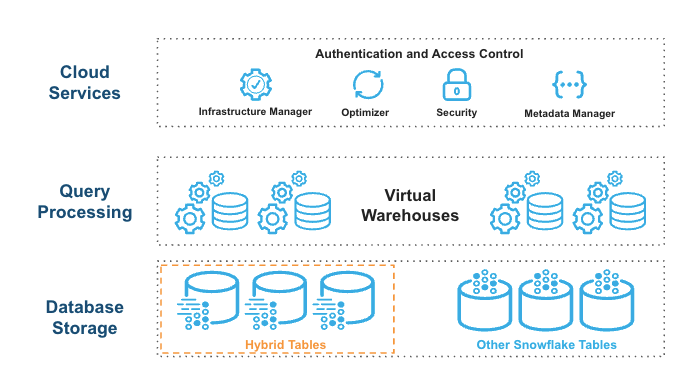
Hybrid tables leverage a row store as the primary data store to provide excellent operational query performance. When you write to a hybrid table, the data is written directly into the rowstore. Data is asynchronously copied into object storage in order to provide better performance and workload isolation for large scans without impacting your ongoing operational workloads. Some data may also be cached in columnar format on your warehouse in order to provide better performance on analytical queries. You simply execute SQL statements against the logical hybrid table and Snowflake’s query optimizer decides where to read data from in order to provide the best performance. You get one consistent view of your data without needing to worry about the underlying infrastructure.
What You Will Learn
- How to design hybrid tables and access patterns that achieve high performance
- How to analyze queries using Snowsight
- How to adjust queries to improve performance
- How hybrid table unique characteristics like Indexes, primary keys, unique and foreign keys affect performance
Prerequisites
- Familiarity with the Snowflake's Snowsight interface
- Familiarity with SQL
- Snowflake non-trial account with Hybrid Tables enabled
- A database and/or schema within which you have permissions to create tables
Process
- We will be creating three tables that represent a data model. Following the trucking example from the Getting Started with Hybrid Tables quickstart, we will use TRUCK and ORDER_HEADER tables to represent our data.
- Create and work with TRUCK table to understand primary keys, secondary indexes, and accompanying query patterns
- Build on TRUCK with ORDER_HEADER to work with foreign key relationships
- Add a secondary index to find orders for trucks based on order date
Setup
We will use table structures populated with synthetic data to create scenarios We will initially create scenarios that do not perform well. Following the guide, you will then adjust the query and/or the table structure to create an optimal query.
NOTE: Queries executed from Snowsight support an interactive development experience with rich statistics and metadata, such as runtime statistics about all query operators in the query profile. Queries executed in Snowsight will not perform with the lowest possible latency. Lowest latency is achieved via queries issued from a code-based driver connection to Snowflake. Please review our best practices and performance testing guides for more information.
Creating an Environment
Create a worksheet and establish a database and schema to do the work. We are doing exploration work here so make sure you are using a role that has permissions to create tables and view query profiles.
-- CUSTOMIZE AS NEEDED
-- CREATE OR REPLACE DATABASE HT_PERFORMANCE;
-- CREATE OR REPLACE SCHEMA HT_PERFORMANCE.PRIMER;

-- CREATE OR REPLACE WAREHOUSE HT_PERFORMANCE_WAREHOUSE WITH WAREHOUSE_SIZE=XSMALL;

-- THE PRIMER WILL USE THIS SCHEMA FOR THE REMAINDER OF THE LEARNING
-- CUSTOMIZE AS NEEDED
USE SCHEMA HT_PERFORMANCE.PRIMER;
USE WAREHOUSE HT_PERFORMANCE_WAREHOUSE;
Now, let's explore primary keys and secondary indexes
Explore the Primary Key
Primary keys are a required configuration for a hybrid table. The key establishes the rules for row uniqueness as well as the sort order for how data is written to the row storage. See primary key documentation for more details.
Secondary Indexes provide fast access to query patterns that may not be able to use the primary key.
What We Will Cover
- Creating a hybrid table with test data
- Primary Key setup and analysis
- Secondary index setup and analysis
Create the TRUCKS Hybrid Table
Create and populate a simple hybrid table. This table is similar to the table used in the getting started with hybrid tables guide but is simplified for brevity. This quickstart will use similar queries for the remainder of the work:
--- CREATE LOTS OF TRUCKS WITH RANDOM YEARS, MAKES, FRANCHISE AND EMAILS.
CREATE OR REPLACE HYBRID TABLE TRUCK (
    TRUCK_ID NUMBER(38,0) NOT NULL,
    YEAR NUMBER(38,0) NOT NULL,
    MAKE VARCHAR(250) NOT NULL,
    FRANCHISE_ID NUMBER(38,0) NOT NULL,
    TRUCK_EMAIL VARCHAR NOT NULL,
    PRIMARY KEY (TRUCK_ID)
)
AS SELECT
    SEQ4(),
    UNIFORM(1970, 2025, RANDOM()),
    ARRAY_CONSTRUCT( 'Freightliner', 'Peterbilt', 'Kenworth', 'Volvo Trucks', 'Mack', 'International (Navistar)', 'Western Star')[UNIFORM(0,6, RANDOM())],
    UNIFORM(1, 250, RANDOM()),
    RANDSTR(8, RANDOM()) || '@sf-quickstart'
FROM TABLE(GENERATOR(ROWCOUNT => 1000000)) -- WE NEED ENOUGH RECORDS FOR REASONABLE TESTING OTHERWISE EVERYTHING IS IN-MEMORY
;
-- SEE WHAT THE RESULTS LOOK LIKE
SELECT * FROM TRUCK LIMIT 10;
Query with the Primary Key
Primary keys are a highly performant way to query hybrid tables. Let's look at a query profile of what querying using the primary key looks like.
-- SELECT AND SET A RANDOM TRUCK_ID TO SESSION VARIABLE FOR CONVENIENCE
SET TRUCK_ID = (SELECT TRUCK_ID FROM TRUCK SAMPLE(1 ROWS));

SELECT *
FROM TRUCK
WHERE TRUCK_ID = $TRUCK_ID;
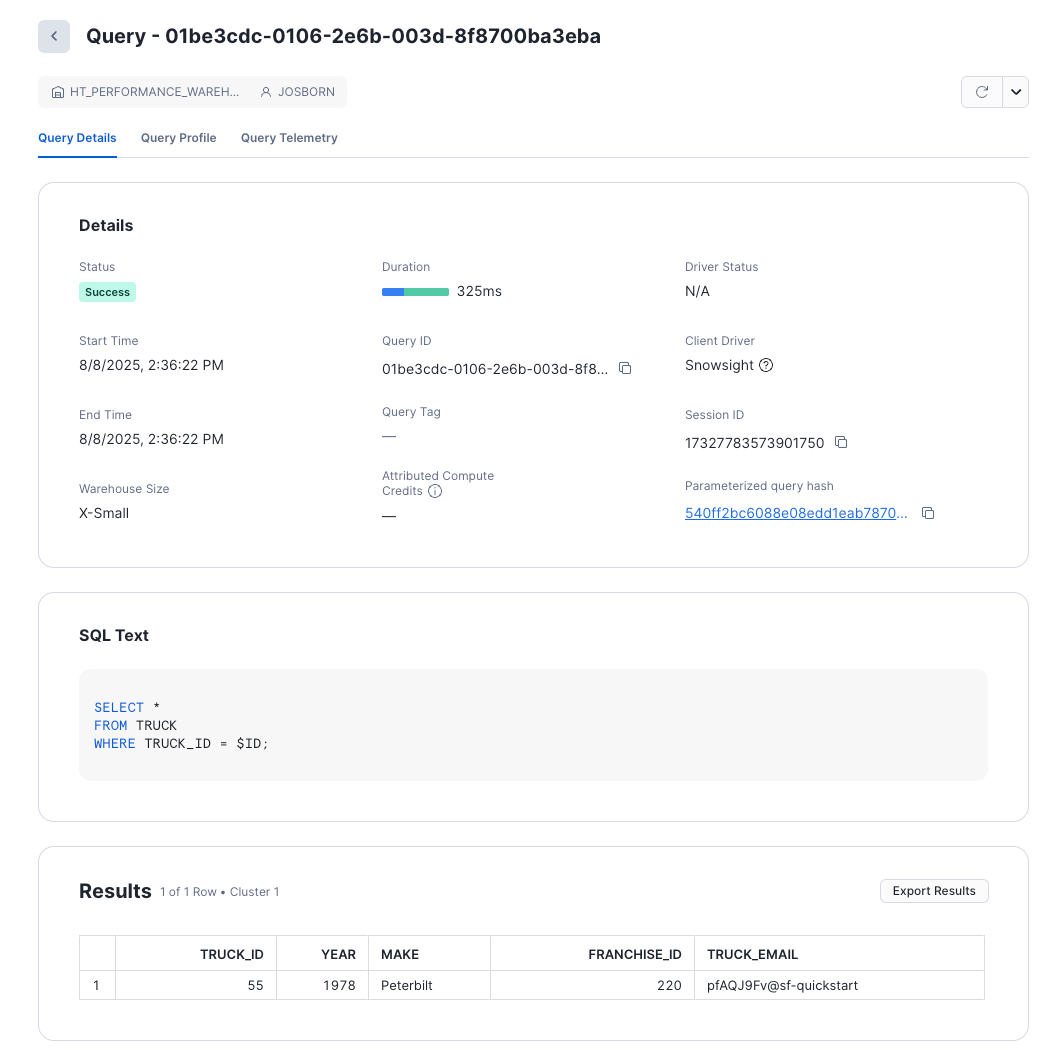
The screen gives you basic information about the query.
NOTE: As this query was executed on Snowsight, compile and execution times will be longer than connected driver based queries. Review hybrid table best practices to learn more.
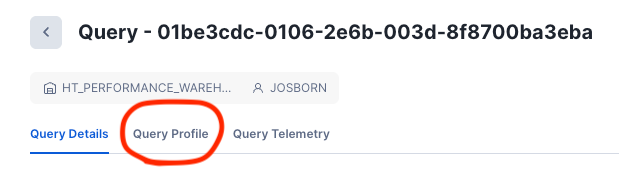
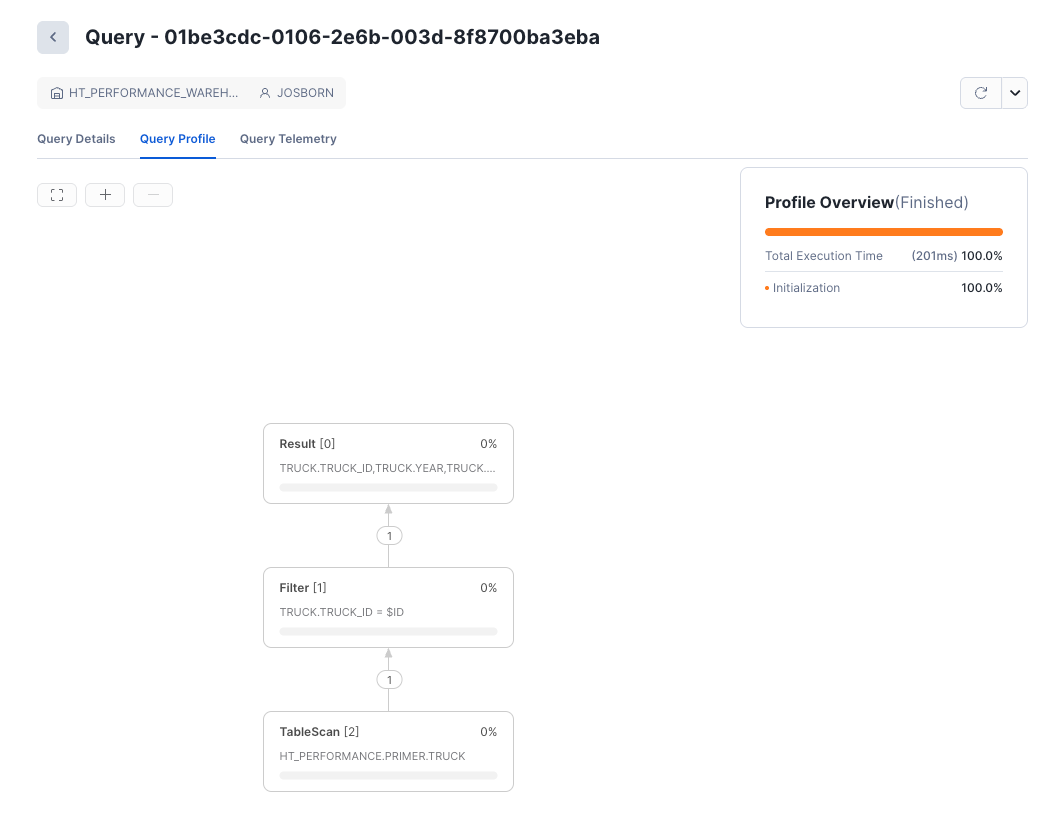
This is the primary screen we will be using for query analysis.
Analyze the Query Profile Output
Now that you understand how to get to the query profile screen, let's discover how this query was executed. Once we understand how the query planner decided to execute the query, we can understand how to implement any changes in the query that will improve performance.
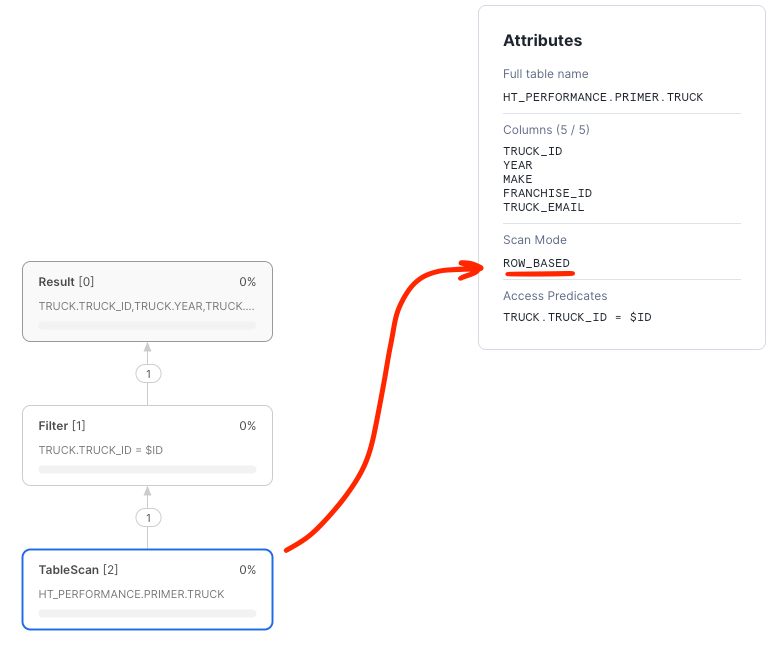
- The Access Predicate was indeed the primary key
TRUCK.TRUCK_ID - The Scan Mode was
ROW_BASED - Exactly one record was retrieved from storage by the scan, exactly matching the truck ID.
ROW_BASED scans means that the query directly accessed the row store and did not use the backing object store to produce the results.
For selective predicates against the primary key, ROW_BASED access indicates that the primary key index was used to
push down the predicate and is the fastest and most efficient way to execute the query.
Query with COLUMN_BASED Access (no key)
Instead of querying the table using the primary key, let's query the table using a column that is not indexed and see what the resulting query plan looks like.
SET EMAIL = (SELECT ANY_VALUE(TRUCK_EMAIL) FROM TRUCK);

SELECT *
FROM TRUCK
WHERE TRUE
    AND TRUCK_EMAIL = $EMAIL;
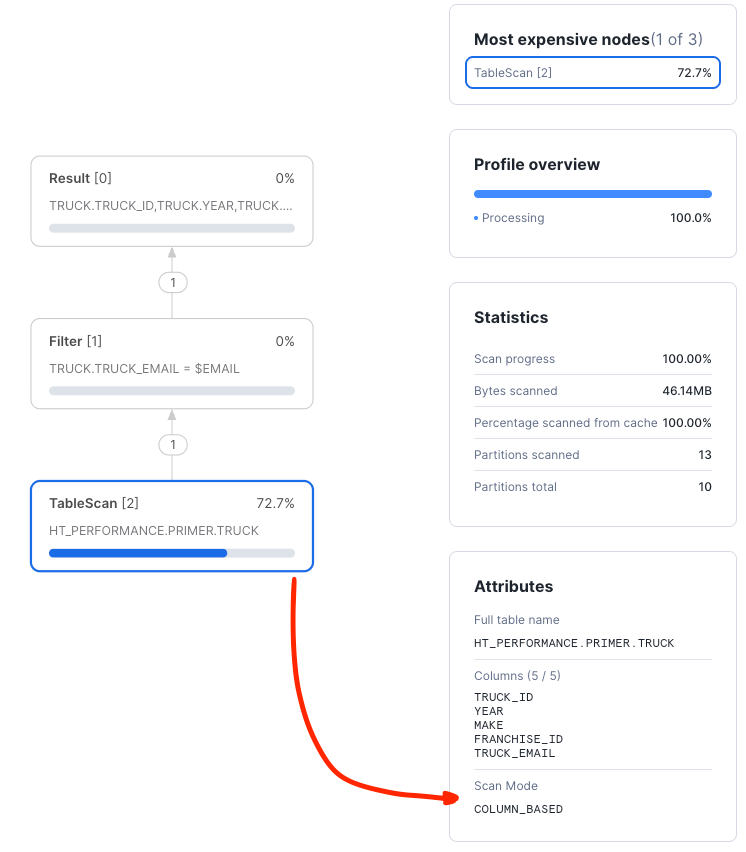
Looking at the "TableScan" node, we can clearly see that the scan was COLUMN_BASED and processed many partitions with lots of data.
The optimizer was not able to push down any access predicates against an index.
Next, we will explore secondary indexes.
Explore Secondary Indexes
Add a Secondary Index
Clearly, the above query is not optimal. A secondary index can help the query run faster. Let's create a secondary index and use it to explore the query improvement:
CREATE OR REPLACE HYBRID TABLE TRUCK (
    TRUCK_ID NUMBER(38,0) NOT NULL,
    YEAR NUMBER(38,0) NOT NULL,
    MAKE VARCHAR(250) NOT NULL,
    FRANCHISE_ID NUMBER(38,0) NOT NULL,
    TRUCK_EMAIL VARCHAR NOT NULL UNIQUE,
    PRIMARY KEY (TRUCK_ID),
    INDEX IDX_TRUCK_EMAIL (TRUCK_EMAIL)
)
AS SELECT
    SEQ4(),
    UNIFORM(1970, 2025, RANDOM()),
    ARRAY_CONSTRUCT( 'Freightliner', 'Peterbilt', 'Kenworth', 'Volvo Trucks', 'Mack', 'International (Navistar)', 'Western Star')[UNIFORM(0,6, RANDOM())],
    UNIFORM(1, 250, RANDOM()),
    RANDSTR(8, RANDOM()) || '@sf-quickstart'
FROM TABLE(GENERATOR(ROWCOUNT => 1000000)) -- WE NEED ENOUGH RECORDS FOR REASONABLE TESTING OTHERWISE EVERYTHING IS IN-MEMORY
;
-- SEE WHAT THE RESULTS LOOK LIKE
SELECT * FROM TRUCK LIMIT 10;
Once the table is created we can re-run the query and show that it is using the newly created index:
SET EMAIL = (SELECT ANY_VALUE(TRUCK_EMAIL) FROM TRUCK);

SELECT *
FROM TRUCK
WHERE TRUE
  AND TRUCK_EMAIL = $EMAIL;
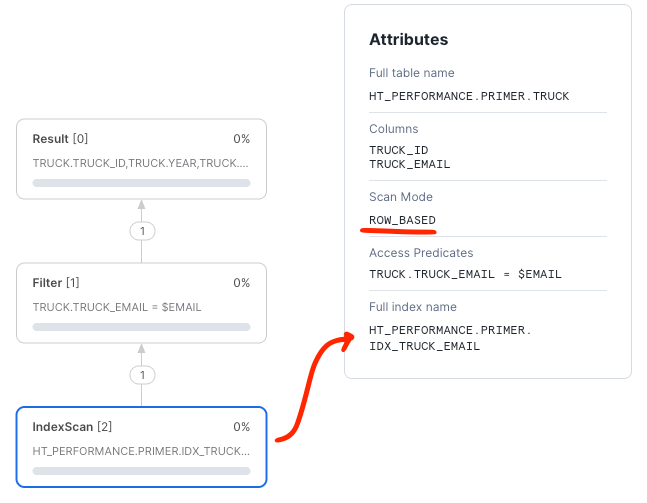
Next, we will cover foreign keys.
Explore Foreign Keys
RDBMS data models use foreign keys to establish relationships between tables. All kinds of models take advantage of the relationships to keep data from becoming corrupted or otherwise orphaned from a definition. We call the relationship between the primary key of the reference table and the usage of the key in another table a foreign key.
Setup
We will use a TRUCK and ORDER_HEADER relationship to create a foreign key relationship. Let's create the tables and
explore how the query plan looks with and without a foreign key.
Let's reuse the TRUCK table and create orders for each truck.
--- CREATE ORDERS FOR EACH TRUCK
CREATE OR REPLACE HYBRID TABLE ORDER_HEADER (
	ORDER_ID NUMBER(38,0) NOT NULL,
	TRUCK_ID NUMBER(38,0) NOT NULL,
    ORDER_TIMESTAMP TIMESTAMP_NTZ NOT NULL,
	ORDER_TOTAL NUMBER(38,2),
	ORDER_STATUS VARCHAR(200) DEFAULT 'INQUEUE',
	PRIMARY KEY (ORDER_ID)
) AS
SELECT
    SEQ4(),
    T.TRUCK_ID,
    DATEADD('seconds', UNIFORM(-1*60*60*24*365, -1*60*60, RANDOM()), CURRENT_TIMESTAMP()), -- SPREAD RANDOM ORDER IDS OUT
    UNIFORM(200.0, 25000.0, RANDOM()),
    ARRAY_CONSTRUCT('DELIVERED', 'INQUEUE', 'LOADING', 'EN-ROUTE')[UNIFORM(0,3, RANDOM())],
FROM TABLE(GENERATOR(ROWCOUNT => 5000))
CROSS JOIN (SELECT TRUCK_ID FROM TRUCK SAMPLE (1000 ROWS)) T    -- ASSIGN ORDERS TO EVERY TRUCK = # TRUCKS X # ORDERS PER TRUCK
;
Consider a query that loads all orders for a specific truck. This query will join the TRUCK table with the ORDER_HEADER
table while filtering for a particular truck.
-- SELECT A TRUCK THAT HAS ORDER DETAILS
SET TRUCK_ID = (SELECT ANY_VALUE(TRUCK_ID) FROM ORDER_HEADER);

-- QUERY FOR ALL ORDERS (5000) FOR THIS PARTICULAR TRUCK
SELECT *
FROM TRUCK T
INNER JOIN ORDER_HEADER O ON O.TRUCK_ID=T.TRUCK_ID
WHERE TRUE
  AND T.TRUCK_ID = $TRUCK_ID
;
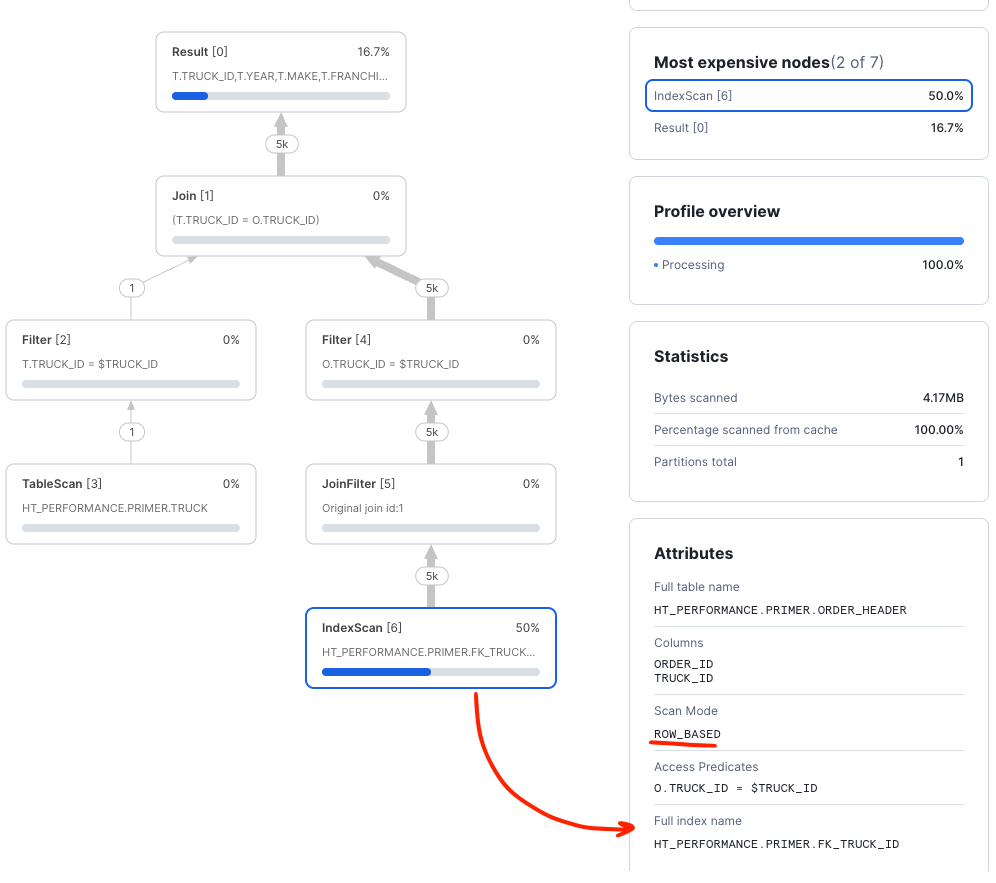
Note that the query optimizer does not have information to relate the two tables within the join. Thus,
the optimizer chooses a column scan mode when reading data from the ORDER_HEADER table. Technically, the optimizer must
interpret the join as a many-to-many join.
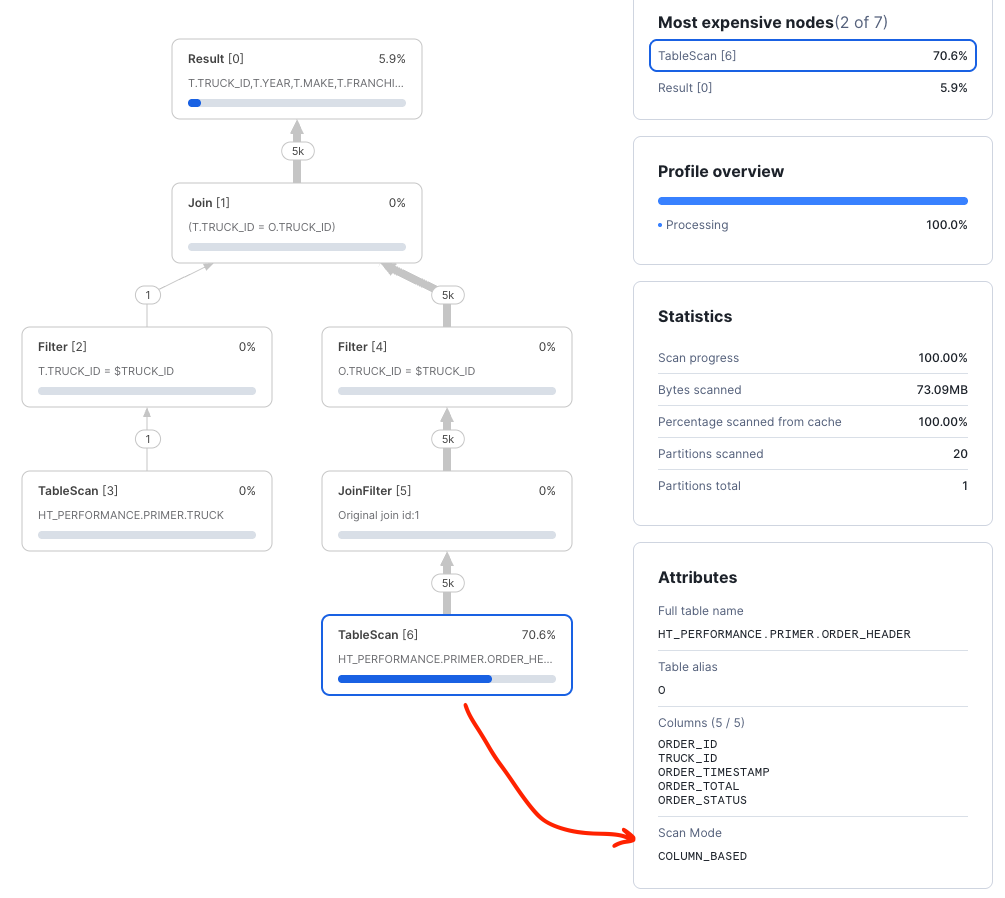
Introducing a FOREIGN KEY will serve two important purposes. First, it establishes a relationship between the tables that
guarantees a one-to-many join for a given PRIMARY KEY in the parent table. Second, the relationship will enforce a
rule that requires data to be consistent such that child table TRUCK_ID values must exist in the TRUCK primary key.
Recreate the table with a FOREIGN KEY:
-- CREATE ORDER_HEADER WITH A FOREIGN KEY
CREATE OR REPLACE HYBRID TABLE ORDER_HEADER (
    ORDER_ID NUMBER(38,0) NOT NULL,
    TRUCK_ID NUMBER(38,0) NOT NULL,
    ORDER_TIMESTAMP TIMESTAMP_NTZ NOT NULL,
    ORDER_TOTAL NUMBER(38,2),
    ORDER_STATUS VARCHAR(200) DEFAULT 'INQUEUE',
    PRIMARY KEY (ORDER_ID),
    CONSTRAINT FK_TRUCK_ID FOREIGN KEY (TRUCK_ID) REFERENCES TRUCK(TRUCK_ID)
);
-- USE INSERT INTO METHOD BECAUSE THE FOREIGN KEY MUST EXIST TO BE ENFORCED
INSERT INTO ORDER_HEADER
SELECT
    SEQ4(),
    T.TRUCK_ID,
    DATEADD('seconds', UNIFORM(-1*60*60*24*365, -1*60*60, RANDOM()), CURRENT_TIMESTAMP()), -- SPREAD RANDOM ORDER IDS OUT
    UNIFORM(200.0, 25000.0, RANDOM()),
    ARRAY_CONSTRUCT('DELIVERED', 'INQUEUE', 'LOADING', 'EN-ROUTE')[UNIFORM(0,3, RANDOM())],
FROM TABLE(GENERATOR(ROWCOUNT => 5000))
CROSS JOIN (SELECT TRUCK_ID FROM TRUCK SAMPLE (1000 ROWS)) T    -- ASSIGN ORDERS TO EVERY TRUCK = # TRUCKS X # ORDERS PER TRUCK
;
Next, find a new TRUCK_ID and execute the query to retrieve the order header information.
SET TRUCK_ID = (SELECT ANY_VALUE(TRUCK_ID) FROM ORDER_HEADER);

SELECT *
FROM TRUCK T
INNER JOIN ORDER_HEADER O ON O.TRUCK_ID=T.TRUCK_ID
WHERE TRUE
    AND T.TRUCK_ID = $TRUCK_ID
;
Checking the query plan, we can see that the query optimizer is now using the foreign key to efficiently select the order detail information.
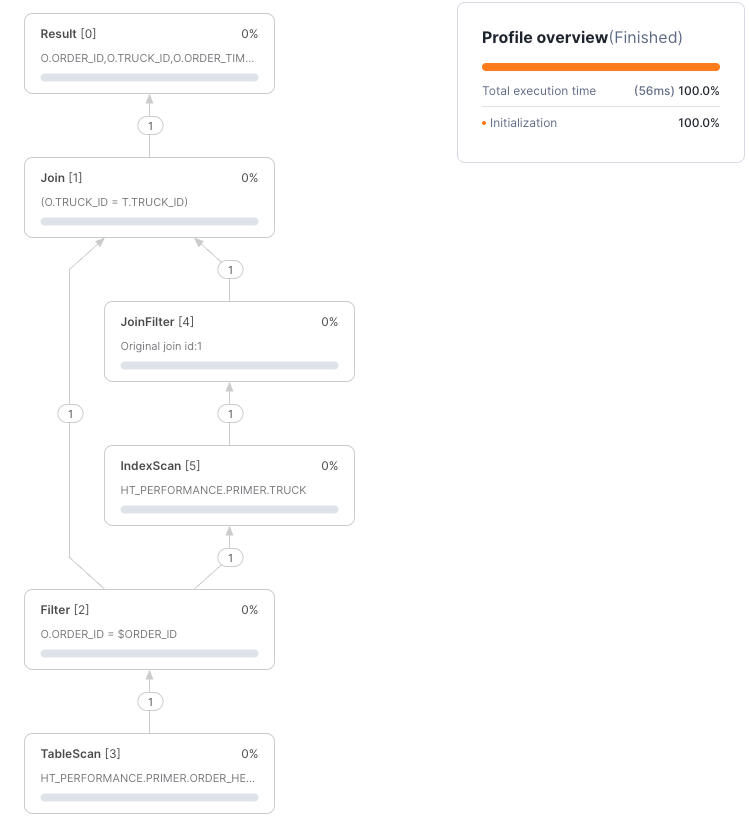
Next, consider a query to retrieve a specific order and join in details for the truck for which the order was submitted. This sort of pattern is common when dealing with normalized data models in transactional applications:
-- SELECT A SPECIFIC ORDER
SET ORDER_ID = (SELECT ANY_VALUE(ORDER_ID) FROM ORDER_HEADER);

SELECT *
FROM ORDER_HEADER O
INNER JOIN TRUCK T ON O.TRUCK_ID=T.TRUCK_ID
WHERE TRUE
  AND O.ORDER_ID = $ORDER_ID
;
The query plan shows both primary keys in use loading only a single record from each table by using an Nested Loop Join pattern where we first retrieve the order record and then use the truck ID for that order to push down the truck lookup against the primary key of the truck table:
Next, we will explore how secondary indexes help queries that do not use primary keys.
Joining and Secondary Indexes
A common query pattern is to join two tables using foreign keys and filter one of them with another column. For example, this query is fetching orders over the last few days for a specific truck:
SELECT *
FROM ORDER_HEADER O
INNER JOIN TRUCK T ON T.TRUCK_ID=O.TRUCK_ID
WHERE TRUE
    AND O.ORDER_TIMESTAMP > DATEADD('days', -2, CURRENT_TIMESTAMP()) :: TIMESTAMP_NTZ  -- NOTE THE CAST
    AND T.TRUCK_ID = $TRUCK_ID
;
The TRUCK_ID will be used as a primary key filter on TRUCK and a foreign key filter on ORDER_HEADER. The timestamp filter
will be applied after data was fetched from hybrid table object store. From the query profile, we can see that only the
TRUCK_ID was used as an access predicate. The ORDER_TIMESTAMP filtering was completed after data was fetched.
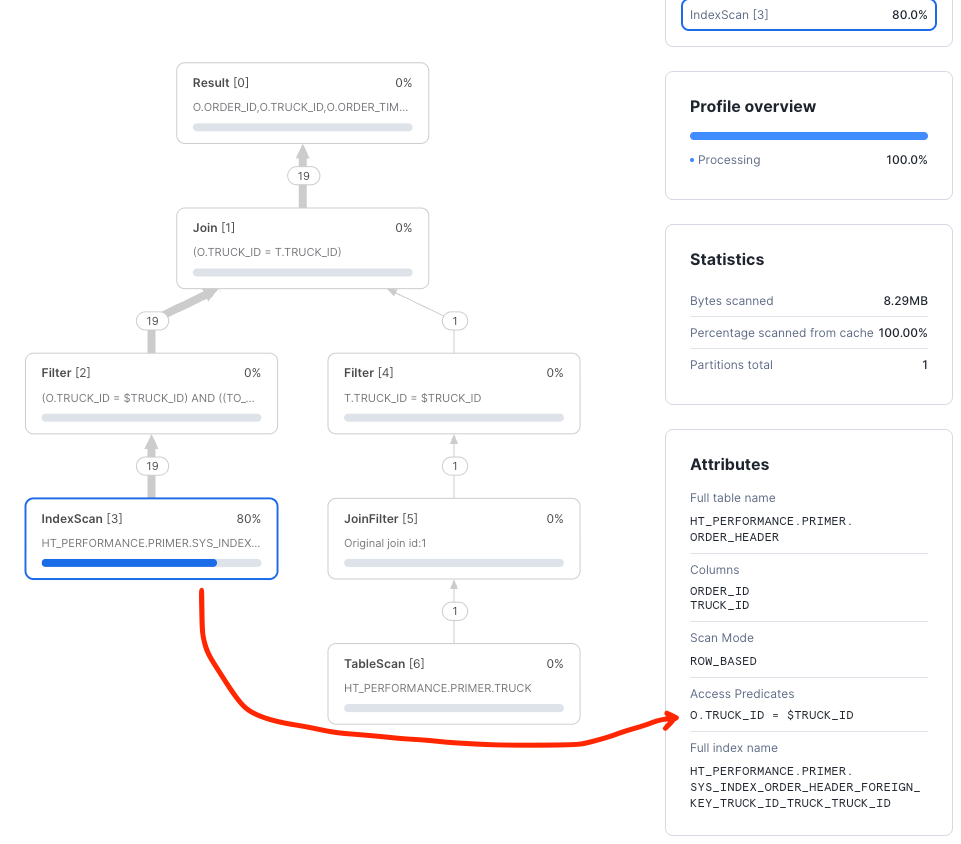
A secondary index on (TRUCK_ID, ORDER_TIMESTAMP) will improve performance by allowing us to also push the timestamp filter down to storage:
--- CREATE ORDERS FOR EACH TRUCK
CREATE OR REPLACE HYBRID TABLE ORDER_HEADER (
    ORDER_ID NUMBER(38,0) NOT NULL,
    TRUCK_ID NUMBER(38,0) NOT NULL,
    ORDER_TIMESTAMP TIMESTAMP_NTZ NOT NULL,
    ORDER_TOTAL NUMBER(38,2),
    ORDER_STATUS VARCHAR(200) DEFAULT 'INQUEUE',  -- USE DEFAULT VALUE
    PRIMARY KEY (ORDER_ID),
    FOREIGN KEY (TRUCK_ID) REFERENCES TRUCK(TRUCK_ID),  -- REFER TO THE TRUCK TABLE FOR TRUCK_ID
    INDEX IDX_TRUCK_TIMESTAMPS (TRUCK_ID, ORDER_TIMESTAMP )  -- ADD THE SECONDARY INDEX FOR ORDER_TIMESTAMP
);
INSERT INTO ORDER_HEADER (ORDER_ID, TRUCK_ID, ORDER_TIMESTAMP, ORDER_TOTAL)
SELECT
    SEQ4(),
    T.TRUCK_ID,
    DATEADD('seconds', UNIFORM(-1*60*60*24*365, -1*60*60, RANDOM()), CURRENT_TIMESTAMP()), -- SPREAD RANDOM ORDER IDS OUT
    UNIFORM(200.0, 25000.0, RANDOM()),
FROM TABLE(GENERATOR(ROWCOUNT => 5000))
CROSS JOIN (SELECT TRUCK_ID FROM TRUCK SAMPLE (1000 ROWS)) T    -- ASSIGN ORDERS TO EVERY TRUCK = # TRUCKS X # ORDERS PER TRUCK
;
Now that the index exists and is ACTIVE, we can use it in a query:
SET TRUCKID = (SELECT ANY_VALUE(TRUCK_ID) FROM ORDER_HEADER);

SELECT *
FROM ORDER_HEADER O
INNER JOIN TRUCK T ON T.TRUCK_ID=O.TRUCK_ID
WHERE TRUE
    AND O.ORDER_TIMESTAMP > DATEADD('days', -1, CURRENT_TIMESTAMP()) :: TIMESTAMP_NTZ
    AND T.TRUCK_ID = $TRUCKID
;
Now the truck and timestamp predicates are being pushed down against the index in order to reduce the amount of data retrieved from the order_header table improving latency and efficiency.
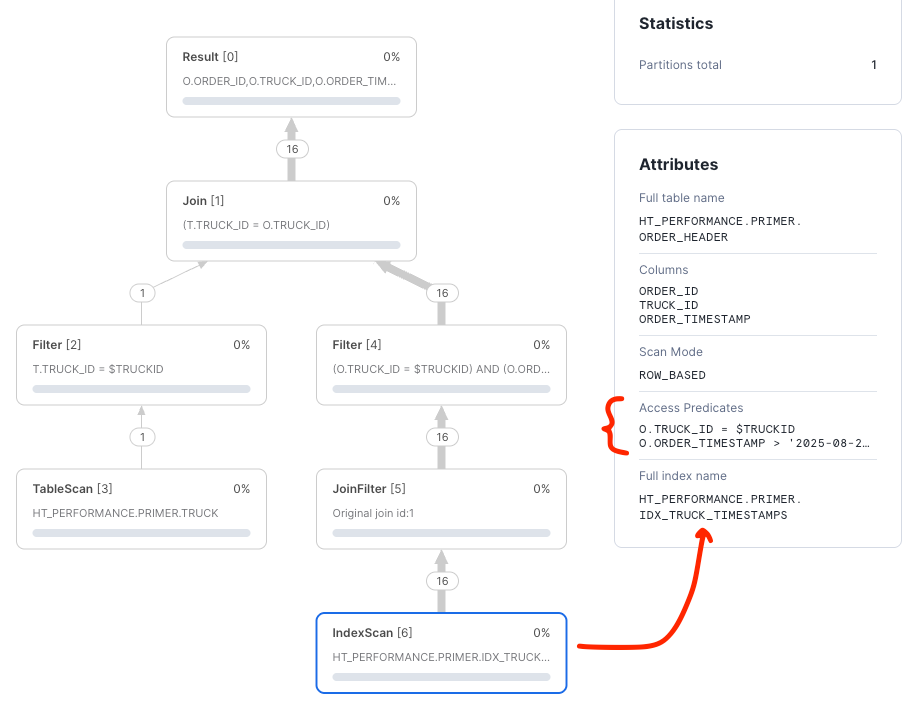
NOTE: Looking at the query in detail, you will notice that there is a cast to
TIMESTAMP_NTZfor theORDER_TIMESTAMPpredicate value. All types of timestamps are supported by hybrid tables, however, columns used in primary keys or indexes are only supported asTIMESTAMP_NTZ. As an exercise, try the query without the cast and inspect the result.
Next, we will summarize best practices.
Summarize Best Practices
Hybrid table performance benefits from following best practices that extract the best performance and highest value from this Snowflake feature.
- Use a
PRIMARY KEY, built from business columns, to drive the highest performance. - Implement
FOREIGN KEYSwhen joining hybrid tables. - Write queries that use keys and indexes to keep queries in
ROW_BASEDmode. - Use Snowsight query plans to verify optimal query plans and troubleshoot performance issues.
- Pay close attention to data types, join criteria, and index utilization.
- Follow Snowflake hybrid table best practices.
Conclusion And Resources
Overview
Thank you for completing this Hybrid Tables Performance Optimization Primer. You now have a solid understanding of how to relate query performance to the query planning tool. You will use this knowledge to help create and optimize your hybrid table solutions.
What You Learned
Having completed this quickstart you have successfully
- Created hybrid tables with primary keys
- Wrote and learned how to analyze a query profile
- Learned how to use secondary indexes and constraints
- Created a child table using foreign keys referencing a parent table
- Joined tables and worked with secondary indexes to maximize performance
- Utilized secondary indexes to speed query performance across non-primary key columns
Related Resources:
This content is provided as is, and is not maintained on an ongoing basis. It may be out of date with current Snowflake instances
