Hybrid Tables Performance Optimization Primer
Overview
Hybrid Tables
A hybrid table is a Snowflake table type that is optimized for hybrid transactional and operational workloads that require low latency and high throughput on small random point reads and writes. A hybrid table supports unique and referential integrity constraint enforcement that is critical for transactional workloads. You can use a hybrid table along with other Snowflake tables and features to power Unistore workloads that bring transactional and analytical data together in a single platform.
Use cases that may benefit from hybrid tables include:
- Applications requiring INSERT/UPDATE/DELETE concurrency matched with SELECT performance
- Usage requiring low-latency, high concurrency INSERT/UPDATE like log tables, metadata tracking, or status information
- Low latency responses for highly selective record retrieval over very large data sets
Architecture
Hybrid tables are integrated seamlessly into the existing Snowflake architecture. Customers connect to the same Snowflake database service. Queries are compiled and optimized in the cloud services layer and executed in the same query engine in virtual warehouses. This provides several key benefits:
- Snowflake platform features, such as data governance, work with hybrid tables out of the box.
- You can run hybrid workloads mixing operational and analytical queries.
- You can join hybrid tables with other Snowflake tables and the query executes natively and efficiently in the same query engine. No federation is required.
- You can execute an atomic transaction across hybrid tables and other Snowflake tables. There is no need to orchestrate your own two-phase commit.
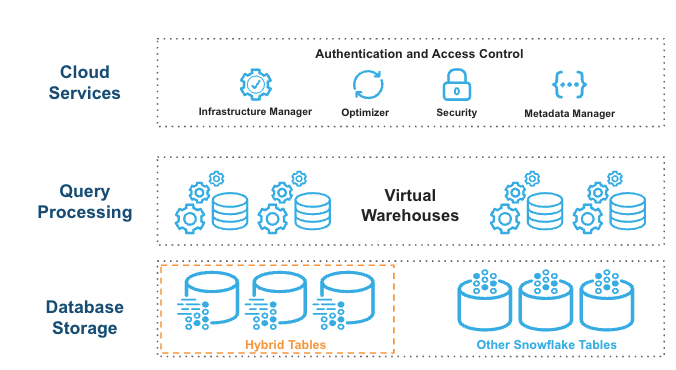
Hybrid tables leverage a row store as the primary data store to provide excellent operational query performance. When you write to a hybrid table, the data is written directly into the rowstore. Data is asynchronously copied into object storage in order to provide better performance and workload isolation for large scans without impacting your ongoing operational workloads. Some data may also be cached in columnar format on your warehouse in order to provide better performance on analytical queries. You simply execute SQL statements against the logical hybrid table and Snowflake’s query optimizer decides where to read data from in order to provide the best performance. You get one consistent view of your data without needing to worry about the underlying infrastructure.
What You Will Learn
- How to design hybrid tables and access patterns that achieve high performance
- How to analyze queries using Snowsight
- How to adjust queries to improve performance
- How hybrid table unique characteristics like Indexes, primary keys, unique and foreign keys affect performance
Prerequisites
- Familiarity with the Snowflake's Snowsight interface
- Familiarity with SQL
- A Snowflake paid account in an AWS or Azure commercial region (Hybrid Tables are not available in GCP, government regions, or trial accounts)
- A database and/or schema within which you have permissions to create tables
Process
- We will be creating three tables that represent a data model. Following the trucking example from the Getting Started with Hybrid Tables quickstart, we will use TRUCK and ORDER_HEADER tables to represent our data.
- Create and work with TRUCK table to understand primary keys, secondary indexes, and accompanying query patterns
- Build on TRUCK with ORDER_HEADER to work with foreign key relationships
- Add a secondary index to find orders for trucks based on order date
Setup
We will use table structures populated with synthetic data to create scenarios We will initially create scenarios that do not perform well. Following the guide, you will then adjust the query and/or the table structure to create an optimal query.
NOTE: Queries executed from Snowsight support an interactive development experience with rich statistics and metadata, such as runtime statistics about all query operators in the query profile. Queries executed in Snowsight will not perform with the lowest possible latency. Lowest latency is achieved via queries issued from a code-based driver connection to Snowflake. Please review our best practices and performance testing guides for more information.
Creating an Environment
Create a worksheet and establish a database and schema to do the work. We are doing exploration work here so make sure you are using a role that has permissions to create tables and view query profiles.
-- CUSTOMIZE AS NEEDED
-- CREATE OR REPLACE DATABASE HT_PERFORMANCE;
-- CREATE OR REPLACE SCHEMA HT_PERFORMANCE.PRIMER;

-- CREATE OR REPLACE WAREHOUSE HT_PERFORMANCE_WAREHOUSE WITH WAREHOUSE_SIZE=XSMALL;

-- THE PRIMER WILL USE THIS SCHEMA FOR THE REMAINDER OF THE LEARNING
-- CUSTOMIZE AS NEEDED
USE SCHEMA HT_PERFORMANCE.PRIMER;
USE WAREHOUSE HT_PERFORMANCE_WAREHOUSE;
Now, let's explore primary keys and secondary indexes
Explore the Primary Key
Primary keys are a required configuration for a hybrid table. The key establishes the rules for row uniqueness as well as the sort order for how data is written to the row storage. See primary key documentation for more details.
Secondary Indexes provide fast access to query patterns that may not be able to use the primary key.
What We Will Cover
- Creating a hybrid table with test data
- Primary Key setup and analysis
- Secondary index setup and analysis
Create the TRUCKS Hybrid Table
Create and populate a simple hybrid table. This table is similar to the table used in the getting started with hybrid tables guide but is simplified for brevity. This quickstart will use similar queries for the remainder of the work:
--- CREATE LOTS OF TRUCKS WITH RANDOM YEARS, MAKES, FRANCHISE AND EMAILS.
CREATE OR REPLACE HYBRID TABLE TRUCK (
    TRUCK_ID NUMBER(38,0) NOT NULL,
    YEAR NUMBER(38,0) NOT NULL,
    MAKE VARCHAR(250) NOT NULL,
    FRANCHISE_ID NUMBER(38,0) NOT NULL,
    TRUCK_EMAIL VARCHAR NOT NULL,
    PRIMARY KEY (TRUCK_ID)
)
AS SELECT
    SEQ4(),
    UNIFORM(1970, 2025, RANDOM()),
    ARRAY_CONSTRUCT( 'Freightliner', 'Peterbilt', 'Kenworth', 'Volvo Trucks', 'Mack', 'International (Navistar)', 'Western Star')[UNIFORM(0,6, RANDOM())],
    UNIFORM(1, 250, RANDOM()),
    RANDSTR(8, RANDOM()) || '@sf-quickstart'
FROM TABLE(GENERATOR(ROWCOUNT => 1000000)) -- WE NEED ENOUGH RECORDS FOR REASONABLE TESTING OTHERWISE EVERYTHING IS IN-MEMORY
;
-- SEE WHAT THE RESULTS LOOK LIKE
SELECT * FROM TRUCK LIMIT 10;
Query with the Primary Key
Primary keys are a highly performant way to query hybrid tables. Let's look at a query profile of what querying using the primary key looks like.
-- SELECT AND SET A RANDOM TRUCK_ID TO SESSION VARIABLE FOR CONVENIENCE
SET TRUCK_ID = (SELECT TRUCK_ID FROM TRUCK SAMPLE(1 ROWS));

SELECT *
FROM TRUCK
WHERE TRUCK_ID = $TRUCK_ID;
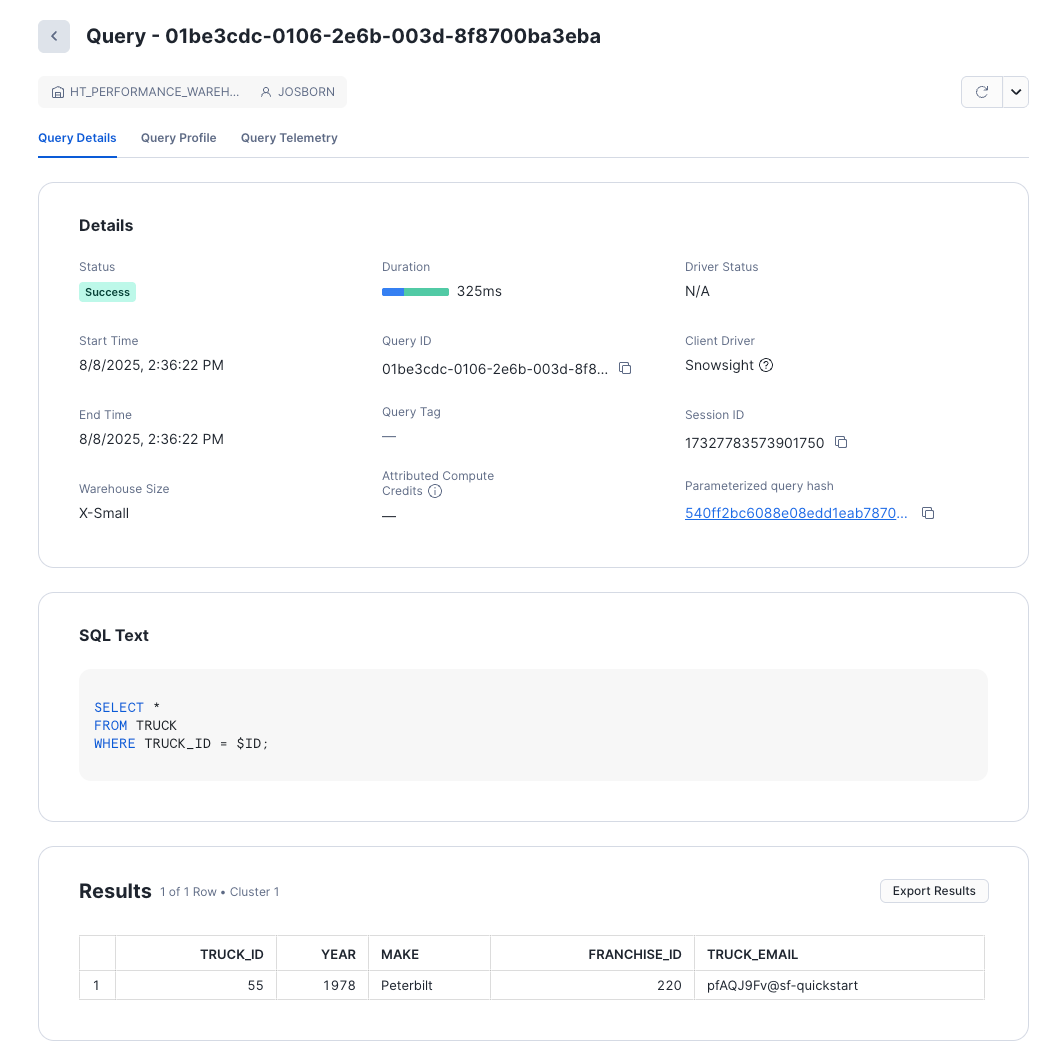
The screen gives you basic information about the query.
NOTE: As this query was executed on Snowsight, compile and execution times will be longer than connected driver based queries. Review hybrid table best practices to learn more.
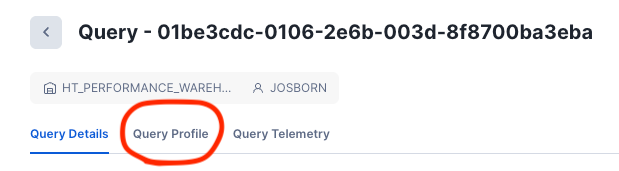
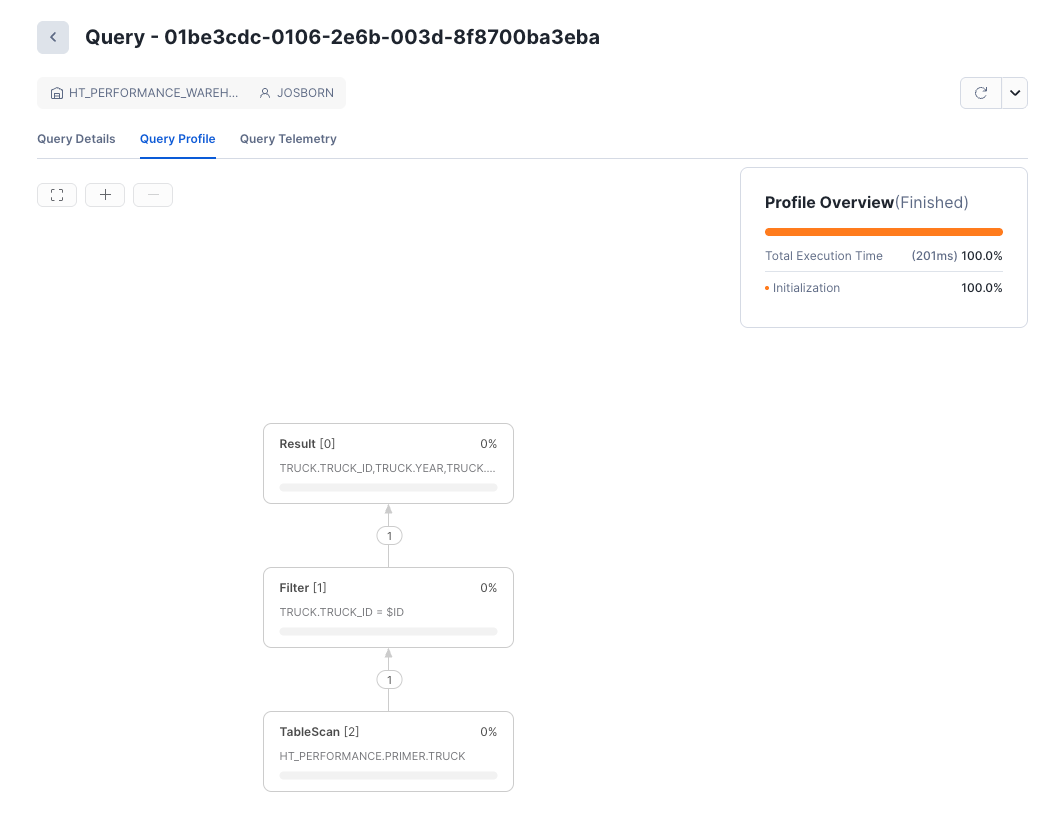
This is the primary screen we will be using for query analysis.
Analyze the Query Profile Output
Now that you understand how to get to the query profile screen, let's discover how this query was executed. Once we understand how the query planner decided to execute the query, we can understand how to implement any changes in the query that will improve performance.
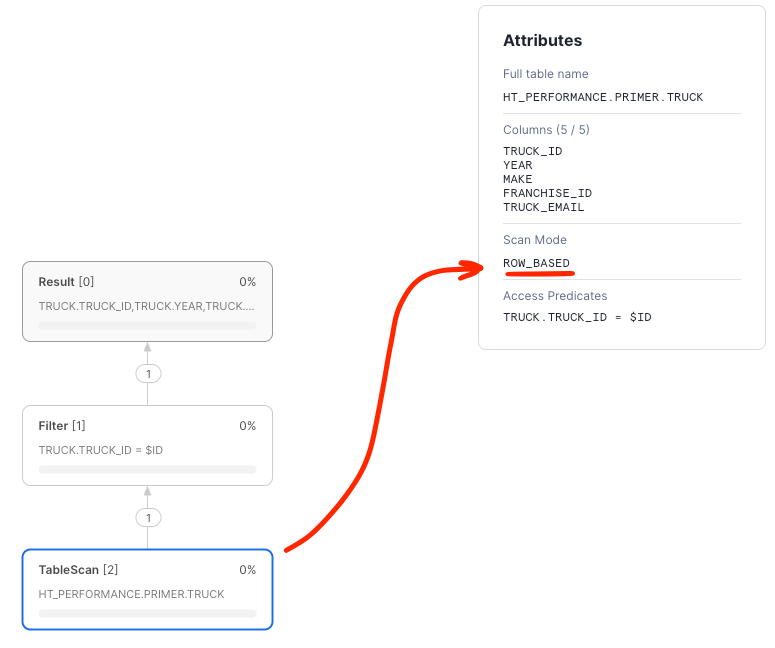
- The Access Predicate was indeed the primary key
TRUCK.TRUCK_ID - The Scan Mode was
ROW_BASED - Exactly one record was retrieved from storage by the scan, exactly matching the truck ID.
ROW_BASED scans means that the query directly accessed the row store and did not use the backing object store to produce the results.
For selective predicates against the primary key, ROW_BASED access indicates that the primary key index was used to
push down the predicate and is the fastest and most efficient way to execute the query.
Query with COLUMN_BASED Access (no key)
Instead of querying the table using the primary key, let's query the table using a column that is not indexed and see what the resulting query plan looks like.
SET EMAIL = (SELECT ANY_VALUE(TRUCK_EMAIL) FROM TRUCK);

SELECT *
FROM TRUCK
WHERE TRUE
    AND TRUCK_EMAIL = $EMAIL;
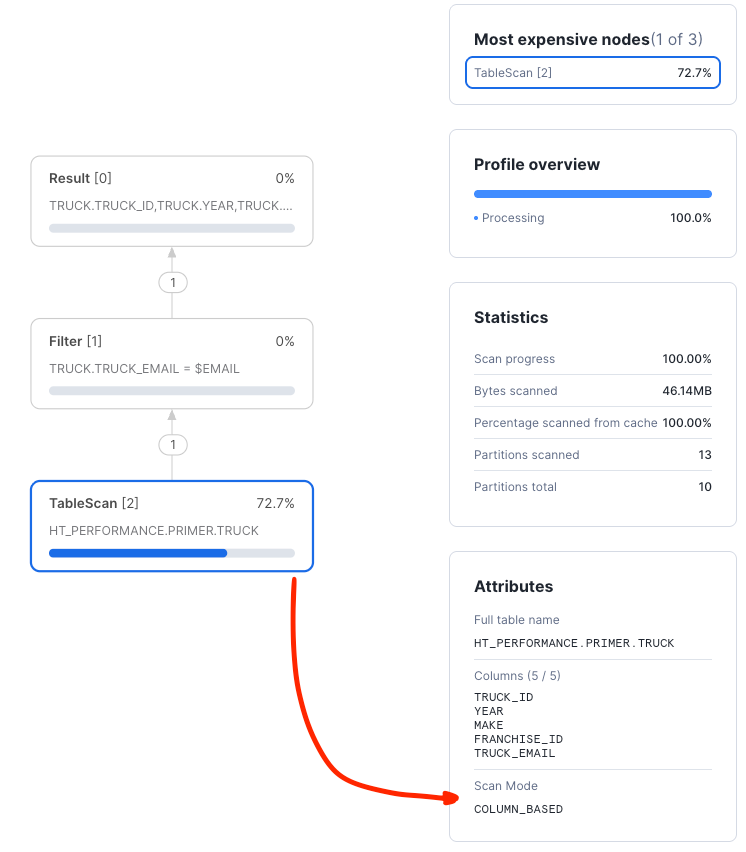
Looking at the "TableScan" node, we can clearly see that the scan was COLUMN_BASED and processed many partitions with lots of data.
The optimizer was not able to push down any access predicates against an index.
Next, we will explore secondary indexes.
Explore Secondary Indexes
Add a Secondary Index
Clearly, the above query is not optimal. A secondary index can help the query run faster. Let's create a secondary index and use it to explore the query improvement:
CREATE OR REPLACE HYBRID TABLE TRUCK (
    TRUCK_ID NUMBER(38,0) NOT NULL,
    YEAR NUMBER(38,0) NOT NULL,
    MAKE VARCHAR(250) NOT NULL,
    FRANCHISE_ID NUMBER(38,0) NOT NULL,
    TRUCK_EMAIL VARCHAR NOT NULL UNIQUE,
    PRIMARY KEY (TRUCK_ID),
    INDEX IDX_TRUCK_EMAIL (TRUCK_EMAIL)
)
AS SELECT
    SEQ4(),
    UNIFORM(1970, 2025, RANDOM()),
    ARRAY_CONSTRUCT( 'Freightliner', 'Peterbilt', 'Kenworth', 'Volvo Trucks', 'Mack', 'International (Navistar)', 'Western Star')[UNIFORM(0,6, RANDOM())],
    UNIFORM(1, 250, RANDOM()),
    RANDSTR(8, RANDOM()) || '@sf-quickstart'
FROM TABLE(GENERATOR(ROWCOUNT => 1000000)) -- WE NEED ENOUGH RECORDS FOR REASONABLE TESTING OTHERWISE EVERYTHING IS IN-MEMORY
;
-- SEE WHAT THE RESULTS LOOK LIKE
SELECT * FROM TRUCK LIMIT 10;
Once the table is created we can re-run the query and show that it is using the newly created index:
SET EMAIL = (SELECT ANY_VALUE(TRUCK_EMAIL) FROM TRUCK);

SELECT *
FROM TRUCK
WHERE TRUE
  AND TRUCK_EMAIL = $EMAIL;
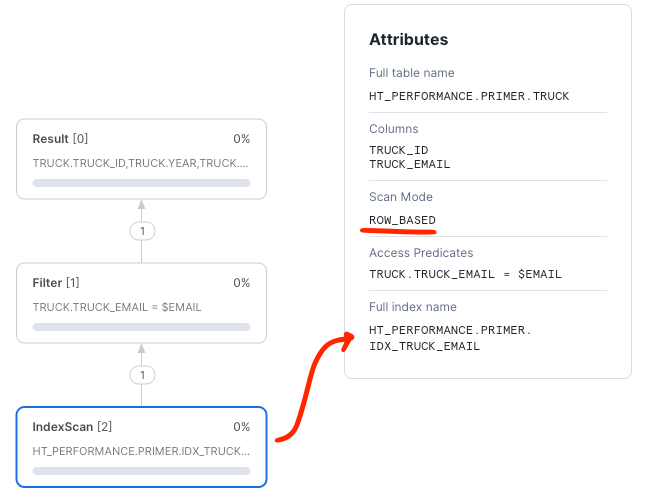
Next, we will cover foreign keys.
Explore Foreign Keys
RDBMS data models use foreign keys to establish relationships between tables. All kinds of models take advantage of the relationships to keep data from becoming corrupted or otherwise orphaned from a definition. We call the relationship between the primary key of the reference table and the usage of the key in another table a foreign key.
Setup
We will use a TRUCK and ORDER_HEADER relationship to create a foreign key relationship. Let's create the tables and
explore how the query plan looks with and without a foreign key.
Let's reuse the TRUCK table and create orders for each truck.
--- CREATE ORDERS FOR EACH TRUCK
CREATE OR REPLACE HYBRID TABLE ORDER_HEADER (
	ORDER_ID NUMBER(38,0) NOT NULL,
	TRUCK_ID NUMBER(38,0) NOT NULL,
    ORDER_TIMESTAMP TIMESTAMP_NTZ NOT NULL,
	ORDER_TOTAL NUMBER(38,2),
	ORDER_STATUS VARCHAR(200) DEFAULT 'INQUEUE',
	PRIMARY KEY (ORDER_ID)
) AS
SELECT
    SEQ4(),
    T.TRUCK_ID,
    DATEADD('seconds', UNIFORM(-1*60*60*24*365, -1*60*60, RANDOM()), CURRENT_TIMESTAMP()), -- SPREAD RANDOM ORDER IDS OUT
    UNIFORM(200.0, 25000.0, RANDOM()),
    ARRAY_CONSTRUCT('DELIVERED', 'INQUEUE', 'LOADING', 'EN-ROUTE')[UNIFORM(0,3, RANDOM())],
FROM TABLE(GENERATOR(ROWCOUNT => 5000))
CROSS JOIN (SELECT TRUCK_ID FROM TRUCK SAMPLE (1000 ROWS)) T    -- ASSIGN ORDERS TO EVERY TRUCK = # TRUCKS X # ORDERS PER TRUCK
;
Consider a query that loads all orders for a specific truck. This query will join the TRUCK table with the ORDER_HEADER
table while filtering for a particular truck.
-- SELECT A TRUCK THAT HAS ORDER DETAILS
-- MIN() SO THE SAME TRUCK IS CHOSEN EVERY TIME,
-- WHICH LETS US RE-RUN THIS EXACT COMPARISON LATER
SET TRUCK_ID = (SELECT MIN(TRUCK_ID) FROM ORDER_HEADER);

-- QUERY FOR ALL ORDERS (5000) FOR THIS PARTICULAR TRUCK
SELECT *
FROM TRUCK T
INNER JOIN ORDER_HEADER O ON O.TRUCK_ID=T.TRUCK_ID
WHERE TRUE
  AND T.TRUCK_ID = $TRUCK_ID
;
Note that the query optimizer does not have information to relate the two tables within the join. Thus,
the optimizer chooses a column scan mode when reading data from the ORDER_HEADER table. Technically, the optimizer must
interpret the join as a many-to-many join.
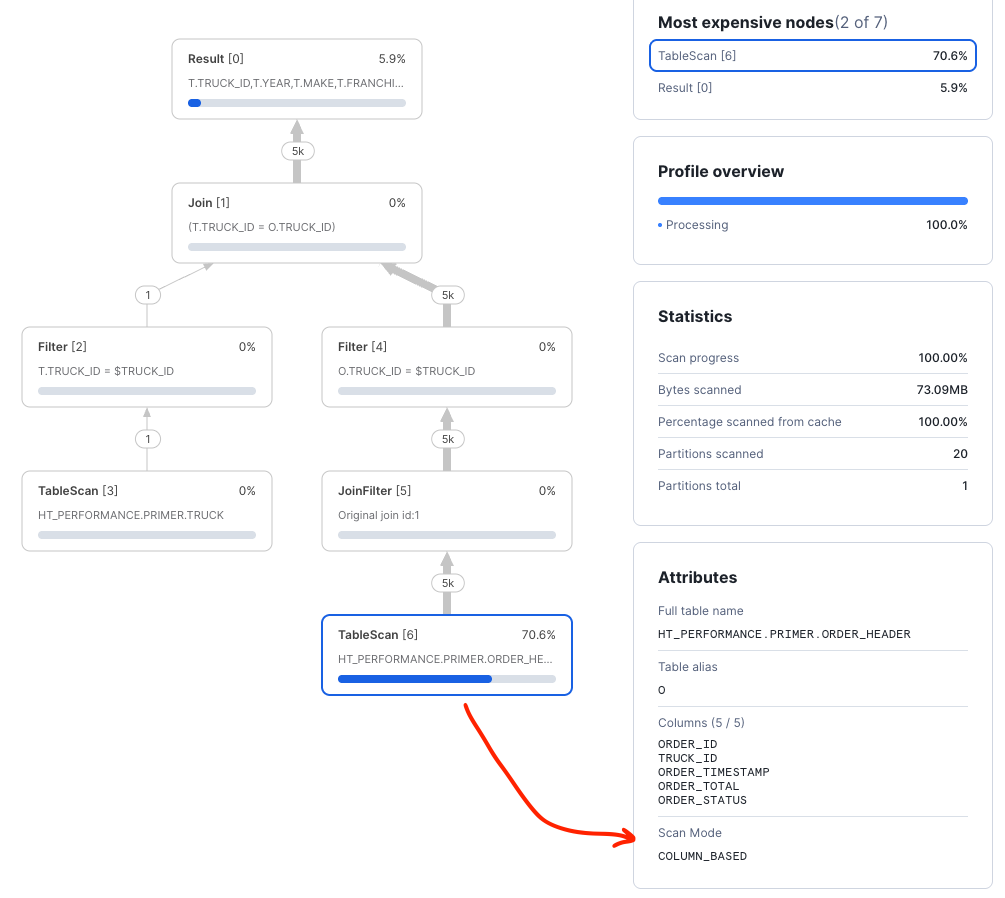
Introducing a FOREIGN KEY will serve two important purposes. First, it establishes a relationship between the tables that
guarantees a one-to-many join for a given PRIMARY KEY in the parent table. Second, the relationship will enforce a
rule that requires data to be consistent such that child table TRUCK_ID values must exist in the TRUCK primary key.
You do not need to recreate the table to add the constraint. Add the foreign key to the table you already loaded:
-- ADD A FOREIGN KEY TO THE EXISTING, POPULATED TABLE
ALTER TABLE ORDER_HEADER
  ADD CONSTRAINT FK_TRUCK_ID FOREIGN KEY (TRUCK_ID) REFERENCES TRUCK(TRUCK_ID);
This is an online operation. Snowflake builds the index that backs the constraint in the background, and ORDER_HEADER
stays available for SELECT and DML while the build runs. Because the build is asynchronous, the ALTER TABLE
statement returns before the constraint is fully in place, so a successful ALTER TABLE is not proof that the
constraint is ready. Check the build status before you measure anything:
-- TRACK THE BACKGROUND BUILD
SHOW INDEXES IN TABLE ORDER_HEADER;
Look at the status column for the FK_TRUCK_ID row. SHOW INDEXES reports one of five values:
status | Meaning |
|---|---|
BUILD IN PROGRESS | The index is being built and is not yet used to retrieve data. This is the expected state immediately after the ALTER TABLE. |
ACTIVE | The index is complete and can be used to retrieve data, if the optimizer chooses it for a given query. For a constraint, the rows already in the table validated successfully. |
BUILD VALIDATION FAILURE | The index backs a UNIQUE or FOREIGN KEY constraint that you added with ALTER TABLE, and rows already in the table violate that constraint. The status_info column explains why. |
BUILD FAILURE | An error occurred during the index build process. Drop and recreate the index. |
SUSPENDED | The index is still updated by DML, but is not used to retrieve data. |
An index in SUSPENDED, BUILD FAILURE, or BUILD IN PROGRESS can be rebuilt with DROP INDEX followed by
CREATE INDEX. BUILD VALIDATION FAILURE is the exception: because that index backs a constraint, you drop and
re-add the constraint with ALTER TABLE instead. See the
CREATE INDEX documentation for details.
A BUILD VALIDATION FAILURE means the index that backing the constraint could not finish building. It will stay in that
state until you intervene: it cannot reach ACTIVE on its own, and join performance below will not improve at all.
Snowflake does enforce the constraing for new writes, so an INSERT or UPDATE that violates it fails with
200009 (22000): Foreign key constraint "FK_TRUCK_ID" was violated. What the failed build does not do is fix
the rows that were already in the table when you added the constraint, which are the rows that failed validation
in the first place.
Note that ALTER TABLE reported success, so SHOW INDEXES is the only place this shows up.
To recover, drop the constraint, correct the offending rows, and add it again. The TRUCK_ID values we generated all
come from TRUCK, so this build should reach ACTIVE.
Re-run SHOW INDEXES IN TABLE ORDER_HEADER; until FK_TRUCK_ID reports ACTIVE before you continue. Expect this
to take several minutes: on the five million rows of ORDER_HEADER created above, the build took roughly eight
minutes on an XSMALL warehouse, while the ALTER TABLE itself returned in about three seconds. Do not skip the
check: a constraint that is still building is not
used to retrieve data, so measuring too early shows you the unimproved plan and makes it look as though the foreign key
did nothing.
Once the status is ACTIVE, re-run the exact same query against the exact same data. Because we added the
constraint in place rather than reloading the table, the rows are identical to the earlier run, which makes this a
genuine before/after comparison.
Note what adding the foreign key actually gave Snowflake. It supplied both the referential relationship, which lets the
optimizer treat the join as one-to-many, and a secondary index on TRUCK_ID that backs the constraint. Foreign key
constraints on hybrid tables build their own underlying index, so the improvement you are about to see comes from both
of those together, not from the relationship metadata alone.
-- SAME ROWS, SAME QUERY AS BEFORE.
-- SETTING THE VARIABLE AGAIN IS SAFE: MIN() RETURNS THE SAME TRUCK,
-- SO THIS STILL WORKS IF YOUR SESSION RECONNECTED.
SET TRUCK_ID = (SELECT MIN(TRUCK_ID) FROM ORDER_HEADER);

SELECT *
FROM TRUCK T
INNER JOIN ORDER_HEADER O ON O.TRUCK_ID=T.TRUCK_ID
WHERE TRUE
    AND T.TRUCK_ID = $TRUCK_ID
;
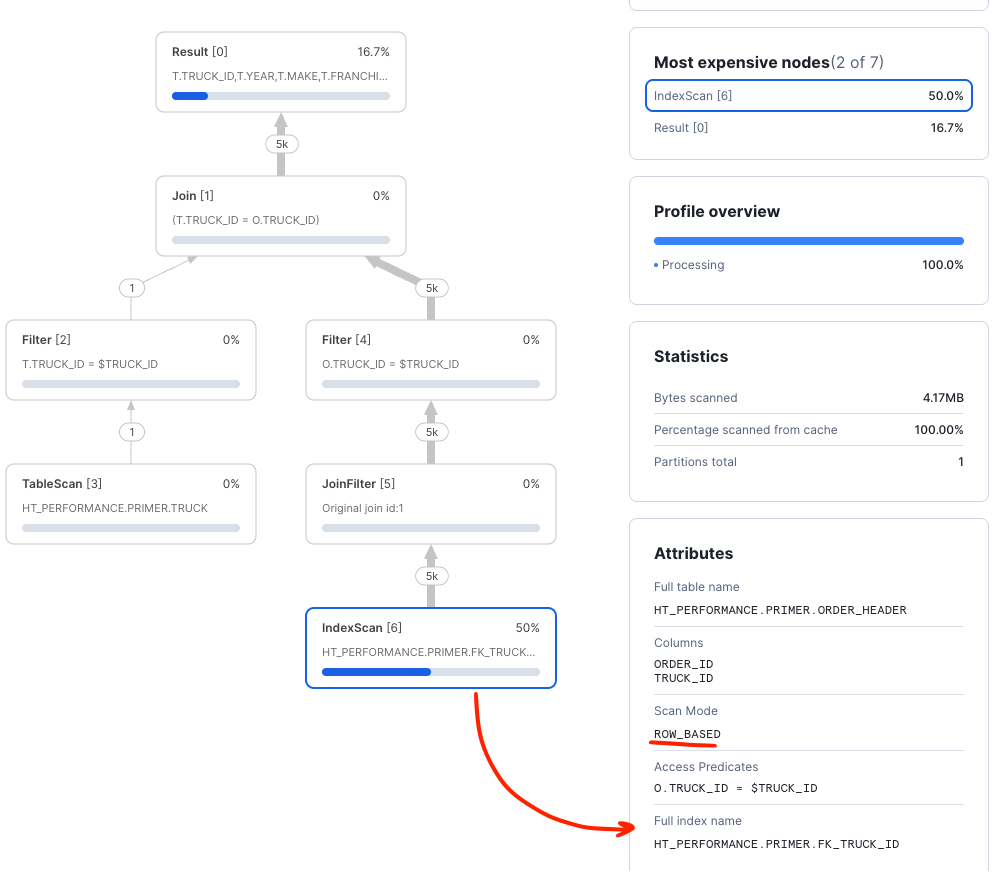
Checking the query plan, we can see that the query optimizer is now using the foreign key to efficiently select the order detail information.
Dropping and Re-Adding a Foreign Key
Because adding a constraint is online, the reverse is also true: you can drop a foreign key and add it back without recreating the table. This is useful for controlled schema maintenance, such as changing which columns a constraint covers or correcting rows that failed validation.
-- DROP THE CONSTRAINT
ALTER TABLE ORDER_HEADER DROP CONSTRAINT FK_TRUCK_ID;

-- THE BACKING INDEX IS REMOVED ALONG WITH THE CONSTRAINT:
-- FK_TRUCK_ID NO LONGER APPEARS IN THE OUTPUT
SHOW INDEXES IN TABLE ORDER_HEADER;
Dropping the constraint removes both the referential relationship and the secondary index that backed it. Re-run the join query and the plan returns to the many-to-many form from earlier in this section:
SET TRUCK_ID = (SELECT MIN(TRUCK_ID) FROM ORDER_HEADER);

SELECT *
FROM TRUCK T
INNER JOIN ORDER_HEADER O ON O.TRUCK_ID=T.TRUCK_ID
WHERE TRUE
    AND T.TRUCK_ID = $TRUCK_ID
;
Now add the constraint back:
ALTER TABLE ORDER_HEADER
  ADD CONSTRAINT FK_TRUCK_ID FOREIGN KEY (TRUCK_ID) REFERENCES TRUCK(TRUCK_ID);

SHOW INDEXES IN TABLE ORDER_HEADER;
As with the first time you added it, re-run SHOW INDEXES until FK_TRUCK_ID reports ACTIVE. Re-adding a
constraint revalidates every row currently in the table, so if any orphaned rows were inserted while the constraint was
absent, the rebuild reports BUILD VALIDATION FAILURE instead of ACTIVE.
aside negative While the foreign key is absent, nothing prevents writes that violate it, so orphaned rows can be created. Those rows then cause the rebuild to fail validation when you add the constraint back. Treat drop/re-add as a deliberate maintenance operation on a change-controlled schema, not as a way to work around a constraint violation in an application.
Next, consider a query to retrieve a specific order and join in details for the truck for which the order was submitted. This sort of pattern is common when dealing with normalized data models in transactional applications:
-- SELECT A SPECIFIC ORDER
SET ORDER_ID = (SELECT ANY_VALUE(ORDER_ID) FROM ORDER_HEADER);

SELECT *
FROM ORDER_HEADER O
INNER JOIN TRUCK T ON O.TRUCK_ID=T.TRUCK_ID
WHERE TRUE
  AND O.ORDER_ID = $ORDER_ID
;
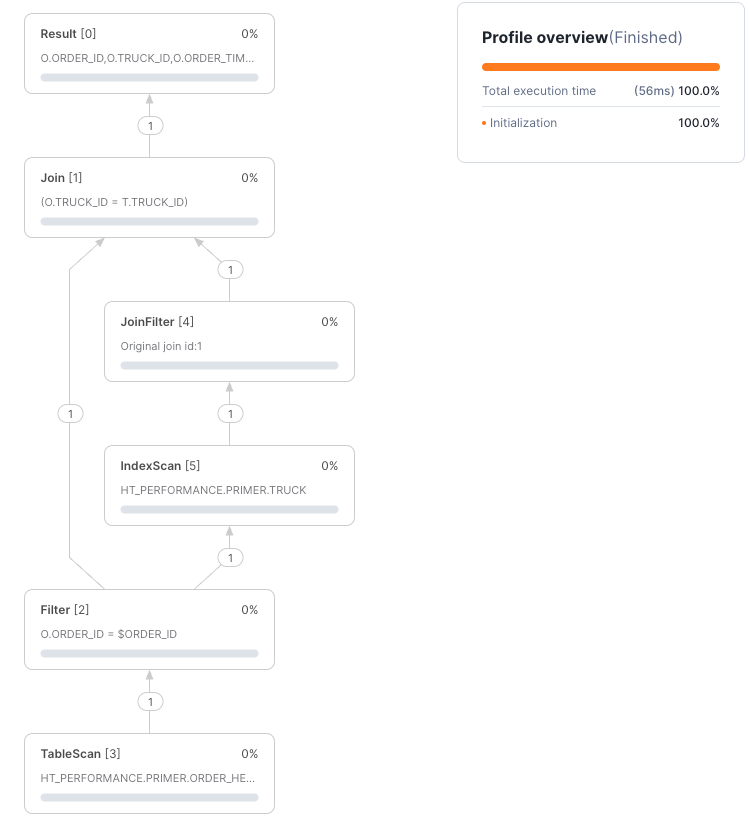
The query plan shows both primary keys in use loading only a single record from each table by using an Nested Loop Join pattern where we first retrieve the order record and then use the truck ID for that order to push down the truck lookup against the primary key of the truck table:
Next, we will explore how secondary indexes help queries that do not use primary keys.
Joining and Secondary Indexes
A common query pattern is to join two tables using foreign keys and filter one of them with another column. For example, this query is fetching orders over the last few days for a specific truck:
SELECT *
FROM ORDER_HEADER O
INNER JOIN TRUCK T ON T.TRUCK_ID=O.TRUCK_ID
WHERE TRUE
    AND O.ORDER_TIMESTAMP > DATEADD('days', -2, CURRENT_TIMESTAMP()) :: TIMESTAMP_NTZ  -- NOTE THE CAST
    AND T.TRUCK_ID = $TRUCK_ID
;
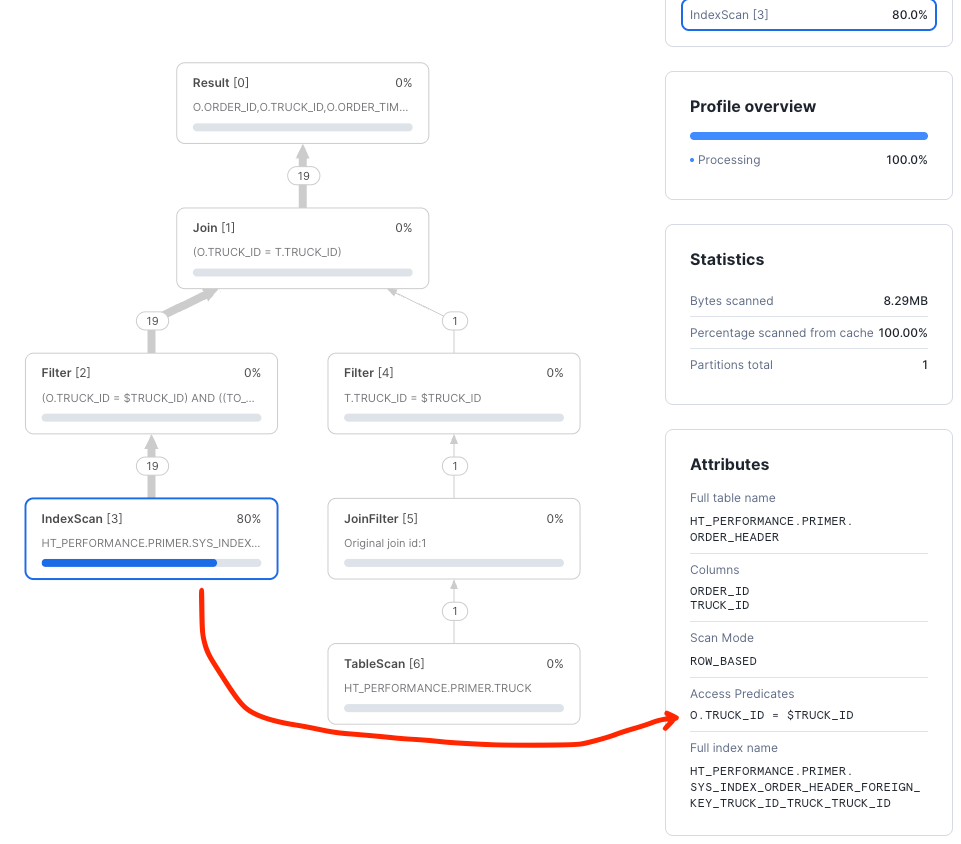
The TRUCK_ID will be used as a primary key filter on TRUCK and a foreign key filter on ORDER_HEADER. The timestamp filter
will be applied after data was fetched from hybrid table object store. From the query profile, we can see that only the
TRUCK_ID was used as an access predicate. The ORDER_TIMESTAMP filtering was completed after data was fetched.
A secondary index on (TRUCK_ID, ORDER_TIMESTAMP) will improve performance by allowing us to also push the timestamp filter down to storage:
--- CREATE ORDERS FOR EACH TRUCK
CREATE OR REPLACE HYBRID TABLE ORDER_HEADER (
    ORDER_ID NUMBER(38,0) NOT NULL,
    TRUCK_ID NUMBER(38,0) NOT NULL,
    ORDER_TIMESTAMP TIMESTAMP_NTZ NOT NULL,
    ORDER_TOTAL NUMBER(38,2),
    ORDER_STATUS VARCHAR(200) DEFAULT 'INQUEUE',  -- USE DEFAULT VALUE
    PRIMARY KEY (ORDER_ID),
    FOREIGN KEY (TRUCK_ID) REFERENCES TRUCK(TRUCK_ID),  -- REFER TO THE TRUCK TABLE FOR TRUCK_ID
    INDEX IDX_TRUCK_TIMESTAMPS (TRUCK_ID, ORDER_TIMESTAMP )  -- ADD THE SECONDARY INDEX FOR ORDER_TIMESTAMP
);
INSERT INTO ORDER_HEADER (ORDER_ID, TRUCK_ID, ORDER_TIMESTAMP, ORDER_TOTAL)
SELECT
    SEQ4(),
    T.TRUCK_ID,
    DATEADD('seconds', UNIFORM(-1*60*60*24*365, -1*60*60, RANDOM()), CURRENT_TIMESTAMP()), -- SPREAD RANDOM ORDER IDS OUT
    UNIFORM(200.0, 25000.0, RANDOM()),
FROM TABLE(GENERATOR(ROWCOUNT => 5000))
CROSS JOIN (SELECT TRUCK_ID FROM TRUCK SAMPLE (1000 ROWS)) T    -- ASSIGN ORDERS TO EVERY TRUCK = # TRUCKS X # ORDERS PER TRUCK
;
Now that the index exists and is ACTIVE, we can use it in a query:
SET TRUCKID = (SELECT ANY_VALUE(TRUCK_ID) FROM ORDER_HEADER);

SELECT *
FROM ORDER_HEADER O
INNER JOIN TRUCK T ON T.TRUCK_ID=O.TRUCK_ID
WHERE TRUE
    AND O.ORDER_TIMESTAMP > DATEADD('days', -1, CURRENT_TIMESTAMP()) :: TIMESTAMP_NTZ
    AND T.TRUCK_ID = $TRUCKID
;
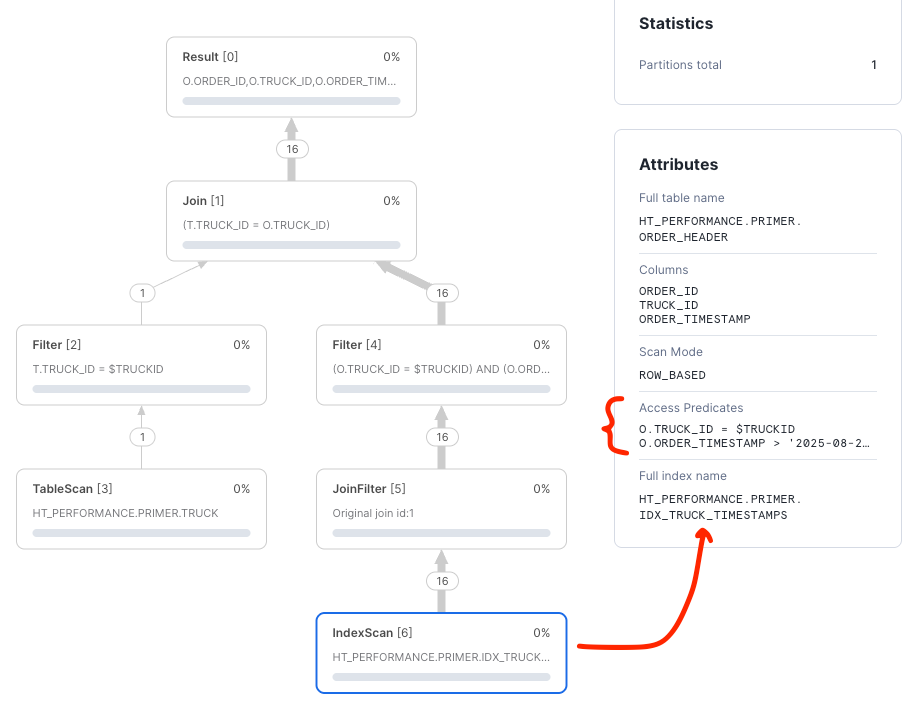
Now the truck and timestamp predicates are being pushed down against the index in order to reduce the amount of data retrieved from the order_header table improving latency and efficiency.
NOTE: Looking at the query in detail, you will notice that there is a cast to
TIMESTAMP_NTZfor theORDER_TIMESTAMPpredicate value. All types of timestamps are supported by hybrid tables, however, columns used in primary keys or indexes are only supported asTIMESTAMP_NTZ. As an exercise, try the query without the cast and inspect the result.
Next, we will summarize best practices.
Summarize Best Practices
Hybrid table performance benefits from following best practices that extract the best performance and highest value from this Snowflake feature.
- Use a
PRIMARY KEY, built from business columns, to drive the highest performance. - Implement
FOREIGN KEYSwhen joining hybrid tables. - Write queries that use keys and indexes to keep queries in
ROW_BASEDmode. - Use
INCLUDEcolumns on secondary indexes to create covering indexes that eliminate probe scans for hot query paths. - Use bound variables (parameterized queries) in application code so Snowflake can cache and reuse compiled query plans.
- Use Snowsight query plans to verify optimal query plans and troubleshoot performance issues.
- Pay close attention to data types, join criteria, and index utilization.
- Follow Snowflake hybrid table best practices.
Conclusion And Resources
Overview
Thank you for completing this Hybrid Tables Performance Optimization Primer. You now have a solid understanding of how to relate query performance to the query planning tool. You will use this knowledge to help create and optimize your hybrid table solutions.
What You Learned
Having completed this quickstart you have successfully
- Created hybrid tables with primary keys
- Wrote and learned how to analyze a query profile
- Learned how to use secondary indexes and constraints
- Created a child table using foreign keys referencing a parent table
- Joined tables and worked with secondary indexes to maximize performance
- Utilized secondary indexes to speed query performance across non-primary key columns
Related Resources:
- Snowflake Unistore Landing Page
- Snowflake Documentation for Hybrid Tables
- Best Practices for Hybrid Tables
- Performance Testing for Hybrid Tables
- Hybrid Table Performance Testing Quickstart
- Secondary Index Design for Hybrid Tables
- Converting Standard Tables to Hybrid Tables
- Simplify Application Development Hybrid Tables Blog
This content is provided as is, and is not maintained on an ongoing basis. It may be out of date with current Snowflake instances
