Nov 10, 2025/6 min readData Engineering
Snowflake Managed Iceberg Tables: Industry Leading Interop Performance


Apache Iceberg™ is rapidly becoming a key building block for modern data architectures. The core reason is to give organizations the freedom to select the best engine or tool for their current and future requirements. However, not all Iceberg tables are created equal. Similarly, not all engines read from and write to Iceberg tables the same. Small variations in how different engines interpret the standard can lead to inefficient reads. Therefore, to ensure efficient reads across engines, customers go through manual and iterative optimizations, such as defining file sizes and partitioning schemes for their Iceberg tables.
The new File Size and Partitioning features offer hassle-free performance tuning on Snowflake, while giving you the flexibility of controlling the optimization for your entire Iceberg ecosystem. This means your tables can work seamlessly with the growing number of engines that support Iceberg — while also providing automatic optimization for the exceptional price-performance on Snowflake. They work by providing Iceberg-specific optimizations that allow customers to configure settings for File Size and Partitioning to promote high performance of the tables when reading from any engine, with defaults that automatically optimize the file size for exceptional price-performance on Snowflake. With these optimizations, customers can achieve on-par performance on external engines reading Snowflake-written Iceberg tables, without impacting the Snowflake experience.
Optimizing interoperability
Optimizing and maintaining file size is a repetitive and manual process, requiring careful consideration of many factors, including the size of the table, nature of workload, memory constraints, and physical location of related rows.
Many engines write Iceberg files that are optimized only for their own reads, making interoperability challenging. In contrast, Snowflake’s goal is to write the most efficient files for Iceberg tables, providing on-par or better read performance on external engines, when processing Snowflake-written Iceberg, while preserving price-performance on Snowflake. In the future, with ongoing engineering investments, external engines will process Snowflake-written Iceberg tables even more efficiently than they read their own.
Choosing the right file size and partitioning for Snowflake-written Iceberg tables made a huge difference on the read performance using external engines. In one set of tests, we saw a 2.3x improvement (57% less run time) when Spark read a Snowflake-written partitioned Iceberg table with a 128MB file size, as compared to a Snowflake-written clustered Iceberg table.
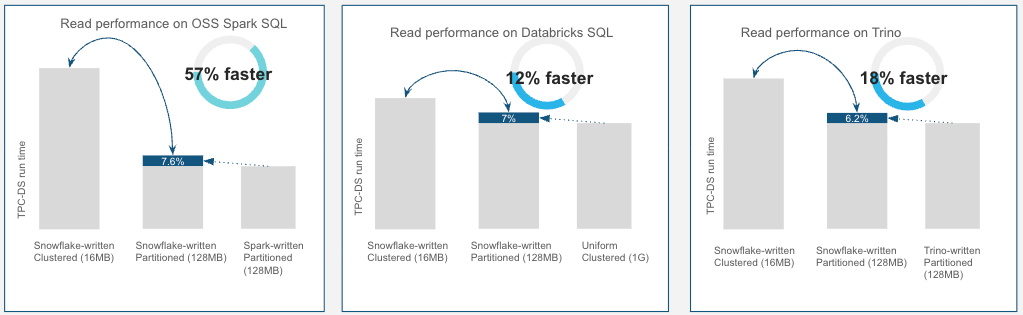
Our internal TPC-DS testing shows how customers can use these features to improve read performance for external engines. We performed an apples-to-apples comparison between the read performance of Spark, Trino and Databricks SQL, when reading Iceberg tables that Snowflake wrote vs. Iceberg tables each engine wrote. Using the options in Snowflake’s File Size and Partition features, we generated partitions with 128MB file size, matching the file size and partitioning schemes typically used with these engines. The performance of TPC-DS queries on Databricks SQL, Spark and Trino reading these Iceberg tables written by Snowflake is within 7%-8% of those written by the engines themselves. This is a significant improvement over the usual 20%-60% performance degradation seen when these same engines read Iceberg tables written by other engines.
Speaking about great defaults and automatic optimization, reads on Snowflake had the best price-performance with the default file size (AUTO), and Snowflake maintained near-optimal performance levels, even when configured with nondefault file sizes. As an example, even when optimized for interoperability with other systems by setting file size to 128MB, Snowflake still provided a near-optimal level of read performance.
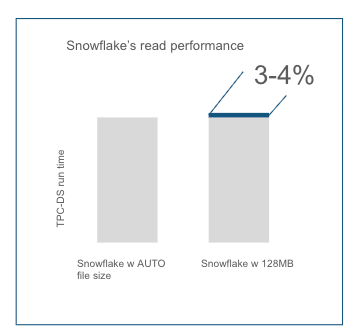
Snowflake automatically adjusts and maintains file size, offering optimal price-performance
Many engines in the Iceberg ecosystem, such as Spark and Trino, are optimized for performance with large file sizes. Choosing the right file size is a matter of balancing trade-offs for your specific workloads. If file sizes are too small, it can lead to increased I/O operations and suboptimal read performance for bulk scan operations. If file sizes are too large, it can make point lookups and certain DML operations, such as bulk UPDATEs, DELETEs and MERGEs more costly. Snowflake’s File Size and Table Optimization service minimizes the pain for manual optimization by automatically tuning the file size.
Core to our design philosophy, Snowflake’s default AUTO file setting allows Snowflake to automatically manage and adjust the file size for optimal performance on Snowflake.
Table Optimization is another example of our automatic performance improvements. For Snowflake managed Iceberg tables, a fully managed and automatic table optimization service runs in the background. This service is enabled by default and continuously organizes, compacts and resizes data files to match the configured target size. It reduces configuration complexity and promotes file size consistency regardless of DML patterns, also benefitting external engines that are reading from these tables.
As we demonstrated from our internal benchmarks, to boost interoperability with other engines, customers have the option to set the target file size explicitly. Changing file sizes to 128MB has minimal performance difference on Snowflake. This provides an ideal option when you need to emphasize improving performance on external engines.
Clustering vs. partitioning: The key to interoperability
Clustering provides superior performance for analytics on Snowflake. Snowflake's clustering feature enhances query efficiency by organizing rows via cluster keys. While this method is now increasingly adopted by data lake providers and offers superior performance compared to partitioning, external engines have not yet evolved to fully take advantage of it. In fact, all major Iceberg engines rely on partitioning to prune data and improve query efficiency by skipping irrelevant chunks of data based on query predicates.
Partitioning is a powerful feature for improving query performance, especially in scenarios where external engine performance is paramount. Unlike clustering, which co-locates similar rows without creating mutually exclusive divisions, partitioning divides the table by writing a set of rows for a given combination of the values in the partitioned columns to specific partitions.
While writing partitions, Snowflake stores the partition tuples and metadata in manifest files in a Iceberg v2 spec-compliant way, which allows external engines such as Spark, Flink and Dremio to read these files efficiently through pruning.
Snowflake supports all the partition transforms in Iceberg v2 standard. With this flexibility, customers can control the type and number of partitions in a table for optimized query performance, regardless of engine. It does so by ensuring a balanced distribution of data across partitions on an optimal number of partitions to improve ingestions, memory management and pruning.
What it means for you
Snowflake’s strives to help you unlock the best performance on Snowflake-written Iceberg on any engine, including our own. We offer capabilities to set file size defaults and partitions to make interoperability seamless, while also offering mechanisms to optimize your Snowflake analytics performance.
Large Files and Partitioned Writes are now in GA. You can use them on Snowflake managed and externally managed Iceberg. We invite you to try out these features today and see the performance benefits for yourself. Try them out on your own or reach out to your Snowflake sales and support representatives to start unlocking better performance and interoperability for your Iceberg data lake.
Get started with our documentation: