Deploy Snowflake Intelligence Routing Agent
🤖 Ask. Route. Optimize. Build an AI-powered route planning assistant that understands natural language locations - powered by OpenRouteService and Snowflake Intelligence.
Overview
Build a conversational AI assistant that provides intelligent route planning using natural language.
This quickstart deploys a Snowflake Intelligence Agent that wraps OpenRouteService routing functions with AI-powered geocoding. Users can ask questions like "Get directions from Union Square San Francisco to Golden Gate Bridge" and the agent automatically converts location names to coordinates, calls the routing functions, and returns formatted results.
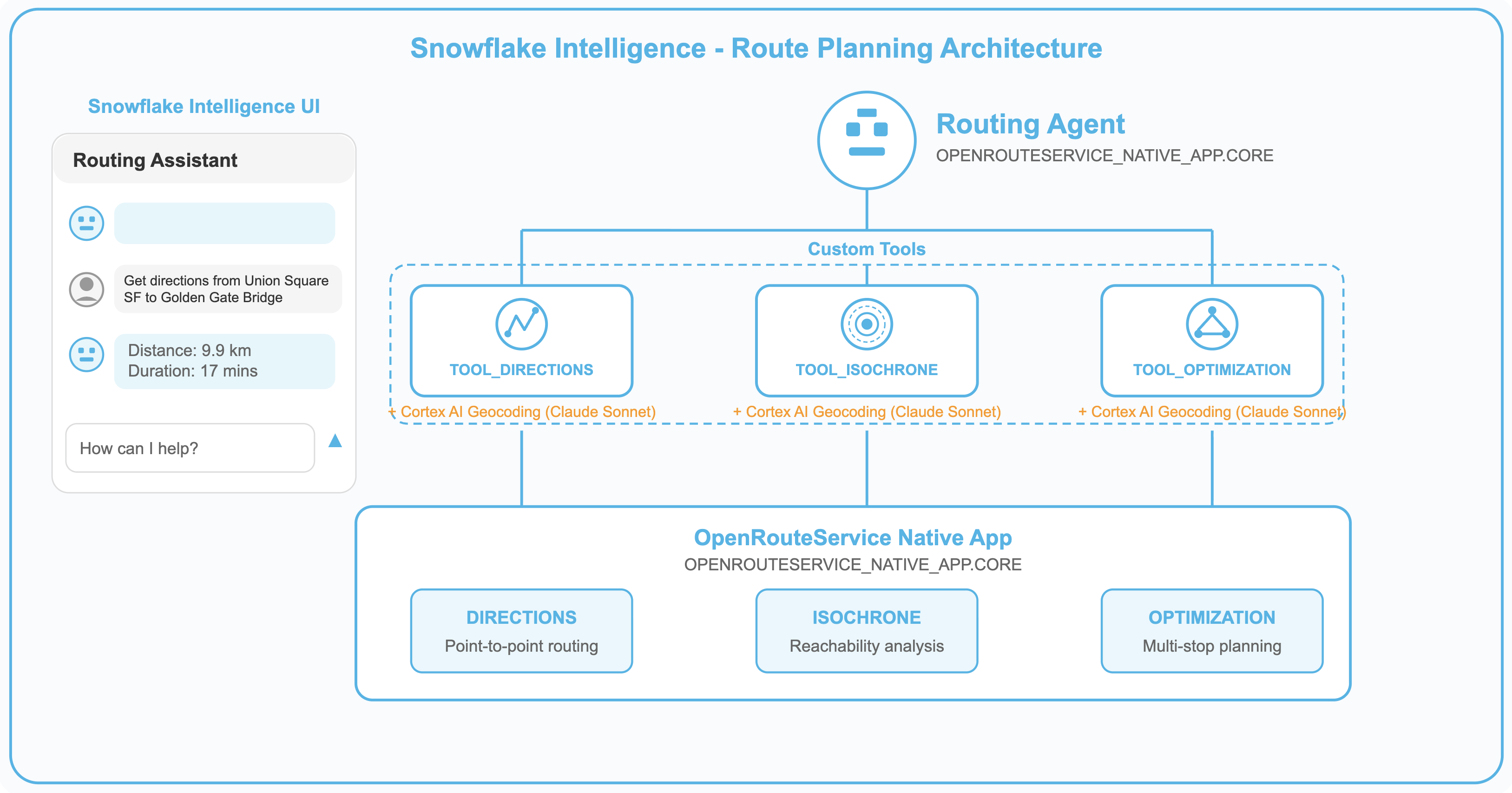
What You'll Build
🤖 Routing Agent - A Snowflake Intelligence agent that:
- Accepts natural language location descriptions (no coordinates needed)
- Uses Snowflake Cortex AI for geocoding locations worldwide
- Provides driving, cycling, and walking directions between any locations
- Generates isochrone catchment areas showing reachable zones
- Optimizes multi-stop delivery routes with multiple vehicles
🛠️ AI-Powered Tool Procedures - Three stored procedures with built-in geocoding:
TOOL_DIRECTIONS- Get turn-by-turn directions between named locationsTOOL_ISOCHRONE- Generate reachability polygons from any locationTOOL_OPTIMIZATION- Optimize delivery routes for multiple vehicles
Prerequisites
IMPORTANT: This demo requires the OpenRouteService Native App to be installed and running. If you haven't installed it yet, complete the Build Routing Solution in Snowflake with Cortex Code quickstart first.
Required:
- OpenRouteService Native App deployed and activated
- Cortex Code CLI installed and configured
- Active Snowflake connection with ACCOUNTADMIN access
- Cortex AI access (claude-sonnet-4-5 model for geocoding), other LLM models can be used as well
What You'll Learn
- Deploy a Snowflake Intelligence Agent using Cortex Code skills
- Create stored procedures that combine Cortex AI geocoding with routing functions
- Build AI tool wrappers that accept natural language input
- Register agents with Snowflake Intelligence for conversational access
- Test routing capabilities via the Snowflake Intelligence UI
Architecture
The Routing Agent architecture combines three key Snowflake technologies:
| Component | Technology | Purpose |
|---|---|---|
| Agent Orchestration | Snowflake Intelligence | Conversational interface and tool selection |
| Geocoding | Cortex AI (claude-sonnet-4-5) | Convert location names to coordinates |
| Routing | OpenRouteService Native App | Calculate routes, isochrones, and optimizations |
How It Works
- User asks a question in natural language (e.g., "Directions from the Eiffel Tower to the Louvre")
- Agent selects the appropriate tool based on the question type
- Tool procedure extracts locations and calls Cortex AI for geocoding
- Coordinates are passed to the OpenRouteService function
- Results are formatted and returned to the user
This architecture enables truly conversational route planning - no coordinates, APIs, or technical knowledge required from the user.
Deploy the Routing Agent
Use Cortex Code to deploy the Routing Agent including tool procedures and agent registration.
Clone Repository and Deploy Skill
Clone the repository:
git clone https://github.com/Snowflake-Labs/sfguide-create-a-route-optimisation-and-vehicle-route-plan-simulator
cd sfguide-create-a-route-optimisation-and-vehicle-route-plan-simulator
In the Cortex Code CLI, type:
$deploy-snowflake-intelligence-routing-agent$
NOTE: The skill will first verify that the OpenRouteService Native App is installed.
Cortex Code will automatically:
- Verify OpenRouteService functions are available (DIRECTIONS, ISOCHRONES, OPTIMIZATION)
- Create Tool Procedures - Deploy 3 AI-enhanced stored procedures with geocoding
- Create the Agent - Deploy the Routing Agent with tool configurations
- Register with Intelligence - Add the agent to Snowflake Intelligence for UI access
- Test the Agent - Verify all tools work correctly
What Gets Installed
The deploy skill creates the following Snowflake objects:
Stored Procedures (AI-Enhanced Tools)
| Procedure | Description |
|---|---|
OPENROUTESERVICE_SETUP.SI_ROUTING_AGENT.TOOL_DIRECTIONS | Directions with AI geocoding for natural language locations |
OPENROUTESERVICE_SETUP.SI_ROUTING_AGENT.TOOL_ISOCHRONE | Isochrone generation with AI geocoding |
OPENROUTESERVICE_SETUP.SI_ROUTING_AGENT.TOOL_OPTIMIZATION | Multi-vehicle route optimization with AI geocoding |
Snowflake Intelligence Agent
| Component | Name | Description |
|---|---|---|
| Agent | OPENROUTESERVICE_SETUP.SI_ROUTING_AGENT.ROUTING_AGENT | Conversational route planning assistant |
Understanding the Tool Procedures
Each tool procedure combines Cortex AI geocoding with OpenRouteService functions. This enables natural language input without requiring users to know coordinates.
TOOL_DIRECTIONS
Purpose: Get directions between named locations.
Parameters:
| Parameter | Type | Description |
|---|---|---|
LOCATIONS_DESCRIPTION | VARCHAR | Natural language locations (e.g., "from Union Square San Francisco to Golden Gate Bridge") |
PROFILE | VARCHAR | Transport mode (default: driving-car) |
Example Usage:
CALL OPENROUTESERVICE_SETUP.SI_ROUTING_AGENT.TOOL_DIRECTIONS(
    'from Union Square San Francisco to Golden Gate Bridge',
    'driving-car'
);
TOOL_ISOCHRONE
Purpose: Generate reachability area from a location.
Parameters:
| Parameter | Type | Description |
|---|---|---|
LOCATION_DESCRIPTION | VARCHAR | Center location (e.g., "Tokyo Station") |
RANGE_MINUTES | NUMBER | Travel time in minutes (1-60) |
PROFILE | VARCHAR | Transport mode (default: driving-car) |
Example Usage:
CALL OPENROUTESERVICE_SETUP.SI_ROUTING_AGENT.TOOL_ISOCHRONE(
    'Fisherman''s Wharf San Francisco',
    15,
    'driving-car'
);
TOOL_OPTIMIZATION
Purpose: Optimize delivery routes for multiple vehicles.
Parameters:
| Parameter | Type | Description |
|---|---|---|
DELIVERY_LOCATIONS | VARCHAR | All delivery stops (e.g., "Ferry Building, Pier 39, Ghirardelli Square") |
DEPOT_LOCATION | VARCHAR | Vehicle start/end location (e.g., "SFO Airport") |
NUM_VEHICLES | NUMBER | Number of vehicles available |
PROFILE | VARCHAR | Transport mode (default: driving-car) |
Example Usage:
CALL OPENROUTESERVICE_SETUP.SI_ROUTING_AGENT.TOOL_OPTIMIZATION(
    'Ferry Building San Francisco, Pier 39 San Francisco, Ghirardelli Square San Francisco',
    'Union Square, San Francisco',
    2,
    'driving-car'
);
The Routing Agent
The Routing Agent is a Snowflake Intelligence agent configured with three tools that map to the stored procedures.
NOTE: Available routing profiles depend on your OpenRouteService configuration.
Using the Routing Agent
Once deployed, you can interact with the Routing Agent through the Snowflake Intelligence UI.
Access the Agent
- Navigate to Snowflake Intelligence in Snowsight
- The Routing Agent agent will appear in your available agents
- Click to start a conversation
Example Conversations
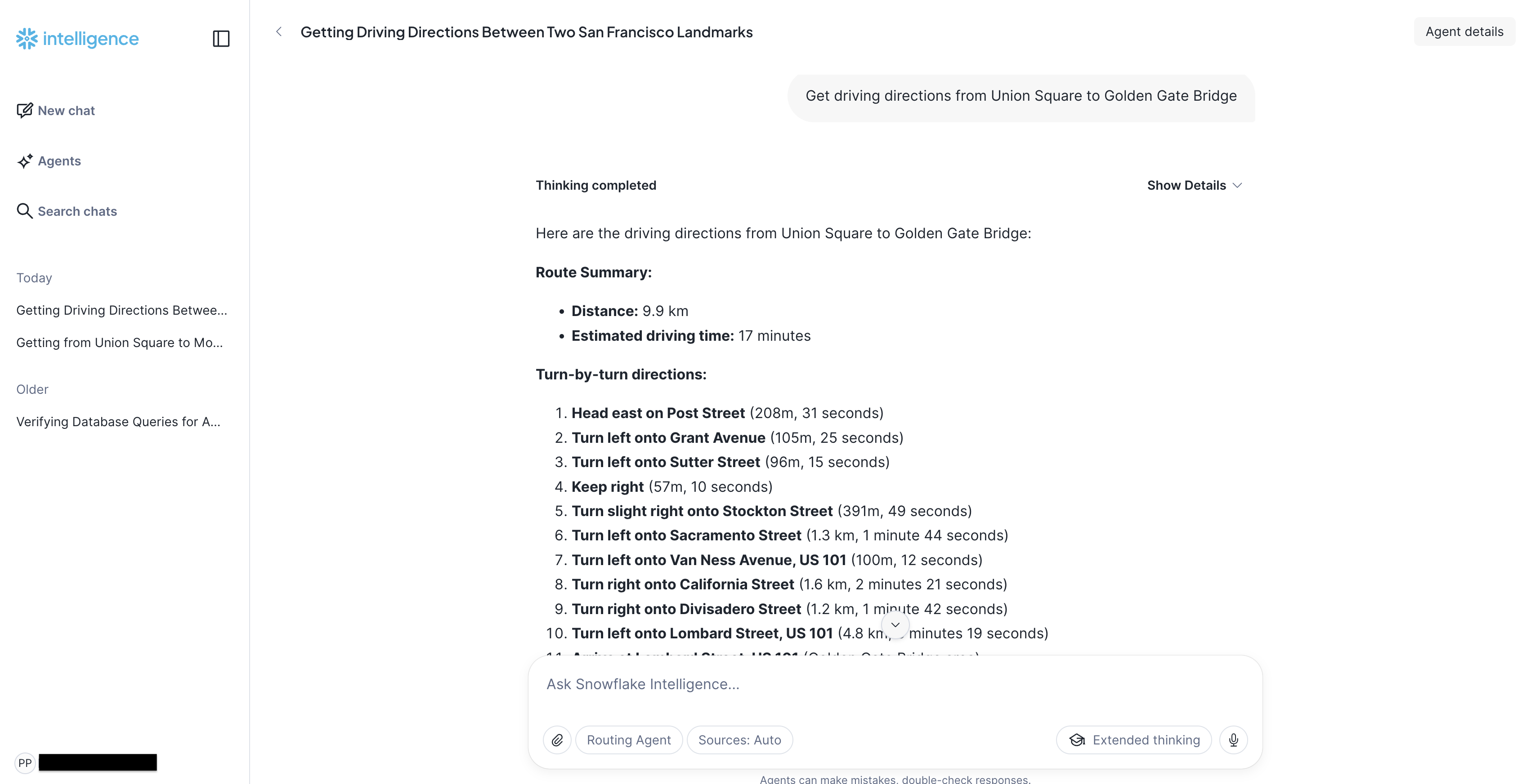
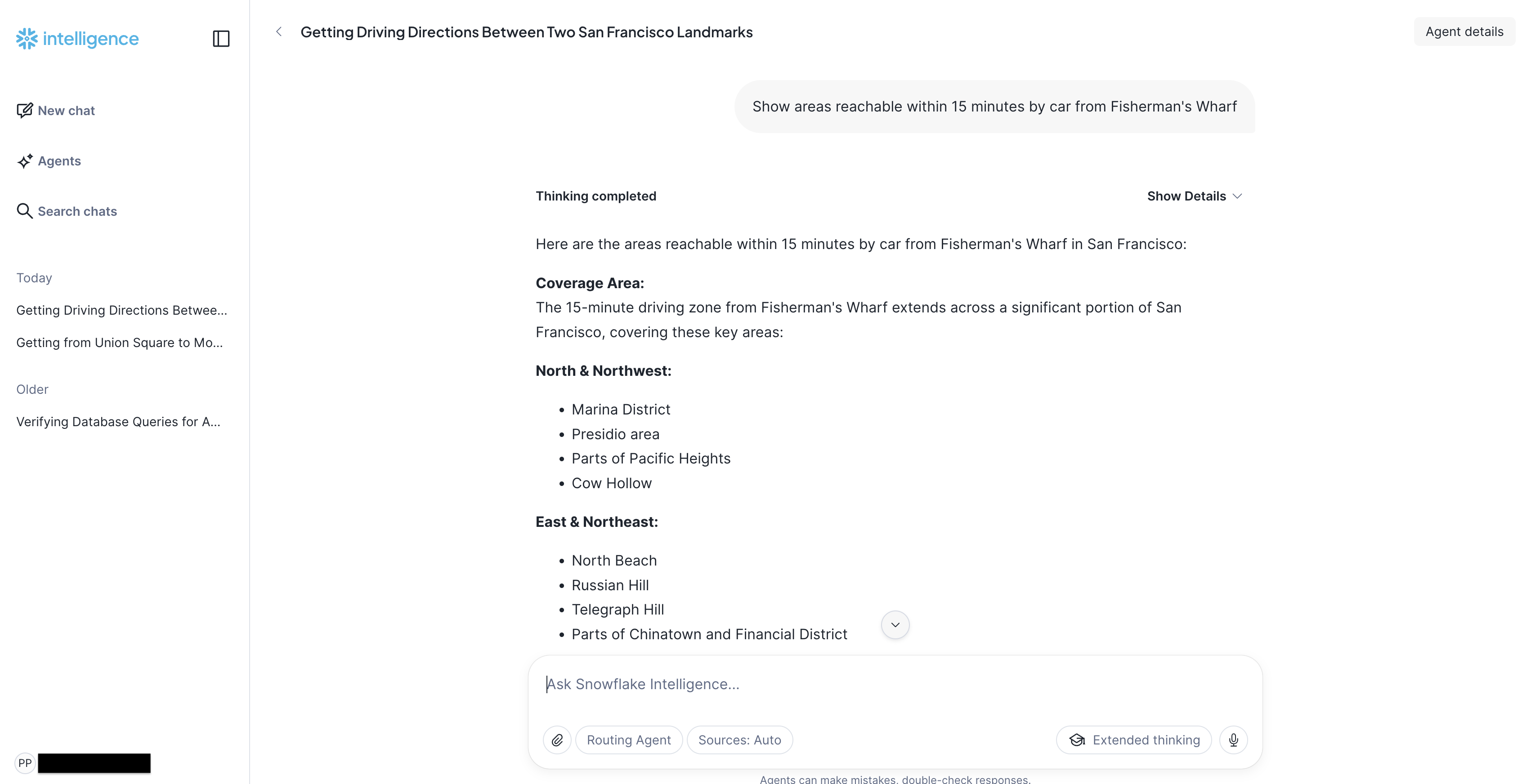
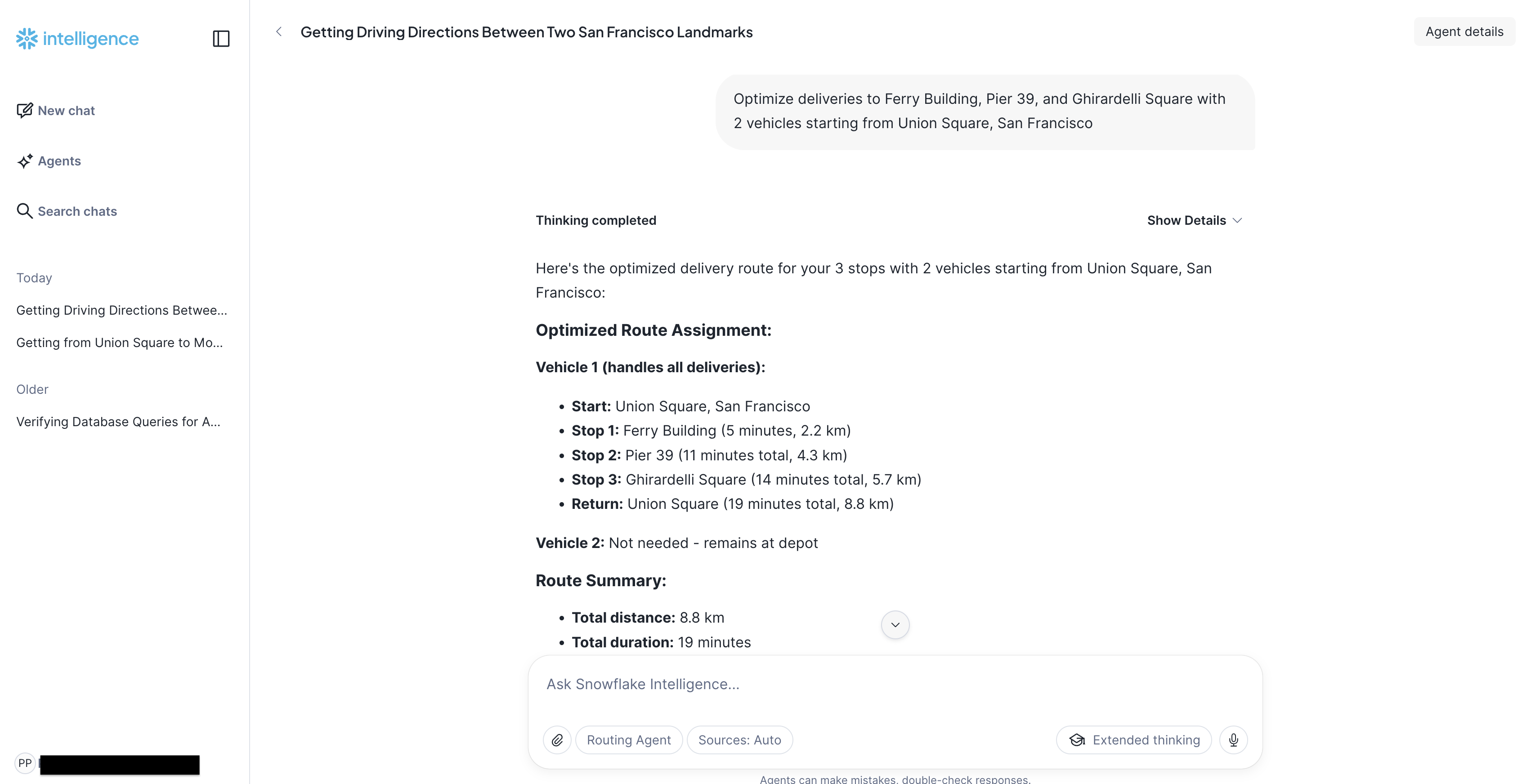
Region Considerations
IMPORTANT: The agent works with locations within the region configured in your OpenRouteService Native App.
Troubleshooting
Checking Service Status
If routing functions fail, verify the OpenRouteService services are running:
SHOW SERVICES IN SCHEMA OPENROUTESERVICE_NATIVE_APP.CORE;
All services should show RUNNING status. If any are suspended:
ALTER SERVICE OPENROUTESERVICE_NATIVE_APP.CORE.<service_name> RESUME;
Testing Individual Tools
You can test each tool procedure directly:
-- Test directions
CALL OPENROUTESERVICE_SETUP.SI_ROUTING_AGENT.TOOL_DIRECTIONS(
    'from Union Square to Fisherman''s Wharf',
    'driving-car'
);

-- Test isochrone
CALL OPENROUTESERVICE_SETUP.SI_ROUTING_AGENT.TOOL_ISOCHRONE(
    'Golden Gate Bridge',
    10,
    'driving-car'
);

-- Test optimization
CALL OPENROUTESERVICE_SETUP.SI_ROUTING_AGENT.TOOL_OPTIMIZATION(
    'Pier 39, Coit Tower, Ferry Building',
    'Union Square',
    2,
    'driving-car'
);
Customization
Change Location or Routing Profiles
In the Cortex Code CLI, type:
$customize-main
NOTE: See the Build Routing Solution in Snowflake quickstart for more content about location customization.
Cortex Code automatically finds the relevant skill and guides you through the options.
You can change the geographic region (e.g., San Francisco to Paris) or update routing profiles (enable/disable car, truck, bicycle, walking).
Uninstall the Solution
To remove the Snowflake Intelligence Routing Agent solution execute:
DROP SCHEMA OPENROUTESERVICE_SETUP.SI_ROUTING_AGENT;
This will remove the OPENROUTESERVICE_SETUP.SI_ROUTING_AGENT schema and its contents.
NOTE: The OpenRouteService Native App remains installed. You can uninstall it separately.
Conclusion and Resources
Conclusion
You've deployed a Snowflake Intelligence Routing Agent that demonstrates the power of combining:
- Snowflake Intelligence - Conversational AI interface with tool orchestration
- Cortex AI - Natural language geocoding without external APIs
- OpenRouteService Native App - Self-contained routing engine in Snowflake
The agent enables truly natural route planning - users simply describe locations in plain language, and the AI handles coordinate conversion, routing calculations, and result formatting.
What You Learned
- Deploy a Snowflake Intelligence Agent using Cortex Code skills
- Create AI-enhanced stored procedures with Cortex geocoding
- Build conversational routing agents with natural language input
- Register and access agents through the Snowflake Intelligence UI
- Test and troubleshoot agent tool execution
Source Code
Related Quickstarts
- Build Routing Solution in Snowflake with Cortex Code - Build and customize the routing solution (prerequisite for this demo)
- Deploy Route Optimization Demo - Build a visual route optimization simulator
- Retail Catchment Analysis with Overture Maps - Build an interactive retail catchment analysis tool using real-world POI data - powered by OpenRouteService in Snowflake.
- Deploy Fleet Intelligence Solution for Taxis - Track and analyze taxi fleet operations
Snowflake Intelligence Resources
- Snowflake Intelligence Documentation - Official documentation
- Snowflake Cortex AI - AI-powered features in Snowflake
- Creating Agents - Agent creation and configuration guide
This content is provided as is, and is not maintained on an ongoing basis. It may be out of date with current Snowflake instances
