Build an LLM Model Comparison App with Streamlit and Snowflake Cortex
Overview
In this quickstart, you'll build an LLM model comparison arena that lets you evaluate different Snowflake Cortex models side-by-side. This tool is invaluable for understanding the trade-offs between model speed, quality, and token efficiency.
What You'll Learn
- How to compare multiple LLM models in a single interface
- How to collect and display performance metrics (latency, tokens)
- How to use session state to persist comparison results
- How to build a responsive side-by-side comparison UI
What You'll Build
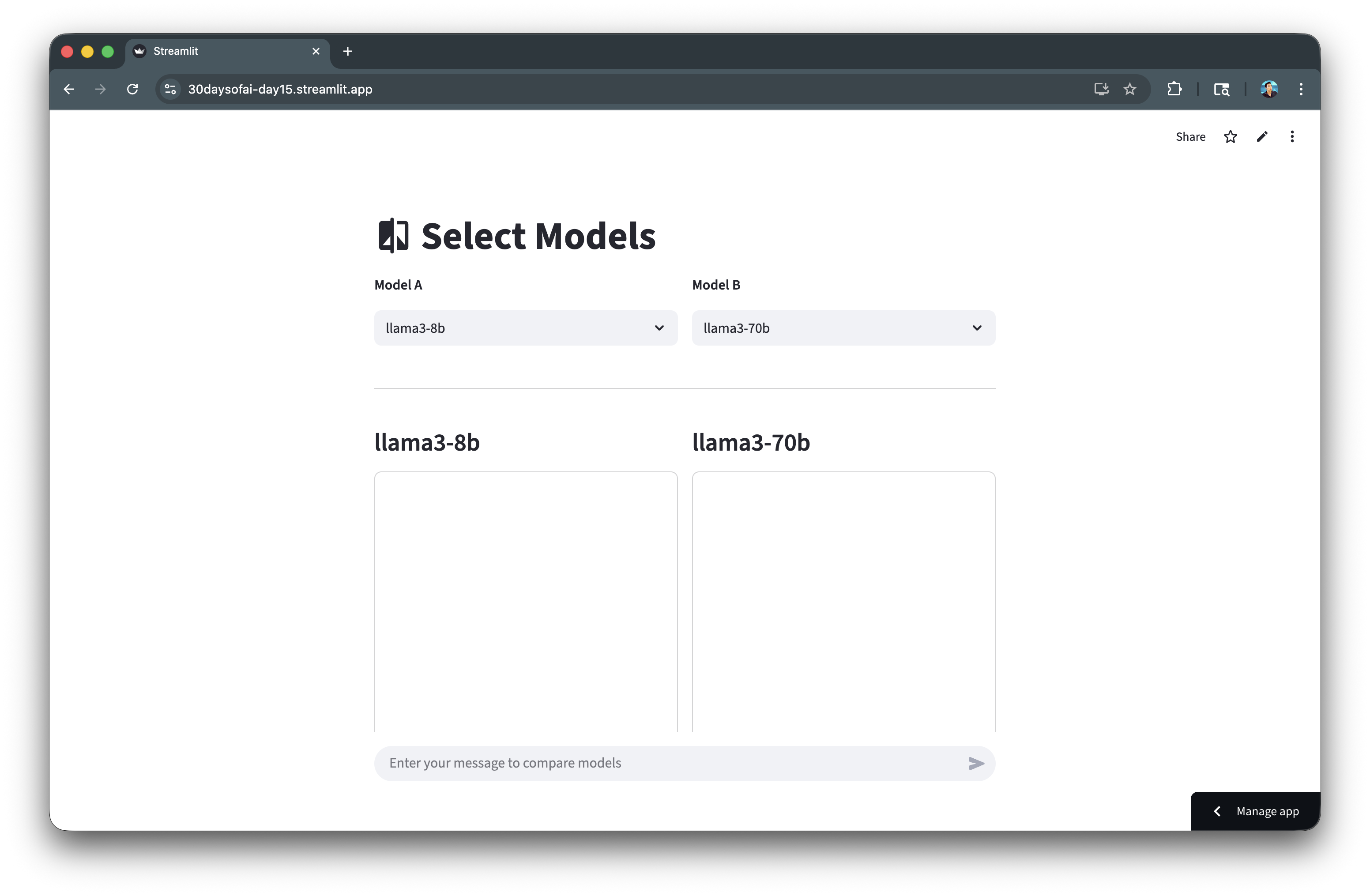
A model comparison arena that runs the same prompt through two different models simultaneously, displaying responses and performance metrics side-by-side.
Prerequisites
- Access to a Snowflake account
- Basic knowledge of Python and Streamlit
- A Snowflake warehouse with Cortex LLM access
Getting Started
Clone or download the code from the 30daysofai GitHub repository:
git clone https://github.com/streamlit/30DaysOfAI.git
cd 30DaysOfAI/app
The app code for this quickstart:
Setup the Connection
First, establish your Snowflake connection.
Note: This is repurposed from Day 15 of the #30DaysOfAI learning challenge.
import streamlit as st
import time
import json
from snowflake.snowpark.functions import ai_complete

try:
    from snowflake.snowpark.context import get_active_session
    session = get_active_session()
except:
    from snowflake.snowpark import Session
    session = Session.builder.configs(st.secrets["connections"]["snowflake"]).create()
The try/except pattern works in both Streamlit in Snowflake (SiS) and local environments by first attempting to get an active session, then falling back to creating one from secrets.
Create the Model Runner
Build a function that runs a model and collects metrics.
Note: This section is repurposed from Day 15 of the #30DaysOfAI learning challenge.
Run Model Function
Create a function that executes a model and collects performance metrics:
def run_model(model: str, prompt: str) -> dict:
    """Execute model and collect metrics."""
    start = time.time()

    df = session.range(1).select(
        ai_complete(model=model, prompt=prompt).alias("response")
    )

    rows = df.collect()
    response_raw = rows[0][0]
    response_json = json.loads(response_raw)

    text = response_json.get("choices", [{}])[0].get("messages", "") if isinstance(response_json, dict) else str(response_json)

    latency = time.time() - start
    tokens = int(len(text.split()) * 4/3)  # Estimate tokens

    return {
        "latency": latency,
        "tokens": tokens,
        "response_text": text
    }
The function times the LLM call from start to finish, capturing latency. Token count is estimated using a standard ratio. Returning a dictionary makes it easy to display metrics and responses separately.
Build the Comparison UI
Create the side-by-side comparison interface.
Note: This section is repurposed from Day 15 of the #30DaysOfAI learning challenge.
Model Selection
Set up the model list and create a side-by-side layout for selecting two models to compare:
llm_models = [
    "llama3-8b",
    "llama3-70b",
    "mistral-7b",
    "mixtral-8x7b",
    "claude-3-5-sonnet",
    "claude-haiku-4-5",
    "openai-gpt-5",
    "openai-gpt-5-mini"
]

st.title(":material/compare: Select Models")

col_a, col_b = st.columns(2)

col_a.write("**Model A**")
model_a = col_a.selectbox("Model A", llm_models, key="model_a", label_visibility="collapsed")

col_b.write("**Model B**")
model_b = col_b.selectbox("Model B", llm_models, key="model_b", index=1, label_visibility="collapsed")
Two columns create the side-by-side layout. Each selectbox uses a unique key for session state. The index=1 on Model B defaults to a different model for immediate comparison.
Display Helper Functions
Define helper functions to display metrics and responses in a consistent format:
def display_metrics(results: dict, model_key: str):
    """Display metrics for a model."""
    latency_col, tokens_col = st.columns(2)
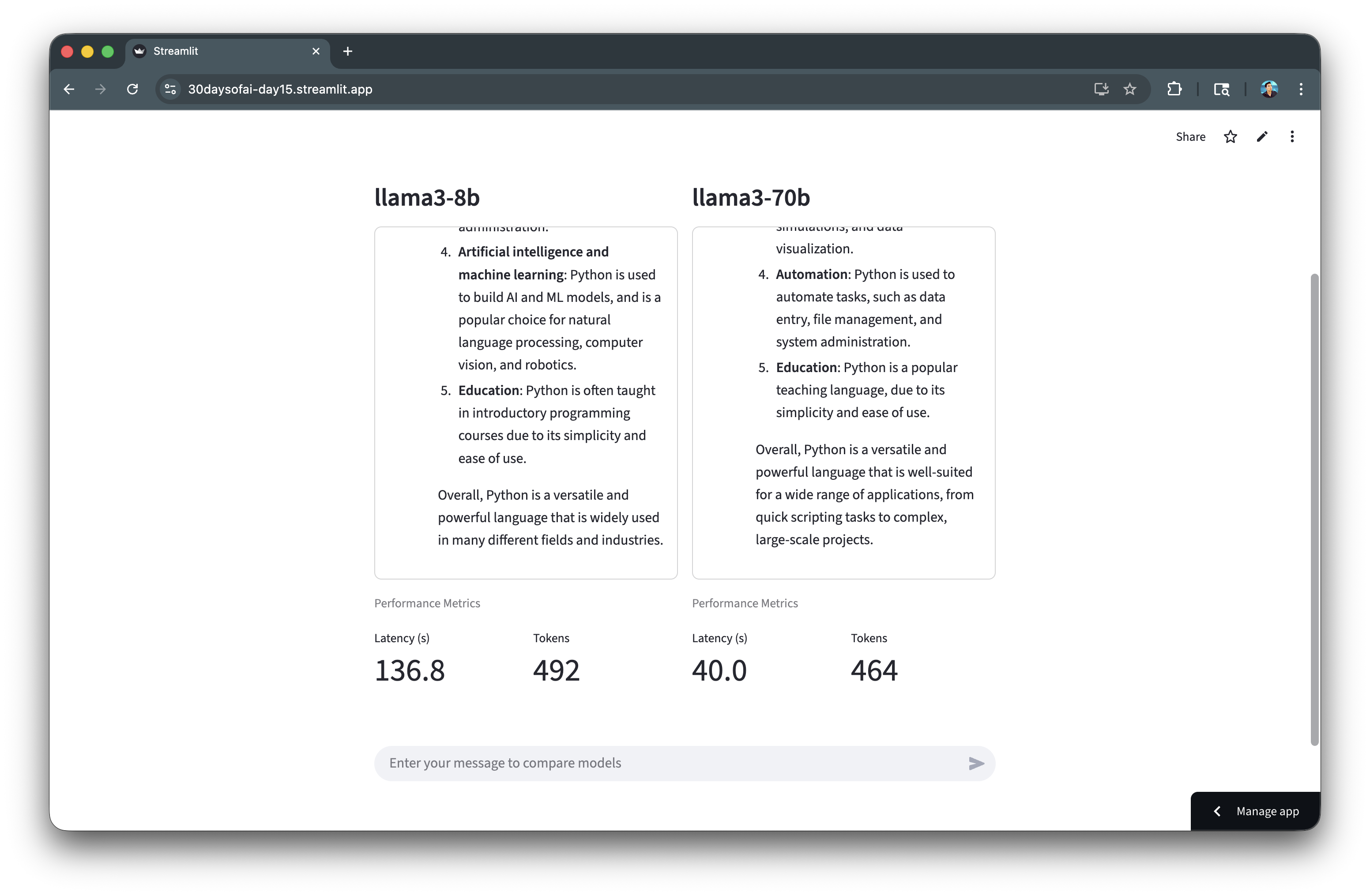
    latency_col.metric("Latency (s)", f"{results[model_key]['latency']:.1f}")
    tokens_col.metric("Tokens", results[model_key]['tokens'])

def display_response(container, results: dict, model_key: str):
    """Display chat messages in container."""
    with container:
        with st.chat_message("user"):
            st.write(results["prompt"])
        with st.chat_message("assistant"):
            st.write(results[model_key]["response_text"])
Separating metrics display and response display into functions keeps the code organized. The container approach ensures consistent layout regardless of response length.
Full Code
Copy the code below to create the model selection and display functions:
llm_models = [
    "llama3-8b",
    "llama3-70b",
    "mistral-7b",
    "mixtral-8x7b",
    "claude-3-5-sonnet",
    "claude-haiku-4-5",
    "openai-gpt-5",
    "openai-gpt-5-mini"
]

st.title(":material/compare: Select Models")

col_a, col_b = st.columns(2)

col_a.write("**Model A**")
model_a = col_a.selectbox("Model A", llm_models, key="model_a", label_visibility="collapsed")

col_b.write("**Model B**")
model_b = col_b.selectbox("Model B", llm_models, key="model_b", index=1, label_visibility="collapsed")

def display_metrics(results: dict, model_key: str):
    """Display metrics for a model."""
    latency_col, tokens_col = st.columns(2)
    latency_col.metric("Latency (s)", f"{results[model_key]['latency']:.1f}")
    tokens_col.metric("Tokens", results[model_key]['tokens'])

def display_response(container, results: dict, model_key: str):
    """Display chat messages in container."""
    with container:
        with st.chat_message("user"):
            st.write(results["prompt"])
        with st.chat_message("assistant"):
            st.write(results[model_key]["response_text"])
Build the Complete Arena
Now combine all the components into a complete working arena.
Note: This section is repurposed from Day 15 of the #30DaysOfAI learning challenge.
Initialize Session State
Initialize session state to store comparison results:
if "latest_results" not in st.session_state:
    st.session_state.latest_results = None
Initializing results to None allows the UI to show placeholder values before the first comparison is run.
Response Containers
Create fixed-height containers for each model's response and metrics:
st.divider()
col_a, col_b = st.columns(2)
results = st.session_state.latest_results

for col, model_name, model_key in [(col_a, model_a, "model_a"), (col_b, model_b, "model_b")]:
    with col:
        st.subheader(model_name)
        container = st.container(height=400, border=True)

        if results:
            display_response(container, results, model_key)

        st.caption("Performance Metrics")
        if results:
            display_metrics(results, model_key)
        else:
            latency_col, tokens_col = st.columns(2)
            latency_col.metric("Latency (s)", "—")
            tokens_col.metric("Tokens", "—")
The loop iterates over both columns, creating identical layouts for each model. The fixed-height container (400px) ensures consistent display. Placeholder metrics ("—") show before results are available.
Chat Input and Execution
Add chat input and execute both models when a prompt is submitted:
st.divider()
if prompt := st.chat_input("Enter your message to compare models"):
    with st.status(f"Running {model_a}..."):
        result_a = run_model(model_a, prompt)
    with st.status(f"Running {model_b}..."):
        result_b = run_model(model_b, prompt)

    st.session_state.latest_results = {
        "prompt": prompt,
        "model_a": result_a,
        "model_b": result_b
    }
    st.rerun()
st.status() shows progress indicators while each model runs. Results are stored in session state as a dictionary containing the prompt and both model responses. st.rerun() refreshes the display with new results.
Complete Application
Here's the complete LLM comparison arena combining model selection, performance metrics collection, side-by-side display, and session state persistence.
Full Code
Copy the code below to create your complete LLM Arena app:
import streamlit as st
import time
import json
from snowflake.snowpark.functions import ai_complete

try:
    from snowflake.snowpark.context import get_active_session
    session = get_active_session()
except:
    from snowflake.snowpark import Session
    session = Session.builder.configs(st.secrets["connections"]["snowflake"]).create()

if "latest_results" not in st.session_state:
    st.session_state.latest_results = None

def run_model(model: str, prompt: str) -> dict:
    """Execute model and collect metrics."""
    start = time.time()

    df = session.range(1).select(
        ai_complete(model=model, prompt=prompt).alias("response")
    )

    rows = df.collect()
    response_raw = rows[0][0]
    response_json = json.loads(response_raw)

    text = response_json.get("choices", [{}])[0].get("messages", "") if isinstance(response_json, dict) else str(response_json)

    latency = time.time() - start
    tokens = int(len(text.split()) * 4/3)

    return {
        "latency": latency,
        "tokens": tokens,
        "response_text": text
    }

def display_metrics(results: dict, model_key: str):
    """Display metrics for a model."""
    latency_col, tokens_col = st.columns(2)

    latency_col.metric("Latency (s)", f"{results[model_key]['latency']:.1f}")
    tokens_col.metric("Tokens", results[model_key]['tokens'])

def display_response(container, results: dict, model_key: str):
    """Display chat messages in container."""
    with container:
        with st.chat_message("user"):
            st.write(results["prompt"])
        with st.chat_message("assistant"):
            st.write(results[model_key]["response_text"])

llm_models = [
    "llama3-8b",
    "llama3-70b",
    "mistral-7b",
    "mixtral-8x7b",
    "claude-3-5-sonnet",
    "claude-haiku-4-5",
    "openai-gpt-5",
    "openai-gpt-5-mini"
]
st.title(":material/compare: Select Models")
col_a, col_b = st.columns(2)

col_a.write("**Model A**")
model_a = col_a.selectbox("Model A", llm_models, key="model_a", label_visibility="collapsed")

col_b.write("**Model B**")
model_b = col_b.selectbox("Model B", llm_models, key="model_b", index=1, label_visibility="collapsed")

st.divider()
col_a, col_b = st.columns(2)
results = st.session_state.latest_results

for col, model_name, model_key in [(col_a, model_a, "model_a"), (col_b, model_b, "model_b")]:
    with col:
        st.subheader(model_name)
        container = st.container(height=400, border=True)

        if results:
            display_response(container, results, model_key)

        st.caption("Performance Metrics")
        if results:
            display_metrics(results, model_key)
        else:
            latency_col, tokens_col = st.columns(2)
            latency_col.metric("Latency (s)", "—")
            tokens_col.metric("Tokens", "—")

st.divider()
if prompt := st.chat_input("Enter your message to compare models"):
    with st.status(f"Running {model_a}..."):
        result_a = run_model(model_a, prompt)
    with st.status(f"Running {model_b}..."):
        result_b = run_model(model_b, prompt)

    st.session_state.latest_results = {"prompt": prompt, "model_a": result_a, "model_b": result_b}
    st.rerun()

st.divider()
st.caption("Day 15: Model Comparison Arena | 30 Days of AI")
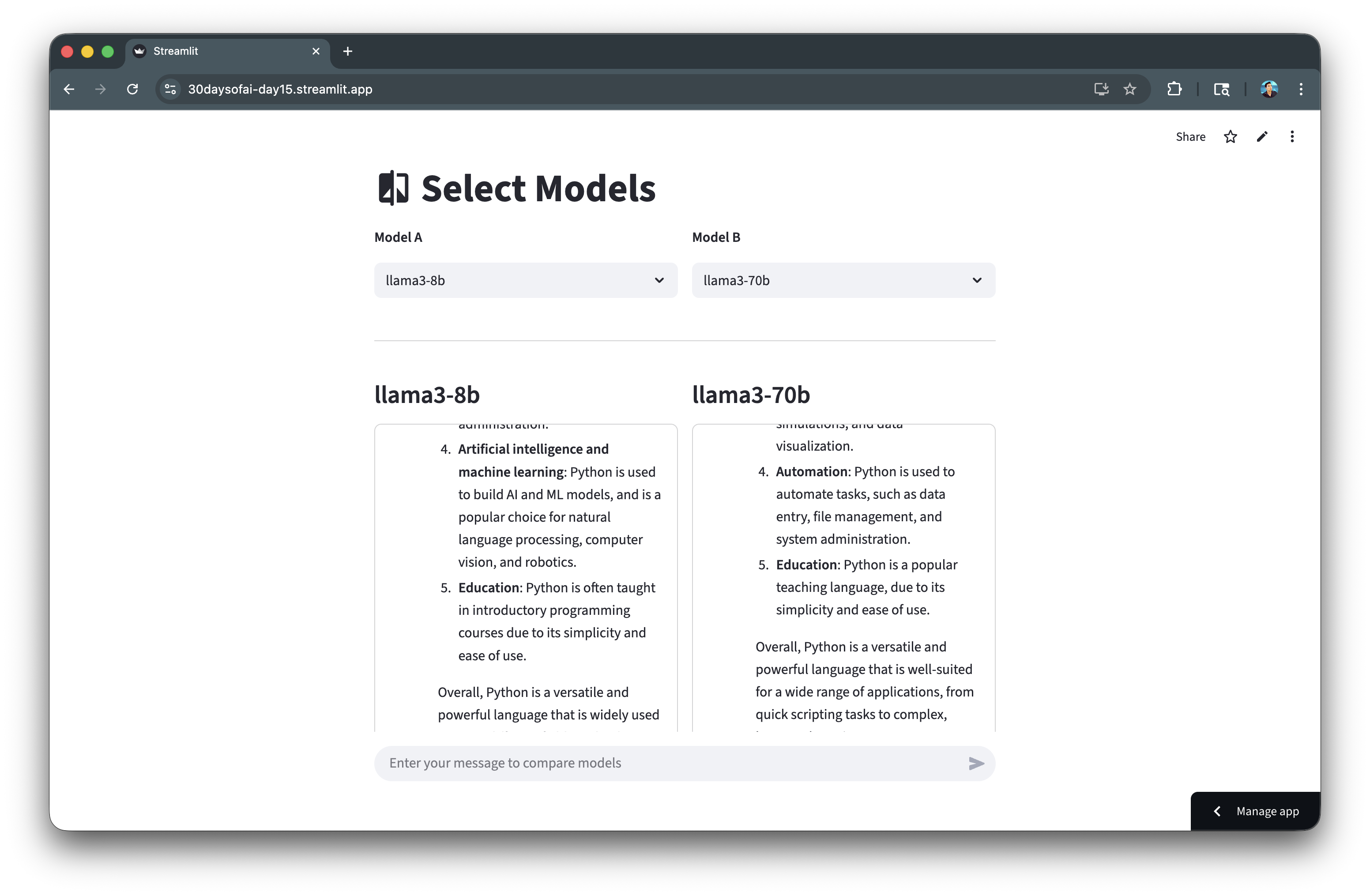
After running the LLM inference, the generated response is shown side-by-side:
Scrolling down, reveals a few metrics display of token count and model latency:
Challenge: Extend Your Arena
Ready to take your model comparison arena to the next level? Try adding additional metrics to give you deeper insights into model performance:
- Time to First Token (TTFT): Measure how quickly the model starts generating output
- Tokens per Second: Calculate the generation speed for streaming responses
- Cost per Query: Estimate credit consumption based on token usage
- Response Quality Score: Add a thumbs up/down rating system to track subjective quality
What other metrics would help you choose the right model for your use case? Experiment and share your extensions with the community!
Deploy the App
Save the code above as streamlit_app.py and deploy using one of these options:
- Local: Run
streamlit run streamlit_app.pyin your terminal - Streamlit Community Cloud: Deploy your app from a GitHub repository
- Streamlit in Snowflake (SiS): Create a Streamlit app directly in Snowsight
Conclusion And Resources
Congratulations! You've successfully built an LLM model comparison arena that helps you evaluate different Snowflake Cortex models side-by-side with performance metrics.
What You Learned
- Comparing multiple LLM models in a single interface
- Collecting and displaying performance metrics
- Using session state to persist comparison results
- Building responsive side-by-side comparison UIs
Related Resources
Documentation:
Source Material
This quickstart was adapted from Day 15 of the 30 Days of AI challenge:
- Day 15: Model comparison arena
Learn more:
This content is provided as is, and is not maintained on an ongoing basis. It may be out of date with current Snowflake instances
