blog
FEATURE
Streamlit in Snowflake
Turn your Python analysis and models into interactive tools your whole team can use. Describe the dashboard or app you need to Snowflake CoCo, which then builds and deploys it in Snowflake.

Start with a prompt, ship in minutes
Build and deploy apps in plain language with Snowflake CoCo in Snowsight or CoCo Desktop, or start from ready-made skills built for Streamlit.

Run on Snowflake’s fully managed infrastructure
Ship the app and move on to the next one. Snowflake handles hosting, user authentication and scaling.

Use your existing data and access controls
Apps work on your governed data under the policies you already have. Role-based access control (RBAC) sets who can build, access, create and share apps.
WHY STREAMLIT IN SNOWFLAKE
Python-basedInternal Applications
BUSINESS INTELLIGENCE AND AI MODERNIZATION
Build BI at the speed of thought with Streamlit and CoCo
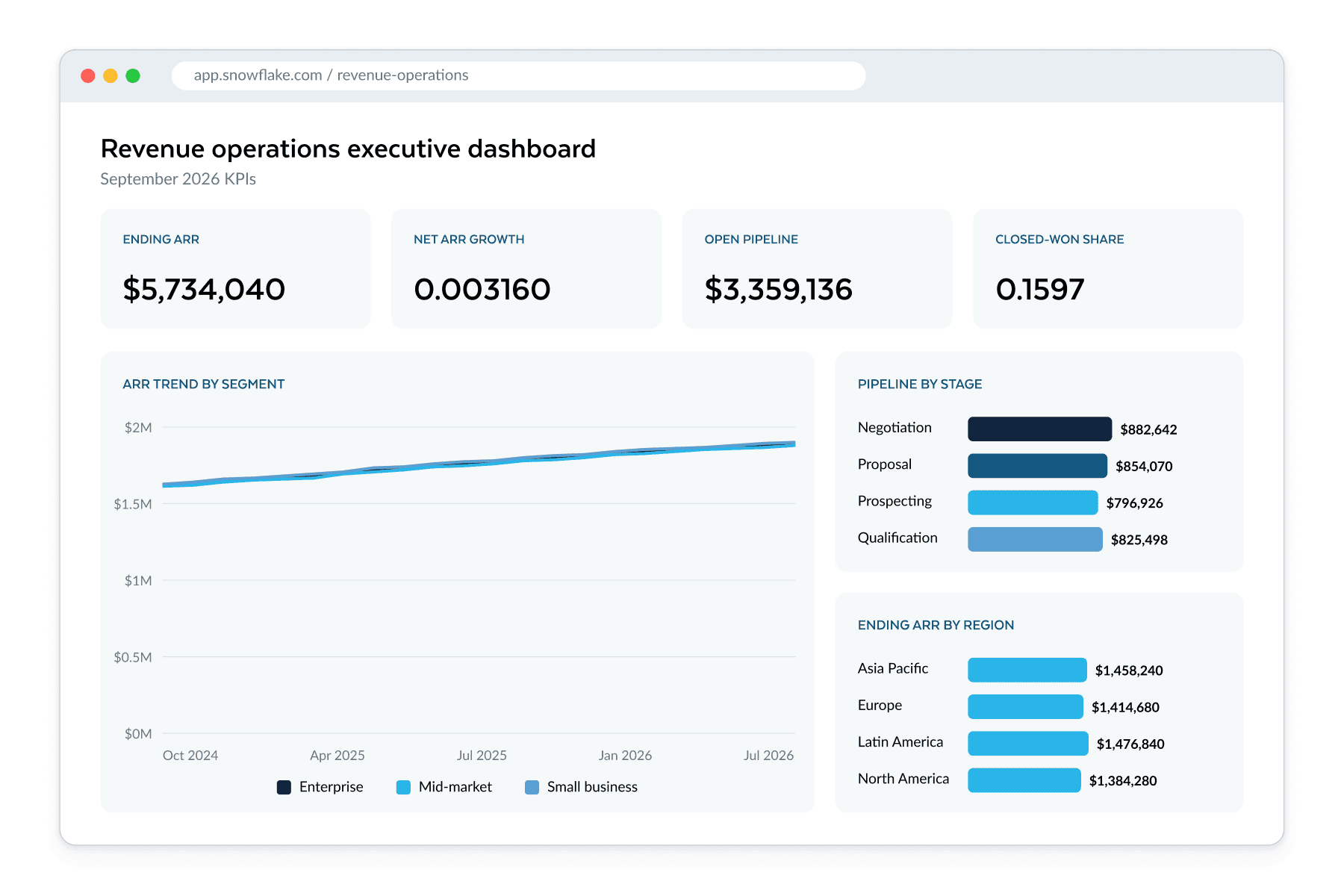
Data scientists and analysts are prompting their way to apps. With CoCo, Streamlit in Snowflake turns an idea into a governed app in minutes, not days.
- Prototype from a screenshot or prompt, then refine by chatting.
- Migrate legacy BI with a simple CoCo skill.
- Trust every number: Semantic Views hold the logic.
- Go beyond static dashboards: drill-downs, writeback and AI, in Python.
- Share one live, role-governed app and let Snowflake handle the infrastructure.
DESIGNED FOR DATA SCIENCE
Turn your Python into apps anyone can use
Your Python models and analysis already hold the answers the business can use. Streamlit gives them an interface in Python, so frontend skills are optional.
- Convert notebooks and scripts into interactive apps in minutes.
- Reuse your libraries, models and Snowflake data as-is.
- Add filters, charts, forms and chat in a few lines.
- Deploy with one click to a secure, fully managed environment.
BUILT-IN AGENTIC AI
Make apps conversational and agent-ready out of the box
Your users expect to get reliable answers, whether they're using apps or agents. With Streamlit in Snowflake, every app is ready for AI the moment you deploy it.
- Chat with your app via CoCo in Snowsight
- Expose each app's data and actions over MCP so any agent can find and use them.
- Embed an agent inside your app in a few lines of code.
- Build apps using your coding agent of choice with available skills.
NATIVE COLLABORATION CAPABILITIES
Build together and distribute effortlessly
Apps start with one team and spread to many more. Streamlit in Snowflake makes it easy to build together and share widely.
- Collaborate in shared workspaces with versioning and conflict resolution, or full GitOps for advanced teams.
- Share finished apps with users or roles, and decide who can re-share.
- Embed apps in custom data portals and SaaS apps for viewers who don’t have a Snowflake login, while you control auth.
- Maintain governed access as the owner or the end user.
USE CASES
What teams can build with Streamlit in Snowflake

Interactive dashboards and BI
Build interactive KPI dashboards, dynamic analytical reports, sales and marketing analytics, and business intelligence views. Explore live data with charts, filters and drill-downs.

Lightweight workflows
Build data entry forms, inventory trackers, approval workflows and operational tools that read and write back to Snowflake tables.

ML/Gen AI tooling
Develop model evaluation and drift tracking tools. Build prompt testing harnesses and model comparison workbenches. Debug agent reasoning and workflow.
Streamlit in Snowflake Resources
Streamlit in Snowflake
Frequently asked Questions
Get answers to common questions about building data apps with Streamlit in Snowflake.
What is Streamlit in Snowflake?
Streamlit in Snowflake lets you build interactive data apps that run entirely inside your Snowflake account. Describe your idea in CoCo or write Python yourself. Snowflake handles hosting, security and authentication.
Can I vibe-code Streamlit in Snowflake apps with AI coding agents?
Yes. Build with Snowflake CoCo or your coding agent of choice, using first-class skills that help generated apps follow best practices. Apps are also conversational by default, and agents can use MCP to access app context and answer questions.
How is Streamlit in Snowflake different from open-source Streamlit?
It runs the open-source framework as a fully managed service inside your Snowflake account with built-in security controls, RBAC and direct access to your data and AI capabilities. Snowflake handles all infrastructure, and your data stays in place.
What can I build with Streamlit in Snowflake?
You can build data dashboards, exploratory analytics tools, internal reporting apps, data entry forms and AI-powered experiences. Apps integrate with Cortex AI, Snowpark, user-defined functions (UDFs) and stored procedures.
How do I share a Streamlit app with my team?
Share deployed apps using standard Snowflake roles or directly with individual users. You can also embed apps in portals, products or third-party tools to reach users without Snowflake logins.
Can I use custom Python packages in Streamlit in Snowflake?
Yes. Apps on the container runtime can install public packages from Snowflake’s built-in PyPI mirror without outbound internet access, and admins control which packages are available. Customer-hosted repositories, such as JFrog Artifactory, are also supported. Apps on the warehouse runtime use packages from the Snowflake Anaconda Channel.
Which cloud providers support Streamlit in Snowflake?
Streamlit in Snowflake is available in AWS, Azure and Google Cloud Platform (GCP) commercial regions.
How much does Streamlit in Snowflake cost?
You pay for the compute your app uses. Billing is based on the app's runtime environment, either a virtual warehouse or a Snowpark Container Services compute pool, plus the query warehouse that runs its queries. Apps suspend after inactivity, and you can set a custom sleep timer to control costs.
