Data Mirroring
Move data between Snowflake Postgres and Snowflake with a fully managed, continuously updated pipeline—without deploying a separate ETL service or CDC connector.
Data mirroring supports two directions:
- Postgres to Snowflake: Replicate operational data into Snowflake for analytics, AI, reporting, and downstream applications. Generally available.
- Snowflake to Postgres: Replicate Snowflake tables into Snowflake Postgres for low-latency application reads and Postgres-compatible workloads. Private Preview.
Choose the direction that matches where your source data lives and where you need to use it.
Postgres to Snowflake
Keep analytics and AI current with operational data
Postgres data mirroring continuously replicates selected tables or schemas from a Snowflake Postgres instance into a Snowflake database. Inserts, updates, deletes, and supported schema changes flow automatically to the target, so your analytical data stays close to the source without a pipeline to build, monitor, or maintain.
Use Postgres-to-Snowflake mirroring when you want to:
- Run analytics and AI workloads on current application data.
- Replace custom sync code, batch jobs, or third-party CDC connectors.
- Make operational data available to Snowflake tools while keeping the application workload in Postgres.
- Preserve transaction boundaries across related tables.
- Query recent row-level changes through the
$changesfeed.
Key capabilities
- No separate replication service. Mirroring is built into Snowflake Postgres and Snowflake.
- Low-lag reads. Each mirrored table includes a
$liveview that combines applied data with pending changes, so committed source changes can be queried without waiting for the next table-apply cycle. - Transactional consistency. Changes from a source transaction become visible together on the Snowflake side, helping preserve relationships such as foreign keys across mirrored tables.
- Schema evolution. Supported schema changes and additions to schema-level replication are reflected automatically.
- Queryable change history. Each mirrored table has a
$changescompanion that exposes inserts, updates, and deletes for the previous seven days. - Flexible targets. Mirror into standard Snowflake tables or Snowflake-managed Iceberg tables.
- Open foundations. Change data is written to Apache Iceberg tables through the open source
pg_lakeextension.
How it works
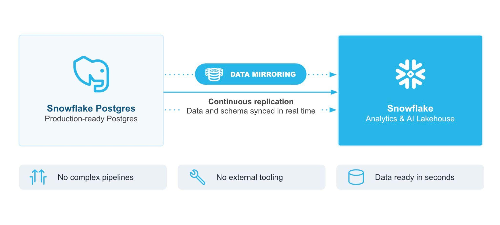
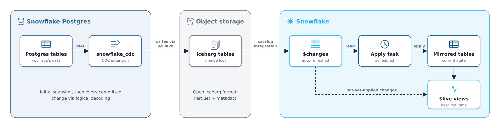
A CDC worker on the Snowflake Postgres source captures changes using standard Postgres logical replication. It writes change records to Iceberg change logs, which Snowflake refreshes and applies to the target database using serverless compute. The target tables and $live views are maintained automatically.
You can create a mirror in Snowsight, with SQL, or by asking Snowflake CoCo. Select individual tables for a curated replication set, or replicate an entire schema so new tables are included automatically.
Under the hood, a mirror is built from standard Postgres pieces:
- A publication on the source, created by the
snowflake_cdcextension. - A logical replication slot, read by a background CDC worker that decodes the WAL.
- Per-table
$changesIceberg tables and a per-mirror metalog, written by the CDC worker throughpg_lake. These are the same Iceberg objects on both sides, so you can read them from Postgres or Snowflake. - On the Snowflake side, a target database, a serverless task named
APPLY_MIRROR_<mirror_name>, and per-table target tables with$liveviews.
The apply task reads the metalog in commit order and applies each batch in a single Snowflake transaction. If a run fails, it rolls back and the next run resumes from the same position, which gives you exactly-once delivery. Apply uses delete-then-append rather than MERGE, so insert-only batches skip scanning the target table.
Set up a mirror with SQL
1. Prepare the source instance. New Snowflake Postgres instances include the required extensions. Older instances need a refresh from Manage in Snowsight to pick up the latest software patch. The BURSTABLE tier isn't supported; use STANDARD or HIGH MEMORY.
2. Grant permissions. The Snowsight UI handles this for you. With SQL, grant the mirror admin application role and give the snowflake application usage on your instance:
GRANT APPLICATION ROLE snowflake.postgres_mirror_admin TO ROLE "my_role";
GRANT USAGE ON POSTGRES INSTANCE "my_instance" TO APPLICATION snowflake;
3. Create the mirror. List tables with postgres_tables, whole schemas with postgres_schemas, or both:
CALL SNOWFLAKE.POSTGRES.CREATE_MIRROR(
    mirror_name         => 'orders_mirror',
    postgres_instance   => 'my_instance',
    postgres_database   => 'postgres',
    target_database     => 'ORDERS_ANALYTICS',
    postgres_tables     => ['public.customers', 'public.orders', 'public.order_items'],
    postgres_schemas    => NULL,
    refresh_interval    => '1 minute'
);
refresh_interval defaults to '10 minutes' and can go up to '1 day'. The target database must not already exist; the mirror creates it. To mirror into Snowflake-managed Iceberg tables instead of standard tables, add target_table_type => 'ICEBERG'. Add external_volume as well to write those tables to your own storage.
4. Check status and query the data. Tables show SNAPSHOTTING during the initial copy and REPLICATING once caught up:
CALL SNOWFLAKE.POSTGRES.LIST_MIRRORED_TABLES('orders_mirror');

-- Applied data, updated every refresh_interval
SELECT COUNT(*) FROM ORDERS_ANALYTICS.PUBLIC.ORDERS;

-- Applied data plus pending changes, about 30 seconds behind the source
SELECT COUNT(*) FROM ORDERS_ANALYTICS.PUBLIC.ORDERS$live;
To add or remove tables later, use ALTER_MIRROR with add_tables/remove_tables or add_schemas/remove_schemas.
Data type mapping
Schema, table, and column names are uppercased on the target, so created_at becomes CREATED_AT. Tables whose names differ only by case can't both be mirrored.
| Postgres type | Lands in Snowflake as | Notes |
|---|---|---|
boolean, smallint, integer, bigint, real, double precision | Native boolean, integer, and float types | Direct mapping |
numeric(p,s) with p and s ≤ 38 | DECIMAL(p,s) | Direct mapping |
Unbounded numeric, or p/s > 38 | Double | Values beyond the float8 range become ±Infinity |
date, time, timestamp, timestamptz | Native date and time types | timetz is normalized to UTC; infinity values are clamped to the nearest boundary |
interval | Struct (months, days, microseconds) | |
text, varchar, char | String | Values over 16 MiB are truncated |
bytea | Binary | Values over 8 MiB are truncated |
uuid | UUID | Top-level columns only; uuid[] or uuid inside a composite is rejected |
| Arrays, composites of supported types | ARRAY, OBJECT | Multidimensional array values become NULL |
json, jsonb, hstore, vector, and other types | String or binary | Oversize json/jsonb values become NULL |
PostGIS geometry | Binary (WKB) | Needs pg_lake_spatial; use TO_GEOMETRY at query time |
| Range and multirange types | String | Top-level only |
See the type mapping reference for the full list, including blocked types.
Things to know before you mirror
- Primary keys matter. Tables without a primary key are mirrored insert-only: the extension sets
REPLICA IDENTITY NOTHING, and Postgres then rejectsUPDATEandDELETEon the source. Add a primary key first if the table needs updates or deletes. - Not every table qualifies. Unlogged tables, views, materialized views, foreign tables, tables with virtual generated columns, and tables with ANSI-reserved column names can't be mirrored.
- Table vs. schema scope. Table-level mirrors only include what you name, so a new table stays unmirrored until you add it. Schema-level mirrors pick up every new table automatically, including ones you might not mean to expose.
- One replication slot per mirror. The default
max_replication_slotsis 10, which is shared with any other logical replication subscribers. - Watch WAL retention.
max_slot_wal_keep_sizedefaults to one-tenth of the disk. If lag pushes the WAL backlog past that, Postgres invalidates the slot and the mirror re-snapshots every table. For sustained high write volume, use STANDARD_L or larger with extra disk. - Cost tradeoff. Compute is the serverless apply task. A longer
refresh_intervalbatches more changes per run and costs less, and$livestill gives you fresh reads in between.
Postgres-to-Snowflake documentation
- Data mirroring overview
- Create a mirror
- Query mirrored data
- Manage and monitor mirrors
- Mirror procedures reference
- Type mapping reference
- Postgres mirroring quickstart: an end-to-end walkthrough with sample data
- Data mirroring GA announcement
Snowflake to Postgres
Bring Snowflake data closer to applications
Snowflake-to-Postgres mirroring—also called reverse mirroring—continuously replicates Snowflake tables into a Snowflake Postgres instance. Changes made in Snowflake flow to Postgres within seconds, giving applications and Postgres-compatible tools access to data managed in Snowflake.
Use Snowflake-to-Postgres mirroring when you want to:
- Serve Snowflake data through a Postgres interface.
- Create a low-latency read path for application workloads.
- Use Postgres-compatible drivers, SQL, and tooling against selected Snowflake tables.
- Keep an operational Postgres representation synchronized with Snowflake-managed data.
Snowflake-to-Postgres mirroring is currently in Private Preview. Access requires enablement through your Snowflake account team. Preview setup uses CDC-based replication from Snowflake source tables into a Snowflake Postgres target instance.
How reverse mirroring works
Reverse mirroring runs the CDC flow in the other direction. Snowflake change tracking on the source table records inserts, updates, and deletes. The snowflake application reads those changes on a schedule you set and applies them to a matching table in your Snowflake Postgres database. After an initial copy of the full table, only changed rows move.
Because the target is a regular Postgres table, your application reads it with any Postgres driver or ORM, joins it with your own tables, and adds indexes that suit its queries.
Set up a reverse mirror
The steps below show the Private Preview flow. Manual grants are expected to be automated at Public Preview.
1. Grant the snowflake application access to your Postgres instance:
GRANT USAGE ON POSTGRES INSTANCE my_instance TO APPLICATION snowflake;
2. Turn on change tracking for each source table. Reverse mirroring reads changes from the table's change tracking data:
ALTER TABLE analytics_db.public.customer_scores SET CHANGE_TRACKING = TRUE;
3. Give the snowflake application read access to the source:
GRANT USAGE ON DATABASE analytics_db TO APPLICATION snowflake;
GRANT USAGE ON SCHEMA analytics_db.public TO APPLICATION snowflake;
GRANT SELECT ON TABLE analytics_db.public.customer_scores TO APPLICATION snowflake;
4. Create the reverse mirror. The arguments are the mirror name, the target Postgres instance, the target Postgres database, an array of fully qualified source tables, and the refresh interval:
CALL SNOWFLAKE.POSTGRES.CREATE_REVERSE_MIRROR(
    'scores_reverse_mirror',
    'my_instance',
    'postgres',
    ARRAY_CONSTRUCT('ANALYTICS_DB.PUBLIC.CUSTOMER_SCORES'),
    '10 seconds'
);
5. Query the table from Postgres. Connect with psql using the host from DESCRIBE POSTGRES INSTANCE. The mirrored table appears in the target database once the initial copy completes:
SELECT count(*) FROM public.customer_scores;
Things to know about reverse mirroring
- Change tracking is required on every source table. Turning it on adds a small amount of storage on the Snowflake side.
- The target table is read-only for your application. The mirror owns its contents, so writes from Postgres would be overwritten or conflict with incoming changes. Keep application-owned data in separate tables and join to the mirrored ones.
- Indexes aren't carried over. Snowflake tables don't have Postgres-style secondary indexes, so you build them on the Postgres side yourself (see below).
- Short refresh intervals give low lag. Intervals in seconds keep Postgres close to Snowflake for application reads.
- Preview behavior can change. Syntax and setup steps may change before Public Preview.
Add indexes after the initial load
Reverse-mirrored tables arrive in Postgres without the secondary indexes your application queries need. Bulk-loading into an unindexed table is faster, so let the initial copy finish, then add indexes that match your read patterns. Use CONCURRENTLY so the build doesn't block the ongoing replication writes:
CREATE INDEX CONCURRENTLY idx_customer_scores_customer_id
    ON public.customer_scores (customer_id);

CREATE INDEX CONCURRENTLY idx_customer_scores_segment_score
    ON public.customer_scores (segment, score DESC);

ANALYZE public.customer_scores;
See the indexing guide for choosing index types.
Snowflake-to-Postgres documentation
Preview documentation is available from your Snowflake account team once your account is enabled.
One platform, two directions
Data mirroring gives teams a consistent way to move data between operational Postgres workloads and Snowflake analytics and AI workloads:
- Build applications in Snowflake Postgres, analyze in Snowflake. Move application data into Snowflake without maintaining a separate CDC pipeline.
- Build analytical and AI workflows in Snowflake, serve data through Postgres. Bring selected Snowflake tables into Snowflake Postgres for application access.
- Use each system for what it does best. Keep transactional workloads close to applications while making data available wherever it is needed across the Snowflake platform.
The two directions are separate mirroring capabilities. Design each flow around the system that owns the source data and the freshness, access, and governance requirements of the target workload.
This content is provided as is, and is not maintained on an ongoing basis. It may be out of date with current Snowflake instances
