Turning Telemetry into a Data Product Your Teams and Customers Actually Use
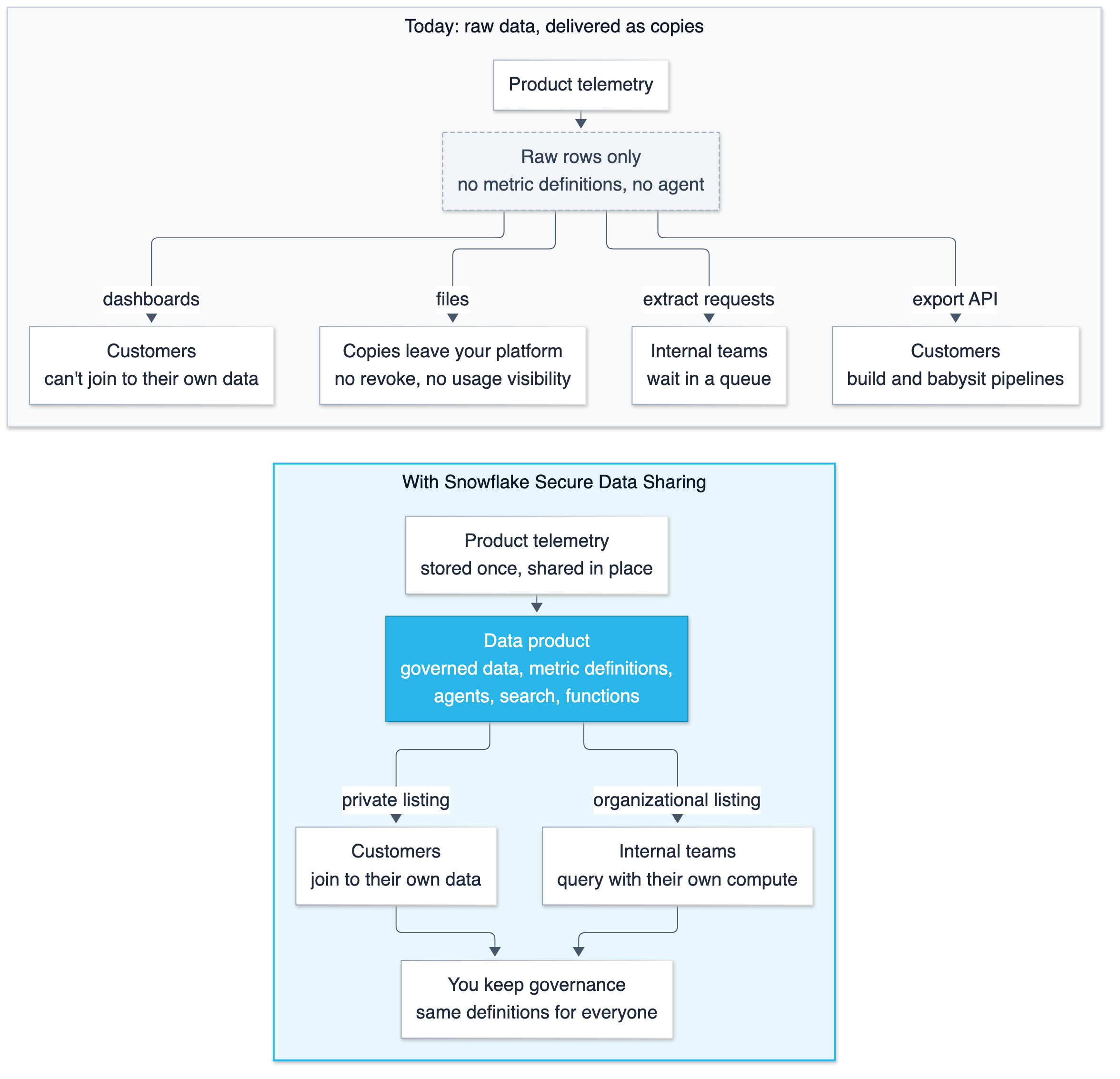
If you are a SaaS provider, your telemetry data answers questions that your teams and your customers keep asking. The hard part is getting it to them with governance in place. Today most SaaS providers deliver telemetry through export APIs, dashboards, and files, and each of these approaches has limits. Internal teams wait in a queue for extracts from whichever team owns the pipeline. Your customers build and babysit pipelines against your export API, dealing with pagination, rate limits, retries, schema changes, and long backfills. Dashboards stop at your boundary. A customer can look at their usage but can't join it to data only they have, such as their HR roster, cost centers, asset registry, support tickets, or security incidents. And governance ends at delivery, because once a customer downloads an extract or file, you generally can't revoke that copy, it doesn't update when the source data changes, and your visibility into how it is used is limited.
This blog post shows how Snowflake Secure Data Sharing changes that. Because Snowflake separates compute from storage by design, consumers in the same region can query shared data in place without a separate copy in their account. You publish the data products, your consumers query them with their own compute, and you keep the governance controls on who sees what.
Unlike the other delivery methods, a data product built for sharing doesn't have to be raw data only. Alongside the data itself (whether standard tables or open-format lake tables), you can share governed metric definitions so everyone calculates KPIs the same way, agents that answer questions in plain English (sharing agents is in preview; the agent's semantic views and other tools must be shared too, in the same database, and only some tool types are supported), search services over documents and logs, secure user-defined functions, whose definitions are hidden from users who don't own them, and notebooks with prebuilt analysis (Declarative Sharing). Instead of handing over rows that every consumer has to model and interpret on their own, you deliver ready-to-use answers to the most common questions.
This post walks through building the telemetry data product with shared metric definitions and an agent on top, and publishing it for both your internal teams and your external customers.
1. The business problems telemetry can solve
Telemetry is the data software records automatically as people and other systems use it. The fastest way to judge the value of a telemetry data product is to list the decisions it would improve. Helio started by asking each team, and a handful of customers, what they would do differently if this data were ready to query tomorrow. The answers fell into two groups. The tables below are illustrative examples of decisions a telemetry data product may support; results depend on your implementation and the data available.
Value for your internal teams
| Team | Business problem today | What changes with a telemetry data product |
|---|---|---|
| Product management | Roadmap debates run on anecdotes; nobody can say which features drive retention | Feature adoption by customer segment and plan, tied to renewal outcomes. Deprecation decisions backed by real usage. |
| Customer success | Churn is discovered at renewal time, when it is too late | Early warning: falling logins, abandoned workflows, rising errors, scored per account so CSMs can decide where to follow up |
| Support | Engineers ask customers for screenshots and steps to reproduce | The event sequence for the affected session, available to query while the ticket is open |
| Engineering | Rollback decisions are judgment calls made under pressure | Crash and latency trends by release cohort, so "roll back or not" has evidence |
| Sales | Expansion opportunities are found by guesswork | Accounts near plan limits, teams adding licenses quickly, trials that behave like the ones that converted |
| Finance | Usage-based invoices get disputed with no shared evidence | Consumption metering traceable to the same events the product emitted |
| Security and compliance | Audit requests trigger manual log pulls | Authentication anomalies and access evidence across customers, queryable without a manual log pull |
Value for your customers
| Customer role | Business problem today | What changes with a telemetry data product |
|---|---|---|
| IT and procurement | They pay for 5,000 user licenses and don't know which licenses are actually used | Usage joined to their HR roster and cost centers to find unused licenses and inform renewal planning |
| Adoption and change management | The product is rolled out; they need data to prove adoption and the benefits of that adoption | Adoption by department and office over time; which teams need a second round of training |
| IT operations | Users complain the tool is slow; it is hard to tell whether the cause is the vendor or the network | Latency and error rates by office, device, and OS build, compared with their own network and asset data |
| Security | Incident investigations stall waiting for the vendor to send logs | Authentication and activity events, queryable in their own account during an incident |
| Vendor management | SLA conversations rely on the vendor's own reports | Their own copy of the events to review alongside other evidence in SLA discussions |
The two tables show how internal and external teams can benefit from telemetry data. Internal teams ask "how is our product doing across all customers?" Customers ask "how is this product doing for us?" The questions differ, so this post shows how to package two data products from the same underlying telemetry, one for each audience.
2. Turning telemetry into a data product for internal and external consumers
In Snowflake, a data product is packaged using a listing, which wraps the governed data and objects with a title, description, usage terms, and target audience, and publishes it so consumers can discover and install it. There are three types of listings:
- Organizational listing: visible only inside your Snowflake organization. Teams discover it in the Internal Marketplace and request access through an approval workflow. Use this for internal consumers.
- Private listing: visible only to the specific consumer accounts you name. Use this for individual customers.
- Public listing: visible to anyone on the Snowflake Marketplace. Use this to reach a broad audience or to monetize the product.
This post uses organizational listings for internal teams and private listings for customers. Helio packages two products from the same telemetry dataset:
Fleet Intelligence, an organizational listing for internal teams. "Fleet" here means all customers combined.
- All-customer events with access scoped by account and role.
- A semantic view with fleet-wide metric definitions. A semantic view defines business metrics, dimensions, and how tables relate once, so every SQL query and every agent computes "weekly active accounts" the same way. Here it covers weekly active accounts, crash rate per release, and feature adoption by plan.
- A natural-language agent for business teams who don't write SQL.
Product Insights, a private listing for each customer.
- That customer's telemetry data only, filtered by an entitlement join inside a secure view. The join decides which rows each customer can see, and marking the view secure hides its definition from consumers.
- A semantic view with customer-scoped metrics (active users, license utilization, error rate by office).
- A natural-language agent that answers each customer's questions.
3. Architecture
Delivering one dataset to many tenants is hard no matter what tool you use. Three problems show up every time. Each tenant should see only its own rows, data shouldn't land in regions where nobody needs it, and the data you move to another region should be limited to what consumers there need. The design below is one way to address each of those.
The data products are built from one telemetry table in the SaaS provider's (Helio's) primary Snowflake account, in AWS us-west-2. Secure views on top of that table define what each audience may see. Internal teams get an unfiltered fleet view that combines data for all customers. External customers get a customer view that returns only the rows belonging to whichever customer account is querying.
Consumers in the same region query these views in place with their own compute, without a separate copy in their account. Consumers in other regions or clouds are served by Cross-Cloud Auto-Fulfillment, which replicates the data underlying a data product into each region where it has consumers and refreshes it on the schedule you set. What gets replicated is decided by what the share references. With the default object-level mode, the objects granted to the share and every object they reference are transferred.
If the customer view sits directly on the full events table, every customer's telemetry is copied into every region that has consumers, whether or not that customer operates there, even though the view filters each customer's query results. The filter in the view controls what a consumer can query, not what gets copied. To avoid that, the telemetry is separated by region with dynamic tables. A dynamic table is a table defined by a query; Snowflake refreshes it according to the target lag and refresh mode you configure, and when the query supports incremental refresh, it processes changes rather than recomputing the whole result. Each remote region gets its own database, filtered to the customers whose entitlements name that region, published as its own listing. Validate the replicated data and the entitlement lifecycle (multi-region customers, reassignment, offboarding) for your deployment. In this design, the entitlement join filters what each consumer can query, while the regional tables and listing configuration determine which data is replicated to each region. Each regional listing can also have its own refresh schedule.
The rest of this section covers the options for getting telemetry into Snowflake, and how to share it internally and externally once it is there.
Cataloging telemetry in Snowflake
Everything downstream starts from a governed telemetry dataset, and there are several ways to make telemetry queryable in Snowflake. The right one depends on where the telemetry lives today. This post covers the two most common sources.
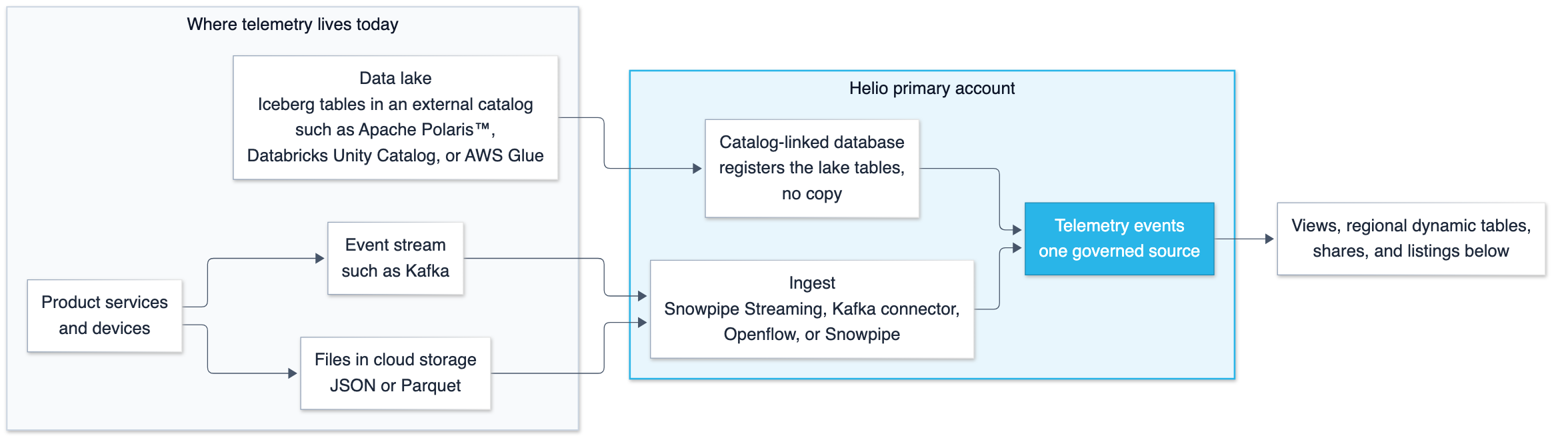
If telemetry events arrive as a stream, Snowpipe Streaming writes rows straight into a table with low latency and no files in between. The Snowflake Connector for Kafka does the same from Apache Kafka® topics, and Openflow provides managed connectors for other sources. If services already write batches of JSON or Apache Parquet™ files to cloud storage, Snowpipe loads each file as it lands. Either way, the result is a standard Snowflake table that the rest of this architecture uses unchanged.
For telemetry that already sits in a data lake as Apache Iceberg™ tables managed by an external catalog, there is no need to copy it to Snowflake. Set up a catalog integration and create a catalog-linked database. Snowflake syncs with the external catalog, discovers its namespaces and tables, and registers them, while the data stays in the lake's storage. Snowflake can share those tables through listings. Cross-Cloud Auto-Fulfillment reads from your storage and replicates the tables into consumer regions as Snowflake-managed Iceberg tables.
Sharing telemetry as a product within the organization
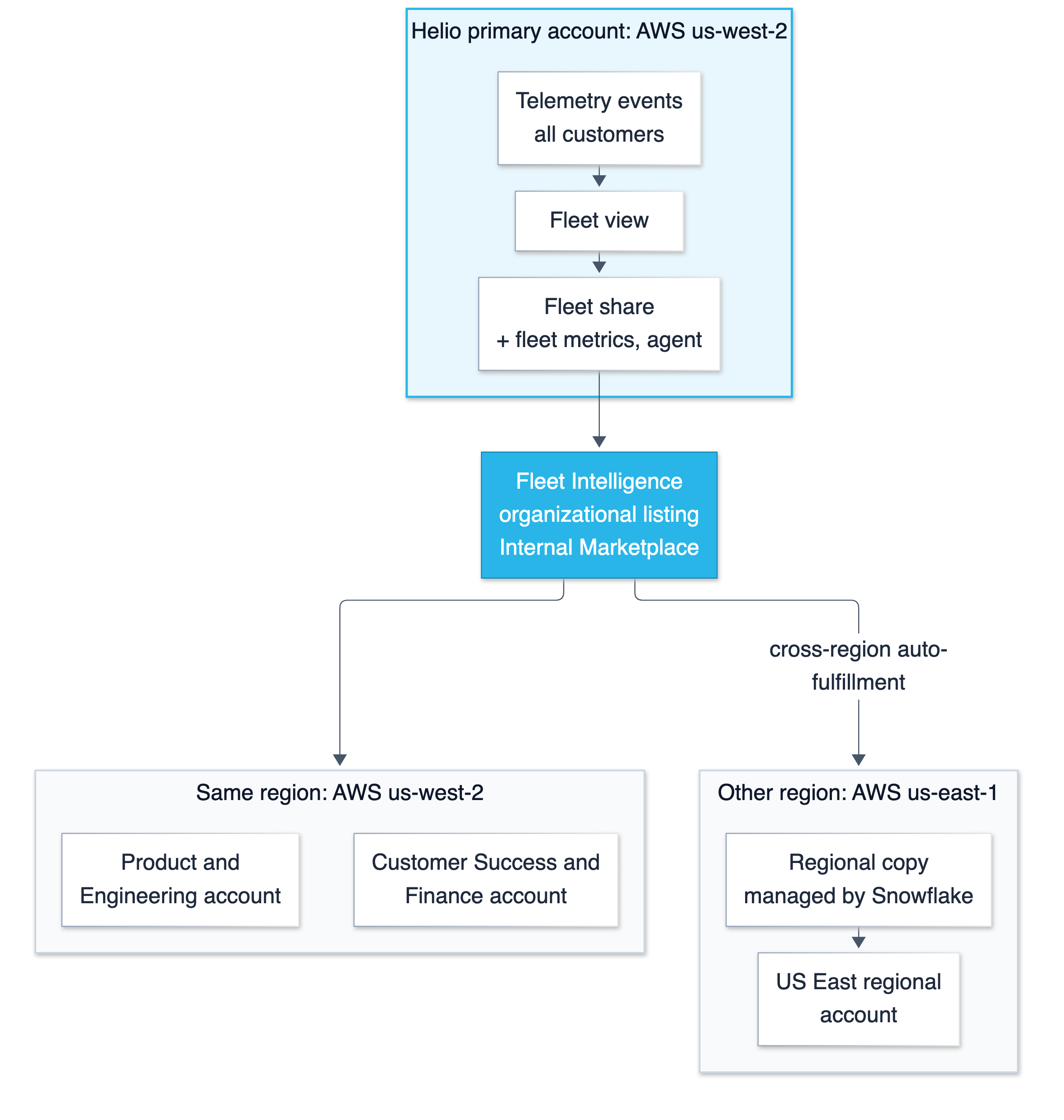
The organizational listing is visible only inside the company's organization. Each team's account sees it in the Internal Marketplace; access is granted by account and role, and teams without access can request it. Teams in other regions are covered by auto-fulfillment for organizational listings, which creates a copy in a team's region the first time someone there requests the listing (Section 4, step 7).
Sharing telemetry as a product externally to customers
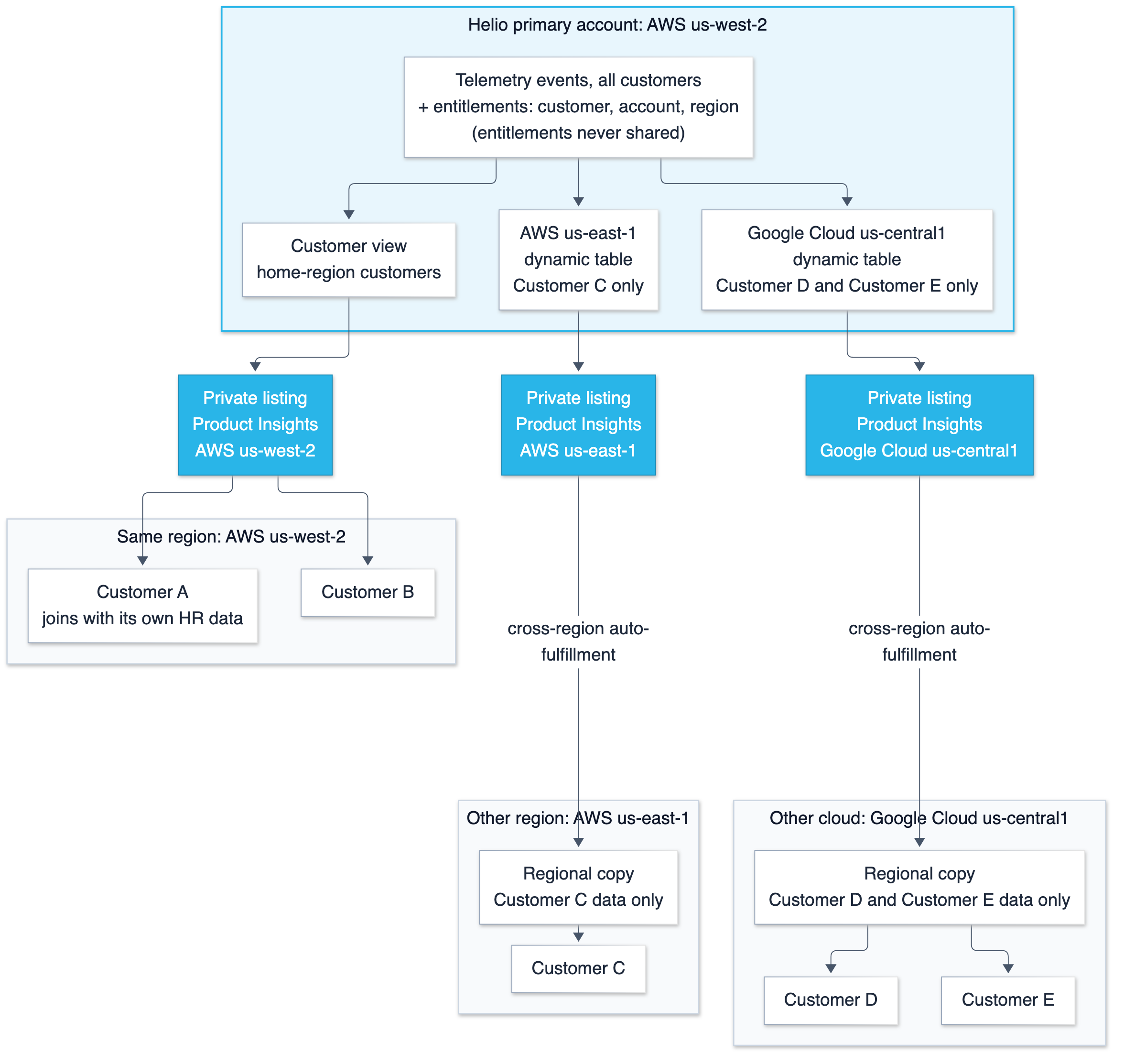
Every customer receives the same private listing, and the customer view checks who is asking, so the view scopes each query to the rows entitled to the querying account. Test this for each account before use. Adding a customer means adding an entitlement row and a listing target, not building new objects. Customers can also capture changes (change data capture, or CDC) with a stream on the shared view (Section 4, steps 6 and 7).
4. How to set this up
The steps below assume that the telemetry table, the entitlements table, the two secure views, the semantic views, and the agents already exist. If you would like to follow along in a sandbox account, download the setup script; it creates all of those objects and loads fabricated telemetry for six customers (the five examples below plus CUST_001), which it maps to your own account so you can see the filter work. All identifiers are illustrative.
Step 0: Create a least-privilege provider role
An administrator runs the grants below once, and from then on a dedicated provider role creates and owns every database, view, share, and listing in the data product. Keeping ownership in one role also means the people who publish the product can't change anything else in the account.
-- Run once as ACCOUNTADMIN.
CREATE ROLE IF NOT EXISTS TELEMETRY_PROVIDER;
GRANT ROLE TELEMETRY_PROVIDER TO USER <data_product_owner>;

GRANT USAGE, OPERATE ON WAREHOUSE TELEMETRY_WH            TO ROLE TELEMETRY_PROVIDER;
GRANT CREATE DATABASE                 ON ACCOUNT           TO ROLE TELEMETRY_PROVIDER;
GRANT CREATE SHARE                    ON ACCOUNT           TO ROLE TELEMETRY_PROVIDER;
GRANT CREATE LISTING                  ON ACCOUNT           TO ROLE TELEMETRY_PROVIDER;
GRANT CREATE ORGANIZATION LISTING     ON ACCOUNT           TO ROLE TELEMETRY_PROVIDER;
GRANT MANAGE LISTING AUTO FULFILLMENT ON ACCOUNT           TO ROLE TELEMETRY_PROVIDER;
GRANT DATABASE ROLE SNOWFLAKE.SHARING_USAGE_VIEWER         TO ROLE TELEMETRY_PROVIDER;
Privilege requirements change over time, so check each one against the current references for listing privileges, data sharing privileges, and CREATE SEMANTIC VIEW, and grant only what your listing types need. What each grant is for:
-
Warehouse
USAGEandOPERATErun the queries and dynamic table refreshes without giving the role ownership of the warehouse. -
CREATE DATABASElets the role createTELEMETRY_DBand the regional databases, so it owns every object inside them, including semantic views and agents. -
CREATE SHARE,CREATE LISTING, andCREATE ORGANIZATION LISTINGcover Steps 3 to 5.MANAGE LISTING AUTO FULFILLMENTis needed for listings that reach other regions. -
SHARING_USAGE_VIEWERgives read access to the listing usage and cost views in Section 5.
If your telemetry comes from a catalog-linked database, the administrator also creates the catalog integration and external volume, then grants the role USAGE on that database and SELECT on its tables.
Step 1: Set up a secure view with entitlements for tenant isolation
The secure view is what separates one customer's rows from another's. Helio publishes a single view for all customers, rather than one view or one table per customer. That view decides, row by row, which data each customer may see. It needs two pieces:
- The telemetry events table holds events for every customer, each tagged with a
customer_id. - A private entitlements table says who may see what. Each row links one
customer_idto the Snowflake account that is entitled to that customer's telemetry, plus anis_activeflag. The table lives in a private schema and is never added to a share, so customers can't read or change it.
For the five example customers, the entitlements table looks like this:
SELECT * FROM TELEMETRY_DB.PRIVATE.ENTITLEMENTS
WHERE customer_id <> 'CUST_001' ORDER BY customer_id;

CUSTOMER_ID | CONSUMER_ACCOUNT            | CONSUMER_REGION  | IS_ACTIVE
------------+-----------------------------+------------------+----------
CUST_002    | CUSTOMER_A_ACCOUNT_LOCATOR  | AWS_US_WEST_2    | TRUE
CUST_003    | CUSTOMER_B_ACCOUNT_LOCATOR  | AWS_US_WEST_2    | TRUE
CUST_004    | CUSTOMER_C_ACCOUNT_LOCATOR  | AWS_US_EAST_1    | TRUE
CUST_005    | CUSTOMER_D_ACCOUNT_LOCATOR  | GCP_US_CENTRAL1  | FALSE
CUST_006    | CUSTOMER_E_ACCOUNT_LOCATOR  | GCP_US_CENTRAL1  | TRUE
CONSUMER_ACCOUNT holds the value that CURRENT_ACCOUNT() returns in each customer's account, which is its account locator. CONSUMER_REGION is used by the regional dynamic tables in step 2 to decide which region each customer's data is copied to. A customer with several Snowflake accounts gets one row per account.
The secure view joins the telemetry events table to the entitlements table using the key condition ent.consumer_account = CURRENT_ACCOUNT(). Inside a shared view, CURRENT_ACCOUNT() returns the account running the query, which is the customer's own account, not Helio's (Use secure objects to control data access). The account identity comes from Snowflake, so a customer can't pass in a different value.
Here is how the filter plays out for the same query against the same view:
- Customer A queries it.
CURRENT_ACCOUNT()returnsCUSTOMER_A_ACCOUNT_LOCATOR. Only theCUST_002row matches, so the join keeps only events wherecustomer_id = 'CUST_002'. - An account with no active entitlement queries it, for example Customer D, whose
IS_ACTIVEis FALSE. No active entitlement row matches, so the view returns zero rows.
Because the filtering happens inside the view, Helio maintains one definition for every customer. Onboarding a customer means inserting an entitlement row and adding the account as a listing target. In the home-region view, offboarding takes effect on the next query after is_active is set to false. Regional views read entitlements from a dynamic table, so there the change takes effect after the next dynamic table refresh, within its target lag, and in other regions after the following listing refresh. It is recommended to test the secure views for onboarding and offboarding new customers.
-- Provider account. The core of the customer view created by the setup script.
CREATE OR REPLACE SECURE VIEW TELEMETRY_DB.PUBLISH.V_CUSTOMER_EVENTS AS
SELECT e.event_id, e.event_timestamp, e.device_id, e.event_type,
       e.metric_name, e.metric_value,
       e.attributes:app_version::STRING AS app_version,
       e.attributes:office::STRING      AS office
FROM TELEMETRY_DB.RAW.EVENTS e
JOIN TELEMETRY_DB.PRIVATE.ENTITLEMENTS ent
  ON  ent.customer_id      = e.customer_id
  AND ent.consumer_account = CURRENT_ACCOUNT()
  AND ent.is_active;
Practical notes:
- The join isolates customers;
SECUREdoesn't. Marking the view secure hides its definition and limits what the optimizer can expose. TheCURRENT_ACCOUNT()join is what filters the rows, so treat it as the boundary and put it under change control. - Test both directions before every release. Set the
SIMULATED_DATA_SHARING_CONSUMERsession parameter to the value stored inconsumer_account(the account locator thatCURRENT_ACCOUNT()returns) to preview what that account would see. Confirm that each test account returns only its entitled rows and that an unentitled account returns none. - Review fields before sharing them. Semi-structured telemetry often contains IP addresses, usernames, and file paths. Expose a reviewed list of fields, as the view above does, rather than the raw attributes payload.
- Filtering by account doesn't control where data is replicated. The
CURRENT_ACCOUNT()join decides what a customer sees. The regional dynamic tables in step 2 decide which regions the data is copied to.
Step 2: Build a regional dataset for each remote region
For each region outside the provider's own, create a database for that region's product. The entitlements table carries a consumer_region column (a region name from SHOW REGIONS, such as AWS_US_EAST_1). One dynamic table keeps the reviewed columns for customers with consumer accounts in that region; a second keeps that region's entitlement rows, so the regional customer view can filter by account without referencing another database.
CREATE DATABASE TELEMETRY_AWS_US_EAST_1;
CREATE SCHEMA   TELEMETRY_AWS_US_EAST_1.PUBLISH;

-- Telemetry for customers whose consumer accounts are in AWS us-east-1.
CREATE OR REPLACE DYNAMIC TABLE TELEMETRY_AWS_US_EAST_1.PUBLISH.DT_EVENTS
  TARGET_LAG   = '1 hour'
  WAREHOUSE    = TELEMETRY_WH
  REFRESH_MODE = INCREMENTAL
AS
SELECT e.event_id, e.event_timestamp, e.customer_id, e.device_id, e.event_type,
       e.metric_name, e.metric_value,
       e.attributes:app_version::STRING AS app_version,
       e.attributes:office::STRING      AS office
FROM TELEMETRY_DB.RAW.EVENTS e
JOIN (SELECT DISTINCT customer_id
      FROM TELEMETRY_DB.PRIVATE.ENTITLEMENTS
      WHERE consumer_region = 'AWS_US_EAST_1' AND is_active) r
  ON r.customer_id = e.customer_id;

-- That region's entitlement rows. Not shared; used only by the view below.
CREATE OR REPLACE DYNAMIC TABLE TELEMETRY_AWS_US_EAST_1.PUBLISH.DT_ENTITLEMENTS
  TARGET_LAG   = '1 hour'
  WAREHOUSE    = TELEMETRY_WH
  REFRESH_MODE = INCREMENTAL
AS
SELECT customer_id, consumer_account
FROM TELEMETRY_DB.PRIVATE.ENTITLEMENTS
WHERE consumer_region = 'AWS_US_EAST_1' AND is_active;

CREATE OR REPLACE SECURE VIEW TELEMETRY_AWS_US_EAST_1.PUBLISH.V_CUSTOMER_EVENTS AS
SELECT d.event_id, d.event_timestamp, d.device_id, d.event_type,
       d.metric_name, d.metric_value, d.app_version, d.office
FROM TELEMETRY_AWS_US_EAST_1.PUBLISH.DT_EVENTS d
JOIN TELEMETRY_AWS_US_EAST_1.PUBLISH.DT_ENTITLEMENTS ent
  ON  ent.customer_id      = d.customer_id
  AND ent.consumer_account = CURRENT_ACCOUNT();

-- GCP us-central1: the same statements against its own database.
CREATE DATABASE TELEMETRY_GCP_US_CENTRAL1;
CREATE SCHEMA   TELEMETRY_GCP_US_CENTRAL1.PUBLISH;

-- Telemetry for customers whose consumer accounts are in GCP us-central1.
CREATE OR REPLACE DYNAMIC TABLE TELEMETRY_GCP_US_CENTRAL1.PUBLISH.DT_EVENTS
  TARGET_LAG   = '1 hour'
  WAREHOUSE    = TELEMETRY_WH
  REFRESH_MODE = INCREMENTAL
AS
SELECT e.event_id, e.event_timestamp, e.customer_id, e.device_id, e.event_type,
       e.metric_name, e.metric_value,
       e.attributes:app_version::STRING AS app_version,
       e.attributes:office::STRING      AS office
FROM TELEMETRY_DB.RAW.EVENTS e
JOIN (SELECT DISTINCT customer_id
      FROM TELEMETRY_DB.PRIVATE.ENTITLEMENTS
      WHERE consumer_region = 'GCP_US_CENTRAL1' AND is_active) r
  ON r.customer_id = e.customer_id;

-- That region's entitlement rows. Not shared; used only by the view below.
CREATE OR REPLACE DYNAMIC TABLE TELEMETRY_GCP_US_CENTRAL1.PUBLISH.DT_ENTITLEMENTS
  TARGET_LAG   = '1 hour'
  WAREHOUSE    = TELEMETRY_WH
  REFRESH_MODE = INCREMENTAL
AS
SELECT customer_id, consumer_account
FROM TELEMETRY_DB.PRIVATE.ENTITLEMENTS
WHERE consumer_region = 'GCP_US_CENTRAL1' AND is_active;

CREATE OR REPLACE SECURE VIEW TELEMETRY_GCP_US_CENTRAL1.PUBLISH.V_CUSTOMER_EVENTS AS
SELECT d.event_id, d.event_timestamp, d.device_id, d.event_type,
       d.metric_name, d.metric_value, d.app_version, d.office
FROM TELEMETRY_GCP_US_CENTRAL1.PUBLISH.DT_EVENTS d
JOIN TELEMETRY_GCP_US_CENTRAL1.PUBLISH.DT_ENTITLEMENTS ent
  ON  ent.customer_id      = d.customer_id
  AND ent.consumer_account = CURRENT_ACCOUNT();
Then create the regional semantic view and agent in each database the same way as in the home region, pointing at that region's view. Practical notes:
- Freshness is the dynamic table's lag plus the listing's refresh.
TARGET_LAGcontrols how far the regional table may trail the source; the listing refresh then carries it to the region. Set both with the customer's expectations in mind. - Prefer incremental refresh. With
REFRESH_MODE = INCREMENTAL, Snowflake can process changes rather than recompute the full result when the query supports it, which can reduce refresh work. Check the refresh mode Snowflake reports for your dynamic tables. Because the regional view reads entitlements from a dynamic table, a deactivated entitlement is removed at the next refresh, within the target lag. Refresh compute runs on the provider's warehouse in the home region (dynamic table refresh modes). - Keep each regional product in one database. Auto-fulfillment doesn't support shared objects that reference a different database, which is why the regional view joins to a regional entitlement table instead of the central one.
Step 3: Put each product on a share
A share is the unit Snowflake replicates and grants, so its contents decide both what a consumer can use and what is copied to their region. Everything a consumer receives goes on one share per region, including the view, the semantic view, and the agent.
CREATE SHARE customer_share;
GRANT USAGE  ON DATABASE      TELEMETRY_DB                           TO SHARE customer_share;
GRANT USAGE  ON SCHEMA        TELEMETRY_DB.PUBLISH                   TO SHARE customer_share;
GRANT SELECT ON VIEW          TELEMETRY_DB.PUBLISH.V_CUSTOMER_EVENTS TO SHARE customer_share;
GRANT SELECT, REFERENCES ON SEMANTIC VIEW TELEMETRY_DB.PUBLISH.SV_CUSTOMER TO SHARE customer_share;
GRANT USAGE  ON AGENT         TELEMETRY_DB.PUBLISH.CUSTOMER_AGENT    TO SHARE customer_share;

-- Regional customer shares, one per regional database
CREATE SHARE customer_share_aws_us_east_1;
GRANT USAGE  ON DATABASE      TELEMETRY_AWS_US_EAST_1                           TO SHARE customer_share_aws_us_east_1;
GRANT USAGE  ON SCHEMA        TELEMETRY_AWS_US_EAST_1.PUBLISH                   TO SHARE customer_share_aws_us_east_1;
GRANT SELECT ON VIEW          TELEMETRY_AWS_US_EAST_1.PUBLISH.V_CUSTOMER_EVENTS TO SHARE customer_share_aws_us_east_1;
GRANT SELECT, REFERENCES ON SEMANTIC VIEW TELEMETRY_AWS_US_EAST_1.PUBLISH.SV_CUSTOMER TO SHARE customer_share_aws_us_east_1;
GRANT USAGE  ON AGENT         TELEMETRY_AWS_US_EAST_1.PUBLISH.CUSTOMER_AGENT    TO SHARE customer_share_aws_us_east_1;

CREATE SHARE customer_share_gcp_us_central1;
GRANT USAGE  ON DATABASE      TELEMETRY_GCP_US_CENTRAL1                           TO SHARE customer_share_gcp_us_central1;
GRANT USAGE  ON SCHEMA        TELEMETRY_GCP_US_CENTRAL1.PUBLISH                   TO SHARE customer_share_gcp_us_central1;
GRANT SELECT ON VIEW          TELEMETRY_GCP_US_CENTRAL1.PUBLISH.V_CUSTOMER_EVENTS TO SHARE customer_share_gcp_us_central1;
GRANT SELECT, REFERENCES ON SEMANTIC VIEW TELEMETRY_GCP_US_CENTRAL1.PUBLISH.SV_CUSTOMER TO SHARE customer_share_gcp_us_central1;
GRANT USAGE  ON AGENT         TELEMETRY_GCP_US_CENTRAL1.PUBLISH.CUSTOMER_AGENT    TO SHARE customer_share_gcp_us_central1;

-- Internal share for the organizational listing
CREATE SHARE fleet_share;
GRANT USAGE  ON DATABASE      TELEMETRY_DB                           TO SHARE fleet_share;
GRANT USAGE  ON SCHEMA        TELEMETRY_DB.PUBLISH                   TO SHARE fleet_share;
GRANT SELECT ON VIEW          TELEMETRY_DB.PUBLISH.V_FLEET_EVENTS    TO SHARE fleet_share;
GRANT SELECT, REFERENCES ON SEMANTIC VIEW TELEMETRY_DB.PUBLISH.SV_FLEET TO SHARE fleet_share;
GRANT USAGE  ON AGENT         TELEMETRY_DB.PUBLISH.FLEET_AGENT       TO SHARE fleet_share;
Grants on a share take effect for every consumer of its listing as soon as you run them, including after the listing is published. Review each GRANT ... TO SHARE before you run it, especially on a share that already has consumers.
Step 4: Publish the internal product as an organizational listing
Internal teams need discovery and an approval path more than they need contracts, which is what an organizational listing adds on top of the share.
CREATE ORGANIZATION LISTING FLEET_INTELLIGENCE
SHARE fleet_share AS
$$
title: "Fleet Intelligence"
description: |
  Product telemetry for every Helio customer in one governed data product.

  **What's inside**
  - `V_FLEET_EVENTS`: one row per event, with device, app version, office, and metric values.
  - `SV_FLEET`: governed definitions for error rate, crash rate, and average latency.
  - `FLEET_AGENT`: ask questions in plain English, answered from the semantic view.

  **Who it's for**
  Product engineering, customer success, finance, and regional teams who need
  fleet-wide adoption, reliability, and performance metrics without building a pipeline.

  **Freshness**
  Events land within an hour. Teams in other regions receive refreshes every 60 minutes.
resources:
  documentation: "https://docs.helio.example/data-products/fleet-intelligence"
listing_terms:
  type: "CUSTOM"
  link: "https://docs.helio.example/data-products/internal-use-policy"
data_dictionary:
  featured:
    database: "TELEMETRY_DB"
    objects:
      - name: "V_FLEET_EVENTS"
        schema: "PUBLISH"
        domain: "VIEW"
usage_examples:
  - title: "Error rate by customer, last 7 days"
    description: "Find the customers with the most errors this week."
    query: "SELECT customer_id, COUNT_IF(event_type = 'ERROR') / COUNT(*) AS error_rate_of_all_events FROM PUBLISH.V_FLEET_EVENTS WHERE event_timestamp >= DATEADD(day, -7, CURRENT_TIMESTAMP()) GROUP BY customer_id ORDER BY error_rate_of_all_events DESC;"
  - title: "Average latency by app version"
    description: "Compare performance across releases."
    query: "SELECT app_version, AVG(metric_value) AS avg_latency_ms FROM PUBLISH.V_FLEET_EVENTS WHERE event_type = 'LATENCY' GROUP BY app_version ORDER BY app_version;"
  - title: "Daily active devices"
    description: "Track adoption across the fleet."
    query: "SELECT DATE_TRUNC('day', event_timestamp) AS day, COUNT(DISTINCT device_id) AS active_devices FROM PUBLISH.V_FLEET_EVENTS GROUP BY day ORDER BY day;"
data_attributes:
  refresh_rate: HOURLY
  geography:
    geo_option: NOT_APPLICABLE
  time:
    granularity: EVENT_BASED
    time_range:
      time_frame: LAST
      units: DAYS
      value: 90
organization_profile: "INTERNAL"
organization_targets:
  discovery:
    - all_internal_accounts: true
  access:
    - account: "PRODUCT_ENG"
    - account: "CS_FINANCE"
    - account: "US_EAST_REGIONAL"
support_contact: "data-products@helio.example"
approver_contact: "data-products@helio.example"
request_approval_type: "REQUEST_AND_APPROVE_IN_SNOWFLAKE"
locations:
  access_regions:
    - name: "ALL"
auto_fulfillment:
  refresh_type: SUB_DATABASE
  refresh_schedule: 60 MINUTE
$$;
Every internal account can discover the listing; only the named accounts can use it, and others request access through the approval workflow. All links and emails referring to helio in these manifests are placeholders; replace them with your own documentation. Field details are in the organization listing manifest reference. Before teams in other regions can receive the product, global data sharing must be enabled for the provider account (Configure organizational listings for auto-fulfillment).
Step 5: Publish the external products as private listings
Each regional share gets its own private listing, so each one replicates only to the region whose customers it targets.
-- Home region: customers in AWS us-west-2, nothing replicated.
CREATE EXTERNAL LISTING PRODUCT_INSIGHTS
SHARE customer_share AS
$$
title: "Product Insights"
subtitle: "Your Helio telemetry, ready to query and join to your own data"
description: |
  Your organization's Helio product telemetry, delivered into your Snowflake account.
  You see only your own data, queried with your own compute.

  **What's inside**
  - `V_CUSTOMER_EVENTS`: one row per event from your devices, with app version, office, and metric values.
  - `SV_CUSTOMER`: governed definitions for error rate and average latency, the same ones Helio uses.
  - `CUSTOMER_AGENT`: ask questions about your usage and performance in plain English.

  **Common uses**
  Join telemetry to your HR, IT asset, or ticketing data, track adoption of new releases,
  and spot offices with degraded performance.
resources:
  documentation: "https://docs.helio.example/data-products/product-insights"
listing_terms:
  type: "OFFLINE"
targets:
  accounts: ["CUSTOMER_A_ORG.CUSTOMER_A", "CUSTOMER_B_ORG.CUSTOMER_B"]
categories:
  - BUSINESS
business_needs:
  - name: "Product Usage Analytics"
    description: "Measure adoption, reliability, and performance of Helio across your organization."
    type: CUSTOM
data_dictionary:
  featured:
    database: "TELEMETRY_DB"
    objects:
      - name: "V_CUSTOMER_EVENTS"
        schema: "PUBLISH"
        domain: "VIEW"
usage_examples:
  - title: "Error rate by office, last 7 days"
    description: "Find the offices with the most errors this week."
    query: "SELECT office, COUNT_IF(event_type = 'ERROR') / COUNT(*) AS error_rate_of_all_events FROM PUBLISH.V_CUSTOMER_EVENTS WHERE event_timestamp >= DATEADD(day, -7, CURRENT_TIMESTAMP()) GROUP BY office ORDER BY error_rate_of_all_events DESC;"
  - title: "Adoption of each app version"
    description: "See how many devices run each release."
    query: "SELECT app_version, COUNT(DISTINCT device_id) AS devices FROM PUBLISH.V_CUSTOMER_EVENTS GROUP BY app_version ORDER BY devices DESC;"
data_attributes:
  refresh_rate: HOURLY
  geography:
    geo_option: NOT_APPLICABLE
  time:
    granularity: EVENT_BASED
    time_range:
      time_frame: LAST
      units: DAYS
      value: 90
resharing:
  enabled: false
$$;

-- AWS us-east-1: customers whose entitlements name this region.
CREATE EXTERNAL LISTING PRODUCT_INSIGHTS_AWS_US_EAST_1
SHARE customer_share_aws_us_east_1 AS
$$
title: "Product Insights"
subtitle: "Your Helio telemetry, ready to query and join to your own data"
description: |
  Your organization's Helio product telemetry, delivered into your Snowflake account.
  You see only your own data, queried with your own compute.

  **What's inside**
  - `V_CUSTOMER_EVENTS`: one row per event from your devices, with app version, office, and metric values.
  - `SV_CUSTOMER`: governed definitions for error rate and average latency, the same ones Helio uses.
  - `CUSTOMER_AGENT`: ask questions about your usage and performance in plain English.

  **Common uses**
  Join telemetry to your HR, IT asset, or ticketing data, track adoption of new releases,
  and spot offices with degraded performance.
resources:
  documentation: "https://docs.helio.example/data-products/product-insights"
listing_terms:
  type: "OFFLINE"
targets:
  accounts: ["CUSTOMER_C_ORG.CUSTOMER_C"]
auto_fulfillment:
  refresh_type: SUB_DATABASE
  refresh_schedule: 60 MINUTE
categories:
  - BUSINESS
business_needs:
  - name: "Product Usage Analytics"
    description: "Measure adoption, reliability, and performance of Helio across your organization."
    type: CUSTOM
data_dictionary:
  featured:
    database: "TELEMETRY_AWS_US_EAST_1"
    objects:
      - name: "V_CUSTOMER_EVENTS"
        schema: "PUBLISH"
        domain: "VIEW"
usage_examples:
  - title: "Error rate by office, last 7 days"
    description: "Find the offices with the most errors this week."
    query: "SELECT office, COUNT_IF(event_type = 'ERROR') / COUNT(*) AS error_rate_of_all_events FROM PUBLISH.V_CUSTOMER_EVENTS WHERE event_timestamp >= DATEADD(day, -7, CURRENT_TIMESTAMP()) GROUP BY office ORDER BY error_rate_of_all_events DESC;"
  - title: "Adoption of each app version"
    description: "See how many devices run each release."
    query: "SELECT app_version, COUNT(DISTINCT device_id) AS devices FROM PUBLISH.V_CUSTOMER_EVENTS GROUP BY app_version ORDER BY devices DESC;"
data_attributes:
  refresh_rate: HOURLY
  geography:
    geo_option: NOT_APPLICABLE
  time:
    granularity: EVENT_BASED
    time_range:
      time_frame: LAST
      units: DAYS
      value: 90
resharing:
  enabled: false
$$;

-- Google Cloud us-central1: customers whose entitlements name this region.
CREATE EXTERNAL LISTING PRODUCT_INSIGHTS_GCP_US_CENTRAL1
SHARE customer_share_gcp_us_central1 AS
$$
title: "Product Insights"
subtitle: "Your Helio telemetry, ready to query and join to your own data"
description: |
  Your organization's Helio product telemetry, delivered into your Snowflake account.
  You see only your own data, queried with your own compute.

  **What's inside**
  - `V_CUSTOMER_EVENTS`: one row per event from your devices, with app version, office, and metric values.
  - `SV_CUSTOMER`: governed definitions for error rate and average latency, the same ones Helio uses.
  - `CUSTOMER_AGENT`: ask questions about your usage and performance in plain English.

  **Common uses**
  Join telemetry to your HR, IT asset, or ticketing data, track adoption of new releases,
  and spot offices with degraded performance.
resources:
  documentation: "https://docs.helio.example/data-products/product-insights"
listing_terms:
  type: "OFFLINE"
targets:
  accounts: ["CUSTOMER_D_ORG.CUSTOMER_D", "CUSTOMER_E_ORG.CUSTOMER_E"]
auto_fulfillment:
  refresh_type: SUB_DATABASE
  refresh_schedule: 60 MINUTE
categories:
  - BUSINESS
business_needs:
  - name: "Product Usage Analytics"
    description: "Measure adoption, reliability, and performance of Helio across your organization."
    type: CUSTOM
data_dictionary:
  featured:
    database: "TELEMETRY_GCP_US_CENTRAL1"
    objects:
      - name: "V_CUSTOMER_EVENTS"
        schema: "PUBLISH"
        domain: "VIEW"
usage_examples:
  - title: "Error rate by office, last 7 days"
    description: "Find the offices with the most errors this week."
    query: "SELECT office, COUNT_IF(event_type = 'ERROR') / COUNT(*) AS error_rate_of_all_events FROM PUBLISH.V_CUSTOMER_EVENTS WHERE event_timestamp >= DATEADD(day, -7, CURRENT_TIMESTAMP()) GROUP BY office ORDER BY error_rate_of_all_events DESC;"
  - title: "Adoption of each app version"
    description: "See how many devices run each release."
    query: "SELECT app_version, COUNT(DISTINCT device_id) AS devices FROM PUBLISH.V_CUSTOMER_EVENTS GROUP BY app_version ORDER BY devices DESC;"
data_attributes:
  refresh_rate: HOURLY
  geography:
    geo_option: NOT_APPLICABLE
  time:
    granularity: EVENT_BASED
    time_range:
      time_frame: LAST
      units: DAYS
      value: 90
resharing:
  enabled: false
$$;
With refresh_type: SUB_DATABASE, auto-fulfillment replicates the objects in the share and the objects they reference rather than the whole database (listing manifest reference). Customers see the same title and contents wherever they are; only the data behind it differs. Target accounts use the <OrgName>.<AccountName> format, and auto_fulfillment is required as soon as any target is outside the provider's region (listing manifest reference). The refresh schedule accepts an interval of at least 10 minutes or a cron expression; SYSTEM$TRIGGER_LISTING_REFRESH triggers a refresh on demand, which fits well after an upstream batch finishes.
To onboard a new customer later, insert an entitlement row with the account's region and add the account to that region's listing targets with ALTER LISTING. The views, shares, and listings stay the same.
What cross-region delivery costs. Same-region consumers query the provider's objects in place, with no data transfer. For other regions you pay for transfer at your source region's published rate, storage of the regional copy, and the compute that keeps it in sync, plus dynamic table refreshes at home (Auto-fulfillment costs). Regional datasets are designed to limit what is replicated to each region to the customers whose entitlements name it, so you move the regional subset rather than the full table. When an entitlement changes, the affected rows leave the regional dynamic table at its next refresh and leave the auto-fulfilled copy at the next listing refresh. Treat this as a design to validate for your deployment, not as a data residency assurance. Total cost still depends on transfer, storage, and refresh compute for your configuration and usage.
Usage is visible in the LISTING_AUTO_FULFILLMENT_REFRESH_DAILY view. Freshness follows the same split. Same-region consumers query the provider's objects directly, so they see data as current as those objects, and other regions see it as of the last completed listing refresh.
Step 6: Enable change tracking so your consumers know what changed
Consumers that load telemetry into their own pipelines usually want only new and changed rows. Streams provide this, but only the provider can enable change tracking on shared objects. The base tables need it for both the home-region view and the incremental dynamic tables, and each shared view needs it too:
ALTER TABLE TELEMETRY_DB.RAW.EVENTS                                SET CHANGE_TRACKING = TRUE;
ALTER TABLE TELEMETRY_DB.PRIVATE.ENTITLEMENTS                      SET CHANGE_TRACKING = TRUE;
ALTER VIEW  TELEMETRY_DB.PUBLISH.V_CUSTOMER_EVENTS                 SET CHANGE_TRACKING = TRUE;
-- Repeat ALTER VIEW for each regional V_CUSTOMER_EVENTS.
Include these points in the consumer documentation:
The following behaviors are what we observed when testing this design; confirm them against current documentation for your configuration.
- If you need to change a shared view, use
CREATE OR ALTER, notCREATE OR REPLACE. In our tests,CREATE OR ALTER SECURE VIEWadded a column in place. The share grant and change tracking stayed, and consumer streams kept working and saw the new column.CREATE OR REPLACEdrops and recreates the view, and in our tests existing consumer streams then failed with "Base table ... dropped, cannot read from stream". If you usedCREATE OR REPLACE, your consumers can recover by recreating the stream withSHOW_INITIAL_ROWS = TRUEand loading with aMERGEonevent_id, which skips rows they already have. - Consumers in other regions should use standard streams. Append-only streams cannot be created on an auto-fulfilled copy of the data.
- Plan for retention. A stream on a shared object doesn't extend the provider's data retention, so a consumer stream becomes stale if it isn't read within that period (Streams on shared objects). Tell consumers your retention period, or set
DATA_RETENTION_TIME_IN_DAYSon the source tables to cover how often they read.
Step 7: What the consumer does
A customer administrator opens Data sharing » External sharing, selects the listing, and chooses Get, which creates a read-only database. This doesn't need ACCOUNTADMIN: a role with CREATE DATABASE and IMPORT SHARE on the account can do it (Access and install listings), plus USAGE on a warehouse to query, and the SNOWFLAKE.CORTEX_USER and SNOWFLAKE.CORTEX_AGENT_USER database roles to use the agent.
A consumer in another region sees Request instead of Get the first time. Auto-fulfillment creates the regional copy only after that request, so the first install in a new region waits for the initial replication; in SQL, with a warehouse in use, CALL SYSTEM$REQUEST_LISTING_AND_WAIT('<listing_global_name>') requests the listing and returns once it can be installed. Later consumers in the same region install immediately.
Internal teams don't need to install anything. An organizational listing can be queried in place by its uniform listing locator, for example ORGDATACLOUD$INTERNAL$FLEET_INTELLIGENCE.PUBLISH.V_FLEET_EVENTS, as soon as their account has access. From then on, analysts can query the product alongside their own data:
-- Customer A's account. License utilization by cost center, joined to Customer A's own HR data.
SELECT h.cost_center,
       COUNT(DISTINCT h.employee_id)  AS licensed_users,
       COUNT(DISTINCT e.device_id)    AS active_devices_30d
FROM CUSTOMER_A_HR.PUBLIC.EMPLOYEES h
LEFT JOIN HELIO_INSIGHTS.PUBLISH.V_CUSTOMER_EVENTS e
       ON e.device_id = h.device_id
      AND e.event_timestamp >= DATEADD('day', -30, CURRENT_TIMESTAMP())
GROUP BY 1
ORDER BY licensed_users - active_devices_30d DESC;

-- Optional: process only new events with a stream in the customer's own database.
-- SHOW_INITIAL_ROWS = TRUE makes the first MERGE backfill existing rows.
CREATE STREAM CUSTOMER_A_CDC.TELEMETRY.S_EVENTS ON VIEW HELIO_INSIGHTS.PUBLISH.V_CUSTOMER_EVENTS
  SHOW_INITIAL_ROWS = TRUE;

MERGE INTO CUSTOMER_A_CDC.TELEMETRY.EVENTS_LOCAL t
USING (SELECT * FROM CUSTOMER_A_CDC.TELEMETRY.S_EVENTS WHERE METADATA$ACTION = 'INSERT') s
ON t.event_id = s.event_id
WHEN NOT MATCHED THEN INSERT (event_id, event_timestamp, metric_value)
                      VALUES (s.event_id, s.event_timestamp, s.metric_value);
Reading a stream doesn't consume it; only a DML statement such as the MERGE advances its position. Without SHOW_INITIAL_ROWS, the stream starts empty and returns only changes made after it was created. Business users can ask the agent instead of writing SQL. A shared agent runs on the consumer's default warehouse, which they can change under AI & ML » Agents.
5. Monitoring how the data product is used
A data product needs its own usage telemetry. The provider wants to know which teams and customers are getting value, which parts of the product they use, and what delivery costs, so it can invest in what works and reach out to consumers who have gone quiet. Snowflake records this for listings without any extra instrumentation (Monitor listing use).
The LISTING_ACCESS_HISTORY view in SNOWFLAKE.DATA_SHARING_USAGE has one row per consumer query, with the consumer account, region, and the shared objects and columns accessed. Its documented columns describe access to shared objects and don't include the consumer's query text or the consumer's own tables, so you can see which shared objects are used. Check the view's column reference before describing provider visibility to your consumers. For example, active customers and the objects they use each month:
SELECT DATE_TRUNC('month', lah.query_date)              AS month,
       lah.consumer_account_name,
       obj.value:"objectName"::STRING                   AS object_name,
       COUNT(DISTINCT lah.query_token)                  AS queries
FROM SNOWFLAKE.DATA_SHARING_USAGE.LISTING_ACCESS_HISTORY lah,
     LATERAL FLATTEN(input => lah.share_objects_accessed) obj
WHERE lah.query_date >= DATEADD('month', -3, CURRENT_DATE())
GROUP BY 1, 2, 3
ORDER BY 1, 4 DESC;
The usage views can lag by up to two days and keep a year of history, so they suit weekly product reviews and customer-success follow-up rather than real-time alerting.
The result closes the loop with Section 1: the same data that tells customer success which customers are adopting the product can now tell the data-product team which customers are adopting the data product.
Where to start
Start inside the company. Publish the organizational listing to the two or three teams already asking for extracts, often customer success and product. There is no contract, and cross-region cost depends on how many teams are in other regions, and you will find gaps in your metric definitions with colleagues rather than customers.
Then run a customer pilot: one design-partner customer in your own region, plus a test account that should see nothing, to prove the separation works. Add a second region next, with its own dynamic table and listing, so refresh timing and cost become real numbers and you can validate what data is replicated there. Offer change processing once the schema stops moving.
References
- About listings and About organizational listings
- Listing manifest reference and Organization listing manifest reference
- Auto-fulfillment for listings, objects, and costs
- Use secure objects to control data access
- Dynamic tables
- Catalog-linked databases and auto-fulfillment with open table formats
- Overview of semantic views
- Monitor listing use
- SaaS Provider Playbook: Sharing Data on Snowflake
This content is provided as is, and is not maintained on an ongoing basis. It may be out of date with current Snowflake instances
