Running Python and Spark projects on Snowflake with Code Bundles
You do most of your data work in Python and Spark: pipelines, training runs, feature-engineering scripts, batch jobs on a schedule. The code lives in a project on your laptop, in Git, with a requirements.txt or pyproject.toml, an entrypoint or two, and maybe a handful of CLI arguments. That's the shape of the artifact you actually ship.
Getting that project to run next to the data it processes, on a schedule, with run history you can query when something fails at 2am, is usually the part that takes the most plumbing. Snowflake Code Bundles run that project as-is, next to your data, without restructuring it.
Before going further, there are two terms that need defining:
- A bundle spec is a single
code_bundle.ymlthat declares how your project runs: language, compute target, runtime version, dependencies, secrets, environment variables. - An entrypoint is the file inside your project that Snowflake actually invokes, named at execution time rather than baked into the object, so one bundle can hold several runnable jobs.
In this post, we'll cover what a Code Bundle is, the loop for deploying and scheduling one, the compute you can run it on, how Spark jobs work, when to reach for a Code Bundle instead of something else, and the operational pieces (runtime spec overrides, asynchronous submission, and run history).
What a Code Bundle is
A Code Bundle is a first-class, schema-level Snowflake object that holds a project's files and runs them on Snowflake compute.
The mental model is small. You have your files plus a single code_bundle.yml, and that one file declares how the project runs. Snowflake reads the spec, provisions the compute, injects a Snowpark session so your code has credential-free access to your data, and runs your entrypoint. Your main.py stays main.py. The dependency file stays where it is. You run the code by reference.
Because a Code Bundle is a real Snowflake object, everything you already do with Snowflake objects works: grants and role-based access, scheduling via Tasks, replication, catalog visibility, orchestration from the Snowflake CLI in a CI/CD pipeline. Full run history, logs, and status are tracked for you.
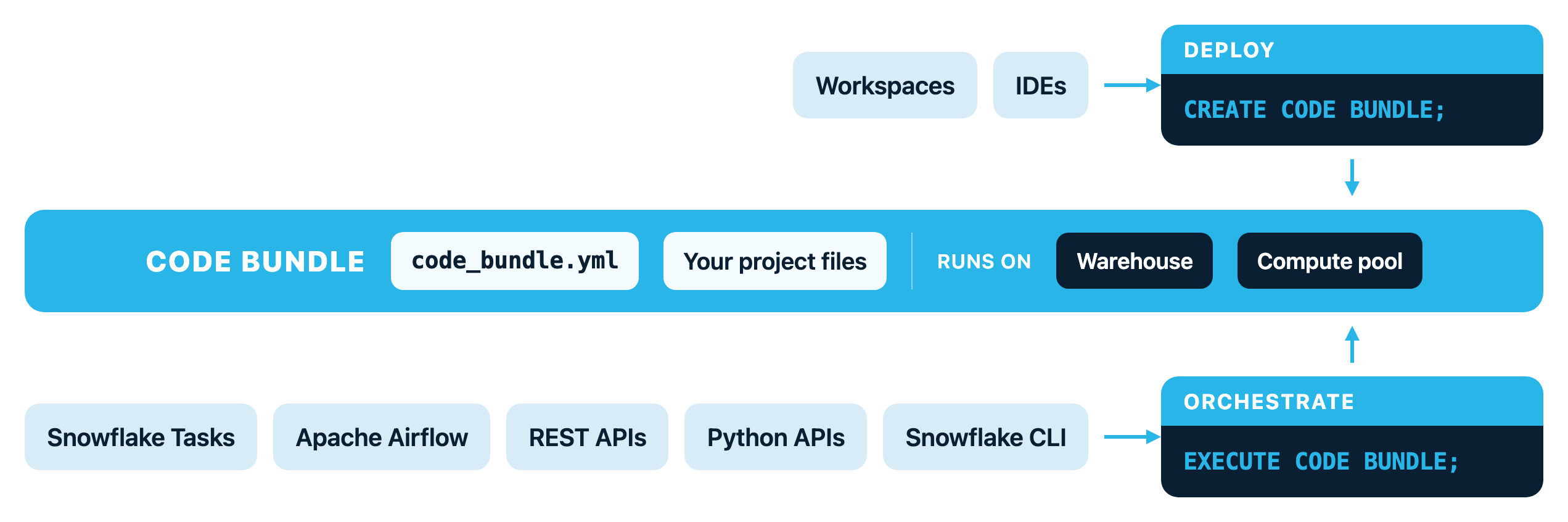
Deploy and schedule a Python job
Say you have a nightly aggregation job. You develop it in whatever IDE you like (Snowflake Workspaces, VS Code, JupyterLab), then describe how it runs in a code_bundle.yml:
bundle:
  type: custom
  compute_type: warehouse
  language: python
  compute_options:
    runtime_version: '3.11'
  properties:
    requirements_file: requirements.txt
Create the bundle from your project files on a stage, then run it by naming the entrypoint:
CREATE CODE BUNDLE sales_pipeline FROM @my_stage/project_files;
EXECUTE CODE BUNDLE sales_pipeline ENTRYPOINT = 'jobs/aggregate.py';
The Snowflake CLI has an equivalent shape. It packages your project directory and creates the bundle in one shot:
snow bundle create sales_pipeline \
  --source . --exclude ".venv/**" \
  --database MY_DB --schema MY_SCHEMA
snow bundle execute sales_pipeline --entrypoint jobs/aggregate.py
Put it on a schedule with a Task, passing arguments the same way you would on the command line:
CREATE OR REPLACE TASK nightly_agg
  WAREHOUSE = my_wh
  SCHEDULE = 'USING CRON 0 2 * * * UTC'
AS
  EXECUTE CODE BUNDLE sales_pipeline
    ENTRYPOINT = 'jobs/aggregate.py'
    ARGUMENTS = ('--source-table', 'RAW_SALES', '--days-back', '7');

ALTER TASK nightly_agg RESUME;
That's the whole loop, from developing the job to describing it to deploying and scheduling it.
Bundles reach external APIs by attaching secrets and external access integrations to the spec.
Choose the compute: warehouse or compute pool
A Code Bundle runs on one of two compute targets. Set it in code_bundle.yml and Snowflake handles the rest.
Run on a warehouse
compute_type: warehouse. Your Python runs on the same virtual warehouses you already use for SQL. You skip the container image and the compute pool ceremony entirely. This is often the fastest path to production for data-processing and ETL jobs where the heavy lifting happens in SQL and UDFs and the Python is orchestration around them.
Run on a compute pool
compute_type: compute_pool. Your job runs in Snowflake's container environment, backed by Snowpark Container Services. You get a full Python runtime with the flexibility to install packages from any source, pick CPU or GPU machine types, and run heavy computation directly in the Python process. Popular ML frameworks come preinstalled, and distributed data-loading and training APIs use every core and GPU on the node. This is the target for model training and fine-tuning, hyperparameter search, and batch inference at scale.
Compute-pool execution is the capability that shipped as Notebook Projects. It runs exactly as it always has (more on that below).
Run Spark jobs with Snowpark Connect
Spark is a bundle type rather than a third kind of compute. Set type: spark and Snowflake runs Spark applications in Scala, Java, or Python as native batch jobs. Spark bundles run on warehouse compute.
Spark support is built on Snowpark Connect, which runs the Spark DataFrame API directly on the Snowflake engine, so existing PySpark code moves over with minimal changes and you don't stand up or tune a Spark cluster. Query pushdown into Snowflake still applies, and the governance and access controls that apply to every other Snowflake operation apply to Spark jobs too. Submit a job through SQL or the REST API, then track, monitor, and cancel it by its job ID.
If you've used spark-submit, the shape will be familiar. Point at the application file on a stage and pass the entrypoint, arguments, and spec in a single statement:
EXECUTE CODE BUNDLE FROM '@my_stage/spark_project/spark_analytics.py'
  ENTRYPOINT = 'spark_analytics.py'
  ARGUMENTS = ('--events-table', 'RAW_EVENTS',
               '--funnel-output', 'FUNNEL_METRICS',
               '--pairs-output', 'PRODUCT_PAIRS')
  WITH SPECIFICATION $$
bundle:
  type: spark
  compute_type: warehouse
  language: python
$$;
compute_options.runtime_version pins the Snowpark Connect for Spark client version. Omit it, as above, to run on the latest available version.
To run the same job on a schedule or share it with other roles, persist it with CREATE CODE BUNDLE from the project directory and execute it by name, the same way as a Python bundle.
Submit a Spark job from the REST API
For orchestration from Airflow, CI/CD pipelines, or a custom submitter, submit the Spark job through the REST API. It submits jobs from a stage path rather than from a stored bundle, which suits callers that aren't running SQL.
Generate a bearer token from key-pair authentication, then POST the job spec:
SNOWFLAKE_TOKEN=$(snow connection generate-jwt)

curl -X POST \
  "https://<account>.snowflakecomputing.com/api/v2/code-bundle-executions?asyncExec=true" \
  -H "Authorization: Bearer ${SNOWFLAKE_TOKEN}" \
  -H "X-Snowflake-Authorization-Token-Type: KEYPAIR_JWT" \
  -H "Content-Type: application/json" \
  -H "X-Snowflake-Role: MY_ROLE" \
  -H "X-Snowflake-Warehouse: MY_WH" \
  -H "X-Snowflake-Database: MY_DB" \
  -H "X-Snowflake-Schema: MY_SCHEMA" \
  -d '{
    "from_location": "@MY_STAGE/spark_project",
    "entrypoint": "spark_analytics.py",
    "arguments": ["--events-table", "RAW_EVENTS",
                  "--funnel-output", "FUNNEL_METRICS",
                  "--pairs-output", "PRODUCT_PAIRS"],
    "specification": {
      "bundle": {
        "type": "spark",
        "compute_type": "warehouse",
        "language": "python"
      }
    }
  }'
An async submission returns 202 Accepted with a job_id you can poll for status:
{
  "code": "392604",
  "message": "Request execution in progress.",
  "job_id": "01c51743-c819-4261-0000-5349586311aa"
}
Check status by GETting /api/v2/code-bundle-executions/<job_id> with the same auth headers. This is the pattern Spark engineers already use on other platforms: POST a job definition, get an ID back, poll for status.
When to reach for a Code Bundle
Snowflake has several ways to run logic against your data. Code Bundles fill the gap between them.
| Reach for a... | When... |
|---|---|
| Code Bundle | You have an imperative Python or Spark job (an ETL script, a model-training run, a batch-inference pipeline) with a defined start, a defined end, and a success-or-failure result you want to deploy as-is and schedule. |
| Stored procedure or UDF | The logic is small and SQL-adjacent, and you want to call it inline from a query. |
| dbt Project | The work is a set of SQL transformations you model, test, and materialize with dbt. |
| Service | The workload stays running and serves requests, like an app or an API that keeps handling traffic between deploys. |
Most teams end up using several of these together. dbt Projects handle the SQL model layer, Code Bundles handle the Python and Spark jobs that run beside them, and stored procedures and UDFs stay embedded in the queries that call them.
Operate it in production
Beyond the create, execute, and schedule loop, three more capabilities let you match execution to the workload as it evolves: per-run spec overrides, asynchronous submission, and run history.
Override the spec at runtime
A code_bundle.yml sets the default, but a single project often contains files that need different runtimes. Override the stored spec inline at execution time with WITH SPECIFICATION:
EXECUTE CODE BUNDLE spark_jobs
  ENTRYPOINT = 'spark_analytics.py'
  ARGUMENTS = ('--events-table', 'RAW_EVENTS',
               '--funnel-output', 'FUNNEL_METRICS',
               '--pairs-output', 'PRODUCT_PAIRS')
  WITH SPECIFICATION $$
bundle:
  type: spark
  compute_type: warehouse
  language: python
$$;
The override replaces the stored spec entirely. Every required field has to be repeated, even if it hasn't changed. One bundle can hold a Python sessionizer and a Spark analytics job side by side, each executed with its own spec.
Submit asynchronously
The REST API and the Snowflake CLI both support asynchronous submission. From the CLI:
snow bundle execute my_pipeline \
  --entrypoint jobs/aggregate.py \
  --async \
  --database MY_DB --schema MY_SCHEMA --warehouse MY_WH
An async submission returns a job ID immediately. Poll status by ID:
snow bundle status <job_id>
Review run history
Every execution shows up in SNOWFLAKE.INFORMATION_SCHEMA.CODE_BUNDLE_HISTORY. Query it like any other table function:
SELECT ENTRYPOINT, STATUS, BUNDLE_TYPE, COMPUTE_TYPE,
       START_TIME, END_TIME, ERROR_MESSAGE
FROM TABLE(SNOWFLAKE.INFORMATION_SCHEMA.CODE_BUNDLE_HISTORY(
  BUNDLE_NAME => 'MY_PIPELINE',
  RESULT_LIMIT => 20
))
ORDER BY START_TIME DESC;
Failures land in ERROR_MESSAGE alongside the query ID, so a run that failed in a Task at 2am is diagnosable the next morning without SSHing into anything.
If you're using Notebook Projects
Code Bundles are Notebook Projects renamed. The name reflects what the feature has grown into: a home for any packaged code, notebooks included. If you're using Notebook Projects today, there's nothing to migrate. Your existing objects, your CREATE and EXECUTE NOTEBOOK PROJECT statements, and your scheduled tasks all keep working. Those objects show up as Code Bundles in the catalog.
Resources
- Official Quickstart: https://www.snowflake.com/en/developers/guides/run-python-and-spark-jobs-with-snowflake-code-bundles/
- Docs: https://docs.snowflake.com/en/developer-guide/code-bundles/code-bundles
- Spark on Code Bundles: https://docs.snowflake.com/en/developer-guide/snowpark-connect/snowpark-connect-submit-code-bundle
- Snowpark Connect: https://docs.snowflake.com/en/developer-guide/snowpark-connect/snowpark-connect-overview
- Companion repo: https://github.com/Snowflake-Labs/sfguide-run-python-and-spark-jobs-with-code-bundles
This content is provided as is, and is not maintained on an ongoing basis. It may be out of date with current Snowflake instances
