Multiplayer AI: Co-Edit Docs, Slides, Reports, and Data with Your Team and an AI Agent in Snowflake
A few weeks ago, Gilberto Hernandez showed how to persist team context with multiplayer AI in Snowflake. His Agent Canvas puts a whole team and one Cortex Agent in the same session. Everyone sees the agent's reasoning as it works, and /file saves a team decision as a governed row next to the data. I loved it. I also noticed what happened right after every great session in it: somebody left the chat to go and actually make the report or slides.
The answer got pasted into a doc. The doc got rebuilt as slides. Someone screenshotted a chart for a report. And when the team agreed on new numbers, someone with the right access opened a worksheet and ran the insert by hand. The conversation was multiplayer but the work was still single-player, and there was far too much context switching.
Agent Canvas Plus keeps everything Gil built and adds the things a team ships and often already collaborates in a multiplayer way, directly to the canvas: documents, slide decks, and HTML reports that everyone edits live, an agent that writes into them as tracked suggestions, and SQL writes that only run after a teammate approves them. It all still runs inside Snowflake, under Snowflake logins and roles. In this post I'll walk through how each piece works, and share the code so you can run it and make it your own.
Why a shared chat isn't enough to ship
Chat is great for deciding. It's a poor place to keep the thing you decided on. A brief lives in a doc, a pitch lives in a deck, and a number the business acts on lives in a table. When those artifacts get made outside the shared session, three things go missing:
- Who changed what. A teammate rewrites the agent's paragraph in their own copy, and nobody else sees it.
- Review. The agent's draft becomes "the doc" because it was the first version, not because anyone accepted it.
- Control over writes. The agent proposes a SQL statement, and someone copies it into a worksheet with whatever role they happen to have.
I wanted the room itself to be where the work happens: a doc everyone can type into at once, an agent that edits it the way a teammate would (with suggestions you can accept or reject), and a write path that stops and waits for a human approval.
What Agent Canvas Plus adds
The original canvas is a shared chat with a Cortex Agent. Agent Canvas Plus adds a sidebar of items beside the chat. Each one is a rich doc, a slide deck, or an artifact (HTML, Markdown, or a Vega-Lite chart), and everyone in the canvas edits it in real time.
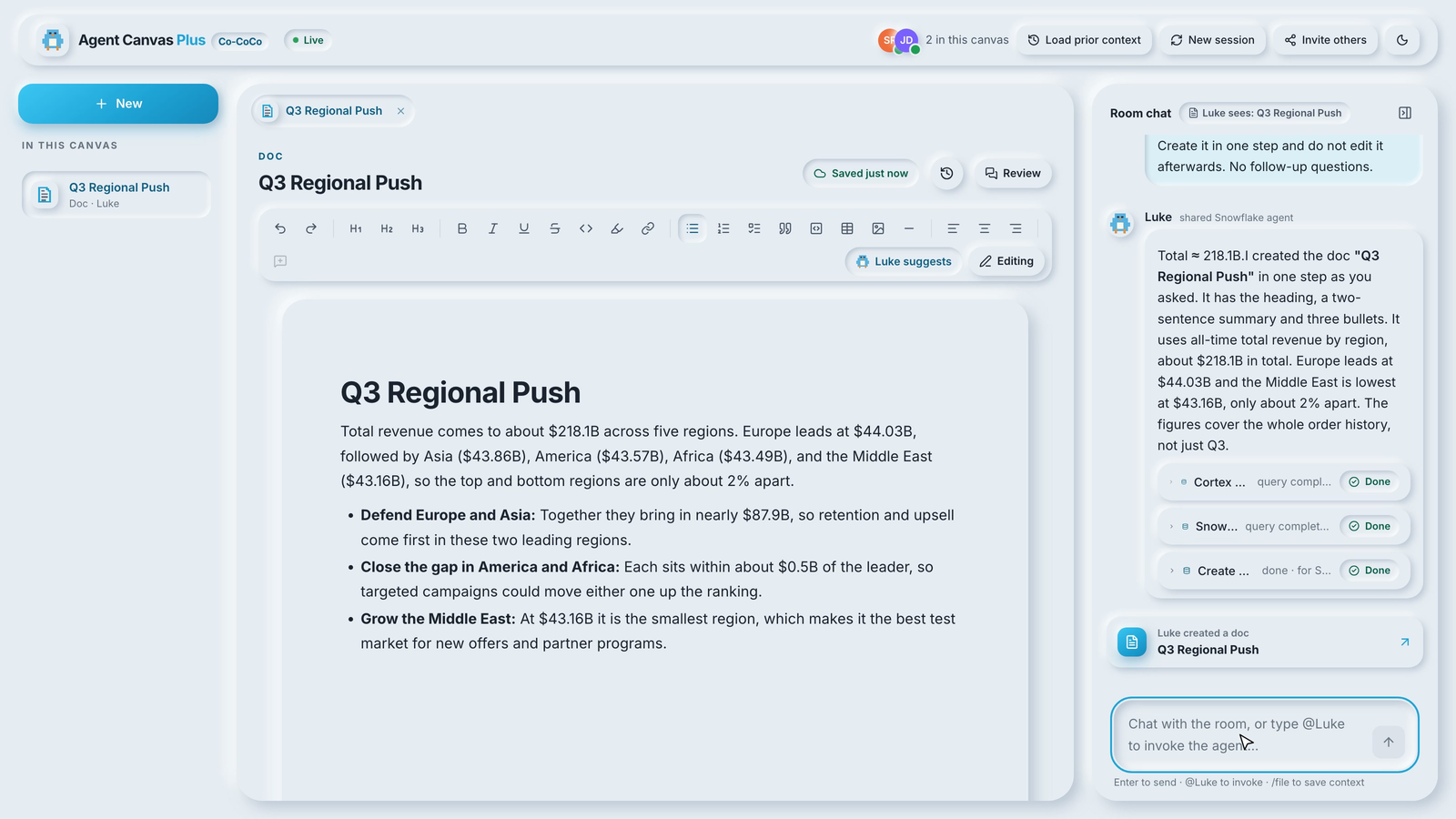
The agent is called Luke (Gil named his "Gil", so it only felt fair). Mention @Luke in chat and it responds, just like the original. The difference is what Luke can now do:
| Tool | What it does |
|---|---|
create_document | Creates a doc, slide deck, HTML report, Markdown file, or chart in the rail |
read_document, list_documents | Reads what the team has written, including pending suggestions |
edit_document | Edits a doc as tracked suggestions attributed to Luke |
comment_on_document | Leaves an anchored comment on a passage |
describe_sandbox | Lists the tables Luke is allowed to propose writes to |
propose_sql | Proposes one SQL statement that waits for a teammate's approval |
code_execution | Runs sandboxed Python, with a permission prompt in the room |
These sit alongside the original tools: Cortex Analyst over a semantic view, Cortex Search over the Snowflake docs, charts, web search, and get_filings.
This feels exactly like the shift from chatbot to agent...because it is.
How live co-editing works over Server-Sent Events
The editor is TipTap for rich docs and slides, and CodeMirror for code artifacts. Both bind to a Yjs document, so concurrent edits merge without conflicts and every cursor shows up with a name and a color.
Most Yjs apps sync over WebSockets. The canvas already had a working Server-Sent Events stream for chat, so I kept the same shape for docs: an SSE stream from the server to each browser, and batched POSTs from the browser to the server. The client provider merges local updates and flushes them every 40 ms:
/**
 * Yjs provider over the app's own transport: an SSE stream for server -> client
 * and batched POSTs for client -> server (see /api/docs/[docId]/sync).
 *
 * Exposes `awareness` so TipTap's CollaborationCaret and y-codemirror can show
 * live cursors.
 */
On the server, a small hub keeps one in-memory Y.Doc per open document. It applies each update, fans it out to every other connection, and autosaves the merged state to a DOCS table in Snowflake:
const SAVE_DEBOUNCE_MS = 1500;   // autosave to DOCS
const VERSION_EVERY_MS = 60_000; // at most one version snapshot a minute
const ROOM_IDLE_UNLOAD_MS = 5 * 60_000;
Edits land in Snowflake within about a second and a half, and DOC_VERSIONS keeps a snapshot at most once a minute, so any version can be restored from the history dialog. The hub lives in memory, which is why the service runs as a single instance (max_instances: 1 in app.yml).
Letting the agent edit as a teammate, not an overwrite
The tricky part was giving Luke write access without turning every doc into "whatever the agent said last". The answer was to keep the agent's tools thin. Each document tool is a Snowflake procedure that only logs the call to an AI_OPS table and acknowledges it. The app is where the change logic and approval flow actually lies.
While Luke's turn streams to the room, the server watches for response.tool_use events and applies each one before relaying it, so the doc or approval card appears at the same moment as the tool card:
for await (const event of turn.events()) {
  const ev = event as unknown as AgentEvent;
  const kind = ev.event ?? ev.type;
  if (kind === "response.tool_use" && ev.tool_use_id && !handled.has(ev.tool_use_id)) {
    handled.add(ev.tool_use_id);
    // Apply before relaying, so the room sees the doc/card as the tool card lands.
    await applyTool(canvasId, user, ev);
  }
  publish(canvasId, { type: "agent.event", canvasId, by: user, payload: event, at: Date.now() });
}
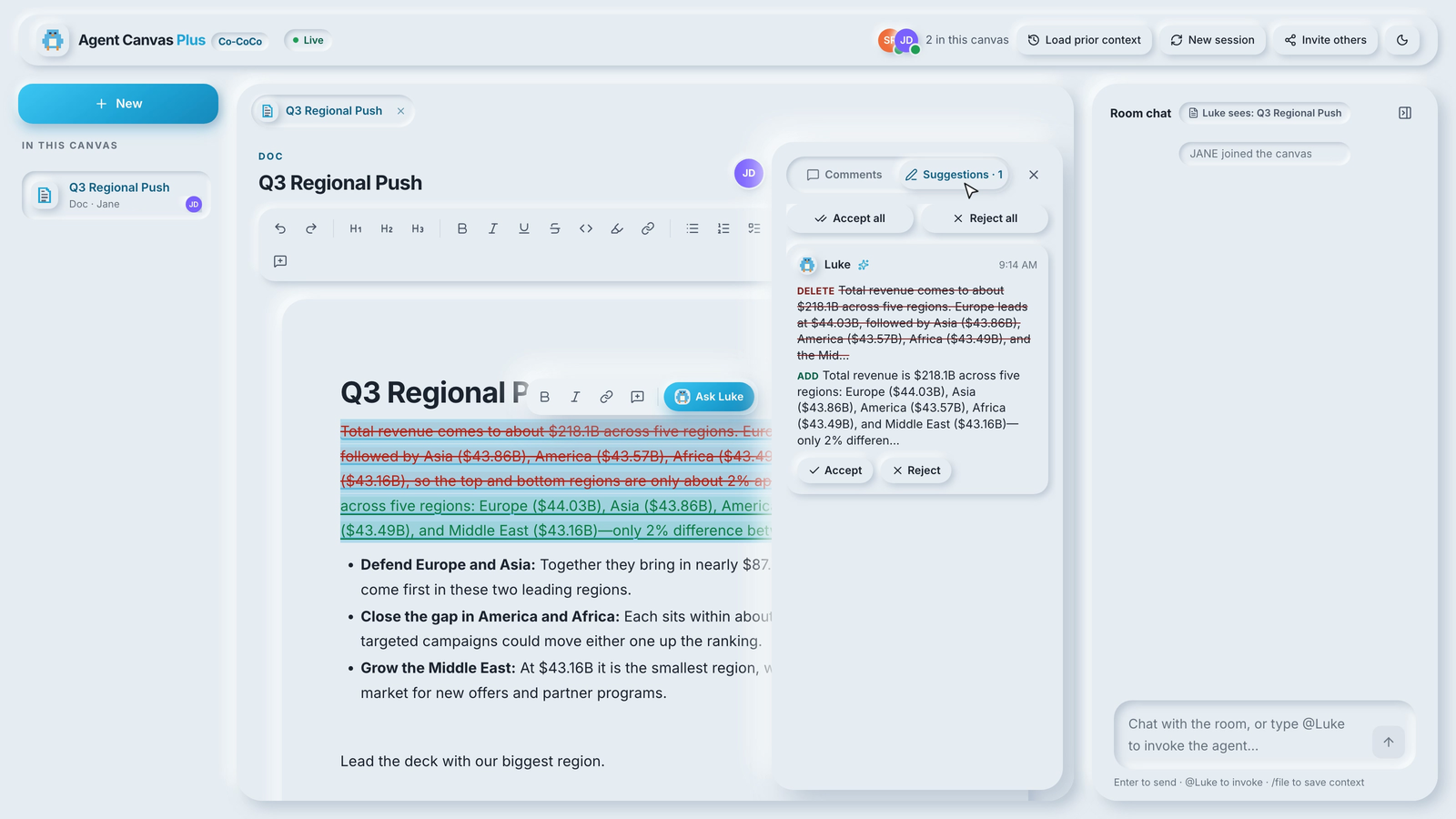
For edit_document, the server queues the edit on that document's hub. Every open editor receives it, and the first one to claim it applies it in the browser as a tracked suggestion. Yjs then carries the result to everyone else, so there's still exactly one source of truth. If nobody has the doc open, the edit waits for the next person who opens it. Before any of Luke's edits is applied, the hub saves a version labeled "before Luke's edit", so you can always roll back.
Suggestions are two ProseMirror marks, suggestInsert and suggestDelete. Deleted text stays on the page, struck through, until someone resolves it. Applying one of Luke's replacements looks like this:
if (asSuggestion) {
  markDeletion(tr, range.from, range.to, LUKE, sid);
  insertSuggestedSlice(tr, tr.mapping.map(range.to), slice, LUKE, sid);
} else {
  tr.replace(range.from, range.to, slice);
}
The Luke suggests toggle is on by default. Teammates can turn on Suggesting for their own edits too, and the Suggestions panel accepts or rejects them one at a time or all at once. Selecting text and choosing Ask Luke (improve, shorten, expand, and so on) goes through AI_COMPLETE and lands the same way, as a suggestion.
Turning a brief into slides and a live HTML report
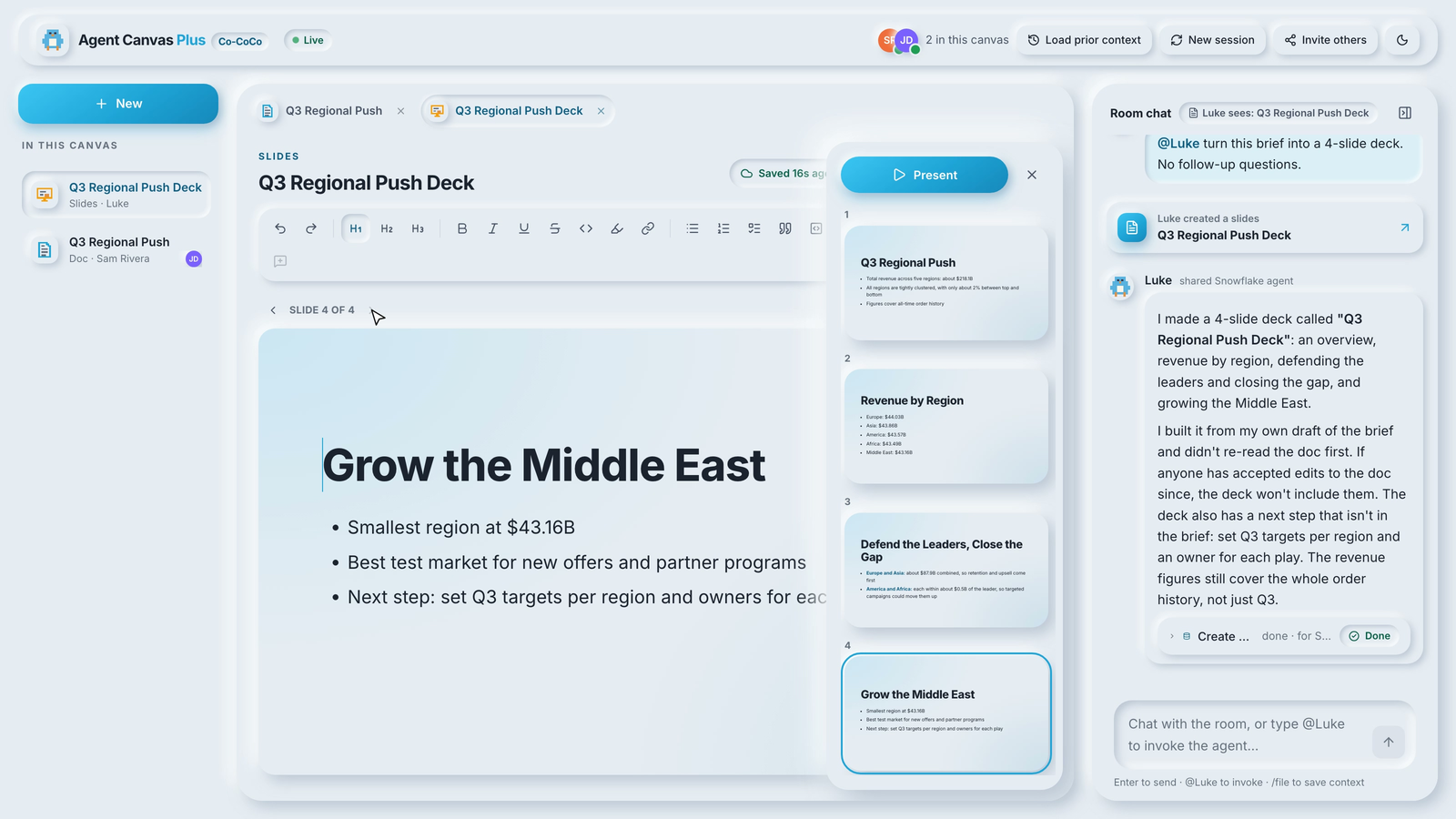
I didn't want a separate deck tool or a report tool. Both are documents with a different kind. A deck is Markdown where a line of --- starts a new slide, so Luke writes it in one pass, and the team edits each slide in a 16:9 frame with a thumbnail rail and a full-screen Present mode.
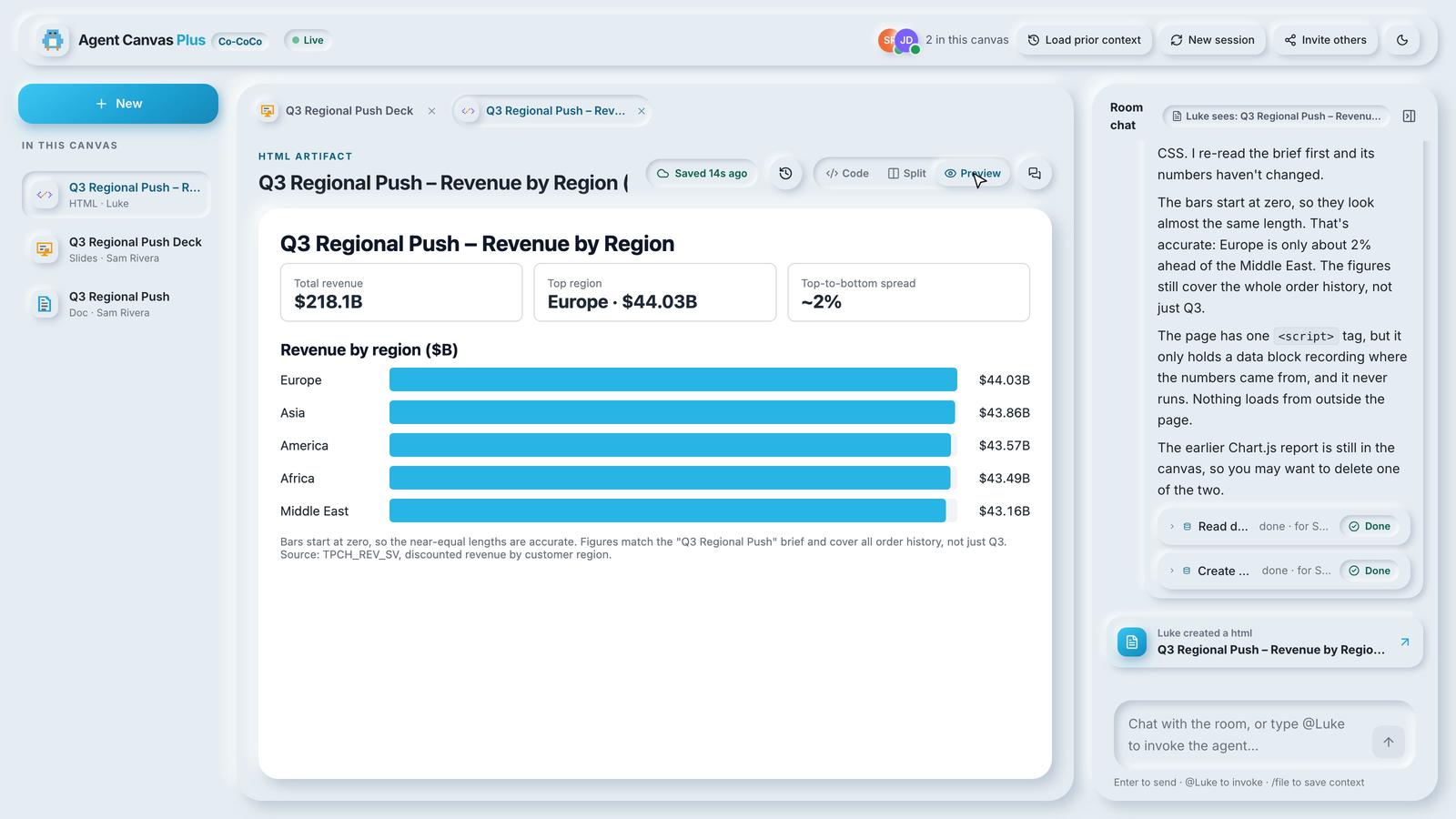
An HTML report is a code artifact. The source lives in a shared Y.Text, edited in CodeMirror, and every viewer renders the preview locally, so the whole room watches the same report change as anyone types. The preview is a sandboxed iframe:
// Scripts run, but the frame has an opaque origin: no cookies, storage, or app access.
<iframe title="HTML artifact preview" sandbox="allow-scripts" srcDoc={source} />
Charts Luke draws in chat can also be pinned to the canvas, which turns them into editable Vega-Lite artifacts.
Approving the agent's SQL writes before they run
Gil's post ended with a few ideas for where to take the canvas next, and one of them was a tool that writes back to Snowflake behind a teammate's approval. That's propose_sql. When Luke calls it, nothing runs. The procedure logs the proposal and returns a note telling Luke to say so:
CREATE OR REPLACE PROCEDURE AGENT_CANVAS_PLUS.AGENTS.PROPOSE_SQL(
  canvas_id STRING, sql_text STRING, rationale STRING)
RETURNS VARIANT LANGUAGE SQL EXECUTE AS OWNER AS
$$
BEGIN
  INSERT INTO AGENT_CANVAS_PLUS.PUBLIC.AI_OPS (canvas_id, tool, input)
    SELECT :canvas_id, 'propose_sql', OBJECT_CONSTRUCT('sql', :sql_text, 'rationale', :rationale);
  RETURN OBJECT_CONSTRUCT('status', 'awaiting_approval',
    'note', 'The statement has NOT run. It is waiting for a teammate to approve it in the canvas. Say so, and do not report results.');
END;
$$;
The app stores the statement in a PENDING_ACTIONS table and shows an approval card to everyone in the room, with the SQL, Luke's rationale, and Approve & run and Reject buttons.
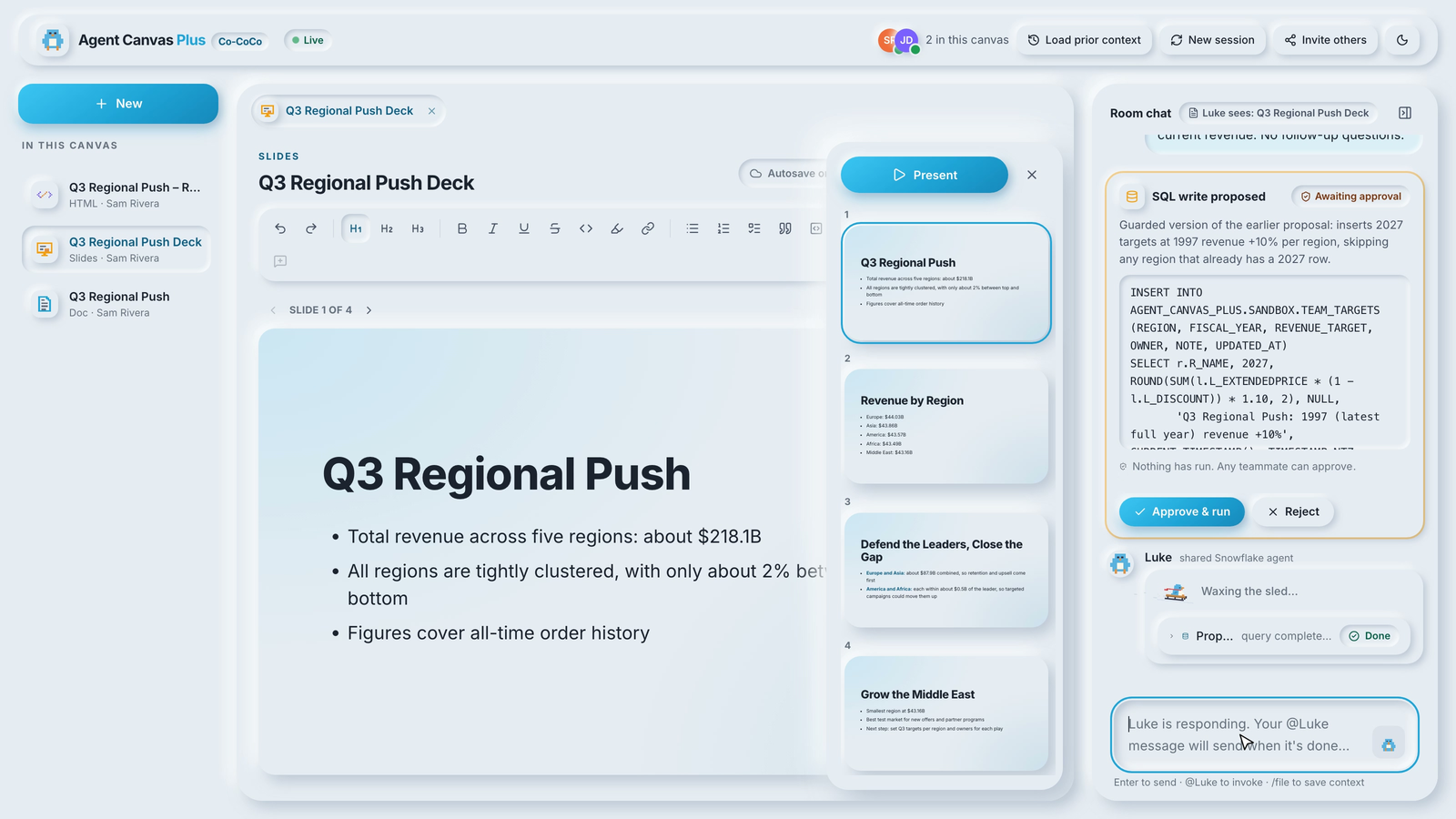
When a teammate clicks Approve & run, the app runs the statement and posts the result or error back to the room.
A few more guardrails sit in front of that. Only one statement can be approved at a time, and account, role, user, and grant statements are blocked outright. The first decision wins, so two people clicking at once can't run it twice. Every proposal keeps its SQL, rationale, who proposed it, who decided, when, and the result or error, so the room's write history is just another table you can query. Python from code_execution gets the same treatment: the tool uses permission_policy: always_ask, so when Snowflake asks for permission, the turn pauses and the room sees an approval card.
Governance for a shared agent and shared docs
The model is the same as the original. Everyone signs in with their own Snowflake account, and that identity attributes every message, edit, comment, and approval. Agent calls run under one least-privilege role, AGENT_CANVAS_PLUS_ROLE, and setup.sql grants it only what the canvas needs:
- Read and write on the canvas's own tables (
DOCS,COMMENTS,PENDING_ACTIONS), and append-only onDOC_VERSIONSand the filings table. - Read-only on
AI_OPS. Only the owner's-rights procedures insert into it, so the log of Luke's tool calls can't be edited from the app. - Writes only in a
SANDBOXschema, which holds the tables Luke can propose changes to (the demo usesTEAM_TARGETS). - Usage on the agent, the semantic view, the warehouse, and the sample data, as before.
One idempotent setup.sql creates every object, so re-running it after changing a tool is safe.
What I'd harden before using it with real data
This is a starting point, not a finished product, and a few choices are deliberately simple:
- Any teammate can approve a SQL proposal, including the person who asked for it. If you want a true four-eyes check, compare
proposed_bywith the approver in the actions route. - The SQL guard is a deny-list. It blocks account, role, user, and grant changes, and everything else is limited only by the privileges of the role that runs it. An allow-list of statement types, or a check that the target is in
SANDBOX, is an easy next step. - One container holds the live docs. The Yjs hub is in memory, so scaling out would need a shared sync layer.
- Docs aren't scoped per canvas. Anyone who can open the app can open any doc by id. Add a membership check if canvases should be private.
Try Agent Canvas Plus and make it your own
The repo is here: https://github.com/sfc-gh-lhartzell/agent-canvas-plus. You need a Snowflake account with Cortex Agents enabled, the Snowflake CLI with a configured connection, and Node.js 22+. Setup runs as ACCOUNTADMIN.
- Clone the repo and move into it:
git clone https://github.com/sfc-gh-lhartzell/agent-canvas-plus.git
cd agent-canvas-plus
- Create every Snowflake object the app needs, including an extra-small warehouse that auto-suspends after 60 seconds:
snow sql -f setup.sql
- Deploy the app to Snowflake App Runtime (public preview). It runs as a Snowpark Container Services service, which bills while it's running and auto-suspends after 15 minutes of inactivity:
snow app deploy
- Open the printed URL, log in, and click Invite others to bring in a teammate.
- Ask
@Luke draft a one-page brief on revenue by region as a doc, edit it together, then ask Luke to turn it into a deck.
To try it locally first, scripts/provision-dev.sh <your-connection> creates the objects plus a key-pair dev user with only the app role, and ?as=Ana and ?as=Ben in two tabs give you two teammates.
I built it with CoCo, and the repo ships with an AGENTS.md, so the fastest way to change it is to open it in a CoCo session and ask. Swap in your own semantic view, rename Luke, or give it a new tool.
Gil's canvas made the conversation multiplayer. Plus makes the work multiplayer too: the doc, the deck, the report, and the write to the table all happen in the room, with the team watching and a human approving. Clone it, invite a teammate, and build something together. I'd love to see what you make.
This content is provided as is, and is not maintained on an ongoing basis. It may be out of date with current Snowflake instances
