What Should I Actually Automate With an Agent?
Work can be monotonous. You redo the same actions over and over, and a lot of the time, the work isn't even that complex. Checking your schedule every morning, evaluating what pipelines failed overnight, synthesizing some data to send a weekly report to your boss.
Maybe this time just seems like an annoyance and insignificant, but even an hour a day of work you've done before (and will do again) will waste you weeks of time over a year.
Agent automations make an agent take care of all of that wasted time and repetition for you.
Learn which recurring work is worth handing over, which should stay a plain SQL task, and how to build one that actually does something to help.
What is agent automation?
An agent automation is a saved prompt on a schedule. Instead of you opening an agent and asking, it runs unattended and keeps a transcript of every run so you can read what it actually did. An automation runs the same type of work CoCo does in a live session, but the key differences are that it starts up on a schedule instead of you manually starting it yourself.
The jobs worth handing over are the ones that require thinking or judgement or decision-making, things you would normally need an agent for instead of a static macro:
- Triage last night's failures. Grouping them by likely cause is a judgment call, not a
GROUP BY. - Explain why a metric moved. The number is a query. The explanation is reading three things and deciding which two mattered.
- Review what the account is spending. The useful answer is which warehouse changed behavior and whether it will keep happening.
- Keep PRs and the backlog honest. Deciding whether a stale PR is risky means reading the diff, not counting rows.
- Check freshness and data quality. Whether a gap matters depends on context that no fixed threshold captures.
Using agents helps speed up your work, but it isn't perfect by any means. You still have to remember the job exists, stop what you're doing, rebuild enough context to ask well, and wait around for the answer. The Wednesday pipeline check keeps getting delayed because it's never the most urgent thing at 2pm. A scheduled automation takes that out of your hands. The automation run happens even if you don't remember to start it, which means that the answer is waiting for you when you need it and that your work still gets done even if you are busy doing something more urgent.
Even if you save just an hour a day automating some of the monotonous and repetitive tasks, over eight weeks, that's a whole working week of time saved.
Why schedulers and traditional automations aren't the same as agent automations
When you decide to automate something, your first instinct is probably to reach for whatever already works: a cron job on your laptop, a Snowflake task, or a DAG in an orchestrator like Airflow or Dagster. None of these were made to handle the type of work that you can do with agent automations.
A scheduled query has a deterministic output and fails loudly: same SQL, same shape of result, and when it breaks there's a FAILED state and a query ID. That's what tasks, cron, and Airflow are built to run.
Nothing on your to-do list fits that type of task. Every item needs you to think or write a paragraph or evaluate something and then send a Slack message to someone. No SQL query returns "these six failures share a cause and this one broke the dashboard." Schedulers are not as flexible and cannot provide the analysis, sentiment, or capability that agentic automations do.
An agent produces a judgment on request, which is what makes any of this possible. It can digest information and run multiple queries for it. It can be dynamic when schemas change or when data is updated. It can think and produce output based on analysis. And my personal favorite, it can do things for you. You aren't stuck to just a result, but you can connect MCPs and send messages, create events, and tons of more actually useful actions to improve productivity and output.
How I automate agents in Snowflake with CoCo
If you aren't aware, CoCo is Snowflake's agentic coding and data tool. CoCo has automations built in, so an automation is a saved prompt that CoCo runs on a schedule inside Snowflake rather than on your machine. Each run happens unattended in a Snowflake-managed sandbox, needs no warehouse, and creates a thread you can open afterward to see every query it ran and what it concluded. Automations are currently in public preview.
I build all of my automations in Snowsight since I prefer browser UI experiences for these, though if you prefer the CLI or Desktop for this, that works too (note automations for these are all public preview).
I prefer using the UI flow to set it up, so that's what I'll walk you through, but you can also just ask CoCo to create the automation for you and that'll work perfectly fine too.
Step 1: Open the Automations panel and click New
Open the CoCo sidebar by pressing the floating button on the right side of the screen, click the clock icon at the top of the sidebar.
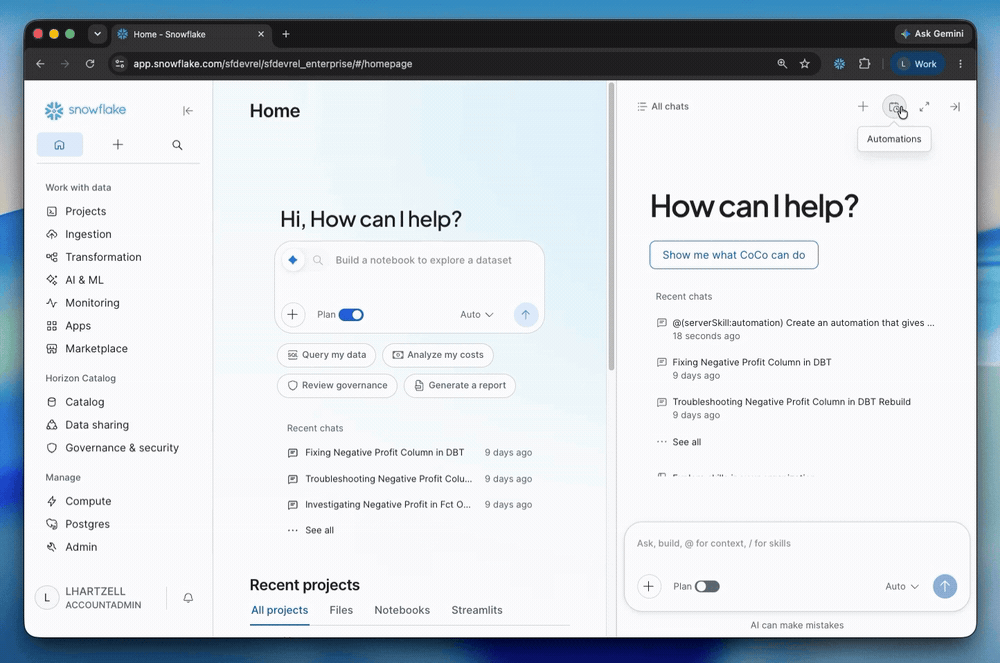
Then click the "New" button.
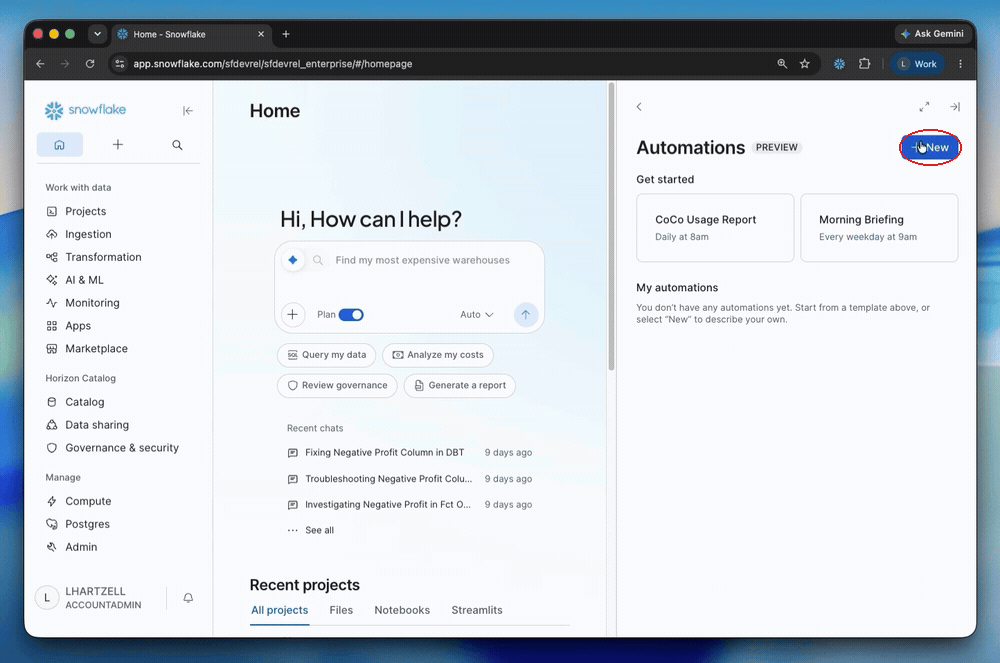
Step 2: Fill in the title and task
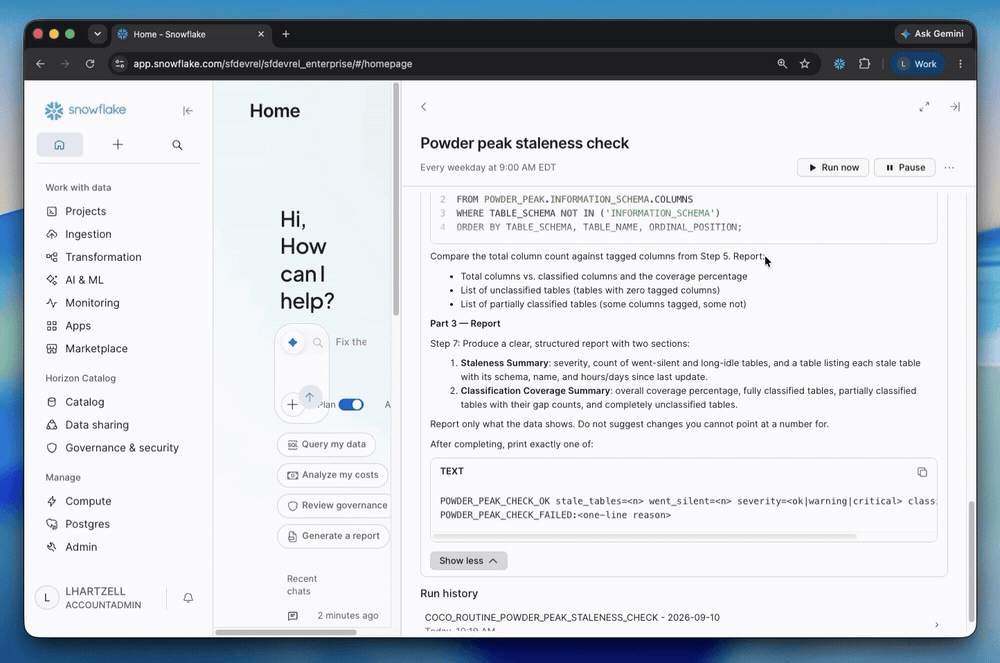
Fill in the title and what you want the automation to actually do.
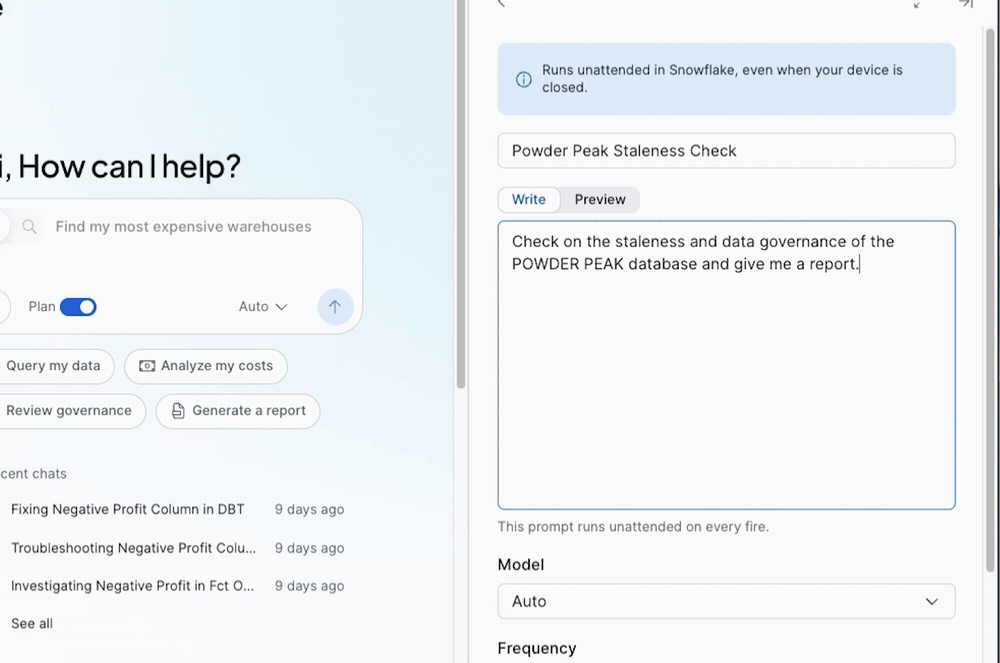
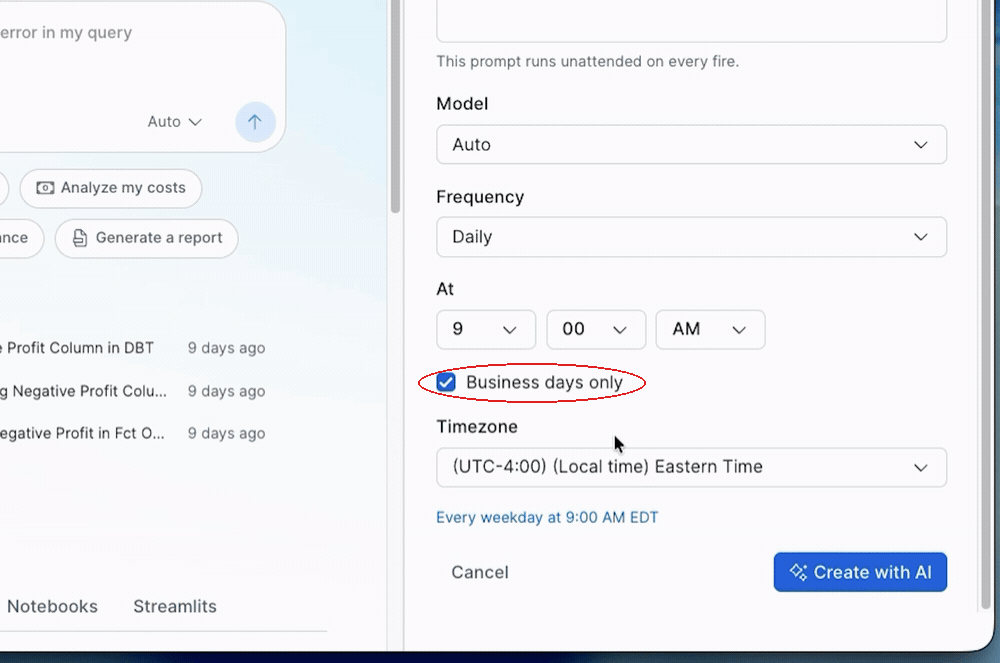
Step 3: Set the schedule and model
Set the schedule for when your automation will run, choose a model. Here, I'll do business days only since I don't want this to run on days where I'm not at work.
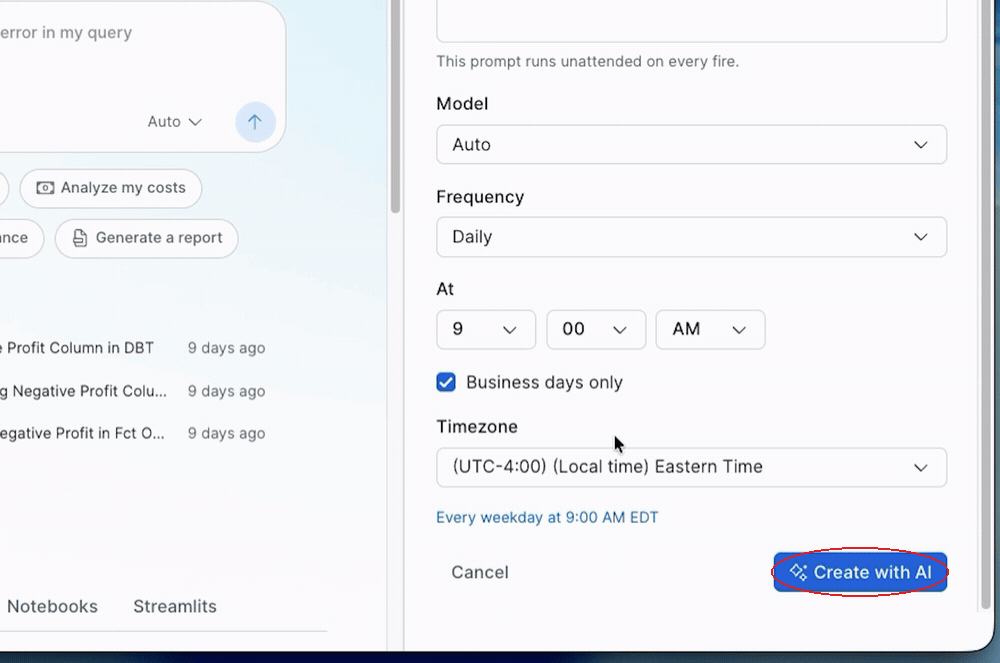
Step 4: Press "Create With AI" to save it
CoCo sets the automation up for you from there.
If you'd rather skip the form, just send CoCo a plain-language prompt and it will draft the automation for you.
For example:
"Every weekday at 9 AM Pacific, check yesterday's pipeline failures, group them by likely cause, and write me a short summary. This runs unattended, so don't ask follow-up questions. End with a one-line status."
Follow the prompts from CoCo to create the automation and then that's it. You never touch SQL, YAML, or technical scheduler config files.
Three habits to make agent automations even more useful
Connect to MCP servers
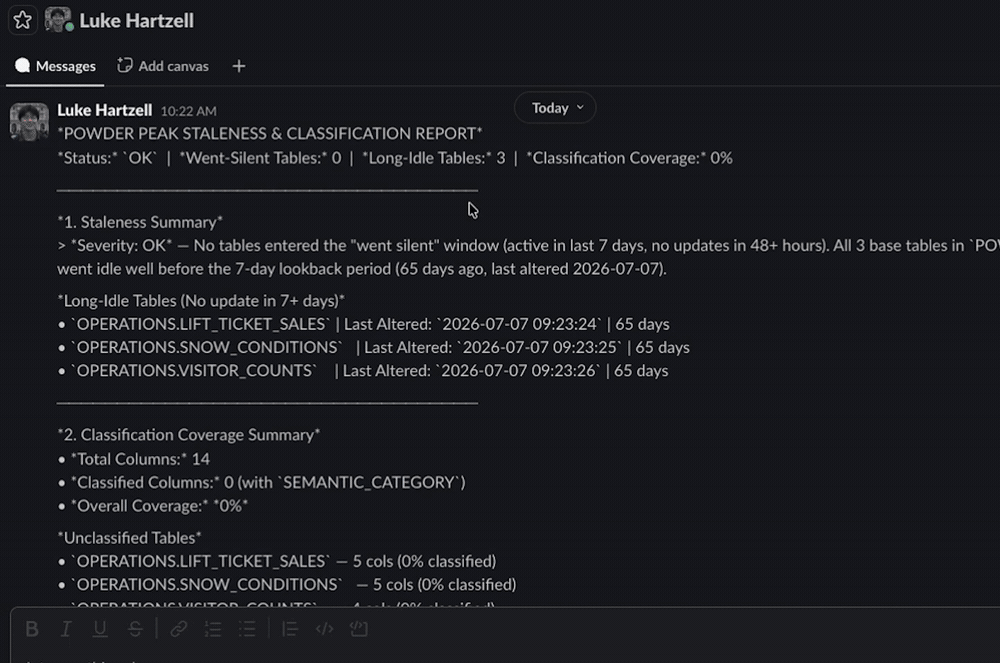
Even with no MCP servers connected, automations are useful. They can query your tables, reason over what it finds, and leave a written answer in the thread for you to read later. However, it's much more useful to connect MCP servers so that you can take more actions that align with your actual workflows.
These are the MCPs that I personally love to use for my automations:
- Slack. To send reports and messages directly to the people I need to talk to and can pull in all sorts of context from my conversations and channels.
- Gmail. To send formatted reports messages.
- Google Drive, Sheets, and Docs. To write updates and syntheses into update docs or spreadsheets based on analysis of documents and files from my Google Drive.
- Google Calendar. Checks what's coming up, can schedule meetings, gives reports on the meetings I've had and who's attended.
- Glean. Finds the internal doc or ticket explaining a code/product change or can find me key documents and stakeholders to contact for reference.
With MCPs attached, an automation can pull the Slack thread behind a number, see which PRs went stale, open a ticket for the failure it found, and put the summary where your team already looks. The job stops being something waiting for you and starts being something that takes action for you.
Point at a skill instead of writing the procedure into the prompt
A free-form prompt lets the agent decide how to approach the work, which means the output shape drifts run to run and results may differ. A skill defines the procedure and context (at least, a good one does), so that the automation can be more consistent, as well as the result.
For example, my AI cost insight automation is super short and just references the /cost-intelligence skill. Since it calls this skill which defines exactly what to do, exactly what the output should be, and exactly what tables to get, my results are not only verified as being what I want and useful, but also more consistent as well.
Run it on demand before you trust the schedule, and read the thread
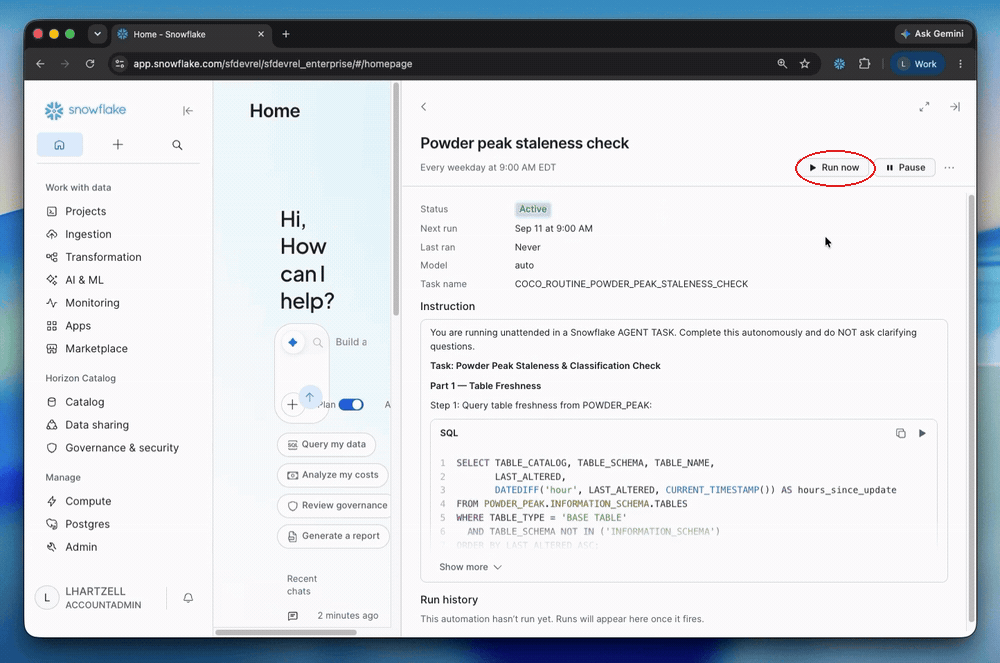
Every run creates a thread you can open. Task state tells you the run completed; the thread tells you whether the work happened and what work did happen. It's best to test an automation first by asking CoCo to do a dry run for you. This way you can catch any ambiguities, differences in what you want vs the output, and any bugs that may arise throughout execution. A broken automation is just costly and ineffective, so testing is crucial.
When you should use agent automations instead of more traditional options
cron or launchd locally
Use when you don't need to collaborate on the task with someone else, if the task needs your own machine, and if you want no infrastructure at all. Mainly if you are more comfortable with this option and want it specifically local.
Use CoCo Automations when you want your automation to run even if your laptop is sleeping.
Airflow, Dagster, dbt Cloud
Use when you have real dependencies, backfills, and retries to reason about.
Use CoCo Automations when it is one prompt, because operating an orchestrator for that is inefficient and is what keeps work unnecessarily manual.
Snowflake tasks
Use when the output is a result set, since tasks can be cheaper, can be more predictable, and give more detailed insight into task history, duration trends, auto-retry, and manual retry of a failed graph within 14 days.
Use CoCo Automations when the useful answer is a judgement that no SQL query is able to produce on its own.
Snowflake alerts
Use when you only want to hear about something on the occasions it is true, keeping in mind that alerts are created suspended until you ALTER ALERT ... RESUME, that an alert on new data allows one table or view with change tracking and no CTEs, joins, DML, or procedure calls, and that SUSPEND_ALERT_AFTER_NUM_FAILURES keeps a broken one from failing quietly forever.
Use CoCo automations when you want a written summary every time rather than a trigger.
CoCo Desktop automations
Use when the work needs your local repo or local tooling.
Use hosted CoCo automations when it has to fire at 3am, because Desktop runs only while the app is open and the machine is awake.
Scripting agent automations from the CLI
Automations created in Snowsight and from the CLI are the same objects, so you can create one either way and manage it from either place. Everything above is one command:
cortex automation create \
  --name pipeline_health \
  --prompt-file pipeline-health.md \
  --schedule "daily at 9am" \
  --timezone America/Los_Angeles \
  --mcp MY_DB.MCP.SLACK \
  --mcp MY_DB.MCP.JIRA
--prompt-file is why I use the CLI for the long ones. Add --dry-run to print the generated task and SQL without creating anything, which is the cheapest way to confirm a natural-language schedule parsed the way you meant.
Then verify and manage:
cortex automation execute pipeline_health --wait
cortex automation doctor pipeline_health --limit 10
cortex conversations transcript <thread_id>
doctor gives you task state, error code, message, and query ID. The rest is list, describe, suspend, resume, and drop.
You need EXECUTE AGENT TASK on the account, which is granted to PUBLIC by default. To restrict it:
REVOKE EXECUTE AGENT TASK ON ACCOUNT FROM ROLE PUBLIC;
GRANT EXECUTE AGENT TASK ON ACCOUNT TO ROLE automation_user;
Runs execute as you under caller's rights, respecting role-based access control, row access policies, and masking policies. To narrow the blast radius, tighten the owning user's default and default secondary roles rather than switching roles before you create the automation, because that switch isn't recorded.
Set up your first automation
Set up your first automation by telling CoCo to "Create a daily automation for me" or by using the UI to set one up.
Read more on automations from official docs: Cortex Code automations
Read more on CoCo in Snowsight from official docs: Cortex Code in Snowsight
Watch the walkthrough on YouTube: CoCo Automations demo
Don't have Snowflake CoCo? Sign up for a trial here.
This content is provided as is, and is not maintained on an ongoing basis. It may be out of date with current Snowflake instances
