From Correct SQL to Accurate Business Answers: Snowflake Business Ontology
Grounding AI Agent Reasoning in Business Context
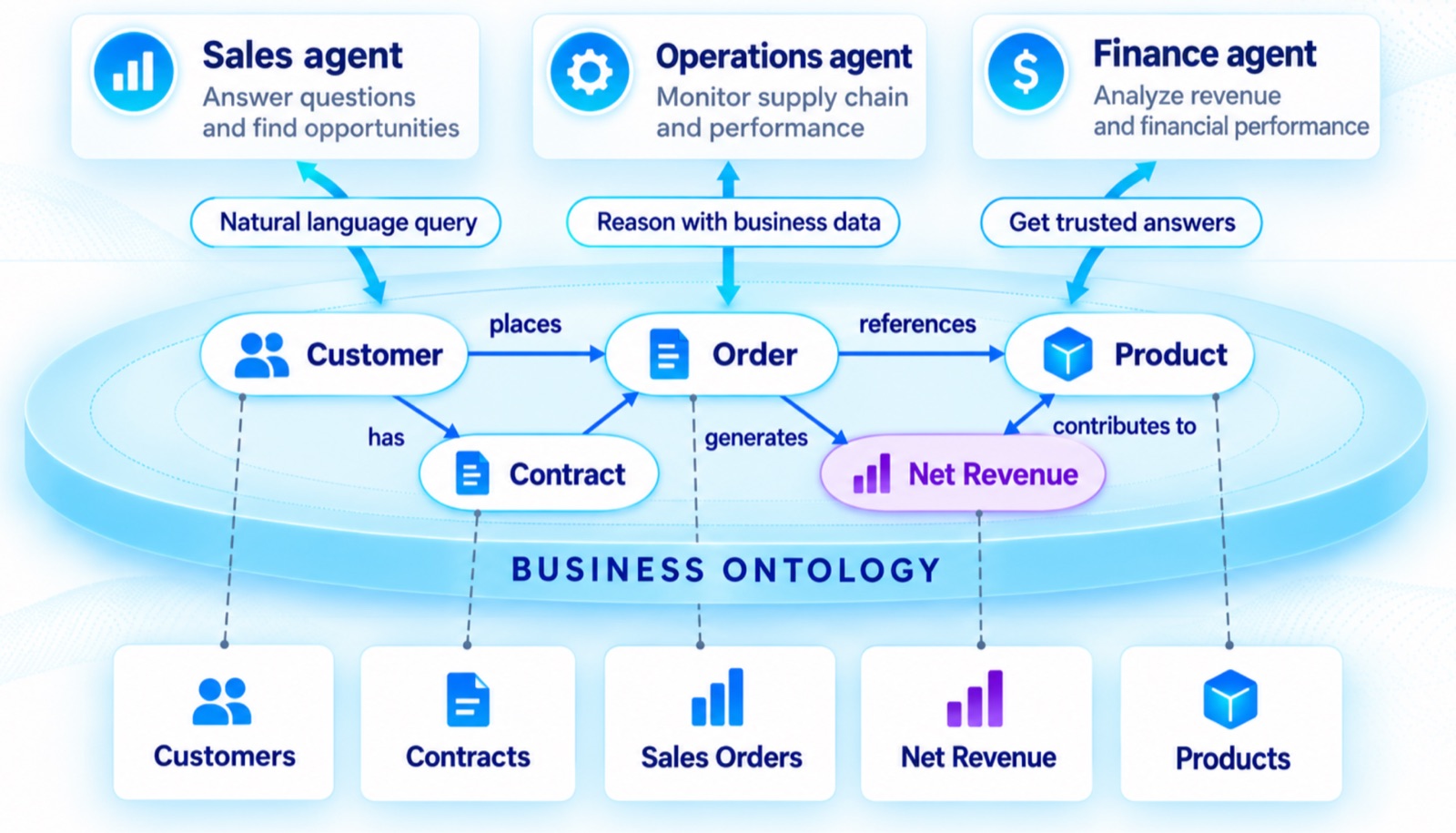
The Gap Between a Correct Query and a Correct Answer
Ask an AI agent: "How many suppliers do we have?"
Procurement's semantic view says 15. Finance's says 14, because it leaves out one vendor on probation. Both views are correct, and both were built carefully by the team that owns them. The agent has nothing that tells it which one is the company's answer. So it guesses, or it says "it depends: 15 on file, 14 active." Reasonable to an analyst. Useless in a board report.
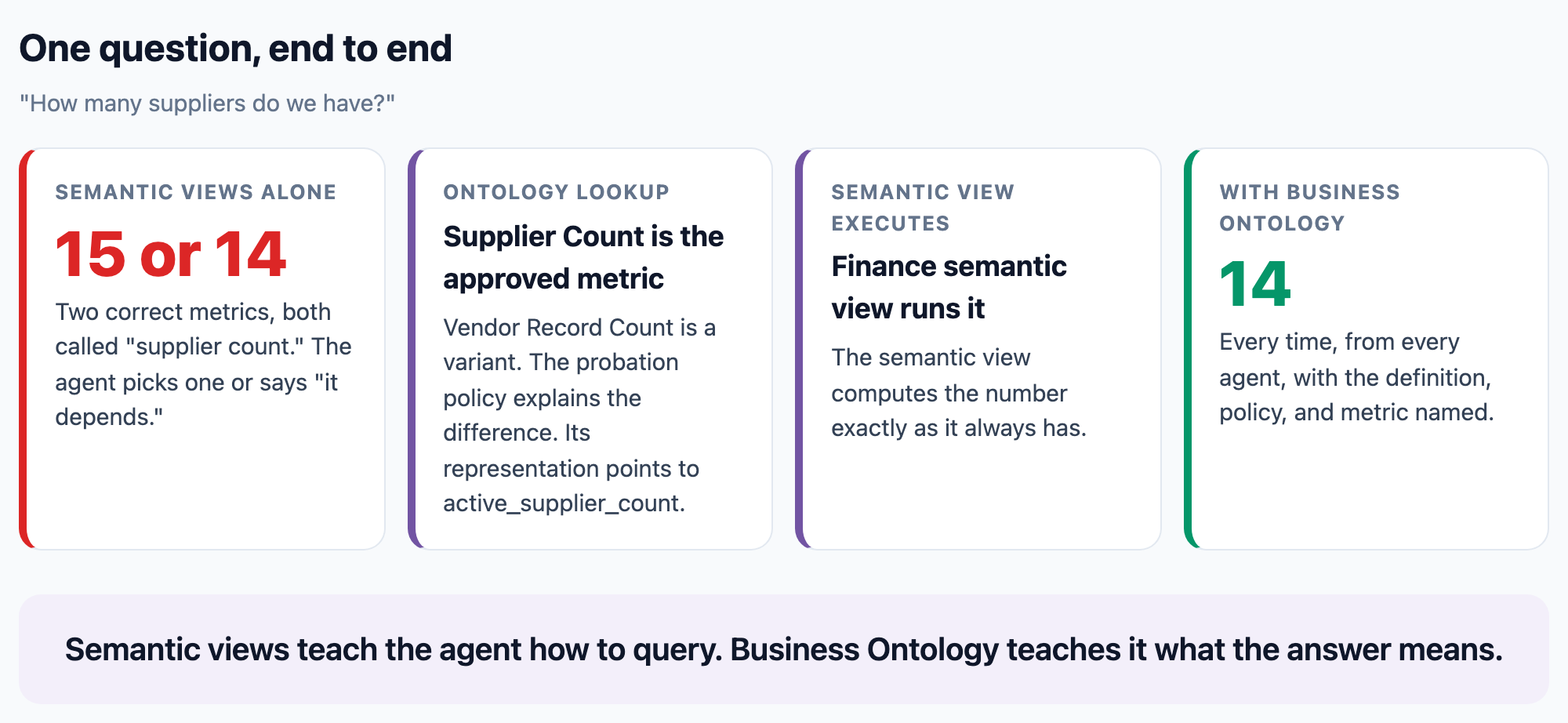
The same question, two ways. With semantic views alone, the agent lands on 15 or 14. With Business Ontology, it looks up what "supplier count" officially means, lets the semantic view compute it, and answers 14 in this scenario.
The four cards above are the whole story of this post. On the left, two correct metrics and no way to choose between them. In the middle, the two steps that fix it: the ontology says which definition the business approved, and the semantic view computes it exactly as it always has. On the right, one answer, from every agent, with its source named.
Nothing in that picture is broken. The SQL is right, the joins are right, the semantic views are well built. What was missing is a decision that was never written down anywhere an agent can read it: which of those two numbers the company actually stands behind. The rest of this post walks through each card: why semantic views stop at the first one, what the ontology adds in the middle two, and what we measured when we compared the two agents side by side.
Note: All the numbers in this article are synthetic examples for informational purposes.
What Semantic Views Already Do Well
It's worth being clear about this first, because the rest of the story depends on it. Semantic views are the right foundation for agents that answer questions about data.
A well-built view teaches an agent how a team thinks about its data. It knows which tables to join, which columns are measures, which expressions turn raw rows into a metric. It can carry synonyms, so "supplier count" maps to a real metric. It can encode quiet business rules: credit memos reduce cost, freight surcharges aren't discounts, a multi-level bill of materials has to be rolled up before you can price a product.
For a question that lives inside one team's world, a good semantic view is enough. The agent finds the metric, runs it, and returns the right number.
The trouble starts when the question doesn't belong to one team.
Why Two Correct Views Still Produce a Wrong Answer
Back to the supplier count. Here is what the vendor master looks like, simplified:
| Vendor group | What it means | Vendors |
|---|---|---|
| Strategic partner | Long-term, high-volume suppliers | 4 |
| Standard vendor | Regular approved suppliers | 10 |
| Probationary | New, still being evaluated | 1 |
| Total on file | 15 |
Procurement's view has a metric called vendor_record_count. It counts all 15, because Procurement maintains the vendor master and needs to see every record. Finance's view has active_supplier_count, which counts only the 14 strategic and standard vendors, because Finance reports on suppliers the company actually does business with.
Both teams gave their metric the synonym "supplier count." Both were right to. In their own context, that's exactly what it is.
A semantic view describes its own team's metric. There is no way to say "my metric is the official one" or "Procurement's metric is a working variant." That isn't a flaw in the view. Authority across teams simply isn't something a single team's model can express. Nobody inside Procurement can decide what Finance reports, and nobody inside Finance can rewrite Procurement's view. A semantic view defines metrics and business logic for its modeled data; organizations may also need to document which definition should be used across teams.
So the agent sees two good candidates and no rule for choosing. Sometimes it picks one. Sometimes it reports both. Either way, the person asking walks away without an answer they can repeat.
The usual fixes help for a while. You can add an instruction to the agent's prompt: "for supplier count, use the Finance metric." That works until the Sales team builds its own agent with its own prompt, and the two drift apart. You can write the definition in a wiki, but agents don't read wikis. You can consolidate everything into one central metrics layer, but that still defines the math, not who approved it or why the other number exists.
What's needed is a place where the company's decision lives, owned by the people who make it, and readable by every agent.
What a Business Ontology Adds
Business Ontology is the governed meaning layer in Snowflake Horizon Catalog. It holds the approved, shared definitions of the concepts your business runs on (customer, revenue, active supplier, churn) and connects each one to the data that implements it. Business Ontology is intended to help organizations represent shared business definitions and their relationships.
| Layer | What it answers |
|---|---|
| Semantic Views (GA) | How to compute a metric: tables, joins, expressions, synonyms, verified queries. |
| Business Ontology (Public Preview) | What a concept officially means, that it was approved, how it relates to other concepts, and which semantic view metric implements it. |
| Cortex Agents | Use both: the ontology to decide which definition applies, the semantic view to execute it. |
In one line: Semantic Views tell Snowflake how to compute your metrics. Business Ontology tells everyone what those metrics mean, that they were approved, and whether different teams agree.
The ontology is built from a handful of simple building blocks:
- Domains group concepts by the part of the business that owns them, such as Procurement, Finance & Controlling, or Sales & Distribution. Who can propose, edit, and approve definitions is granted per domain.
- Nodes are the concepts themselves. A node can be a metric (Supplier Count), an entity (Supplier), a company term (Tier A Supplier), or a policy concept (Probationary Vendor Exclusion).
- Relationships connect nodes with a named meaning: one metric has a variant, one term is a kind of another, one metric derives from another, a policy applies to a metric.
- Representations link a node down to the Snowflake object that implements it, such as a specific metric in a specific semantic view.
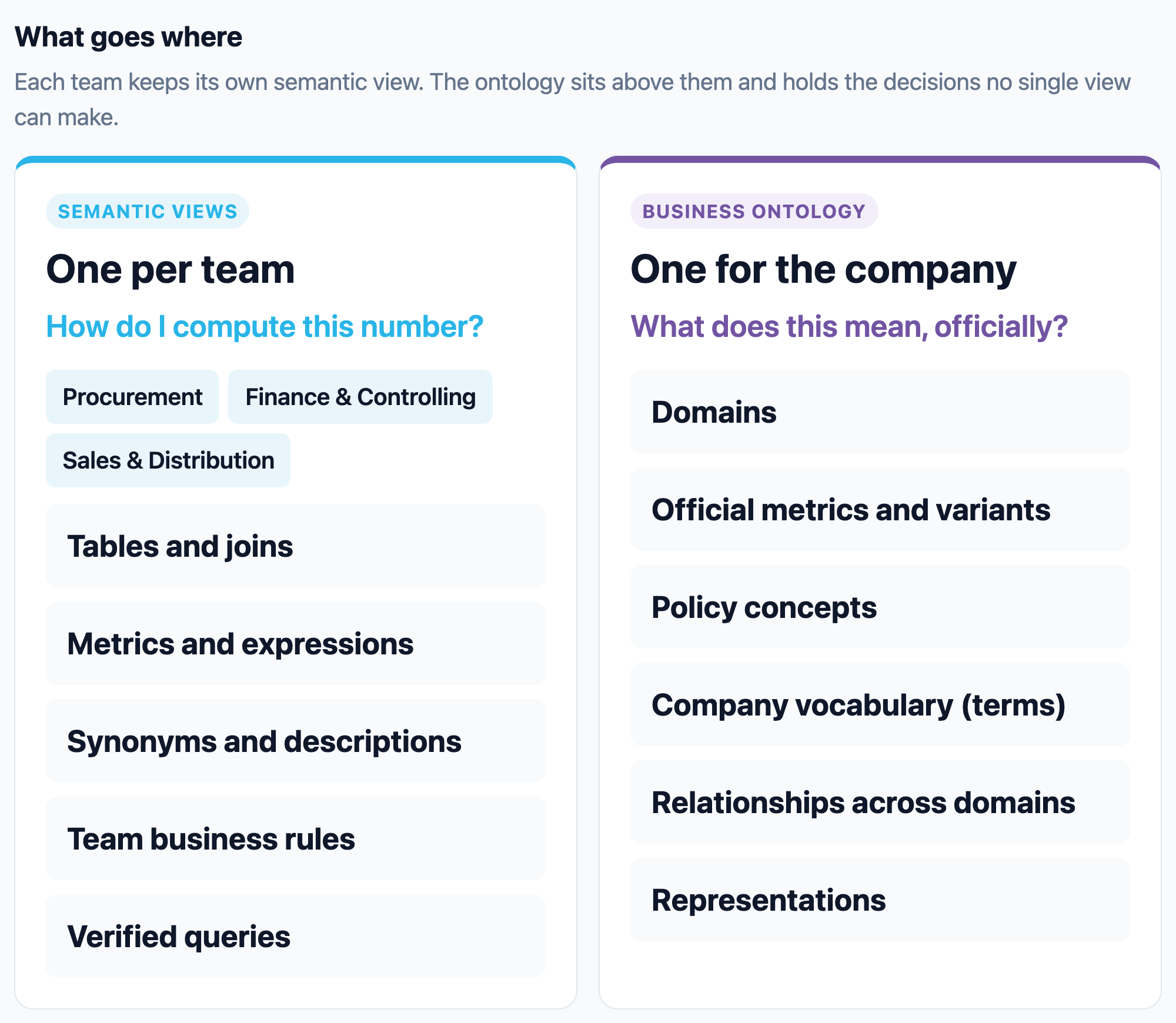
Semantic views answer "How do I compute this number?" for one team. Business Ontology answers "What does this mean, officially?" for the whole company.
The figure above places the two layers side by side. On the left, each team keeps its own semantic view: the tables and joins, the metrics and expressions, the synonyms, the team's business rules, and verified queries. Procurement's view computes vendor_record_count = 15; Finance's view computes active_supplier_count = 14; both carry the synonym "supplier count." Each view is right for its own team, and neither can say its metric is the company's. On the right, one ontology serves the whole company. It holds what no single view can: domains with their own owners, the official metric and its scoped variants, policy concepts that explain why numbers differ, company vocabulary, relationships that cross team boundaries, and representations that point each concept at the semantic view metric that computes it. Nothing on the left is replaced; the right-hand side adds the decisions on top.
For the supplier count, the ontology records a few simple facts that no single view could:
- Supplier Count is the official number for all reporting: vendors that are strategic or standard partners.
- Vendor Record Count is a legitimate variant, used by Procurement for master data upkeep. It isn't the supplier count.
- A policy, Probationary Vendor Exclusion, explains the difference: vendors on probation don't count as active suppliers until they're promoted.
- Supplier Count is implemented by Finance's
active_supplier_count. Vendor Record Count is implemented by Procurement'svendor_record_count.
Notice that nothing about the semantic views changed. Procurement keeps its metric, Finance keeps its metric, and both stay correct for their own purpose. The ontology sits above them and says which one answers the company's question.
Supplier count is one small corner of a larger picture. Across a business, these definitions connect: a margin derives from revenue and cost, a company term like "Tier A" narrows the idea of a supplier, a policy applies to a metric. Each concept points down to the semantic view metric that computes it.
A Conceptual Ontology Graph
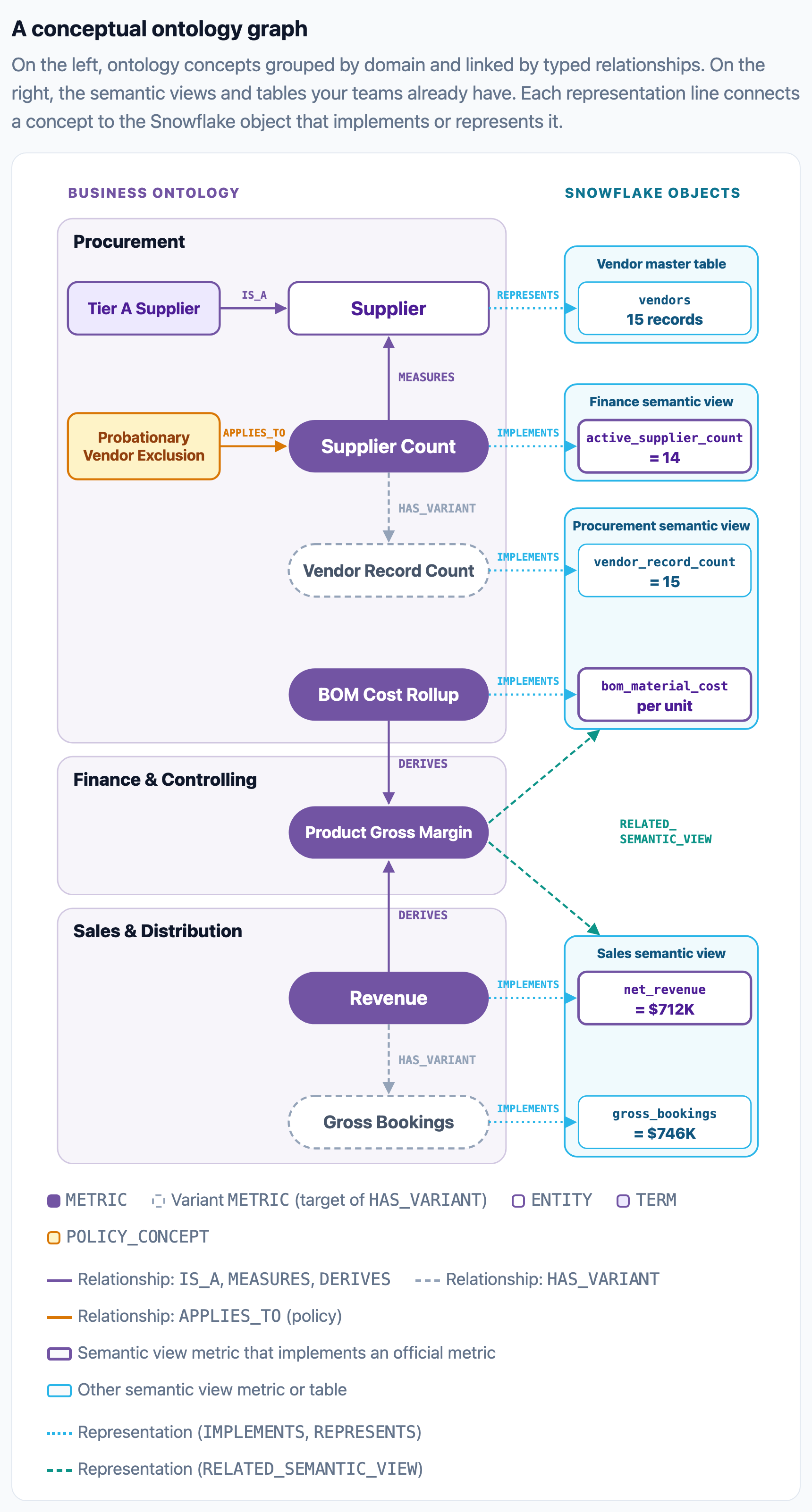
On the left, ontology concepts are grouped by domain and linked by typed relationships. On the right, the semantic views and tables your teams already have. Each representation line connects a concept to the Snowflake object that implements or represents it.
Read the graph in two columns. On the left is the ontology, with its three domains stacked from top to bottom. In Procurement, Supplier Count (the official metric) measures the Supplier entity above it and has a variant, Vendor Record Count, below it, shown dashed to mark it as a variant rather than the official metric. Probationary Vendor Exclusion, a policy concept, applies to Supplier Count, which is exactly the rule that separates 14 from 15. Tier A Supplier is a Supplier, so the company's own vocabulary has a precise meaning. Further down, the same pattern repeats for money: Revenue in Sales & Distribution has a variant, Gross Bookings, and Product Gross Margin in Finance & Controlling, in the middle, derives from both BOM Cost Rollup above it and Revenue below it, a relationship that crosses all three domains.
On the right is what already exists: the vendor master table and the Finance, Procurement, and Sales semantic views. Each concept connects to the object beside it with a short dotted line, a representation. Supplier Count is implemented by active_supplier_count in the Finance semantic view, Vendor Record Count by vendor_record_count and BOM Cost Rollup by bom_material_cost in Procurement's, and Revenue and Gross Bookings by net_revenue and gross_bookings in Sales. The Supplier entity represents the vendor master table. Metrics outlined in purple are the ones that implement an official company metric. Product Gross Margin has no single metric to implement it, because no one view holds both revenue and cost; instead, two dashed lines link it to each view that contributes to it, Procurement and Sales, as a related semantic view. Those lines are what let an agent go from "what does the business mean?" to "which metric do I run?" in a single step.
Every definition starts as a draft, and a steward approves it before agents can see it. Drafts are not served to agents. So the answer an agent gives isn't the model's best guess; it's a decision the business reviewed and approved.
Following the Question Again
Now ask the same agent the same question, with the ontology available.
"How many suppliers do we have?"
Before it touches any data, the agent looks up "supplier" in the ontology. It finds Supplier Count, sees that it's the official definition, notices the probationary vendor policy, and learns which semantic view metric implements it. Then it does what it always did: it asks Finance's semantic view to compute active_supplier_count.
This is the middle of the picture from the top of the post. The ontology lookup is the second card: Supplier Count is the approved metric, Vendor Record Count is a variant, the probation policy explains the gap, and the representation points to active_supplier_count. The semantic view running it is the third card, computing the number exactly as it always has.
The answer comes back as 14, every time, with a line explaining where it came from: Supplier Count (Procurement domain), implemented by Finance's active_supplier_count, probationary vendors excluded.
The semantic view still does the computing. The ontology decides what is officially being computed. Neither could produce that answer alone.
Four Things Semantic Views Can't Settle on Their Own
To see how often this matters, we modeled a hypothetical manufacturer's supply chain with three teams (Procurement, Finance & Controlling, Sales & Distribution), each with its own well-built semantic view. Two Cortex Agents used the same model, the same views, and the same instructions. Only one could consult the ontology.
Where a view already encoded the rule, both agents answered the same way. The differences showed up in four places.
1. Which of two correct metrics is official
The supplier count was the clearest case, and revenue behaved the same way. The Sales view had gross_bookings ($746,000, which even carries the synonym "revenue") and net_revenue ($711,915). Without the ontology, the agent usually picked well and sometimes answered "it depends." With it, the agent answered $711,915 every time, because Gross Bookings is approved as a pipeline variant of Revenue, explicitly "not official revenue."
That's the difference between a hint in a column description and a steward-approved statement of authority.
2. The words your business uses, not the words your data uses
"How much have we spent with our Tier A suppliers?"
"Tier A" is how this hypothetical company talks about its strategic partners. It isn't a column, a code, or a synonym in any semantic view. The agent without the ontology did the sensible thing: it listed spend by vendor group and asked which one we meant, or assumed. The ontology defines Tier A Supplier as a kind of Supplier: a vendor in the strategic partner group. So the ontology agent answered directly.
Every organization has this vocabulary: tier names, segment labels, program names, "active," "eligible," "at risk." It lives in people's heads and slide decks. The ontology is where it becomes something an agent can read.
3. The company's definition, not the textbook's
Asked "What is the difference between gross bookings and revenue?", the agent without the ontology gave a fluent answer about ASC 606: bookings are counted at signing, revenue is recognized at delivery.
It sounded authoritative. It wasn't how this company defines either term. The ontology agent gave the company's definition: gross bookings is order value before discounts, used by Sales for pipeline; revenue is net of discounts and is the official figure.
This is the failure mode that worries us most. When company knowledge is missing, a capable model fills the gap with general knowledge, and it sounds most confident exactly where it knows least about your business.
4. Where the number came from
Every ontology-grounded answer named the definition it used, the domain it belongs to, and the metric that computed it. The agent without the ontology could show its SQL, but not whose definition that SQL implemented.
When an executive asks "where did this number come from?", that line is the audit trail.
Same Question, Different Teams, Same Answer
Agents multiply. Finance builds one, Sales builds another, each on the semantic views it needs. In our test, the Finance agent could see active_supplier_count and the Sales agent could only see vendor_record_count. Without the ontology, they gave different supplier counts. With it, both answered 14.
That's the organizational value. Adding agents shouldn't multiply interpretations. Every new agent that consults the ontology inherits the company's decisions instead of making its own.
The same holds for questions that span teams. Gross margin on a product needs revenue from Sales and the cost to build from Procurement. No single view holds both sides, and none should. As the conceptual ontology graph above shows, the ontology records that Product Gross Margin derives from Revenue and BOM Cost Rollup, so every agent builds margin from the same governed pieces: net revenue rather than gross bookings, true build cost rather than a planning price.
One boundary is worth stating: an ontology defines meaning, not access. Our Finance agent, which can't query sales data, declined a revenue question with or without the ontology.
Why It Belongs Inside the Data Platform
Most companies already have a glossary somewhere: a wiki, a spreadsheet, a catalog tool. It stops at documentation. No agent reads it, and nothing ties a definition to the metric that computes it, so the two quietly drift apart.
Keeping the ontology in Snowflake closes that loop. "Supplier Count" doesn't just have a description; through its representation, it points to the metric that computes it. Agents use the ontology through a built-in search tool: they find the approved definition, then follow it to the semantic view that implements it, with no export or sync job to maintain. Who can propose, edit, and approve definitions is controlled with Snowflake roles and privileges on each domain. And when a steward updates a definition, every agent that consults the ontology picks it up at the next search index refresh, typically within a few hours, with no edits to semantic views or prompts.
What We Measured (Business Ontology in Public Preview)
In a small, synthetic exercise, we compared agents with and without Business Ontology across four question types. Results depend on the questions, data, configuration, and evaluation method. In our test, we asked 20 questions in four tiers, each with a plausible wrong answer taken from a real metric in some team's view. Each question was run multiple times, for 160 graded answers in total.
| Tier | Semantic views only | + Business Ontology |
|---|---|---|
| 1. Business rules in one view (control) | 100% | 100% |
| 2. Conflicting definitions & company vocabulary | 84% | 100% |
| 3. Cross-domain reasoning | 96% | 100% |
| 4. Governed meaning | 73% | 100% |
| Overall | 89% | 100% |
Note: This material contains hypothetical scenarios created for informational purposes only. The scenario and its data are synthetic. Scenarios are not intended to predict or guarantee any specific results or cost savings. The potential accuracy of these scenarios is contingent upon numerous factors, including information provided by you, and Snowflake makes no guarantee that you will achieve any stated results.
The control tier is the part we find most telling. When one team's view already holds the rule, the ontology adds nothing, and it shouldn't. The whole gap came from the questions semantic views can't settle on their own: which definition is official, what the company's own words mean, and how the company (not a textbook) defines a term. The ontology agent never did worse on any question, and it cost about a second per answer.
It's a small, synthetic benchmark, so treat the percentages as directional. The pattern matters more than the exact numbers.
Trying the Pattern on Your Own Data
You don't need our scenario to see this effect. You likely already have it. A quick way to find out:
- Find a word with two answers. Pick a term your company argues about: active customer, revenue, headcount, churn. Ask two teams how they compute it. If you get two numbers, both of them defensible, you've found the gap this post is about.
- Check whether your agent can tell them apart. Ask your agent the question in plain language. If it picks one silently, hedges between both, or explains a textbook definition, it's filling a gap that no semantic view can close.
- Write the decision down once. Decide which definition is official, which ones are legitimate variants, and what policy explains the difference. Name the domain that owns it. Then point the official definition at the semantic view metric that already computes it. That is the whole ontology for this one term, and it's where we'd start: one disputed word, not the entire business.
- Ask again. Ask the same question, from more than one agent. You're looking for the same number every time, with a line that says where it came from.
When You Don't Need It, and Where Cortex Sense Fits
If you have one agent in one domain, a good semantic view and a clear prompt are enough. If nobody will own definitions, an ontology turns into a stale glossary, so settle ownership first.
Business Ontology is also narrow on purpose. It holds only meaning a steward has approved. Most of what an agent needs to know about a data estate will never be governed concept by concept: which of hundreds of tables holds a field, the grain of a dataset, the joins analysts actually use. Cortex Sense covers that long tail by discovering and retrieving context at runtime, and it can surface candidate definitions and conflicts for stewards to promote. Each layer is designed for one job: Cortex Sense proposes, Business Ontology governs, semantic views execute. How those work together is the subject of our next post.
From Correct SQL to Accurate Business Answers
Enterprise agents are moving from demos to production, and the bar has moved with them. The question is no longer "can it write SQL?" Good semantic views have largely answered that. The question is "is this the company's answer?"
Semantic views answer how. Business Ontology answers what, whether it's approved, and whether teams agree. Together they take an agent from "15 or 14, it depends" to one supplier count with a named source behind it.
Your semantic views already teach the agent how to query. Business Ontology teaches it what the answer means.
Note: Business Ontology and Cortex Sense are in Public Preview at the time of writing.
Related Resources
This content is provided as is, and is not maintained on an ongoing basis. It may be out of date with current Snowflake instances
