How to pick the right Python execution environment on Snowflake
Your Python environment shouldn't depend on your job title. An analyst exploring a table, a data engineer transforming a pipeline, and a data scientist training a model all need the same four things: a reliable execution environment, first-party Snowflake libraries that work on the first import, the open source frameworks they already know pre-installed, and a support model they can take into production.
Dependency conflicts, "works on my machine" bugs, and notebooks that break when a package updates are some of the most common Python pain points. Snowflake Container Runtime 3.0 takes a different approach: it ships a pinned, tested set of about 100 data science packages, plus Snowflake's own libraries, so you start with a known-good environment instead of building one.
Working across analytics, data engineering, and machine learning workloads, the Snowflake Container Runtime is a preconfigured, versioned environment that powers Notebooks, Python files, Code Bundles, and ML Jobs through the full development to production lifecycle.
- Runtime that works out of the box, with first-party Snowflake packages and the most popular frameworks pre-installed — plus distributed compute when you need to scale.
- Automatic upgrades by default, so every interactive notebook picks up new features, performance improvements, and bug fixes as they ship.
- Long-term, predictable support, so production notebooks and jobs stay stable and patched, with a single place to track what changed.
- Architecture-agnostic runtimes now support both x86 and the new ARM instance families — including AWS Graviton4 (
GEN_ARM_G1).
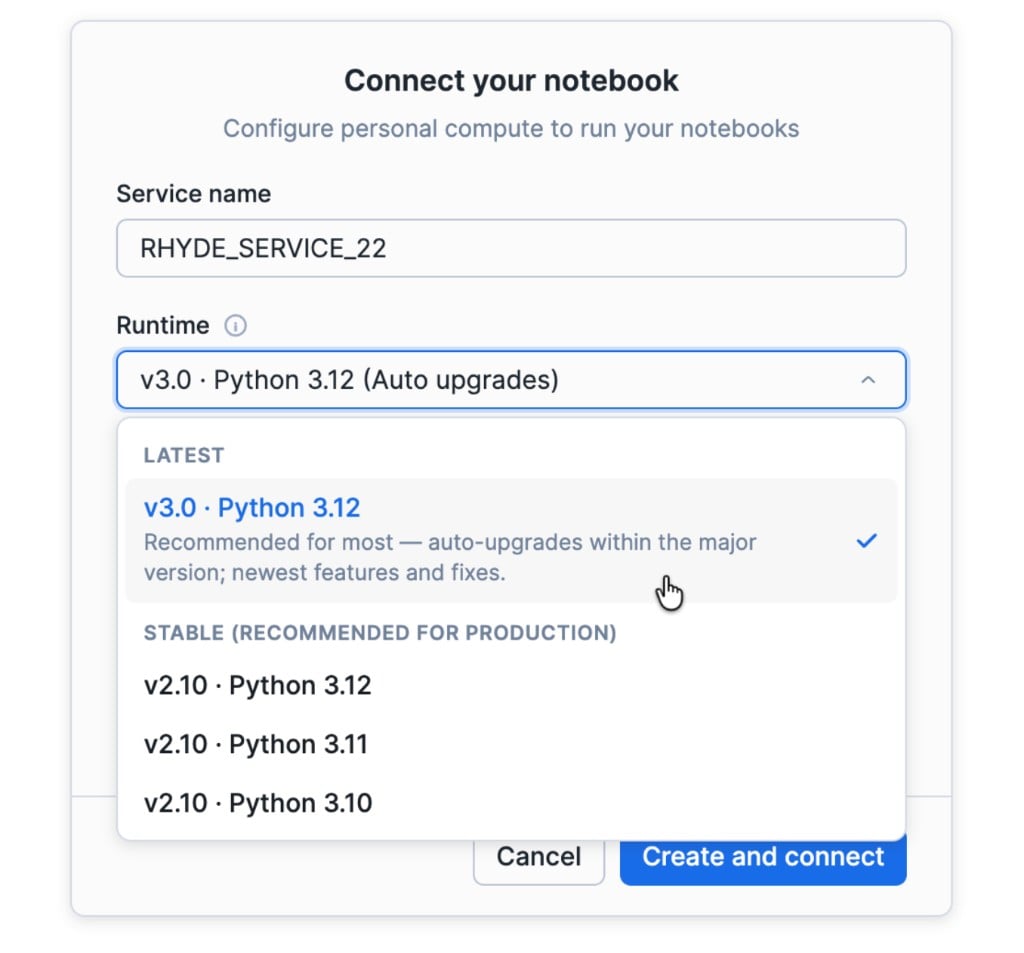
As v4.0 ships, the last v3.x version becomes a Stable version and can be used as a pinned runtime alongside v2.10.
One runtime for analytics, data engineering, and machine learning
There is no ML Container Runtime and DE Container Runtime to choose between. Snowflake Container Runtime ships with the latest first-party packages. V3.0 contains:
- Snowflake ML v2.5.0 (
snowflake-ml-python) for feature engineering, modeling, and registry, plus distributed data loading, training, and hyperparameter optimization that scale across cores, GPUs, and multi-node pools - Snowpark v1.55.1 (
snowflake-snowpark-python) for DataFrame pipelines and warehouse-pushdown compute - Snowpark Connect v1.45.0 (
snowpark-connect) so Spark-style workloads can run against Snowflake without a lift-and-shift rewrite
On top of those first-party libraries, the runtime includes a curated set of roughly 100 popular data science Python frameworks: pandas, matplotlib, NumPy, scikit-learn, XGBoost, LightGBM, PyTorch, and more.
If you need something that isn't there, or want to upgrade the version of a pre-installed package, run pip install in a Python cell to install it from the Snowflake-managed PyPI Artifact Repository, through an external access integration, or from your own private repo. The various package installation sources provide flexibility that best suits your needs while keeping everything inside the Snowflake governance boundary.
The result is an environment that's equally at home in an afternoon exploration, a scheduled notebook pipeline, and a GPU training job.
Long-term support you can pin and trust
Production Python has two opposing requirements: don't break me, and don't leave me on an unpatched image. Container Runtime 3.0 introduces a lifecycle built for both.
Latest is the active supported feature development release. This runtime will receive minor version updates that ship new features, optimization, and core Python dependency upgrades.
Stable runtimes are major releases that have exited the feature development phase. These are mature and well-supported runtime environments that will continue receiving security and stability patches for up to 1 year.
Choosing between them is straightforward. For interactive, open-ended analysis, stay on Latest. You want new notebook behavior, package updates, and performance work as soon as they ship. Your environment stays current and patched, and the team can spend its time on analysis and models instead of maintaining the runtime.
For a pipeline you plan to schedule, develop on Latest and you'll naturally pin to that major when the next one lands. For a fully locked production environment, pair a Stable runtime with requirements.txt and Artifact Repository, or bring a custom runtime image.
This example runs main.py on the CPU runtime for major version 3 and Python 3.12:
EXECUTE CODE BUNDLE my_bundle ENTRYPOINT = 'main.py'
WITH SPECIFICATION
$$
bundle:
  type: custom
  compute_type: compute_pool
  language: python
  compute_options:
    compute_pool: system_compute_pool_cpu
    query_warehouse: my_database.my_schema.my_warehouse
    runtime_version: 'V3-CPU-PY3.12'
  properties:
    requirements-file: requirements.txt
$$;
A compute pool is required for Container Runtime. The warehouse runs SQL and Snowpark pushdown compute. Python runs on the compute pool.
Read more about how to use a runtime.
One place to see what changed
Container Runtime's release notes now live here. This page is the source of truth for the runtime itself: base image, Python version, preinstalled packages, and security fixes, plus Notebooks features, performance improvements, and bug fixes. API changes for first-party packages are linked from there so you can follow a runtime version into the APIs that shipped with it.
Same runtime across ARM and x86
Starting with v2.10 Stable, these runtimes work on both ARM-based and x86-based compute pools — same packages, same first-party libraries, same support window. ARM instances are available on AWS and GCP.
Read Iceberg tables straight from the compute pool
SFIcebergDataSource gives Container Runtime access to training data in Snowflake-managed Iceberg tables. Ray workers on your Compute Pool read the table's Parquet files directly and in parallel using the Horizon Iceberg REST catalog. On Container Runtime, the container authenticates with its own SPCS service identity, so there are no keys or catalog URIs to configure.
- Single read, no export or durable data copy. Each worker streams Parquet straight from the table's files into training. There is no export, staging or duplicate dataset to maintain, so the table itself is the training set.
- No warehouse in the read path. Data loading runs on the compute pool you're already using.
- Governed by the catalog. Access is authorized through Horizon using your role's privileges to the table. Column selection and simple row filters are evaluated against Iceberg metadata, so files that can't match are skipped. Snapshot pinning lets you retrain on an exact table version (while snapshots are retained).
import ray
from snowflake.ml.ray.datasource import SFIcebergDataSource

ds = ray.data.read_datasource(SFIcebergDataSource("ML.FEATURES.TRAIN"))
What you can do today
Container Runtime already meets you in the products you use:
- Create a Notebook in Workspace — CPU or GPU, warehouse for SQL, compute pool for Python.
- Train and tune with distributed Snowflake ML APIs without leaving the notebook.
- Pin a Stable runtime version so scheduled notebook jobs stay reproducible.
- On AWS and GCP, create a compute pool using ARM instances and connect your notebooks.
SFIcebergDataSourceallows direct high-speed access to Parquet from a compute pool, allowing direct inbound batch streams with no data copy.
This new evolution makes it one runtime for analytics, data engineering, and ML workloads, a support policy you can operate on, and hardware that is no longer locked to x86.
Related resources
Note: If you're using Snowflake Container Runtime v2.2-2.9 in Notebooks, scheduled pipelines using Notebook Project Objects or Code Bundles, or ML Jobs, we highly encourage you to take advantage of the latest updates in v2.10 (Stable) and above.
This content is provided as is, and is not maintained on an ongoing basis. It may be out of date with current Snowflake instances
