Persist Team Context with Multiplayer AI in Snowflake
AI is, unfortunately, single-player by default. This default can create context silos that are untenable in the long term, especially in an era where context is king. Data analysts, data engineers, data scientists, app developers – they all quickly build solutions in agent sessions where they're the only human present. This isn't a bad thing in and of itself. In fact, solo agent sessions work well when the problem is scoped to one person. But most problems worth solving at a company will belong to a team.
When you consider the thousands of agent sessions a team will spin up and use to build and deploy solutions, it's likely that valuable context is going uncaptured. It also tends to disappear when each session closes. If key context that a teammate holds never makes it into the agent session you're using to ship a solution, there's a risk that the business acts on an incomplete picture. That's the context silos problem.
Multiplayer AI can be a solution to this problem. With multiplayer AI, you could imagine sharing an agent session with teammates, building alongside each other, and persisting important context as you build. This pattern could help eliminate context silos, or at least reduce them. The general idea of multiplayer AI isn't new; it's actively being explored across the industry. But what really piqued my interest is how powerful this architecture could be in a platform like Snowflake, where all of your governed data and context layers already live. So I set out to build it.
In this post, I'll walk through how I built it: a shared session with a Cortex Agent, where teammates file critical context and decisions as they build, before the next artifact, like a new pipeline, ships. I'll also share the code so you can spin it up yourself and tailor or expand it however you want.
Context silos can introduce risk to data-driven decisions
With context silos, the issue is not just that teams may build overlapping artifacts (although I'm sure this happens often). Fast moving teams may unintentionally produce similar skills, plugins, automations, and generally, outputs. And given how fast AI helps them move, they may not stop to check for duplicate artifacts, or assess which version of an artifact is "better", or for other related aspects. This is annoying, but the riskier effects of context silos will tend to show up later, in downstream workflows. Consider the following:
-
A data analyst quickly ships a dashboard highlighting critical business metrics. To build it, they pulled relevant context from their data, internal docs, and a couple of stakeholders. A couple of weeks later, a teammate that wasn't involved in the building of the dashboard mentions that several relevant tables are missing from the analysis. Sure, the fix is easy, but the org already made a critical decision based on the first version of that dashboard. The correction lands, but nothing records it, so the next analyst and the next agent session start from the same gap.
-
A team of data engineers discuss a new pipeline they need to stand up. They're experienced and can move quickly. On a quick call, they agree on how to deduplicate incoming records, and one of them mentions an edge case: some records arrive days late and need to be merged into the rows already loaded. That afternoon, one of the engineers builds the pipeline in a solo agent session. The edge case didn't make it into the session, and nothing recorded that it was ever discussed. Three weeks later, a finance report comes in and the numbers look off. Now backfilling needs to happen, and downstream stakeholders need to be notified of the impact on every report that read from that table.
These are just a couple of examples. There are countless more, but you get the gist: someone works in a solo agent session, ships an output, and later learns that a key piece of context never made it in. Reconciliation follows and the problem gets fixed, but the process is cumbersome and potentially risky to the business. Sure, capturing shared context will always be lossy, but single-player AI modes exacerbate that and can lead to more risk in decision making.
The compounding value of multiplayer AI in Snowflake
If a governed context layer for your data already lives within Snowflake, then, in my mind, it makes sense to land the relevant context used to build a solution in that same layer. A lot of problem-fixing will tend to happen in Slack threads, Google Drive docs, Zoom calls (the list goes on), but must somehow find its way into the agent session used to ship a solution. You can easily wire these sources into your CoCo agent sessions using MCP (and, rest assured, I do), but these all feel complementary to the core problem I was trying to solve. My criteria for a solution:
-
Work with multiple teammates in a collaborative agent session, in real-time (the way you might in a Google Doc)
-
Capture and persist valuable context directly from within a shared session as we build
-
Allow new sessions to easily access persisted context from previous sessions, for use within that new session
-
This entire experience must be contained directly within Snowflake
Plenty of teams already bring agents into Slack, and that makes sense. Slack is where the conversation happens, and for a quick question or a status check, a shared thread with an agent is often all a team needs. But build sessions that ship a high-stakes pipeline or a dashboard need something more durable. The decisions a team makes along the way have to land somewhere the next teammate and the next agent session can find, trust, and query.
If I could do all of this right next to where my data already lives, then we could build on the shared context layer and ship even stronger solutions in subsequent build sessions using previous context. And, in my mind, this compounds over time as your data and solutions grow.
Multiplayer AI in Snowflake with Agent Canvas
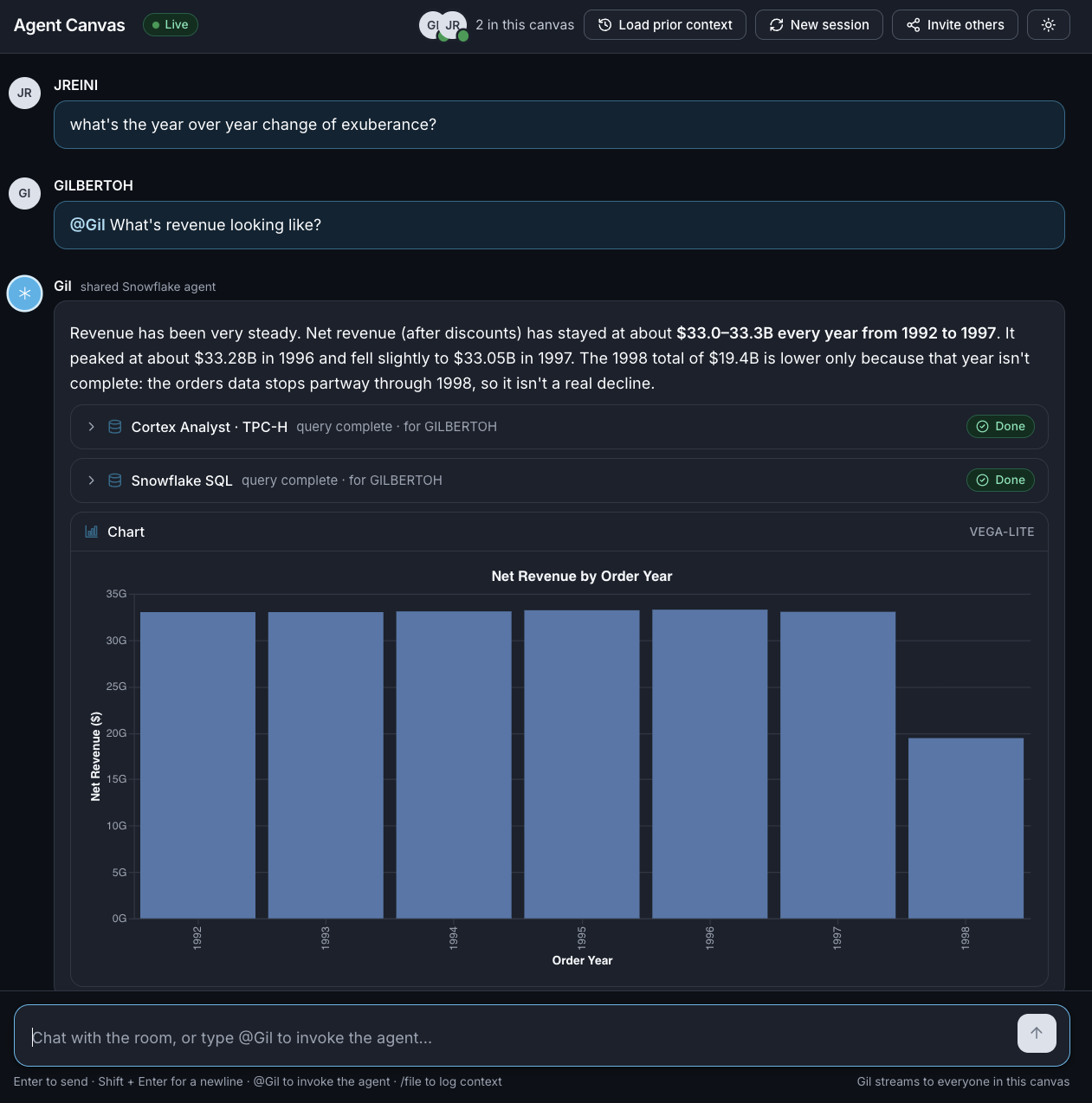
So I built Agent Canvas, a shared workspace where a team and a Cortex Agent work together in real time. Everyone in the canvas sees the full conversation, including the agent's reasoning and its work, so the whole team builds from one shared context. When the team lands on a decision worth keeping, they file it, and that context carries forward into future sessions for both teammates and agents.
In the canvas, every filing becomes an attributed, append-only row in a Snowflake table, governed by the same access controls as the data it describes. Teams can keep talking through problems in Slack, then open a canvas when it's time to build and file what they decide. The conversation can happen anywhere, but the record of what the team decided lands next to the data.
Here are the components and how they work:
Snowflake App Runtime (public preview) – The app is a Next.js app deployed with snow app deploy, which builds it and runs it on Snowpark Container Services, inside the same account as your data. Deploying was the easiest part of the whole build, because CoCo handled the scaffolding and deploy steps for me. Snowflake App Runtime also let me build a fully custom UI for the canvas, which a real-time, multi-user experience like this one needed.
How multiplayer works – Snowflake handles login at the app's ingress, so every teammate who opens the canvas arrives with their own Snowflake identity. Share the canvas link, and each teammate who logs in lands in the same room. Each browser holds open a Server-Sent Events stream, and an in-memory bus fans every event out to everyone connected, which is what makes the room feel live:
export function publish(canvasId: string, ev: CanvasEvent): void {
  // ...keep a short buffer of recent events...
  const subs = s.subscribers.get(canvasId);
  if (!subs) return;
  for (const fn of subs) fn(ev);
}
Chatting and invoking the agent – Plain chat goes to the whole room. Mention @Gil to bring the agent in. That message takes a turn lock so only one agent request runs at a time while teammates keep chatting. It then attaches to the canvas's agent thread through the Cortex Agent SDK and streams every event back to the room, so everyone sees the agent's reasoning and tool calls as they happen:
convo = await client.conversations.attach(String(threadId));

const taggedPrompt = `[canvas: ${canvasId}]\n\n${prompt}`;
const turn = await convo.send(taggedPrompt, {
  agent: { type: "data", spec: agentFqn() },
});

for await (const event of turn.events()) {
  publish(canvasId, { type: "agent.event", canvasId, by: user, payload: event, at: Date.now() });
}
What the agent can do – "Gil" is a Cortex Agent with five tools: Cortex Analyst over a semantic view for data questions, Cortex Search over the Snowflake documentation Cortex Knowledge Extension, a charting tool, web search, and a custom tool that reads the team's filings. I named this Cortex Agent "Gil" for fun; rename it to whatever fits your team.
CREATE OR REPLACE AGENT AGENT_CANVAS.AGENTS.CANVAS_AGENT
  PROFILE = '{"display_name": "Gil", "color": "blue"}'
  FROM SPECIFICATION
  $$
  # Abbreviated. See setup.sql for tool descriptions, instructions,
  # and warehouse execution environments.
  tools:
    - tool_spec: { type: "cortex_analyst_text_to_sql", name: "tpch_analyst" }
    - tool_spec: { type: "cortex_search",              name: "docs_search" }
    - tool_spec: { type: "data_to_chart",              name: "data_to_chart" }
    - tool_spec: { type: "web_search",                 name: "web_search" }
    - tool_spec: { type: "generic",                    name: "get_filings" }
  tool_resources:
    tpch_analyst: { semantic_view: "AGENT_CANVAS.AGENTS.TPCH_REV_SV" }
    docs_search:  { search_service: "SNOWFLAKE_DOCUMENTATION.SHARED.CKE_SNOWFLAKE_DOCS_SERVICE" }
    get_filings:  { identifier: "AGENT_CANVAS.AGENTS.GET_FILINGS", type: "function" }
  $$;
Filing and reusing context – Type /file to capture context worth keeping. You can write the note yourself, or let Gil summarize everything since the last filing. Every filing lands as a row in CANVAS_CONTEXT, recording who filed it, who was in the room, and whether a human or Gil wrote it. A plain SQL UDF hands those rows back to the agent, so asking Gil "what has this team decided?" returns the actual record:
CREATE OR REPLACE FUNCTION AGENT_CANVAS.AGENTS.GET_FILINGS(canvas_id STRING)
RETURNS ARRAY
AS
$$
  SELECT ARRAY_AGG(OBJECT_CONSTRUCT(
    'id', id, 'filed_by', filed_by, 'source', source, 'participants', participants,
    'context', context, 'filed_at', filed_at
  )) WITHIN GROUP (ORDER BY filed_at DESC)
  FROM AGENT_CANVAS.PUBLIC.CANVAS_CONTEXT c
  WHERE c.canvas_id = canvas_id
$$;
Memory works in two layers. The agent thread stays short and resets with each new session, and the filings persist across sessions. A new session can load the team's prior filings, so the agent starts with what the team already knows.
Governance – Each teammate logs in with their own Snowflake account, and that identity is how the canvas attributes every message and filing. Once inside, every agent call runs under the app's single least-privilege role, AGENT_CANVAS_ROLE, so everyone in the room works with the same scoped access: usage on the agent, the semantic view, the filings UDF, and the warehouse, plus read access to the sample data and the documentation listing. That role can only append to the filings table, so the team's record grows without being rewritten from the app. The service is also configured for caller's rights, which gives a future feature a path to run queries under each teammate's own role. Team memory sits under the same access controls as the rest of your data, and you can query it like any other table. A single idempotent setup.sql creates every object: the database, warehouse, role, tables, semantic view, UDF, agent, and grants.
Put together, the team works in one shared session, the agent reasons in front of everyone, and important decisions that matter are captured and persisted, in real-time, during build time, next to the data they work with.
Try it out and make it your own
The repo is here: https://github.com/Snowflake-Labs/snowflake-multiplayer-ai-canvas. Consider it a starting point – spin it up and tailor it to your use case, or add new features: swap in your own semantic views, add a tool that writes back to Snowflake behind a teammate's approval, or bring a second agent into the canvas. Here's how you can try it out:
-
Make sure you have a Snowflake account with Cortex Agents enabled, the Snowflake CLI, Node.js 22+, and a configured connection (
snow connection add). Setup runs as ACCOUNTADMIN and needs a human user, because it requests the Snowflake documentation listing from the Marketplace. -
Clone the repo and move into it:
git clone https://github.com/Snowflake-Labs/snowflake-multiplayer-ai-canvas.git cd snowflake-multiplayer-ai-canvas -
Create every Snowflake object the app needs, including an extra-small warehouse that auto-suspends after 60 seconds:
snow sql -f setup.sql -
Deploy the app to Snowflake App Runtime. The app runs as a Snowpark Container Services service, which bills while it's running and auto-suspends after 15 minutes of inactivity:
snow app deploy -
Open the URL printed by
snow app deployand log in. -
Click Invite others and send the link to a teammate. They log in with their own Snowflake credentials and land in the same canvas.
-
Ask
@Gila question together, then type/fileto save what you learned.
To tailor it, open the repo in a CoCo session. The repo ships with an AGENTS.md that gives CoCo the context it needs to help you make the app your own.
Multiplayer AI can change where a team's reasoning lives. When teammates build together and file what they decide, the context behind a dashboard or a pipeline lands as a governed record next to the data it describes. Over time, that record may help every new teammate and every new agent session start from what the organization already knows, and it gives you a durable answer to why each decision was made.
Clone the repo, invite a teammate, and file your first decision together. Remix it to your heart's content. I'd love to hear what you build with it.
This content is provided as is, and is not maintained on an ongoing basis. It may be out of date with current Snowflake instances
