

Getting Started with Microsoft Azure Observability
Learn how to collect, explore, and correlate Azure telemetry to investigate performance issues and understand the health of your cloud applications.
AZURE OBSERVABILITY DEFINED
Azure observability is the practice of collecting and analyzing telemetry, including logs, metrics and traces, to understand the behavior and performance of applications and infrastructure running on Microsoft Azure.
Observability helps engineering teams investigate unexpected behavior, troubleshoot performance issues and understand how different components of a system interact. The right approach depends on your architecture, workloads, operational requirements and existing monitoring tools.
Microsoft Azure provides built-in monitoring capabilities for its services. Teams can also use additional observability tools when they need to bring together telemetry from multiple environments, investigate issues across service boundaries or connect operational data with other sources.
This article covers the fundamentals of Azure observability, Microsoft's monitoring capabilities, common implementation considerations and ways to extend visibility across your technology stack.
The basics of Azure observability
Azure provides cloud infrastructure and managed services for running applications, storing data, deploying software and processing workloads. Each service can generate telemetry that helps teams understand its operation.
Common Azure services include:
- Compute: Azure Virtual Machines and Azure Functions.
- Storage: Azure Blob Storage and other Azure storage services.
- Databases: Azure SQL Database and other managed database services.
- Containers: Azure Kubernetes Service (AKS).
- Application delivery: Azure Pipelines and related development tools.
The telemetry available varies by service and configuration. Teams should identify which resources and application components need monitoring, what information they expose and how that information will be collected and used.
What should you monitor on Azure?
An Azure observability strategy typically considers several types of telemetry:
- Metrics provide numerical measurements over time, such as request rates, CPU utilization and response latency.
- Logs record events and application activity that can help explain unexpected behavior.
- Traces show how requests move across instrumented services and where time is spent.
- Events and resource metadata provide context about deployments, configuration changes and infrastructure state.
Collecting these signals can help teams investigate issues from different perspectives. For example, a rise in application latency may coincide with increased database response times or a recent deployment.
The goal is to collect enough relevant information to investigate issues effectively while accounting for retention requirements, access controls and data costs.
Azure observability and monitoring tools
Microsoft provides several services for monitoring Azure resources and applications. The appropriate combination depends on the services being used and the team's monitoring requirements.
Azure Monitor
Azure Monitor provides monitoring capabilities for Azure resources and applications. It supports the collection and analysis of monitoring data, with features for metrics, logs, alerts and visualization.
Teams can use Azure Monitor to track resource health, examine performance trends and configure alerts for conditions that require attention.
Application Insights
Application Insights supports application performance monitoring. It can help developers examine application requests, dependencies, exceptions and performance characteristics.
For instrumented applications, this information can help teams investigate slow requests, application errors and dependencies that contribute to response times.
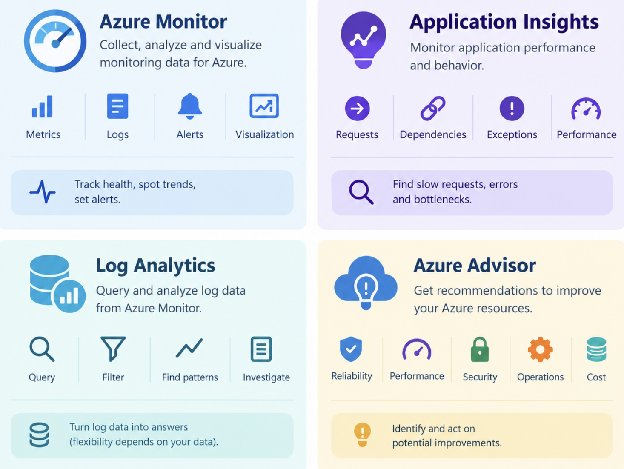
Figure 1: Azure observability and monitoring tools.
Log Analytics
Log Analytics provides query and analysis capabilities for log data available through Azure Monitor. Teams can use queries to filter events, examine patterns and investigate activity across collected logs.
Its usefulness depends on the telemetry being collected, the available fields and how the team structures its investigations.
Azure Advisor
Azure Advisor provides recommendations related to areas such as reliability, performance, security, operational excellence and cost.
It complements monitoring by helping teams identify potential improvements to their Azure resources and configurations.
These tools address different monitoring needs. Teams should evaluate them against their operational requirements and determine whether additional tools are needed for applications, infrastructure or environments beyond Azure.
Common considerations for Azure observability
Azure's native services provide monitoring capabilities for Azure workloads. As environments become more distributed, teams may need to consider how they collect and investigate telemetry across different services and platforms.
Monitoring across environments
Organizations may run applications across Azure, other cloud providers, private infrastructure and on-premises environments.
When telemetry is collected through different tools, engineers may need to move between systems to understand an issue that crosses multiple services. A shared approach to telemetry collection and investigation can help teams examine related activity across these environments.
The need for a separate observability platform depends on the organization's architecture, existing tools and operational requirements.
Correlating different telemetry types
Metrics, logs and traces answer different questions. Using them together can help engineers investigate how a performance change relates to an application request, a downstream dependency or a recent deployment.
Correlation depends on factors such as instrumentation, timestamps, resource identifiers, trace context and the fields available in each data source.
Teams should review whether their current tools provide the context needed to move from a high-level alert to the relevant events and requests.
Customizing investigations and dashboards
Preconfigured dashboards and alerts can help teams get started. Engineering teams may also need custom views that reflect their applications, service dependencies and operational priorities.
When evaluating monitoring tools, consider how easily users can create queries, build dashboards, configure alerts and investigate underlying telemetry.
Managing telemetry costs
Telemetry collection, querying and retention can all contribute to operating costs. Costs depend on factors such as data volume, retention periods, query activity and the pricing model of each service.
Reducing telemetry indiscriminately can make investigations more difficult if important diagnostic information is no longer available. Instead, teams should review collection policies, retention requirements and usage patterns to determine where changes are appropriate.
Extending Azure observability across your stack
When evaluating observability tools, consider how well they fit your existing environment and the questions your engineering teams need to answer.
Collecting telemetry from relevant sources
Look for a collection approach that supports the Azure services and application technologies in your environment.
OpenTelemetry can provide a common approach to instrumenting applications and collecting telemetry. Supported integrations and setup requirements vary by source and tool.
Before adopting a solution, verify the specific data sources it supports, the signals it collects and any configuration or instrumentation requirements.
Retaining and querying telemetry
Telemetry retention needs vary by workload, operational requirements, and compliance obligations. Evaluate how a solution handles storage, retention, query performance and the cost of keeping data available for investigation.
Consider the trade-offs between retaining detailed telemetry and managing the resources required to store and query it.
Connecting related operational data
Observability becomes more useful when engineers can investigate relationships between telemetry sources.
For example, an engineer investigating a rise in application errors may need to examine request traces, service logs, infrastructure metrics and deployment activity together.
Evaluate whether your tools make it practical to move between these sources and identify the context relevant to an investigation.
Supporting multiple cloud environments
If your organization uses more than one cloud provider, review how each environment is monitored and how teams investigate issues that cross platform boundaries.
Consider the available integrations, supported telemetry formats, and query capabilities before deciding whether to standardize on a common observability platform.
Where Observe by Snowflake fits
Observe by Snowflake is an observability platform that engineering teams can evaluate as part of their monitoring architecture.
For organizations operating Azure workloads alongside applications and infrastructure in other environments, an observability platform can provide another way to bring operational telemetry together for investigation.
When evaluating Observe by Snowflake for an Azure environment, consider:
- Telemetry collection: Confirm support for the Azure services and telemetry sources relevant to your environment.
- Investigation workflows: Evaluate how engineers can search and analyze telemetry when troubleshooting application or infrastructure issues.
- Cross-environment context: Determine how the platform fits with your existing observability data and other operational information.
- Retention and cost: Review supported retention options, usage models, and the expected cost for your telemetry volumes.
The right architecture depends on your current monitoring setup, the systems you operate and the outcomes your engineering team needs from observability.
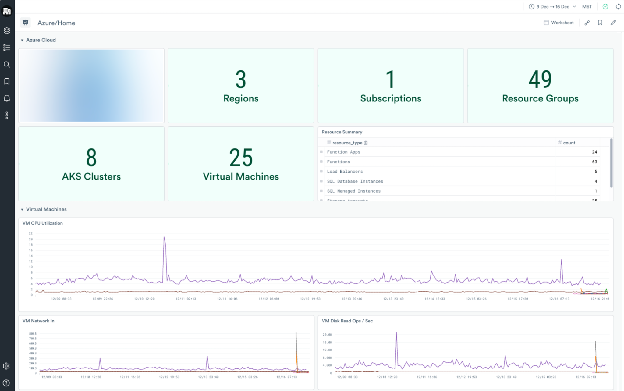
Figure 2: Observe by Snowflake UI for Azure observability.
Getting started with Azure observability
A practical Azure observability strategy starts with understanding your workloads, identifying the telemetry needed to troubleshoot them and deciding how that data will be collected, analyzed and retained.
Use these steps to guide your approach:
- Identify critical workloads: Determine which applications, services and infrastructure components need monitoring.
- Review available telemetry: Check which metrics, logs, traces and events your services expose and whether additional instrumentation is needed.
- Define investigation requirements: Identify the questions engineers need to answer when an alert fires or an application behaves unexpectedly.
- Evaluate collection and retention: Establish which data to collect, how long to retain it and how to manage access and costs.
- Test the investigation workflow: Use a representative issue to determine whether engineers can move from an alert to the relevant telemetry and identify contributing factors.
- Revisit the approach as systems change: Review telemetry coverage and operational requirements as applications, dependencies and infrastructure evolve.
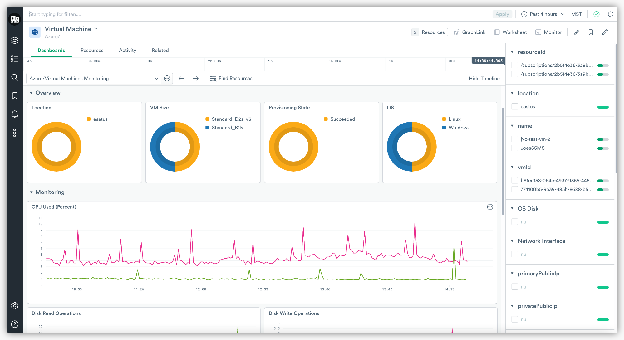
Figure 3: Observe by Snowflake UI showing usage stats.
KEY TAKEAWAY
Azure observability involves more than collecting monitoring data. Teams need a practical way to interpret telemetry, investigate issues and understand relationships between applications and infrastructure. Start with the capabilities available in Azure, identify gaps in your current workflows and evaluate additional tools against your technical and operational requirements.
Explore Observability Resources
Explore Observability Topics
Deep dives into every aspect of observability
