Certified Solution
Build Autonomous Pipelines for AI
AITransformation
Define the desired state of your data and Snowflake manages the incremental updates and orchestration — no manual coding, no third-party tools.

Overview
Dynamic Tables handle the hard parts of data pipelines so your team can focus on insights.

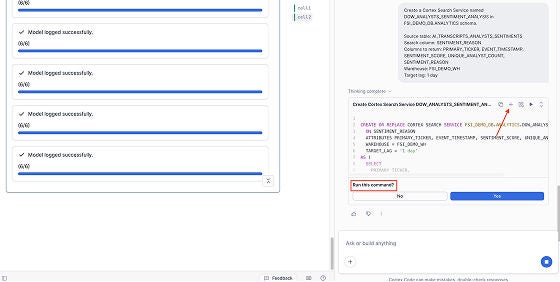
Build and troubleshoot pipelines with Cortex Code using natural language, or define transformations in a single SQL statement. Native DAG observability — no third-party tools needed.

Set data freshness with TARGET_LAG. Snowflake auto-infers dependencies and schedules refreshes to meet your target — no manual DAGs or orchestrators.

Incremental refreshes process only changed data, avoiding full-table recomputation. Lock stable data with immutability and let automatic query mode optimize for your SLAs.
TRUSTED BY DATA TEAMS AT



Key Features
Everything you need to build autonomous data pipelines.

Data engineering coding agent with skills and workflow to build, troubleshoot, and optimize Dynamic Tables using natural language. Available in Snowflake Workspaces and via CLI.

AI agent that builds, troubleshoots, and optimizes Dynamic Tables using natural language. Available in Snowflake Workspaces and via CLI.

Lock portions of your Dynamic Tables so they never recompute during refreshes. Less recomputation, significantly lower refresh costs.

Powerful autonomous pipelines now available for your Iceberg Lakehouse.

Fine-grained control over how incremental refreshes process your data — details coming soon.

Intelligent refresh mode selection that automatically optimizes for your workload — details coming soon.
USE CASES
From analytics pipelines to real-time change data processing and Lakehouse workflows.
Transform and model data for analytics, no third-party transformations or orchestrators needed.

Continuously transform ingested change data into serving-ready datasets that stay synchronized as upstream data evolves.
Automated incremental updates keep data fresh in under a minute.

Simplify pipeline development within your Open Lakehouse.

Resources
Get Started
DYNAMIC TABLES
Dynamic Tables are a declarative way to build data pipelines in Snowflake. Instead of writing and scheduling transformation logic manually, you define the result you want with a SQL query and Snowflake handles the refresh automatically — eliminating the need to orchestrate the pipeline.
Traditional ETL pipelines require custom orchestration, scheduling, and incremental logic. Dynamic Tables replace that complexity with a single SQL definition. Snowflake determines what data has changed and refreshes only what's needed.
Dynamic Tables use a user-defined target lag — the maximum acceptable time between a source data change and its reflection in the table. Snowflake continuously monitors upstream data and triggers incremental refreshes automatically to stay within that lag window.
Target lag defines how fresh your data needs to be — for example, TARGET_LAG = '1 minute' means Snowflake will refresh the table within one minute of upstream changes. You can also set DOWNSTREAM to let Snowflake optimize lag based on dependent objects.
Use SHOW DYNAMIC TABLES to check status and lag, and query DYNAMIC_TABLE_REFRESH_HISTORY() in the Information Schema for refresh logs. Snowsight also provides a visual DAG view of your pipeline, making it easy to identify failures, bottlenecks, or tables stuck in an UPSTREAM_FAILED state.
dbt and Dynamic Tables are complementary. dbt excels at transformation modeling, testing, documentation, and lineage — while Dynamic Tables provide the automated, incremental refresh engine that keeps data current without manual scheduling.
With dbt version 1.12+, you can now use Dynamic Tables as a native materialization type directly within your dbt project. This means you get the best of both worlds: dbt's development workflow, testing, and documentation layered on top of Snowflake's automated incremental processing. Simply set materialized='dynamic_table' in your model config along with your desired target_lag, and dbt will create and manage the Dynamic Table for you. It’s easy to test the performance.
For teams already using dbt, this makes Dynamic Tables the recommended path for incremental pipelines on Snowflake.