Build Autonomous SQL Pipelines for AI Agents
Overview
What if you could build a production data pipeline by simply describing what you want? In this quickstart, you'll do exactly that — using Snowflake CoCo as your AI co-pilot to build an end-to-end Dynamic Tables pipeline from natural language prompts.
Dynamic Tables let you declare what your pipeline should produce using SQL. Snowflake CoCo lets you describe what you want in plain English and generates the SQL for you. Together, they represent a fully declarative approach to data engineering — from intent to production pipeline, no boilerplate required.
You'll work with the Tasty Bytes dataset (a fictitious food truck company) to build a three-tier pipeline that enriches raw order data, joins it into fact tables, and pre-aggregates business metrics — all by giving Snowflake CoCo prompts. Once the pipeline is running, you'll wire it up to an AI agent that answers natural language questions about your data.
Prerequisites
- Basic familiarity with data engineering concepts (data loading, transformations)
- No SQL writing required — Snowflake CoCo writes it for you
What You'll Learn
- How to use Snowflake CoCo as a data engineering co-pilot in Snowsight
- How to build Dynamic Tables by describing your pipeline in natural language
- How to configure refresh strategies (TARGET_LAG, DOWNSTREAM) through prompts
- How Dynamic Tables handle incremental refresh automatically
- How to monitor pipeline operations conversationally
- How to create semantic views and AI agents using Snowflake CoCo
What You'll Need
- A Snowflake account (trial, or existing accounts) - preferably in AWS US West 2 (Oregon) region, Enterprise edition
- ACCOUNTADMIN access (available in trial accounts)
- Snowflake CoCo enabled in your account (setup guide)
What You'll Build
- A three-tier declarative data pipeline processing ~1 billion order records
- A stored procedure for generating synthetic test data
- Monitoring queries for pipeline observability
- A semantic view for natural language querying
- A Cortex Agent for conversational data exploration
Open Snowflake CoCo
All of the work in this quickstart is driven through Snowflake CoCo — Snowflake's AI co-pilot built into Snowsight.
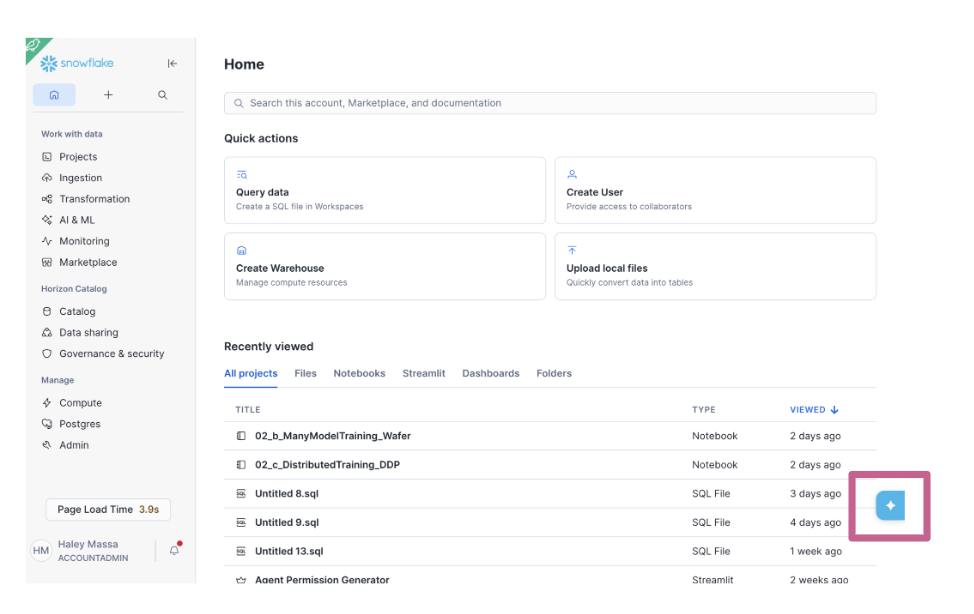
You'll see a chat interface. Throughout this quickstart, you'll paste prompts from each section directly into CoCo. CoCo will generate the SQL, explain what it's doing, and execute it for you.
Set Up the Environment
Let's create the database, warehouse, and load the Tasty Bytes dataset. Give CoCo the following prompt:
Using ACCOUNTADMIN, create a role called lab_role and grant it CREATE WAREHOUSE
and CREATE DATABASE privileges on the account. Then switch to lab_role and:
- Create a database called tasty_bytes_db with two schemas: raw and analytics
- Create a 2XL standard warehouse called tasty_bytes_wh with 60s auto-suspend
  and auto-resume enabled
- Create these tables in tasty_bytes_db.raw:
  - order_header: columns for order_id, truck_id, location_id, customer_id,
    discount_id, shift_id, shift_start_time, shift_end_time, order_channel,
    order_ts (TIMESTAMP_NTZ), served_ts, order_currency, order_amount (NUMBER),
    order_tax_amount, order_discount_amount, order_total (NUMBER)
  - order_detail: columns for order_detail_id, order_id, menu_item_id,
    discount_id, line_number, quantity, unit_price, price, order_item_discount_amount
  - menu: columns for menu_id, menu_type_id, menu_type, truck_brand_name,
    menu_item_id, menu_item_name, item_category, item_subcategory,
    cost_of_goods_usd, sale_price_usd, menu_item_health_metrics_obj (VARIANT)
- Create a CSV file format in tasty_bytes_db.public
- Create an external stage tasty_bytes_db.raw.tasty_bytes_stage pointing to
  s3://sfquickstarts/tasty-bytes-builder-education/ using the CSV file format
- Load all three tables using COPY INTO from the stage subdirectories:
  raw_pos/order_header/, raw_pos/order_detail/, raw_pos/menu/
CoCo will create all infrastructure and load ~1 billion rows from S3. The data load takes a few minutes due to the volume.
Note: When CoCo asks for permission to execute SQL, you'll see an approval prompt with three options:
- Allow Once — approves only this specific statement
- Allow CREATE — approves all CREATE statements for the current session
- Always Allow CREATE — permanently allows CREATE statements without prompting in future sessions
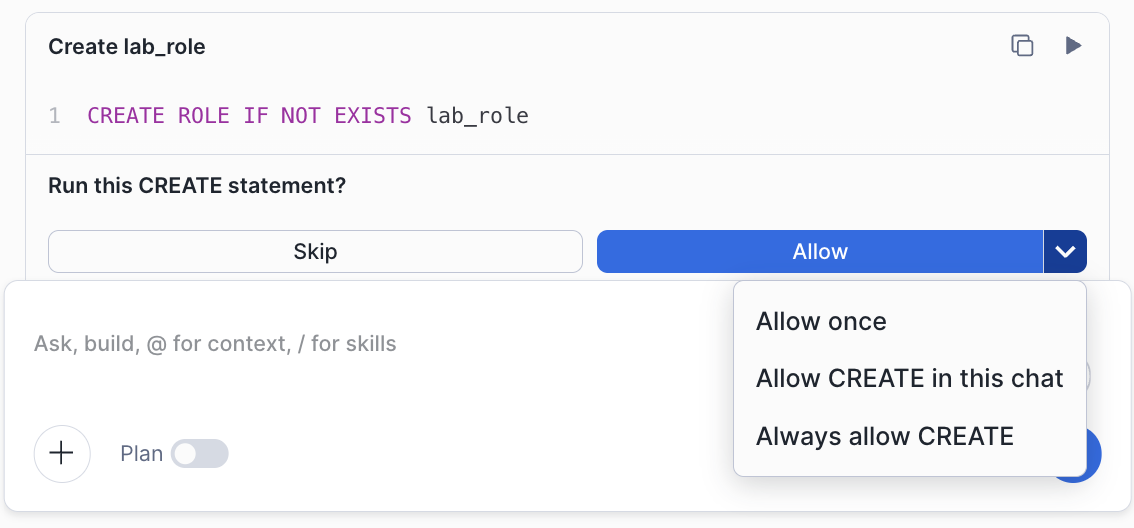
Note: If you encounter permission errors, ensure you're running as ACCOUNTADMIN when creating the role and granting privileges.
Understanding Dynamic Tables
Before we build the pipeline, let's understand the key concepts.
Dynamic Tables are a declarative way of defining data transformations in Snowflake. Instead of writing stored procedures, streams, and tasks to orchestrate your pipeline, you define the desired result using a SELECT statement. Snowflake automatically:
- Identifies and processes only changed rows (incremental refresh)
- Refreshes tables based on a target lag setting
- Manages dependencies between Dynamic Tables
Key Concepts:
-
TARGET_LAG: The maximum acceptable delay between source changes and the Dynamic Table reflecting them. Example:
TARGET_LAG = '1 hour'means data is at most 1 hour stale. -
DOWNSTREAM: A special TARGET_LAG value meaning "refresh only when downstream consumers need it." Creates an efficient pull-based refresh model.
-
Incremental Refresh: Dynamic Tables process only changed data rather than recomputing everything. Processing 1,000 new orders out of 1 billion is nearly instant.
-
Dependency Graph: Snowflake tracks dependencies between Dynamic Tables and determines refresh order automatically.
-
INITIALIZE = 'ON_SCHEDULE': By default (
ON_CREATE), a Dynamic Table performs an immediate full refresh the moment it's created — processing all source data before returning. WithON_SCHEDULE, the table is created instantly (empty) and populated on the first scheduled or manual refresh. This is the recommended approach for production and lab pipelines because it separates definition from execution: you can create the entire pipeline structure quickly, then trigger the initial load when you're ready. It also avoids long-running CREATE statements and makes deployments faster and more predictable.
Now let's tell Snowflake CoCo to build a three-tier pipeline using these concepts.
Build the Pipeline
This is the core of the quickstart — you'll describe an entire three-tier data pipeline to Snowflake CoCo, and it will generate all the Dynamic Table DDL.
Before submitting the prompt, switch CoCo to Plan mode by pressing Shift+Tab. In Plan mode, CoCo will show you exactly what it intends to do before executing anything — useful for reviewing a large DDL change like this before it runs. Once you've reviewed the plan and are happy with it, switch back to normal mode and execute.
Give CoCo the following prompt:
Build a 3-tier dynamic table pipeline in tasty_bytes_db.analytics using
warehouse tasty_bytes_wh:

Use INITIALIZE = 'ON_SCHEDULE' for all dynamic tables.

Tier 1 - Enrichment (TARGET_LAG = DOWNSTREAM):
- orders_enriched: From tasty_bytes_db.raw.order_header. Include order_id,
  truck_id, customer_id, order_channel. Add temporal dimensions: order_date,
  day_name (DAYNAME), order_hour (HOUR), and order_ts as order_timestamp.
  Include order_amount and order_total. Cast order_discount_amount to NUMBER(10,2)
  using TRY_TO_NUMBER. Add a has_discount boolean (true when discount_id is not
  null and not empty string). Filter out null order_id and null order_ts.

- order_items_enriched: Join tasty_bytes_db.raw.order_detail with
  tasty_bytes_db.raw.menu on menu_item_id. Include order_detail_id, order_id,
  line_number, menu_item_id, menu_item_name, item_category, item_subcategory,
  truck_brand_name, menu_type, quantity, unit_price, price as line_total,
  cost_of_goods_usd, sale_price_usd. Calculate unit_profit (unit_price minus
  cost_of_goods_usd), line_profit (unit_profit times quantity), and
  profit_margin_pct (rounded to 2 decimals, handle zero unit_price). Cast
  order_item_discount_amount to NUMBER(10,2) as line_discount_amount. Add
  has_discount flag. Filter out null order_id and null menu_item_id.

Tier 2 - Fact Table (TARGET_LAG = DOWNSTREAM):
- order_fact: Inner join orders_enriched (alias o) with order_items_enriched
  (alias oi) on order_id. Include all columns from both. Rename
  o.order_discount_amount as order_level_discount and o.has_discount as
  order_has_discount, oi.has_discount as line_has_discount.

Tier 3 - Aggregated Metrics (TARGET_LAG = 1 hour):
- daily_business_metrics: Aggregate order_fact by order_date and day_name.
  Include count distinct order_id (total_orders), truck_id (active_trucks),
  customer_id (unique_customers), sum quantity (total_items_sold), sum
  order_total (total_revenue), avg order_total (avg_order_value), sum
  line_total (total_line_item_revenue), sum line_profit (total_profit),
  avg profit_margin_pct (avg_profit_margin_pct), count orders with discount,
  sum discount amounts.

- product_performance_metrics: Aggregate order_fact by menu_item_id,
  menu_item_name, item_category, item_subcategory, truck_brand_name, menu_type.
  Include count distinct order_id (order_count), sum quantity (total_units_sold),
  sum line_total (total_revenue), sum line_profit (total_profit), avg unit_price,
  avg profit_margin_pct, avg cost_of_goods_usd (avg_cogs), avg sale_price_usd
  (standard_sale_price), revenue_per_unit, profit_per_unit.
Review before executing: Verify that TARGET_LAG values match (DOWNSTREAM for Tier 1-2, 1 hour for Tier 3),
INITIALIZE = 'ON_SCHEDULE'is set on all tables, join conditions are correct, and the dependency flows raw → Tier 1 → Tier 2 → Tier 3.
Why ON_SCHEDULE? With
INITIALIZE = 'ON_SCHEDULE', all 5 CREATE statements return immediately — no waiting for an initial full scan of 1 billion rows. The pipeline is defined but empty. You'll trigger the first load manually in the next step, giving you full control over when the expensive initial refresh happens.
Now trigger the initial load by refreshing only the top-tier tables. Snowflake will automatically cascade through the dependency graph — refreshing Tier 1 and Tier 2 first, then Tier 3:
Refresh daily_business_metrics and product_performance_metrics in
tasty_bytes_db.analytics. Snowflake will handle the upstream dependencies.
What to observe: You only triggered Tier 3 — but Snowflake automatically refreshed orders_enriched and order_items_enriched (Tier 1), then order_fact (Tier 2), before completing the Tier 3 aggregations. This is dependency graph management in action.
View Dependency Graph
Snowflake automatically tracks dependencies between your Dynamic Tables. Let's visualize this.
- Navigate to Catalog > Database Explorer in Snowsight and open
tasty_bytes_db - Click on the
analyticsschema - Click on any Dynamic Table (e.g.,
order_fact) - Look for the Graph tab
You'll see:
- Upstream:
orders_enriched,order_items_enriched - Downstream:
daily_business_metrics,product_performance_metrics
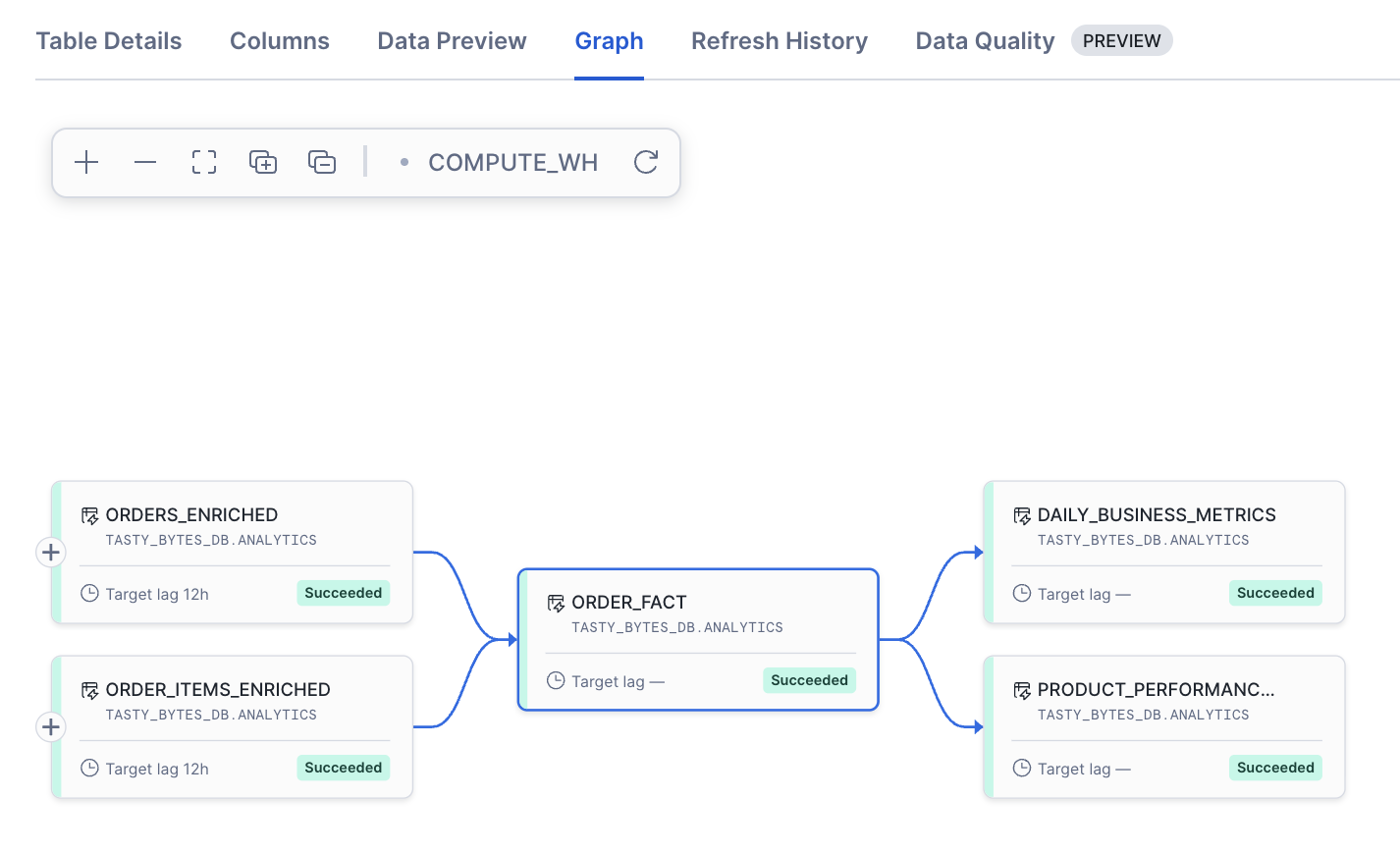
Optionally, ask CoCo:
Show me all dynamic tables in tasty_bytes_db.analytics with their target lag settings
Generate Test Data
To demonstrate incremental refresh, we need a way to insert new orders. Ask CoCo to create a stored procedure:
Create a stored procedure tasty_bytes_db.raw.generate_demo_orders(num_rows INTEGER)
using SQL language that generates synthetic orders. It should:
- Capture row counts in order_header and order_detail before insertion
- Sample num_rows random existing orders from order_header into a temporary table
- Assign new unique order IDs to avoid conflicts with existing data
- Set timestamps to the current date while preserving the original time-of-day
- Apply random price variation of plus or minus 20% using UNIFORM
- Insert the new orders into order_header
- For each new order, copy the corresponding order_detail records from the
  original order, generating new order_detail_ids and applying the same
  price randomization
- Capture row counts after insertion
- Clean up the temporary table
- Return a summary string showing how many orders and line items were inserted
Review before executing: This is a complex stored procedure — verify it creates a temp table with new_order_id mappings and joins back to order_detail to preserve referential integrity.
Test Incremental Refresh
Now let's see incremental refresh in action. Give CoCo these prompts one at a time:
Prompt 1 — Establish baseline:
How many rows are currently in tasty_bytes_db.raw.order_header and
tasty_bytes_db.raw.order_detail?
Prompt 2 — Generate new data:
Call tasty_bytes_db.raw.generate_demo_orders(1000)
Prompt 3 — Trigger refresh (top tier only):
Refresh daily_business_metrics and product_performance_metrics in
tasty_bytes_db.analytics.
What to observe: You only issued refresh commands for the Tier 3 tables — but Snowflake automatically cascaded through Tier 2 and Tier 1 first. This is the DOWNSTREAM dependency model at work.
Prompt 4 — Verify incremental behavior:
Query tasty_bytes_db.information_schema.dynamic_table_refresh_history() for each
of the 5 dynamic tables in tasty_bytes_db.analytics. Show the most recent
refresh_action, state, refresh_trigger, and duration in seconds for each.
Key insight: The
refresh_actioncolumn should show INCREMENTAL — Snowflake processed only the 1,000 new orders through the entire pipeline, not the full billion-row dataset. This is what makes Dynamic Tables efficient at scale.
Discussion: Notice that
product_performance_metricsshows a FULL refresh. Why? This table aggregates across all products — when a new order arrives for an existing product (e.g., "The King Combo"), the aggregate row for that product must be updated. Snowflake rewrites the affected group rather than appending a new row. Does a full rewrite make sense here? Consider: with 1,000 new rows out of 1 billion, the rewrite only touches the affected product groups — it's still far more efficient than processing all source data.
Prompt 5 — View updated results:
Query tasty_bytes_db.analytics.daily_business_metrics ordered by order_date
descending, limit 5. Then query tasty_bytes_db.analytics.product_performance_metrics
ordered by total_revenue descending, limit 10.
Monitor Pipeline
Ask CoCo for a full monitoring summary:
Show a monitoring summary for all dynamic tables in tasty_bytes_db.analytics.
For each table, show its name, target_lag, scheduling state, and — from
tasty_bytes_db.information_schema.dynamic_table_refresh_history() — the most
recent refresh_action, state, and duration in seconds. Use a window function
to get only the latest refresh per table.
Key columns to watch:
- refresh_action:
INCREMENTAL(efficient) vsFULL(first run or when incremental isn't possible) - state:
SUCCEEDEDorFAILED - duration: How long the refresh took
Create Semantic View and Agent
Let's make our pipeline data queryable in natural language by creating a semantic view and AI agent:
Create a semantic view called tasty_bytes_semantic_model in TASTY_BYTES_DB.ANALYTICS
over all 5 dynamic tables in the analytics schema: orders_enriched,
order_items_enriched, order_fact, daily_business_metrics, and
product_performance_metrics. Then create a Cortex Agent called tasty_bytes_agent
in TASTY_BYTES_DB.ANALYTICS that uses this semantic view as its Cortex Analyst
tool. Set the display name to "Tasty Bytes Analytics Agent".
Test Your Agent
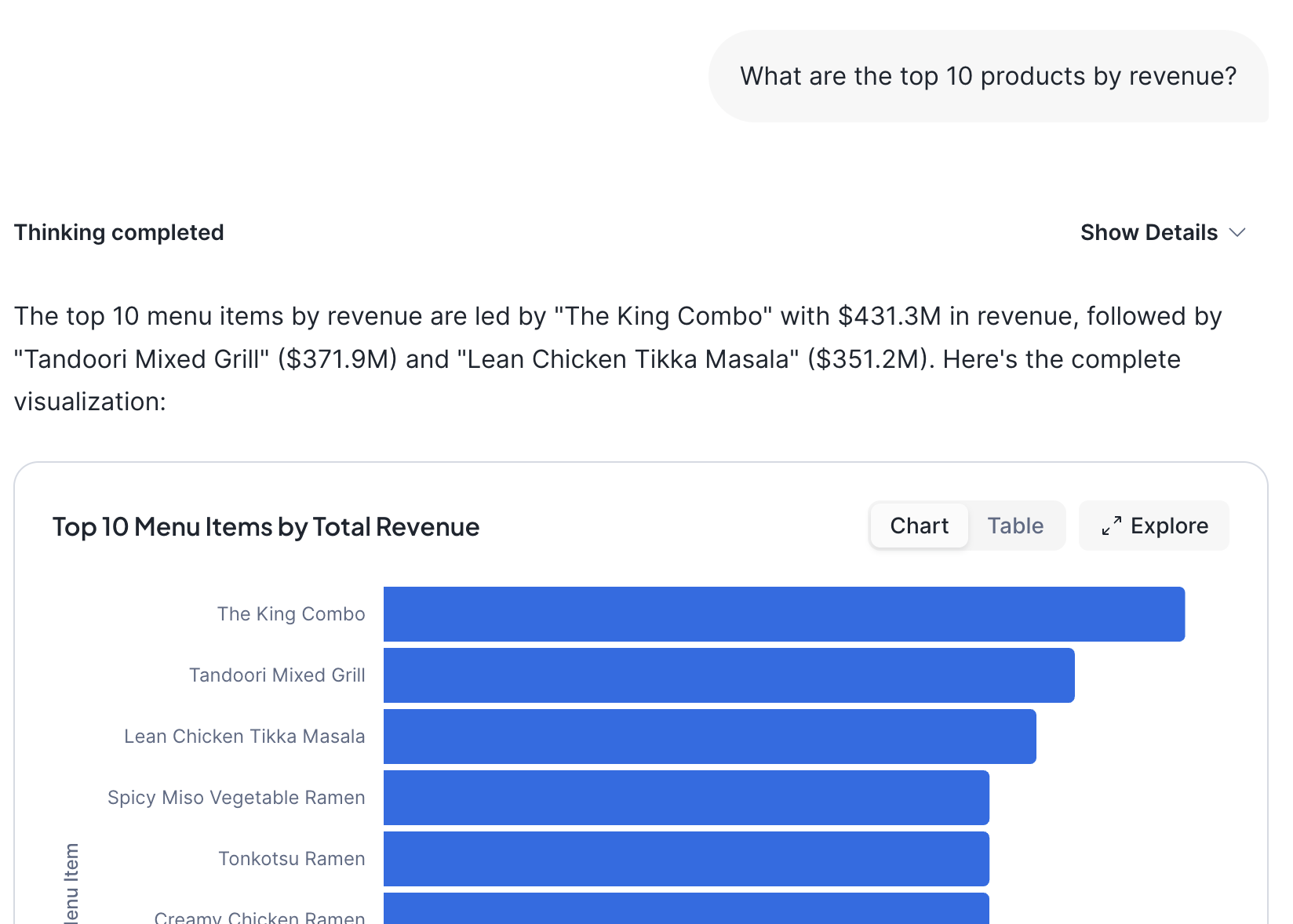
Once created, navigate to AI & ML → Snowflake CoWork in Snowsight, select your agent, and try:
- "What are the top 10 products by revenue?"
- "Show me daily revenue trends for the last 30 days"
- "Which truck brands are most profitable?"
- "What's the average order value by day of week?"
The agent translates natural language into SQL queries against your Dynamic Tables and returns results with visualizations.
Clean up
Ask CoCo to tear down everything created during this quickstart:
Drop database tasty_bytes_db and warehouse tasty_bytes_wh using lab_role.
Then switch to ACCOUNTADMIN and drop lab_role.
Conclusion and Resources
Congratulations! You've built a complete autonomous data pipeline without writing a single line of SQL manually. By combining Snowflake CoCo with Dynamic Tables, you:
- Described a multi-tier pipeline in plain English and had it materialized automatically
- Generated and executed complex stored procedures from a single prompt
- Verified incremental refresh behavior across a billion-row dataset
- Created a natural language AI agent backed by your pipeline data
What You Learned
- Using Snowflake CoCo to generate and execute SQL from natural language
- Building multi-tier Dynamic Table pipelines declaratively
- Configuring TARGET_LAG and DOWNSTREAM refresh strategies
- Verifying incremental refresh behavior
- Monitoring Dynamic Table operations
- Creating semantic views and AI agents with Snowflake CoCo
Related Resources
This content is provided as is, and is not maintained on an ongoing basis. It may be out of date with current Snowflake instances
