Oct 21, 2026/10 min readProduct and Technology
The Snowflake AIM Application: Data Migration Gets Its Own Front Door


Database migrations have always been one of those projects that everyone needs to happen and nobody volunteers to run. The tooling is fragmented and the risk tolerance is zero. Teams spend weeks stitching together data migration tools: extraction scripts, conversion tools, deployment pipelines and validation jobs — and then spend another few weeks wondering if they got it right.
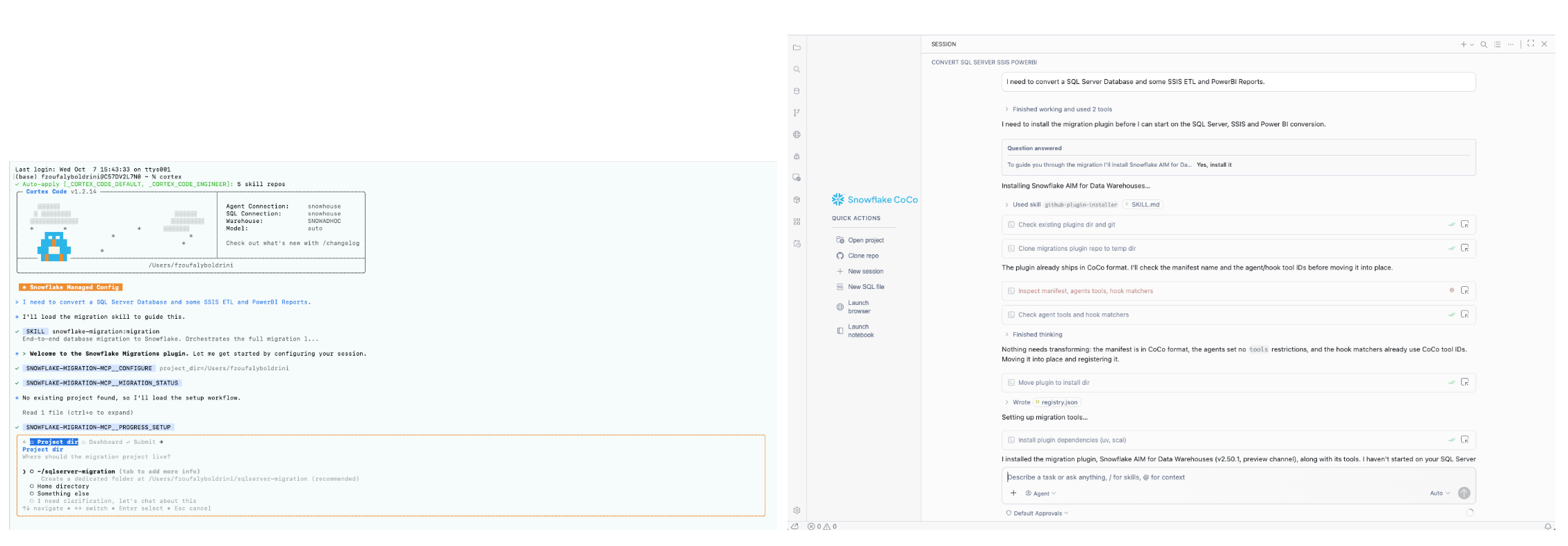
We set out to change that with Snowflake AIM. It started as a skill inside the Snowflake CoCo CLI, then arrived in CoCo Desktop. As of Oct. 20, AIM has a surface entirely its own: the Snowflake AIM application, now in public preview.
With the AIM application, migration engineers have many new advantages:
- Zero setup, zero prerequisite knowledge: As long as you have the standard CoCo CLI and Snowflake CLI available, just open the app and start. No SCAI CLI to install, no IDE to configure, no terminal commands to memorize. Dependencies install themselves on the first run. You need to update the app? Just click on update directly from it.
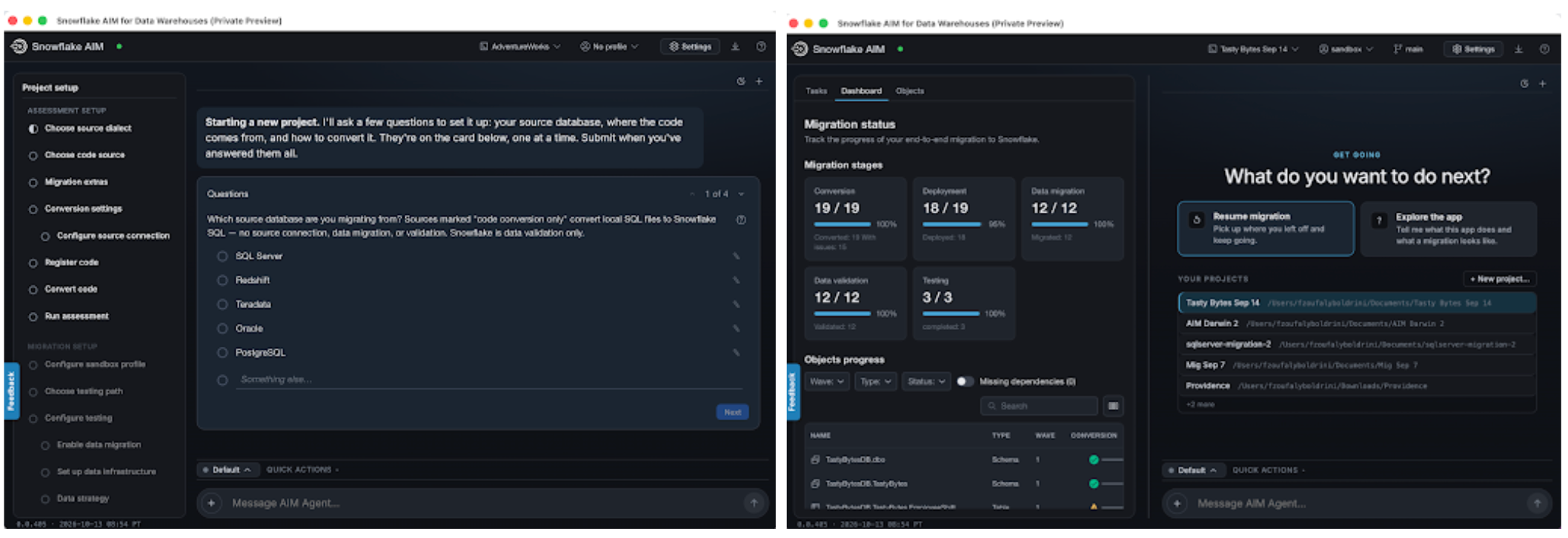
- Guided end-to-end workflow: You don't need to know the right sequence of a migration. The application walks you through every stage — from connecting to your source database through validated deployment on Snowflake.
- Migration-focused UX: No distractions from unrelated IDE or development features. The entire interface is organized around the migration lifecycle. Everything you need is visible; nothing you don't need is in the way.
- Persistent project state: Close the app, come back days or weeks later. The agent picks up exactly where you left off. No reorientation tax, no lost progress, no "where were we?"
- Deterministic conversion with AI remediation: You get the reliability of our five-year-proven deterministic code conversion engine for the baseline, plus AI that fills in the gaps — explaining issues, suggesting fixes and generating tests. Every fix can become a reusable rule, and every rule can propagate across every similar object in the project, so the migration gets smarter as you work. That's how teams avoid fixing the same pattern 200 times.
- Automated testing and validation: Source-side baselines, two-sided comparison, automated fix loops. Data validation and code testing are handled as separate concerns so you always know what you're looking at.
- Multi-user collaboration: Multiple team members can work on the same project simultaneously without duplicating effort.
- Full CoCo power underneath: For advanced users, the entire agentic platform is accessible — custom rules, MCP tools, custom skills, deployment wave tuning. The guided path is a fast lane, not a cage.
- Broad platform coverage: SQL Server, Redshift, Oracle, Teradata, PostgreSQL out of the box, with Snowflake AIM supporting 15+ dialects and ETL conversion for SSIS and Informatica.
Same migration engine, new experience
Under the covers, the core engine is unchanged: It powers the same deterministic code conversion, dependency-aware deployment waves and advanced agentic test-fix loops — spanning both deterministic and AI-driven validation — that make a migration project smarter as it progresses. What changed is how you reach it.
The AIM application is a standalone desktop application built for migration projects and nothing else. You open it, point it at your source database, and a guided workflow carries you through each stage without an IDE to configure or a terminal to drive.
The CoCo CLI and CoCo Desktop remain excellent surfaces for AIM if you already work in them. The application is a purpose-built third option where the migration workflow sits front and center. With the AIM application, migration engineers always know what assistance to expect from the AIM agent, including a guided setup for each phase, clear visibility into the status of the migration project and precise indicators of where human judgment is needed to assist AI. An engineer driving a migration gets every stage laid out in order, with state tracked and the freedom to pause and resume. A DBA or data engineer who inherited the project without migration being their day job gets structure instead of a blank prompt. Migration engineers retain full control through the underlying agentic loop — customizing rules, writing fix patterns, reordering waves and building test cases. Meanwhile, project stakeholders get instant visibility into progress, object counts and validation results without digging through log files.
What the AIM application actually does
The application guides you through six stages of a migration to Snowflake:
- Connect: Set up a connection to your source database.
- Initialize: Create a local migration project with the scaffolding it needs.
- Register: Extract data definition language (DDL) and stored procedures from the source, or import existing .sql files.
- Convert: Translate source SQL to Snowflake SQL through the deterministic code conversion engine.
- Assess: Generate an interactive report covering complete end-to-end lineage and the migration plan assisted by multiple specialized reports.
- Migrate: Deploy the code, move the data and validate the result. This is where most of the work lives.
- Test-fix AI loop: AI-assisted remediation handles what the deterministic pass cannot. AIM generates test cases and synthetic data, runs the converted code to verify its accuracy, and AI fixes any issues.
Inside the migrate phase
Stages one through five set the table. Stage six covers four workstreams, each with its own logic, validation and fix loops. The agent coordinates all of them while keeping them distinct, because they could fail in different ways.
The validation and fix loop deserves a more in-depth discussion. In fact, testing is three problems, not one
Confirming that rows landed correctly is a different job from confirming that a stored procedure returns what it returned on the source, and both differ from confirming that converted ETL logic produces the same result. The application treats them separately.
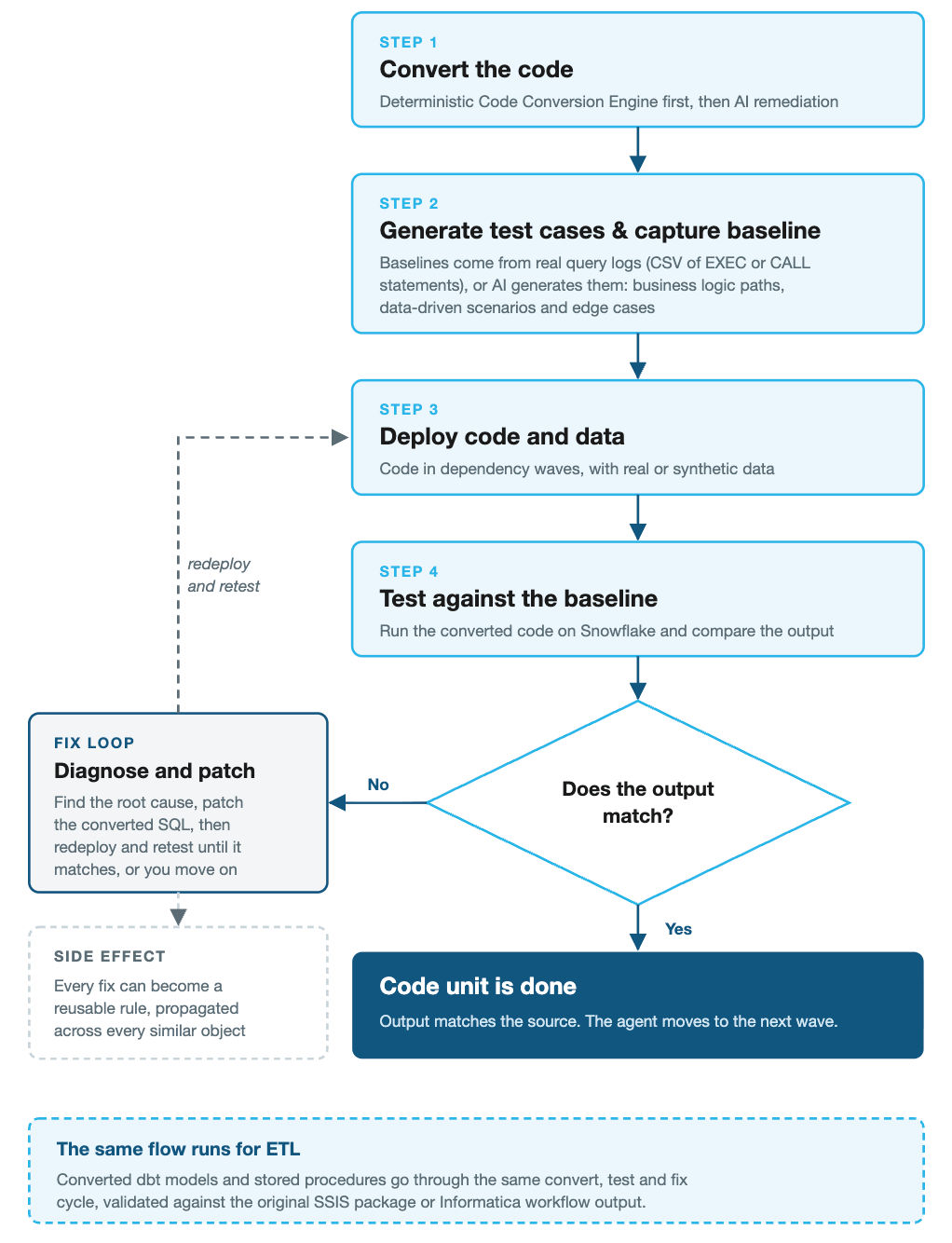
Database code testing covers stored procedures, functions and views. The agent captures source-side baselines either from real query logs, if you have CSV logs of EXEC or CALL statements, or by generating test cases and synthetic data with AI. When it generates them, specialized subagents cover business logic paths, data-driven scenarios and edge cases such as NULLs, boundary values and type limits. The converted code then runs on Snowflake, and its output is compared against the baselines. A failure opens a fix loop: Diagnose the root cause, patch the converted SQL, redeploy and retest, repeating until the output matches or you choose to move on.
ETL testing confirms that converted dbt models or stored procedures produce equivalent results to the original SSIS packages or Informatica workflows. The agent claims each ETL code unit, runs it through a phase-based stabilization engine, applies fixes and iterates until the output is correct. Because ETL transformations chain together, it tracks dependencies between models so upstream fixes propagate before downstream units are retested.
Database DDL deployment
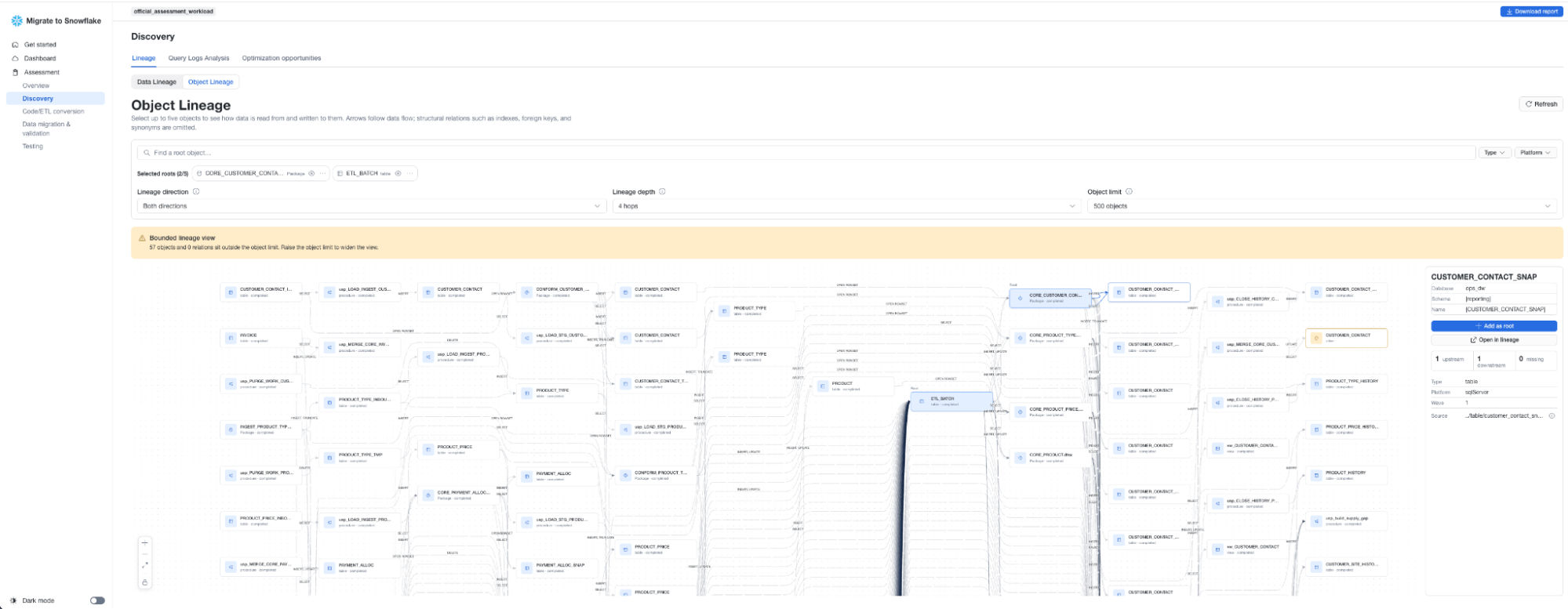
Tables, views, stored procedures, functions and sequences deploy wave by wave in dependency order. The assessment phase already mapped the relationships between objects and grouped them so prerequisites land before whatever depends on them. Each object deploys individually, and failures surface immediately. When a view can't compile because a function it depends on hasn't passed testing, the agent parks it and retries once the dependency clears, which means circular dependencies get untangled during assessment rather than by hand on a Friday night.
ETL pipeline migration
SSIS packages and Informatica workflows convert to a Snowflake-native target, either dbt projects on Snowflake or SQL stored procedures, depending on your operational preference and existing toolchain. Snowflake AIM parses control flows, data flows and transformation logic, then produces the equivalent in whichever target you choose. Where the deterministic pass cannot fully resolve a transformation, AI-assisted remediation explains what it could not convert, proposes a fix and applies it interactively. Converted ETL units then run through their own stabilization and testing cycle.
Report repointing
Downstream analytics assets, starting with Power BI reports, can be repointed at Snowflake. The agent handles connection strings, data source mappings and the validation that each report still renders correctly against migrated data. Moving the database and the pipelines only gets you so far if the reports your business users open every morning still query the old system.
Historic data migration
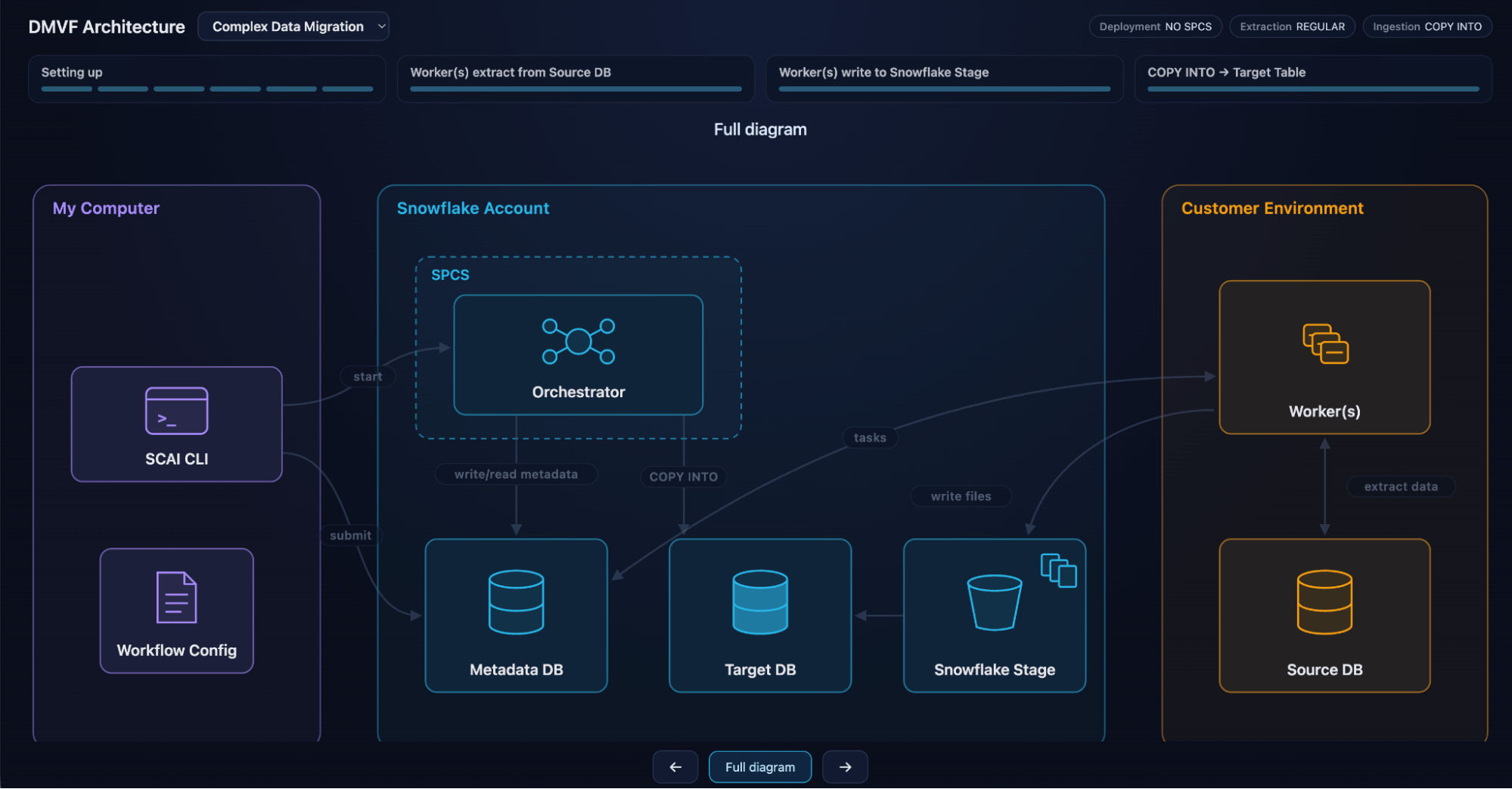
Moving data runs on an orchestrator and worker architecture. The orchestrator manages workflow metadata and tracks state, while workers connect to both source and Snowflake to move the data, running either locally or on Snowpark Container Services and scaling horizontally for large volumes.
Every run validates automatically at three levels. Schema comparison (L1) confirms that table structures in Snowflake match the source. Metric comparison (L2) checks row counts, sums and key aggregates. Row-level comparison (L3) is optional and exists for tables where exact equivalence matters.
Partition key selection, interval handling and other platform-specific data type mappings are configured through the agent, which walks you through the options that matter for your source and generates the configuration.
Built for projects that run for weeks
You can start and continue the project for weeks, and multiple users can share the migration state and work together. The agent reads your project state and picks up exactly where you left off, with the extraction, conversion and deployment record all intact. For a migration spanning hundreds of objects and several weeks, that's the difference between a managed project and a pile of sticky notes.
Several people can work on the same project at once. Using its Git repository integration, the agent tracks which code units each person has claimed, so effort isn't duplicated and nothing falls through the cracks.
Supported platforms
| Capability | Platforms |
|---|---|
| Direct connection and end-to-end migration | SQL Server, Amazon Redshift, Oracle, Teradata, PostgreSQL |
| Deterministic code conversion via Snowflake AIM | Azure Synapse, Netezza, Vertica, Google BigQuery, Databricks SQL, Apache Spark™ SQL, IBM DB2, Hive, Greenplum, Sybase IQ |
| ETL migration | SSIS packages and Informatica workflows, converted to dbt projects or SQL stored procedures |
| BI repointing | Power BI |
Coverage expands continuously with new source connectors, deeper ETL support and broader BI integration, so check the latest documentation if your platform is not listed yet.

From Day 1, we optimized for autonomy and speed. Organizations can no longer afford data migrations that drain specialized engineering resources or stall over unforeseen complexities. We built an intuitive, self-serve experience that gives teams the velocity to actually use their data immediately — without the risk or friction.
Venky Ganti
Senior Director for Migration Product Management, Snowflake
Where data migration goes from here
Migrations used to be a tax on modernization, a multi-month slog that consumed good engineers and produced anxiety instead of confidence. Expertise was the entry fee, and validation came down to faith.
The application is a significant step toward retiring that mode of operation. The structure, automation and persistent intelligence replace a great deal of manual coordination, and a simplified data foundation on Snowflake arrives sooner as a result.
It also sets a clearer division of labor. The application is designed to handle the most common migrations end to end, which frees Snowflake partners to concentrate their expertise where it matters the most: the change management process of switching a platform, the genuinely complex estates with deep custom logic, unusual source topologies and heavy regulatory constraints.
Whether your workload is tables, views, stored procedures, functions, ETL pipelines or downstream BI reports, AIM handles the coordination so your team spends its judgment where judgment is actually required.
Get started
Migrations still have to be done right. Now there's an application built specifically to make sure they are. Download the Snowflake AIM application and point it at your source database. The agent installs its dependencies, sets up the project and guides you through each stage. If you have questions or need support, reach out to aim-support@snowflake.com.
Want help building a plan? Explore a Snowflake LiftOff migration workshop, where our teams and partners can work with you to establish the foundation and develop an actionable migration plan.
