

Continuous Training in Machine Learning: When to Retrain and How to Validate
Models age as data and behavior change. Continuous training helps teams decide when to retrain, determine whether a new model is actually better and preserve the governance needed to manage each production version.
CONTINUOUS TRAINING DEFINED
Continuous training is the automated, policy-driven process of producing and evaluating new model versions as production conditions change. Rather than retraining constantly, it keeps a repeatable training workflow ready to run when predefined signals indicate that a new candidate may be needed.
Production machine learning (ML) models can degrade even while the application around them is functioning normally. Changes in data distributions or in the relationships the model learned may cause a stale model to return perfectly valid-looking predictions as its accuracy gradually declines. In a study of 128 model-data set pairs, researchers observed temporal degradation in 91% of the pairs they evaluated. For most models, performance degradation isn’t a question of if, but when.
Retraining is the obvious response. The challenge is defining the conditions that should trigger it, the criteria required for promotion and the lineage needed to understand each new version.
Continuous training puts those decisions into a repeatable sequence: a defined trigger starts a retraining run, validation determines whether the challenger should replace the production model and monitoring tracks the new version after deployment. Done well, that sequence keeps retraining responsive without separating automation from the governance needed to understand and control each production change.
What continuous training actually means in MLOps
Continuous training is an MLOps practice for automatically initiating and managing retraining of production models according to predefined conditions. Despite the name, training doesn’t run continuously. The workflow is available to run when a trigger fires, typically because a schedule has been reached, incoming data has shifted, enough new training data has accumulated or measured model performance has deteriorated.
For example, a continuous training workflow might sit idle for a week, start a training job on Monday night and produce a new candidate model several hours later. The candidate must then pass the organization’s evaluation and promotion criteria before it replaces the current production version.
Continuous training generally retains the familiar batch training model. Each run has identifiable inputs, produces an identifiable model version and can be evaluated before anything changes in production. Those boundaries also give teams useful model governance points: a training data set can be recorded, a model version registered, evaluation results retained and a promotion approved or rejected.
Continuous training is related to but distinct from two related processes:
- In online learning, the model updates incrementally as new observations arrive rather than waiting for a discrete retraining run.
- In continual learning, the same model keeps learning over time as new data or tasks are introduced. The technical challenge is preserving what it learned earlier while incorporating the new information.
Continuous training and continual learning solve different problems. Continuous training is an MLOps process comparable to CI/CD: a trigger starts a new training run, which produces a new model version for evaluation and possible deployment. Continual learning is a model-training approach: the model learns sequentially from new data or tasks while trying to retain what it learned earlier. That is why catastrophic forgetting is a central concern in continual learning, but not in a conventional continuous-training pipeline.
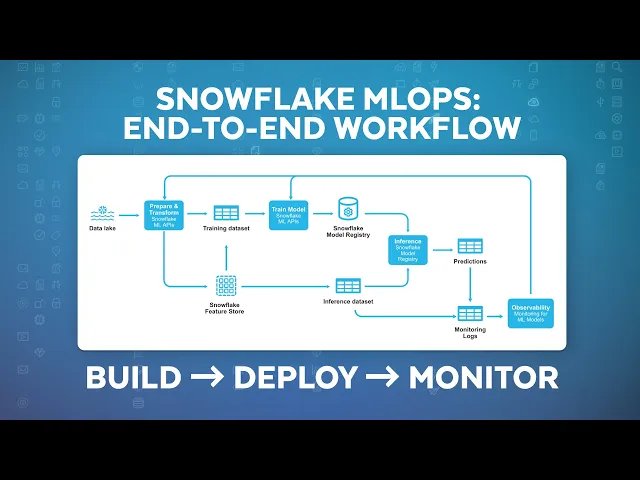
In this video, Sukanya Joshi, AI/ML Solutions Consultant at Snowflake, guides you through an end-to-end MLOps workflow — from model development to deployment:
Once a retraining pipeline exists, teams need a policy for starting it. Common trigger types include:
- Scheduled retraining: Run the pipeline daily, weekly, monthly or at another predefined interval.
- Drift threshold: Start a run when production data crosses a statistical drift threshold.
- Performance degradation: Retrain when a metric such as accuracy, F1 or root mean squared error falls below an established floor.
- Data-volume threshold: Wait until enough new labeled observations have accumulated to support another training cycle.
- Upstream change or manual trigger: Start retraining after a feature, data source or other relevant dependency changes, or when a practitioner explicitly initiates a run.
Scheduled retraining is often a sensible default for machine learning teams. The compute budget is predictable, teams know when new model versions will be produced and the cadence is straightforward to document. If the underlying data changes slowly and the model’s useful life is reasonably well understood, a weekly or monthly schedule may be entirely appropriate.
When production conditions shift faster than the chosen cadence, however, another approach is needed. For example, a product launch might change customer behavior within days, or an upstream pipeline change might alter feature distributions between scheduled runs. In those cases, teams usually add another trigger.
Performance degradation is another indicator. If model quality has fallen below the accepted threshold, there’s a clear reason to investigate a replacement. The difficulty is that many production systems cannot measure performance immediately. For example, a churn model predicting whether a customer will leave within 90 days has to wait for enough outcomes to be known before today’s predictions can be scored. Credit defaults, medical outcomes and other long-horizon applications have the same problem. By the time the team has enough ground truth to confirm declining performance, the model may have been operating under changed conditions for weeks or months.
Drift monitoring fills part of that gap. Production inputs and prediction distributions are available earlier than outcome labels, so changes in those signals give teams something to investigate while they’re still waiting for direct performance evidence.
For practical reasons, many teams combine a schedule with a few event-based triggers. The schedule prevents the model from aging indefinitely, while drift or performance thresholds bring the next run forward when the data or model behavior changes sooner than expected.
It’s important to note that the trigger should start the training process and nothing more. Promotion should depend on whether the challenger performs well enough to replace the production model.
COMMON PITFALL
A common mistake is treating drift as proof that a model needs replacement. A drift alert shows that production conditions have changed, not necessarily that model performance has declined. Use drift to trigger investigation or retraining, but keep promotion dependent on validation against the current production model.
Choosing a drift signal: what conditions fire a trigger
“Detect drift” isn’t specific enough to implement. Teams have to decide which distribution they’re monitoring, how they’ll compare it with a baseline and how large a change should count as significant.
Data drift: changes in production inputs
Data drift measures changes in the distribution of production features relative to a reference distribution, often the data used to train the current model. A retailer might see order values shift after a pricing change, for example, or a lender might start receiving applications from a population that looks materially different from the one represented in the training set.
Several statistical methods are commonly used to quantify those shifts. The Kolmogorov-Smirnov test compares distributions directly, while the Population Stability Index (PSI) measures how far a current distribution has moved from its baseline. ADWIN/ADWIN2 takes a streaming approach, looking for statistically significant changes within a moving window of observations.
Data drift is an especially useful signal when outcome labels are delayed because production feature values are available immediately. The signal still needs interpretation, though. A feature distribution can change without affecting the relationship the model learned, so a crossed threshold indicates that production conditions have shifted; it doesn’t, by itself, show that model performance has deteriorated.
Concept drift: changes in the relationship the model learned
Concept drift concerns the relationship between the inputs and the target. If a pattern that once predicted churn no longer carries the same predictive value, the model is relying on a relationship that no longer reflects current behavior.
This makes concept drift more directly relevant to model quality than input drift, but it’s also harder to observe quickly. Confirming that the relationship has changed usually requires ground-truth outcomes, which may not be available until days, weeks or months after the original prediction.
For applications with significant label lag, teams often use input or prediction drift as an earlier warning while they wait for enough outcome data to measure the model’s actual performance.
Prediction drift: changes in model outputs
Prediction drift tracks changes in the distribution of the model’s own outputs. Suppose a fraud model historically classifies 10% of transactions as high risk and then begins classifying 25% as high risk. A team can then investigate why the change has occurred.
Prediction drift is useful as an early-warning signal, especially when ground truth isn’t yet available. As with data drift, the signal is merely a reason to investigate rather than evidence that the current model should be replaced.
Setting drift thresholds
The final design choice is how much change should be enough to trigger action. A tight threshold catches smaller shifts, but it also increases the number of false alarms and unnecessary retraining runs. A loose threshold reduces that activity but increases the chance that meaningful degradation persists unnoticed.
The trade-off is operational as much as statistical. An unnecessary retraining run consumes compute and review time, and a missed signal leaves the underperforming model in production longer. The threshold should reflect the cost of both outcomes, along with the model’s criticality and the change rate of the production environment.
The validation gate: what stops a bad retrain from reaching production
A completed retraining job produces a candidate model that needs to be evaluated against the existing model. It shouldn’t automatically produce the next production model.
A typical validation sequence looks like this:
Validate incoming training data → train the challenger → compare challenger and champion → run guardrail checks → approve and promote → monitor with a rollback path
Validate the incoming training data
Before the training job starts, check the data feeding it. Schema changes, unexpected ranges, missing values or other quality issues are cheaper to catch here than after the pipeline has trained and registered another model on top of them.
Compare the challenger with the champion
Once training finishes, evaluate the new challenger against the current production champion on the same held-out data set. The practical question is whether the challenger performs well enough to justify replacing what is already serving, not whether it clears some generic definition of a “good” model.
Run guardrail checks
Aggregate metrics don’t always tell the whole story. A challenger might improve overall accuracy while performing worse for an important segment, so validation often includes segment-level analysis, fairness checks, prediction sanity checks and other application-specific criteria.
Test under production conditions when needed
For higher-consequence applications, offline evaluation may be only the first gate. Shadow deployment lets the challenger process live inputs without affecting production decisions, while A/B testing compares model behavior across separate traffic populations. Both approaches need enough data and time to distinguish real improvement from ordinary variation.
Approve and promote
Promotion is a governance checkpoint. Depending on the model and the organization, that step may include automated acceptance criteria, human approval or both. Recording the decision alongside the model version, metrics and deployment status preserves the reason one model replaced another.
Monitor and roll back if needed
Validation doesn’t end at deployment. Production monitoring should continue against defined thresholds, with a known previous version available if the newly promoted model underperforms.
Note that the trigger and the validation gate answer two different questions. The trigger answers whether another candidate should be trained. The gate answers whether that candidate is worthy of replacing the existing model.
QUICK TIP
Define promotion criteria before retraining begins. Predefined thresholds for model quality, segment performance and guardrails make challenger-versus-champion decisions more consistent and easier to audit.
Why continuous training fails without governed data and features
Continuous training depends on being able to trust what each retraining run used and produced. As the pipeline repeats, weak data controls, inconsistent feature logic or missing lineage make it harder to tell whether a new model reflects a genuine improvement or simply a change somewhere upstream.
Weak data controls propagate into every retraining run
Automated retraining places more pressure on the data foundation underneath it. During a manual retraining cycle, a practitioner is likely to inspect at least part of the training data. Once the workflow runs automatically, an upstream quality problem may pass through repeated training cycles unless the pipeline catches it first.
Schema changes, missing values, unexpected ranges or changes in source behavior all deserve checks before training starts. Otherwise, the pipeline is simply repeating a bad assumption more efficiently.
Inconsistent feature logic creates training-serving skew
If the training pipeline calculates a feature one way and the serving system calculates it another way, the model learns from a representation it won’t actually receive during inference.
A feature store can reduce that risk by centralizing feature definitions and reuse across training and serving. Historical training adds another requirement: point-in-time correctness. Features should reflect only the information that would have been available at the time of the original prediction, rather than incorporating later data that leaks future knowledge into the training set.
Missing lineage makes retraining hard to reproduce
A registry entry showing only that model version 17 replaced version 16 leaves teams wondering why the new version performed better. Reconstructing a new version’s history requires the training data, feature definitions, code and configuration associated with each run.
As retraining cycles accumulate, those relationships become increasingly important. Data versioning and lineage connect each model to the inputs and transformations that produced it, giving teams a way to reproduce a run, investigate unexpected behavior and explain why one version replaced another.
Retraining cadence and cost: how often is too often
Every retraining run consumes resources. Training uses compute, evaluation adds more work and successful runs create additional model versions that have to be tracked and governed. For this reason, teams need to know how quickly the current model is likely to lose enough performance to justify the next run. This gives them a defensible starting cadence — perhaps monthly rather than weekly — while drift or performance triggers handle changes that happen between scheduled runs.
Historical experiments can provide a starting point. Train the model on data from an earlier period, evaluate it against successive later periods and measure how long it takes performance to cross the organization’s acceptable threshold. If meaningful deterioration tends to appear after six weeks, for example, a monthly retraining schedule has a defensible basis.
That kind of experiment also helps separate cadence from habit. “We retrain every Friday” is an operational convention. “We retrain every four weeks because performance has historically degraded after five to six” is a good model policy.
More frequent retraining carries costs beyond compute. Training on small amounts of newly accumulated data may cause the model to respond to noise rather than meaningful change. Rapid version turnover also makes production analysis harder: when data, features and model versions are all changing frequently, isolating the cause of a metric shift takes more careful lineage and experimentation.
The acceptable cadence also depends partly on consequence. A model driving a high-impact operational decision may justify closer monitoring, faster retraining and a more extensive validation process, while a stable internal ranking model with expensive training requirements may warrant a slower schedule and an event-based trigger for unusual changes.
Research hasn’t settled on a universal retraining interval. Work on retraining timing continues to examine both when a new run is warranted and how much post-drift data is enough to support it. That uncertainty is useful to acknowledge. Daily, weekly and monthly schedules are design choices tied to the model, the data and the cost of degraded predictions, not markers of MLOps maturity.
For large language models, the same economic logic applies even though the update mechanisms differ. Fine-tuning, retrieval changes and other narrower updates are often more practical than full retraining.
Continuous training on Snowflake
A retraining loop depends on several objects staying connected over time: production signals, training data, feature definitions, training runs, model versions and promotion decisions.
Snowflake supports the lifecycle around governed data already used for model development and evaluation. Tasks and task graphs (DAGs) can schedule and coordinate retraining workflows, while Snowflake ML Jobs supports scalable training workloads. Snowflake Notebooks and Snowpark Container Services provide additional environments for development and specialized compute where the workflow requires them.
Snowflake Feature Store manages reusable feature definitions for training and inference, including point-in-time-correct retrieval for historical training data. That helps reduce training-serving skew and gives teams a consistent way to reconstruct the inputs behind a retraining run.
Once training produces a candidate, Snowflake Model Registry records model versions, metrics, metadata and deployment status. The registry also manages models trained outside Snowflake, which gives teams a consistent lifecycle record even when training takes place across different tools.
Snowflake ML Observability covers the production side of the loop, tracking model behavior and drift over time. Those signals feed the retraining decision, while evaluation and promotion remain separate steps.
Lineage ties the pieces together. When source data, feature views, training data sets and model versions are connected, practitioners have more than a list of model artifacts. They can trace a production model back toward the inputs that produced it and compare successive retraining runs with the surrounding context intact.
Keep retraining reproducible and governed
Continuous training works best as a governed sequence around each retraining run. A trigger determines when to train another candidate, validation determines whether that candidate should replace the current model and post-deployment monitoring shows how the new version performs in production.
The quality of that process depends on the context preserved from one run to the next. Versioned training data, consistent feature definitions and lineage make it possible to reconstruct why one model differs from another, while the registry records which version was approved and deployed.
For many teams, the practical design combines a scheduled retraining cadence with drift or performance signals that can bring a run forward when conditions change sooner than expected. Keeping the model, its training data, feature definitions, lineage and production history connected gives each new retraining sequence the context it needs — and gives teams a clear record of what changed, why the new model was promoted and what to restore if production performance declines.
KEY TAKEAWAY
Continuous training isn’t simply automated retraining. A reliable approach separates the decision to train a new candidate from the decision to promote it, while preserving the data, features, metrics and lineage needed to understand every model version.
Frequently Asked Questions
Your common questions about continuous training, answered by Snowflake experts.
Should a retrain start from scratch or continue from the existing model?
Retraining from scratch on a refreshed data set is often the cleaner operational choice because each model version has a distinct training run and a clearly defined set of inputs. Warm-starting from existing weights may reduce training time for some models, but it also adds the previous model version to the lineage that practitioners need to track.
The right choice depends on the algorithm, training cost and how much reproducibility the application requires.
Who owns the retraining pipeline — data science or platform engineering?
Ownership usually spans both functions. Data scientists define the model logic, evaluation metrics and acceptance criteria, while ML platform or engineering teams handle orchestration, triggers, deployment controls and rollback mechanisms.
The validation gate provides a useful handoff point. Data science defines what a challenger has to prove; platform engineering makes sure the workflow enforces those conditions consistently.
Explore AI Resources
Explore AI Topics
Deep dives into every aspect of artificial intelligence
