Oct 6, 2026/9 min readCore Platform
Snowflake Optima Planning: From Two Hours to 30 Seconds


TL;DR: Optima Planning already learns from repeated queries. It can now also learn across queries — when a brand-new query shares a plan fragment or join with something that has already run, it reuses that feedback on the very first execution. In production, this turned a 19-join analytics query from almost two hours into 30 seconds. No manual configuration required.
Optima Planning: One more question about a query
In a production workload by a large U.S.-based healthcare technology company, cross-query feedback reduced a 19-join analytics query from almost two hours to 30 seconds. Here's how that's possible.
Optima Planning has so far answered one question about a whole query: has this query, or a variation of it, run before? (Covered in our previous “Boosting Recurring Query Performance with Snowflake Optima Planning” blog.) Optima Planning can now also answer a complementary question about a piece of the plan inside a query — a plan fragment, or an individual operator.
Per-query feedback answers an important question:
Has this query, or a variation of it, run before?
Matching on a plan fragment or an individual operator answers a complementary question, about a piece of the plan rather than the whole query:
Has this plan fragment, or this specific operator such as a join, appeared inside any other query that has already run?
Together, they widen the population of queries Optima Planning can learn from, covering both queries that are the same and queries that repeat in shape but are not the same.
How this works
Today, Optima Planning can also match inside the query — on a plan fragment, such as the join tree inside a shared view, or on an individual operator, such as a specific join — at a finer grain than the whole query. At a high level:
- After a query compiles, Optima Planning computes a hash for each plan fragment and each individual operator in the plan, such as a specific join, over the optimizer's output for that piece of the plan, not the whole query's SQL text.
- If a different query later contains a fragment or operator with that same hash, even if the rest of that query is entirely new, such as an added join to a table that has not been joined before, Optima Planning recognizes the match on that shared piece.
- Feedback from the first query's execution feeds into the second query's plan for that shared fragment or operator, so the optimizer chooses its plan with evidence for that piece instead of starting cold, even though the second query has not run before as a whole.
Matching on a plan fragment or an individual operator finds a shared piece of the plan. That match is a candidate, not a commitment. Optima Planning also keeps track, intelligently, of whether reusing that feedback from execution in the new query would over-generalize: applying evidence from one context in another where it no longer holds. When the transfer looks too aggressive, that feedback is not applied.
The important part is that the match happens on a fragment or an operator in the plan Snowflake's optimizer produces, not on the whole query's SQL text.
This does not replace per-query feedback, which already handles variations of the same query. It is intended to complement it, filling in for the case per-query feedback cannot reach: a query that is not the same, because it is built on a fragment or operator that has already run inside some other query. The handoff between the two mechanisms is clean: matching inside the query helps on that new query's first execution. The moment that same query runs a second time, it has its own identity like any other repeated query, and per-query feedback takes over from there.
Snowflake's optimizer is cost-based: it estimates each operator's row count and picks the plan expected to be cheapest. When an estimate is wrong, the optimizer can pick the wrong join order or build side, sometimes cascading into billions of unneeded intermediate rows (covered in more depth in “Boosting Recurring Query Performance” and “Grounding Query Plans in Real Data”).
Where learning across queries helps
Extending an existing view with a new join
-- v_customer_orders already joins customers, orders, and order_items, and already has feedback
SELECT * FROM v_customer_orders v JOIN returns r ON v.order_id = r.order_id WHERE ...  -- new join, never run before
An analyst builds on a view that's already common in the workload, adding one join this workload has not run in that combination before. The combined query is brand new and gets a brand-new identity; the join fragment inside v_customer_orders is not new at all.
A common join pattern reused in a new report
-- the customers-orders join already runs inside a dozen other reports
SELECT c.region, COUNT(*) FROM customers c JOIN orders o ON o.customer_id = c.customer_id
WHERE o.status = 'RETURNED' GROUP BY c.region  -- this exact report is new
The specific report, this exact SELECT list and grouping, is new and has never run before. The join it depends on, customers to orders, is not new: it already has feedback from every other report that uses it.
Logically identical queries, written differently
FROM orders o JOIN customers c ON c.customer_id = o.customer_id   -- one BI tool's join order
FROM customers c JOIN orders o ON o.customer_id = c.customer_id   -- a different tool, same result
Two BI tools can generate the same join with the tables listed in opposite order. For now, those are treated as different queries. Matching on a plan fragment or an individual operator can still share feedback on that join, because it looks at the operator in the plan rather than the FROM-list order in the text.
In each case, matching inside the query can reuse feedback already learned on that shared fragment or operator.
A synthetic example
Let's reuse the restaurant example from our earlier blog: the restaurants, menu_items, sourcing_records, and suppliers tables, joined on restaurant_id, ingredient_category, and supplier_id. As we saw earlier, top-rated restaurants tend to use a small set of premium ingredients, and those ingredients tend to come from artisan suppliers rather than industrial ones. That pattern is spread across three tables, so per-table statistics have no way to catch it.
Here's a query — let's call it Query A:
SELECT COUNT(*)
FROM   restaurants      r
JOIN   menu_items       mi ON r.restaurant_id = mi.restaurant_id
JOIN   sourcing_records sr ON mi.ingredient_category = sr.ingredient_category
JOIN   suppliers        s  ON sr.supplier_id = s.supplier_id
WHERE  r.guide_rating >= 1
  AND  s.supply_chain_type = 'industrial';
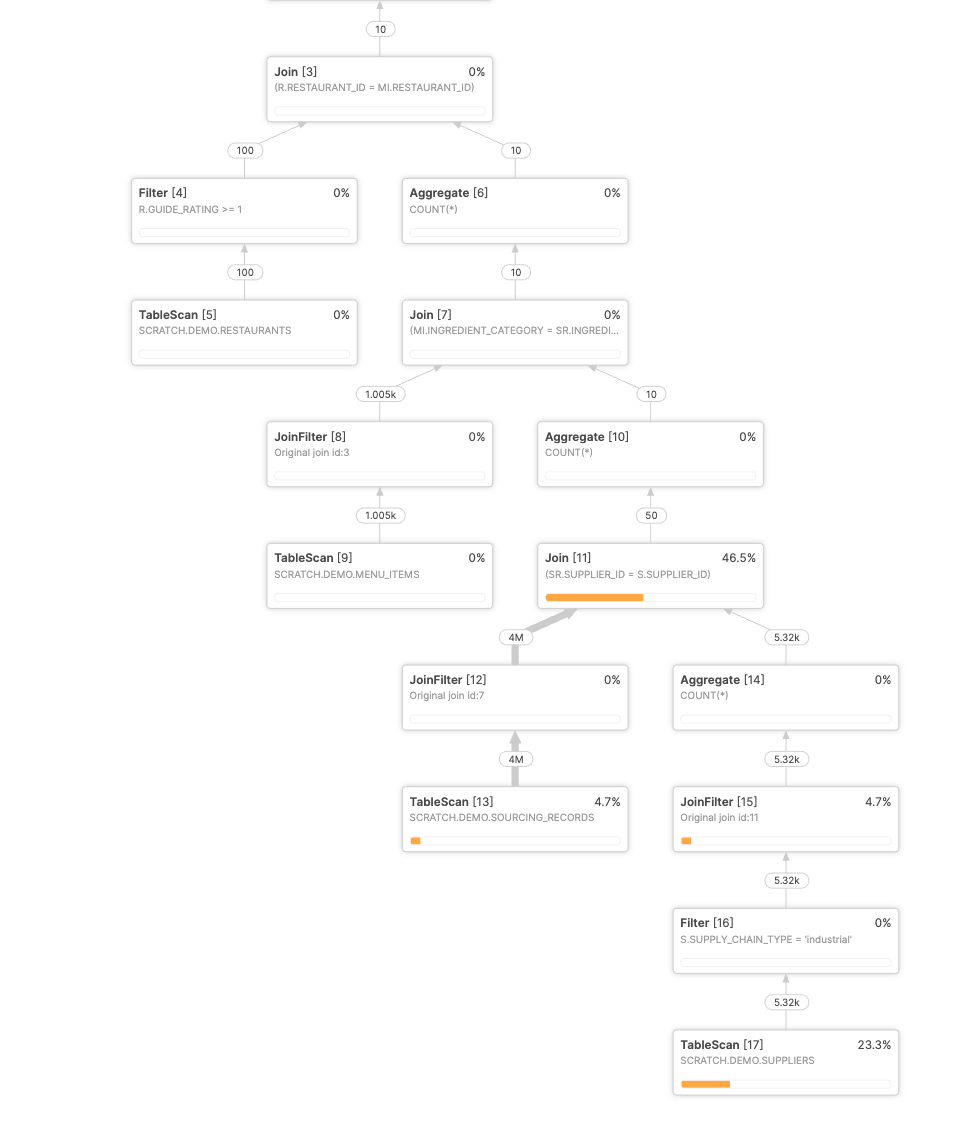
On its first run, the optimizer has no idea about the correlation, so the join explodes, producing tens of millions of rows before the filters bring it back down to almost nothing. On the next run, Optima Planning uses data from previous executions of the same query to produce a better plan:
But what happens if we have a similar query but distinct query? Here's Query B. It joins the same three tables on the same columns as Query A, but the output columns are different, the rating cutoff is different, and it adds a sort:
SELECT r.restaurant_id, mi.menu_item_id, s.supplier_name
FROM   restaurants      r
JOIN   menu_items       mi ON r.restaurant_id = mi.restaurant_id
JOIN   sourcing_records sr ON mi.ingredient_category = sr.ingredient_category
JOIN   suppliers        s  ON sr.supplier_id = s.supplier_id
WHERE  r.guide_rating = 1
  AND  s.supply_chain_type = 'industrial'
ORDER BY r.restaurant_id, mi.menu_item_id;
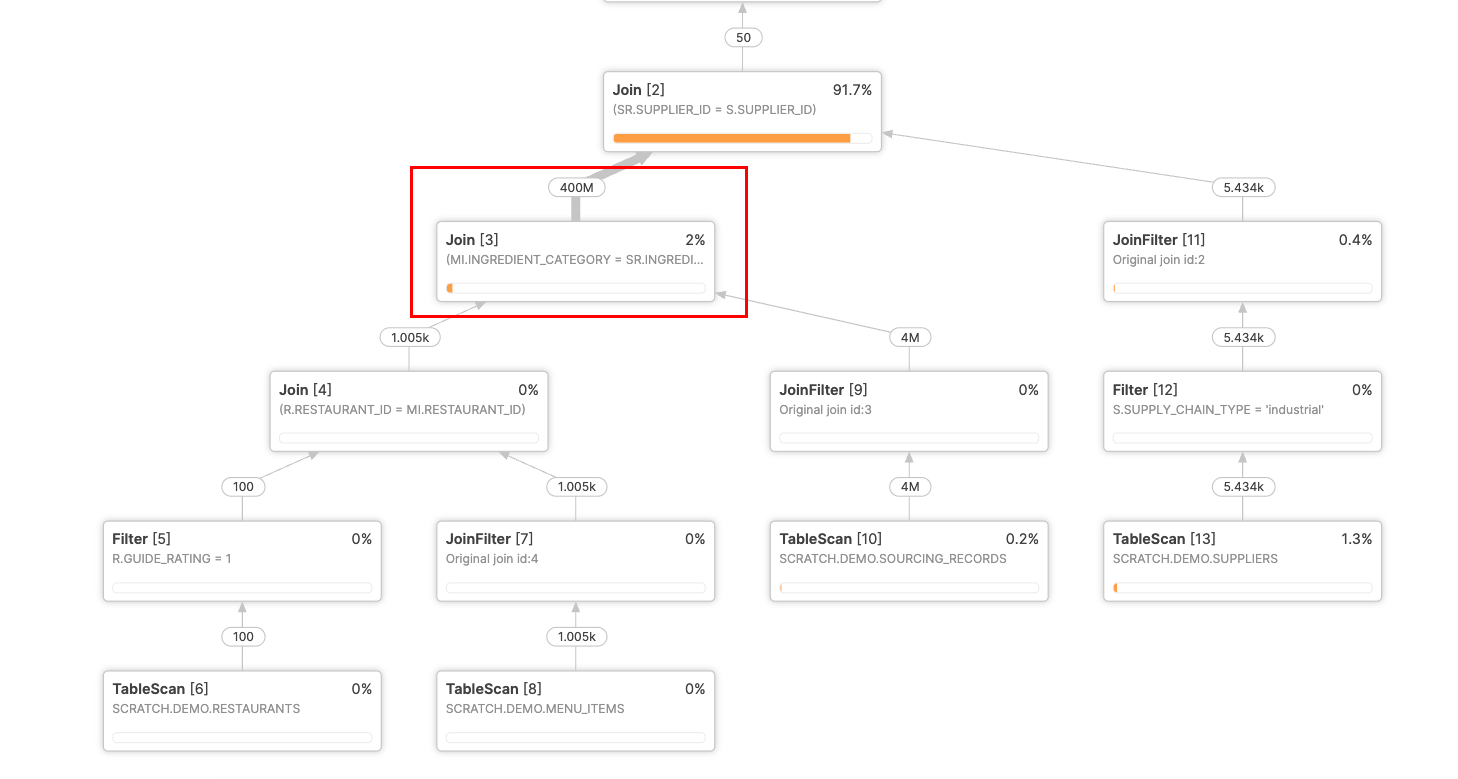
The optimizer hasn’t seen this exact query before, so it struggles to produce a good plan, just like when we ran Query A for the first time. We end up with an exploding join and the query takes about ~13 seconds to execute.
With our new feature, we can apply the cardinality estimation information from query A to query B. This allows us to produce an improved plan when Query B is run as a brand new query for the very first time. The new plan executes in about half a second:
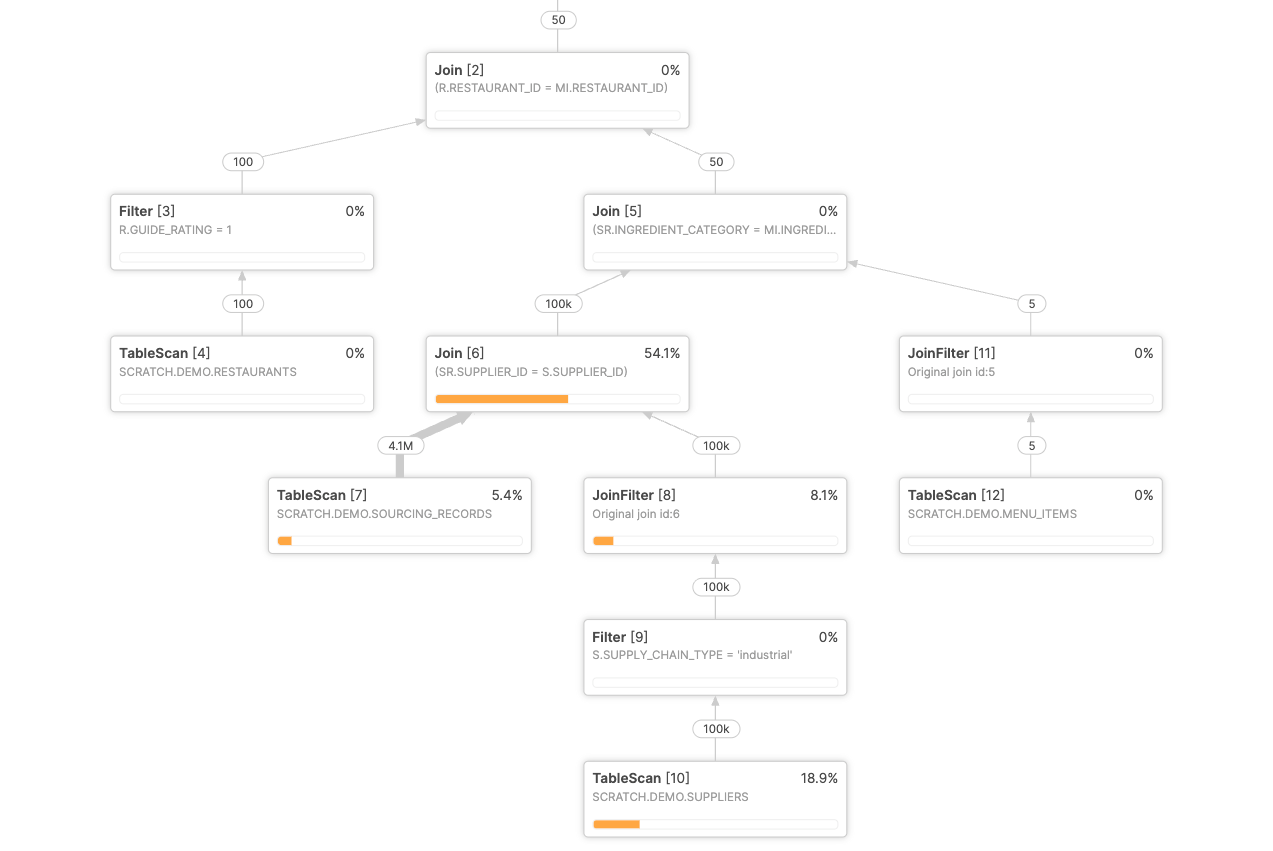
That's roughly a 26x speedup on a query that had never run before and had no history of its own to draw on.
A production example
Here's a real query from a large U.S.-based healthcare technology company that shows the power of this feature. A customer ran an analytics query with 19 joins and several correlated join predicates — the kind of shape where traditional cardinality estimation struggles. The optimizer generated a sub-optimal plan with an exploding join producing billions of rows. The query took almost two hours to complete.
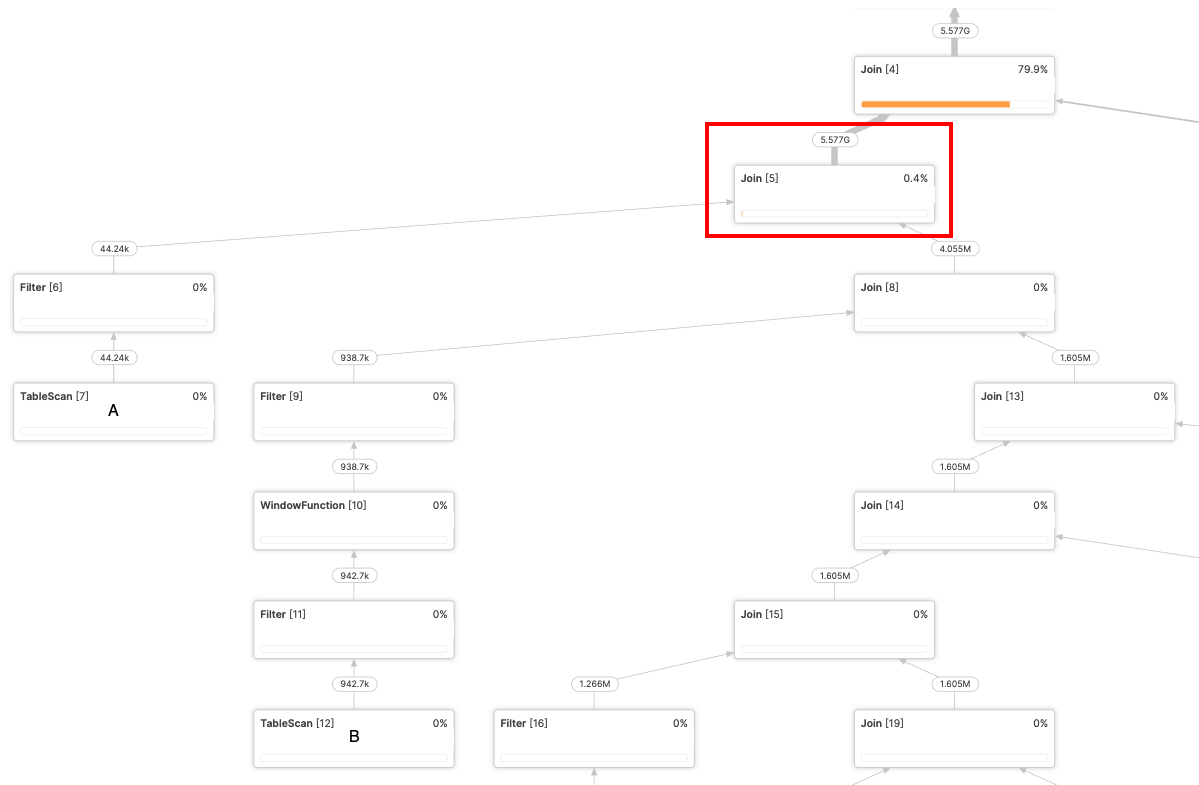
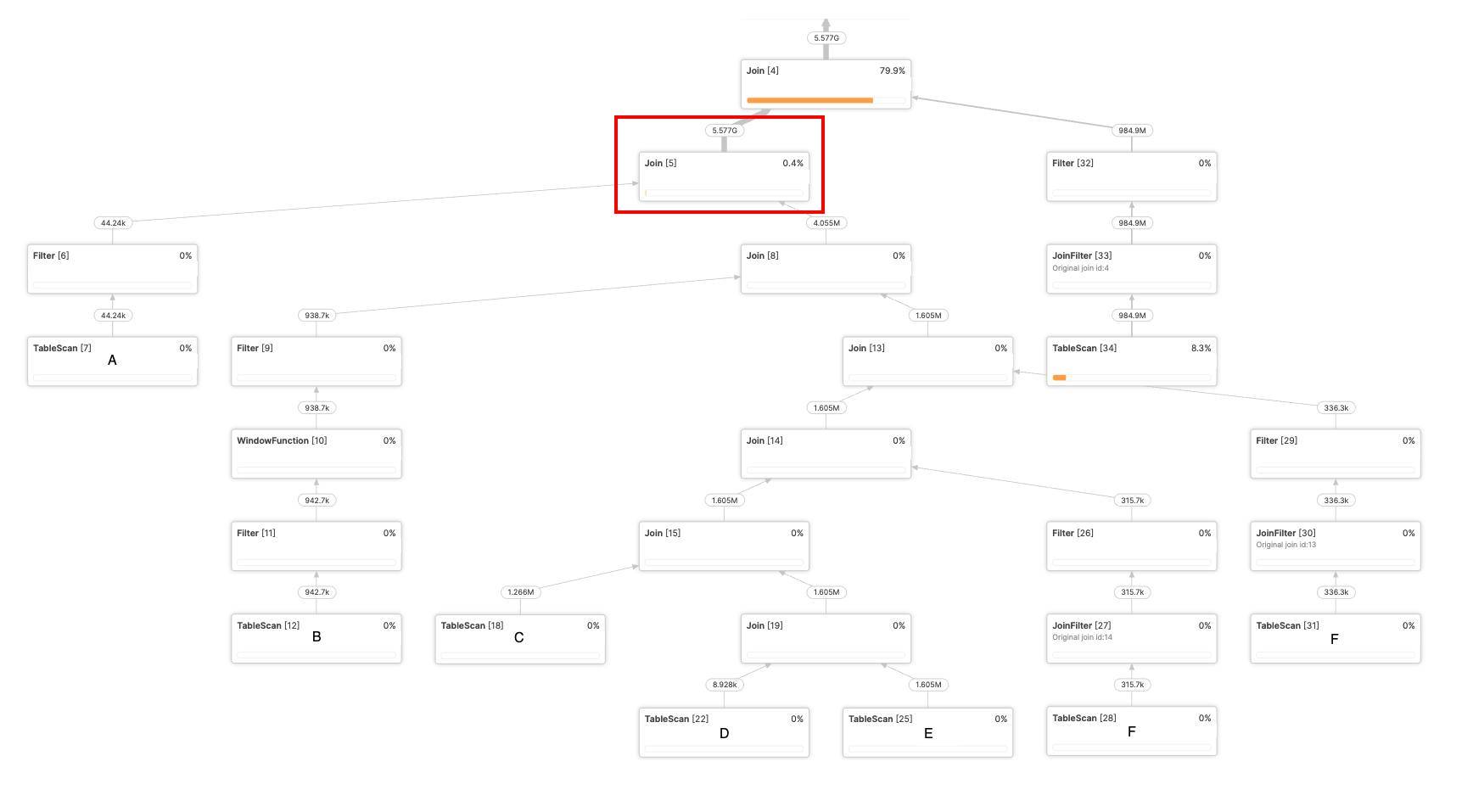
On a subsequent query execution, the optimizer was able to apply cross-query feedback from a structurally similar but distinct query to improve cardinality estimation and produce a better plan, with an execution time of only 30 seconds!
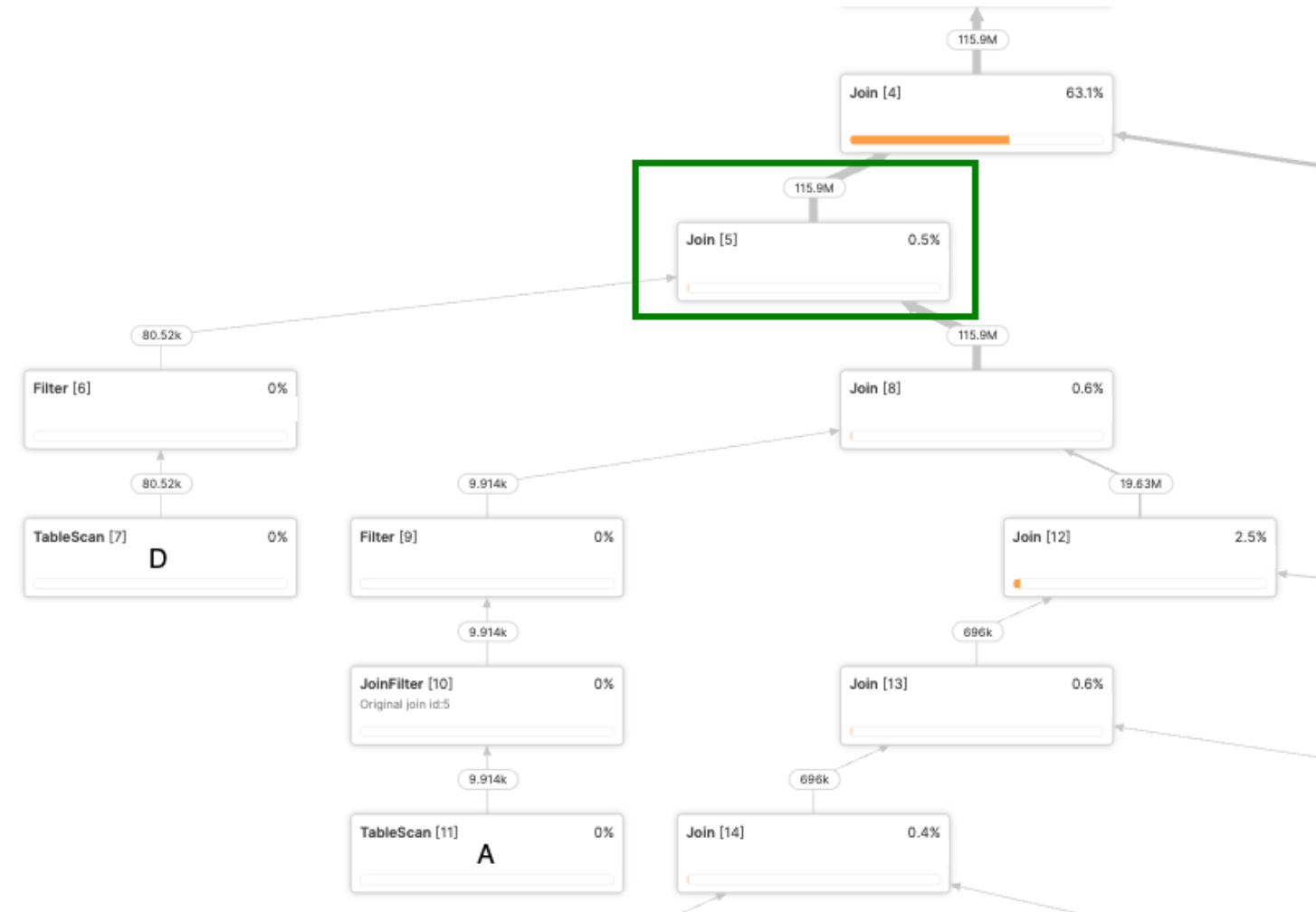
What this example gets at is the real unlock of cross-query feedback: a query doesn't need a track record of its own to benefit from one. If its join shape has shown up anywhere else in the workload, Optima Planning can put that experience to work immediately — even on a query's very first run.
When this helps
This capability is most valuable when a genuinely new query shares a plan fragment or an individual operator with something that has already run. By matching inside the query, Optima Planning extends feedback to queries that are not the same. It helps most when:
- the query is expensive enough that a bad plan would trigger large scans or joins
- the query is genuinely new, a new join, a new table, a new combination, but extends an existing view, CTE or common join pattern already used elsewhere in the workload
- an ad hoc analyst query builds on a join pattern that recurs across many other reports, even though the specific report is new
- the SQL is freshly generated by BI tools or LLMs (for example, Cortex Analyst, Tableau Pulse)
- two BI tools or ORMs write the same join with a different join order — for now those are treated as different queries
These are the cases where matching on a plan fragment or an individual operator, instead of the whole query, can materially improve plan coverage.
How customers can observe Optima
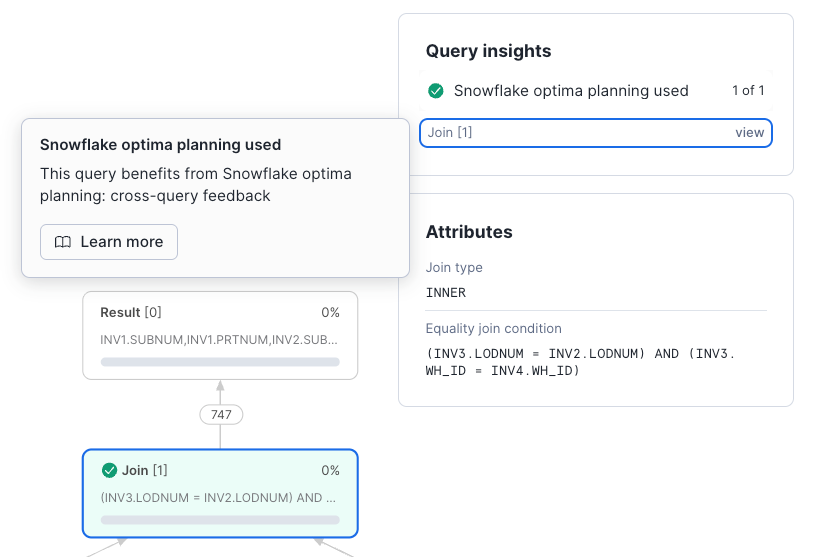
Customers can monitor Snowflake Optima use in Query Profile under Query History, including the Query insights pane and Statistics pane, and through the QUERY_INSIGHTS view (full mechanism covered in “Grounding Query Plans in Real Data”).
For Optima Planning specifically, this means customers can see when Snowflake has applied optimization insights to improve plan quality. Today, this new matching shares the same customer-facing insight as Optima Planning's other feedback: “This query benefits from Snowflake optima planning.” There is currently no separate message distinguishing a fragment or operator match from a match on the same query; both surface identically in Query Profile and QUERY_INSIGHTS.
Key takeaways
Optima Planning is about better evidence for better plans.Per-query feedback and cross-query feedback now cover more of the workload lifecycle:
- Recurring workloads: Dashboards, scheduled reports and ELT pipelines improve as Optima Planning learns about exploding joins from past executions.
- Queries that extend the known: A new join added on top of an existing view, CTE or common join pattern already used elsewhere now benefits from that fragment's feedback, even on its own first run.
- Production impact: In a production workload, cross-query feedback reduced a 19-join analytics query from almost two hours to 30 seconds.
No manual tuning. No manual configuration. Just better plans.
*This post may contain forward-looking statements about future product capabilities. Actual results may differ. See our latest 10-Q.*