May 29, 2026/9 min readCore Platform
Boosting Recurring Query Performance with Snowflake Optima Planning


Summary
- Optima Planning is a new Snowflake performance capability that learns from query executions and automatically improves query plans.
- Key benefit: acceleration for recurring queries suffering from performance issues (up to 500x speedup observed) — at no additional cost on Gen2 and Adaptive warehouses.
- Where it helps most: workloads such as BI dashboards, scheduled reports and ELT pipelines, where repeated executions give the optimizer an opportunity to improve future plans automatically.
The criticality of plan choice in modern data platforms
Query optimization is the foundation of every modern data platform. The choice of plan shape and join order can determine whether a dashboard query returns in seconds or stalls for an hour. These decisions underpin everything from BI exploration to the ELT pipelines feeding analytics and AI workloads.
These decisions can become performance bottlenecks when the optimizer has incomplete information about how much data will flow through a plan, especially for joins on skewed or correlated data. Snowflake directly addresses this challenge with Optima Planning, part of the Snowflake Optima family of workload-intelligent optimizations available on Snowflake's modern warehouse generations. On Gen2 and Adaptive warehouses, we observed acceleration improvements for certain eligible recurring queries with severe plan inefficiencies, with some workloads showing improvements of up to 500× under observed conditions.
Ultimately, Optima Planning allows data teams to deliver fresh, reliable insights more rapidly and cost effectively, without rewriting queries.
What is Optima Planning?
Optima Planning is a Snowflake performance capability that learns from query executions to refine query plan choices.
With each execution, Snowflake captures what actually happened at runtime. On the next run, the optimizer uses that information to make a better-informed plan choice based on observed behavior rather than relying only on its initial estimate. Over time, recurring queries benefit from plans that reflect how the workload actually behaves.
Understanding the challenge: When cost-based estimates go wrong
Snowflake's optimizer is cost-based: For every query, it enumerates candidate plans, estimates the cost of each and executes the cheapest. Those estimates are only as good as the optimizer's understanding of how many rows each operator will produce. When the estimates are accurate, the chosen plan is usually close to optimal. When they are not, the gap can be enormous — a plan that looks cheap from a cost estimation perspective can materialize hundreds of millions of rows of intermediate results that ultimately get thrown away.
The first failure mode Optima Planning targets is join explosion — a join that produces many more intermediate rows than inputs, most of which are later discarded. The two examples below show how this plays out in practice and how feedback from earlier executions fixes the plan choice.
Customer query example
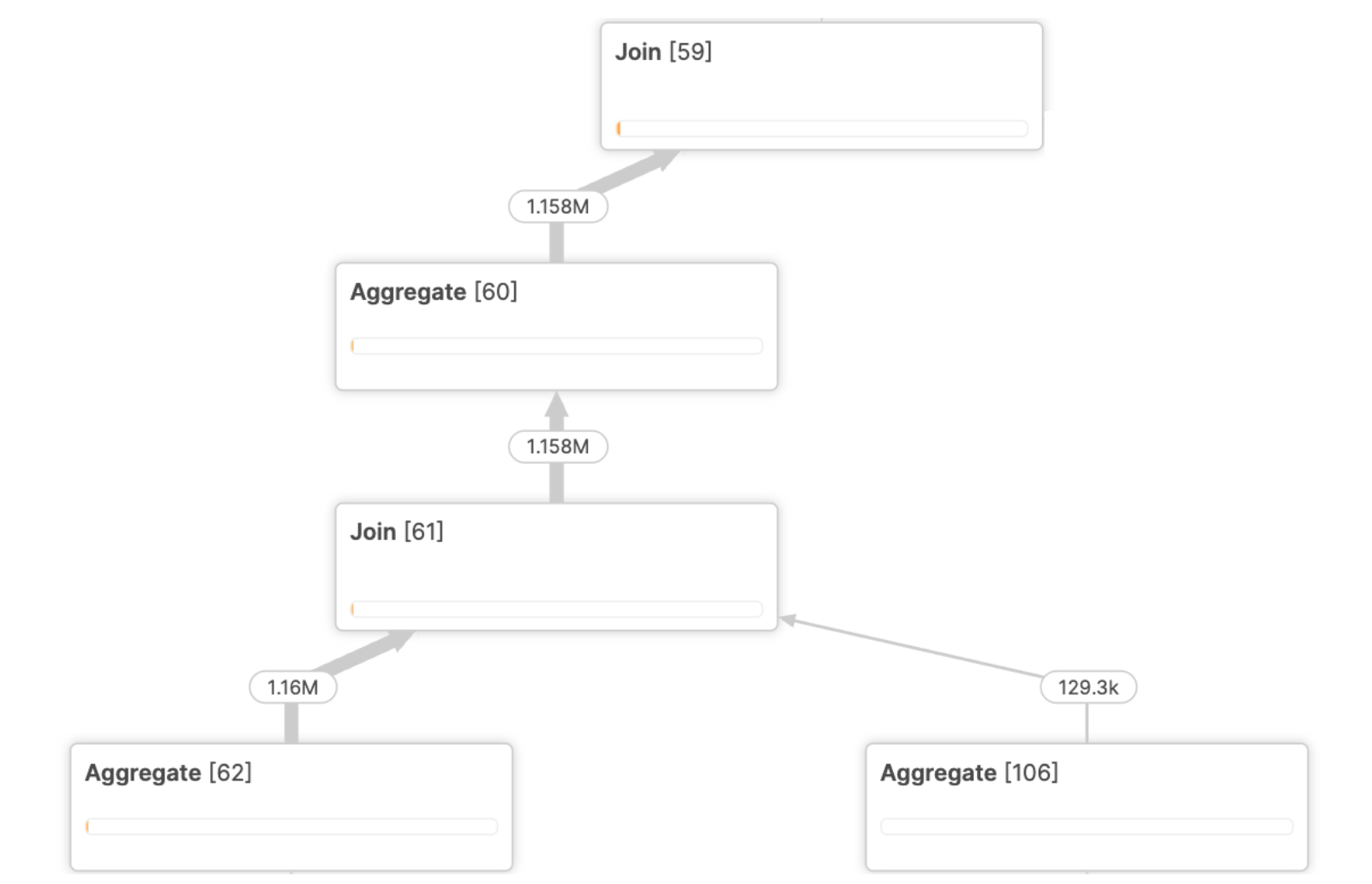
Let's consider this real-life customer query that performs a change-data-capture (CDC) load into a history table. The query contains 44 joins scanning multiple GBs of data with complex join-crossing correlations. Classic cardinality estimation techniques cannot find a good join order, and we end up with an exploding join producing tens of billions of rows of intermediate results that have to be further processed in the rest of the plan. The query took more than 1 hour to execute.
![Figure 1. Customer query — pre-Optima Planning profile: Join[59] explodes from 1.158M and 38.13k inputs to 27.97G rows that are then aggregated and rejoined upstream.](https://www.snowflake.com/adobe/dynamicmedia/deliver/dm-aid--8cd25093-d2e9-477d-9c27-69d9b1218a6b/optimaplanningfig1.png?quality=85&preferwebp=true)
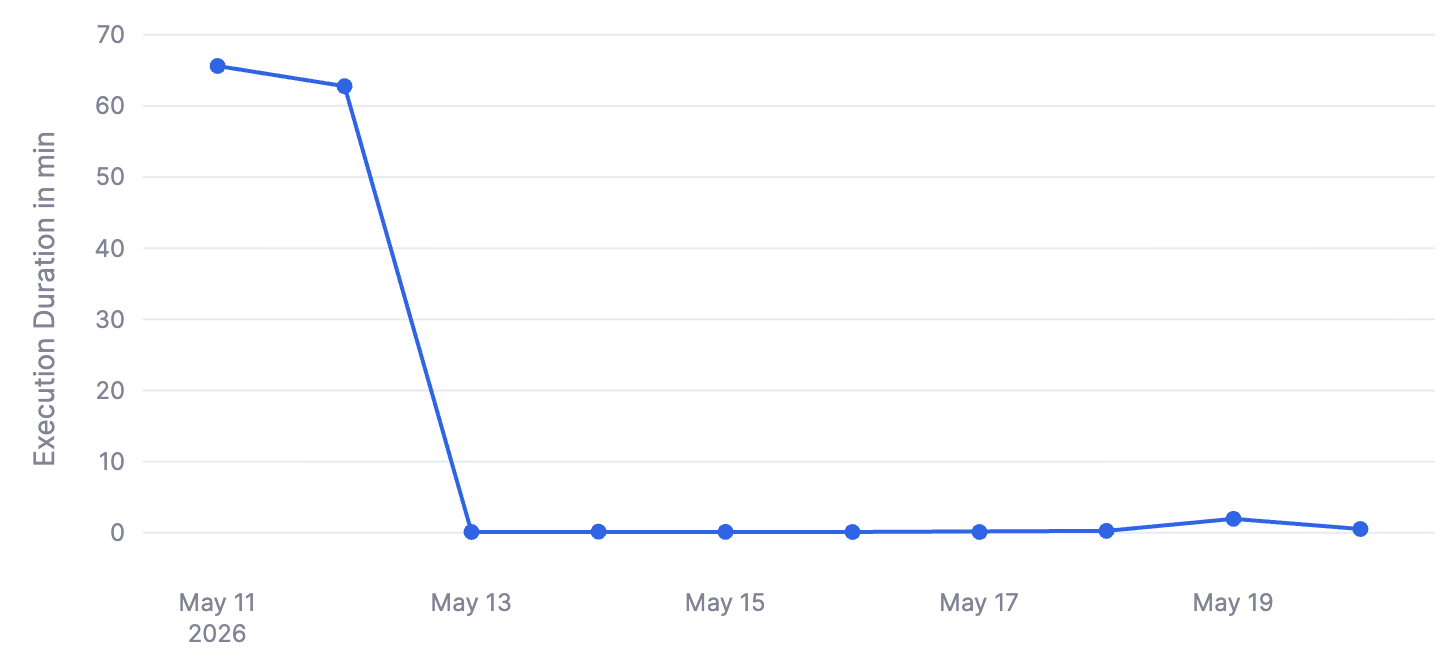
After enabling Optima Planning, the optimizer was able to learn from previous executions and change the join order to avoid this exploding join. In this workload example, the query now executes in just 20 seconds — a 180× improvement after Optima adapted its plan selection.
The plot below shows the evolution of execution time for this same query on a stable input.
Synthetic example
Let's walk through a synthetic example to show in more detail what kinds of problems Optima Planning can handle.
Here is an example depicting one of the hardest challenges for any cost-based optimizer: join-crossing correlation — a dependency between columns that lives across multiple tables. Per-table statistics, no matter how detailed, cannot capture it. Consider this example query against a food-service analytics warehouse:
SELECT *
FROM   restaurants      r
JOIN   menu_items       mi ON r.restaurant_id = mi.restaurant_id
JOIN   sourcing_records sr ON mi.ingredient_category = sr.ingredient_category
JOIN   suppliers        s  ON sr.supplier_id = s.supplier_id
WHERE  r.guide_rating >= 1            -- ~1% of the restaurants match
  AND  s.supply_chain_type = 'industrial';  -- ~75% of food suppliers match
Michelin criteria reward provenance. Starred kitchens cluster into a tight set of premium ingredient categories — heritage pork, line-caught fish, foraged mushrooms — and those same categories carry the bulk of the global sourcing_records ledger. The suppliers behind those records are overwhelmingly artisan, not industrial — even though industrial suppliers are 75% of the supplier dimension overall.
So a predicate that looks broad in isolation (supply_chain_type = 'industrial', passing 75% of suppliers) ends up deleting ~85% of the rows the join was about to produce, because starred restaurants source from the 25% minority the filter excludes. Cost-based optimizers cannot capture this correlation since they estimate predicate selectivities on each table independently.
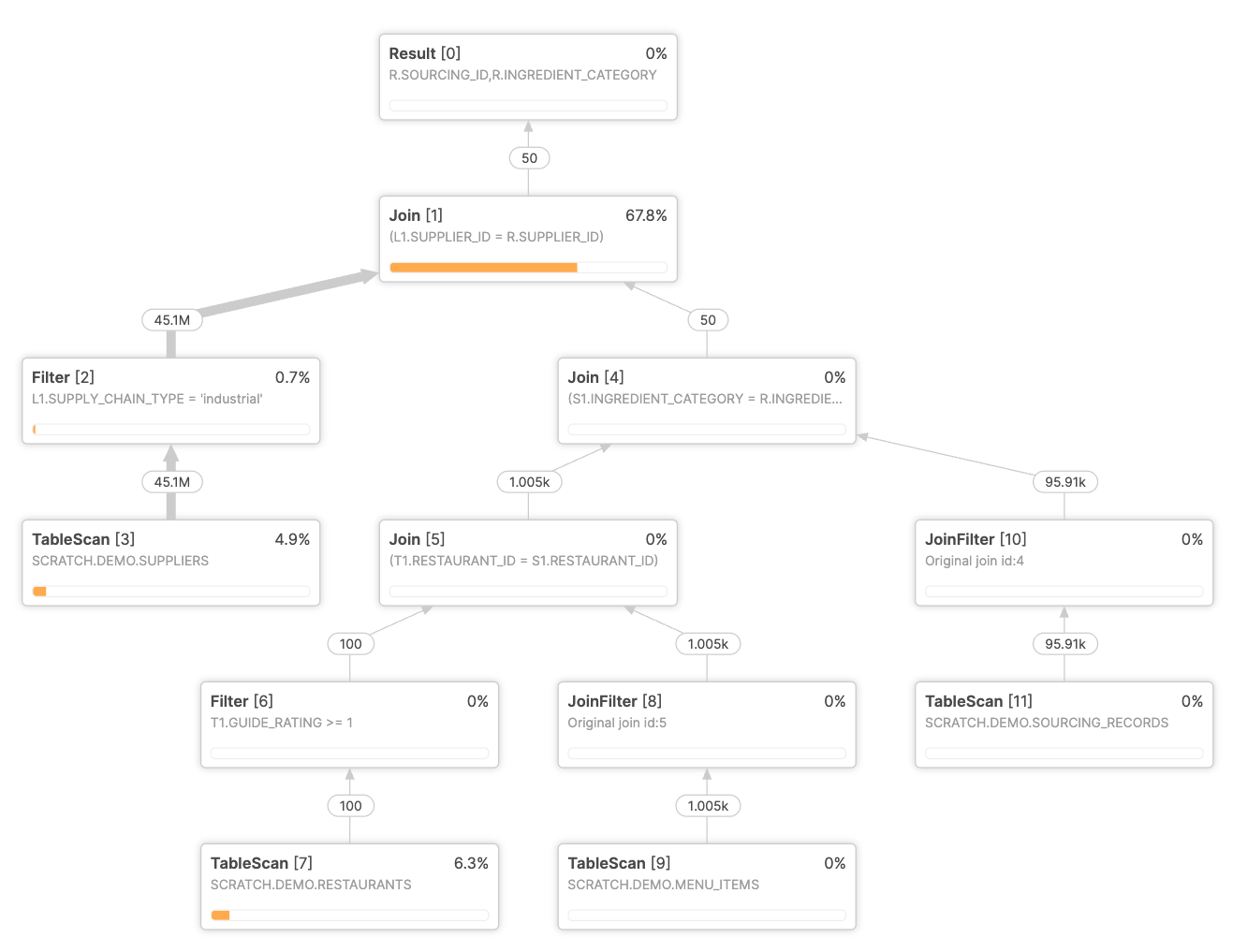
Here is a fragment of the plan chosen by the optimizer, showing a join explosion:
![Figure 4. Synthetic example — exploding join in the initial plan: Join[1] on R.SUPPLIER_ID = L1.SUPPLIER_ID processes 90M rows after the supplier-side filter is applied above it.](https://www.snowflake.com/adobe/dynamicmedia/deliver/dm-aid--38629084-bd5a-4786-8526-3f9f7f22b52c/optimaplanningfig4.png?quality=85&preferwebp=true)
After the first execution, Optima Planning flags this join as exploding. That information is exactly what the cost model fundamentally could not produce on its own. On the next run, the optimizer plans the same query with the corrected estimate. The new plan produces a much smaller intermediate result because of the prefiltering of the data using the bloom filter generated from the filtered suppliers table. In this example, the Optima improved plan reduced query execution time by 8.5× under the illustrated conditions.
The innovation: Optima Planning closes the feedback loop
Optima Planning introduces a feedback loop for queries. With each query execution, Snowflake retains signals from the run and uses them to improve plan choices for the same workload.
Optima Planning works automatically. It requires no configuration changes or code changes from users and is designed to improve query performance without changing how customers write queries.
The advantages of Optima Planning are substantial:
- Better plans over repeated queries: By learning from real execution rather than relying only on initial estimates, the optimizer can make more informed planning decisions for queries.
- Automatic and workload-aware: Optima Planning applies feedback to queries, helping BI, analytics and data engineering workloads improve over time.
- Zero customer effort: Users don't need to decide when feedback should apply. Optima Planning automatically applies feedback when it is beneficial for performance.
- Low overhead: Optima Planning is designed to deliver these improvements without introducing meaningful user-visible overhead.
- Built for production use: The feature is designed to improve performance automatically across workloads.
Where does Optima Planning help most?
Optima Planning is automatic on supported warehouses, but it is especially helpful in the following workload patterns:
- Operational Analytics: Dashboards that refresh hourly or daily, often joining large fact tables with dimension tables. These workloads benefit when repeated executions allow the optimizer to learn from earlier runs.
- Scheduled reports and ELT pipelines: Workloads that run on a fixed cadence against data with skew or correlation that may be difficult to capture from initial estimates alone.
- SQLs generated by frameworks, tools and applications: Query patterns from tools such as Looker, Tableau, Hex or dbt are natural candidates because similar shapes appear again and again over time.
Why does Optima Planning matter?
Optima Planning helps address classes of query latency that can be difficult for customers to mitigate manually. Specifically:
- Performance: Acceleration for recurring queries suffering from performance issues (up to 500x speedup observed)
- Cost: Faster queries may reduce warehouse runtime duration, which can reduce compute usage in per-second-billed environments.
- Operational simplicity: Optima Planning reduces the need for repeated manual investigation of query slowdowns.
- Predictability: Queries that previously had wide tail latency can become more consistent as the optimizer learns from executions.
Who should care about Optima Planning?
- Data engineers → Optima Planning helps data pipelines and transformations run faster and more consistently without requiring query rewrites.
- BI and analytics leads → Optima Planning reduces wide-tail-latency outliers that come from optimizer mistakes on dashboard queries, helping dashboard performance become more consistent over time.
- Platform and FinOps teams → Optima Planning reduces compute spend on per-second-billed Gen2 and Adaptive warehouses by shortening recurring-query wall-clock time on high-frequency workloads.
Getting started with Optima Planning
The best part about Optima Planning is its simplicity: If you are running on a Gen2 or Adaptive warehouse, recurring queries automatically benefit from Optima Planning — at no additional cost. No tuning, code changes or configuration is needed. Optima Planning is part of the Snowflake Optima family of workload-intelligent optimizations.
You can confirm your warehouse type by checking the Snowflake UI under the Warehouses tab, or by running:
SHOW WAREHOUSES LIKE 'yourwarehousename';Look at the TYPE column. If it is STANDARD_GEN2 or an Adaptive warehouse type, Optima Planning is in effect for your recurring queries.
If your queries are still on Gen1 warehouses, test it out yourself — pick a query with a heavy exploding join in your workload, run it on a Gen2 or Adaptive warehouse and check its performance. The improvement kicks in immediately for eligible queries.
Conclusion: Plans that get smarter with every run
Snowflake's mission is to continuously improve the performance and efficiency of your workloads — automatically. Optima Planning is the latest in a series of database engine enhancements that deliver significant performance improvements with zero effort from users, and joins a growing family of Optima capabilities that learn from how your workloads actually run. If your workloads include recurring queries — dashboards, scheduled reports, BI exploration, ELT pipelines — moving to a Gen2 or Adaptive warehouse is the easiest way to unlock faster query times, more predictable performance and lower compute cost without any requiring customer code changes for eligible workloads. To learn more about Snowflake Optima and the family of workload-intelligent optimizations it includes, visit the Snowflake Optima documentation. For a list of key performance improvements by year and month, see the Snowflake Performance Improvements release notes.
Note that performance observations are based on specific observed workloads, and internal testing conditions. Results may vary depending on query structure, data distribution, workload patterns and warehouse configuration.
Related
- Snowflake Optima documentation
- Snowflake Optima Announcement Blog
- Snowflake Performance Index: Methodology and weekly improvements
- Snowflake Performance Improvements release notes: Month-by-month list of shipped optimizations
- Snowflake Engineering Blog: For the broader cadence of performance posts