

Streaming Analytics: Analyzing Data in Motion — and Knowing When You Need To
Not every real-time workload needs streaming analytics. This article explains what streaming analytics actually involves (streaming ingestion, stream processing and low-latency serving) and how to tell whether your workload requires it.
STREAMING ANALYTICS DEFINED
Streaming analytics is a subset of real-time analytics where data is continuously ingested and optionally processed in flight before landing in the serving layer. It combines streaming ingestion, stream processing and low-latency serving so results can update as new events arrive. It carries stricter freshness and processing requirements than other real-time analytics patterns.
A request for “real-time analysis” often starts with a latency target: five seconds, 30 seconds, maybe a minute. But knowing how quickly the result needs to arrive doesn’t tell you whether you need streaming analytics.
A dashboard that feels current to the user might be backed by stream processing that continuously transforms events in flight, or by fast queries against recently loaded data. If the latter meets the requirement, there’s no reason to take on the complexity — and the resulting demands on the architecture — of streaming analytics.
A better way to frame the decision is to answer three questions: How old can the answer be before it loses value? Does the data need to be transformed or enriched before it’s useful? And does that transformation need to happen continuously on in-flight events, or can it happen after the data lands?
The first answer gives you a freshness goal. The second and third answers tell you how much of the streaming analytics stack you actually need. From streaming ingestion alone, to streaming ingestion plus stream processing.
What is streaming analytics?
Streaming analytics is the end-to-end discipline of continuously ingesting data and optionally processing it in flight so it reaches the serving layer as quickly as possible for decisions and actions. Some streaming analytics workloads require the system to maintain state and update results as new events are incorporated (stream processing). Others need only fast, reliable ingestion into a serving layer that can query the data immediately.
Streaming analytics sits inside a broader event-driven architecture, so it helps to be precise about which part is doing what.
Streaming ingestion is how events enter the analytical environment. Platforms such as Kafka transport time-stamped events between producers and consumers, while direct-write APIs and change data capture bring data from operational systems. The focus is on getting data reliably and quickly.
Stream processing is the computation layer. Engines such as Apache Flink or Spark Structured Streaming provide the machinery for windowed aggregations, stateful joins, filtering and enrichment over those streams.
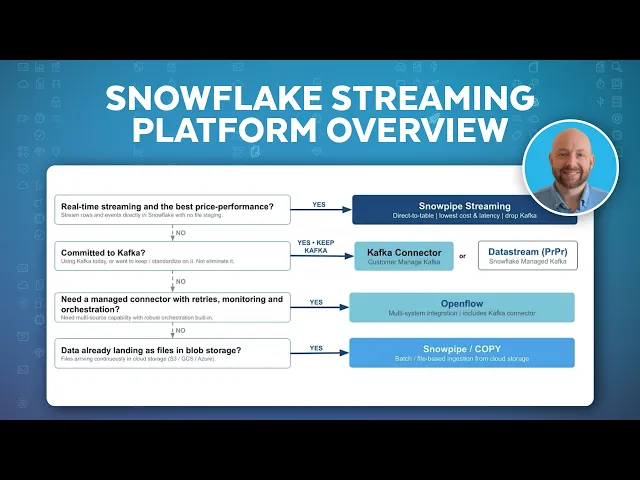
Watch an overview of Snowpipe Streaming, which lets you stream large amounts of continuous data for near real-time insights:
Streaming analytics vs. real-time analytics
Streaming analytics and real-time analytics are often discussed together, but they aren’t the same.
Real-time analytics is the umbrella term. Data and results need to be fresh enough, and queries fast enough, for a decision or action to happen within a defined time window. That freshness can come from streaming ingestion, micro-batch loading, CDC replication or any combination — and queries typically combine fresh data with historical context.
Learn more about real-time analytics >
Streaming analytics is a subset of real-time analytics. It has stricter requirements for how data is processed before it reaches the serving layer. It adds a more specific processing model: incoming events are processed as they arrive, often with state maintained across events, windows or sequences. The data freshness and transformation requirements are stricter because computation operates on data in flight, not at rest.
Suppose an interactive query returns in less than a second against data loaded five seconds ago. If the business needs an answer no more than 10 seconds old, that architecture might satisfy the real-time requirement perfectly well. No standing streaming query is required.
Now flip the example. A pipeline continuously updates an aggregate, but the dashboard displaying it is checked only once an hour. The computation is streaming, but the organization gets very little value from that additional freshness.
This is also why streaming analytics sits inside the broader real-time analytics category rather than alongside it. Streaming computation is one way to achieve the freshness that real-time analytics requires — but it’s not the only way, and it carries additional complexity in state management, ordering and delivery semantics.
The distinction affects what you have to build. A freshness requirement sets constraints on how quickly data is available and how quickly queries return. A streaming requirement means the calculation itself has to keep track of an ongoing event stream — including any state, ordering or timing semantics the result depends on.
For some workloads, periodically running the calculation against newly loaded data is enough. Others depend on event sequences, moving windows or accumulated state that needs to be preserved as the stream develops.

Why stream processing results require context
One of the biggest conceptual shifts when stream processing enters the architecture is that there’s no natural point at which the input is simply “done.”
When you run a query against last week’s sales table, the boundary is obvious. You know which records belong in the calculation. But with an ongoing stream, you have to establish those boundaries yourself — which events belong in a calculation, how long you’re willing to wait for late data and what should happen when events are retried or delivered more than once.
Windows define what you are measuring
Most streaming calculations need some way to turn an ongoing stream into analyzable units. That’s where windows come in.
- A tumbling window creates fixed, non-overlapping periods. You might calculate transaction volume from 10:00 to 10:05, then start a new window from 10:05 to 10:10.
- A sliding window overlaps. If you want “transactions during the previous 10 minutes” recalculated every minute, each new window contains some events from the previous one.
- A session window works differently, grouping events according to periods of activity rather than fixed clock boundaries.
In other words, a streaming figure such as “1,240 transactions” is incomplete on its own. You also need to know what interval or session those transactions belong to.
Event time and processing time are rarely identical
Event time is when something actually happened. Processing time is when the analytical system saw or processed it. Those timestamps often differ.
Suppose a transaction occurred at 10:04:58 but didn’t reach the analytics pipeline until 10:06. Maybe a network connection stalled, or perhaps an upstream system retried the event. From the perspective of event time, the transaction belongs in the 10:00–10:05 window. But from the perspective of processing time, that window has already passed.
This is why watermarks and late-data policies are necessary. A watermark represents the system’s estimate of how far event time has progressed, allowing it to decide when an event-time window is ready to produce a result. A lateness policy determines what happens when events arrive after that point. Waiting longer captures more stragglers before a result settles, while closing earlier produces fresher output but with a greater chance that late data will require an update or be handled separately.
Will Xu, Principal Product Manager for Snowflake Interactive Analytics, suggests grounding that tolerance in the decision itself: “Teams should decide the max window that late-arriving data a workload can tolerate. Typically, the window is four hours. The larger the window, the higher the infrastructure cost. It’s a business decision that should be made early in the planning stage.”
Delivery semantics affect the number too
Late events are only one source of uncertainty. Retries create another. Distributed systems, by nature, lose connections, restart processes and resend data. Eventually a fairly mundane question will have important analytical consequences: Have I already processed this event?
With at-least-once delivery, the system prioritizes avoiding event loss, which means a consumer might receive the same event more than once. Downstream processing has to tolerate duplicates — commonly through idempotent operations that produce the same effective result when repeated.
Exactly-once delivery aims to give each event one effective impact on the result, even when retries happen. This typically requires coordination across the systems producing, processing and storing the events.
For someone reading an analytical result, all of this infrastructure just shows up as a number on a screen. But the semantics shouldn’t disappear inside the pipeline. If a streaming metric is going to influence a decision, teams should know its window, how late data is handled and what delivery guarantees sit underneath it.
Teams also need a reconciliation policy. A streaming figure used at 10:05 might differ from a later batch result after delayed records have made their way through the system. Decide in advance which figure becomes the system of record and how those differences are resolved.
QUICK TIP
Document the window, lateness policy and delivery semantics alongside the metric. A streaming number is much easier to trust when consumers know what data it includes and what can still change.
When streaming analytics is worth the cost
Some workloads genuinely live in extremely short decision windows. Fraud authorization, ad bidding and certain machine-control systems might need to react within milliseconds. Processing generally sits directly in the application or stream-processing path so the decision can happen within the transaction.
But most enterprise analytics use cases aren’t operating under these constraints, and many can be served by near real-time analytics without continuous in-flight computation. An operations team might need to see a backlog developing within a few minutes so someone can intervene. Or a logistics workflow might need a shipment exception surfaced while rerouting is still possible. An automated process might need recent telemetry before deciding what to do next. In cases like those, seconds-to-minutes freshness has real, practical value.
When periodic or micro-batch processing is enough
There are good reasons why batch processing has stuck around. Each run works with a bounded set of data at a defined interval, which gives you a relatively clear unit to test, replay and inspect when something goes wrong.
Micro-batching shortens the interval, so small groups of records are processed every few seconds or minutes. Depending on the workload, it can often produce data that’s fresh enough.
For example, if a logistics dashboard is useful at a five-minute refresh interval, maintaining continuous state between every incoming event might not improve the decision and near real-time analytics is likely the better fit. If the team needs to detect a sequence as it unfolds, however, or if waiting five minutes would cause the intervention window to close, stream processing has a stronger case.
Many teams combine batch and streaming approaches rather than forcing every stage of the pipeline into the same processing model.
Lower latency usually means higher cost
This approach gives you a more useful cost model as well. Lower latency generally requires more frequent processing and tighter operational tolerances, which can increase compute costs along with the monitoring, troubleshooting and reconciliation the workload requires. Compare that ongoing cost with the decisions whose outcomes actually improve when the data reaches them sooner.
These examples show how different the requirements can be:
- Fraud authorization: Often milliseconds, with decision logic in the transaction or stream-processing path.
- Operational anomaly detection: Seconds to minutes, depending on how quickly a person or automated workflow needs to respond.
- Inventory and fulfillment monitoring: Frequently measured in minutes, where incremental or short-interval processing might satisfy the requirement.
- Executive reporting: Often hourly or daily unless another downstream workflow consumes the data sooner.
COMMON PITFALL
A common mistake is assuming every streaming analytics workload requires stream processing. Many workloads need only streaming ingestion and a fast query layer — no windows, no state management, no watermarks. Add stream processing when the data must be transformed, enriched or deduplicated in flight; leave it out when raw ingested data is already query-ready.
Running streaming analytics on Snowflake
Snowflake supports streaming analytics across ingestion, stream processing and low-latency consumption within a single governed platform so teams don’t need to operate a separate streaming infrastructure stack.
The streaming analytics path has three stages, each with a dedicated deep-dive:
Streaming ingestion brings event data into Snowflake as it’s produced, avoiding staged files and intermediate object storage. This includes direct API ingestion via Snowpipe Streaming, Snowflake Kafka Connector and change data capture from operational databases.
Stream processing transforms, enriches and shapes data in flight before it reaches the serving layer. This includes deduplication, joins against dimension tables, time-window aggregations and CDC processing — operations that traditionally required a separate stream-processing engine like Apache Flink.
Low-latency serving makes the resulting data queryable at the speed the workload requires. Interactive analytics supports sub-second, high-concurrency queries.
Because all three stages run natively inside Snowflake, every row inherits the existing governance, access controls and lineage that you configure. There’s no separate streaming stack to secure or reconcile.
Treat streaming as a design choice, not a default
When real-time analytics enters the picture, the instinct is often to jump straight to streaming analytics: continuous ingestion, in-flight processing, the full stack. But real-time analytics is the umbrella term, and streaming analytics is one way to deliver it. Many real-time workloads are well served by fast queries over frequently refreshed data, without any data-in-motion architecture at all.
Start with what the workload actually requires: how fresh the data needs to be, whether it needs transformation before it’s useful, and whether that transformation has to happen in flight. Let those answers determine how much of the streaming analytics stack belongs in the design. You end up with fewer moving parts to operate and reconcile — while still getting streaming performance where it serves a purpose.
KEY TAKEAWAY
Start with the workload, not the technology. Define how fresh the data needs to be, whether it requires in-flight transformation, and what query speed the consuming application or user needs — then build only the parts of the streaming analytics stack those answers demand.
Frequently Asked Questions
Your common questions about streaming analytics, answered by Snowflake experts.
Is streaming analytics the same as real-time analytics?
No. Streaming analytics is a subset of real-time analytics. Real-time analytics describes any workload where data and results need to be current enough for a timely decision or action. That freshness can come from streaming ingestion, micro-batch loading or any combination. Streaming analytics specifically involves continuously ingesting data and optionally processing it in flight before it lands in the serving layer for low-latency queries.
When should you use streaming analytics instead of batch processing?
Streaming analytics is useful when data needs to be available for analysis within seconds and when in-flight processing (stream processing) is needed to transform, enrich or deduplicate events before they reach the serving layer. If periodic updates still get the answer there in time, near real-time analytics is often simpler and less expensive to operate.
Explore Analytics Resources
Explore Analytics Topics
Deep dives into every aspect of analytics
