Jul 12, 2026/6 min readData Engineering
Stop Bad Data Before It Hits Production: AI-Ready Spark Pipelines on Iceberg, Across Catalogs


Your Apache Spark™ job finishes without an error. Hours later, a dashboard shows a revenue dip that didn't happen or a model starts scoring customers on duplicated rows. The batch was bad the whole time, and by the time anyone notices, the fix is a rollback instead of a prevention.
And if that job writes to an Apache Iceberg™ table, the damage spreads further. The moment it commits, every engine reading the table sees the new snapshot. Iceberg already has the fix, with branches that let you check a write before anyone else sees it, but the Spark job doing the writing can't always use them.
Problems like that are getting harder to ignore. AI can now draft a transformation or suggest a pipeline fix in seconds, but engineering teams still need to know what a workflow is supposed to do, what depends on it and whether a change is safe to release. Without a safe way to test changes on real data, AI assistance doesn't remove work. It just adds more changes to review.
Today we're bringing the Apache Iceberg™ Spark APIs to Snowpark Connect for Apache Spark™, including Iceberg SQL extensions and DataFrame options, on both Snowflake-managed and externally managed Iceberg tables (all features are generally available, unless otherwise noted). Spark teams can run the code they already have against Iceberg tables in the catalog they already use, and they can validate every write on an isolated branch before it reaches production.
Why Spark teams need more from Iceberg
Iceberg made the multiengine lakehouse practical: Spark, Snowflake, Trino and Apache Flink can all work from one governed copy of data. In most of these environments, Spark does the writing. But the parts of the Iceberg API that keep production data correct, such as branches, tags and snapshot-level reads, aren't always available to the Spark job doing the writing.
So teams build workarounds. They copy data into shadow tables to test changes, write swap-and-rename or MERGE scripts to promote it and rescan full tables to find what changed since the last run. Each workaround adds storage, compute and code to maintain, and none of them makes the release itself atomic.
Run Spark on Iceberg tables across catalogs, under one set of governance
Snowpark Connect for Apache Spark runs your existing PySpark, Java and Scala code directly on Snowflake, with minimal code changes and no Spark clusters to size, patch or scale. Spark workloads also run on Adaptive Compute, which matches resources to each job automatically, so there's no warehouse or cluster tuning to manage.
Interoperability works at both the engine and catalog levels. Snowpark Connect reads and writes both Snowflake-managed and externally managed Iceberg tables, and it works with the catalog you already run, including Apache Polaris, AWS Glue and Unity Catalog through catalog-linked databases. Your Spark pipelines run on Snowflake without moving the data or migrating catalogs, and the other engines that rely on those tables keep reading them as before.
That gives architects one Spark engine for the whole Iceberg estate and one governance model to go with it. Snowflake Horizon Catalog applies governance and lineage across every Iceberg table Spark touches, not just the tables Snowflake manages. For a deeper look at how this works with a catalog-linked database, see our engineering blog.
Publish only validated data with Spark write-audit-publish
Write-audit-publish puts a quality gate in front of every Spark write. Spark write-audit-publish with Iceberg branching (private preview) lands each batch on a named branch of the table instead of on main. Readers of main see nothing while the batch sits on the branch, so there are no partial or dirty reads.
Branches can be queried like any other table, from Spark on Snowflake or from any other engine that supports Iceberg branches, so you can check row counts, nulls, schema and business rules against the real committed data. If the checks pass, publishing fast-forwards main to the branch's snapshot in a single Iceberg commit. Because the branch and main share the same data files, publishing is metadata-only: There's no data rewrite, no reload and no duplicate storage. If the checks fail, you can drop the branch. Main was never touched, so there's nothing to undo. You fix the issue and rerun the same job.
That one pattern replaces the shadow tables and swap-and-rename scripts teams maintain today with one table, one schema and far less pipeline code. And because every snapshot keeps its lineage, you can prove exactly what shipped and when.
This is where AI-assisted engineering becomes practical. When an agent or an engineer proposes a pipeline change, it can run on a branch first, against real data, with a clear pass or fail and an auditable record before anything moves to production. In your existing Spark job, routing writes to a branch takes one configuration change, and publishing is a single procedure call:
# Write: create a branch and point Spark at it
spark.sql("ALTER TABLE db.sales CREATE BRANCH audit_run")
spark.conf.set("spark.wap.branch", "audit_run")
df.writeTo("db.sales").append()   # lands on the branch, not main

# Audit: read the branch like any table
bad_rows = spark.sql("""
    SELECT count(*) AS bad_rows
    FROM db.sales.branch_audit_run
    WHERE order_id IS NULL
""").first()["bad_rows"]

if bad_rows == 0:
    # Publish: atomic, metadata-only fast-forward of main. Here cat is catalog name.
    spark.sql("CALL cat.system.fast_forward('db.sales', 'main', 'audit_run')")
else:
    # Reject: drop the branch; main never saw the bad data
    spark.sql("ALTER TABLE db.sales DROP BRANCH audit_run")
Use the Iceberg APIs your Spark code already relies on
Teams already writing to Iceberg shouldn't have to rewrite how they do it. With enhanced Iceberg support, Snowpark Connect now supports DataFrameWriterV2 APIs (public preview) and flexible partitioning (private preview). You can partition with expression and bucket transforms and evolve a table's partitioning as data grows, without a full table rewrite. That means the Iceberg writes in your existing Spark code carry over with minimal changes.
Incremental reads are designed to make Spark jobs more efficient by processing only the changes between Iceberg snapshots instead of scanning the full table. For pipelines that run every few minutes or every night, that can mean less compute spent rereading data that hasn't changed.
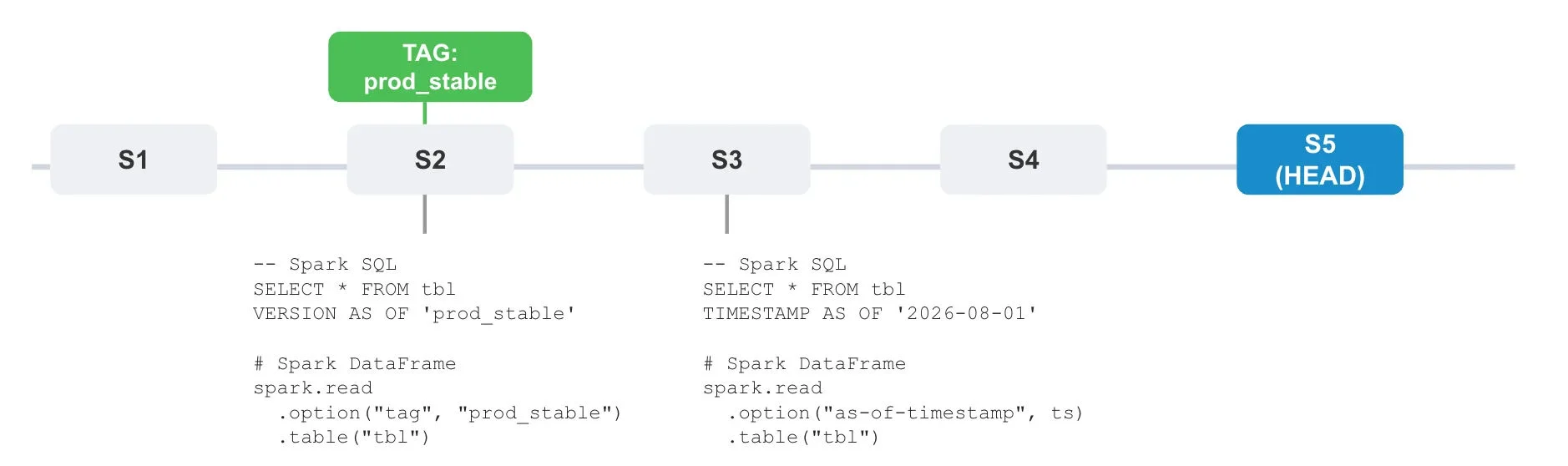
Time Travel and tags (public preview) let you query any past snapshot and roll back to a known-good state. Tags give teams stable, shareable checkpoints, so a data scientist, an auditor and a downstream Spark job can all reference the same named version of a table.
Faster pipelines with less to manage
Teams are already bringing their heaviest Spark workloads to Snowflake. Klarent, a Telenav company, moved its Spark pipelines off Amazon EMR with Snowpark Connect and now runs them 3.6x faster at 60% lower total cost of ownership, with its longest pipeline going from more than 10 hours to under three.
We assumed Snowflake would be an expensive option. It turned out to be the opposite. Moving our heavy Spark workloads off Amazon EMR cut our total cost of ownership by 60%. Our longest pipeline went from more than 10 hours to under 3, and our engineers no longer spend their time keeping clusters alive.
Kumar Maddali
VP of Engineering and AI, Klarent
A foundation for AI-native data engineering
As more pipeline changes come from AI, the safeguards around them matter as much as the code itself. The same Spark code can run on Iceberg tables across catalogs, under one set of governance. Branching gives every change a safe place to be tested on real data. Incremental reads, Time Travel and tags are designed to keep pipelines efficient and recoverable. Together, they let Spark teams move faster without trading away confidence in what reaches production.
Get started
Run your existing Spark code on your Iceberg tables, test a write on a branch, and publish only what passes. Read the documentation to learn more about Iceberg support.


Oct 22, 2026Core Platform
Bring Your Spark Workloads to Snowflake With Minimal Code Changes and No Catalog Migration

Oct 6, 2026Core Platform
Unified Governance for the Interoperable Lakehouse with Snowflake Horizon Catalog

Jan 27, 2026Core Platform
Extend Unified Governance Across the Iceberg Ecosystem with Horizon Catalog
