Oct 22, 2026/7 min readCore Platform
Bring Your Spark Workloads to Snowflake With Minimal Code Changes and No Catalog Migration


Apache Iceberg™ turned the multiengine lakehouse into a practical architecture pattern rather than an aspiration. Typically, it involves multiple platforms and engines like Snowflake, Apache Spark™, Trino and Apache Flink™ handling distributed data engineering, serving interactive query patterns and handling streams, with every engine reading one governed copy of the data. Enterprise teams that build this way accumulate two investments that are expensive to disturb: a PySpark codebase spanning jobs, notebooks, shared libraries and user-defined functions (UDFs), and an external catalog such as AWS Glue, Apache Polaris™, Databricks Unity Catalog or Microsoft OneLake that every other engine already trusts. For these teams, the question is whether they can get there without a multiquarter rewrite or a catalog cutover that touches every other engine.
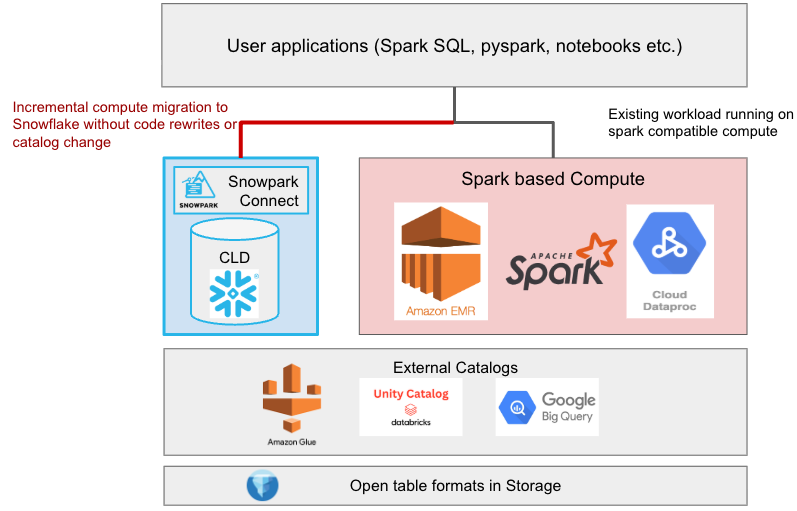
When these teams evaluate consolidating their workload in Snowflake, the migration is usually framed as two coupled choices: to rewrite the Spark code against a platform-native API, and to hand the tables to a different catalog. Coupling those choices is what makes the migration disruptive, because the rewrite runs into the long tail of production code while the catalog change reaches every engine that is not Snowflake. This post explores how we separated the two decisions, using Snowpark Connect for Apache Spark on the compute plane and an external catalog projected into Snowflake through a catalog-linked database as the metadata plane. After evaluating their workload with Snowflake, the teams can optionally modernize their catalog to Horizon to unlock the full suite of enterprise AI and data platform capabilities.
The migration challenge: Coupled compute and metadata cutovers
Historically, moving Spark workloads onto a single analytics platform has meant running two migrations at the same time. The compute-plane migration rewrites PySpark jobs, notebooks and Spark SQL onto that platform's native DataFrame or SQL surface while the metadata-plane migration hands the tables to that platform's catalog. Each migration is tractable in isolation, but when run together, they force every producer and consumer of every table to be accounted for before the first workload can move.
There are a few practical questions that decide the risks and benefits for the migration. How will the platform perform on this workload, and at what cost for the same unit of work? How can that be verified without disturbing the pipelines running today? Is there an incremental path, or does the first workload commit the whole estate? What does rollback look like once both the code and the catalog have moved?
Problem 1: The rewrite comes before the evidence
The visible part of a PySpark estate is its scheduled production jobs. The rest is shared libraries, UDFs, notebooks, ad hoc analysis and the continuous integration (CI) pipelines that grew around them over several years. A rewrite onto a different DataFrame or SQL API has to account for all of it, because a half-rewritten codebase risks delaying the migrations since new risks get discovered with each piece of code being migrated.
More critically, the rewrite is a prerequisite for the evidence that would justify it. How a job performs on a new engine is a property of that engine's optimizer rather than a prediction from the old execution plan, so it stays unknown until the job runs there. Maintenance cost has the same shape, because cluster patching, version upgrades and capacity tuning are only priced accurately once a workload runs without them. Total cost of ownership (TCO) therefore remains an estimate until the port is far enough along to compare, and that is the point at which backing out costs the most.
Problem 2: The catalog choice used to be a one-way door
Amazon Elastic MapReduce (EMR), Trino, Apache Flink and Amazon Athena resolve tables through the catalog and expect to observe every committed snapshot. Historically, a platform's own catalog was closed: Metadata lived in a proprietary format with no open protocol in front of it, so handing the tables over stranded every other engine. That is why the catalog decision, rather than the code rewrite, set the date of the cutover window, and why teams treated it as irreversible. That constraint no longer holds, because Snowflake Horizon Catalog exposes the Apache Iceberg REST API, so other engines read and write Snowflake-managed Iceberg tables using Snowflake’s roles and policies.
Choosing a catalog
With the compute question answered separately, the remaining decision is which system arbitrates table state. This is optionality rather than a gate, because both answers are first-class Iceberg catalogs that keep other engines working, and neither has to be settled before a workload moves. The choice stems from two different, perfectly valid views of where metadata authority belongs. Each choice has its own valid use cases based on an organization's lakehouse setup.
Snowflake Horizon Catalog as the catalog of record
In this model the tables become Snowflake-managed Iceberg tables and Horizon Catalog arbitrates their state. A table that uses Snowflake as the Iceberg catalog has full native Snowflake platform support, while a table that uses an external catalog has limited platform support.
An external catalog as the catalog of record
In this model AWS Glue, Apache Polaris, Unity Catalog or OneLake stays authoritative and Snowflake participates through a catalog-linked database. No table is reregistered and no table management changes hands, so the migration touches neither the codebase nor the catalog. It suits organizations that have already committed to an external catalog but still want to use the Snowflake platform's rich capabilities.
The rest of this post follows the external catalog choice, because it provides an easy, nondisruptive path for users to evaluate the Snowflake platform without fully committing to it.
Snowflake's solution: Decoupling the compute plane from the metadata plane
Snowflake implementations of open table formats have decoupled compute and metadata, so rather than asking customers to move both at once, we made a deliberate engineering choice: Treat them as two independent migrations, and make each one optional.
Run existing Spark code on Snowflake with minimal changes
Snowpark Connect for Apache Spark leverages the Spark Connect protocol to enable users to run their Spark apps in an optimized way on Snowflake’s vectorized engine. Teams point their Spark sessions at Snowflake instead of a cluster, and their existing DataFrame and Spark SQL code keeps working, with no clusters to size, patch or scale.
Rather than translating one API into another, Snowpark Connect implements the Spark Connect protocol itself. That distinction is what the migration rests on: Most existing Spark code runs as is. For the parts that don't, the CoCo Spark Migration skill assesses compatibility, converts code and validates the changes.
Zero-touch metadata with live catalog projection
A catalog-linked database is a Snowflake database that behaves as a live, bidirectional projection of an external Iceberg REST catalog as introduced in an earlier post on bringing the Snowflake platform to data lakes. Namespaces appear as schemas and remote tables appear as tables, while statements on either side propagate to the other. Snowflake commits its writes through the same catalog every other engine already uses, with the concurrency control and commit resilience on the shared write path. Snowflake deliberately only projects the catalog rather than copying it, because the system other engines already trust stays the one that decides table state.
Next, we will explore a detailed case study demonstrating how an enterprise system can perform this migration seamlessly. We will examine a real-world pipeline that processes large-scale transactional data managed in an AWS Glue Data Catalog, walking through both the metadata setup and compute reconfiguration required to transition the job to Snowflake without code rewrites or catalog relocations.
Example: Running an AWS Glue Spark job on Snowflake
Consider a PySpark job that reads a raw sales table managed by AWS Glue, aggregates it by product and writes a report table back. On the metadata side, the Glue catalog is projected into Snowflake through a catalog integration, which also supplies the storage credentials Snowflake uses to read the files, and a catalog-linked database:
CREATE DATABASE glue_lake_db
  LINKED_CATALOG = (
    CATALOG = 'my_glue_catalog_int',          -- Iceberg REST integration for AWS Glue
    ALLOWED_NAMESPACES = ('sales_lakehouse')  -- limits visibility to one Glue database
  );

SELECT SYSTEM$CATALOG_LINK_STATUS('glue_lake_db'); -- confirms discovery is running
Snowflake discovers the Glue namespace as a schema and its Iceberg tables as tables, with no per-table registration step, resolved through the explicit identifier casing contract at the catalog-linked database boundary. On the compute side, what changes is the endpoint the session talks to:
from snowflake import snowpark_connect

spark = snowpark_connect.get_session()  # Snowflake stands in for the Spark driver

sales = spark.table("glue_lake_db.sales_lakehouse.raw_sales")  # identifiers Glue already uses
report = sales.groupBy("product_id").agg(...)                  # the aggregation that ran on Snowflake against AWS Glue Catalog
report.write.insertInto("glue_lake_db.sales_lakehouse.top_products")
The aggregation, the column expressions and the write are the same code that ran on Glue. What did not change is the table layout, the catalog that governs it or the identifiers other engines use, so a downstream Amazon EMR job sees the new Iceberg snapshot on its next read without knowing the writer changed.
The payoff: Snowflake capabilities on data you never moved
Because neither the codebase nor the catalog has to move first, the migration changes shape. Instead of one program with a date attached, it becomes a sequence of workload moves that ship as ordinary production changes. The reductions in work are concrete:
- No rewrite project: Existing PySpark DataFrame code, Spark SQL and much of the surrounding tooling run as they are, so migration becomes mostly a connection exercise.
- No table reregistration: Tables do not have to be recreated in Snowflake, and there is no dual-catalog synchronization service to build and operate.
- No coordinated cutover: Amazon EMR, Trino, Athena, Apache Flink and Databricks keep reading the same tables, including snapshots that Snowflake compute wrote.
- No rollback runbook: Returning a workload to its previous Spark environment is a configuration change, because the tables are still ordinary Iceberg tables in the same catalog.
Reversibility becomes a property of the architecture rather than an operational procedure. That is what answers the evaluation questions the migration opens with, because performance and cost can be measured on the real workload against production traffic rather than modeled from a benchmark.
Customers are already seeing the impact. Klarent, a Telenav company, moved its heavy Spark pipelines off Amazon EMR with Snowpark Connect and now runs them 3.6x faster at 60% lower TCO, with its longest pipeline going from more than 10 hours to under 3.
Modernizing the catalog
Modernizing your catalog to Horizon unlocks broader platform capabilities and makes your data AI-ready. By moving to Snowflake-managed Iceberg tables, you gain features such as managed storage, automated clustering, cloning, continuous table maintenance and tuning, and cross-region disaster recovery.
Owning the table lifecycle allows Snowflake to optimize performance continuously via Automatic Clustering, data compaction, manifest compaction and snapshot expiration tailored to your workload. Furthermore, other engines can still interact seamlessly through the Horizon Iceberg REST Catalog API, thereby enabling engines such as Apache Spark, Apache Flink and Trino to read and write under unified roles and governance policies.
The following table highlights some of the trade-offs between the two catalog models:
| Dimension | Horizon Catalog as the catalog of record | External catalog as the catalog of record |
|---|---|---|
| Table management | Moves to Snowflake-managed Iceberg tables | Unchanged |
| Metadata authority | Horizon Catalog with automatic table maintenance | The external catalog, with Snowflake participating (no Snowflake-driven table maintenance) |
| Other engines connect through | Horizon Iceberg REST Catalog API | The external catalog they already use |
| Permission model | Unified Snowflake users, roles and policies | Two systems, each governing its own plane |
| Policy enforcement | Full enforcement at the catalog, for every caller | Limited support Snowflake enforcement, like policies and tags over external tables |
| Managed storage | Yes | No |
| Cross-region disaster recovery | Yes | No |
Conclusion
For an organization with years invested in Spark, the payoff is work that no longer has to happen. The PySpark code keeps running on Snowpark Connect, so there is no rewrite project to staff, and the clusters stop needing to be sized, patched and capacity-planned. The teams on Trino, Apache Flink and Amazon EMR carry on against the same tables in the same catalog, which a catalog-linked database leaves in place, so there is no cutover to negotiate across groups that do not report to each other. Because a workload can be moved back with a configuration change, none of it has to be committed to in advance.
The step that proves it is a small one: Move a single workload, let it run against production traffic, then compare what it costs and how it performs against what the cluster was doing. If those numbers hold, the same tables become available to Snowflake's governance and AI without being copied into another system, so an estate that was expensive to change becomes something the organization can build new work on. For a walkthrough that builds this end to end against AWS Glue, see "Interoperable Lakehouse with AWS Glue, Snowflake Iceberg Tables, and Snowpark Connect for Apache Spark."
Ready to try it on your own workload? Start with the CoCo Spark Migration skill to assess your existing Spark code, then run one job on Snowpark Connect and compare.