CoCo Desktop: Your Data-Native AI Coding Agent
Video Overview
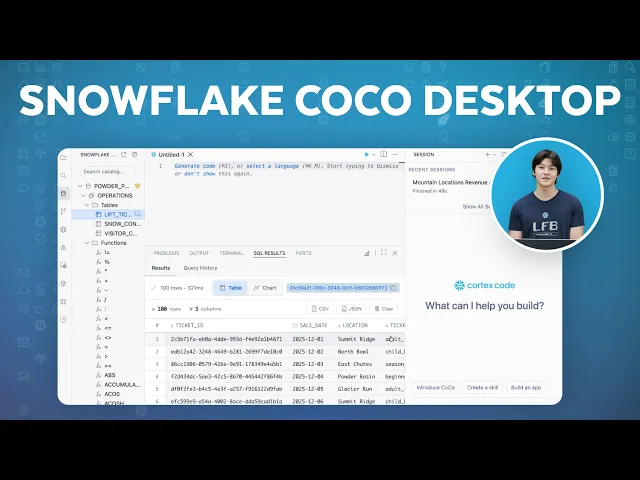
CoCo Desktop is Snowflake's native IDE for Mac and Windows. It connects directly to your Snowflake account the moment you open it, giving you a visual database explorer and a full SQL editor in one free app.
Editor Mode gives you complete SQL control, while Agent Mode lets you ask questions in plain English. CoCo finds the right tables, writes the joins and returns charts, all from a single prompt.
CoCo also takes you from a question to a working, deployed dashboard with one prompt. You don't need an app framework or manual deployment steps.
Video Transcript
If you work with Snowflake, you already have data. The question is how fast you can turn that data into something useful. A query? An answer? An app? CoCo is your data-native AI coding agent that brings Snowflake expertise directly into your workflow. CoCo Desktop is Snowflake's native IDE. It's a free app for Mac and Windows that connects directly to your Snowflake account the moment you open it.
Let me give you a tour, starting from the beginning. CoCo Desktop opens in editor mode, and if you've used any coding tool or SQL editor before, this will feel familiar. On the left is your database explorer. Every database, schema, and table in your Snowflake account is right here. I'm connected to Powder Peak Resorts, a ski resort chain with five mountains. You can see their tables, lift ticket sales, snow conditions, visitor counts. Click a table and you can see its columns right here without writing a single line of SQL. This is a huge time saver when you're exploring a new database.
In the center, we can open a SQL editor. This is where you write and run queries, just like any other SQL tool. Let me pull some data. Results come back right below. Standard stuff so far, but here's what's different.
On the right is the CoCo panel. This is an AI agent that's been watching everything you've been doing. It knows what tables are in your account, it can see your query, and it can help you do more without leaving this window. We'll come back to CoCo in a second, but first, notice up here. This is your Snowflake connection. CoCo connected to your existing Snowflake account automatically when you signed in. No copying credentials, no pasting connection strings. It just works.
Now let's switch to agent mode. This is where things get interesting. In agent mode, you don't need to write any SQL or code. You just ask CoCo a question, like you'd ask a colleague who knows your entire database. Let's ask, which of our mountain locations earned the most revenue last month? And was there a relationship between snow depth and ticket sales? CoCo figured out which tables to use, wrote the join, ran the query, and gave me a chart, all from one question. Glacier Run is leading on revenue, and you can see the correlation with Snow Depth right there. I didn't write any SQL. I didn't even know the exact column names. CoCo looked those up on its own. You can keep asking follow-up questions in the same conversation. It remembers context.
Before we go further, a quick look at how CoCo is configured. Up here, you can manage personalization, your skills, and MCP connectors to your favorite services, depending on what you need.
Okay, let's put it all together. One of the most powerful things you can do with CoCo is go from data to a full working app without writing any code yourself. The operations team at Powder Peak wants a dashboard, revenue by mountain, snow conditions at a glance. Let's build it. CoCo wrote the whole app, the queries, the charts, the layout, and deployed it to Snowflake. That URL is a live dashboard that anyone on the team can open right now. No app framework knowledge, no deployment steps, one prompt.
That's a complete tour of CoCo Desktop. Editor mode for when you want full control, browse your data, write SQL, work exactly like you're used to. Agent mode for when you want to move fast, ask questions, get answers, build things from scratch. It's free to download for Mac and Windows. Link is in the description. Thank you.
Featured Speakers

Luke HartzellDeveloper Advocate
