Jun 15, 2026/10 min readProduct and Technology
What's New with Dynamic Tables: Faster and More Flexible


Thousands of customers turn to Dynamic Tables for a modern and fast approach to data transformations. With end-to-end pipeline latency in minutes and an efficient incremental processing engine, Dynamic Tables provide a modern and scalable approach to autonomous pipelines. Over the past year, Snowflake has shipped a wave of updates that make Dynamic Tables faster, more expressive and more interoperable with the tools you already use.
At Summit, Sergey Labetsik, a senior data engineer at Wind Creek Hospitality, demonstrated how his team was able to deliver food vouchers to guests within a minute of eligibility. By migrating a dbt batch job to a Dynamic Tables pipeline, they cut end-to-end latency to under a minute, a vast improvement from the 30-minute schedule that the job had been running on.
Here's what's new with Dynamic Tables and why it matters for your pipelines.
Benchmarks of up to 2.8x faster refresh performance
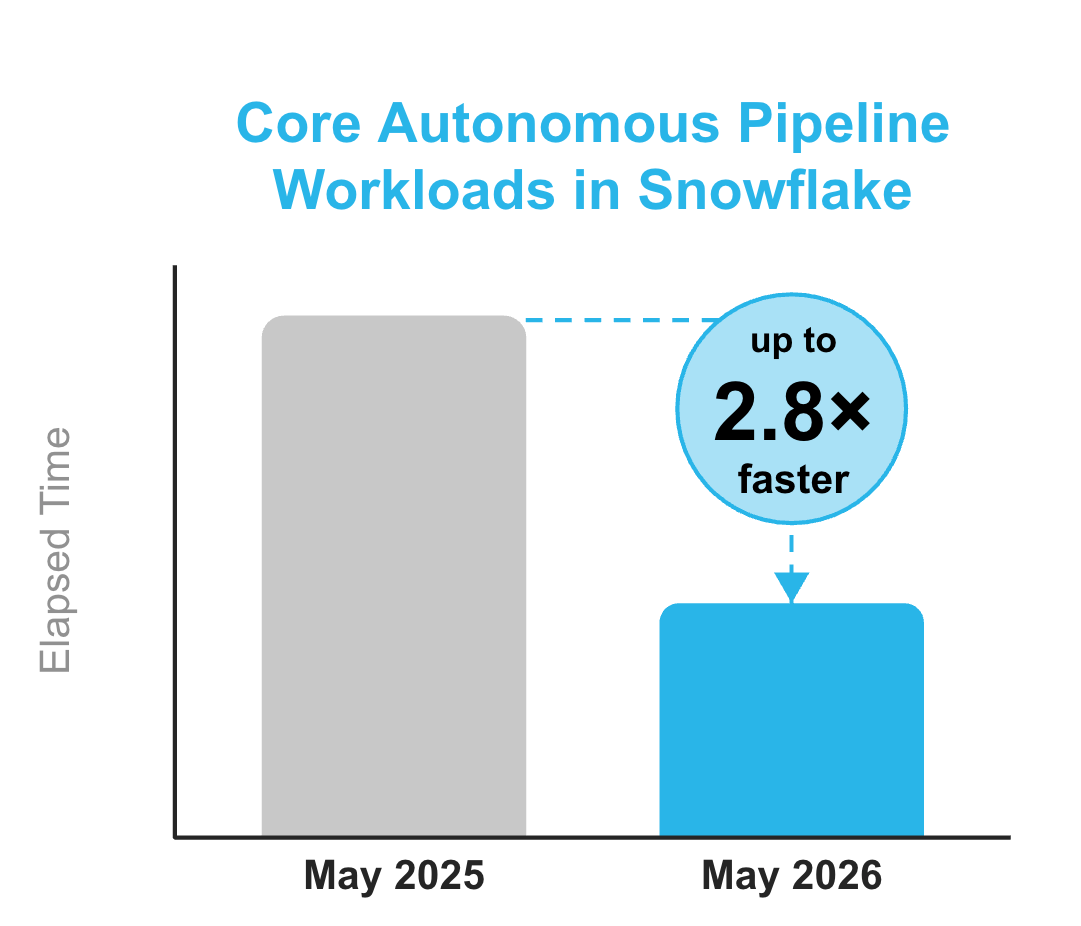
Speed is the foundation on which everything else builds. We benchmarked the most popular Dynamic Table patterns from May 2025 to May 2026 and measured up to 2.8x faster refresh performance. This reflects updates we made under the hood to accelerate performance on Dynamic Tables, including top-level aggregate functions, QUALIFY row/rank = 1 (SCD-1), cluster-by operations and joins — all measured on Gen2 warehouses.
These gains come from performance optimizations specifically built for Dynamic Tables paired with Gen2 warehouses. Incremental refreshes process less data, finish sooner and free up compute for the rest of your workload. If you haven't moved your Dynamic Table workloads to Gen2 warehouses yet, now is the time.
Design patterns: How to build well with Dynamic Tables
Let's go back to the basics and review best practices to build efficient pipelines with Dynamic Tables:
Use multiple Dynamic Tables chained together: Break complex pipelines into a chain of two or more Dynamic Tables, each handling one logical step. Many teams use medallion vocabulary: bronze (raw landing), silver (TARGET_LAG = DOWNSTREAM), gold (aggregated with a time-based lag). In the world of Dynamic Tables, the bronze layer represents the raw landing table, silver layer is the Dynamic Table where you clean the data, and gold layer is where you enrich the data, ready to be served for your downstream applications.
Decompose joins and aggregations across separate Dynamic Tables: Place joins first, aggregations next. Each step then refreshes incrementally, compounding the efficiency gains and improving the manageability.
Use a dual warehouse strategy: Set INITIALIZATION_WAREHOUSE for reinitializations (full scans, resource-intensive) and a smaller warehouse for ongoing incremental refreshes.
Never use REFRESH_MODE = AUTO in production: Use the auto refresh mode in development to discover whether your pipeline runs incrementally or requires a full refresh. Then set the refresh_mode explicitly in production.
New updates make refreshes even faster
SCD-1 deduplication with QUALIFY row/rank = 1
For CDC pipelines where your base table receives append-only records, QUALIFY ROW_NUMBER() = 1 (generally available) is the cleanest way to incrementally keep only the latest row per business key. The window function picks the correct row irrespective of the ingestion order, handling out-of-order arrival without additional logic.
On top of that, if you use the SELECT * EXCLUDE pattern, it also gives you automatic schema evolution: Columns added to or dropped from the base table automatically propagate downstream without touching the Dynamic Table definition.
SELECT * EXCLUDE _metadata_cols
FROM raw_events
QUALIFY ROW_NUMBER() OVER (
  PARTITION BY id
  ORDER BY updated_at DESC
) = 1
Primary keys: Elegantly address insert-overwrites
Here's a common story: You have an elegantly running incremental pipeline. Then an INSERT OVERWRITE hits a base table, and it resets the change-tracking metadata. Or, there is a complex aggregation that requires a full refresh. Now every downstream table is reprocessing everything from scratch. You can now address this with a simple PRIMARY KEY RELY constraint (generally available) on the base table.
ALTER TABLE dim_customers
  ADD PRIMARY KEY (customer_id) RELY;
This tells Snowflake: "Trust this key for change detection. Don't rely on change-tracking columns."
| Benefit | Details |
|---|---|
| Pipeline-wide propagation | Declare once on the base table; the benefit flows to all downstream Dynamic Tables. Note: Primary Key RELY doesn't apply retroactively. After adding it, run CREATE OR REPLACE on downstream Dynamic Tables to activate the benefit. |
| Derived keys | Snowflake reads your SELECT, GROUP BY columns and QUALIFY ROW_NUMBER() partitions automatically that become the unique key. |
| Apache Iceberg™ v2 sources | Significantly improves update/delete performance for tables in cloud storage. |
| Breaks cascade dependency | Downstream Dynamic Tables stay INCREMENTAL even when reading from a FULL refresh parent. |
Adaptive refresh mode
What if you can't use primary keys, but your incremental pipeline occasionally hits conditions where a full recompute would actually be cheaper? That's the problem adaptive refresh mode (public preview) solves.
Think of it as incremental but smarter. Snowflake has built-in heuristics that evaluate at each refresh whether to process incrementally or reinitialize, based on what will give better price-performance at that moment.
CREATE DYNAMIC TABLE my_table
  REFRESH_MODE = ADAPTIVE
  TARGET_LAG = '10 minutes'
  WAREHOUSE = my_warehouse
AS
  SELECT ... FROM source_table;
Guardrails built in for adaptive refresh mode: Expensive functions (Cortex AI Functions, user-defined functions) are never reinitialized unexpectedly. If a Dynamic Table definition can't support incremental refresh, creation fails proactively. This helps reduce unexpected runtime behavior.
Masking and row access policies in incremental Dynamic Tables
If you're in financial services, healthcare or any regulated industry, you're likely using masking or row-access policies. Previously, certain policy functions would require a full refresh even when the query itself was eligible for incremental processing.
Any row access or masking policies that grant full data access to the Dynamic Table owner role are expected to support incremental refreshes so there are no more unnecessary full scans.
Improved expressibility: Build more sophisticated models with Dynamic Tables
Frozen regions: Stop paying for data that doesn't change
Imagine five years of historical order data in your pipeline. On every refresh, Snowflake reprocesses all of it, including the rows from 2020 that will never change. Frozen regions (generally available) let you declare which rows can be frozen with a simple predicate. Snowflake skips frozen rows on every refresh. Only the mutable window with new data gets recomputed.
CREATE DYNAMIC TABLE orders_enriched
  FROZEN WHERE order_date < CURRENT_DATE() - 1
  TARGET_LAG = '1 hour'
  WAREHOUSE = my_warehouse
AS
  SELECT o.*, c.region
  FROM orders o
JOIN customers c ON o.customer_id = c.id;| Benefit | What it means |
|---|---|
| Pay only for change | Frozen rows are skipped on every refresh. |
| Deletes are ignored | Deleting source rows won't propagate to frozen output. |
| Dimension stability | Frozen join results don't recompute even if dimensions change. |
| Full-refresh savings | Full-refresh Dynamic Tables with frozen regions behave like incremental refreshes for historical data. |
| Query evolution | Only new rows are recomputed when you evolve the query. |
Backfill: Migrate without reprocessing
Building a new pipeline, but already have years of clean historical data? BACKFILL FROM zero-copy clones the existing data directly into the frozen region with no recomputation (generally available).
CREATE DYNAMIC TABLE new_pipeline_table
  FROZEN WHERE event_date < CURRENT_DATE()
  BACKFILL FROM existing_historical_table
  TARGET_LAG = '1 hour'
  WAREHOUSE = my_warehouse
AS
  SELECT * FROM raw_events;
Migrate existing pipelines to Dynamic Tables in minutes, not hours, without reprocessing years of data. So if you have historical data, we highly recommend that you use frozen regions from the get-go. We also hear from customers that they occasionally want to catch up with any change to the historical data or have a GDPR use case of deleting specific rows. Now, you can use DML commands into these frozen regions to keep your Dynamic Table up to date without paying the cost of recomputation.
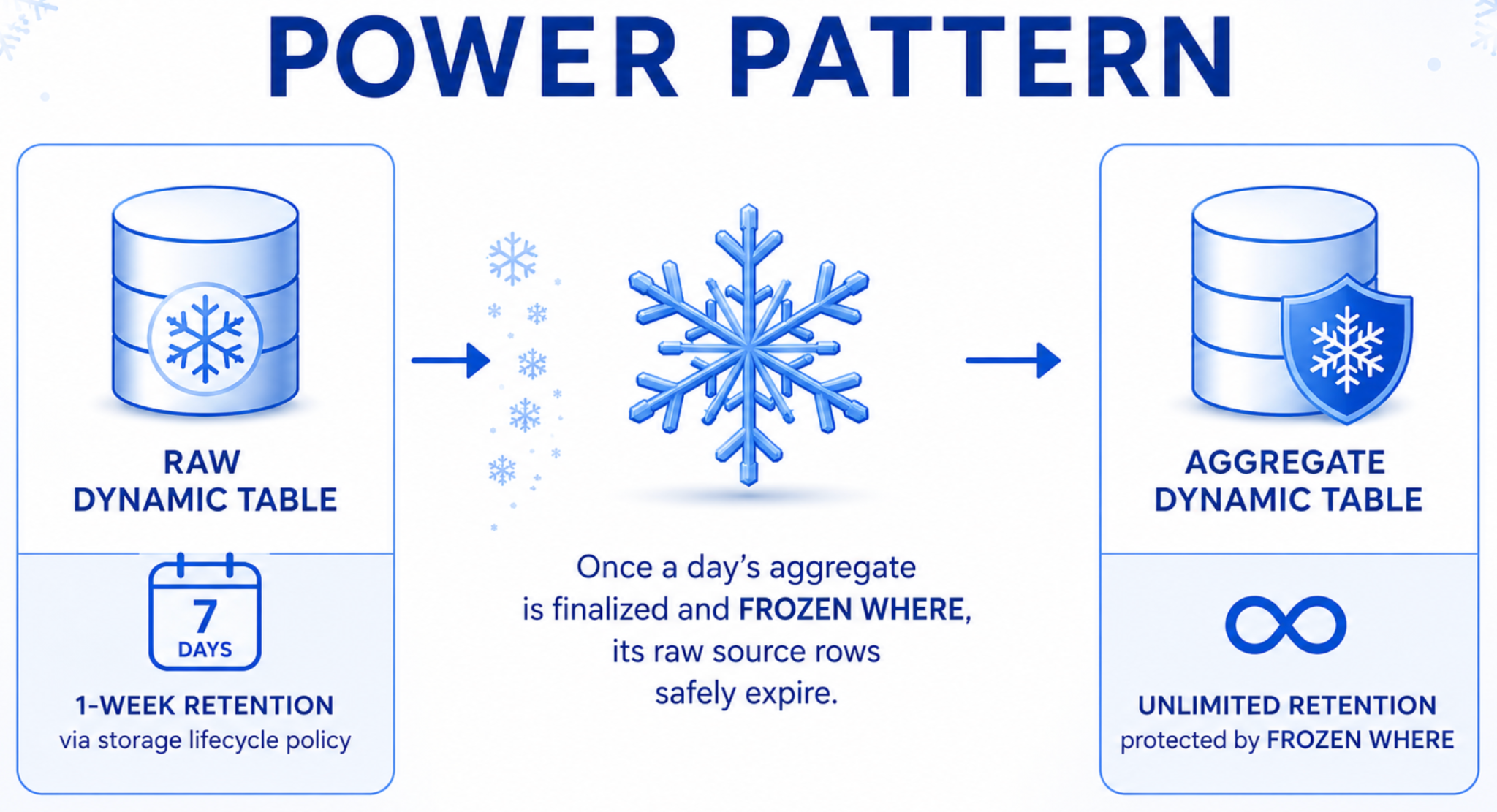
Storage lifecycle policies: Expire raw data, keep aggregates
Raw event data has a shelf life. You don't need three years of raw logs sitting in a hot pipeline table. But purging without breaking downstream aggregates can turn into its own engineering project.
Storage Lifecycle Policies (generally available) let you attach a retention rule with a single clause. Rows expire automatically on their own schedule, independent of refresh. No custom jobs. No DELETE statements. No risk of accidentally reprocessing purged data.
Refresh boundaries: Run independent pipelines
By default, Dynamic Tables in a pipeline share snapshot isolation where all refreshes are synchronized and read from the same point in time. That's great for consistency. But sometimes you need independence.
Refresh boundaries (generally available) let you insert a soft break into your directed acyclic graph (DAG), including the Dynamic Table → View → Dynamic Table pattern, which allows subpipelines to operate on their own freshness schedules.
| Use case | Why it helps |
|---|---|
| Slow-moving dimensions | Product catalog or geo lookups don't block fast-moving orders pipelines. |
| Cross-team pipelines | Team A's failures don't cascade to Team B. |
| Data sharing | You control your own refresh schedule, independent of your data provider that you might not have control over. |
Custom incremental Dynamic Tables
What if your pipeline needs complex MERGE logic, a stream-static join, soft deletes or running accumulators? Standard SELECT-based Dynamic Tables can't always express this elegantly, but you still want managed scheduling, retries and monitoring.
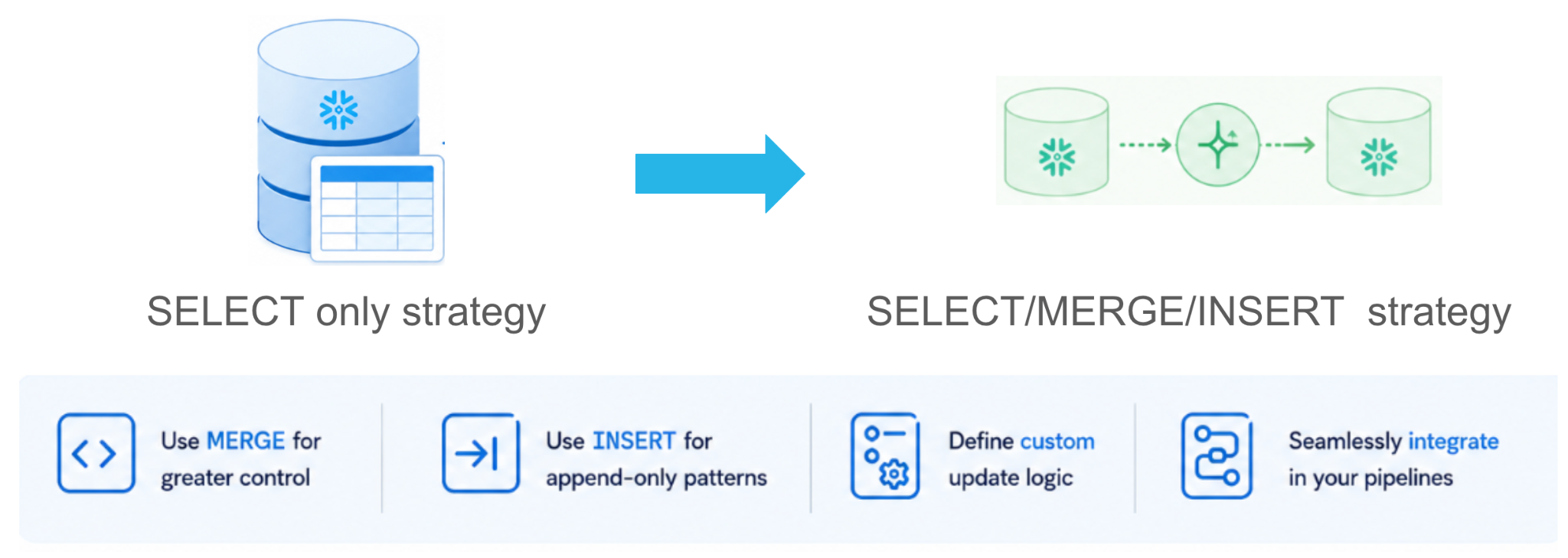
Custom incremental Dynamic Tables move you from a SELECT-only strategy to SELECT / MERGE / INSERT strategy. You get full expressive power while Snowflake still controls execution (managed scheduling, dependency tracking, observability and replication) without sacrificing the performance and control of imperative batch processing.
CREATE OR REPLACE DYNAMIC TABLE order_enriched (
  order_id   INT,
  amount     NUMBER(18,2),
  region     VARCHAR
)
  TARGET_LAG    = '5 minutes'
  WAREHOUSE     = my_warehouse
  REFRESH_MODE  = CUSTOM_INCREMENTAL
  REFRESH USING (
    MERGE INTO SELF AS t
    USING (
      SELECT s.order_id, s.amount, d.region
      FROM orders CHANGES(INFORMATION => DEFAULT) AS s
      JOIN dim_customers d ON s.customer_id = d.id
      WHERE s.METADATA$ACTION = 'INSERT'
    ) src ON t.order_id = src.order_id
    WHEN MATCHED THEN UPDATE SET
      t.amount  = src.amount, t.region  = src.region
    WHEN NOT MATCHED THEN INSERT
      (order_id, amount, region) VALUES (src.order_id, src.amount, src.region)
  );
Dynamic Tables with custom incrementalization can be composed with standard SELECT-based Dynamic Tables in the same pipeline. Common use cases involve:
| Pattern | CI-DT Type |
|---|---|
| CDC enrichment with dimension lookup and delete propagation | MERGE |
| Maintain a Top-K leaderboard | MERGE |
| Append-only stream-static join enrichment | INSERT |
| Migrate from Tasks and Streams | MERGE or INSERT |
Interoperability
CoCo skill for Dynamic Tables
Debugging pipelines shouldn't require reading through refresh history logs line by line. The new Dynamic Tables skill in Snowflake CoCo gives you expert guidance on creating, optimizing, monitoring and troubleshooting Dynamic Tables directly in your IDE.
Describe your goal, mention Dynamic Tables, and the skill gets invoked. Get help with refresh failures, lag tuning, pipeline design and performance optimization fast.
Apache Iceberg compatibility
Dynamic Tables are fully compatible with Apache Iceberg on both ends of your pipeline.
| Use case | What you can do with Dynamic Tables |
|---|---|
| Read from Apache Iceberg | Use externally managed Iceberg v2 tables as sources. PRIMARY KEY RELY constraints significantly improve update/delete performance here. |
| Write to Apache Iceberg | Create Dynamic Iceberg Tables with an output in Iceberg format on Snowflake-managed external storage, readable directly by Apache Spark™, Trino and other engines. |
Same refresh modes, same scheduling, same pipeline semantics with an open format output.

Wolt (part of DoorDash) standardized on Apache Iceberg to give us the flexibility to run each workload on the right engine. We use Snowflake Dynamic Iceberg Tables to enrich, prepare and automatically refresh data in our data lake — we define a single query with a target freshness and Snowflake manages the incremental updates and orchestration. With Dynamic Tables on Apache Iceberg, we have launched pipelines faster, cut maintenance time and reduced the overhead of our incremental pipelines.
Raimund Kämmerer
Staff Data Engineer, Wolt
Dynamic Tables as a dbt materialization
Some teams don't need continuous refresh. They need data ready at 5 a.m., or they're driving pipelines from dbt or Airflow. TARGET_LAG doesn't work well for these cases.
New scheduler capabilities:
- Disable the scheduler for externally orchestrated pipelines
- Synchronous refresh support with Snowflake Database Change Management (DCM) projects
dbt + Dynamic Tables: Better together
dbt handles your engineering workflow. Dynamic Tables handle your data freshness. Together, you eliminate the trade-off between pipeline discipline and pipeline performance.
The integration is a drop-in replacement: Most dbt models are already CTAS statements. Convert them to Dynamic Tables with zero logic rewrites. You keep your full dbt lineage graph, test suites and documentation, while you gain automatic skip-on-unchanged-source behavior:
- No logic rewrites to convert existing models directly
- Snowflake identifies unchanged sources and skips the refresh automatically
- Full dbt lineage, testing and documentation preserved
You can read more about this powerful combination in this blog.
What this means for your pipelines
These updates add up to a clear message: Dynamic Tables give you more control without more complexity. You can now:
- Use
MERGEandINSERTfor transformations that need complex logic - Manage Dynamic Tables in dbt and Git
- Store results in Iceberg format for data lake interoperability
- Enrich data with Cortex AI Functions inline
- Filter by current time for rolling windows
- Let schemas evolve automatically
- Get AI-assisted help building and debugging pipelines
- Run refreshes faster on Gen2 warehouses
Get started
Try the new capabilities today:
- Dynamic Tables documentation
- Custom incrementalization guide
- Adaptive Refresh Mode
- Dynamic Iceberg Tables
- dbt-snowflake adapter
- Cortex Code
If you're already running Dynamic Tables, upgrade your warehouse to Gen2 and measure the difference. If you've been holding off because of orchestration complexity or expressibility gaps, those blockers are gone.
Forward-Looking Statement
This content contains forward-looking statements, including about our future product offerings, and are not commitments to deliver any product offerings. Actual results and offerings may differ and are subject to known and unknown risks and uncertainties. See our latest 10-Q for more information.