Jun 25, 2026/10 min readCore Platform
Routing Inside Snowflake, Part 1: From Per-Call to Per-Compute


TL;DR
You can run a Routing Service instance directly in Snowflake at a fraction of the cost of managed routing APIs — and because it runs inside Snowpark Container Services, your origins, destinations and route requests don't leave your Snowflake governance boundary.
Why buy-vs-build is worth revisiting now
AI is changing the pace at which we develop applications — from buying software, to building from scratch, to now prompting agents in natural language.
In this shift, Snowflake is helping customers move faster by shipping Accelerators: high-value, common use cases that you can install by prompting CoCo instead of running a multi-month build project. This blog introduces the first Accelerator we've released — Routing and Fleet Intelligence — which you can install in about 30 minutes with these CoCo Skills.
We chose routing as the first Accelerator for three reasons:
- It is a near-universal building block: Any workload that dispatches vehicles, estimates arrival times or visualizes reachability needs it.
- The economics are painful at scale: managed APIs charging per call and costs climbing quickly under agent-driven volume.
- The data is often sensitive: customer addresses, patient pickup points, cash-in-transit stops.
What is Routing?
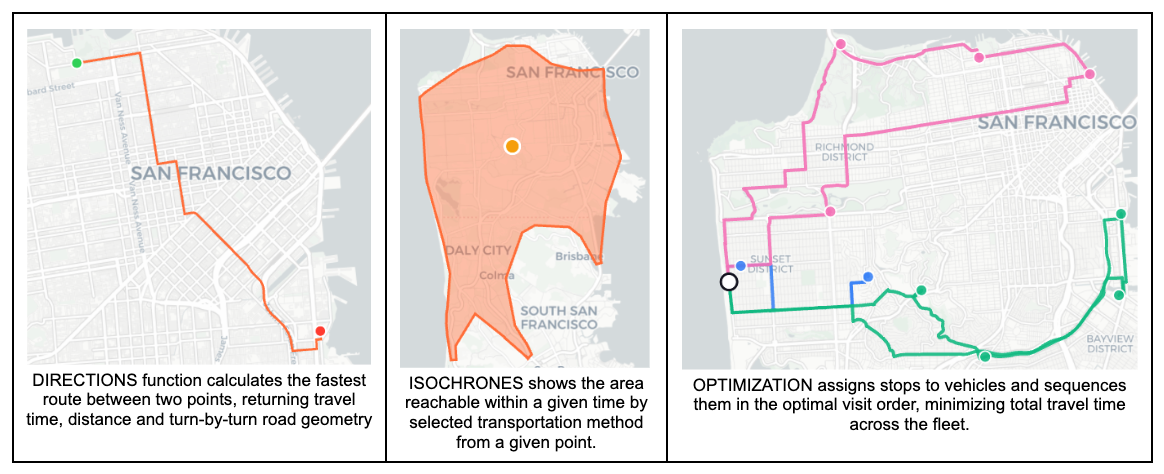
Routing is the process of computing a path between two or more locations on a road network. At its simplest, a routing engine answers "what is the fastest way from A to B?" — returning a travel time, a distance, and optionally the turn-by-turn road geometry. More advanced queries include isochrones (everywhere reachable within N minutes), many-to-many travel-time matrices (every origin paired with every destination) and multistop tour optimization. Any application that dispatches vehicles, estimates arrival times or visualizes reachability depends on a routing engine under the hood — whether that engine is a managed API or a self-hosted service.
What the Accelerator includes
The Accelerator ships with ready-to-run demos that show how routing becomes a business outcome — each one installable from CoCo and runnable against your own data:
- Fleet route optimization and dispatch: Plan efficient multistop tours across a fleet and match drivers to jobs, the way a commercial dispatcher would.
- Freight backload matching: Fill empty return legs by matching idle trailers to internal volumes and external freight-exchange offers.
- Dispatcher freight exchange: a marketplace cockpit to browse, filter and map freight offers with trust scores and market-rate badges, mirroring the load boards dispatchers use today.
- Retail catchment and site selection: Draw isochrone catchment zones around stores and map competitor coverage to inform location decisions.
- Fleet intelligence dashboards: Track vehicles' telemetry live, with route-deviation detection and dwell/congestion analytics.
- Emergency response intelligence: Assess which people and assets a wildfire, hurricane, flood or storm will affect, and route around hazards using avoid-zones.
- Natural-language routing agent: Let planners ask routing, reachability and optimization questions in plain English through a Cortex Agent.
All of it runs inside your account, against your data, under your existing controls.
How the routing architecture works inside Snowflake
Routing has a useful architectural seam, and every open source OpenStreetMap-based routing engine shares it:
Build side: downloading map data, compiling a graph for each transport profile (driving, walking, cycling, heavy goods) and storing that graph for reuse.
Serving side: answering directions and reachability questions against that graph — route polylines, ETAs, isochrones, and, where the engine supports it, multistop tours.
Orchestration layer: Handles lifecycle, retries, scaling and status, and exposes the SQL functions that analysts or applications actually call.
The Routing Accelerator in Snowflake has the following high-level architecture:
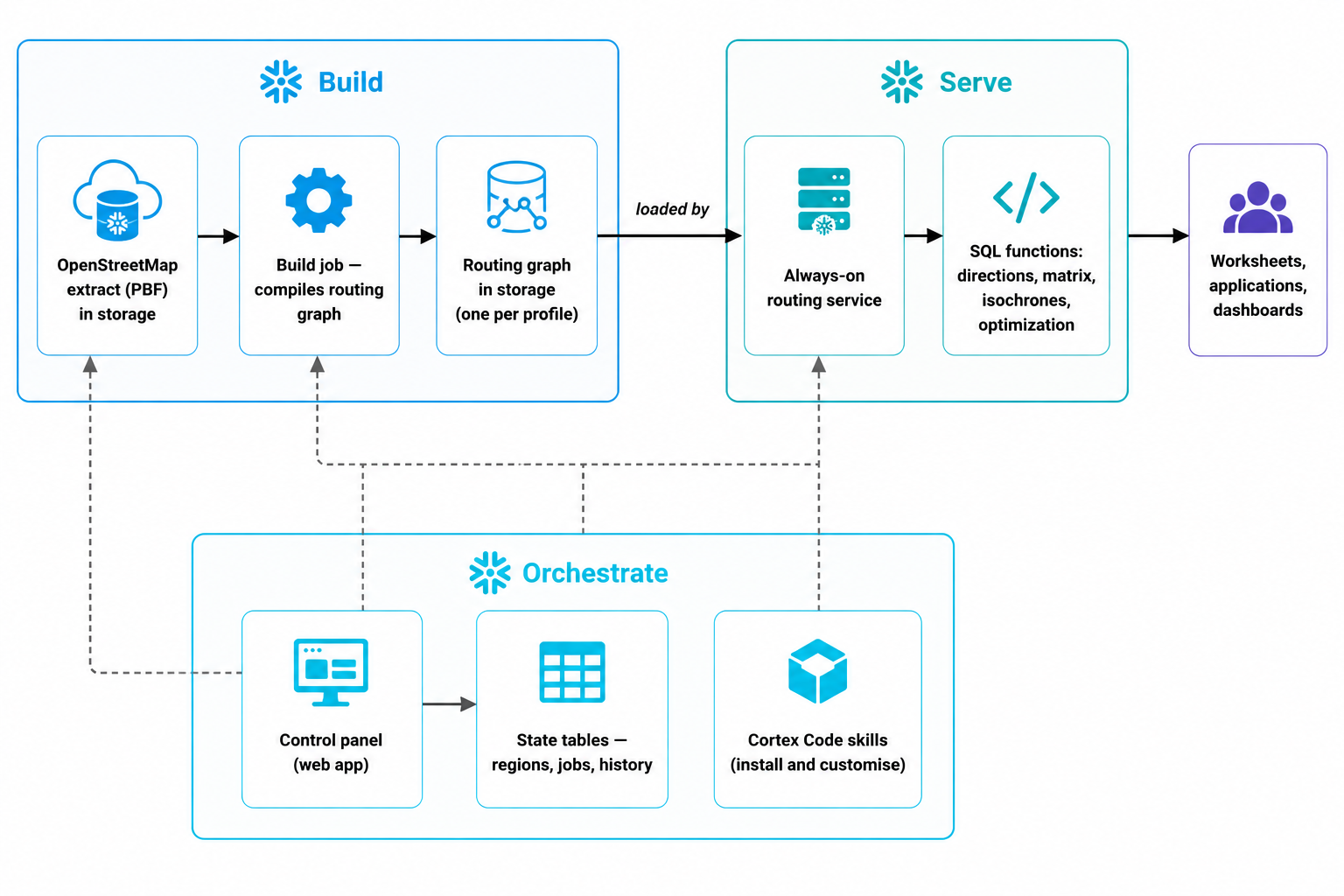
Because every stage — the OpenStreetMap extract, the compiled graph, the SPCS service and the SQL functions consuming it — lives inside your Snowflake account, the routing pipeline inherits your existing RBAC, masking policies and audit history. No coordinates, addresses, or route payloads cross an account boundary.
Buy vs. build: Side-by-side
The two paths price very differently. A managed routing API is the fastest to start with and the simplest to reason about — you pay per call, and the bill scales linearly with volume. Hosting a routing service on Snowflake flips that shape: there is a small one-time cost to compile the routing graph, after which you pay per compute-hour on credits you already operate, and the per-call cost falls as utilization rises.
| Dimension | Buy (Managed Routing API) | Build (OpenRouteService on Snowflake) |
|---|---|---|
| Time to first call | Minutes — sign up, get an API key | ~30 minutes — install the Accelerator, run one build |
| Pricing model | Per call (directions ~$1/1k; matrix 4-8× more) | Per compute-hour on Snowflake credits |
| Cost at 100 vehicles | ~$1,000 / month | ~Tens to hundreds of dollars / month, depending on the region and refresh rates |
| Cost at 1,000 vehicles | ~$10,000 / month | Roughly flat — same compute serves more callers |
| Agent-driven volume | Costs scale linearly with calls | Mostly absorbed by existing compute |
| Concurrency ceiling | Vendor rate limits | Sized by your warehouse / SPCS pool |
| Where data flows | Origins, destinations, stops sent to a third-party endpoint | Stays inside your Snowflake account and governance boundary |
| One-time setup cost | None | City: ~10 min, negligible credits. Continental US: ~5 hrs on a large high-memory pool, ~a dozen credits |
| Ongoing operations | Vendor-managed | Suspend/resume on demand, graph reused across cycles |
Buy-side detail
The buy side — a managed routing API — is the easier one to price. Managed routing APIs invoice per call:
- Directions: roughly a dollar per thousand requests at the low end of public pricing.
- Matrix calls (the many-to-many ones that dispatch and ETA workloads lean on): four to eight times more expensive.
A typical commercial fleet refreshes routing on the order of once or twice a minute per vehicle during operating hours, which works out to about ten thousand calls a vehicle a month — roughly ten dollars a vehicle a month at the low-end rate. A hundred vehicles become a thousand dollars a month, a thousand becomes ten thousand. The numbers go higher still for sub-minute workloads — ride-hail in-trip, on-demand food delivery — where every five to fifteen seconds is realistic, and the per-vehicle line item climbs proportionally.
Agent volume amplification
The upper bound on call volume is moving. The unit-economics math above assumes a human dispatcher or an application calling routing on a vehicle's behalf. Once the caller is an agent — replanning every minute, exploring counterfactuals, running what-if simulations on behalf of a planner — a single planner can issue more routing requests in an afternoon than a team of human dispatchers does in a week.
Build-side detail
The build side — hosting the open source OpenRouteService engine on Snowflake compute you already operate — prices per compute usage, and decomposes into two components with different shapes.
Graph-compilation cost (one-time per region per transportation profile)
The first component is what you pay to compile the routing graph from the OpenStreetMap extract.
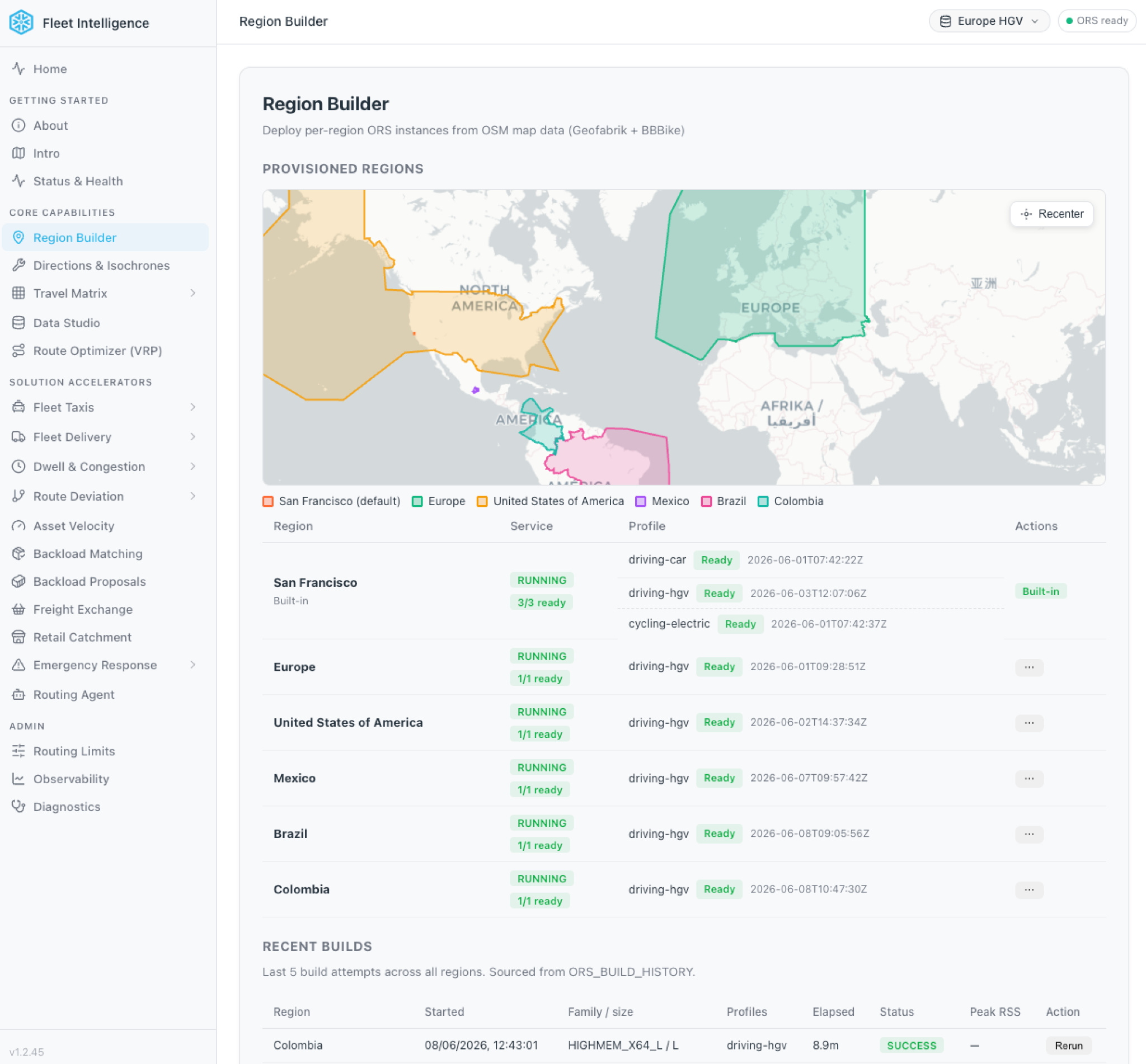
- City-sized region (for example, San Francisco): The build finishes in about five minutes on a small compute pool, and the credit cost is small enough not to register on a monthly bill.
- Country-sized region: Runs measurably longer. The continental United States build (a single freight profile against the full US map) takes about five hours on a large high-memory pool and consumes credits in the order of a dozen — the precise figure depends on the instance family, edition and region. Multi-profile builds multiply that roughly linearly.
After the build, the compiled graph sits on durable Snowflake storage and is reused across suspend and resume cycles, so its storage component is a rounding error against the compute component. Rebuilds happen on whatever cadence you set — usually monthly or quarterly when the underlying map data is republished.
Serving cost (ongoing)
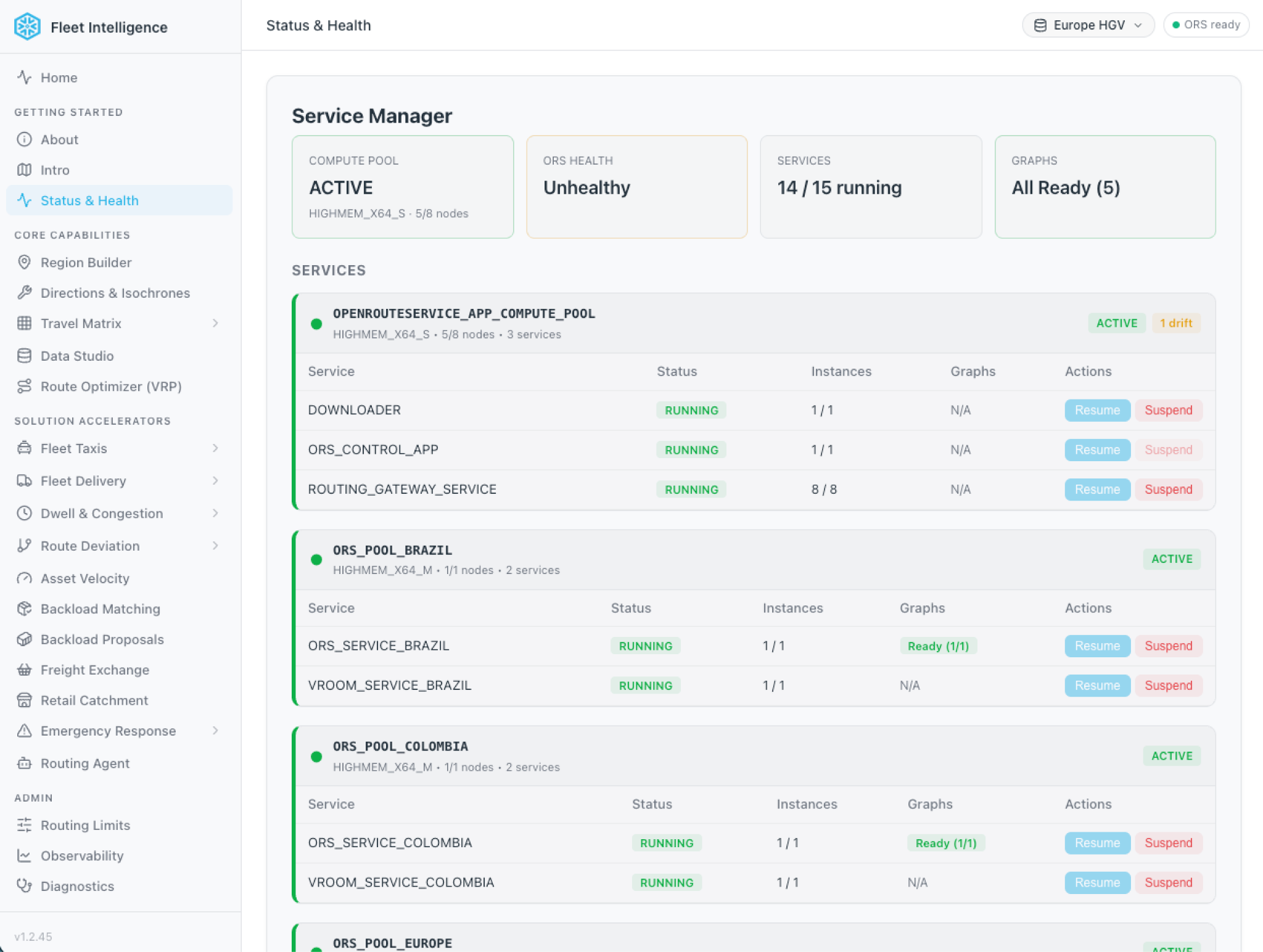
The second component is the serving cost — what you pay for the runtime to keep the routing engine to stay warm. The deployed footprint has two parts:
- Fixed base (always on): a small pool that runs the control panel, routing gateway and downloader.
- Per-region pool: Each additional region adds one more pool of its own.
Each per-region pool is sized for serving rather than building. The system auto-downsizes the runtime tier the moment the first build succeeds, because answering routing questions needs far less memory than compiling the graph in the first place. The graph itself scales with map size — a city graph is a few hundred megabytes per profile, a country graph is about 2-15 gigabytes, a continental graph about 20 gigabytes — but even the continental case fits comfortably in a small high-memory tier, with headroom for JVM overhead and concurrent queries. The runtime tier is therefore driven by concurrency and multi-profile requirements, not by graph size: A single-profile region at moderate concurrency runs on a small pool, a region serving multiple profiles or higher concurrency runs on a mid-size pool.
Translating that into a monthly bill depends on Snowflake edition, region, service topology and how warm the pools are kept. But the cost shape is different from per-call pricing: The base footprint is a steady recurring spend, each additional region adds something on top, and larger pools are needed only when you serve multiple profiles or higher concurrency. Once the pool is running, more routing questions share the same compute footprint, so the effective cost per query falls as utilization rises. Auto-suspend gives you another lever: a regional pool that sleeps when idle and resumes from the persisted graph in one to two minutes pays only for the hours it is actually answering questions.
When should you use each architecture?
Where the architecture lands depends on the workload:
- Low-volume (thousands of routing calls/month): A managed routing API is comfortable and likely not worth a build.
- High-volume (millions of calls, or agent-amplified volumes): The per-call invoice and the per-compute footprint cross over, and self-hosting is more optimal.
- Regulated or sensitive data (healthcare, financial logistics, defense, secure transport): When origins and destinations are themselves sensitive — patient pickup addresses, cash-in-transit stops, customer locations under data-residency clauses — sending them to an external API is often a nonstarter for security review. Self-hosting inside Snowflake keeps every coordinate inside the existing governance perimeter, so routing inherits the controls already implemented for the underlying data.
There is one more case worth flagging: A large class of routing workloads ask the same travel-time question over and over (dispatch, ETAs, reachability, batch backtests). For those, there's an even cheaper architecture that turns routing into a simple table lookup — no live engine required. We cover that pattern, and how to design the underlying tables, in Part 2.
Key takeaways
- Per-call vs. per-compute: Managed routing APIs charge per request (~$1/1k directions). Route Service on Snowpark Container Services charges per compute-hour — the more calls you make, the wider the gap.
- Agent amplification changes the math: A single AI planner can generate more routing requests in an afternoon than a team of human dispatchers does in a week.
- Built-in security: Self-hosting keeps every coordinate inside your existing Snowflake governance perimeter.
- 30-minute install: The Accelerator Fleet Intelligence skill in CoCo deploys the full stack — build, serve and orchestrate in about 30 minutes of unattended installation.
