Nov 18, 2026/7 min readData Engineering
Introducing Schema Evolution for Structured Types in COPY INTO and Snowpipe

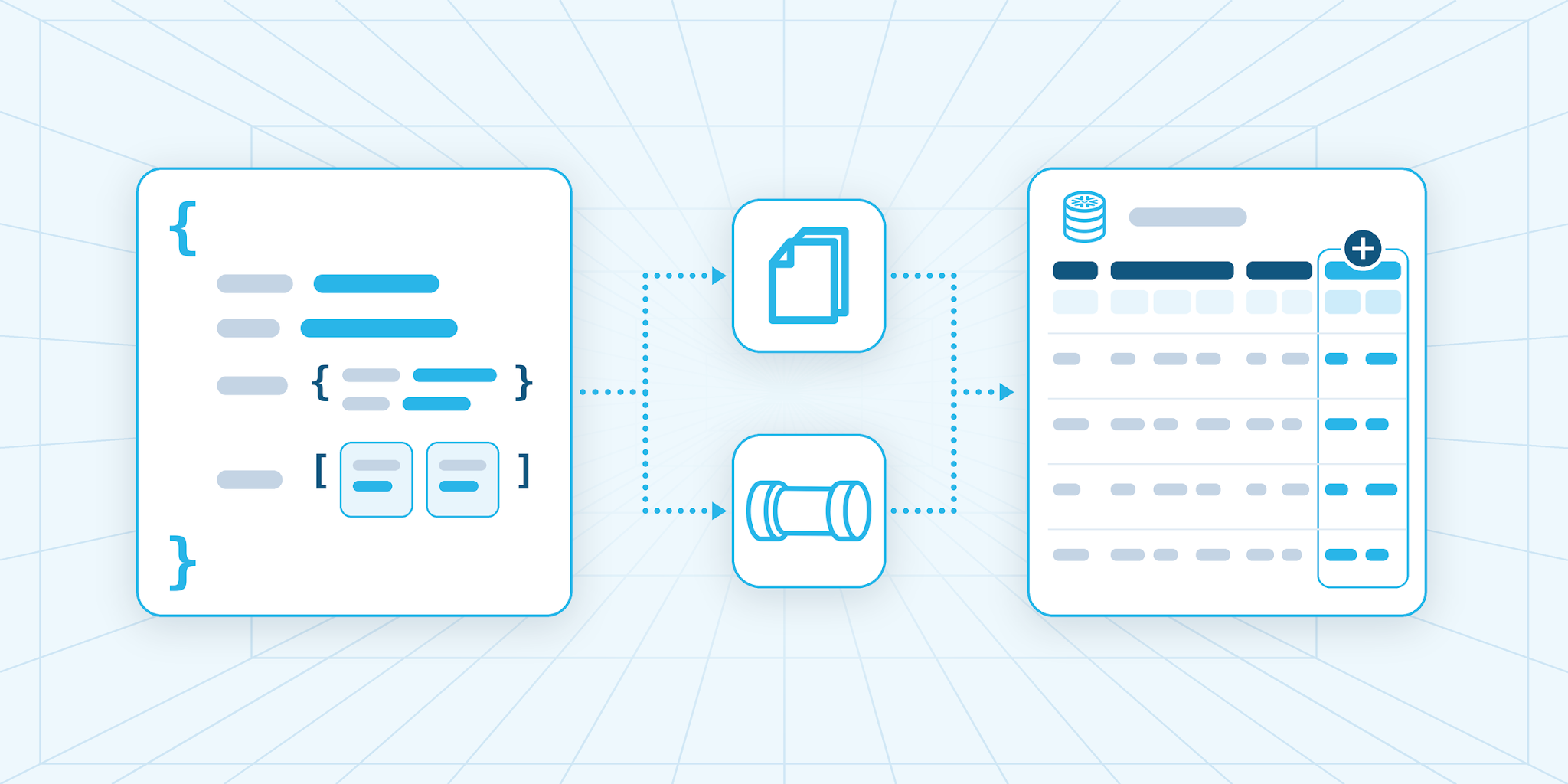
Much of the data flowing into analytics platforms today is nested. Apps and APIs send JSON with objects inside objects, data lakes hold Parquet files with arrays of records and event streams write Avro. That structure also keeps changing. New features, firmware updates and partner revisions add fields deep inside those objects and arrays, often without notifying the people who load the data.
Teams can land it in a VARIANT column, which accepts any shape, or in typed OBJECT, ARRAY and MAP columns, which reject bad values at load and let analysts query them without casts. With typed columns, though, a record that carries a field the column doesn’t declare fails to load until someone updates the column’s type, so every new field waits on a schema change.
Today, we are announcing the general availability of structured type support in schema detection and schema evolution for file ingestion with COPY INTO and Snowpipe. Snowflake already detects top-level columns in your files and adds new ones as they appear. Now it does the same for the fields inside nested objects and arrays, so new fields are ready to query the moment they arrive. To turn it on, set the INFER_NESTED_TYPES option to TRUE when you infer the schema and when you load.
What this changes for data teams
With nested schema detection and evolution, you can:
- Skip handwritten nested DDL: One CREATE TABLE statement turns the nested fields that INFER_SCHEMA finds into typed columns.
- Keep pipelines running when sources add nested fields: Once schema evolution is on, the first file with a new field adds it to the table, and records from older app versions keep loading.
- Hand analysts query-ready fields: New fields come back as typed values that need no casts. A query that names a misspelled or missing field fails before it runs, where a VARIANT path would return NULL.
- See the full schema: DESCRIBE TABLE lists each nested field and its type, and every column’s evolution record names the file and the query or pipe behind its latest change.
Where it helps most
Typed nested columns suit data with a stable core and a steady stream of new fields:
- Product and app events: Clickstream and checkout records that gain fields with every release, ready for analysis on launch day.
- Device and service telemetry: Readings and logs whose payloads pick up attributes with each firmware or software change.
- Partner and vendor feeds: Order or catalog files that arrive as Parquet, JSON, Avro or ORC and change on the sender’s schedule.
- Event streams landed as files: Topics written to cloud storage in Parquet or Avro and loaded as they arrive.
- Data in open table formats: Snowflake-managed Apache Iceberg™ tables that other engines also read, where new nested fields get Iceberg types that match the files.
Keep VARIANT for objects keyed by IDs, for data whose structure is still settling and for fields whose types change between files. One table can hold both kinds of columns. Nested schema evolution applies to file ingestion, not to tasks or Snowpipe Streaming (including through the Kafka connector).
What happens when a file adds a nested field
When a table has schema evolution turned on and a load sets INFER_NESTED_TYPES = TRUE, Snowflake compares the file’s fields with the table, adds what’s new and then writes the rows (see Figure 1).
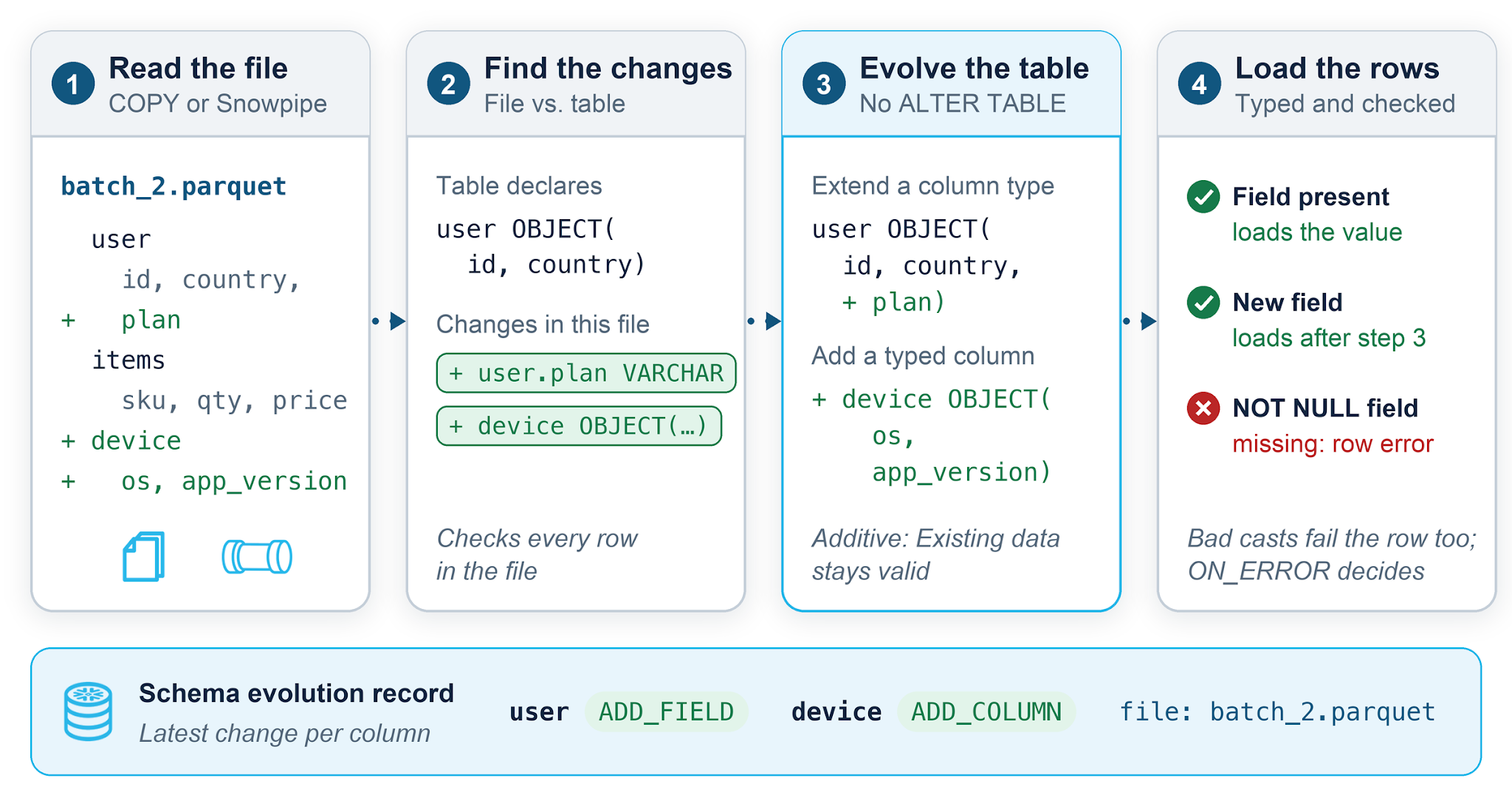
New fields join the column: A file’s new fields, including those inside array elements and nested objects, go after the existing ones. Rows loaded earlier return NULL for them.
New nested columns join the table: When a file includes an object or array column the table doesn’t have yet, Snowflake adds it with its full structured type.
Existing data stays valid: Schema evolution only adds nullable columns and fields. It never drops, reorders or retypes what’s already there, not even to widen numeric precision, so queries built on the table keep working.
Bad data still fails: The load rejects a row when a value can’t be cast to its type, a NOT NULL field is missing or the row has a field that schema evolution doesn’t add. Your ON_ERROR setting decides what happens next.
Schema evolution for nested columns in three statements
Take a mobile app’s checkout feed. Its first batch, events 1 and 2, comes from app version 5.0 and stores user and items as nested Parquet fields. With a stage (events_stage) and a file format (my_parquet_format) in place, three statements create a typed table from these files and keep it current as later batches land:
-- 1. Infer typed columns from staged files
SELECT column_name, type
  FROM TABLE(INFER_SCHEMA(
    LOCATION           => '@events_stage/checkout/',
    FILE_FORMAT        => 'my_parquet_format',
    INFER_NESTED_TYPES => TRUE));

-- 2. Create a table from the inferred schema
CREATE TABLE checkout_events
  ENABLE_SCHEMA_EVOLUTION = TRUE
  USING TEMPLATE (
    SELECT ARRAY_AGG(OBJECT_CONSTRUCT(*)) WITHIN GROUP (ORDER BY order_id)
      FROM TABLE(INFER_SCHEMA(
        LOCATION           => '@events_stage/checkout/',
        FILE_FORMAT        => 'my_parquet_format',
        INFER_NESTED_TYPES => TRUE)));

-- 3. Load and evolve the nested columns as files change
COPY INTO checkout_events
  FROM @events_stage/checkout/
  FILE_FORMAT = (FORMAT_NAME = 'my_parquet_format')
  MATCH_BY_COLUMN_NAME = CASE_SENSITIVE
  INFER_NESTED_TYPES = TRUE;
With INFER_NESTED_TYPES => TRUE, INFER_SCHEMA returns the full structure of these nested columns instead of VARIANT:
-- Default
COLUMN_NAME | TYPE
------------+--------------------------------------------------------
event_id    | NUMBER(38, 0)
event_type  | TEXT
user        | VARIANT
items       | VARIANT

-- INFER_NESTED_TYPES => TRUE
COLUMN_NAME | TYPE
------------+--------------------------------------------------------
event_id    | NUMBER(38, 0)
event_type  | TEXT
user        | OBJECT(id TEXT, country TEXT)
items       | ARRAY(OBJECT(sku TEXT, qty NUMBER(10, 0), price REAL))
Columns keep the file’s lowercase names, which is why the revenue query below double-quotes them. For JSON files, review the inferred types before step 2: Numeric types are sized from the values that INFER_SCHEMA scans, so a later record with a larger value can fail to load.
Follow the feed release by release
Run step 3 as each batch lands, or put the same COPY INTO statement in a pipe for continuous loading.
Ship version 5.1 with no ALTER TABLE
In the second batch, events 3 and 4 come from version 5.1. Event 3 sets the new plan field inside user and adds a device object, and event 4, a refund, sends plan as null. The step 3 load picks up both changes (see Figure 2).
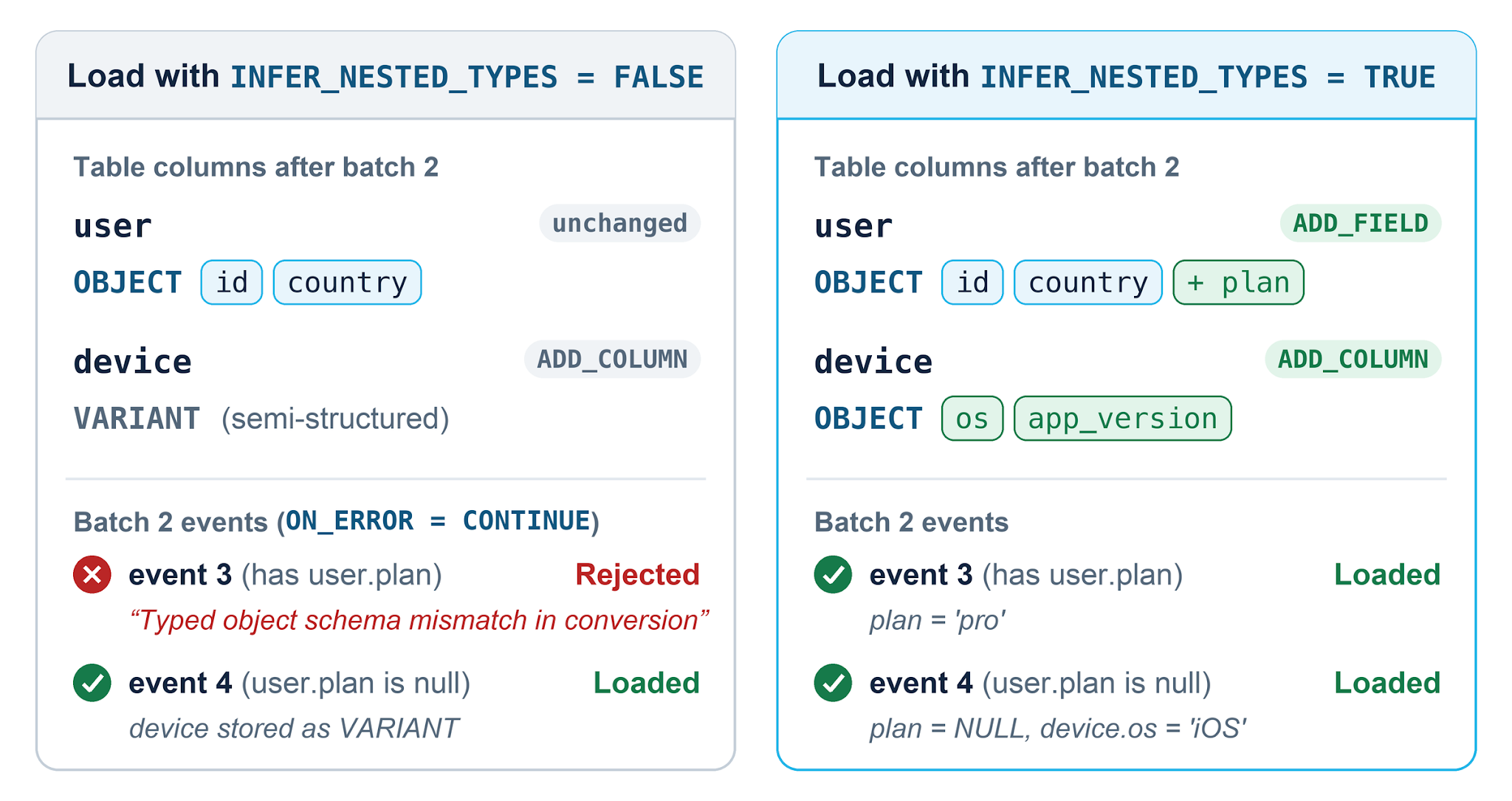
DESCRIBE TABLE shows both changes (other columns and VARCHAR lengths omitted, evolution records shortened to evolutionType):
DESCRIBE TABLE checkout_events;

name   | type                                              | schema evolution record
-------+---------------------------------------------------+------------------------
user   | OBJECT(id VARCHAR, country VARCHAR, plan VARCHAR) | ADD_FIELD
device | OBJECT(os VARCHAR, app_version VARCHAR)           | ADD_COLUMN
The full records also name the file behind each change: checkout/batch_2.parquet. The third batch, event 5 from a client still on version 5.0, loads with NULL in plan and device.
Report on new fields as soon as they land
In the fourth batch, version 5.2 puts a discount on every line item, and the step 3 load adds the field to items. A revenue query can use it right away:
SELECT COALESCE("user":plan, 'free')    AS plan,
       COALESCE("device":os, 'unknown') AS os,
       COUNT(DISTINCT "event_id")       AS orders,
       ROUND(SUM(i.value:qty * i.value:price
                 * (1 - COALESCE(i.value:discount, 0))), 2) AS net_revenue
  FROM checkout_events,
       LATERAL FLATTEN(INPUT => "items") i
 WHERE "event_type" = 'checkout'
 GROUP BY 1, 2
 ORDER BY net_revenue DESC;

PLAN | OS      | ORDERS | NET_REVENUE
-----+---------+--------+------------
pro  | Android |      1 |      1559.4
team | iOS     |      1 |         144
free | unknown |      3 |      103.94
One result now covers every app version. The free row counts the three checkouts from version 5.0 clients, which send no plan or device. The team row is the version 5.2 checkout, the first whose line items carry a discount.
Iceberg schema evolution
Snowflake-managed Iceberg tables also support nested schema detection and evolution. Add KIND => 'ICEBERG' to the INFER_SCHEMA call in step 2 and create the table with CREATE ICEBERG TABLE ... USING TEMPLATE. Nested fields then take the Iceberg types that match the file, so qty, the Parquet int32 inside items, stays an int for the other engines that read the table. New fields from later loads get matching types too.
Get started
Start with the feed that gains nested fields most often:
- Preview its schema: Run the step 1 query against its stage. It’s read-only and shows the typed columns you’d get.
- Turn it on: Create the table with step 2 and load it as in step 3, with INFER_NESTED_TYPES = TRUE in every COPY INTO statement and pipe. The loading role (the pipe owner, for Snowpipe) needs EVOLVE SCHEMA or OWNERSHIP on the table.
- Check the details: Schema evolution for structured type columns covers limits, existing tables and how to add the option to a running pipe without losing or duplicating files.
Jun 15, 2026Data Engineering
Snowflake Iceberg V3: Variant Performance

Nov 7, 2025Open Source
The Apache Iceberg™ Variant Type: Flexible Semistructured Data, Reimagined

Jul 28, 2026Data Engineering
Operationalizing Data Interoperability in Multi-Engine Lakehouses