Discover and Share AI Skills with Snowflake
Video Overview
Snowflake's skills and plugins sharing gives teams one place to find, trust and reuse the AI workflows they have already built. Teams stop rebuilding the same skills, agents use fewer tokens on problems a skill already solves and results stay consistent.
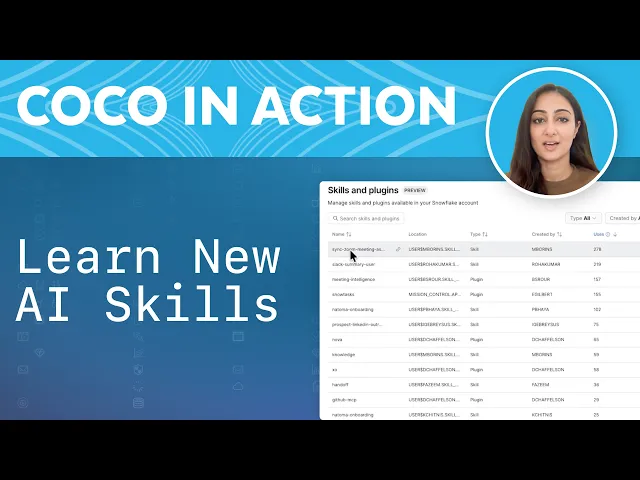
In Snowsight, a dedicated skills and plugins catalog shows every shared skill and plugin, who built it, when it was last updated and how often teams use it. Search for a skill, click use, and Snowflake CoCo installs and runs it. To share with a colleague, copy the link and send it in Slack or Teams.
Admins can mark any skill or plugin as certified directly in Snowsight, so the catalog shows a check mark next to official workflows. Role-based access control (RBAC) governs who can publish and who can access. Your team gets consistent outputs, fewer wasted tokens and a single place to find workflows it can trust.
Video Transcript
Hi everyone! As more of your team starts using agents to automate tasks and create skills, someone on your team has already built the exact skill you need. The issue is there are hundreds of powerful skills out there, but people cannot find them, and nobody knows which ones are trustworthy. So teams rebuild the same workflows, agents waste tokens solving the same problem, and you end up with inconsistent results. This was never a skills creation problem. It's a skills access and governance from skills and plugins sharing solves both. It lets you codify best practice workflows and share them with snowflake integrated governance, saving tokens, standardizing processes and giving admins control over what's official.
Let's start with discovery. In Snowsight, there's a dedicated skills and plugins catalog. Every shared skill and plugin lives here. Who built it, when it was last updated, and how often people are using it. Say I heard about a skill and want to try it. All I have to do is search for it, find it, and click use. CoCo opens, installs, and runs it. Here, I'm using the daily digest skill to better organize and understand what's going on and what I have to do. Much easier than creating a custom workflow to do this for me. And if I want to share this with a colleague, I can just go back to the skill and plugins sharing catalog, copy the link and drop it in Slack or Teams. My colleague can paste it into CoCo and it installs and runs. A useful workflow that's easy to scale.
Now, the publishing side. Let's say I've got a plugin I built and I want to share it with my team from CLI. Every time CoCo uses a skill, whether by you explicitly invoking it or by CoCo auto invoking it based on context, the skill lets CoCo run verified steps instead of reasoning through the approach from scratch. Across an entire organization, that means cost savings and time savings, which add up. Fewer tokens are wasted, more consistent outputs, less time rebuilding what already exists.
For sharing to work effectively, people need to trust what's in the catalog and governance handles that.
Admins can mark any skill or plugin as certified directly in Snowsight. Certified means this is an official way to handle this workflow. The right tables, the right logic, the right output. Once it's marked, it shows up with a check mark in the catalog. That tells your team which skills are official without anyone having to ask. RBAC controls who can publish and who can access. You're sharing knowledge and you're sharing it safely.
Your team's skills shouldn't be living on one machine or in 20 different repos with too many variants of the same workflow. Publish once, share the link, and it works everywhere CoCo does. The good news? All of this only takes a couple of minutes. Learn more by reading the official docs in the description below. What skills will you share?
Featured Speakers

Sartaj KaurSr. Product Marketing Manager, Snowflake
