May 28, 2026/9 min readProduct and Technology
How We Used Cortex Code to Turn Finance Variance Analysis into a Live, Intelligent Workflow


FP&A Should Spend Close on Analysis — Not Spreadsheet Assembly
Every FP&A team knows the pattern. Close begins, actuals start moving, and before anyone can explain what changed in the business, someone has to rebuild the workbook.
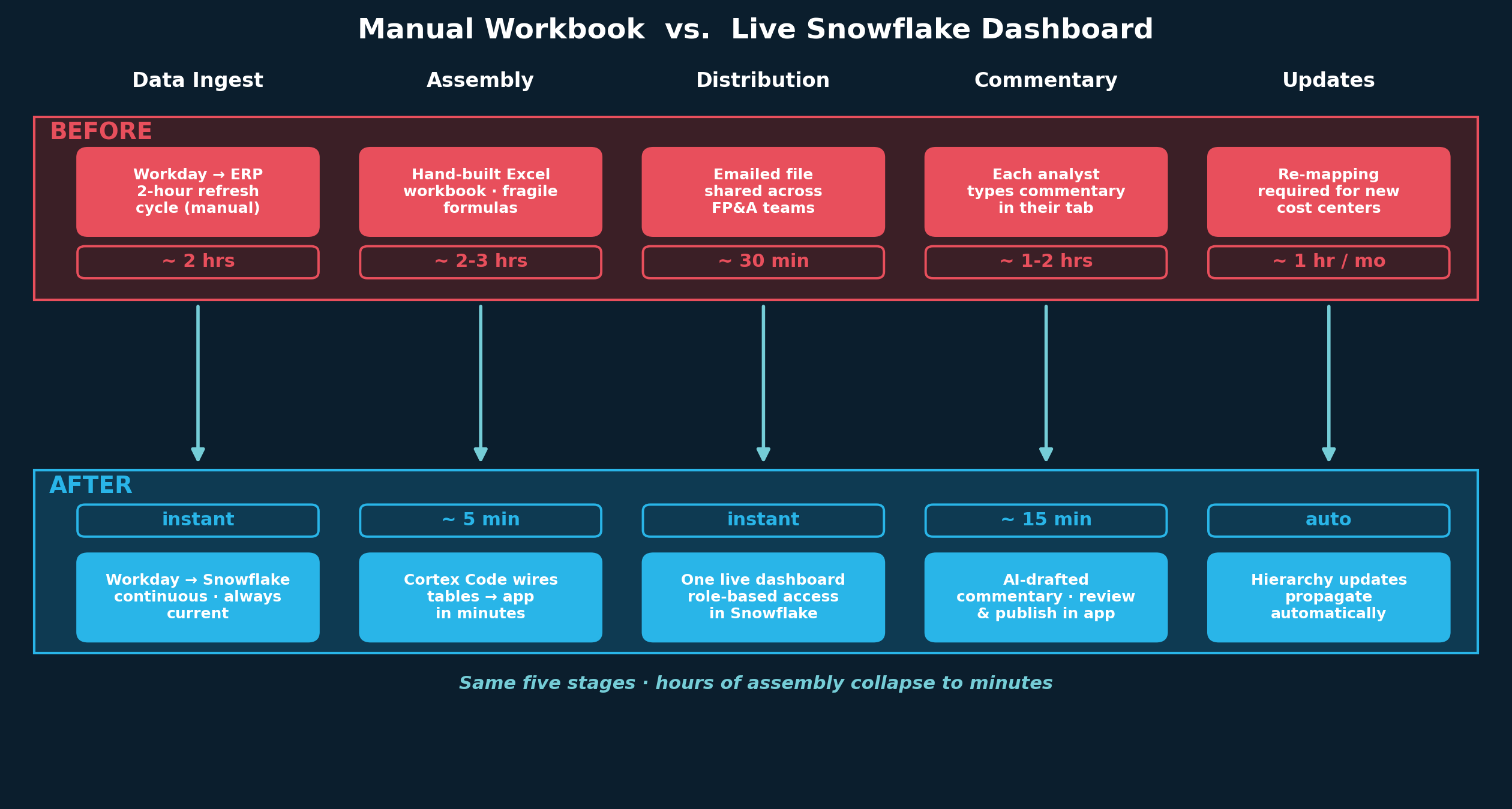
That was our reality. Each month, our team spent hours stitching together department-level P&Ls, aligning mappings, refreshing actuals, formatting outputs and chasing one more cut of the same budget vs. actual analysis. In a normal close, that meant three to four hours lost before the real work of analysis began. When a mapping or linking issue surfaced, that could stretch to five or six.
And that is the core problem: FP&A teams are hired to explain performance, pressure-test the plan and help leaders make decisions. But too often, a meaningful share of the job is spent on logistics: pulling actuals from the ERP, aligning charts of accounts, mapping to the budget model, reconciling timing and reclasses, and rebuilding the same workbook every close.
Our previous budget vs. actual process reflected exactly that. During close, Corporate FP&A consolidated department-level P&Ls into a single Excel workbook with variances across every line item. That workbook was distributed to the broader FP&A organization, and each team manually added commentary and formatting for the departments they supported. It worked, but it was fragile, repetitive and slow.
The bigger issue wasn’t the workbook; it was the workflow
Manual effort was only part of the challenge.
Actuals flowed from Workday on a two-hour refresh cycle, so journal entries posted by accounting were invisible until the next scheduled update. The workbook could not be finalized until accounting had completed posting for the period. And every organizational change — for example, a new cost center, a new hierarchy, a restructuring — created manual rework across formulas, mappings and layouts.
In other words, the process was not just time-consuming; it delayed finance’s ability to see what was happening and act on it. Instead of helping the business understand emerging variances in real time, FP&A was stuck assembling the infrastructure required to begin the conversation.
That was the opening for Snowflake Cortex Code, or CoCo.
Why we turned to CoCo
The question for us was not whether we could build a better budget vs. actual workflow in Snowflake. The question was whether CoCo could help us build it fast enough, directly enough, and simply enough for finance to own.
That is what made CoCo compelling in this use case. Because it runs natively in Snowflake, it had context on the data model, cost center and ledger mappings, and forecast tables and journal lines already powering the workflow. We were not starting from a blank page in a disconnected tool. We were building directly where the data, logic and governance controls already lived.
That context changed the build process. Instead of spending weeks onboarding data into a separate development environment, analysts could describe the variance view they wanted in plain English, and CoCo could help wire it to the right Snowflake objects. That dramatically compressed the distance between idea and working application.
From static workbook to live finance application
A live dashboard is only as good as the structure underneath it, so we first established a clean hierarchy in Snowflake across four nodes: leader, BvA section, headcount and cost center. That gave users a full drill-down view of the P&L from the consolidated level all the way down to an individual cost center, without manual pivoting or workbook gymnastics.
From there, CoCo accelerated the build. With it, we created a budget vs. actual dashboard in Streamlit that replaced the static Excel workbook entirely. The pipeline runs continuously, pulling actuals directly into Snowflake without manual intervention. No one has to trigger a refresh, rebuild a tab or redistribute a file.
The impact during close is immediate. As accounting posts entries, the dashboard reflects them. That removes the two-hour refresh lag as a blocker and changes how FP&A operates. Teams no longer have to wait for a workbook to be assembled and distributed. They can open the dashboard during close, review variances as they emerge, and investigate major discrepancies before the formal review cycle even begins.
Built in weeks, not months
One of the clearest proofs of value was speed.
We had a prototype within two weeks and a fully functional app live within a month. Stakeholder feedback turned into code changes the same afternoon instead of waiting for the next sprint. Before CoCo, a project like this likely would have required dedicated BI support and could have taken up to three months to deliver a working version.
That matters because the benefit was not just a better end product. CoCo changed the economics of getting there. Instead of sitting in a technical backlog, finance could move from business problem to working solution while the need was still immediate.
More than a dashboard: a better way to work
The old Excel model locked users into a fixed view. The new application does not.
Users can toggle across forecast versions and time periods, adjusting the view to the scenario most relevant to their analysis instead of waiting for a new published cut. Adding a new cost center or department no longer requires a manual rebuild. As the business grows, the dashboard grows with it. New business units, reporting dimensions and organizational changes are reflected automatically through the underlying hierarchy and source data.
That is important, but the bigger shift is that the workflow now supports the way FP&A actually works. Users can move from the consolidated P&L down to the cost center level to isolate the precise driver of a variance. The app is not just faster than the workbook. It is better aligned to the questions finance actually needs to answer.
Where CoCo starts to change the job
This is where the use case becomes more compelling than simple dashboard modernization.
Selected expense categories already include AI-generated commentary drafted directly in context. Analysts can review, refine and publish that commentary in the dashboard, turning what used to be one of the most time-consuming parts of close into a review task rather than a writing task.
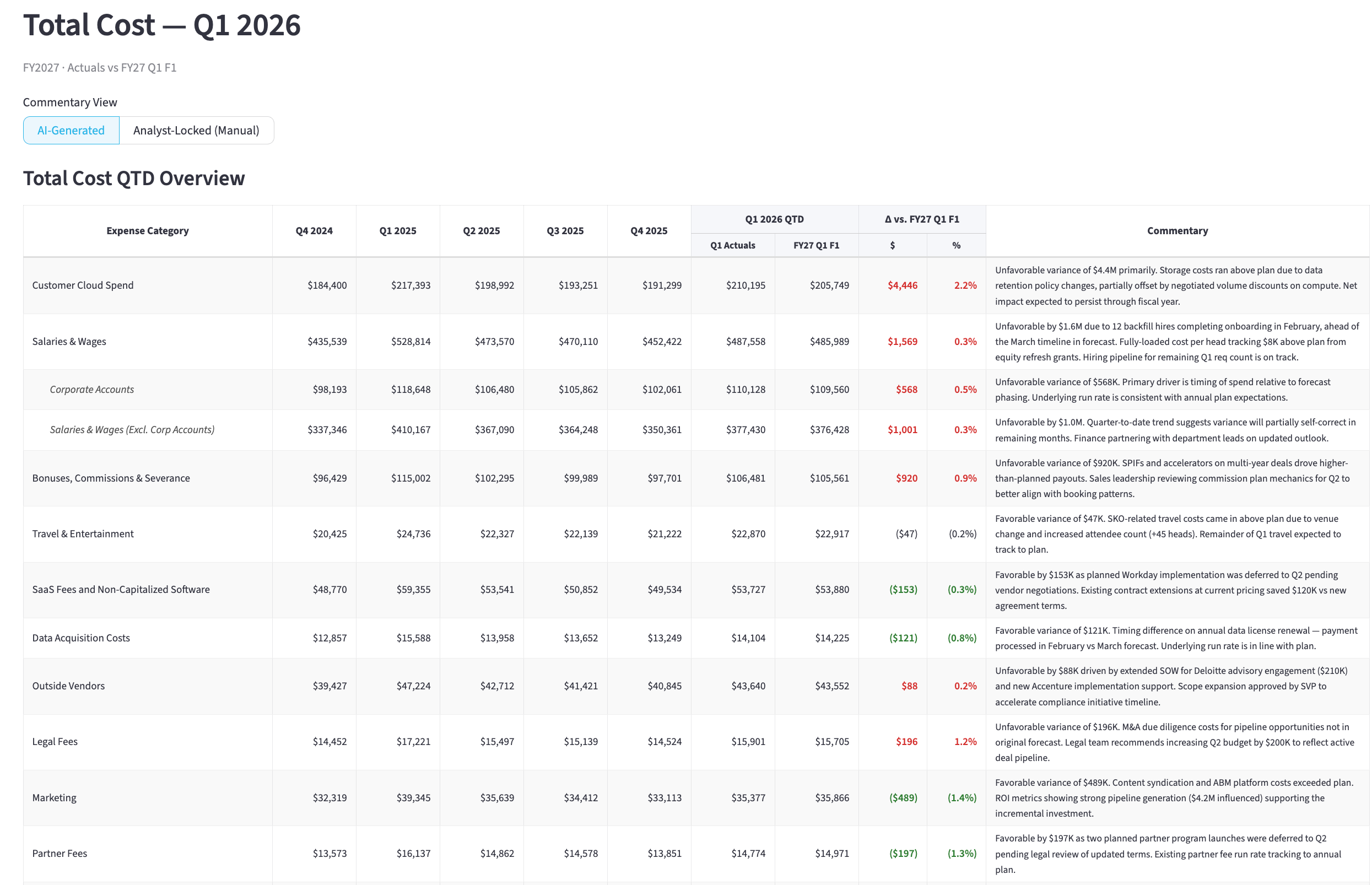
Q1 2026 Total Cost view with AI-generated variance commentary. Analysts toggle between AI-generated and analyst-locked modes, turning commentary from a writing task into a review task. Note: Illustrative example using hypothetical data and AI-generated sample commentary. Content shown does not represent actual Snowflake financial results or internal records.
That is a meaningful shift. CoCo is not only helping finance build the workflow faster. It is helping finance execute the workflow differently by giving analysts a first draft to pressure-test instead of a blank page to fill.
The collaboration layer is also interactive. Cross-functional teams such as GL accounting and FP&A leadership can post questions directly on spend-category line items, tag the relevant owners and preserve a full thread history behind each variance. Instead of scattering context across email and side conversations, the workflow keeps the discussion attached to the line item itself, creating a traceable record of how an issue was investigated and resolved.
For leadership, the app also supports a single presentation view that consolidates the full P&L and can export directly to Excel and PowerPoint. That removes another layer of manual work before executive reviews and helps ensure that the materials used in meetings come from the same governed source as the analysis itself.
Why finance can trust it
In finance, automation only matters if it is trustworthy.
This workflow stays inside Snowflake’s governance boundary. Access is managed through Snowflake role-based permissions. Core FP&A and finance development roles can access the full working view, while reviewers can see a curated presentation-only view. Secrets, queries and writes stay inside Snowflake, making it easier to share the application with adjacent teams without creating a separate governance hurdle.
That trust extends to the workflow itself. Formatting, calculations and hierarchy definitions are standardized and locked in, reducing the risk of overwritten formulas or deleted tabs. Every action is timestamped and traceable, delivering a level of auditability that a workbook circulated over email simply cannot match. And because the interface is intuitive by design, new team members can start navigating it without needing a guided walkthrough first.
The broader shift: who gets to build
One of the most important changes here is not just the app. It’s who gets to build.
With CoCo, analysts no longer have to queue behind a BI or data engineering backlog to test a new view or workflow. They can prototype directly against production data and iterate with stakeholders in the room. That changes delivery speed, but it also changes ownership. Finance teams can solve more of their own workflow problems directly, while still operating inside the governance model that enterprise finance requires.
That is what makes this exciting beyond a single use case. Once finance can move from question to working application quickly, the bottleneck shifts away from technical assembly and back toward business judgment.
This is just the beginning
The current dashboard replaced the assembly layer. The next phase is about making AI a fuller partner in the analysis.
We are expanding AI-generated commentary across the full P&L, not just selected categories. The goal is to produce a complete first draft of variance explanations at the start of every close, so analysts can spend their time pressure-testing and refining the narrative rather than building it from scratch. We are also bringing forecast data directly into the dashboard to enable forecast-versus-forecast reviews, giving teams a way to compare the latest view against plan or prior forecasts and update the story as the numbers evolve.
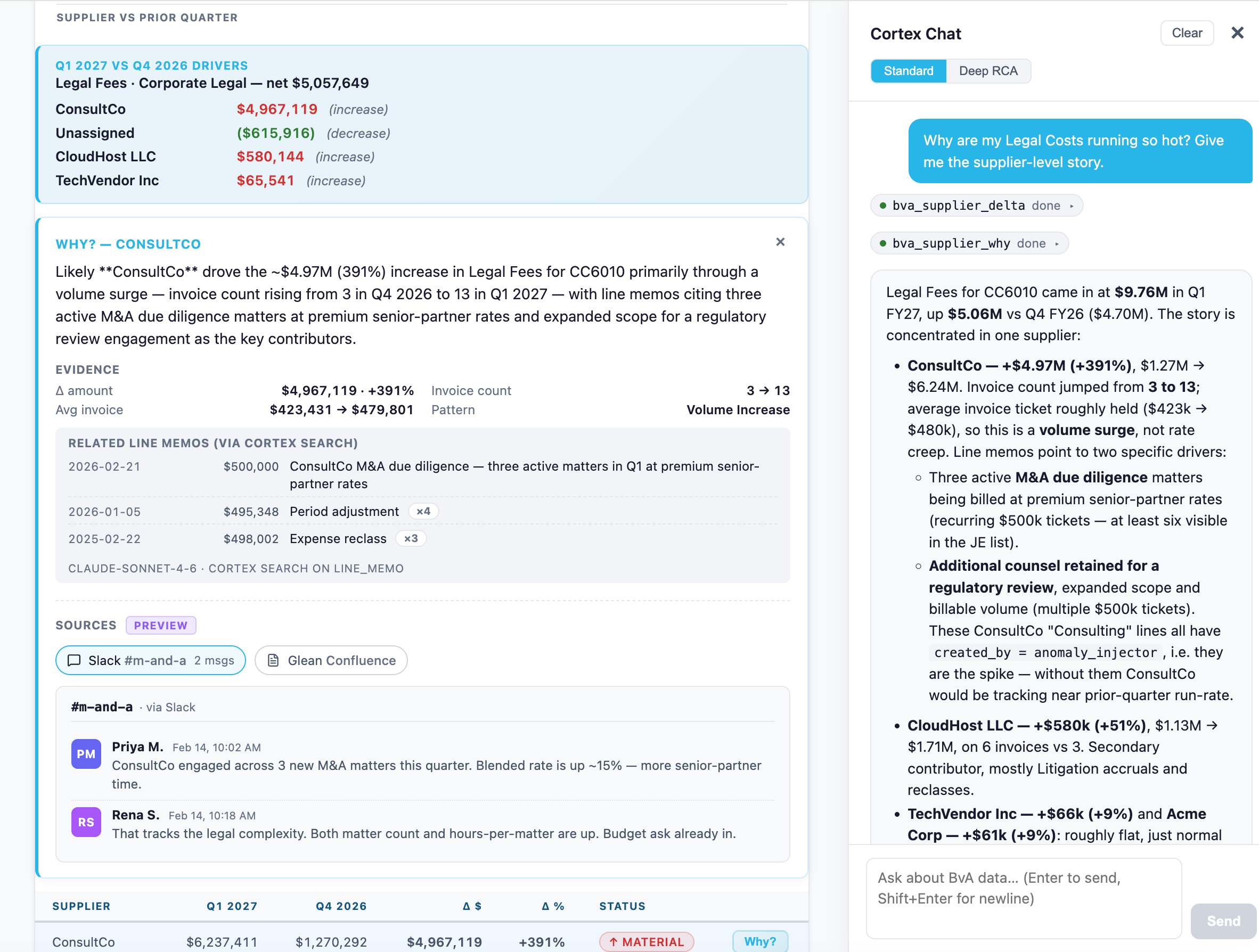
A preview of where this is headed: an agentic investigation flow, surfaced through Cortex Code, that drills from a variance to the supplier driving it and grounds the explanation in journal line memos, Slack discussions and business context.
The real ROI of CoCo in finance
An automated budget vs. actual layer does not replace judgment. It protects it.
It standardizes definitions, refreshes on a schedule you trust, and surfaces variances in a format FP&A and operators already use. That allows the team to focus on root causes and actions, not on stitching spreadsheets together.
That is the real reason behind CoCo in finance: not just building a better interface, but reclaiming the work finance was meant to do. Explain the variance. Align the organization. Drive decisions. And eliminate the manual tax of rebuilding the same workbook over and over for every unit and every line.


