Nov 17, 2026/13 min readData Engineering
Cost-Effective Apache Kafka® Topic Materialization into Apache Iceberg™ with Snowflake


Getting Apache Kafka® data into Apache Iceberg™ is only part of the job.[1] Keeping it useful means handling traffic spikes, making fresh events available to queries and maintaining the files and metadata as the stream grows. If you run the Kafka platform, you want a destination that fits your existing Kafka Connect deployment. If you develop an application, you want to get your events into a table without becoming responsible for a custom ingestion service. In either case, the goal is the same: Keep the events flowing and make the data useful.
With Snowpipe Streaming, Snowflake combines near-real-time ingestion into Iceberg with volume-based pricing of 0.0037 credits per uncompressed GB, about $0.01 per GB depending on your Snowflake credit price. You get fresh data for analytics without building an Iceberg writer or operating separate ingestion compute.
Bring Kafka data into Iceberg with Snowflake
Snowpipe Streaming is Snowflake's serverless ingestion service for continuously arriving data. It lets applications and connectors send rows directly into Snowflake tables or Snowflake-managed Iceberg tables, without first building and staging files. Snowflake manages ingestion compute as traffic changes, and the service supports server-side validation and SQL-based transformations through PIPE objects. For Iceberg, it writes compatible data files and metadata while Snowflake handles compaction. It is the ingestion service behind the integrations below, helping bring Kafka events into queryable Iceberg tables without building your own Iceberg writer or operating a separate ingestion-compute layer.
Kafka is an important part of many data platforms, and the right integration depends on how you use it. These options use Snowpipe Streaming for the Iceberg write path, with different responsibilities for the streaming infrastructure and integration layer.
Snowflake Connector for Kafka: Keep your existing Kafka deployment
If you already run Kafka and Kafka Connect, Snowflake Connector for Kafka v4 streams your topics into Snowflake-managed Iceberg tables. You keep your producers and Connect deployment; the connector handles Snowpipe Streaming integration underneath.
Snowflake Openflow: Consolidate upstream integrations
If Kafka is one of several sources you need to connect, Snowflake Openflow provides a managed integration framework for Kafka, databases, SaaS applications and other supported sources. Its Kafka connector uses Snowpipe Streaming to write into Snowflake-managed Iceberg tables, bringing Kafka into the same framework as your other integrations.
Snowflake Datastream: Kafka-compatible infrastructure managed by Snowflake
For teams using Kafka primarily as a buffer into Snowflake or Iceberg tables for analytics, Snowflake Datastream offers a broader infrastructure alternative. It provides a Kafka-compatible API so compatible producers and consumers can connect through configuration changes, replacing the separate streaming infrastructure and connector layer rather than adding another sink. Datastream is in private preview, with public preview coming soon. Work with the Snowflake team to validate your workload's requirements and preview scope.
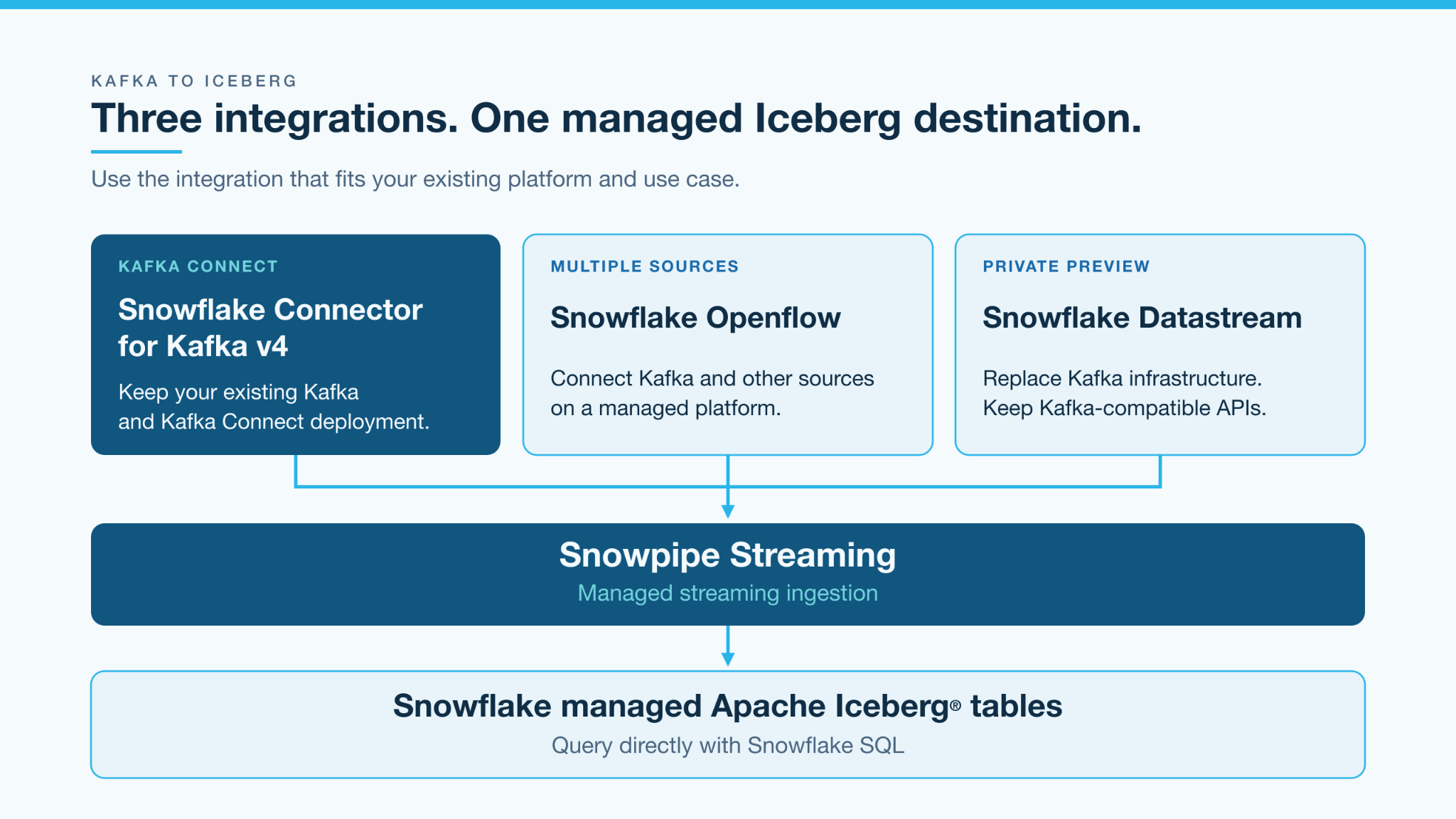
In this post, we'll focus on a common path: You already use Kafka Connect and want to stream your topics into Iceberg tables. We'll look at the managed Iceberg capabilities behind that path, then walk through Snowflake Connector for Kafka v4.
Let Snowflake manage the Iceberg files and metadata
Writing events to Iceberg involves more than putting files in object storage. The files need to become part of a consistent table, with the metadata that readers use to discover them. Continuous writes can also create small files and a growing snapshot history. Apache Iceberg's maintenance documentation describes why compaction and metadata maintenance matter for streaming workloads.
With Snowflake-managed Iceberg tables, Snowflake manages the catalog and table lifecycle, including compaction. Snowpipe Streaming writes the Iceberg-compatible Apache Parquet™ files and metadata. You do not need to implement an Iceberg writer or build a separate compaction job for the managed table.
This path supports Snowflake-managed Iceberg tables, not writes to tables managed by an external catalog. The table files can live in supported Snowflake storage or in your own cloud storage through an external volume. The Iceberg ingestion guide covers both options.
The distinction is practical: You get data in the Iceberg format while Snowflake operates the table-writing and maintenance machinery.
Keep streaming data ready for queries
For high-throughput, low-latency workloads, ingestion and table layout need to work together. Frequent writes should not leave you building a second system just to organize the data for readers. Here are the Iceberg capabilities that matter along that path and where to start when configuring them.
Handle small files with managed compaction
Continuous ingestion can produce small files. Snowflake's managed table optimization includes background data compaction, so your application does not need to accumulate a large file before submitting events or run its own compaction scheduler afterward.
Start with compaction enabled and TARGET_FILE_SIZE set to AUTO. For managed tables, Snowflake selects file sizes based on table characteristics, including the ingestion workload and clustering configuration. If your readers have a specific file-size requirement, you can choose a documented target and compare the resulting query and maintenance behavior. A target is not a guaranteed size for every file, and existing files are adjusted asynchronously. It is a table-layout setting, not an ingestion-latency control.
Write into the partitions your queries need
Snowpipe Streaming supports partitioned and nonpartitioned managed Iceberg tables, in both Iceberg v2 and v3. New data is written using the table's current partition specification. You define the layout on the table rather than implementing partition-aware file writing in the Kafka consumer.
For an order-events table frequently filtered by event date, a day-based partition is a useful candidate to evaluate. Choose partition transforms around real query filters and the volume each partition will receive. A partition for every event ID, for example, would scatter the stream into many tiny groups. Kafka partitions distribute consumption work; Iceberg partitions organize table data. They do not need a one-to-one mapping.
As access patterns change, partition evolution lets you add, drop or replace partition fields without rewriting existing data. Subsequent writes use the new specification; existing files stay in place. Test query behavior across both old and new data rather than expecting a layout change to reorganize history immediately.
Accommodate new fields with server-side schema evolution
When a producer adds a field such as sales_channel, Snowpipe Streaming can infer a supported new top-level field and add its column to the destination. Enable ENABLE_SCHEMA_EVOLUTION on the table and configure the required schema-evolution privileges. For Snowflake Connector for Kafka v4, start with snowflake.validation=server_side (the default). Client-side validation and schema evolution are also supported for precreated Iceberg v3 tables with RECORD_METADATA VARIANT and compatible column types, using the default pipe. See the client-side Iceberg setup for configuration and type restrictions; Iceberg table auto-creation requires server-side validation.
Server-side schema evolution is asynchronous, and it infers types from values rather than preserving a Schema Registry contract. Predefine columns where precision or a specific type matters. Both Iceberg v2 and v3 support inference for documented scalar types. Iceberg v3 also supports inferring a new nested JSON object as a VARIANT column. Automatic evolution does not widen existing column types or create structured ARRAY, OBJECT or MAP columns. Define those explicitly. The table-support guide describes the full boundaries.
Start with Iceberg v3 for new pipelines
For a new pipeline, start with Iceberg v3 to take advantage of event-data types such as VARIANT and nanosecond timestamps. Select v3 explicitly when creating the table, and check that every engine reading it supports the features you use. Iceberg v2 remains supported when reader compatibility requires it. Version choice, schema evolution and partition design are separate decisions; none requires replacing Kafka or writing a custom Iceberg sink.
Deep dive: Snowflake Connector for Kafka v4
For customers keeping Kafka Connect, Snowflake Connector for Kafka v4 brings the managed Iceberg write path into your existing deployment. It handles the Snowpipe Streaming integration under the hood. You configure the connector and its destination, without writing SDK code or managing streaming channels yourself.
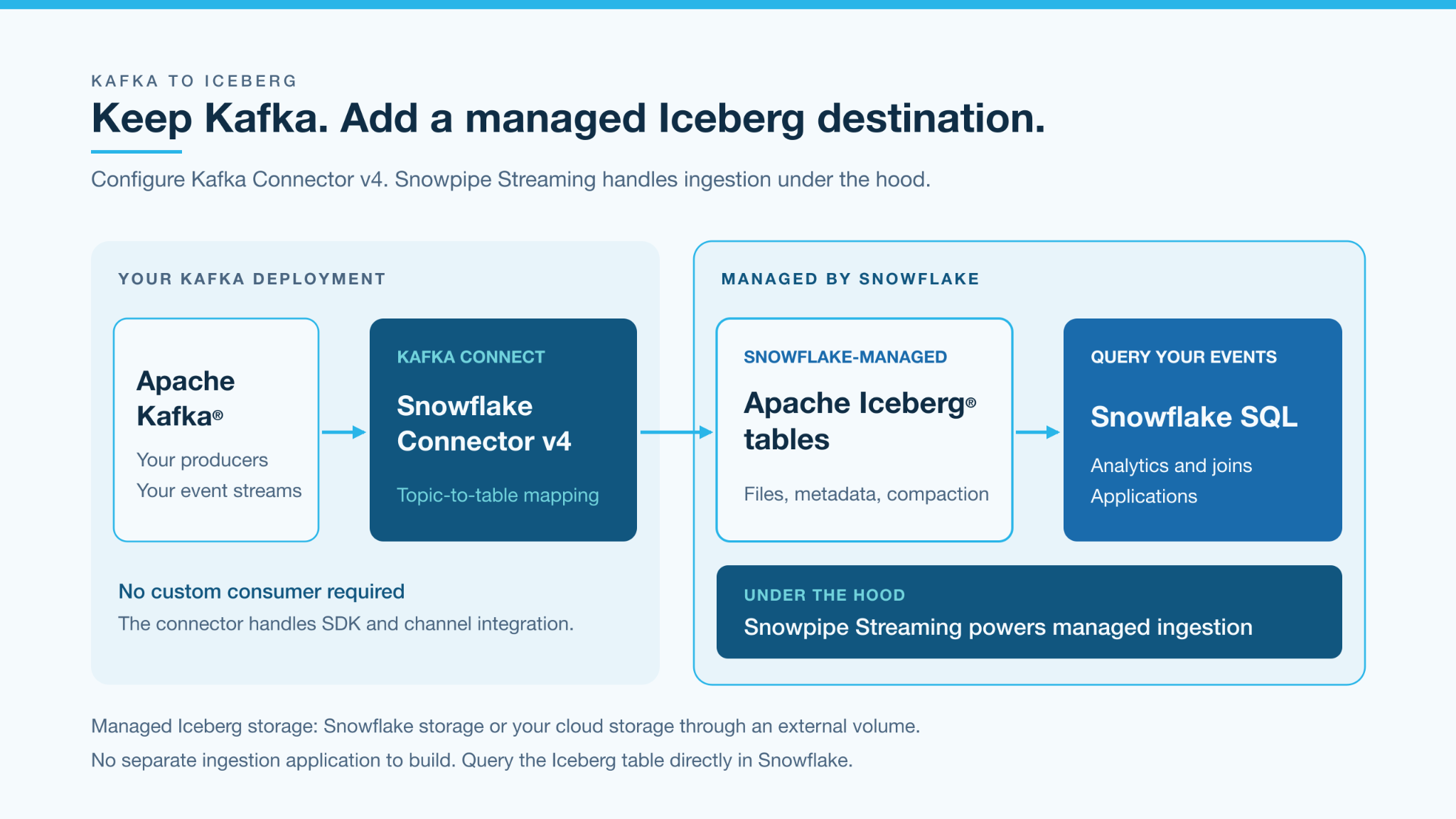
If you already operate Kafka Connect, the connector fits into that deployment model. Configure the topics, destination and record format instead of writing the consumer loop and integrating the ingestion SDK yourself. If you do not yet run Connect, you will need to provision a compatible runtime or use a supported hosting option.
Under the hood, v4 uses a Rust-based client core and supports server-side validation and transformations through Snowflake PIPE objects. A pipe defines how incoming records are processed before reaching the table. For supported operations such as field selection, renaming and type conversion, you can express that logic in the ingestion path rather than building a separate application just to reshape records.
You still manage Kafka and the Connect runtime. Snowflake manages the ingestion service and Iceberg table. That division lets you focus on which data to publish and how to use it, rather than on the mechanics of creating Iceberg files and commits.
Start with one topic and one Iceberg table
Suppose an application publishes order events to order-events. Each record contains an event ID, order ID, customer ID, event timestamp and amount. The first milestone is straightforward: Make those events queryable in an Iceberg table.
Create the destination
Create a Snowflake-managed Iceberg table with columns that match your event contract. Choose Snowflake storage where available, or configure an external volume for your own cloud storage. Decide whether the table needs a partition specification and automatic evolution for supported new fields. Starting with explicit types for known fields gives the producer and the consuming team a clear agreement about the data.
Point the connector at it
Install a supported v4 release and configure access to Kafka and Snowflake. Map your source topic to the destination table, and select server-side validation. These properties illustrate that choice; they are an excerpt, not a complete deployment configuration:
connector.class=com.snowflake.kafka.connector.SnowflakeStreamingSinkConnector
topics=order-events
snowflake.topic2table.map=order-events:ORDER_EVENTS
snowflake.validation=server_side
Choose a converter that matches your records, and enable error logging on the precreated table so server-side rejected records can be inspected. Converter failures happen before records reach Snowflake and use a configured Kafka dead-letter queue instead. The connector setup guide walks through the runtime, connectivity, identity and configuration prerequisites.
Publish, query and verify
Send a small batch with known event IDs. Query the destination, check that the expected records arrived and then publish a second batch. You now have a concrete test of the full path from producer to Iceberg table, not just a connector reporting that it is running.
This example appends events. Applying database updates and deletes to maintain a current-state table is a separate processing requirement. Before expanding the pipeline, also verify how your selected connector version and validation mode handle schema changes and rejected records.
Put those events to work with Snowflake
Once the events are in the Iceberg table, query that table directly with Snowflake's SQL engine. You do not need to copy the data into a separate standard Snowflake table first.
For the orders stream, that might mean counting orders by minute, joining events with customer data already in Snowflake or investigating a change in purchasing activity. The same event stream that serves your applications becomes available for analytical questions without requiring analysts to consume Kafka themselves.
Measure the queries your users will actually run. Apply representative time filters and inspect the query profile to understand scanning and pruning before changing the layout or compute size. Also distinguish when a record is queryable in Snowflake from when a new Iceberg metadata snapshot becomes visible to an external reader. Those are different freshness measurements.
Iceberg is the destination. Snowflake gives your team a place to query it and combine it with the rest of your data.
Streaming performance with predictable ingestion cost
Snowpipe Streaming is designed for high-throughput, low-latency ingestion into Snowflake-managed Iceberg tables, with ingestion currently charged at 0.0037 credits per uncompressed GB. At an illustrative credit price of $2.70, that is approximately $0.01 per GB; your dollar rate depends on your Snowflake edition, region and contract. The Rust-based client and server-managed ingestion path support scaling the stream without building your own file-writing service. Evaluate throughput and query freshness with your workload, and estimate the ingestion charge from the volume you send. Kafka, Connect, Openflow or Datastream infrastructure, storage, table management, query compute and network charges are separate.
Integrate directly with the SDK
Use the Snowpipe Streaming SDK when ingestion needs to fit directly into your application or custom Kafka consumer. You control record processing, concurrency, backpressure and recovery, giving you flexibility to tune the application for your workload's performance needs. The SDK handles batching and delivery to Snowflake; Snowflake manages the Iceberg files and metadata.
Start with our Java custom-consumer example, which demonstrates Kafka consumption and offset coordination. The sample targets a standard Snowflake table; pair it with the Iceberg setup guide to configure an Iceberg destination.
Bring your first topic to Iceberg
Choose one topic your team already cares about. Create its Snowflake-managed Iceberg destination, connect it with Snowflake Connector for Kafka v4 and verify the first records with a query. You keep the event infrastructure your applications already use. Snowflake handles the Iceberg write path and table lifecycle. Your team gets a table it can use. You can also watch our on-demand virtual hands-on lab "Build real-time pipelines on Iceberg with AI agents" to learn more. Get started with Snowflake Connector for Kafka v4.
Sources
- Kafka Connector v4 documentation: Architecture, Rust\-based client, target support and limitations.
- Working with the Kafka connector: Topic-to-table mapping, PIPE processing and transformations.
- Connector setup tasks: Runtime prerequisites and region guidance.
- Snowpipe Streaming with Iceberg: Supported target, storage choices, Parquet/metadata writing and SDK setup.
- Snowflake-managed Iceberg tables: Catalog responsibilities, lifecycle maintenance, storage and billing considerations.
- Snowpipe Streaming costs: Volume-based billing and measurement basis.
- Apache Iceberg maintenance: Streaming small-file and metadata-maintenance context.
- Official custom Kafka consumer example: README verified through the GitHub API.
- Custom-consumer developer guide: Example walkthrough and its standard-table scope.
- Connector validation and error handling: Server-side and client-side validation, Iceberg configuration restrictions and error routing.
- Streaming table support and schema: Asynchronous evolution, inference boundaries, v2/v3 types and insert-only API.
- Partitioned streaming GA: Current-partition-spec writes into managed v2/v3 tables.
- Partition evolution GA: Partition changes without rewriting existing data.
- Manage Iceberg tables: Compaction, target file sizes and asynchronous maintenance.
- SDK best practices: Automatic batching, long-lived channels and bounded outstanding work.
- Openflow Connector for Kafka: Kafka ingestion into managed Iceberg using Snowpipe Streaming.
- About Openflow: Fully managed integration service, multisource framework and deployment options.
- Snowflake Datastream: Preview availability, Kafka compatibility, producer/consumer configuration changes and topic-to-table positioning.
- Apache®, Apache Kafka®, Kafka®, Apache Iceberg™, Iceberg®, Apache Parquet™, and Parquet™ are either registered trademarks or trademarks of the Apache Software Foundation in the United States and/or other countries. No endorsement by the Apache Software Foundation is implied by the use of these marks. ↩