Apr 24, 2026/6 min readCore Platform
Reduce Risk and Save Time: Scaling Trust with Agentic AI


Maintaining security and compliance and reducing risk across Snowflake accounts is a continuous effort. The Snowflake Trust Center already streamlines the surfacing of security findings — the harder part is remediating them quickly and accurately, without increasing alert fatigue. Cortex Code now closes that gap with AI-guided remediation for Trust Center violations.
This blog post shows you how to:
- Get personalized, context-aware guidance for investigating Trust Center violations
- Remediate security risks faster through conversational interactions
- Track the full lifecycle of security findings directly in the Snowsight interface
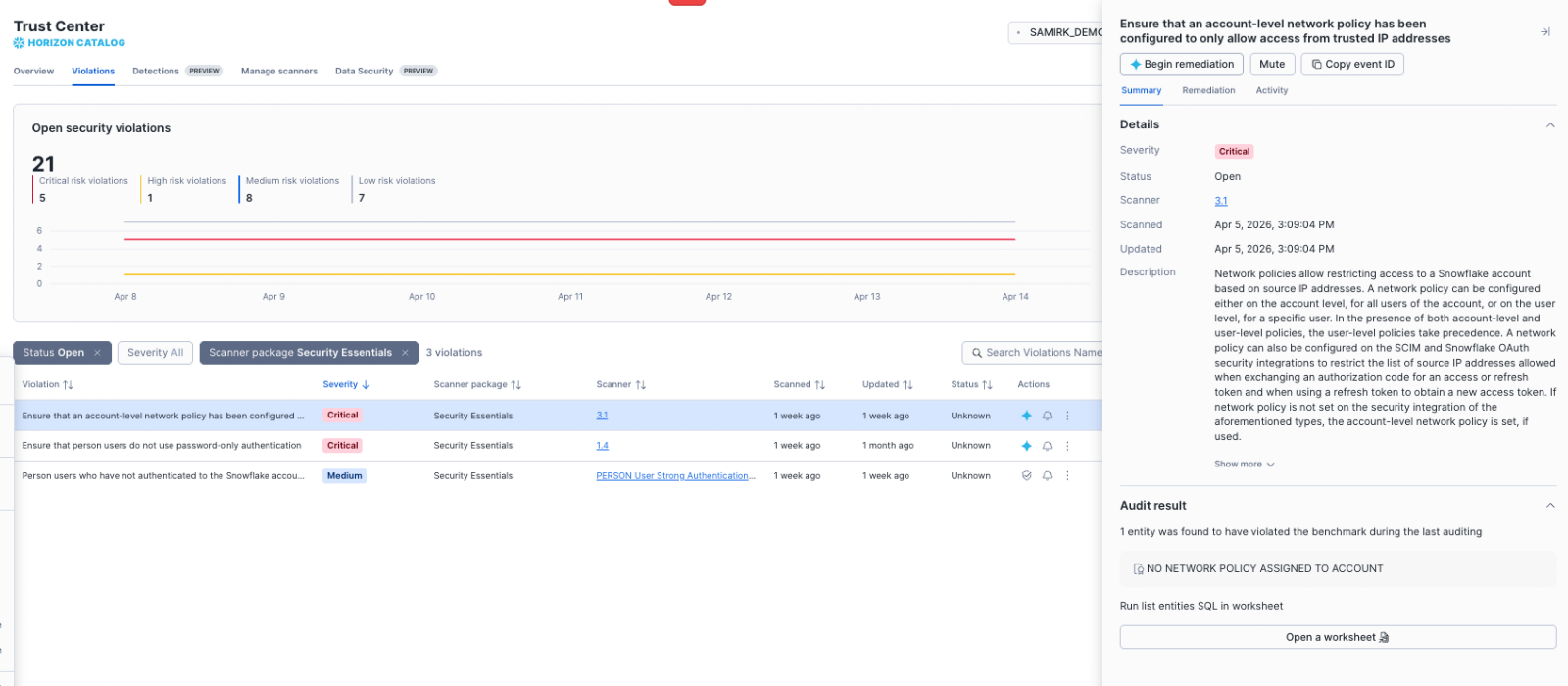
Background: Trust Center findings and violations
Trust Center is Snowflake's centralized hub for monitoring and remediating security, compliance, privacy and governance risks. It continuously evaluates your accounts against predefined recommendations specified in scanners. When a scanner identifies a configuration that deviates from best practices, it generates a finding. A finding that represents a mitigatable risk is called a violation.
Until now, remediating violations required teams to manually interpret in-product instructions, understand the organizational context and execute remediation actions — a process that created friction and delayed resolution, especially for time- or resource-constrained admins.
Cortex Code: A conversational agent for remediation
Cortex Code, the AI coding agent for your data stack, now acts as a security agent. It delivers AI-guided remediation for Trust Center violations directly within Cortex Code for Snowsight, SnowWork or Cortex Code CLI.
When you encounter a violation in the Trust Center, you can launch a conversational chat with Cortex Code. It customizes the guidance based on the specific entities and configurations involved in your account. This reduces guesswork and the risk of misconfiguration — which is particularly valuable for admins who have been hesitant to act without first consulting data stewards.
Interactive, iterative remediation
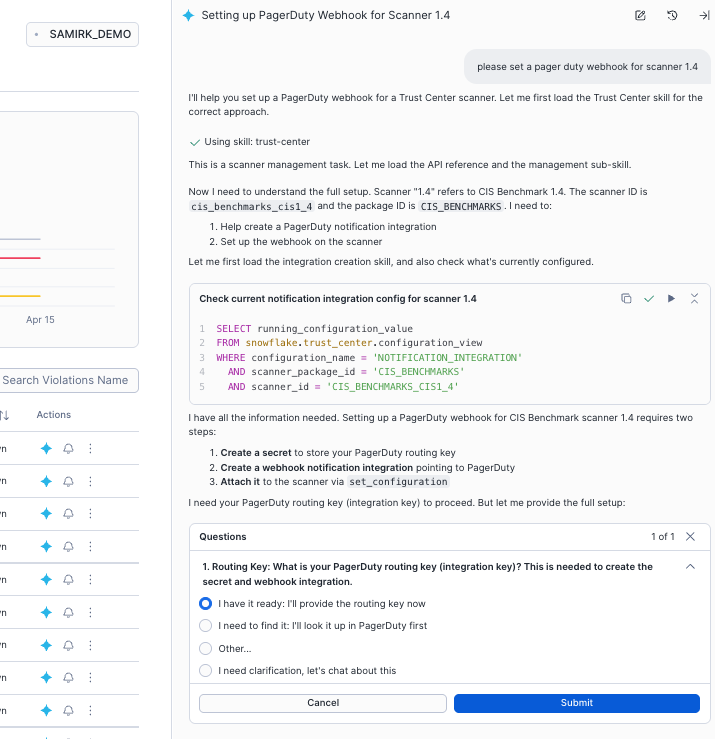
Cortex Code doesn't present just a single instruction. Through a conversational flow, you can:
- Ask follow-up questions about a violation's impact and dependencies
- Request alternative approaches if the initial suggestion doesn't fit your policies
- Generate SQL statements for the recommended actions
Figure 2: Conversational flow.
Confident review and execution
The current Trust Center experience lets you run generated SQL straight from the interface while keeping you firmly in the driver's seat, empowering you to review changes against your own internal security processes and standards. We are evolving the Trust Center toward agentic posture management — where your stack may eventually self-remediate.
Streamlined finding management
Beyond AI-guided remediation, we've enhanced the Snowsight experience with simplified lifecycle actions for tracking, collaborating and progress reporting.
- One-click mute: Silence notifications for findings already being addressed or triaged as not applicable. Muted findings do not generate notifications, even if the scanner re-runs and updates the at-risk entities.1
- Evidence and comments: Add context, external URLs or Jira tickets, or ownership details directly on a finding to build the audit trail required by compliance teams.
With these improvements, platform and security admins can:
- Remediate findings using Cortex Code or manual steps
- Change the finding state (for example, open → muted) to focus on what matters
- Add or edit comments for context and ownership tracking
Future releases will add support for changing severity and managing findings lifecycle across the organization via Org 2.0. The org account already aggregates and provides findings metadata across all your accounts.
Note: Currently, lifecycle management applies only to violation findings. Detection findings represent past events and are primarily investigatory; they may not have direct remediation steps. For now, you can still use Cortex Code to investigate detections and plan steps. A detection and lifecycle management experience is planned for a future release.
Bonus: Instant security posture reporting and configuration
Open Cortex Code chat and ask it to:
- Summarize the current Trust Center security posture
- Detail new violations reported in the last 30 days
- List all remediated violations over the past 90 days
- List the most common at-risk users or entities across all findings
- Help improve identity posture by addressing MFA findings
- Set up findings notification integrations
This turns a complex reporting task into a natural-language query, providing immediate visibility for executive reviews or compliance audits.
Getting started
Prerequisites
To leverage AI-guided remediation, ensure the following conditions are met for your role:
- Cortex Code availability: Cortex Code in Snowsight must be available for your account.
- Application role: Your role must have the
SNOWFLAKE.TRUST_CENTER_ADMINapplication role granted to it. - Database role: Your role must have the
SNOWFLAKE.CORTEX_USERdatabase role granted to it.
Step-by-step remediation
- Sign in: Sign in to Snowsight.
- Navigate to violations: In the navigation menu, select Governance & security » Trust Center
- Initiate remediation: Select a specific violation to open the findings detail panel, then choose "Begin Remediation," by clicking the blue Snowflake Cortex AI icon directly in the list of violations.
- Review and execute: Review the explanation and remediation steps provided by Cortex Code. Engage conversationally to clarify details, request alternative actions, or generate the final SQL statements. After careful review, run the necessary SQL directly from the chat.
- Verify resolution: After completing the remediation steps, wait for the next scheduled scanner run or run the scanner on demand to verify that the violation is remediated. Upon confirmation by the scanner, the Trust Center will automatically remove the violation from the Violations tab.
Important considerations
- Human review is mandatory. Always review generated SQL before running it to ensure correctness and alignment with your governance policies.
- Some actions are external. Certain violations require steps outside of Snowflake — for example, coordinating an organization-wide MFA policy change or investigating a suspicious IP login. Cortex Code will explain these steps but cannot run them for you.
Note: While this blog post focuses on the Snowsight experience, these capabilities are also available via Cortex Code CLI and SnowWork. All three interfaces natively understand Trust Center. They all include optimized skills that security practitioners can use to review the posture, dependencies and remediation steps using natural language.
Read more about:
- Powering the era of the agentic enterprise
- Project SnowWork, a new autonomous AI platform for business leaders and knowledge workers
- Cortex Code CLI for any data, anywhere
1 This mute behavior is specific to a class of finding (uniquely identified by package+scanner+severity+risk). But if the same scanner reports multiple findings, differentiated by “severity+risk,” those others won't be muted. Mute replaces the former "resolve" action.