Aug 17, 2026/7 min readProduct and Technology
Building an Internal Context Layer for AI Agents at Snowflake


Modern enterprises collect and manage millions of data sources and signals across their business. At Snowflake, we use Snowflake internally to monitor our business systems and product telemetry at scale — across every query, warehouse and click. But without a shared understanding, petabytes of raw data become a source of conflicting answers, not a foundation for action.
To leverage our data at scale for both humans and AI agents, we curate an internal semantic layer. This post covers how we built our context layer using semantics and the best practices we learned in the process.
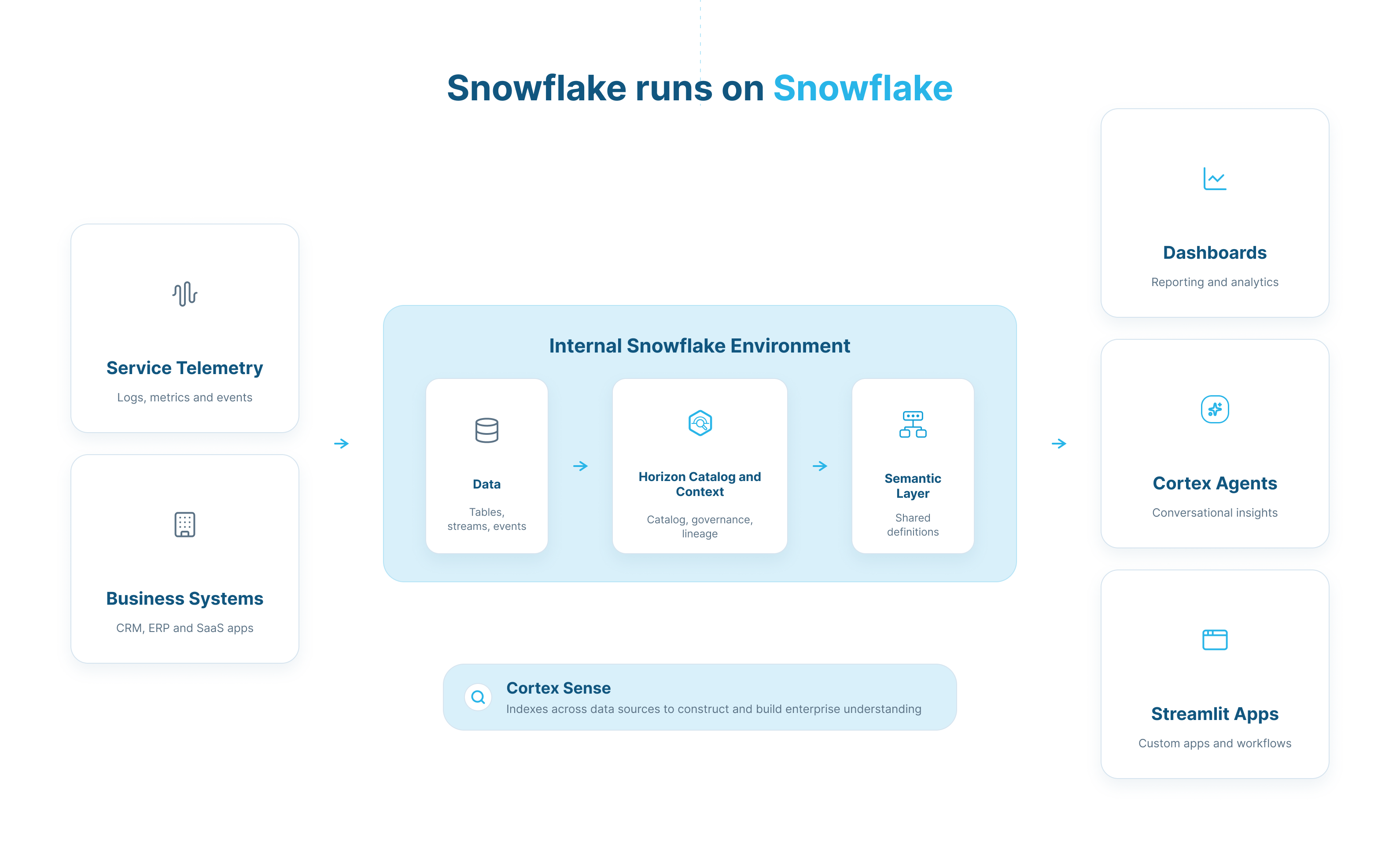
Figure 1: Snowflake’s internal environment uses a semantic layer to empower every entity to query consistent and accurate data.
The bottleneck was never the data — it was context
The immense amount of internal telemetry makes it incredibly powerful, but that same scale makes failure modes frustrating. Take a seemingly simple question such as “What is an active customer?” That question could yield different answers across different tables and varying metric definitions:
Active is WHERE days_since_last_login < 30 from the table login_counts
Active is WHERE credits_consumed > 0 and account_type != ‘TRIAL’ from the table customers
Active is COUNT(DISTINCT account_id) without a region identifier from the table customers_with_accounts
Typically, based on our internal use cases and what we have seen from our customers, the burden of clarifying data’s meaning falls on data science teams: Humans design queries and confirm these queries with a trusted data scientist, who calls out flaws and gotchas.
The alignment problem becomes exponentially worse with AI. New metrics and data sources are built at lightning speed, creating information gaps for even skilled analysts. If a Cortex Agent reports one number while a legacy dashboard shows another, no one knows which source to trust.
One definition for every AI and BI interface
Every interface needs consistent meaning, or context, for its data, which can be achieved by using a semantic layer. A semantic view is a top-level object that sits between the downstream consumers and raw data tables, translating governed business language into physical database schemas.
Instead of exposing raw tables to dashboards or AI agents directly, the semantic view standardizes the data flow from physical tables to facts, dimensions and metrics. This gives people and tools consistent context about what the data means before they query it.
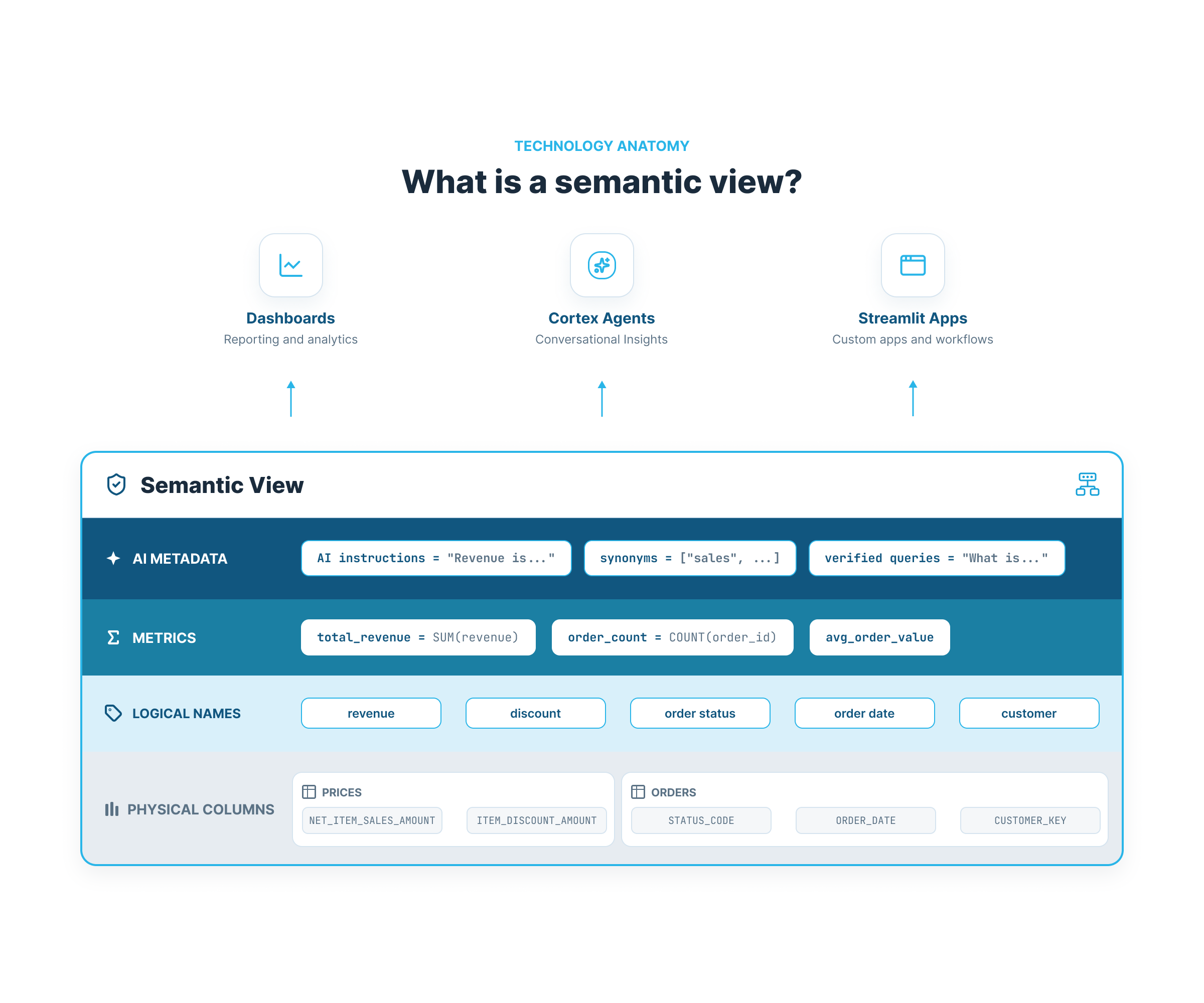
Figure 2: Semantic views consist of logical names, metrics and AI metadata on top of physical tables to power downstream consumption.
AI agents gain two benefits when using semantic views to query data at scale:
Faster execution: Agents querying raw data spend time finding, understanding and sampling multiple data sources. At scale, these processes can dominate runtime. Instead, agents can use semantic views to go directly to SQL execution.
Lower cost: Agents are significantly more token-efficient when using table relationships and join data in semantic views. With materialization, semantic SQL natively leverages preaggregated data, reducing repeated computation.
With a semantic-oriented data architecture, returns compound quickly across the stack:
Increased accuracy: Provide precise business context to models. In AtScale’s benchmark testing, adding semantic context increased text-to-SQL accuracy from 20% to more than 90% across 40 business questions on TPC-DS.
One source of truth: Replace isolated, tool-specific semantics with a single semantic layer.
Free governance: Leverage Snowflake’s access controls on semantic views and metric objects natively.
True self-service: Support ad hoc, natural-language questions for any user on their own.
"With semantic views we get a golden layer, a single trusted API for our data. With semantic view materializations, this one semantic API now works for every downstream consumer of our data, including use cases where query performance is critical. Now queries from dashboards, AI and ad hoc workflows can run through the same trusted data API."
Zachary Blackwood
Staff Data Scientist at Snowflake
Snowflake’s internal product data science team uses an agent that leverages the internal semantic layer to field product questions from across the company. In July 2025 alone, more than 400 distinct internal users ran over 5,400 queries through the product data science agent and the semantic layer. And in the same time frame, more than 5,600 internal employees across all Snowflake teams and agents ran over 320,000 queries using the broad semantic layer in sales, HR, support and other areas.
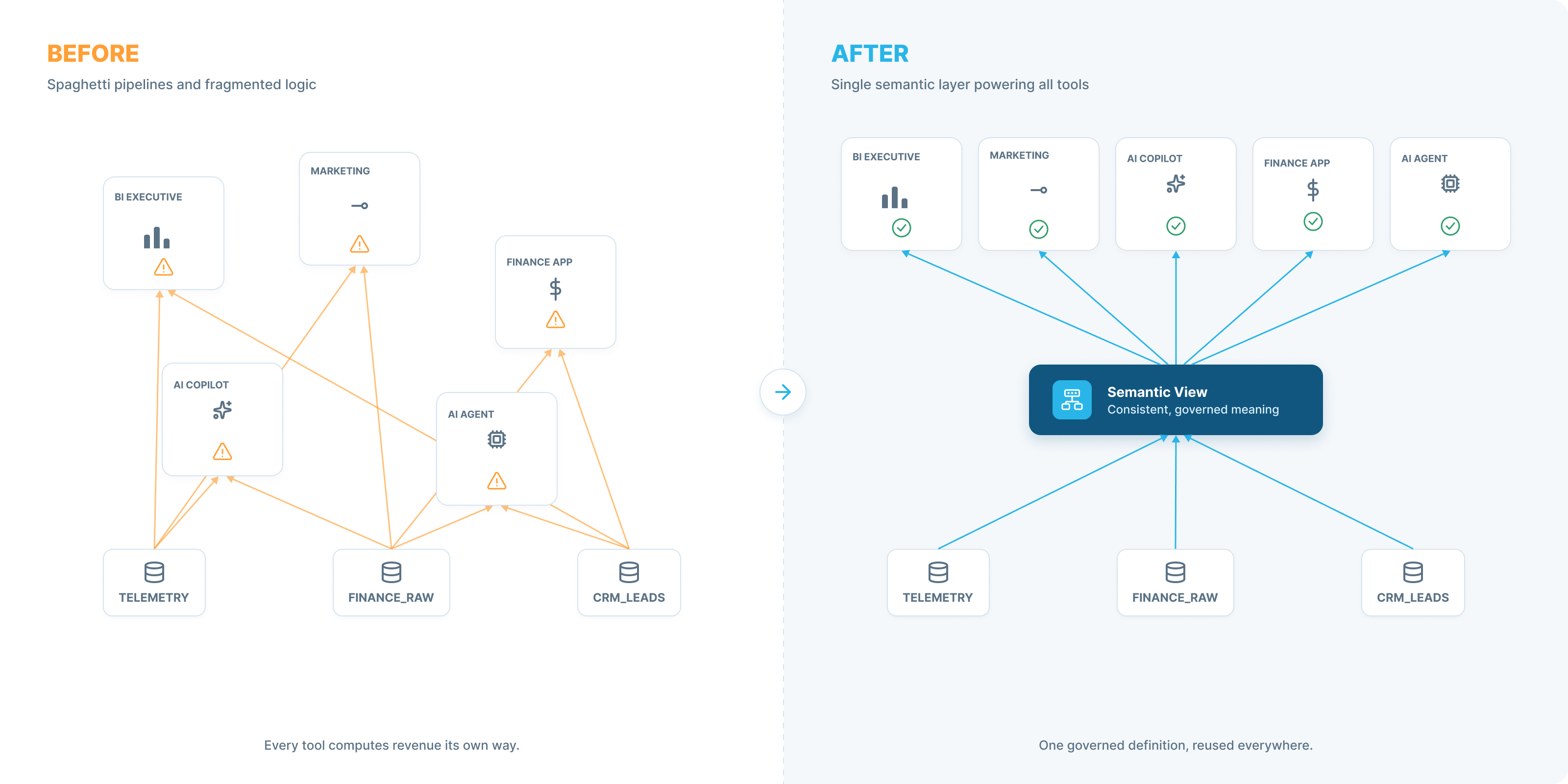
Figure 3: With a unified semantic layer, all tools and interfaces get one consistent, governed meaning of data.
Best practices for the semantic layer
Version, test and evaluate semantic views
The semantic layer needs to be treated with the same rigor as production software. With Snowflake’s native data build tool (dbt) integration, we’re able to fully version control, peer review and apply continuous integration and continuous delivery (CI/CD) to our metrics. Though at Snowflake we primarily build semantic views using code, we use the UI to test and suggest improvements that integrate with our code. And because the UI and underlying code are perfectly synced, users can move between constructing a view in the Snowflake UI and committing fields to repositories easily.
To evaluate semantic views, we needed access to the questions that people actually ask. A high-signal source for evals is popular dashboard tiles, which are constructed and used precisely to answer questions. We also log common questions to refine our eval sets.
Prioritize performance with data engineering
If your semantic layer sits on top of slow queries and poorly constructed tables, your AI agents will be slow. Early on, we tried pointing a semantic view at multiple raw, billion-count event tables. Every time a user asked a question, the view crawled and joined these tables, resulting in massive latency.
Initially, we built and maintained our own preaggregated slices with Dynamic Tables. Each dashboard had the rollup and grain that it needed. However, as we expanded our semantic coverage to support new questions and domains, we had to manually add new pipelines and tables and maintain a rapidly growing estate.
With semantic view materializations, we’re able to model semantic views directly on high-grain source tables and declare which dimension and metric combinations need to be fast. Snowflake intelligently maintains those slices for us in the background, helping reduce response times.
As a bonus, we used Snowflake CoCo to draft and refine our semantic and data processes, as its built-in semantic view skills are purpose built for these use cases.
Curate relentlessly and route intelligently
A cluttered and inconsistent semantic layer defeats the purpose of standardizing metrics. For the key product areas that are frequently queried, we curate semantic views (using CoCo) to answer specific questions we have in mind. Every query is logged within Snowflake, including the returned results. With this, we’re able to easily build new semantic views and verified queries to continually expand our scope to what our users are asking.
For intelligent routing, Cortex Agents automatically scan across all semantic views using our custom routing instructions to find the right context for a given query. And for broad coverage of the long tail of data, we lean on Cortex Sense, which evaluates data across our estate to help route questions to relevant data sets.
Build your semantic layer today
Raw data doesn't answer questions; context does. The semantic layer acts as this "golden layer" — defining business logic once to power every dashboard, Streamlit app and Cortex Agent across the agentic enterprise.
We can get started with a useful semantic view in just one file. Note that we are using YAML in this example, but the use of SQL to define semantic views is also fully supported.
name: account_activity_model
tables:
  - name: daily_account_usage
    base_table:
      database: core
      schema: metrics
      table: daily_account_usage

    dimensions:
      - name: region
        expr: region
        data_type: VARCHAR
        description: "The geographic region of the account."   # AI metadata
        synonyms: ["location", "geography", "area"]                          # AI metadata

    metrics:
      - name: compute_spend
        expr: SUM(credits_used)
        description: "The total number of Snowflake credits consumed."       # AI metadata
        synonyms: ["cost", "spend", "credits used", "usage"]                 # AI metadata

verified_queries:                                                            # AI metadata
  - name: total_spend
    question: "What is the total compute spend?"
    use_as_onboarding_question: true
    sql: |
      SELECT
        SUM(credits_used) AS compute_spend
      FROM core.metrics.daily_account_usage
      ORDER BY compute_spend DESC
Now we can query the semantic view directly using standard SQL, without ever having to worry about underlying joins or raw column names:
SELECT
    region,
    AGG(compute_spend) as compute_spend
FROM account_activity_model
GROUP BY region
ORDER BY compute_spend DESC;
For improved performance, we can also materialize this semantic view to preaggregate metrics (compute_spend) across dimensions (region):
ALTER SEMANTIC VIEW account_activity_model SET MAX_STALENESS = '1 hour';

ALTER SEMANTIC VIEW account_activity_model
ADD MATERIALIZATION spend_by_region
WAREHOUSE = semantic_wh
AS
  DIMENSIONS
    region
  METRICS
    compute_spend;
Snowflake semantic views are also interoperable with Apache Ossie™ (incubating). Ossie is the vendor-neutral, open standard for semantic and business context models. This allows you to use your semantics with the tool and platform of your choice. Even if your semantic models are stored elsewhere, you can always read them in Snowflake with a single function call:
SELECT SYSTEM$READ_OSSIE_YAML_FROM_SEMANTIC_VIEW('db.schema.account_activity');
Semantics are the shared foundation for the entire AI and analytics stack. Get started with building a single, governed source of truth using Snowflake today, and stay tuned for a follow-up post where we’ll cover real-world customer case studies leveraging semantics in production.
