

Stored procedures have long been a part of how teams build and manage data workflows in Snowflake. They allow developers to bring SQL statements, business logic and error handling together in the database, rather than coordinating each step in their application. For longer-running tasks such as data transformations and batch processing, they provide a practical way to organize and reuse that logic.
With hybrid tables, developers can also build applications that depend on frequent, low-latency reads and writes. However, these applications have different requirements. A read or write may touch only a handful of rows, but it needs to complete quickly while keeping related changes consistent.
To support these workloads, we're introducing Inline Stored Procedures, a new type of SQL stored procedure designed specifically for hybrid tables. Inline Stored Procedures execute a group of statements as one atomic unit in Snowflake's query processing layer, reducing the overhead of coordinating each statement separately.
In this article, we'll explore why that matters for transactional applications, walk through an example and compare its performance with a Standard Stored Procedure.
Why Inline Stored Procedures matter
Snowflake already supports stored procedures that combine multiple SQL statements in a single application call. While this removes the need for the application to send each statement separately, a Standard Stored Procedure still coordinates execution statement by statement within Snowflake.
For a transformation that processes a large volume of data, this coordination may account for a small portion of the overall runtime. For a hybrid table procedure made up of short point lookups or small writes, the same overhead can become a significant part of the overall execution time. Faster individual queries do not remove the time spent coordinating the complete operation.
A procedure call alone does not make its writes atomic. Developers need to define a boundary and handle failures so that related changes either commit together or roll back. Inline Stored Procedures address these concerns by bringing the statements into a single atomic block and dispatching that block as one unit.
Introducing atomic blocks
An atomic block is a group of statements treated as one all-or-nothing operation. Atomic compound statements are part of the ANSI/ISO SQL standard, defined in SQL/PSM (Persistent Stored Modules). In Snowflake, BEGIN ATOMIC ... END is currently supported only inside an Inline Stored Procedure.
Consider an application that stores customer orders in an orders table and tracks their history in an order_events table. Creating an order requires a write to both tables. An atomic block ensures that either both writes succeed or neither takes effect:
BEGIN ATOMIC
  INSERT INTO orders (
    order_id, customer_id, status, total_amount
  )
  VALUES (1001, 42, 'PLACED', 50.00);

  INSERT INTO order_events (
    order_id, event_type
  )
  VALUES (1001, 'CREATED');
END;
While these statements execute sequentially, their changes commit together when the invocation succeeds. If the second insert fails because an event already exists with that primary key, the unhandled error also rolls back the first insert. We do not leave behind an order without its event, and we do not need explicit COMMIT or ROLLBACK statements. Statements within the block share a consistent read snapshot and can read changes made by earlier statements in the same block.
Using an Inline Stored Procedure
To create an Inline Stored Procedure, add INLINE to the procedure declaration and use BEGIN ATOMIC for the procedure body:
CREATE INLINE PROCEDURE procedure_name(...)
RETURNS ...
LANGUAGE SQL
AS
$$
  BEGIN ATOMIC
    ...
  END;
$$;
To understand Inline Stored Procedures and what they are capable of, let's look at an application that manages account balances. When money moves in or out of an account, the application needs to record the transaction, update the account balance and return the new balance to the caller.
This involves three steps: inserting a ledger entry with the account and amount, updating the account's balance and reading back the new balance. The ledger entry and the balance update describe the same operation, so they need to be saved together. If any step fails, the preceding steps should be rolled back rather than leaving a ledger entry without its matching balance update.
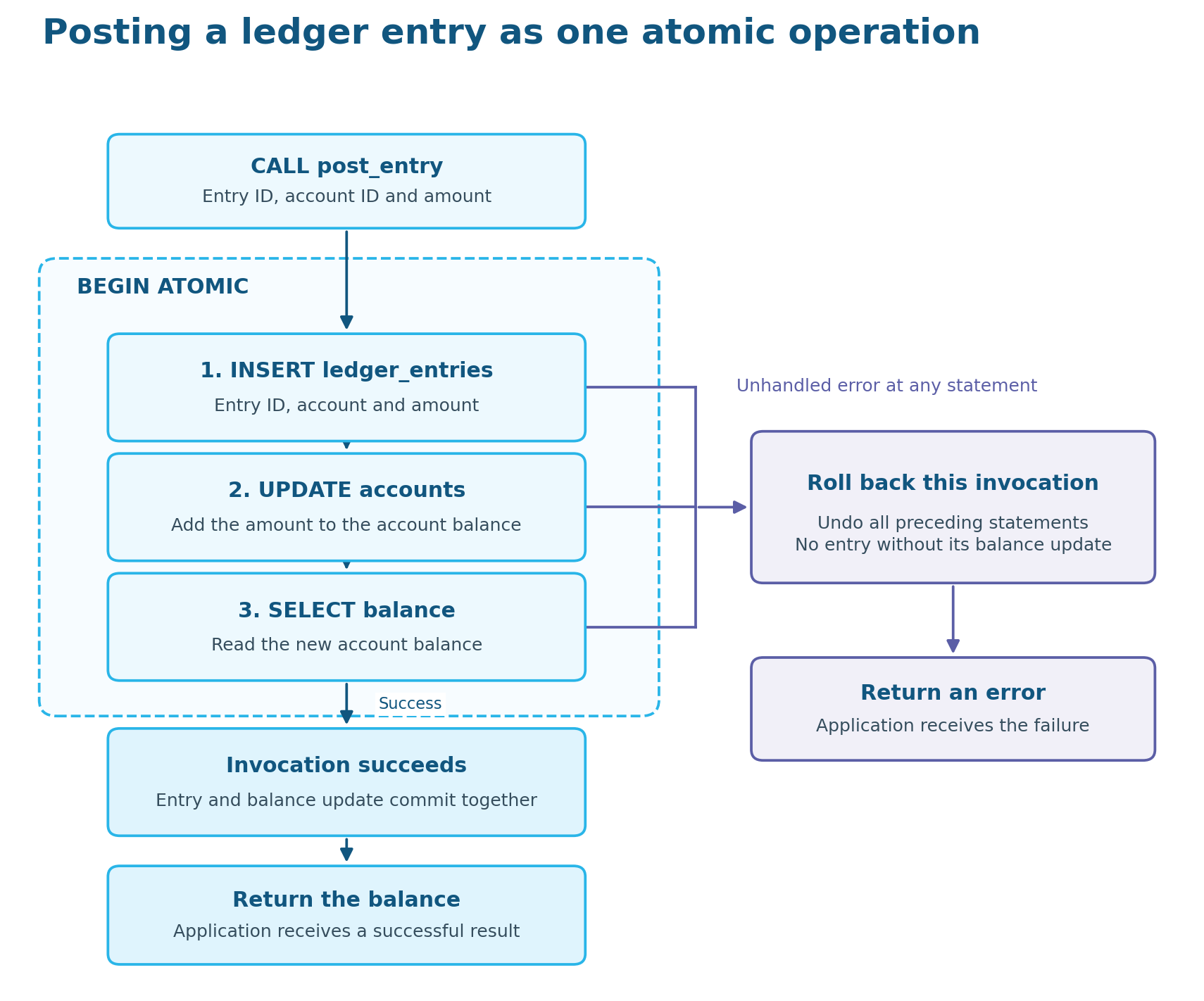
We can use an Inline Stored Procedure to perform this work in a single call from the application. For example, the procedure below accepts the entry ID, account ID and amount. It inserts the ledger entry, updates the account balance and returns the new balance. These statements belong to one atomic block, so an unhandled error rolls them all back rather than leaving the ledger and the balance out of sync.
CREATE OR REPLACE INLINE PROCEDURE post_entry(
    p_entry_id NUMBER,
    p_account_id NUMBER,
    p_amount NUMBER(18,2)
)
RETURNS NUMBER(18,2)
LANGUAGE SQL
AS
$$
DECLARE
    v_balance NUMBER(18,2);
BEGIN ATOMIC
    INSERT INTO ledger_entries (entry_id, account_id, amount)
    VALUES (:p_entry_id, :p_account_id, :p_amount);

    UPDATE accounts
    SET balance = balance + :p_amount
    WHERE account_id = :p_account_id;

    SELECT balance INTO :v_balance
    FROM accounts
    WHERE account_id = :p_account_id;

    RETURN :v_balance;
END;
$$;
Comparing the two procedures
To compare performance, we converted the Inline Stored Procedure above into a Standard Stored Procedure, keeping the same business logic and tables. We then benchmarked both versions on the same X-Small warehouse.
The benchmark ran for 10 minutes, with the first two minutes reserved for warmup. Both versions received matching inputs, and we verified that every call returned the correct total.
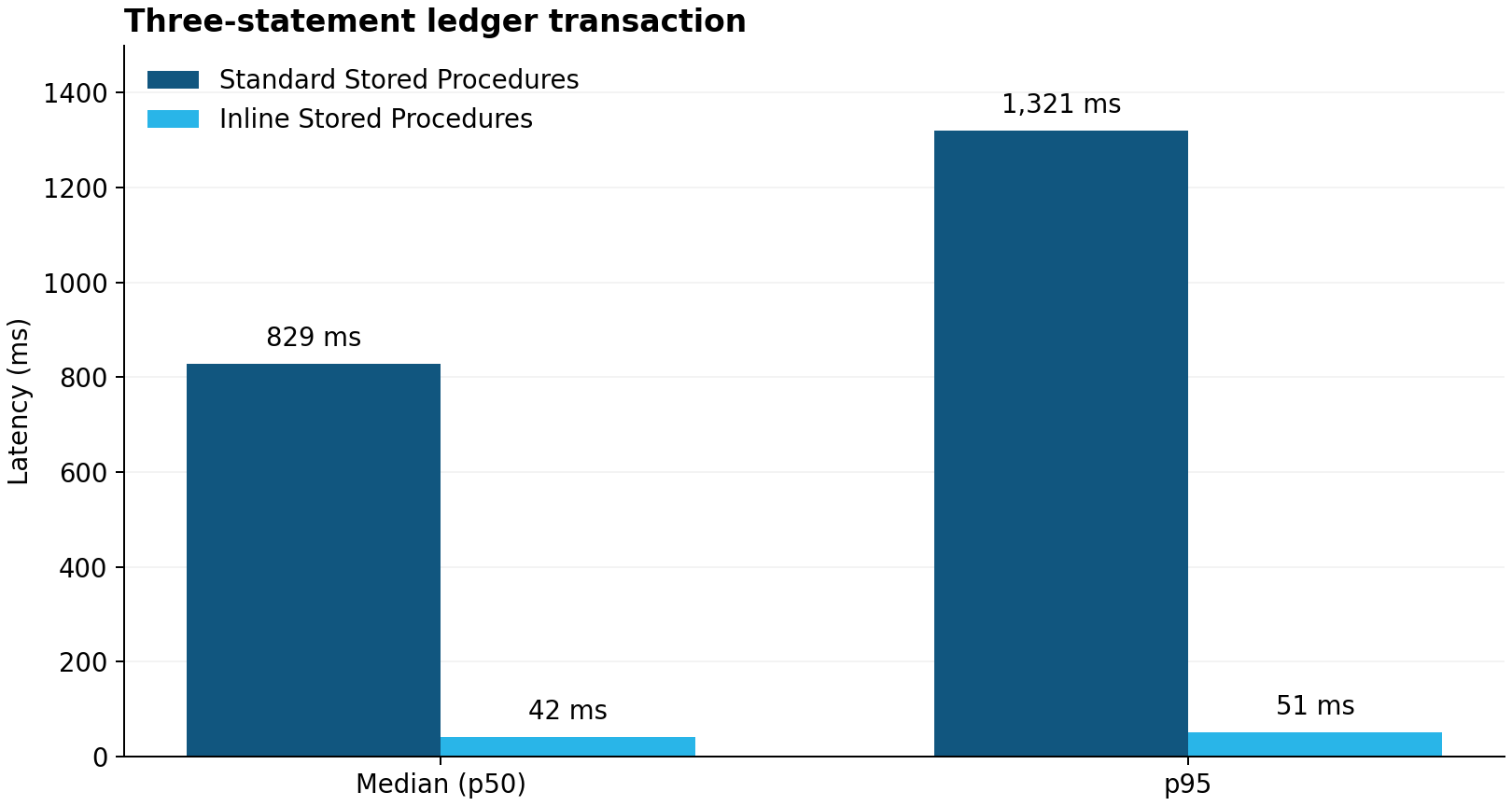
In this benchmark, Inline Stored Procedures reduced median latency by 93.7% compared with Standard Stored Procedures, from 829 ms to 42 ms. That means the same ledger transaction completes around 20 times faster. We also see similar gains at the 95th percentile, where latency fell from 1,321 ms to 51 ms, which is around 26 times faster.
Compared with explicit multistatement transactions
To see how Inline Stored Procedures compare with multistatement transactions, we use the same example as above converted to a multistatement explicit transaction.
BEGIN;

INSERT INTO ledger_entries (entry_id, account_id, amount)
VALUES (1001, 42, 25.00);

UPDATE accounts
SET balance = balance + 25.00
WHERE account_id = 42;

SELECT balance
FROM accounts
WHERE account_id = 42;

COMMIT;
Using the same Inline Stored Procedure that we defined earlier, we can see how this multistatement transaction compares.
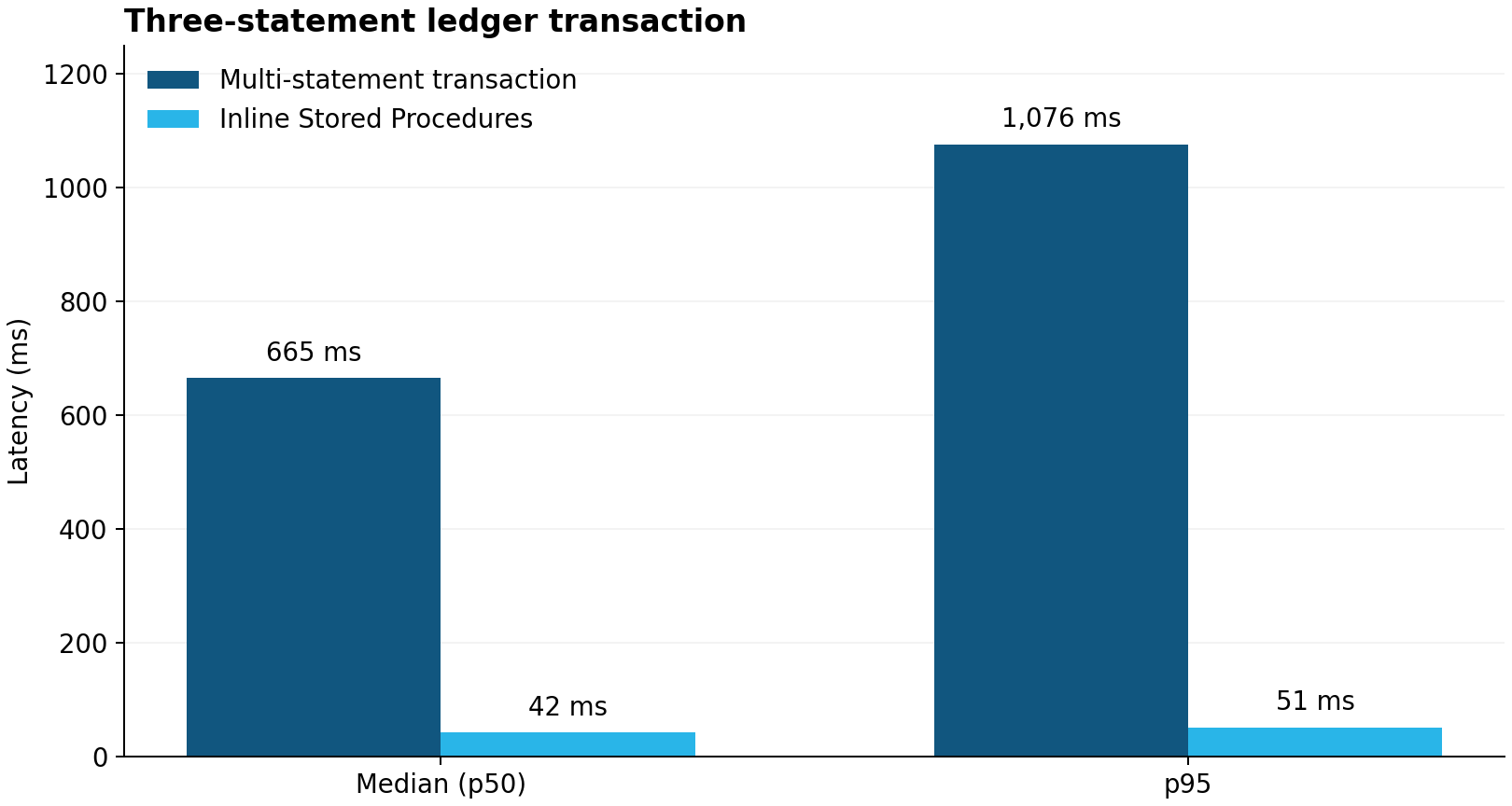
In this scenario, Inline Stored Procedures reduced median latency by 94.9% compared with multistatement transactions, from 665 ms to 42 ms. We also see even better gains at the 95th percentile, where latency fell from 1,076 ms to 51 ms.
Getting started
Inline Stored Procedures provide a way to run short, multistatement operations on hybrid tables with less execution overhead and a built-in atomic boundary. They are a good starting point when an application repeatedly combines a few lookups and related writes, while Standard Stored Procedures remain useful for broader workflows and longer-running data processing.
Before converting an existing procedure, review the supported constructs. Inline Stored Procedures access hybrid tables within one database, and they must be called with autocommit enabled and outside an existing transaction.
Inline Stored Procedures use the same Query History and Query Profile tools as Standard Stored Procedures. You can inspect the parent CALL and its child statements in Query History, and use query profiles to investigate execution details, including how the queries access hybrid tables and their indexes. Learn more.
To get started, choose a frequently executed transaction or stored procedure on hybrid tables and compare the two approaches using representative inputs. The Inline Stored Procedures documentation covers the syntax, supported operations and performance recommendations.