Nov 20, 2026/9 min readCore Platform
Announcing Error Logging and CHECK Constraints for File Ingestion: Validate Data as It Loads


Today, we’re announcing the general availability of error logging and CHECK constraints for file ingestion with Snowflake COPY INTO and Snowpipe, so the dashboards and AI agents that read your tables get only data that meets your rules. When error logging is on and a load uses ON_ERROR = CONTINUE, rows that fail a type conversion or a CHECK constraint go to an error table with the reason they failed, where you can correct and reload them without waiting on the source. To get started, visit the error logging documentation.
Analytics and AI applications often run on files from sources you don’t control. For example, a retail team loads order files from hundreds of suppliers into one supplier_orders table, in batches with COPY INTO and continuously with Snowpipe. One morning, a supplier starts writing quantities with a thousands separator, so 1200 arrives as "1,200", which doesn’t fit a NUMBER column. Another feed sends an order with a negative quantity. Partner exports and sensor files also tend to arrive with a few bad rows in an otherwise good file.
COPY INTO and Snowpipe can already load files like these. With ON_ERROR = CONTINUE, a load keeps the good rows and rejects the bad ones. The slow part has been finding which rows failed and why, then fixing and reloading them without duplicating the rest of the file. While the team spends its morning in the files, sales reports and AI agents miss the rejected orders, and forecast models still learn from rows that break rules like “quantity must be positive.”
After the retail team turns on error logging, row 418 of orders-0931.json lands in the error table with its cast error and original record. Once a CHECK constraint requires positive quantities, later negative-quantity orders go there too and stay out of the forecast. The team fixes the separator in SQL that morning, in time for the day’s sales report. Error logging covers CSV, JSON and Parquet loads into standard tables and Snowflake-managed Apache Iceberg™ tables.
With this launch, you can:
- Turn on error logging in one statement: Existing loads then log every rejected row with
ON_ERROR = CONTINUEor one error per skipped file withSKIP_FILE. - See why each row failed: Query the reason and, in most cases, the original record.
- Enforce CHECK constraints on load: Stop rows that break business rules before they reach a report.
- Load data into Snowflake-managed Iceberg tables: Use error logging and CHECK constraints on tables that Apache Spark™ and other engines read.
- Repair rows and reload them: Fix rejected rows from their original records without waiting for a corrected file.
- Get alerted when a source starts failing: An email tells you when a feed’s rows land in the error table, before someone spots the gap in a dashboard.
Turn on error logging
The retail team turns on error logging for supplier_orders with one ALTER TABLE statement and no new COPY INTO or pipe option. Each load needs an ON_ERROR value of CONTINUE or SKIP_FILE:
-- 1. As the table owner, turn on error logging
ALTER TABLE supplier_orders SET ERROR_LOGGING = TRUE;

-- 2. Load with CONTINUE to keep the good rows (use a path no pipe loads)
COPY INTO supplier_orders FROM @supplier_drops/
  FILE_FORMAT = (TYPE = JSON) MATCH_BY_COLUMN_NAME = CASE_INSENSITIVE
  ON_ERROR = CONTINUE;

-- 3. See what was rejected
SELECT * FROM ERROR_TABLE(supplier_orders);
The good rows and rejected row from orders-0931.json commit together (see Figure 1). COPY INTO reports the file as PARTIALLY_LOADED (Partially loaded in COPY_HISTORY) and doesn’t fail, so have scheduled jobs check the error table.
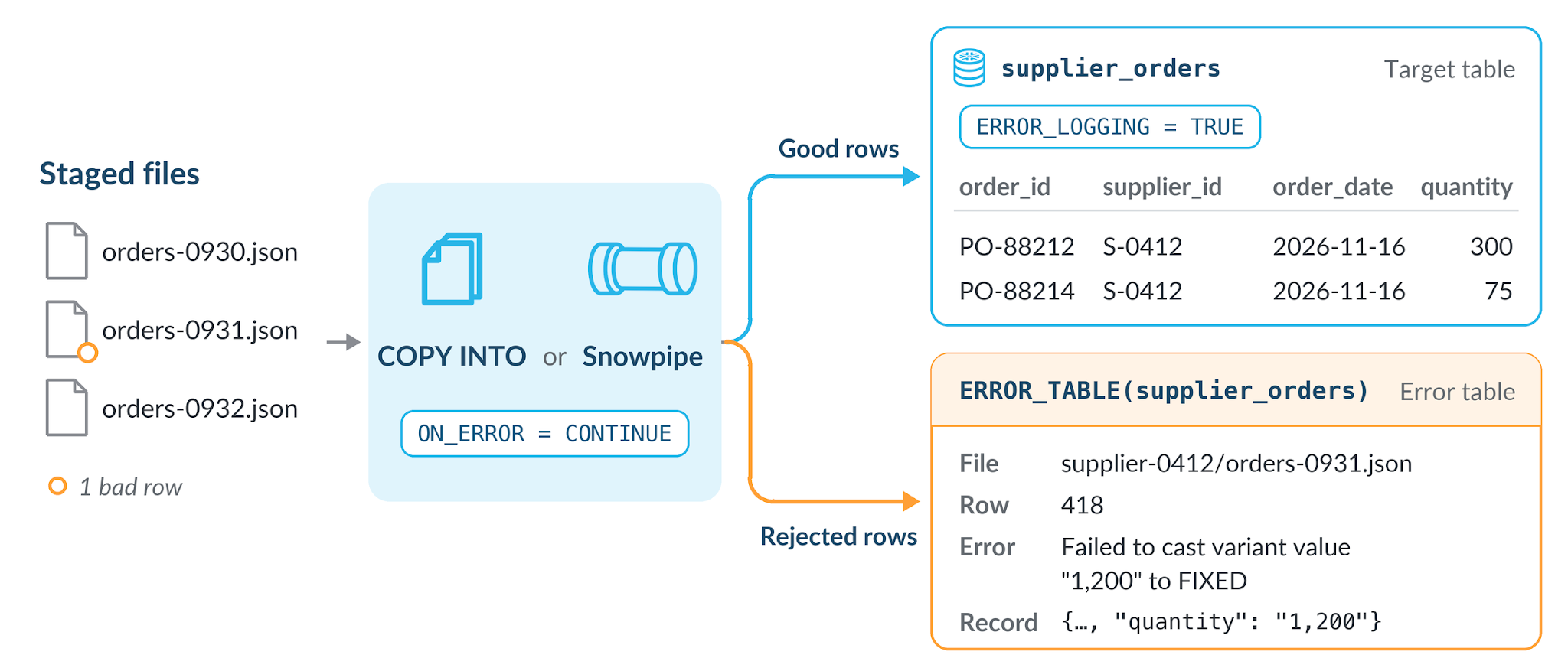
For a new table, set ERROR_LOGGING = TRUE in CREATE TABLE instead, and repeat it in any CREATE OR REPLACE TABLE script. Replacing the table or turning error logging off drops the error table, so copy out any rows you want to keep first.
Error logging also applies to the table’s INSERT, UPDATE and MERGE statements, which log supported errors and still write the other rows. If a job relies on those statements failing, set OPT_OUT_ERROR_LOGGING = TRUE for its sessions.
Decide what each load keeps and logs
Your ON_ERROR value controls whether one bad row holds back a whole file and what reaches the error table:
ON_ERROR |
What loads | What the error table gets |
|---|---|---|
CONTINUE |
Every good row | Every rejected row |
SKIP_FILE (Snowpipe’s default) |
Files with no errors | One error for each file skipped for a row-level error |
ABORT_STATEMENT (COPY INTO’s default) |
Nothing, because the load stops at the first error | Nothing |
SKIP_FILE_num and SKIP_FILE_num% |
Good rows from files under the error threshold | Nothing; COPY_HISTORY reports each file’s error count and first error |
A pipe’s ON_ERROR value is part of its definition, so to log every rejected row from a pipe on SKIP_FILE, recreate it with CONTINUE. First list the files it skipped, since recreating removes its load history. Then use the alert below to catch files it loads partially, which don’t trigger error notifications or FAILED events.
See why each row failed
When a number in a report looks wrong, query the error table to see which rows were rejected and why. The error_metadata column describes each error and, when available, where the row came from. The error_data column holds the original record. The error table also collects rejected rows from the table’s DML statements and Snowpipe Streaming with high-performance architecture, so filter on error_metadata:service to see only file loads:
SELECT error_metadata:details:pipe_name::STRING AS pipe_name,
       error_metadata:details:file_name::STRING AS file_name,
       error_metadata:details:row_number::NUMBER AS row_number,
       error_metadata:error_message::STRING AS error_message,
       error_data:"$1"::STRING AS source_record
FROM ERROR_TABLE(supplier_orders)
WHERE error_metadata:service IN ('copy', 'snowpipe');
Row 418’s error_metadata, abridged:
{
  "error_code": 100071,
  "error_message": "Failed to cast variant value \"1,200\" to FIXED",
  "error_source": "QUANTITY",
  "service": "copy",
  "details": { "file_name": "supplier-0412/orders-0931.json",
               "file_format_type": "JSON", "on_error": "CONTINUE",
               "row_number": 418 }
}
Under $1, error_data usually holds the record as the supplier wrote it: {"order_id": "PO-88213", "supplier_id": "S-0412", "order_date": "2026-11-16", "quantity": "1,200"}. CSV records are stored as raw text and Parquet records as JSON, truncated if too large.
Malformed records, such as a CSV row with the wrong number of fields, are logged the same way, while problems that prevent a file from being read stay in COPY_HISTORY.
Rejected rows keep the original record, including fields the load doesn’t insert and data the table’s policies mask or filter. Error messages can contain that data too. The table owner and roles with both SELECT and SELECT ERROR TABLE can query the error table. GRANT ALL includes SELECT ERROR TABLE, so before turning on error logging, revoke it from roles that shouldn’t see the source data.
If a masking, row access or projection policy is set directly on the table or its columns, readers, including the owner, also need READ UNREDACTED ERROR TABLE or their queries fail. Only ACCOUNTADMIN can grant this account-wide privilege. Masking policies assigned through tags don’t require it, so readers see the original values. Database replication also copies error tables and their source records to other accounts.
Enforce CHECK constraints on load
COPY INTO and Snowpipe now enforce CHECK constraints as data lands, catching values that fit a column’s type but break a business rule, such as a negative quantity. ON_ERROR handles a violating row like any other error. Pipes block adding, changing or dropping a CHECK constraint on the table they load, so the retail team drops its pipes, adds the constraint and recreates them with ON_ERROR = CONTINUE:
ALTER TABLE supplier_orders
  ADD CONSTRAINT quantity_positive CHECK (quantity > 0) ENABLE NOVALIDATE;
ENABLE NOVALIDATE, which an existing table requires, doesn’t check rows already in the table. CHECK constraints let NULL values through.
When a later file has an order with a quantity of -12, a load with CONTINUE keeps the file’s other rows and logs that order with a message naming the rule. CHECK violations might omit the file name or row number, but COPY_HISTORY still shows which files had errors. To see only these violations, filter on the constraint name:
-- Snowpipe rows have a NULL query_id; pipe_name identifies them
SELECT query_id,
       error_metadata:details:pipe_name::STRING AS pipe_name,
       error_metadata:error_message::STRING AS error_message,
       error_data
FROM ERROR_TABLE(supplier_orders)
WHERE error_metadata:service IN ('copy', 'snowpipe')
  AND error_metadata:error_message::STRING ILIKE '%QUANTITY_POSITIVE%';
Load data into Snowflake-managed Apache Iceberg tables
If your data science team wants the same orders in Spark, load them into a Snowflake-managed Iceberg table. Use CREATE ICEBERG TABLE or ALTER ICEBERG TABLE to turn on error logging and add CHECK constraints. Spark and other Iceberg-compatible engines read data that passed your checks. Externally managed Iceberg tables support neither feature. Loads with LOAD_MODE = ADD_FILES_COPY don’t log errors, and external engines can’t write to an Iceberg table with a CHECK constraint.
Repair rows and reload them
Because the error table keeps the original record, the team fixes the supplier’s orders itself. It pauses the table’s loads, reloads with CONTINUE any files that SKIP_FILE skipped, strips the separator and inserts the corrected rows:
INSERT INTO supplier_orders (order_id, supplier_id, order_date, quantity)
SELECT r:order_id::STRING, r:supplier_id::STRING, r:order_date::DATE, qty
FROM (SELECT TRY_PARSE_JSON(error_data:"$1"::STRING) AS r,
             TRY_TO_NUMBER(REPLACE(r:quantity::STRING, ',', '')) AS qty
      FROM ERROR_TABLE(supplier_orders)
      WHERE error_metadata:details:on_error = 'CONTINUE'
        AND r:quantity::STRING LIKE '%,%')
WHERE qty > 0;
TRY_TO_NUMBER returns NULL for values the fix can’t repair, so the INSERT doesn’t fail. The qty > 0 filter keeps those rows and negative quantities out. The on_error filter leaves out errors from skipped files, which the reload already covered. Paths like r:quantity are case-sensitive, so match your files’ key names.
Clear the error table after the repair, or rerunning the INSERT adds the rows again. Loading a corrected file as well would duplicate its good rows. A scheduled COPY INTO reloads Load failed files, so move files whose rows are already in the error table out of its path. TRUNCATE ERROR_TABLE(supplier_orders) removes every row. Before you run it, copy anything you still need into a regular table, which won’t inherit the error table’s access controls, and keep loads paused until it finishes. TRUNCATE needs ownership or the TRUNCATE privilege, which can also empty the supplier_orders table.
Get alerted when a source starts failing
The retail team uses a serverless alert on new data that watches a change-tracked view of the error table and sends an email when rows from COPY INTO or Snowpipe arrive:
CREATE VIEW supplier_orders_errors CHANGE_TRACKING = TRUE
  AS SELECT * FROM ERROR_TABLE(supplier_orders);

CREATE ALERT supplier_orders_rejects
  IF (EXISTS (
    SELECT 1 FROM supplier_orders_errors
    WHERE error_metadata:service IN ('copy', 'snowpipe')))
  THEN
    CALL SYSTEM$SEND_EMAIL(
      'data_team_email',
      'first.last@example.com',
      'New rejected rows in supplier_orders',
      'Query ERROR_TABLE(supplier_orders) to see which pipes and files are affected.');

ALTER ALERT supplier_orders_rejects RESUME;
Use your own email notification integration and verified email address. Create the view and alert as the table’s owner with EXECUTE MANAGED ALERT and the other alert privileges. If the table’s policies require READ UNREDACTED ERROR TABLE, the owner needs it too, or the alert fails without emailing. The view runs with its owner’s privileges, so share it only with roles allowed to see the source data.
Get started today
Check the prerequisites and required privileges in the error logging documentation, then:
- Pick a table behind a key report and, as its owner, turn on error logging.
- Add a CHECK constraint with
ENABLE NOVALIDATEfor a rule your data should meet. - Run your next load with
CONTINUE, queryERROR_TABLE()to see which rows it set aside, and fix them in SQL.
Rejected rows stay in the error table until you clear them. They’re billed at the standard storage rate, with no extra Snowpipe charges.
