Oct 29, 2026/7 min readCore Platform
Govern Your AI Spend With Snowflake Cortex AI Gateway


AI cost control has a feedback loop measured in billing cycles. Spend from a coding agent or an application calling a model API shows up as an invoice total, with no breakdown of who spent it, which model served it, or whether it was a production workload or an experiment. The only lever before the invoice is a per-tool cap in a vendor console, which gives you one limit per tool and no ceiling for any individual person.
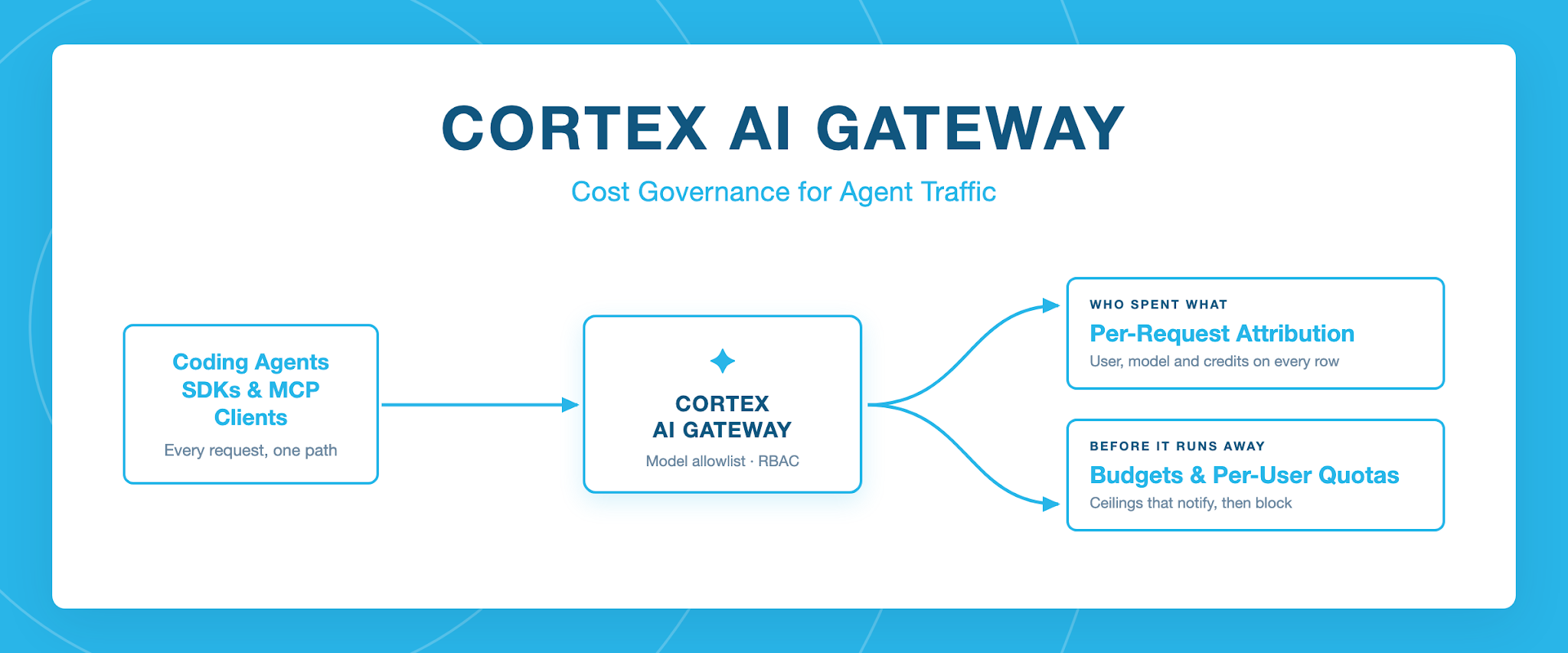
The underlying problem is that cost control needs something to attach to. A warehouse is a Snowflake object you can size, suspend and put a budget on; a coding agent on someone's laptop is not. Cortex AI Gateway, now in public preview, gives AI traffic the same kind of object: a governed entry point in your Snowflake account that every request passes through.
Because every request from a coding agent, SDK or MCP client takes the same path, there is a single place to decide which roles may spend, record what each request cost, enforce a limit once one is crossed and bound which models they can reach. Those four controls are the subject of this post, and they put agent spend under the same roles as the rest of your platform activity.
Available today with Cortex AI Gateway:
- AI_GATEWAY_USAGE_HISTORY view: Public preview, in both ACCOUNT_USAGE and ORGANIZATION_USAGE.
- Shared, custom resource budgets for the AI Gateway: Public preview.
- Per-user quotas for the AI Gateway: Public preview.
AI Gateway builds on Snowflake’s trusted RBAC
Most cost problems begin as access problems. When the only way to see what AI costs is to hold the same privileges as the people spending it, usually, either too many people have visibility or no one does.
The gateway separates the two. USAGE lets a role send inference requests through the gateway. MONITOR lets a role query gateway usage data, including the related Account Usage views. A finance or platform role granted MONITOR alone can review every credit the gateway consumed without being able to send a single request through it.
GRANT MONITOR ON AI GATEWAY SNOWFLAKE TO ROLE cost_admin;Cost visibility for every request
Before the gateway, spend from an external coding agent arrived as a number on a provider invoice with no user, no model breakdown and no way to tell an experiment apart from a production workload.
Traffic through the gateway lands in AI_GATEWAY_USAGE_HISTORY, available in both the ACCOUNT_USAGE and ORGANIZATION_USAGE schemas. Each row is a single request, carrying the authenticated user, the gateway that served it, the service type, the operation details and the credits consumed. CREDITS_GRANULAR breaks a request down by what the credits were spent on, so a request that touched more than one model reports each separately. The view holds 365 days of history.
Every row carries a REQUEST_ID that joins to the gateway's agent trace table, so a credit figure leads back to the request that produced it, including step timing and errors. Querying the trace table requires MONITOR on the gateway.
All of it depends on logging being enabled in the gateway specification. While logging.enabled is false, nothing is recorded. Requests are recorded by service type: inference as AI_INFERENCE, MCP tool calls as AI_MCP. Snowsight charts gateway credit usage across models, tools and users without any SQL.
Apply limits to gateway traffic
Visibility tells you where spend went. Limits decide what happens next, and the gateway supports two kinds that differ in what they scope and how fast they act.
Budgets: attribution and ceilings for a team
Budgets track the gateway as a resource. A shared resource budget attributes gateway credits to the team or cost center consuming them by tagging users, so an engineering team and a finance team sending traffic through the same gateway each track only their own. You can also add the gateway directly to a custom budget, the same way you'd add a warehouse or a task, so gateway credits count against a budget you already track. Budgets notify when spend approaches a threshold, and they can run stored procedures you write at specific threshold percentages, so they can actually act and enforce instead of only alerting.
Revoking USAGE on the gateway stops a role from sending requests. You can automate this as a response to a budget threshold. So a budget can hard-stop gateway traffic. What it can't do is act quickly or act per user: budget evaluation is periodic, up to 6.5 hours, or one hour with the low-latency option.
Per-user quotas: blocking a single user
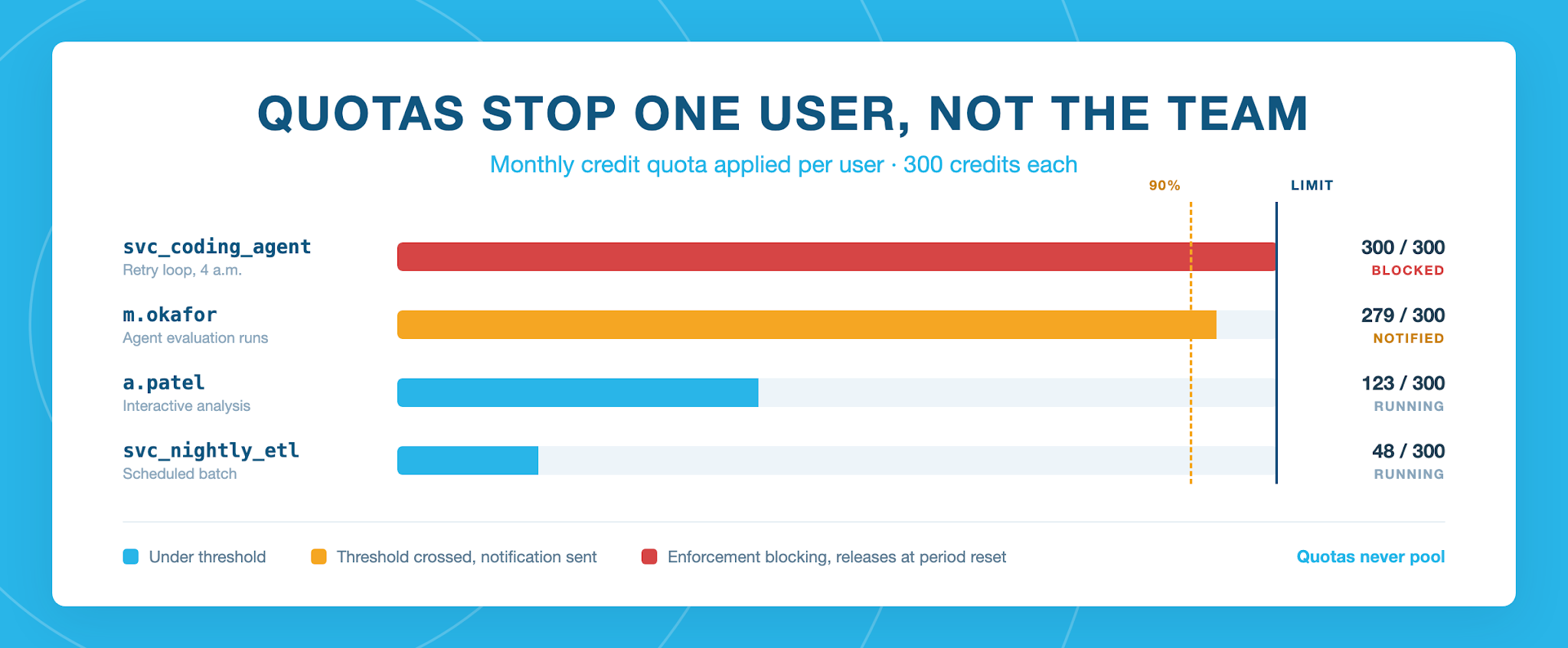
Per-user quotas are the control with built-in blocking. They set monthly, weekly, or daily credit limits that apply to each user individually, and when block enforcement is enabled, Snowflake denies further AI requests for a user who reaches their limit, within minutes rather than on a budget cycle. The block releases when the period resets. Block enforcement covers the AI domains, including the AI Gateway.
With a pooled limit, one runaway agent eats the headroom everyone behind it was relying on, and the people who did nothing wrong are the ones who notice first. Per-user limits keep the consequence with the person who caused it: their requests stop, everyone else keeps working. Limits never pool, so ten users on a 100-credit quota can spend up to 1,000 between them, and because the block lands shortly after a spend event rather than at request time, it's worth setting the number a little below where you actually want people to stop.
Choosing a threshold
Thresholds deserve a deliberate choice. They can evaluate on actual spend, which triggers once a user has consumed the configured percentage of their limit, or on projected spend, which is the default and extrapolates the user's current rate to the end of the UTC period. Projected thresholds fire much earlier: on a 300-credit quota with a 90% projected threshold, day one of a 30-day month triggers once the user has spent 9 credits.
The practical split is a budget when several teams share the gateway and each needs its own attribution and ceiling, a quota when one user's usage has to stop.
Bound what the gateway will serve
Budgets and quotas act on spend that has already happened. The cheaper control is narrowing what can be called at all.
Model prices can differ by an order of magnitude or more, so the most expensive model a gateway exposes sets its worst-case cost per request no matter what budgets you may enforce on it. The gateway's specification is where you set that ceiling. It names which models the gateway exposes, and the gateway won't serve one that isn't on the list, which makes that list the outer bound on what any client routed through the gateway can call.
A specification can name an explicit set of models, or use a name of '*' to expose every model the account has access to. The wildcard needs no maintenance as new models land, and it also leaves you without a ceiling. Naming models explicitly costs you an ALTER each time you want to add one, and in exchange your most expensive models aren't reachable by default.
One thing to know before editing it: ALTER AI GATEWAY ... FROM SPECIFICATION replaces the specification as a whole rather than patching the fields you name, so start from what DESCRIBE AI GATEWAY returns and submit all of it. A field left out falls back to its default.
What's next?
If you're the platform admin, turn the gateway on before your next billing cycle. AI spend only becomes attributable to a user and a model once traffic runs through it, so turning it on sooner gives you visibility and control faster.
Once you’ve turned it on:
- Route your coding agents, SDK calls and MCP clients through the gateway. USAGE is granted to PUBLIC, so there's nothing to provision.
- Grant MONITOR to whoever owns the cost conversation.
- Put a budget on the gateway and quotas on your users.
Then AI can scale across the enterprise without spending outrunning anyone's ability to explain or control it.
For how the gateway governs agentic and MCP traffic, see the blog post, Snowflake Launches Cortex AI Gateway And Advanced AI Security at Black Hat 2026
