Comprehensive Guide to Orchestration in Snowflake
Overview
Every pipeline needs something that decides what runs, when, and what happens when a step fails. In Snowflake that something can be a dynamic table that keeps itself fresh, a single task on a schedule, a task that wakes up when a stream has data, or a whole graph of tasks that runs as one unit.
Picking the wrong one is how you end up babysitting schedules at 2am. Picking the right one usually means writing less code.
This guide is the concepts tour. It explains each primitive, when to reach for it, and how the pieces fit together, with one short snippet per idea. The centre of the guide is the task graph object: a database object that owns a pipeline's schedule, retry policy and member defaults, and lets you edit a running pipeline and release the change with a single commit.
If you'd rather build one end to end first, the Getting Started with Task Graphs guide walks through a working graph, and this guide is where it sends you for the theory. To build a graph visually instead, see Getting Started with Pipeline Builder.
What You'll Learn
- How to choose between dynamic tables, tasks, triggered tasks and task graphs
- Task fundamentals: serverless vs warehouse compute, schedules, conditions, retries, timeouts and session parameters
- The task graph object: what it owns, its three kinds of settings, how membership works, and overlap policy
- Versioning: staged edits, COMMIT and REVERT, and how in-flight runs behave
- Control flow: advanced branching, finalizers, configuration, return values and runtime information
- Operations: notifications, alert templates, monitoring, security and cost
- Authoring surfaces: SQL, DCM projects and Pipeline Builder, plus how to migrate an existing root-task graph
- How to orchestrate dynamic tables and stored procedures from a task graph
What You'll Build
This is a concepts guide, so there's no single build. The snippets work on one small pipeline: DEMO_ORDERS_PIPELINE, an hourly task graph with an extract root, a transform child and a finalizer. Along the way you'll schedule it, version it, branch it on conditions and configuration, and wire it to notifications.
What You'll Need
- A Snowflake account and a role that can create a database, a warehouse and tasks
- The account-level EXECUTE TASK privilege, plus EXECUTE MANAGED TASK if you want serverless tasks
- For the alert template snippet, the alert privileges listed in that section
- Familiarity with basic SQL
The snippets are illustrative, not a script to run top to bottom. They assume a scratch schema and a warehouse like the ones below; every object uses a DEMO_ prefix so it's easy to find and drop.
CREATE DATABASE IF NOT EXISTS DEMO_ORCHESTRATION COMMENT = 'Orchestration guide scratch database';

CREATE SCHEMA IF NOT EXISTS DEMO_ORCHESTRATION.DEMO COMMENT = 'Orchestration guide scratch schema';

CREATE WAREHOUSE IF NOT EXISTS DEMO_WH WAREHOUSE_SIZE = 'XSMALL' AUTO_SUSPEND = 60 COMMENT = 'Orchestration guide warehouse';
Later snippets refer to a few small tables (DEMO_RAW_ORDERS, DEMO_ORDERS_CLEAN, DEMO_RUN_LOG), a stream on the raw table, a dynamic table and a stored procedure. Create your own versions if you want to try a snippet.
The whole guide works with three tasks: DEMO_T_EXTRACT, DEMO_T_TRANSFORM and DEMO_T_FINALIZE. When a snippet shows a new idea, it redefines one of them rather than adding another task.
Choose the Right Primitive
Start with the shape of the work, not the tool. Snowflake gives you three ways to decide when something runs:
| Primitive | Reach for it when | Who decides when it runs | Watch out for |
|---|---|---|---|
| Dynamic tables | The logic is a SELECT and what you care about is freshness | Snowflake, from a target lag you declare, in dependency order | Target lag can't go below 60 seconds, and the definition can't call stored procedures or external functions |
| Standalone or triggered task | One step on a schedule, or one step that should run as soon as a stream has data | The task's schedule or its stream condition | Only one instance runs at a time; chains of steps belong in a graph |
| Task graph | Several imperative steps in order, with parallel branches, error handling and a cleanup step | The graph's schedule or condition, or an on-demand run | Every member must share an owner and a schema |
Dynamic tables first. If a step can be written as a query, a dynamic table usually needs less code: Snowflake refreshes a pipeline of them in dependency order, an incremental refresh computes only the rows that changed, and Snowflake can skip refreshing downstream tables whose upstream data hasn't changed. The Comprehensive Guide to Dynamic Tables covers them in depth.
Tasks for procedures, dbt Projects and Code Bundles. When a step is a stored procedure, a dbt Project or a Code Bundle, it doesn't fit a SELECT. Run it from a task.
Task graphs when there's more than one step. A graph runs steps in dependency order, runs siblings in parallel, and gives the whole pipeline one schedule, one retry policy and one place to change settings.
You can mix them. A common shape is dynamic tables for the transformations and a task graph around them for loads, exports and notifications, which is the final concept section of this guide.
Task Fundamentals
A task runs one SQL statement, a Snowflake Scripting block, or a call to a stored procedure. Everything a task graph does is built from these settings, so they're worth knowing well.
Compute: serverless or warehouse
A task runs either on serverless compute, where Snowflake predicts the resources from recent runs and sizes them for you, or on a user-managed warehouse you name with WAREHOUSE. Leave out the warehouse and the task is serverless.
Serverless tasks bill for the compute they actually use and suit stable workloads where keeping to the schedule matters. If a run overruns its interval, Snowflake sizes up. The largest size is the equivalent of an XXLARGE warehouse. Warehouse tasks suit warehouses that are already busy with concurrent work or loads that are hard to predict, and they bill like any warehouse, with a 60-second minimum each time it resumes.
On a serverless task, TARGET_COMPLETION_INTERVAL sets how soon a run should finish. Snowflake scales resources to meet it, and ignores it once the task is already at its largest size. You can also bound the size with SERVERLESS_TASK_MIN_STATEMENT_SIZE and SERVERLESS_TASK_MAX_STATEMENT_SIZE.
The snippets in this section are three versions of one standalone task, DEMO_T_EXTRACT, which later becomes the root of a graph.
CREATE OR REPLACE TASK DEMO_T_EXTRACT
  SCHEDULE = 'USING CRON 15 2 * * * UTC'
  TARGET_COMPLETION_INTERVAL = '60 MINUTE'
  SERVERLESS_TASK_MAX_STATEMENT_SIZE = 'LARGE'
  COMMENT = 'Demo: serverless nightly load'
AS
  INSERT INTO DEMO_ORDERS_CLEAN
  SELECT * FROM DEMO_RAW_ORDERS WHERE AMOUNT > 0;
Schedules
A schedule is either an interval such as '60 MINUTE' or '10 SECONDS', or a CRON expression with a time zone for calendar-based runs. Use an interval when you mean "every N minutes", and CRON when you mean a time of day or a day of the week.
Snowflake runs only one instance of a scheduled task at a time. If a run is still going when the next one is due, that scheduled time is skipped.
A new task is created suspended. RESUME starts its schedule, and EXECUTE TASK runs it once on demand, which is handy for testing.
Conditions and triggered tasks
A WHEN clause is a Boolean condition checked before each run. If it's false, the run is skipped.
When the condition is SYSTEM$STREAM_HAS_DATA and there's no schedule, you have a triggered task: it runs when the stream has new data and doesn't use compute until then. Triggered tasks work on streams over tables, views, dynamic tables, Iceberg tables, data shares and directory tables, but not on hybrid tables or streams on external tables.
A few behaviours to know:
- A serverless triggered task needs TARGET_COMPLETION_INTERVAL. A warehouse triggered task names its warehouse instead.
- Triggered tasks run at most every 30 seconds by default. You can lower that to 10 seconds with the USER_TASK_MINIMUM_TRIGGER_INTERVAL_IN_SECONDS parameter.
- If a triggered task hasn't run for 12 hours, Snowflake schedules a health check to stop the stream going stale.
- You can combine a schedule with a stream condition to check for data on a fixed cadence instead.
CREATE OR REPLACE TASK DEMO_T_EXTRACT
  TARGET_COMPLETION_INTERVAL = '15 MINUTES'
  COMMENT = 'Demo: serverless triggered task'
  WHEN SYSTEM$STREAM_HAS_DATA('DEMO_ORDERS_STREAM')
AS
  INSERT INTO DEMO_ORDERS_CLEAN
  SELECT ORDER_ID, AMOUNT, REGION, LOADED_AT FROM DEMO_ORDERS_STREAM;
How streams, CHANGES and row timestamps capture what changed is its own topic, covered in Incremental Processing with Streams, CHANGES and Row Timestamps.
Failures, retries and timeouts
Three settings decide what happens when things go wrong:
- TASK_AUTO_RETRY_ATTEMPTS retries a failed run automatically. It's off by default.
- SUSPEND_TASK_AFTER_NUM_FAILURES suspends the task after that many consecutive failed or timed-out runs, so a broken task stops spending credits. Both parameters can also be set at the account, database or schema level.
- USER_TASK_TIMEOUT_MS caps how long a run can take. If STATEMENT_TIMEOUT_IN_SECONDS is also set, the lower non-zero value of the two wins, after converting seconds to milliseconds.
A task also accepts any session parameter, such as TIMEZONE or TIMESTAMP_INPUT_FORMAT, set directly on the task. Account and user parameters aren't supported.
CREATE OR REPLACE TASK DEMO_T_EXTRACT
  WAREHOUSE = DEMO_WH
  SCHEDULE = '60 MINUTE'
  USER_TASK_TIMEOUT_MS = 600000
  STATEMENT_TIMEOUT_IN_SECONDS = 300
  TASK_AUTO_RETRY_ATTEMPTS = 2
  SUSPEND_TASK_AFTER_NUM_FAILURES = 3
  TIMEZONE = 'UTC'
  COMMENT = 'Demo: hourly rollup on a warehouse'
AS
  INSERT INTO DEMO_ORDERS_CLEAN
  SELECT * FROM DEMO_RAW_ORDERS
  WHERE LOADED_AT >= DATEADD('HOUR', -1, CURRENT_TIMESTAMP());
On a standalone task these settings live on the task. In a task graph, the retry and suspend parameters move to the graph, as the next section shows.
The Task Graph Object
A task graph is a directed acyclic graph of tasks that runs as one orchestrated unit. Steps run after their predecessors finish, and siblings run in parallel.
For a long time a graph had no object of its own. Its schedule, overlap policy and retry behaviour lived on the root task, which was both the first step of the pipeline and the settings panel for the whole thing. Changing anything meant suspending that root first.
The task graph object gives the pipeline its own identity. A graph object owns:
- Graph-level settings: the schedule, the root, the finalizer, the overlap policy, notification integrations and configuration.
- Member defaults (TASK_DEFAULTS): settings such as the warehouse or log level that apply to every member unless the member overrides them.
- Membership: every task reachable from the root through AFTER relationships.
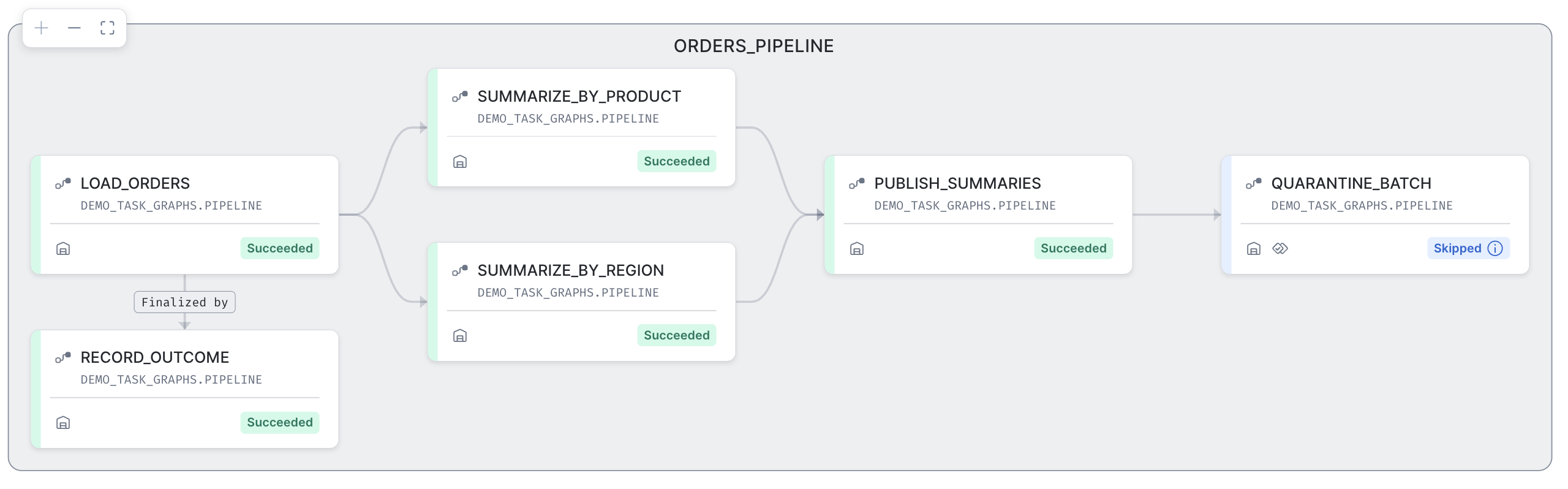
Three kinds of settings
| Kind | What it is | Settings |
|---|---|---|
| Graph properties | Describe the pipeline as a whole and are set on the graph | SCHEDULE, ROOTS, FINALIZER, OVERLAP_POLICY, ERROR_INTEGRATION, SUCCESS_INTEGRATION, CONFIG, and WHEN (the root may also carry its own) |
| Graph parameters | Graph-wide behaviour that follows the account, database and schema inheritance chain | TASK_AUTO_RETRY_ATTEMPTS, SUSPEND_TASK_AFTER_NUM_FAILURES |
| Task defaults | Values that cascade to every member unless the member sets its own | WAREHOUSE, serverless sizing, TARGET_COMPLETION_INTERVAL, EXECUTE AS USER, USER_TASK_TIMEOUT_MS, LOG_LEVEL, TRACE_LEVEL, COMMENT |
The graph-level settings really are graph-only. Setting the schedule, overlap policy, either integration, the configuration, or the retry and suspend parameters on a member task returns an error, and that includes the root task once it belongs to a graph. Even the finalizer is declared on the graph with FINALIZER rather than on the finalizer task.
A WHEN condition on the graph decides whether a run starts at all. If the root task has its own condition, both must be true. The graph's condition isn't checked again for the other members, and members can still carry their own WHEN clauses, which is how branching works.
Overlap
OVERLAP_POLICY on the graph decides whether a new run can start while the previous one is still going:
- NO_OVERLAP (the default): the next run waits until the whole previous run has finished.
- ALLOW_CHILD_OVERLAP: a new run can start while child tasks of the previous run are still running, but the root never overlaps itself.
- ALLOW_ALL_OVERLAP: whole runs, root included, can run concurrently.
Allow overlap only when overlapping runs can't produce duplicate or incorrect data. Otherwise, widen the schedule, move heavy steps to serverless, or size the warehouse up so a run finishes before the next one is due.
One root, membership through AFTER
A task graph has exactly one root, named in ROOTS. Member tasks are ordinary tasks, created with CREATE TASK and connected with AFTER. The graph object sits over a set of tasks that are already linked. Add a task with an AFTER that reaches the root and it joins the graph; remove its last link and it leaves.
The task graph documentation sets the limits at 1,000 tasks per graph, and up to 100 parents and 100 children for a single task.
These first CREATE OR REPLACE statements are fine because the graph doesn't exist yet. The members carry no compute settings of their own here. The warehouse, timeout and log level come from the graph's TASK_DEFAULTS:
CREATE OR REPLACE TASK DEMO_T_EXTRACT
  COMMENT = 'Demo root task'
AS
  INSERT INTO DEMO_ORDERS_CLEAN SELECT * FROM DEMO_RAW_ORDERS WHERE AMOUNT > 0;

CREATE OR REPLACE TASK DEMO_T_TRANSFORM
  COMMENT = 'Demo transform step'
  AFTER DEMO_T_EXTRACT
AS
  ALTER DYNAMIC TABLE DEMO_ORDERS_DAILY REFRESH;

CREATE OR REPLACE TASK DEMO_T_FINALIZE
  COMMENT = 'Demo finalizer'
AS
  INSERT INTO DEMO_RUN_LOG
  SELECT SYSTEM$TASK_RUNTIME_INFO('CURRENT_TASK_GRAPH_NAME'), 'FINISHED', NULL, CURRENT_TIMESTAMP();
Then the graph object holds everything that describes the pipeline:
CREATE OR ALTER TASK GRAPH DEMO_ORDERS_PIPELINE
  SCHEDULE = 'USING CRON 0 * * * * UTC'
  ROOTS = ( DEMO_T_EXTRACT )
  FINALIZER = DEMO_T_FINALIZE
  OVERLAP_POLICY = NO_OVERLAP
  CONFIG = '{"region": "EMEA"}'
  TASK_AUTO_RETRY_ATTEMPTS = 1
  SUSPEND_TASK_AFTER_NUM_FAILURES = 5
  COMMENT = 'Demo: hourly orders pipeline'
  TASK_DEFAULTS (
    WAREHOUSE = DEMO_WH,
    USER_TASK_TIMEOUT_MS = 900000,
    LOG_LEVEL = 'INFO'
  );
Watch the clause order. On a task, COMMENT goes before AFTER; the other way round is a syntax error. On a graph, TASK_DEFAULTS goes before WHEN.
CREATE OR ALTER TASK GRAPH is declarative: anything the statement leaves out is unset or reset on an existing graph, so omitting FINALIZER removes the finalizer. A later ALTER TASK GRAPH ... SET TASK_DEFAULTS merges into the existing defaults instead of replacing them, and you remove a single default by naming it in UNSET TASK_DEFAULTS.
Versioning: Edit, Commit, Revert
This is the feature that changes how you run pipelines day to day. You no longer suspend a graph to change it.
A running graph executes against a committed version: a frozen snapshot of the graph's shape and settings, captured when you commit. Once a graph has a committed version, every edit to the graph or its members is staged. In-flight and scheduled runs carry on with the committed version until you release the staged changes.
The lifecycle is five statements:
| Command | Effect |
|---|---|
| COMMIT | Freezes staged changes into a new committed version. Doesn't start the schedule. |
| RESUME | Starts the schedule on the most recent committed version. Needs a schedule or a WHEN condition. |
| SUSPEND | Stops scheduling new runs. |
| REVERT | Discards staged changes and restores the graph and its members to the committed version. |
| EXECUTE TASK GRAPH | Runs the committed version once, now, whatever the schedule. |
A newly created graph doesn't run. RESUME needs a committed version, so a first deployment is COMMIT followed by RESUME. A graph with neither a schedule nor a WHEN condition can't be resumed, but you can still commit it and run it on demand. If you run EXECUTE TASK GRAPH on a graph that has never been committed, Snowflake commits it once and runs that first version.
Staged edits aren't in the next manual run. EXECUTE TASK GRAPH always runs the committed version, so commit first if you want your edits included.
Here's the loop for changing a running graph: stage an edit, look at what a commit would release, then either commit it or throw it away.
ALTER TASK GRAPH DEMO_ORDERS_PIPELINE SET TASK_DEFAULTS ( LOG_LEVEL = 'DEBUG' );

SELECT * FROM TABLE(INFORMATION_SCHEMA.TASK_GRAPH_CHANGES(TASK_GRAPH_NAME => 'DEMO_ORDERS_PIPELINE'));

ALTER TASK GRAPH DEMO_ORDERS_PIPELINE COMMIT;
TASK_GRAPH_CHANGES returns one row per added, removed or changed entity, with the DDL before and after the change. It needs the graph to have been committed at least once. If you change your mind, REVERT instead of COMMIT. Member tasks that were added but never committed are disconnected from the graph, not dropped.
Member edits work the same way. Use CREATE OR ALTER TASK or ALTER TASK on a member and the change is staged with everything else. Here the transform step gets a longer timeout than the graph default:
CREATE OR ALTER TASK DEMO_T_TRANSFORM
  USER_TASK_TIMEOUT_MS = 1800000
  COMMENT = 'Demo transform step with a longer timeout'
  AFTER DEMO_T_EXTRACT
AS
  ALTER DYNAMIC TABLE DEMO_ORDERS_DAILY REFRESH;
Staged versus committed, side by side
SHOW TASKS shows your latest, possibly staged, definitions. SHOW COMMITTED TASKS shows what is actually deployed. If the two differ, there are staged changes waiting for a commit. SHOW TASK GRAPHS also has a has_pending_changes column that tells you the same thing at a glance.
SHOW COMMITTED TASKS IN GRAPH DEMO_ORDERS_PIPELINE;
Removing a member
The documentation says a task in the graph's committed version can't be dropped or replaced while it's part of that version. On a resumed graph, Snowflake enforces this: DROP TASK and CREATE OR REPLACE TASK on a member both fail with an error that the task is part of a running task graph.
Don't suspend the graph to get around it. The error suggests suspending, but on a suspended graph both the drop and a CREATE OR REPLACE of the member go through, and the graph's committed version is discarded with them. Remove a member in three steps instead, which works while the graph keeps running: sever it, commit, then drop it.
ALTER TASK DEMO_T_TRANSFORM REMOVE AFTER DEMO_T_EXTRACT;

ALTER TASK GRAPH DEMO_ORDERS_PIPELINE COMMIT;

DROP TASK DEMO_T_TRANSFORM;
The next section adds the transform step back with CREATE OR ALTER TASK and an AFTER clause.
This is also why member edits use CREATE OR ALTER TASK or ALTER TASK rather than CREATE OR REPLACE: altering keeps the task in the graph and stages the change, while replacing it is rejected on a running graph. Every member snippet from here on uses CREATE OR ALTER TASK for that reason.
A note on stored procedures. The version freezes task definitions, not the code a task calls. If a procedure changes mid-run, the run can pick up the new procedure body.
Control Flow
A graph is more than "run B after A". Members can branch on outcomes, read shared configuration, hand values to each other and find out where they are. This section explains the theory; Getting Started with Task Graphs builds a graph that uses all of it.
Advanced branching
By default a child runs only when all its predecessors succeed. If one fails, the child isn't scheduled, never appears in task history, and nothing downstream of it runs.
Advanced branching lets a child run on other outcomes. Call one of two functions in the child's WHEN clause:
- SYSTEM$PREDECESSORS_STATE tests all of the task's predecessors against a condition such as ALL_SUCCEEDED, ALL_FAILED, ALL_DONE, AT_LEAST_ONE_FAILED or NONE_FAILED_MIN_ONE_SUCCEEDED. You can call it only from a child task.
- SYSTEM$TASK_COMPLETION_STATE returns the state one named task finished in: SUCCEEDED, FAILED, SKIPPED, CANCELLED, or NOT_EXECUTED if it hasn't finished yet. You can call it from a child or the finalizer. Pass the bare, uppercase task name, and branch only on a direct or indirect predecessor if you want a deterministic answer.
The two snippets below are alternative definitions of the transform step, and both still refresh the daily table. As a fallback that runs only when the extract failed, it refreshes from the rows already loaded and records why:
CREATE OR ALTER TASK DEMO_T_TRANSFORM
  COMMENT = 'Demo: refresh from existing rows when the extract failed'
  AFTER DEMO_T_EXTRACT
  WHEN SYSTEM$PREDECESSORS_STATE('ALL_FAILED')
AS
BEGIN
  ALTER DYNAMIC TABLE DEMO_ORDERS_DAILY REFRESH;
  INSERT INTO DEMO_RUN_LOG
  VALUES ('DEMO_ORDERS_PIPELINE', 'FALLBACK', 'Extract failed; refreshed from existing rows', CURRENT_TIMESTAMP());
END;
This works on the root: in this guide's test run, a child with ALL_FAILED ran when the root task itself failed. In a real graph you would usually keep the normal transform and add a separate fallback task beside it; here the transform is redefined to keep the graph at three tasks.
You can combine the functions with each other and with other WHEN expressions, such as a stream check or a predecessor's return value. The task runs only when the whole expression is true. This version refreshes once the extract has finished, whether it succeeded or failed, but only if new orders are waiting:
CREATE OR ALTER TASK DEMO_T_TRANSFORM
  COMMENT = 'Demo: refresh after the extract settles, if new orders arrived'
  AFTER DEMO_T_EXTRACT
  WHEN SYSTEM$PREDECESSORS_STATE('ALL_DONE')
   AND SYSTEM$STREAM_HAS_DATA('DEMO_ORDERS_STREAM')
AS
  ALTER DYNAMIC TABLE DEMO_ORDERS_DAILY REFRESH;
Three rules change once any task in a graph uses either function:
- Every task is scheduled. Each one evaluates its own condition and either runs or is recorded as SKIPPED, so the graph produces more task history rows. Each evaluation also carries a small cloud services charge, even when the task is skipped.
- Conditions wait for everyone. A task waits until all its resumed predecessors reach a terminal state before it checks its condition, so AT_LEAST_ONE_FAILED doesn't fire on the first failure. Suspended predecessors aren't counted.
- Tasks without a condition keep their old behaviour. They act as if their condition ended with ALL_SUCCEEDED.
If the root is skipped or cancelled, nothing else runs, with or without branching.
Retries change too. A retry starts from the earliest failed tasks, those with no failed ancestors. Snowflake then re-evaluates successors using the states their predecessors reached across all attempts, so a task that was skipped on the first attempt can run on the retry.
The finalizer
A finalizer is one task that runs after every other task in the graph has finished or failed to finish. Use it for cleanup and for recording or announcing the outcome. Declare it on the graph with FINALIZER, as in the graph definition above.
A finalizer can't have children. It's scheduled only when nothing else in the run is running or queued, and it doesn't start if the root was skipped. Because SYSTEM$TASK_COMPLETION_STATE works in a finalizer's WHEN clause, a finalizer can react to what a specific step did.
Configuration
CONFIG on the graph is a JSON string every member can read with SYSTEM$GET_TASK_GRAPH_CONFIG. To change it, set the whole string again; you can't update one key. For a one-off run, EXECUTE TASK GRAPH ... USING CONFIG merges your values over the graph's for that run only and leaves the definition alone:
EXECUTE TASK GRAPH DEMO_ORDERS_PIPELINE USING CONFIG = $${"region": "APAC"}$$;
Return values
A task can hand a string to its children with SYSTEM$SET_RETURN_VALUE. A child reads it with SYSTEM$GET_PREDECESSOR_RETURN_VALUE, naming which predecessor if it has several. Return values also show up in the RETURN_VALUE column of task history, which makes them useful for logging.
The root below reads its region from the graph configuration, loads that region, and passes the region on:
CREATE OR ALTER TASK DEMO_T_EXTRACT
  COMMENT = 'Demo root task'
AS
BEGIN
  LET region VARCHAR := SYSTEM$GET_TASK_GRAPH_CONFIG('region')::VARCHAR;
  INSERT INTO DEMO_ORDERS_CLEAN
    SELECT * FROM DEMO_RAW_ORDERS WHERE REGION = :region;
  CALL SYSTEM$SET_RETURN_VALUE(:region);
END;
A child can use that value in its body or in its WHEN clause:
CREATE OR ALTER TASK DEMO_T_TRANSFORM
  COMMENT = 'Demo transform step'
  AFTER DEMO_T_EXTRACT
  WHEN SYSTEM$GET_PREDECESSOR_RETURN_VALUE('DEMO_T_EXTRACT') = 'EMEA'
AS
  ALTER DYNAMIC TABLE DEMO_ORDERS_DAILY REFRESH;
Task names in these functions are case-sensitive, and unquoted names are stored in uppercase, so pass the uppercase form.
Runtime information
SYSTEM$TASK_RUNTIME_INFO tells a running task about its run: for example the original scheduled time of the graph run, or the name and id of the current graph through CURRENT_TASK_GRAPH_NAME and CURRENT_TASK_GRAPH_ID. The finalizer above uses it to stamp the graph name into the run log.
Operations
Notifications
Set ERROR_INTEGRATION and SUCCESS_INTEGRATION on the graph to send graph-level notifications through a notification integration. The role needs USAGE on each integration. Tasks that use error notifications send one for each failed retry attempt.
ALTER TASK GRAPH DEMO_ORDERS_PIPELINE SET ERROR_INTEGRATION = DEMO_PIPELINE_ALERTS;
This assumes a notification integration named DEMO_PIPELINE_ALERTS already exists. For anything richer than "tell me when it fails", such as a custom message or a summary of every step, have the finalizer send it.
Alerts from templates
To watch for patterns across runs rather than single failures, create an alert from a template. An alert template is a ready-made condition and action that Snowflake renders into an alert from a few parameters in TEMPLATE_PARAMS, so you write no monitoring query yourself. Two templates cover tasks:
- TASKS_ERROR_RATE fires when the share of failed task runs in an account, database or schema passes a threshold.
- TASK_LONG_RUNNING fires when a run of one named task takes more than a multiple (3 by default) of its historical average. It requires TASK_NAME, supports account scope only, and reads ACCOUNT_USAGE.TASK_HISTORY.
SYSTEM$LIST_ALERT_TEMPLATES lists the templates your account offers, and SYSTEM$GET_ALERT_TEMPLATE shows each one's variables, defaults and allowed values.
Before you create one, check three things:
- Task events must be logged. The alert reads task events, so set LOG_EVENT_LEVEL on the database, schema or tasks it watches, for example ALTER SCHEMA DEMO_ORCHESTRATION.DEMO SET LOG_EVENT_LEVEL = INFO. LOG_LEVEL in the graph's defaults is a different parameter.
- The alert owner role needs privileges. It needs USAGE on the database and schema, CREATE ALERT on the schema, EXECUTE ALERT on the account, and EXECUTE MANAGED ALERT on the account for a serverless alert (or USAGE on a warehouse). It also needs the application role SNOWFLAKE.EVENTS_VIEWER, granted with GRANT APPLICATION ROLE, and USAGE on the email integration. Create doesn't check that last grant; the send fails later with error 394225.
- The alert sees only tasks its owner can see. It counts only tasks owned by roles that its owner role holds.
Set the email integration in two places: as the EMAIL_NOTIFICATION_INTEGRATION variable and in notification_config, together with the recipients. In this guide's test run, with the integration only in notification_config, the rendered alert had no integration and would have emailed its creator instead of the listed recipients.
CREATE OR ALTER ALERT DEMO_TASK_ERROR_RATE_ALERT
  FROM TEMPLATE TASKS_ERROR_RATE
  SCHEDULE = '30 MINUTE'
  COMMENT = 'Demo: email when more than 20 percent of task runs in the demo schema fail'
  TEMPLATE_PARAMS = '{
    "template_variables": {
      "ERROR_RATE_THRESHOLD": 0.2,
      "SCOPE_ACTIVE": "SCHEMA",
      "SCOPE_DATABASE": "DEMO_ORCHESTRATION",
      "SCOPE_SCHEMA": "DEMO",
      "NOTIFICATION_MODE": "EMAIL",
      "EMAIL_NOTIFICATION_INTEGRATION": "DEMO_PIPELINE_ALERTS"
    },
    "notification_config": {
      "notification_integration": "DEMO_PIPELINE_ALERTS",
      "email_config": { "toAddress": ["oncall@example.com"] }
    }
  }';
The alert is created suspended; RESUME it to start the schedule. To test it without waiting for the schedule, run EXECUTE ALERT DEMO_TASK_ERROR_RATE_ALERT. Here DEMO_PIPELINE_ALERTS must be an email notification integration. This alert is serverless; add WAREHOUSE = DEMO_WH to run it on the warehouse instead. CREATE OR ALTER re-applies TEMPLATE_PARAMS in full, so any variable you leave out resets to its default.
Monitoring
The task graph object adds its own inspection commands, and the existing task monitoring surfaces understand graphs too:
| Surface | What it tells you |
|---|---|
| SHOW TASK GRAPHS and DESCRIBE TASK GRAPH | The graph objects, their id and properties, and the full definition |
| SHOW COMMITTED TASKS and DESCRIBE COMMITTED TASK | What is deployed, as opposed to what is staged |
| TASK_GRAPH_CHANGES | The staged changes a commit would release |
| GET_DDL for a task graph | A runnable script that recreates the members and the graph |
| TASK_HISTORY table function | Every run of every member, filtered by graph id |
| CURRENT_TASK_GRAPHS and COMPLETE_TASK_GRAPHS | Running and finished graph runs, filtered by graph name |
| Account Usage views | TASK_HISTORY, COMPLETE_TASK_GRAPHS and TASK_VERSIONS with graph columns, for longer history |
Pass either a graph argument or a root-task argument to these functions, not both. For a task graph object the graph columns are filled in and the root-task columns are NULL. For an old root-task graph it's the other way round, so a filter on the root task id finds nothing for a graph object.
Take the id from the id column of SHOW TASK GRAPHS and swap it in for the placeholder:
SELECT NAME, STATE, SCHEDULED_TIME, ERROR_MESSAGE
FROM TABLE(INFORMATION_SCHEMA.TASK_HISTORY(
  GRAPH_ID => '<graph_id>',
  SCHEDULED_TIME_RANGE_START => DATEADD('DAY', -1, CURRENT_TIMESTAMP())))
ORDER BY SCHEDULED_TIME DESC;
To see whole runs, query COMPLETE_TASK_GRAPHS by graph name. Its GRAPH_RUN_GROUP_ID is what you pass to EXECUTE TASK GRAPH ... RETRY GRAPH RUN GROUP to retry an older run. To retry the latest failed run from the tasks that failed, use RETRY LAST. Either works for runs whose first attempt started in the last 14 days.
SELECT GRAPH_NAME, STATE, SCHEDULED_TIME, COMPLETED_TIME, GRAPH_RUN_GROUP_ID
FROM TABLE(INFORMATION_SCHEMA.COMPLETE_TASK_GRAPHS(GRAPH_NAME => 'DEMO_ORDERS_PIPELINE'))
ORDER BY SCHEDULED_TIME DESC;
Snowsight also shows tasks and task graphs, including each run's graph with the state of every task. See View tasks and task graphs in Snowsight.
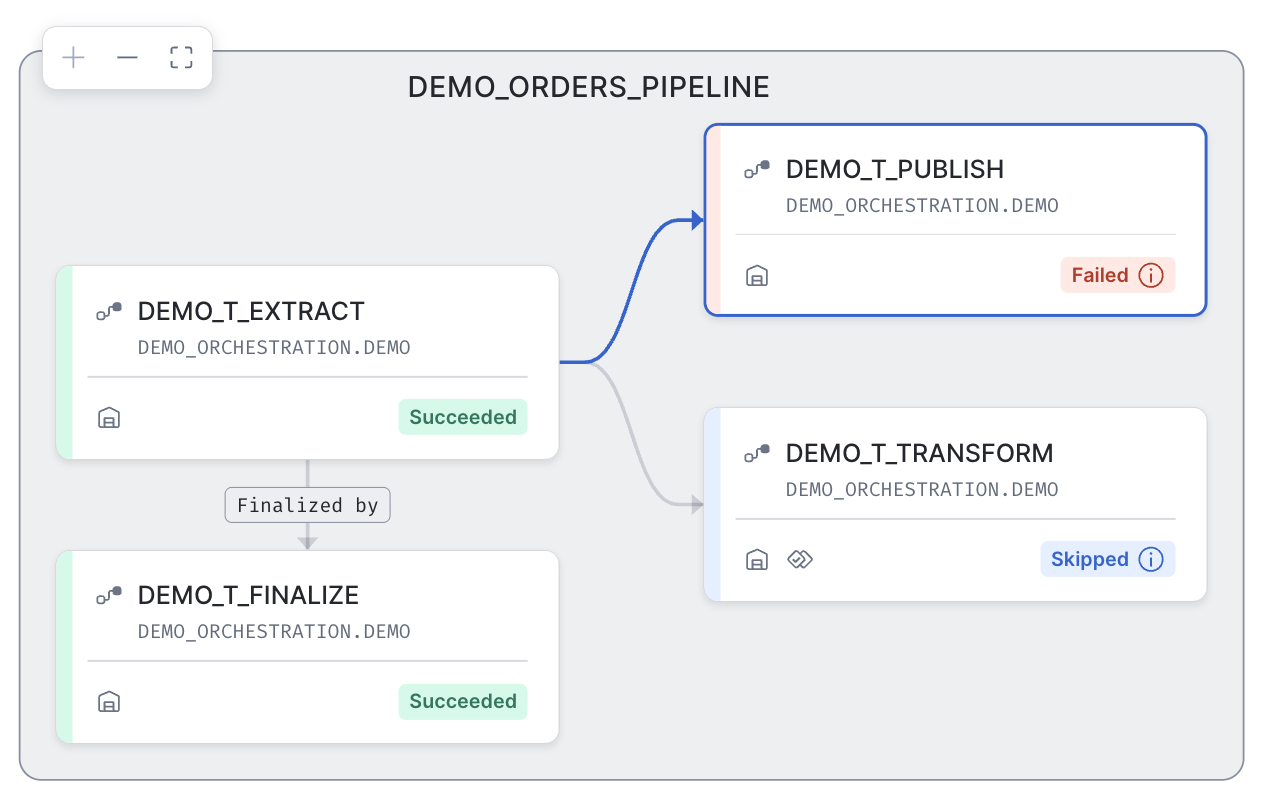
Security
Tasks run as their owner. By default a task runs as a system service with the privileges of the task's owner role, not as the person who created it, so it keeps running if that person is dropped or locked out. If a task's SQL works in a worksheet but fails as a task, the owner role is usually missing a privilege.
The rules that matter for graphs:
- All tasks in a graph must have the same owner and live in the same database and schema. The tasks named in ROOTS and FINALIZER must be owned by the role that owns the graph.
- Graphs use the CREATE TASK privilege; there's no separate privilege for creating one. Running a graph needs EXECUTE TASK on the account, plus EXECUTE MANAGED TASK if any member is serverless.
- COMMIT, RESUME, SUSPEND and EXECUTE TASK GRAPH need OPERATE on the graph or ownership of it, not OPERATE on each member. SET and UNSET need ownership.
- Transferring ownership of a single task removes its links to its parents and children. Transfer every task in the schema at once if you want the links kept.
Run as a user when governance needs a person. EXECUTE AS USER runs tasks on behalf of a named user instead of the system service. This is useful when masking or row access policies look at the querying user, when you need secondary roles, or when you want every run attributed to an account in the audit trail. The owner role needs IMPERSONATE on that user, and the user needs the owner role. For production, use a dedicated service user for the team rather than a person. On a graph, set it once in the member defaults:
ALTER TASK GRAPH DEMO_ORDERS_PIPELINE SET TASK_DEFAULTS ( EXECUTE AS USER DEMO_PIPELINE_SVC );
This assumes a service user named DEMO_PIPELINE_SVC that has been set up as described.
Cost
Warehouse tasks bill as warehouse time while they run. Serverless tasks bill for the compute they use, scaled by Snowflake from task history. A few habits keep the bill small:
- Schedule no more often than the data needs, and prefer triggered tasks when work arrives unpredictably, since they don't use compute until there's data.
- Use SUSPEND_TASK_AFTER_NUM_FAILURES and retries so a broken pipeline stops spending.
- Remember that a graph with advanced branching evaluates every task's condition, at a small cloud services cost per check.
- Put budgets on serverless spend, and watch it in SERVERLESS_TASK_HISTORY or in the metering views filtered on the SERVERLESS_TASK service type.
SELECT TASK_NAME, DATE_TRUNC('DAY', START_TIME) AS USAGE_DAY, SUM(CREDITS_USED) AS CREDITS
FROM SNOWFLAKE.ACCOUNT_USAGE.SERVERLESS_TASK_HISTORY
WHERE DATABASE_NAME = 'DEMO_ORCHESTRATION'
GROUP BY TASK_NAME, USAGE_DAY
ORDER BY USAGE_DAY DESC;
Authoring Surfaces
You can write the same graph three ways. They all produce a task graph object, so everything above applies to each:
| Surface | Best for | How a change ships |
|---|---|---|
| SQL | Learning, scripts and one-off changes | You stage edits with CREATE OR ALTER and ALTER, then COMMIT yourself |
| DCM projects | Pipelines as code, reviewed in Git and deployed to several environments | Plan shows the change; deploy applies it and manages the graph's lifecycle |
| Pipeline Builder | Building a graph visually from notebooks, Python files, ML Jobs and SQL | A visual canvas that saves a DCM project and deploys through the same plan |
The Snowflake Python API documents tasks and root-task graphs (its DAG classes), not the task graph object, so this guide doesn't cover it.
DCM projects
In a DCM project you declare members with DEFINE TASK and the graph with DEFINE TASK GRAPH, which takes the same clauses as CREATE OR ALTER TASK GRAPH. It adds one thing: a desired state, STARTED or SUSPENDED, placed at the end of the statement. It belongs to the graph only. A member task can't have its own desired state, while a standalone DEFINE TASK outside any graph still can.
DEFINE TASK GRAPH DEMO_ORCHESTRATION.DEMO.DEMO_ORDERS_PIPELINE
  SCHEDULE = 'USING CRON 0 * * * * UTC'
  ROOTS = (DEMO_ORCHESTRATION.DEMO.DEMO_T_EXTRACT)
  TASK_DEFAULTS ( WAREHOUSE = DEMO_WH, LOG_LEVEL = 'INFO' )
  STARTED;
DEFINE statements run only inside a DCM project's definition files, not as standalone SQL. The desired state is DCM metadata and doesn't appear in the deployed graph's DDL. A single deployment of a task graph can include up to 1,000 tasks. A project can hold both task graph objects and root-task graphs, and a task can move between them only while the graph that contains it is suspended.
DCM Projects for Tasks deploys a graph this way and changes it through a second plan and deploy.
Pipeline Builder
Pipeline Builder is a visual designer in Workspaces. You drag notebooks, Python files, ML Jobs and SQL onto a canvas and connect them. Connect two or more and it creates a task graph object with a schedule, run policies and task defaults. It packages project code into Code Bundles for you, and every pipeline is a DCM project, so you plan before you deploy and keep the pipeline in Git.
It orchestrates; it doesn't build transformations. Dynamic tables and views go in the same DCM project's definition files, and stored procedures run from a SQL task. All tasks in a graph must be in one schema, defined in the same project, owned by one role, and named with fully qualified names.
See Getting Started with Pipeline Builder for a walkthrough.
Migrate a Root-Task Graph
If you already have a graph defined by its root task, you don't rebuild the members. A task graph object sits over tasks that are already connected by AFTER, so migrating means moving the graph-level settings off the tasks and onto a new graph object.
Suppose DEMO_T_EXTRACT and DEMO_T_FINALIZE had started life as a root-task graph, with the schedule on the root and FINALIZE on the finalizer. If you tried the earlier snippets, these tasks already belong to DEMO_ORDERS_PIPELINE, so try this in a fresh schema or after dropping that graph.
- Suspend the root task. In a root-task graph, the root must be suspended before you modify any of its tasks.
- Move the graph-level settings off the root. Unset the root's schedule and any overlap, integration, configuration, retry or suspend settings. A task graph object rejects a root that still carries them.
- Unlink the finalizer. Unset FINALIZE on the finalizer task, because the graph object names its finalizer with FINALIZER instead.
- Create the graph object with those settings, the root in ROOTS, and the finalizer in FINALIZER. Move shared compute and logging into TASK_DEFAULTS.
- Commit and resume the graph.
ALTER TASK DEMO_T_EXTRACT UNSET SCHEDULE, SUSPEND_TASK_AFTER_NUM_FAILURES;

ALTER TASK DEMO_T_FINALIZE UNSET FINALIZE;
CREATE TASK GRAPH DEMO_ORDERS_PIPELINE
  SCHEDULE = '60 MINUTE'
  ROOTS = ( DEMO_T_EXTRACT )
  FINALIZER = DEMO_T_FINALIZE
  SUSPEND_TASK_AFTER_NUM_FAILURES = 3
  COMMENT = 'Demo: migrated from a root-task graph'
  TASK_DEFAULTS ( WAREHOUSE = DEMO_WH );

ALTER TASK GRAPH DEMO_ORDERS_PIPELINE COMMIT;
After the move, monitor by graph: TASK_HISTORY with the graph id, and COMPLETE_TASK_GRAPHS with the graph name. Filters on the old root task id no longer return the graph's runs.
Orchestrate Dynamic Tables and Procedures
Dynamic tables refresh themselves in dependency order, so you don't need a graph for the refreshes themselves. You need one when the refreshes have to line up with work a dynamic table can't do: loads before them, exports and notifications after them, a procedure in the middle.
For that, create the dynamic tables with SCHEDULER = DISABLE. Snowflake then doesn't schedule them, and a task refreshes each one in the order you choose. These refreshes don't cascade up or down the pipeline, and you can't set a target lag on such a table, so the graph owns the order, the timing and the error handling. A task body can mix refreshes with procedure calls:
CREATE OR ALTER TASK DEMO_T_TRANSFORM
  COMMENT = 'Demo: refresh a dynamic table, then publish'
  AFTER DEMO_T_EXTRACT
AS
BEGIN
  ALTER DYNAMIC TABLE DEMO_ORDERS_DAILY REFRESH;
  CALL DEMO_PUBLISH_SNAPSHOT();
END;
The version a graph run uses covers task definitions, not the procedures they call, as noted in the versioning section.
Pipeline design for dynamic tables, from target lag to refresh modes, lives in the Comprehensive Guide to Dynamic Tables. For a larger task graph that runs ML Jobs end to end, see End-to-End Task Graph.
Cleanup
If you tried the snippets, everything lives in one database:
DROP DATABASE IF EXISTS DEMO_ORCHESTRATION;
DROP WAREHOUSE IF EXISTS DEMO_WH;
Conclusion and Resources
Orchestration in Snowflake comes down to one question: who decides when work runs? If a query can express it, let a dynamic table decide. If it's one step, a task on a schedule or a stream does the job. If it's a pipeline of imperative steps, a task graph object gives you one schedule, one retry policy, member defaults, branching on outcomes, and edits you release with a commit instead of a suspend.
What You Learned
- Chose between dynamic tables, tasks, triggered tasks and task graphs
- Configured tasks: serverless or warehouse compute, schedules, conditions, retries, timeouts and session parameters
- Modelled a pipeline as a task graph object with graph properties, graph parameters, task defaults and an overlap policy
- Changed a running graph with staged edits, inspected them, and released them with COMMIT, or discarded them with REVERT
- Built control flow with advanced branching, a finalizer, configuration, return values and runtime information
- Monitored, secured and costed a graph
- Compared SQL, DCM projects and Pipeline Builder, and migrated a root-task graph to a task graph object
Related Guides
Additional Resources
- Introduction to tasks
- Triggered tasks
- Create a sequence of tasks with a task graph
- Declare Task Graph as an object
- CREATE TASK GRAPH
- ALTER TASK GRAPH
- EXECUTE TASK GRAPH
- TASK_GRAPH_CHANGES
- SYSTEM$PREDECESSORS_STATE
- SYSTEM$TASK_COMPLETION_STATE
- Pipeline Builder
- Migrate from streams and tasks to dynamic tables
This content is provided as is, and is not maintained on an ongoing basis. It may be out of date with current Snowflake instances
