Nov 19, 2026/7 min readCore Platform
Improving document extraction quality in Snowflake AI_EXTRACT


Extraction quality directly affects how much of a document workflow a business can reliably automate. Consider an insurer looking to process claims faster and control costs. The goal is to approve valid claims quickly, reject those that do not meet policy requirements and reduce the manual work involved in reaching a decision. Getting those decisions right depends on accurately extracting information from supporting documents.
As part of the latest release (now available to all customers in Public Preview), we’ve delivered a significant quality upgrade to AI_EXTRACT to help customers automate complex document workflows, from validating insurance claims to reconciling invoices and analyzing financial reports.
The release includes a 17% average relative improvement in extraction accuracy, measured in our benchmarks, with expanded support for documents of up to 1,000 pages, giving teams more accurate extraction and the ability to process longer documents using simple SQL.
Why accurate extraction takes more than reading text
The biggest challenges we see in customer workflows involve identifying the right information in dense, complex documents. A business may need a single amount to validate a claim, but the supporting documents contain multiple totals, repeated figures and tables spanning several pages. Accurate extraction needs to identify the requested information and preserve the context that gives it meaning. For example:
- Invoices: Identify the balance due without confusing it with the subtotal or tax amount.
- Financial reports: Match each figure to the correct business unit and reporting period.
- Complex tables: Capture every row and keep values in the correct columns, even where cells are empty.
- Forms: Capture the selected options, including those marked by hand, rather than every option listed.
Getting these details right helps businesses use extracted data to apply business rules and make reliable decisions, with less manual checking and correction.
AI_EXTRACT quality gains by output type
The updated AI_EXTRACT engine improved accuracy across individual fields, lists and tables in our benchmark suite, with the largest relative gains in tables and lists.
We compared the updated engine with the previous engine across invoices, receipts, forms and reports, including digital PDFs, blurry scans, handwriting and varied table layouts.
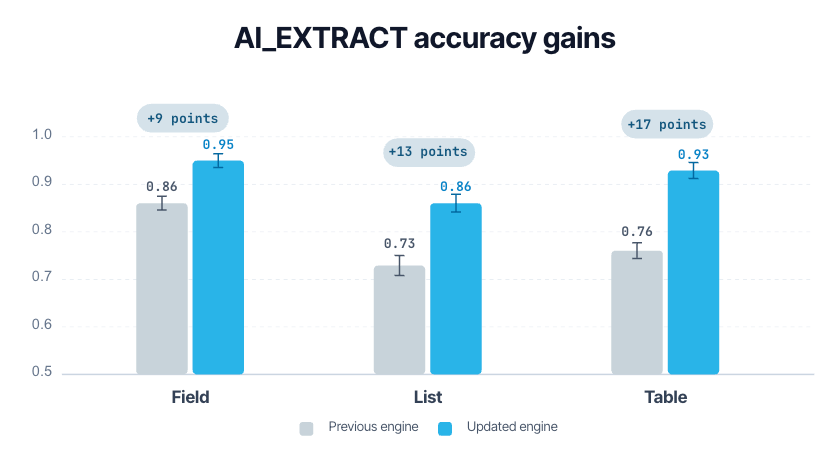
Pooled extraction accuracy by extraction type. Error bars show 95% confidence intervals.
More accurate tables for analysis and reconciliation
Table extraction accuracy increased from 0.76 to 0.93 — a 22% relative improvement.
The gains span sparse tables, dense tables in real-world documents and tabular data extracted from charts. For teams reconciling invoices or analyzing financial reports, more accurate tables provide more reliable inputs for calculations and comparisons — and can reduce the manual correction needed before that data is ready to use.
More accurate lists for review and routing
List extraction accuracy increased from 0.73 to 0.86 — an 18% relative improvement.
One of the largest gains appeared in checkbox- and handwriting-heavy forms, where list accuracy increased from 0.52 to 0.82. These gains are particularly relevant to workflows that use selected options and handwritten entries to route completed forms or determine what needs review.
More accurate individual fields
Field extraction accuracy increased from 0.86 to 0.95.
Individual fields connect document content to the rest of a workflow. An invoice number links a document to a transaction. A reporting period determines which results should be compared. A replacement count records an action taken. More accurate extraction of these values helps businesses use document content for record matching, analysis and operational review.
AI_EXTRACT vs. Textract, Azure and Databricks
On our 11-dataset benchmark suite, AI_EXTRACT achieved the highest pooled extraction accuracy for individual fields, lists and tables among the services evaluated for each output type.
We compared the updated engine with Databricks ai_extract() in Precision mode, AWS Textract using the Queries API and Azure Document Intelligence using Query Fields. Within each output-type comparison, services received the same documents and extraction questions. Comparisons covered only the extraction types supported by the evaluated APIs.
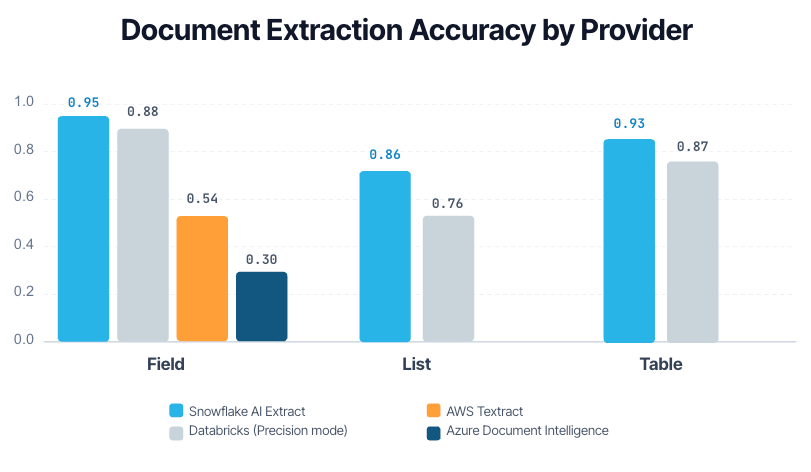
Pooled extraction accuracy by provider and extraction type. Each comparison includes the services evaluated for that output type.
Extending the comparison to public datasets
We also compared AI_EXTRACT with Databricks ai_extract() in Precision mode using VAREX and RealDocBench, extending the evaluation beyond our 11-dataset suite to 20,055 additional annotated extraction tasks.
VAREX covers government forms with document-specific schemas, including nested structures. RealDocBench includes business documents from finance, healthcare, mortgage and supply-chain workflows. For our RealDocBench evaluation, we used a custom multi-field extraction schema and structured ground truth for each document.
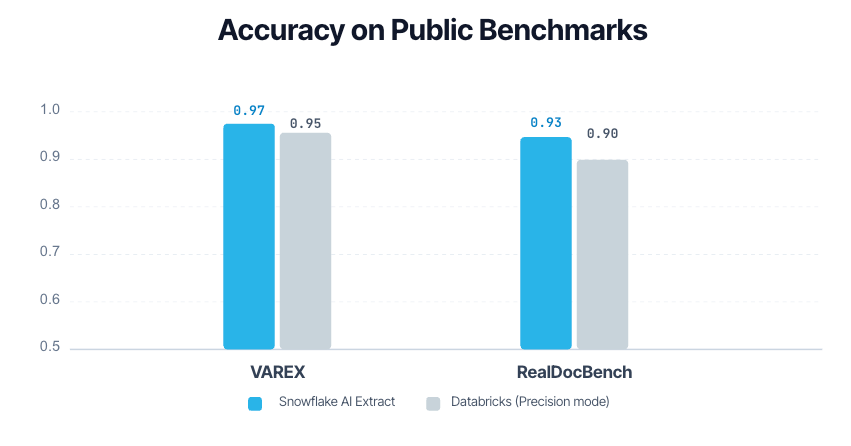
Extraction accuracy on two public benchmarks, covering 20,055 annotated extraction tasks in total.
AI_EXTRACT in action: from documents to usable data
This example shows how AI_EXTRACT turns a scanned railcar inspection form into structured information for operational review.
Inspection forms: Distinguishing instructions from recorded answers
For inspection review, a workflow needs to capture what someone recorded — not simply what the form instructed them to do. This scanned railcar inspection form combines printed instructions, handwritten entries, circled answers and inspection tables.
The checklist refers to four placards, but the handwritten replacement count is two. AI_EXTRACT returns "2" for placards_replaced, distinguishing the recorded count from the number in the instructions. It also captures "NO" for both circled gasket-replacement answers.
For the Post Inspections table, AI_EXTRACT returns all seven items, preserving each requirement, its item number and whether initials are present. This keeps the checklist text connected to the markings recorded beside it.
The structured output can support searches by railcar and inspection date, as well as review of replacement counts, recorded answers and checklist markings. These details become available to downstream workflows without requiring each workflow to interpret the original scan.
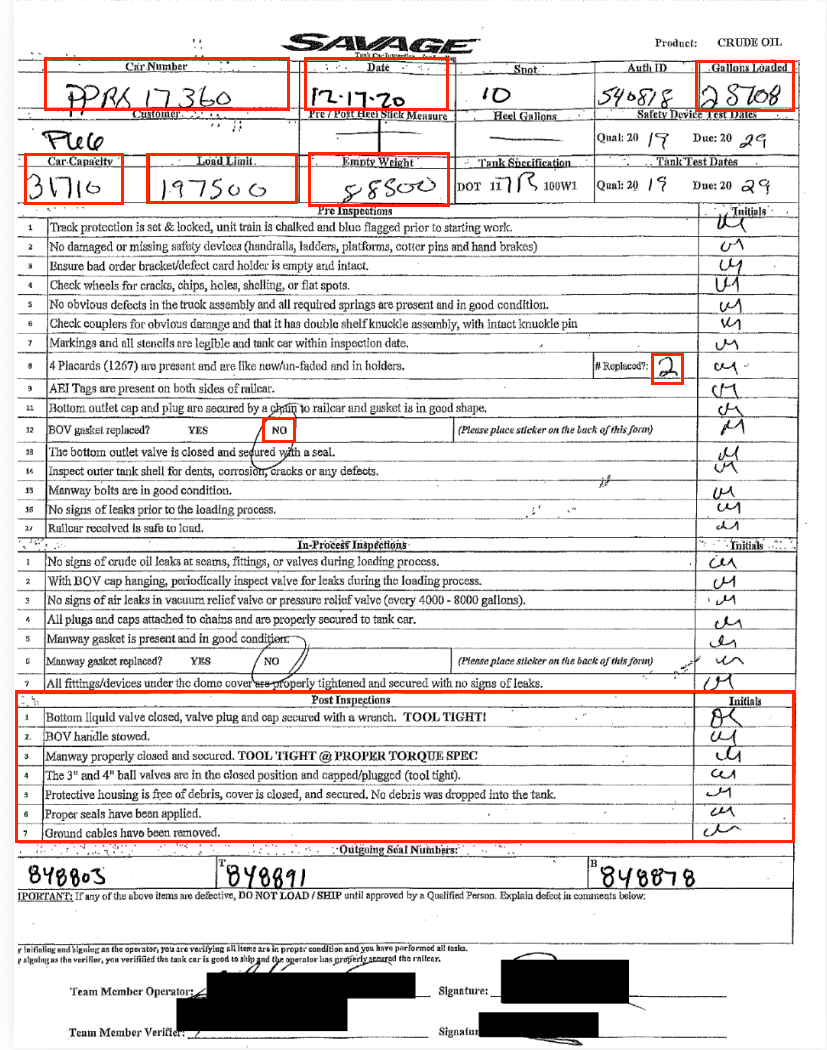
The displayed response includes inspection evidence alongside fields such as car_capacity, empty_weight, gallons_loaded, load_limit and product.
{
    "bov_gasket_replaced": "NO",
    "car_capacity": "31716",
    "car_number": "PPRX 17360",
    "empty_weight": "88500",
    "gallons_loaded": "28708",
    "inspection_date": "12-17-20",
    "load_limit": "197500",
    "manway_gasket_replaced": "NO",
    "placards_replaced": "2",
    "post_inspections": {
      "initials_present": [
        "Yes",
        "Yes",
        "Yes",
        "Yes",
        "Yes",
        "Yes",
        "Yes"
      ],
      "inspection_item": [
        "Bottom liquid valve closed, valve plug and cap secured with a wrench. TOOL TIGHT!",
        "BOV handle stowed.",
        "Manway properly closed and secured. TOOL TIGHT @ PROPER TORQUE SPEC",
        "The 3\" and 4\" ball valves are in the closed position and capped/plugged (tool tight).",
        "Protective housing is free of debris, cover is closed, and secured. No debris was dropped into the tank.",
        "Proper seals have been applied.",
        "Ground cables have been removed."
      ],
      "item_number": [
        "1",
        "2",
        "3",
        "4",
        "5",
        "6",
        "7"
      ]
    },
    "product": "CRUDE OIL"
}
Automate your document workflows more reliably
For the insurer processing claims, higher extraction quality supports the original goal: faster decisions, correct application of policy requirements and less manual work. The same principle applies to invoice reconciliation and financial analysis — reliable automation depends on accurate information from the documents behind each decision.
The updated AI_EXTRACT engine brings more accurate extraction and support for documents of up to 1,000 pages, with no changes to existing SQL calls or pricing.
To use the updated engine, enable Cross-Region Inference for your account. Accounts with it enabled receive the updated behavior automatically. Without it, AI_EXTRACT continues to use the previous engine.
Start with representative documents from your workflow and compare the extracted information with your reference data. Check whether the output captures the fields, complete lists and correctly aligned tables your process needs. Then measure how much manual checking and correction is still required. Use those results to determine how much more of your business process you can reliably automate.
Get started here at the Developer Guide.
Appendix: Evaluation notes
- Coverage. The engine comparison includes 2,789 annotated extraction tasks across 11 public and proprietary datasets, covering digital and scanned invoices, receipts, forms and reports with handwriting, checkboxes, charts and varied table layouts.
- Accuracy. Scores range from 0 to 1 and penalize missing or extra list items and table rows, plus incorrect table cells. Relative improvement is
(updated accuracy − previous accuracy) / previous accuracy. The 17% headline averages relative gains across fields, lists and tables equally — not by task count. Percentages are rounded. - Provider comparison. Scores use only annotations with valid results from all services evaluated in each comparison: 2,764 after excluding 25 (0.9%). They measure extraction quality on this shared subset, not overall request-success rates.
- Public benchmarks. Separate evaluations cover 19,058 annotated tasks from VAREX and 997 from RealDocBench — 20,055 total.
- Examples. The displayed JSON contains selected fields from an actual response to a one-page scanned inspection form. It illustrates extraction behavior, not accuracy at the 1,000-page limit.