Nov 18, 2026/12 min readCore Platform
How Snowflake Uses Cortex AI Gateway to Control Runaway AI Spend


One afternoon, an engineer pointed 200 internal Slack bots at "auto" model selection to test a finance workflow. Every bot picked the most expensive model. By the next morning that engineer had spent more than $1,100 in a single day, and the only signal was an after-the-fact alert. Around the same time, a premium model was added to a coding agent's model pool without access controls, and usage jumped before anyone noticed.
These were not uncommon events. Coding agents, AI-assisted IDEs and internal bots now run all day for thousands of Snowflake employees. Spending on an internal coding agent was growing every month. A single long-running agent session or a misconfigured batch job could cost more than a month of normal use. We could see the spend, but we had no way to stop it for one person without stopping it for everyone.
This post describes how we put that spend under control with Cortex AI Gateway and per-user quotas. It covers the controls the platform gives you, the design we chose, the small app that lets directors manage quotas without writing SQL and what we would do differently.
Key takeaways
- Per-user quotas block further AI requests within minutes of reaching a user’s limit. Each user’s spend across the AI Gateway, Snowflake CoCo, Cortex Agents, Snowflake CoWork and Cortex AI Functions counts against their own limit. A breach blocks only that user’s AI requests, while everyone else keeps working. The block lifts on its own at the next cycle or when their tier changes.
- A few tag-scoped quotas can govern a large organization. Snowflake extended quotas to in-scope users with a handful of tags. Even more targeted quotas can be applied with additional tags or tag combinations. Moving someone to a higher tier is a single tag change that clears any existing block automatically.
- Spending decisions work best with the leader closest to the work. So we built a director-only app on Snowflake App Runtime that checks the reporting chain, supports time-boxed bumps with a justification for the top tier and logs every change.
- Privacy and cost control can coexist. AI Gateway supports exclusion from prompt logging based on Snowflake tags. Users who are excluded from prompt logging can still have cost controls.
Why visibility alone was not enough
We had a good showback dashboard. Every engineer could see what they spent and on which model (using SNOWFLAKE.LOCAL.GET_AI_GATEWAY_USAGE). That helped, but showback only answers where the money went. It does not answer what happens next. We needed three things from a control standpoint:
- Predictability: A ceiling on the surprise, applied per person, so one runaway session cannot consume a month of headroom. Alerts at preset thresholds also meant users could get advance notice when they were approaching their limits.
- Accountability: Costs roll up to a leader's budget, so the decision about how much an engineer can spend belongs to the person closest to the work, not to a central team.
- Fairness: Most engineers use a modest amount, and a few use a lot, often for good reasons. We wanted to give heavy users room without raising the limit for everyone.
Cortex AI Gateway gave us the object to attach those controls to. Requests from a coding agent, SDK or MCP client go through Cortex AI Gateway. That makes the gateway the one place to decide who can spend, which models they can reach, what each request costs and when to stop.
The controls Cortex AI Gateway gives you
Before getting into our design, here is the full set of controls available. They act at different scopes and on different timescales, and in practice, we used all of them together.
| Layer | Knob | Scope | How fast it acts |
|---|---|---|---|
| Prevent | Strict model role-based access control (RBAC) enforcement and a model list in the gateway specification | Request | Immediately; models not on the list aren't served |
| Prevent | USAGE / MONITOR privileges on the gateway |
Role | Immediately |
| Observe | AI_GATEWAY_USAGE_HISTORY view and AGENT_TRACE_TABLE |
Request | Reporting |
| Attribute | Shared-resource budget scoped by user tag | Team, pooled | Periodic |
| Warn | Alerting on per-user quotas at defined spending thresholds | Individual | Within minutes |
| Enforce | Per-user quota with block enforcement | Individual | Within minutes |
- Restrict models: Using RBAC, the admin can select exactly which model can be used by whom. AI Gateway checks model access against configured RBAC grants on each request.
- Separate spending from seeing: USAGE lets a role send requests.
MONITORlets a role read gateway usage. An audit role with onlyMONITORcan review every credit without being able to send a request. - Attribute by team: A shared-resource budget counts gateway credits only for users carrying a given tag, such as a cost center. Budgets notify and can call stored procedures you write, but they evaluate periodically and pool spend across the team.
- Stop an individual: A per-user quota is the control with built-in blocking. Its main settings include:
- Cycles: Monthly, weekly and daily credit limits, reset at 00:00 UTC.
- Scope: All users, user tags or explicit inclusion/exclusion lists.
- Enforcement: Denies new requests within minutes of exceeding the quota; clears automatically on reset or tier upgrade.
- Notifications: Alerts for users, admins or custom stored procedures based on spend thresholds.
- Introspection: Inspect active blocks and spend via built-in functions and history views.
Budgets answer "how much did this team spend?" Quotas answer "should this person's next request go through?" We needed the second question answered within minutes.
Our design: four tier quotas, one tag
Start from data
We did not guess at the numbers. We grouped engineers by their historical monthly AI spend and found natural buckets. Those buckets became four tiers:
| Tier | Monthly budget | Who sits here |
|---|---|---|
TIER_1 |
$1,000 | Most engineers |
TIER_2 |
$3,000 | Sustained heavy users |
TIER_3 |
$5,000 | Power users on AI-intensive work |
TIER_4 |
$20,000 | Critical projects only, always time-boxed |
Note: Dollar figures are illustrative and not reflective of our actual limits.
It is much easier to reason about the budget in terms of dollars rather than AI credits, so the tiers are presented in dollars. Quotas are enforced in AI credits, so we convert each tier to credits when provisioning. Every engineer started in the tier that matched their own history, which made the initial assignment easy to defend.
Why one quota per tier, not per team
Instead of creating a bespoke quota for every individual team, we established four standardized tiered buckets that categorize users cleanly rather than managing fragmented team-specific limits. Our initial thought was to manage separate quota objects for each director and tier combination, but consolidating into four shared tiers simplified management significantly while keeping governance consistent.
Quota membership is driven by a single user tag, AI_BUDGET_TAG, whose allowed values are TIER_1 through TIER_4. Each tier quota is scoped to one value of that tag. A second tag, AI_COST_DIRECTOR, records which of our engineering directors the cost rolls up to. That tag drives reporting and permission checks but does not affect enforcement.
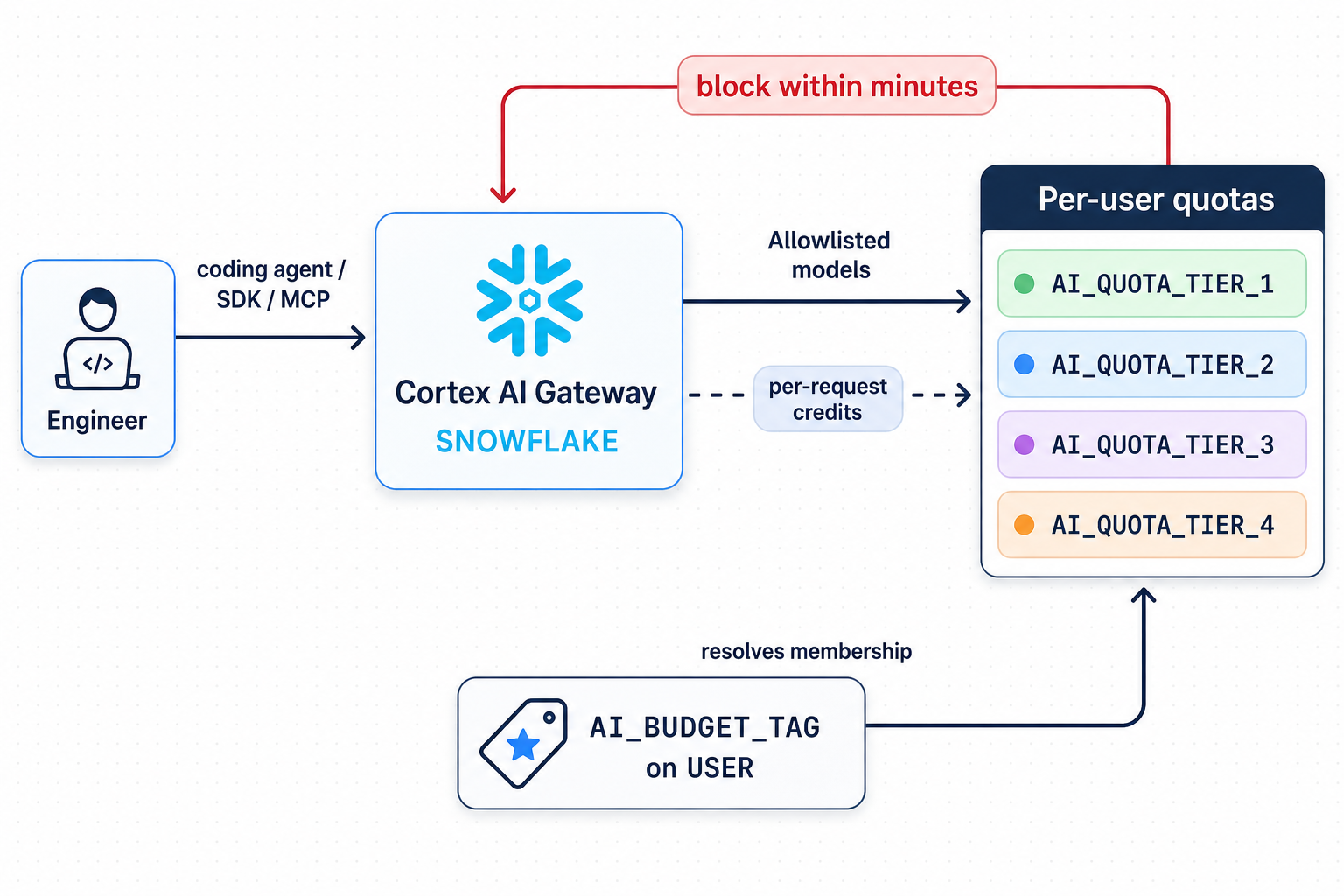
Here is a simplified version of how we provision a tier. Limits are illustrative.
USE SCHEMA cost_mgmt_db.ai_quotas;

CREATE SNOWFLAKE.CORE.QUOTA ai_quota_tier_1();

-- Track every AI domain, including the gateway, so a user can't route around the limit.
CALL ai_quota_tier_1!ADD_SHARED_RESOURCE('AI GATEWAY');
CALL ai_quota_tier_1!ADD_SHARED_RESOURCE('SNOWFLAKE COCO');
CALL ai_quota_tier_1!ADD_SHARED_RESOURCE('AI FUNCTION');
CALL ai_quota_tier_1!ADD_SHARED_RESOURCE('CORTEX AGENT');
CALL ai_quota_tier_1!ADD_SHARED_RESOURCE('SNOWFLAKE COWORK');

-- Membership: users whose AI_BUDGET_TAG is TIER_1.
CALL ai_quota_tier_1!SET_USER_TAGS(
  [[(SELECT SYSTEM$REFERENCE('TAG', 'cost_mgmt_db.tags.ai_budget_tag', 'SESSION', 'APPLYBUDGET')), 'TIER_1']],
  'UNION'
);

-- Verify scope before turning anything on.
CALL ai_quota_tier_1!GET_QUOTA_SCOPE();

-- Monthly limit in AI credits; a daily limit catches runaway loops within hours.
CALL ai_quota_tier_1!SET_PER_USER_LIMIT(1000);
CALL ai_quota_tier_1!SET_PER_USER_LIMIT(100, 'DAILY');

-- Email the user at 80% of actual monthly spend.
CALL ai_quota_tier_1!ADD_NOTIFICATION_THRESHOLD(80, 'ACTUAL', TRUE, 'MONTHLY');
CALL ai_quota_tier_1!SET_ADMIN_EMAILS('ai-spend-alerts@example.com');

-- Block at the limit, and tell the user why.
CALL ai_quota_tier_1!SET_BLOCK_ENFORCEMENT_ENABLED(TRUE, TRUE);
A safety net for everyone else
People without a tier fall into no tier quota. Those people are still covered by an account-wide quota scoped to all human users, which blocks independently. Two lessons came out of this:
- Scope the safety net to humans: Our largest service user consumes well over $100,000 a month (illustrative) on legitimate modeling work. An all-users quota with a "reasonable" limit would have broken a production pipeline. Our tagging procedures accept only
TYPE = PERSONusers, and service accounts are governed separately. - Keep the safety-net limit at or above the top tier: A user can be in more than one quota, and each quota blocks independently. If the safety net is lower than
TIER_4, it will block your top-tier users first.
Putting the decision with directors
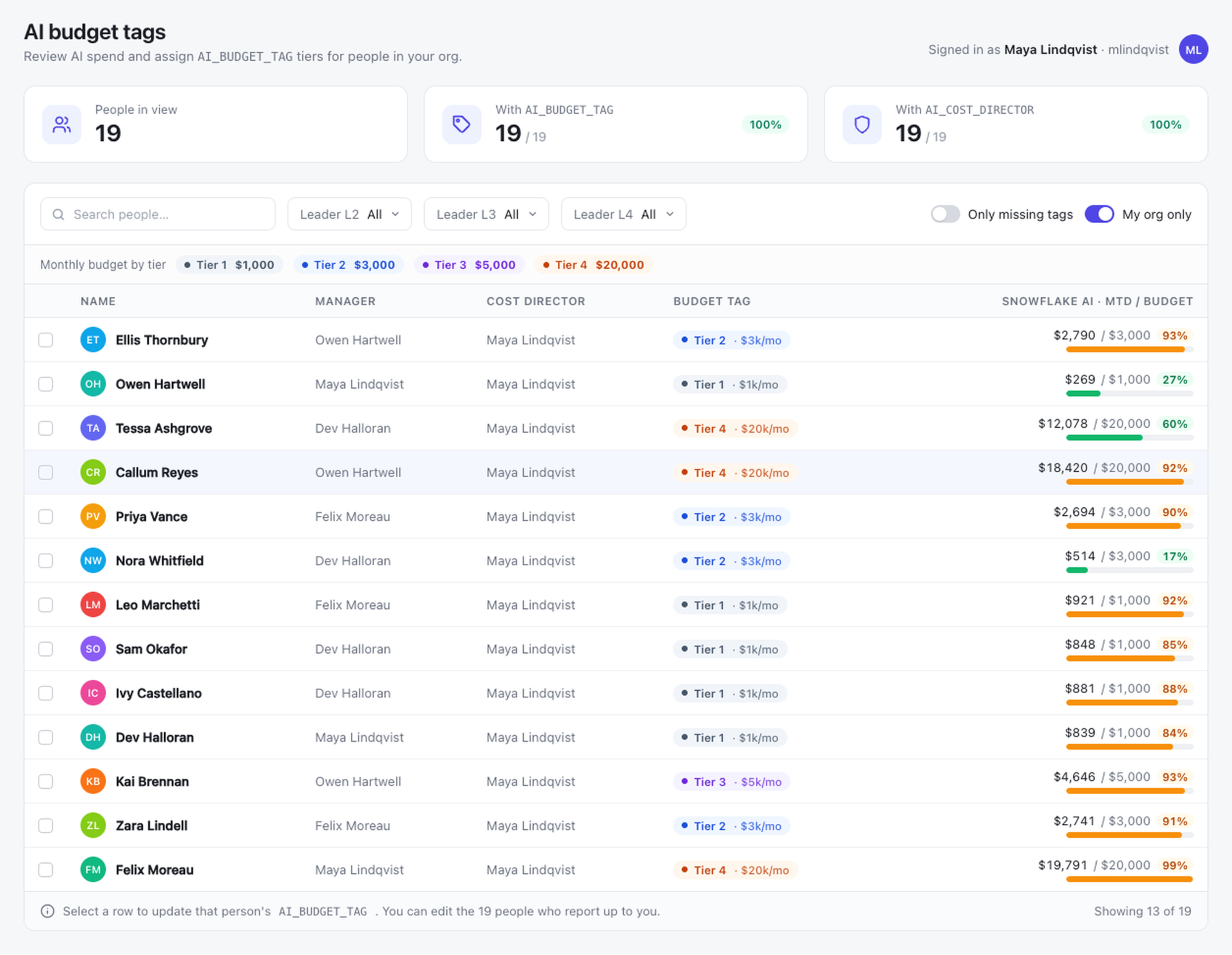
We deliberately did not centralize quota decisions. Spending decisions work best with the leader closest to the work. The data sets the default, and the director decides who moves up or down. To simplify the process, we built an app (running in Snowflake App Runtime) called Engineering AI Cost Quotas. It shows everyone in the viewer's org with their director, month-to-date spend and current tier, and it filters by leadership level. A director picks a person, picks a new tier and a duration, and submits.
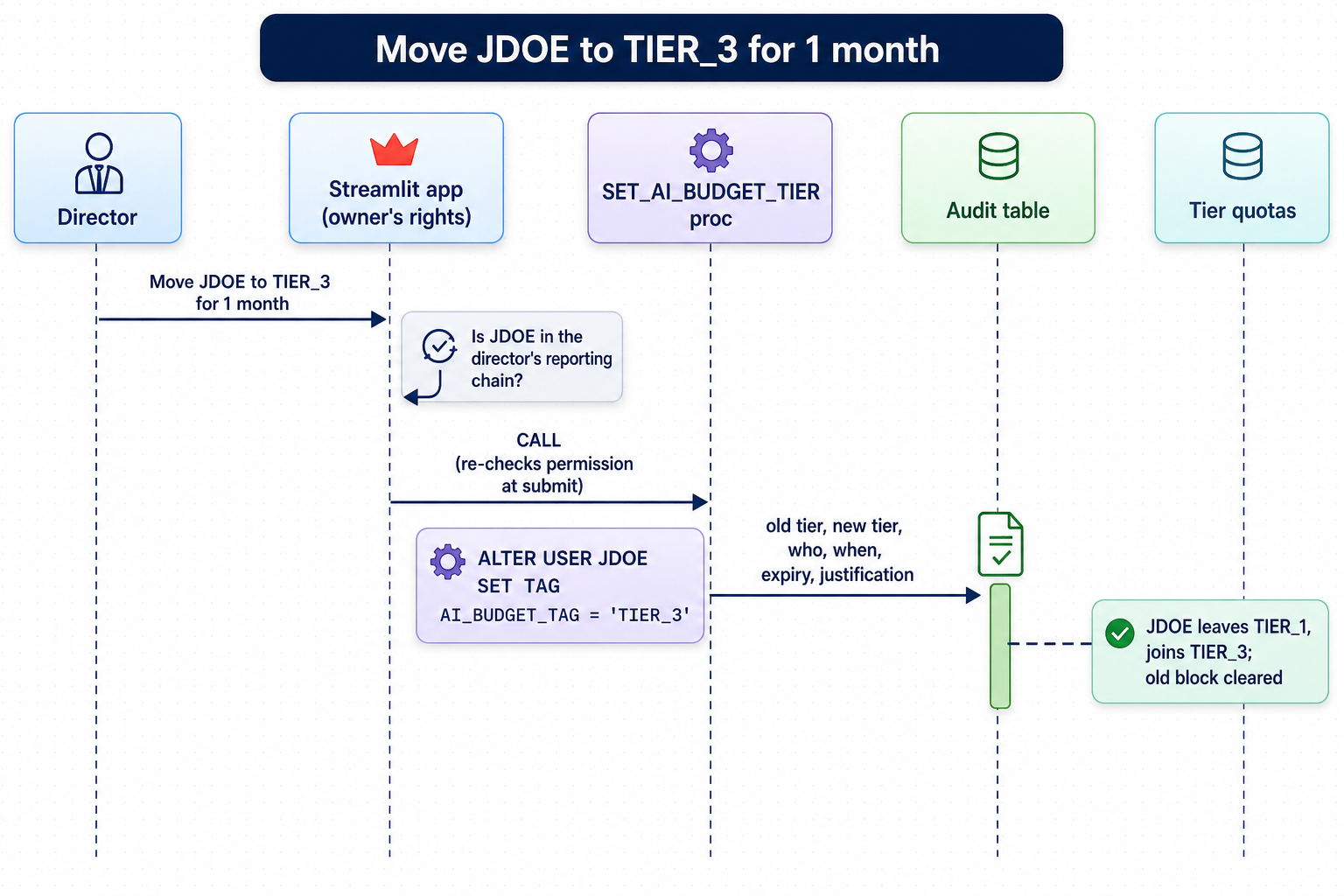
Moving someone up a tier is one tag change. The user leaves the lower quota's scope and enters the higher one, and the platform clears any block from the old quota with no separate unblock step.
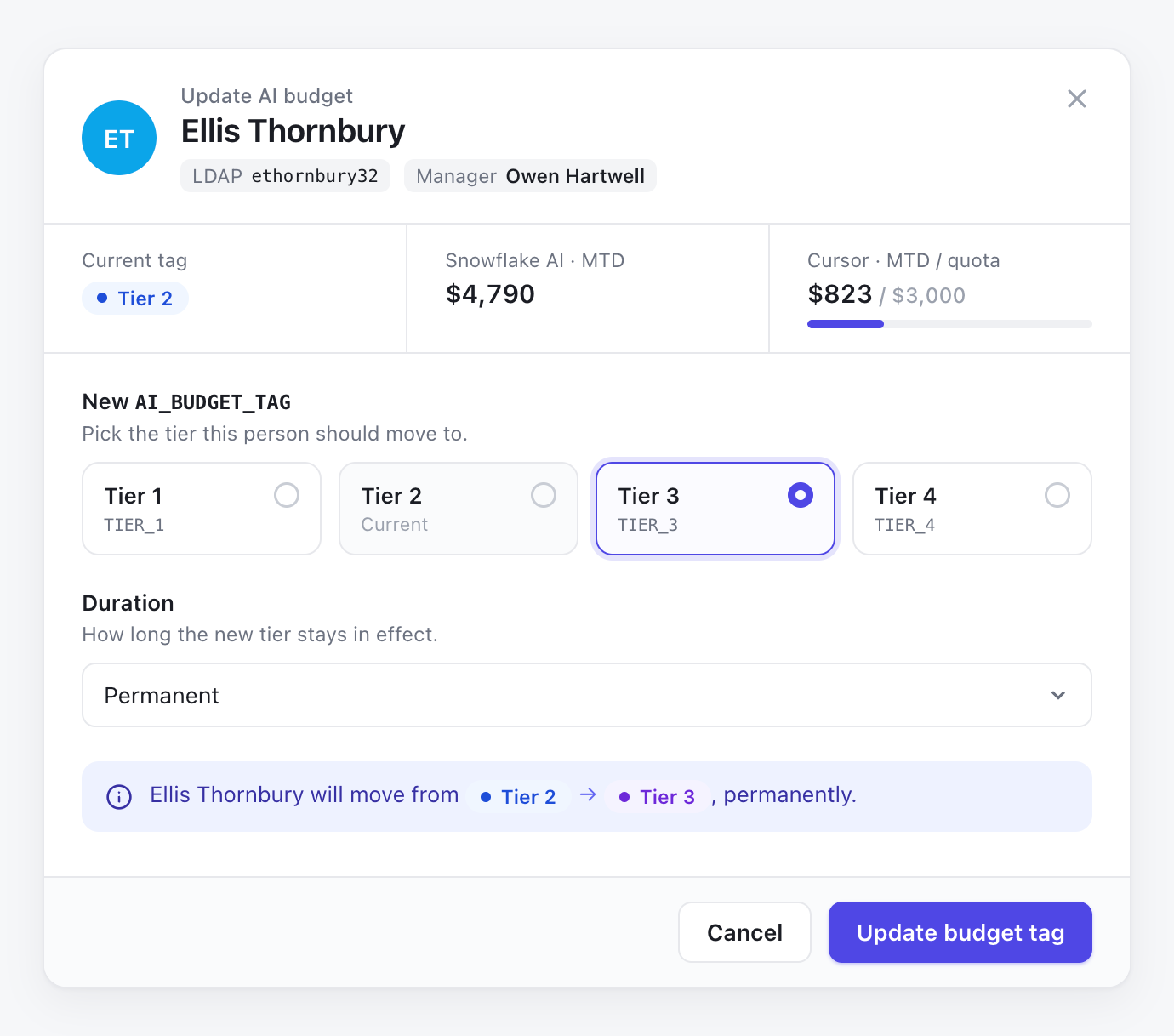
Permissions without granting permissions
The app runs with its owner's rights, so directors never need privileges to modify tags. Before allowing a change, the app looks up the signed-in user in the employee hierarchy and checks that the target reports into the viewer's chain. A director can change anyone beneath them and no one else, and a small admin group handles exceptions. The stored procedure runs the same check again at submit time, so the permission rule does not live only in the UI.
Make temporary the easy option
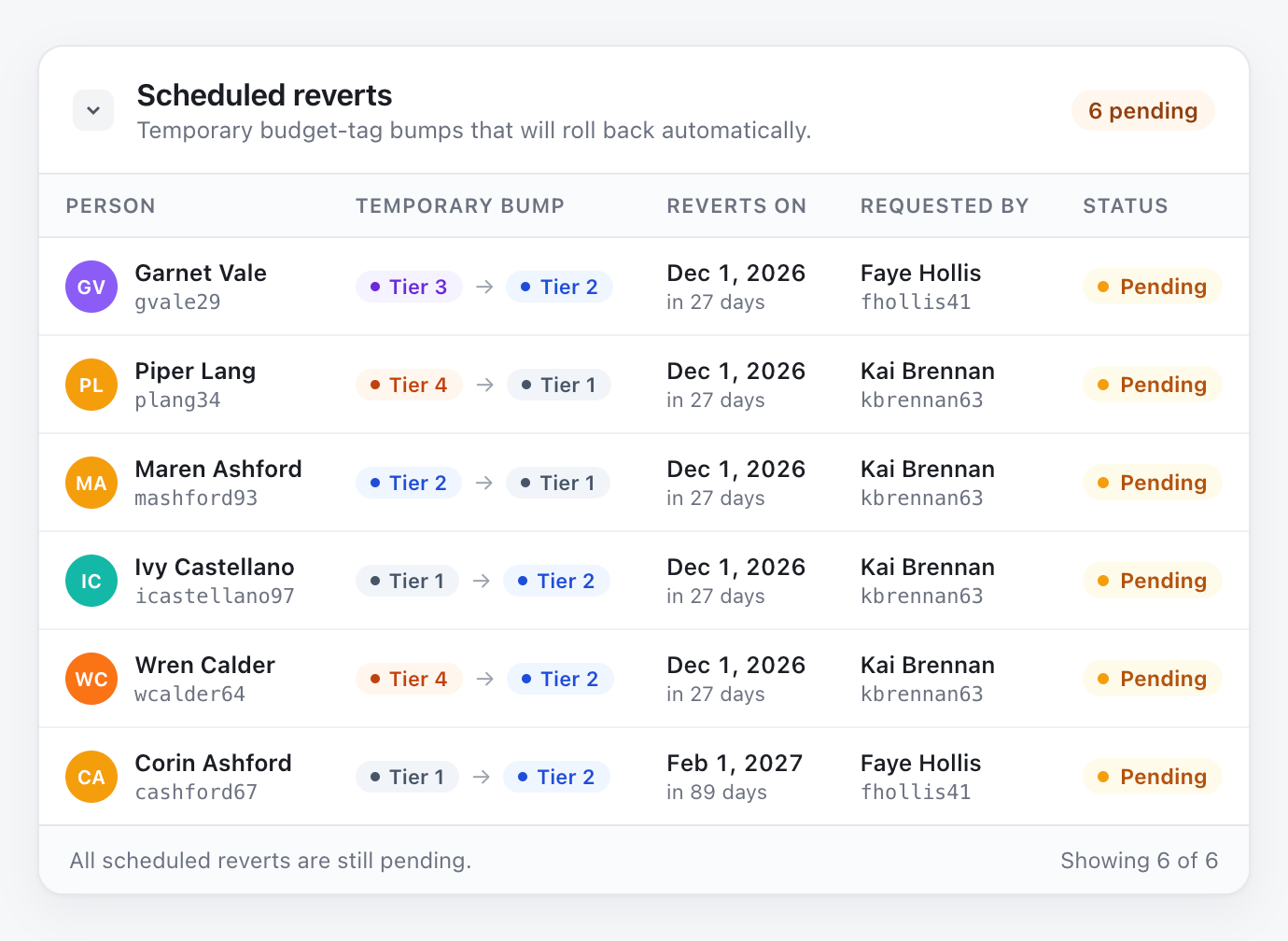
Most bump requests are short-term: a launch, a migration or a month of heavy evaluation work. Each change carries a duration:
- Permanent (the default for tiers 1–3)
- This month only, which reverts on the first of next month
- Three months, which reverts on the first of the month three months out
A daily Snowflake task returns expired bumps to the previous tier. It reverts only if the tier has not been changed again in the meantime, so a later decision by a director is never overwritten. The revert is logged as a system change.
CREATE OR REPLACE TASK cost_mgmt_db.ai_quotas.revert_expired_bumps
  SCHEDULE = 'USING CRON 0 1 * * * UTC'
AS
  CALL cost_mgmt_db.ai_quotas.revert_expired_tier_bumps();
  -- For each audit row with expires_on <= CURRENT_DATE() and no later change for that user:
  --   restore old_tier, then insert an audit row with changed_by = 'SYSTEM'.
Guardrails on the top tier
TIER_4 is 20 times the default budget, so it has extra rules. It cannot be permanent, only one or three months. It also requires a written business justification, which is stored with the change.
Log everything
Every change goes to an audit table: old tier, new tier, timestamp, who made it, expiry and, for TIER_4, the justification. Denied and failed attempts are logged too. The app shows recent changes, so a director can see what happened in their org without asking anyone.
Expanding beyond engineering without capturing sensitive prompts
Once engineering was live, the next step was the whole company. That raised a confidentiality question. Our gateway captures prompts and responses for debugging and quality work. Some teams or roles working on sensitive data should not have their prompts stored, but they still need quotas.
The gateway specification handles this with logging.capture_payload.exclude_tags. Requests from a user carrying any listed tag get metadata-only logging: user, model, token counts and timing, but no prompt or response content. Quotas and cost attribution run on that metadata, so they keep working.
-- Always start from DESCRIBE AI GATEWAY SNOWFLAKE; this replaces the whole spec.
ALTER AI GATEWAY SNOWFLAKE FROM SPECIFICATION $$
schema_version: 1
models:
  - name: claude-sonnet-4-6
  - name: claude-haiku-4-5
logging:
  enabled: true
  capture_payload:
    request_response: true
    exclude_tags:
      - governance.tags.ai_gateway_payload_excluded
$$;
Two details mattered more than the configuration:
- Name the tag for what it does: The original request was for a "logging excluded" tag. The gateway cannot turn off all logging per user, because metadata is always recorded when logging is on, and that is what quotas depend on. We named the tag
AI_GATEWAY_PAYLOAD_EXCLUDEDso no one was told something the system doesn't do. - Use a dedicated tag: The exclusion applies to anyone who has the tag set, regardless of its value. Our existing cost-center tag is on nearly every user, so listing it would have excluded the whole company. Admins can apply the dedicated tag to users or roles designated for metadata-only logging.
What we learned
Quotas are near-real-time, not real-time: Enforcement lands within minutes of a spend event. The daily limit bounds the damage from a runaway loop far better than a monthly limit alone.
Roll out in monitor-only mode first: We piloted with two engineering orgs and enforcement off. That let us check scope with GET_QUOTA_SCOPE and GET_SPENDING_DETAILS_BY_USERS and fix tag gaps before anyone was blocked.
Choose actual or projected thresholds deliberately: Quotas support two kinds of alerts. Projected alerts extrapolate your current run rate, so they can warn you early in the month while a change in behavior is easy. Actual alerts fire on real spend, so they can give an early signal at a low threshold or tell someone they're close to their limit at a high one, and we used them for our user-facing "you're at 80%" email.
Notifications need verified email addresses: Quota emails go only to verified addresses. Verify the company domain by having ACCOUNTADMIN run SELECT SYSTEM$VERIFY_DNS_DOMAIN('YOURDOMAIN.com'), which applies to every account in the organization. Admin summaries are sent after any quota run that breaches. At our scale of about 3,500 users that can mean several a day, so we decided to send them to a dedicated list.
Quotas are one lever among several: Gating premium models behind roles, keeping the gateway model list explicit, retiring older models and defaulting agents to cost-efficient routing each cut spend before a quota ever has to act. Quotas are the backstop that catches what those levers miss.
Users can check their own usage using SNOWFLAKE.LOCAL.MY_BUDGET_SUMMARY().
Results
- Cost predictability and savings: AI quotas established clear spend ceilings, yielding about a 16% reduction in costs while encouraging engineers to use AI resources more efficiently.
- Role-based and leader-managed quotas: Limits are tailored by role and function (for example, engineering vs. nonengineering, researchers vs. typical engineers), with engineering leaders primarily using temporary quota adjustments to manage team spend.
- Protection against runaway spending: Daily quotas provide an additional control for limiting exposure to unexpected spend spikes caused by automated processes or alert loops.
- Complementary cost-governance layer: Quotas complement prompt and model-level optimization by placing hard boundaries on total spend while broader efficiency improvements take effect.
Get started
If you run AI workloads on Snowflake, you can explore these controls (Cortex AI Gateway and related quota capabilities are in public preview):
- Route traffic through Cortex AI Gateway and keep an explicit model list in the specification.
- Grant
MONITORto whoever owns the cost conversation, and queryAI_GATEWAY_USAGE_HISTORYto find your natural spend tiers. - Tag your users with a tier tag, using SCIM
snowflakeTagsif you provision through an identity provider. - Create one per-user quota per tier, run it in monitor-only mode for a week, then enable block enforcement.
- Add a shared-resource budget per team for attribution.