Share Only Their Data: Per-Tenant Cortex Agents with Snowflake Listings
In the last post, we shared a Cortex Agent — and all of its data — with another Snowflake account. But what if each Consumer should only ever see their own data?
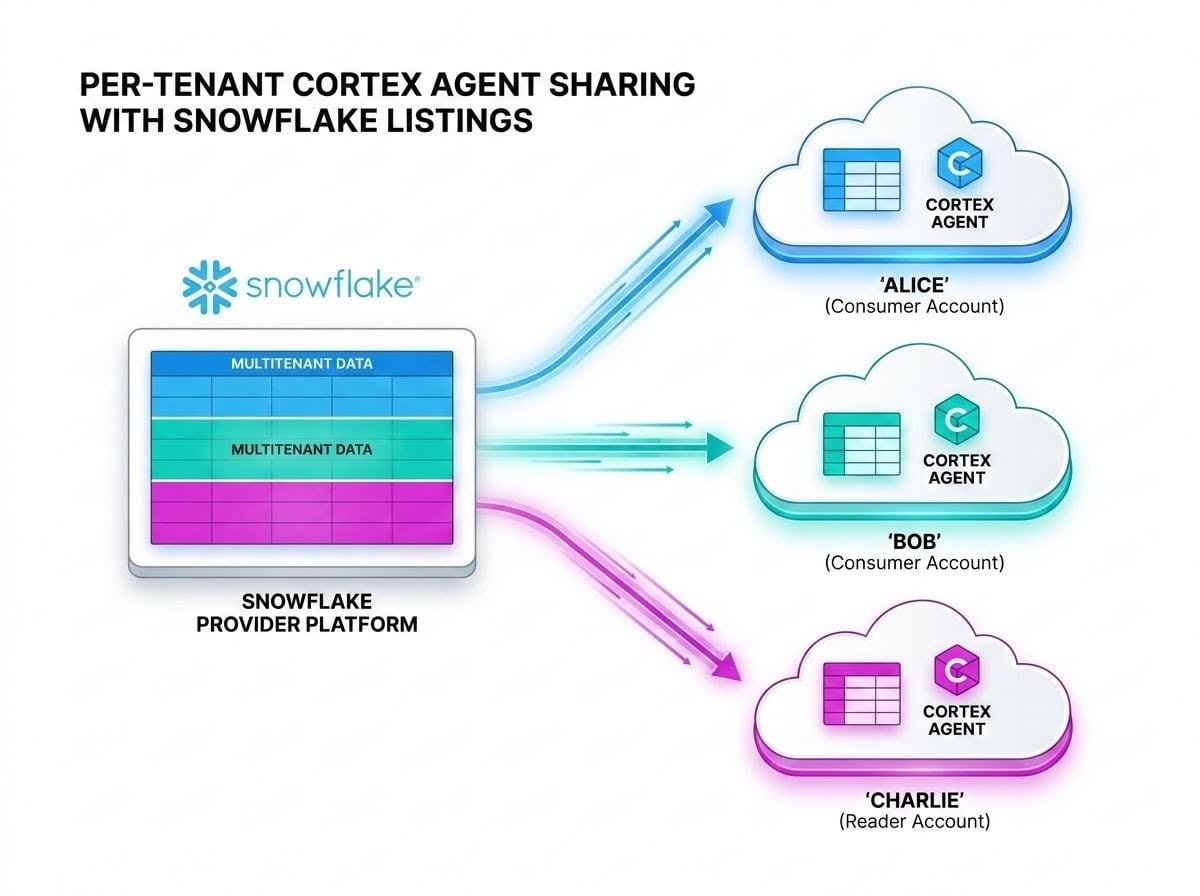
In the last post, we shared a Cortex Agent with another Snowflake account using a private listing. That agent could see every restaurant's data, which is fine when the Consumer is an internal team or a trusted partner. But many Snowflake customers run multitenant services: one set of tables holding data for many customers, where each customer must only ever see their own rows. If one of those customers wants to talk to their data from inside their own Snowflake account, sharing the whole agent isn't an option.
The patterns we'd use inside a single account don't carry over, either. Those patterns set the tenant context in the session — the user, the role, or a session attribute — but the Provider doesn't control the Consumer's sessions. In fact, in secure views shared with another account, Snowflake returns NULL for CURRENT_ROLE() and CURRENT_USER(). And we still can't trust the LLM to add the right WHERE clause.
In this post we'll share a single tenant's slice of a multitenant data set — along with a Cortex Agent that can only see that slice — with the tenant's own Snowflake account, or with a Reader Account if they don't have one. The complete example is in this Snowflake Notebook.
We'll start with the approach: a schema per tenant, built from secure views over the multitenant tables. Then we'll build a database role, share, and private listing for one tenant, look at what that tenant sees on the Consumer side, and cover Reader Accounts for tenants without Snowflake. We'll finish with what it takes to run this at scale and some other ways to solve the same problem.
TL;DR
- For each tenant, create a schema of secure views filtered to that tenant, and build the tenant's own Cortex Search Service, semantic view, and agent on those views.
- Wrap the tenant's schema in a per-tenant database role, and share it through a per-tenant share and private listing. Nothing from the multitenant schema is granted.
- The Consumer sees only their own schema — not the multitenant tables, and not any other tenant.
- Tenants without Snowflake can use a Reader Account, but the Provider pays for its compute.
Why Not Just Share the Agent?
The agent from the last post sits on top of the multitenant ITEMS and ORDERS tables, which hold sales data for all three restaurant chains: Alice's Restaurant, Bob's Place, and Charlie's Diner. Share that agent with Alice, and Alice can ask about Bob's sales.
Inside a single account, we'd scope the session — a user, role, or session attribute per tenant — and let row access policies filter the data. Across accounts, that doesn't work the same way: the Consumer's users and roles belong to the Consumer, not to us. So the tenant boundary has to live in what we share, not in how a session is configured.
That's the idea behind this approach. As I described in Snowflake Cortex and Multitenancy, the data can stay in multi-tenant tables, while what we share is an object-per-tenant layer on top of them.
The Approach: A Schema per Tenant
For each tenant, we create a schema in the same MULTISALES_SHARING database — ALICE, BOB, and CHARLIE — and fill it with secure views that select just that tenant's rows from the multitenant tables:
-- Alice
CREATE SCHEMA IF NOT EXISTS alice;
USE SCHEMA alice;

-- Data Views
CREATE SECURE VIEW IF NOT EXISTS items AS SELECT * FROM data.items WHERE tenant = 'Alices Restaurant';
CREATE SECURE VIEW IF NOT EXISTS orders AS SELECT * FROM data.orders WHERE tenant = 'Alices Restaurant';
Why secure views? Two reasons. With a secure view, the view definition — including the filter and the names of the other tenants — isn't visible to the Consumer. And Snowflake doesn't apply the internal optimizations that, for a regular view, could indirectly expose rows the view is supposed to hide. Shares only allow secure objects by default, for exactly this reason.
On top of those views, we build the tenant's own Cortex Search Service, semantic view, and agent. They're the same definitions as before, just pointed at the tenant's views instead of the multitenant tables.
The Cortex Search Service is worth calling out. Cortex Search Services don't support row access policies, so we can't build one service over the multitenant table and filter it later. The search service itself has to be built on the tenant's data — which is what building it in the tenant's schema, over the tenant's items view, does.
The tenant's agent points at the tenant's semantic view and search service:
"semantic_view" :"MULTISALES_SHARING.ALICE.MULTISALES_SV"
...
"search_service": "MULTISALES_SHARING.ALICE.ITEMS_SEARCH",
Everything Alice's agent touches is scoped to Alice, and all of it lives in the same database — which, as we saw last time, is what sharing an agent requires.
Provider Side: A Database Role, Share, and Listing per Tenant
The Tenant's Database Role
Each tenant gets its own database role, with privileges on the objects in the tenant's schema — and nothing else:
-- Alice
CREATE DATABASE ROLE IF NOT EXISTS multisales_sharing.alice_rl;
GRANT USAGE ON DATABASE              multisales_sharing                        TO DATABASE ROLE multisales_sharing.alice_rl;
GRANT USAGE ON SCHEMA                multisales_sharing.alice                  TO DATABASE ROLE multisales_sharing.alice_rl;
GRANT SELECT ON VIEW                 multisales_sharing.alice.items            TO DATABASE ROLE multisales_sharing.alice_rl;
GRANT SELECT ON VIEW                 multisales_sharing.alice.orders           TO DATABASE ROLE multisales_sharing.alice_rl;
GRANT USAGE ON CORTEX SEARCH SERVICE multisales_sharing.alice.items_search     TO DATABASE ROLE multisales_sharing.alice_rl;
GRANT REFERENCES ON SEMANTIC VIEW    multisales_sharing.alice.multisales_sv    TO DATABASE ROLE multisales_sharing.alice_rl;
GRANT SELECT ON SEMANTIC VIEW        multisales_sharing.alice.multisales_sv    TO DATABASE ROLE multisales_sharing.alice_rl;
GRANT USAGE ON AGENT                 multisales_sharing.alice.multisales_agent TO DATABASE ROLE multisales_sharing.alice_rl;
Compare this to the last post. The grants are on the tenant's secure views (SELECT ON VIEW), not on the tables. And notice what's missing: nothing in the DATA schema is granted — not the multitenant tables, and not the all-tenant agent. The database role is the tenant boundary.
The Tenant's Share and Listing
Each tenant also gets its own share, with the tenant's database role granted to it:
USE ROLE accountadmin;

CREATE SHARE IF NOT EXISTS multisales_share_alice;
GRANT USAGE ON DATABASE multisales_sharing TO SHARE multisales_share_alice;
GRANT DATABASE ROLE multisales_sharing.alice_rl TO SHARE multisales_share_alice;
That gives us three shares over one database, and the database role is what scopes each one to a single tenant.
Then we publish the share as a private listing for the tenant's account:
USE ROLE accountadmin;

CREATE EXTERNAL LISTING multisales_listing_alice
    SHARE multisales_share_alice
    AS
$$
title: "Multisales Listing Alice"
description: "Sales agent that enables talk-to-your-data for sales data from franchises of Alices Restaurant."
listing_terms:
   type: "OFFLINE"
external_targets:
   access:
    - organization: <org>
      accounts: [ <acct> ]
$$
    PUBLISH = FALSE
    REVIEW = FALSE;

ALTER LISTING multisales_listing_alice PUBLISH;
Publishing, adding targets, and the terms work exactly as they did in the [last post](<https://www.snowflake.com/en/developers/blog/sharing-cortex-agents/).
Consumer Side: What the Tenant Sees
In Alice's account, we get the listing just as before — SHOW AVAILABLE LISTINGS IS_SHARED_WITH_ME=TRUE to find its global_name — and create a database from it:
CREATE DATABASE multisales_alice FROM LISTING <global_name>;
This is where the approach pays off. The new database contains exactly two schemas: INFORMATION_SCHEMA and ALICE. There's no DATA schema, no BOB, and no CHARLIE. Everything Alice can see lives in her own schema:
SHOW VIEWS IN SCHEMA multisales_alice.alice;
SHOW CORTEX SEARCH SERVICES IN SCHEMA multisales_alice.alice;
SHOW SEMANTIC VIEWS IN SCHEMA multisales_alice.alice;
SHOW AGENTS IN SCHEMA multisales_alice.alice;
To let Alice's users use the agent, grant them the shared database role (and, as before, SNOWFLAKE.CORTEX_USER):
GRANT DATABASE ROLE multisales_alice.alice_rl TO ROLE <role>;
Now we can ask the agent a question. Alice's users can do that in Snowsight or CoWork, but we can also call it straight from SQL with DATA_AGENT_RUN, passing the agent's name and a request body with the question:
SELECT TRY_PARSE_JSON(
  SNOWFLAKE.CORTEX.DATA_AGENT_RUN(
    'MULTISALES_ALICE.ALICE.MULTISALES_AGENT',
    $${
      "messages": [
        {
          "role": "user",
          "content": [
            { "type": "text", "text": "List the available tenants and the number of store locations they have." }
          ]
        }
      ]
    }$$
  )
) AS resp;
The response is JSON, with the agent's answer in the text element of its content:
The data contains a single tenant, Alices Restaurant, which operates 4 stores.
As far as Alice's agent is concerned, Bob's Place and Charlie's Diner don't exist.
Everything else on the Consumer side works the same as in the last post: the agent runs on the user's default warehouse, it can be added to CoWork, and Alice can put her own MCP server in front of it, pointing at MULTISALES_ALICE.ALICE.MULTISALES_AGENT.
Tenants Without Snowflake: Reader Accounts
Not every tenant has a Snowflake account. For those, the Provider can create a Reader Account: a Snowflake account that the Provider creates, owns, and manages on the tenant's behalf. The tenant doesn't need to become a Snowflake customer.
Creating one takes ACCOUNTADMIN (or a role with the CREATE ACCOUNT privilege) in the Provider account:
USE ROLE accountadmin;

CREATE MANAGED ACCOUNT reader_alice
    ADMIN_NAME = <admin> , ADMIN_PASSWORD = '<admin_password>' ,
    TYPE = READER;
The output includes the new account's name, locator, and login URL. Then we add the reader account to Alice's listing as another target:
ALTER LISTING multisales_listing_alice ADD TARGETS
$$
external_targets:
  access:
    - organization: <org>
      accounts: [ <acct> ]
$$;
From there, the reader account gets the listing exactly as above.
A few things are different about Reader Accounts, and they're worth knowing before you hand one to a tenant:
- The Provider pays. The Provider is responsible for all credits used by warehouses in the reader account — the opposite of a full Consumer account, which pays its own way. Without a resource monitor, those warehouses can consume an unlimited number of credits, so set one up.
- It starts empty. A new reader account has just its administrator. Before the tenant can use the agent, the administrator has to create users, create a warehouse (set to auto-suspend), create the database from the listing, and grant the database role and
USAGEon the warehouse to the users' roles. Since the shared agent runs on the user's default warehouse, make that warehouse the users' default, too. - Same region and edition. A reader account is created in the same region, and with the same Snowflake edition, as the Provider account.
- There's a limit. By default, a Provider can create up to 75 reader accounts.
Operating This at Scale
Once this works for one tenant, a few things matter as the number of tenants grows:
- Onboarding a tenant is a recipe. Each new tenant needs a schema, secure views, a search service, a semantic view, an agent, a database role, a share, and a listing. That's very scriptable, and worth scripting.
- Grants aren't automatic. A database role granted to a share doesn't support future grants, and shared agents don't pick up new tools on their own. If you add an object or a tool, grant it to the tenant's database role explicitly.
- The filter is the boundary. Tenant isolation lives in the
WHERE tenant = '…'clause of each secure view. Treat those definitions like code: generate them, review them, and test them. - Cross-region is expensive. If a tenant's account is in another region, Cross-Cloud Auto-Fulfillment can deliver the listing. But for a share of secure views, it replicates the full underlying multitenant tables — not just that tenant's rows. With many tenants spread across regions, that adds up, and it's the main reason to consider one of the alternatives below.
Other Ways to Share Tenant Data
Schema-per-tenant with secure views is one way to share a tenant's data from a multitenant data set — not the only one. The right choice depends on how many tenants you have, how many regions they're in, and how much replication you're willing to pay for. Some other options:
- A Dynamic Table per tenant. Copy each tenant's data into its own Dynamic Table and share that. This is good for cross-region sharing, since only that tenant's data gets replicated.
- One multitenant table with a row access policy on
CURRENT_ACCOUNT(). An entitlement table maps each Consumer account to its tenant value, and the policy filters on it. It's simple and the same listing can be used with multiple Consumers, but cross-region replication copies the full data set to every region. - The same, with secure views instead of a row access policy. Same idea, same caveats.
- A Dynamic Table per destination region, plus a row access policy or secure views. Each region gets a copy of just the tenants in that region, filtered with
CURRENT_ACCOUNT()and an entitlement table. You need fewer Dynamic Tables than option 1, at the cost of a little more complexity, but you can use the same listing for all Consumers in the same destination region.
Options 2 through 4 rely on CURRENT_ACCOUNT(), which is what Snowflake recommends for authorizing rows in shared secure views — it's the one piece of the Consumer's context the Provider can reliably check.
Wrapping Up
Sharing a Cortex Agent across accounts doesn't have to mean sharing all of your data. With a schema of secure views per tenant, a per-tenant database role, and a per-tenant listing, each tenant gets an agent that can only see their own rows — and Snowflake, not the LLM, enforces the boundary.
To try it, run the notebook, publish Alice's listing to a second account (or a Reader Account), and ask the agent about the other restaurants — it won't know they exist. Then, if you have tenants in other regions, look at whether one of the alternatives fits better.
This content is provided as is, and is not maintained on an ongoing basis. It may be out of date with current Snowflake instances
