Sharing Snowflake Cortex Agents with Other Snowflake Accounts
You've built a Cortex Agent that answers questions about your data. Now someone in another Snowflake account wants it, too.
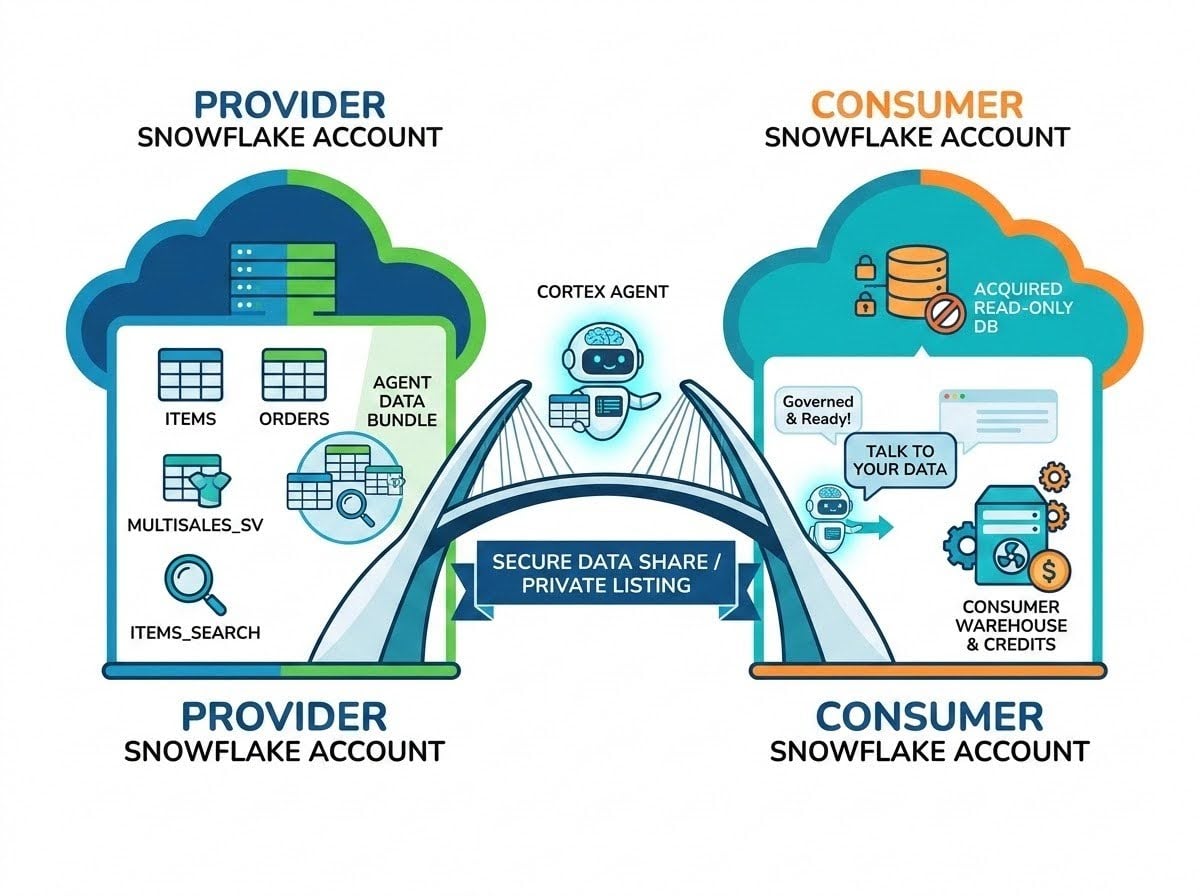
You've built a Cortex Agent that answers plain-English questions about your data. Now someone in a different Snowflake account wants it, too — another team with its own Snowflake account, a partner, or a customer who wants to ask questions of the data you manage for them, from inside their own Snowflake.
You could stand up a web app or an API for them, but there's a more Snowflake-native answer: share the agent itself. With Secure Data Sharing, packaged as a private listing, the agent, its semantic views, its Cortex Search Services, and the tables behind them show up in the other account as a read-only database. No copies, no pipelines. And the Consumer can use the agent right away — in CoWork, Snowsight, through the API, or behind their own MCP server.
In this post we'll walk through sharing a Cortex Agent from one Snowflake account to another, using the restaurant-sales agent from my previous post. The complete example is in this Snowflake Notebook.
We'll start with why you'd share an agent and how Secure Data Sharing and listings apply to agents. Then we'll package the agent in a share, publish it as a private listing, get the listing on the Consumer side, and finish by putting an MCP server in front of the shared agent.
TL;DR
- A Cortex Agent can be shared with Secure Data Sharing: grant the agent and every object it uses — semantic view, Cortex Search Service, underlying tables, etc — to a share, using a database role to bundle the grants.
- Offer the share through a private listing: the share is what is shared, and the listing is who it's shared with.
- The Consumer gets the listing as a read-only database and grants the database role to their own roles.
- On the Consumer side, the shared agent runs on the Consumer's warehouse and credits.
- The Consumer can create their own MCP server over the shared agent, or access via CoWork.
Why Share an Agent?
There are a few common reasons to put an agent in someone else's account:
- Internal teams. Many organizations run more than one Snowflake account — per business unit, per region, per environment. The team that built the agent can share it with the teams that need it.
- Partners. If you already share data with a partner, sharing an agent over that data gives them governed, natural-language access to it instead of a pile of tables.
- Customers. If you manage data on behalf of a customer, you can ship the agent with the data, so they can ask questions of it from their own Snowflake.
In each case, the Consumer gets the full agent experience without you hosting anything for them — in their Snowsight, it shows up under AI & ML → Agents with a Source of Shared.
Secure Data Sharing, Listings, and Agents
Secure Data Sharing works the same way for agents as it does for tables. The Provider grants objects to a share, and the Consumer gets a database containing those objects, read-only. Within a region, nothing is copied: the Consumer queries the Provider's data in place, and changes on the Provider side are visible immediately.
What's specific to agents is that an agent is only useful if the things it calls come along with it. Sharing an agent means granting the agent and every linked object to the share:
- the agent itself (
USAGE) - its semantic views (
SELECTandREFERENCES) - its Cortex Search Services (
USAGE) - the tables behind the semantic view (
SELECT)
Two constraints are worth knowing up front. First, the linked objects must be in the same database as the agent. Second, only agents whose tools are semantic views, Cortex Search Services, or functions can be shared — an agent that uses procedures, skills, or MCP connectors can't be. The docs list the full set of requirements and limitations for sharing agents.
The share handles what is shared. A listing handles who it's shared with. A listing is an enhanced form of Secure Data Sharing — the same Provider and Consumer model — and it's the recommended way to offer a share to other accounts. A private listing is offered only to the specific Consumer accounts you choose. Listings also add things a direct share can't do, like reaching accounts in other regions or publishing on the Snowflake Marketplace; this post stays within a single region.
It's also worth being clear about who pays. The Consumer is billed for the tokens their invocations use and for the warehouse that runs the agent's queries — the agent runs queries on the Consumer's warehouse, not the Provider's.
Finally, if the Consumer you want to share with doesn't have Snowflake at all, you can create a Reader Account for them and add it to the listing. More on that in the next post.
The Example
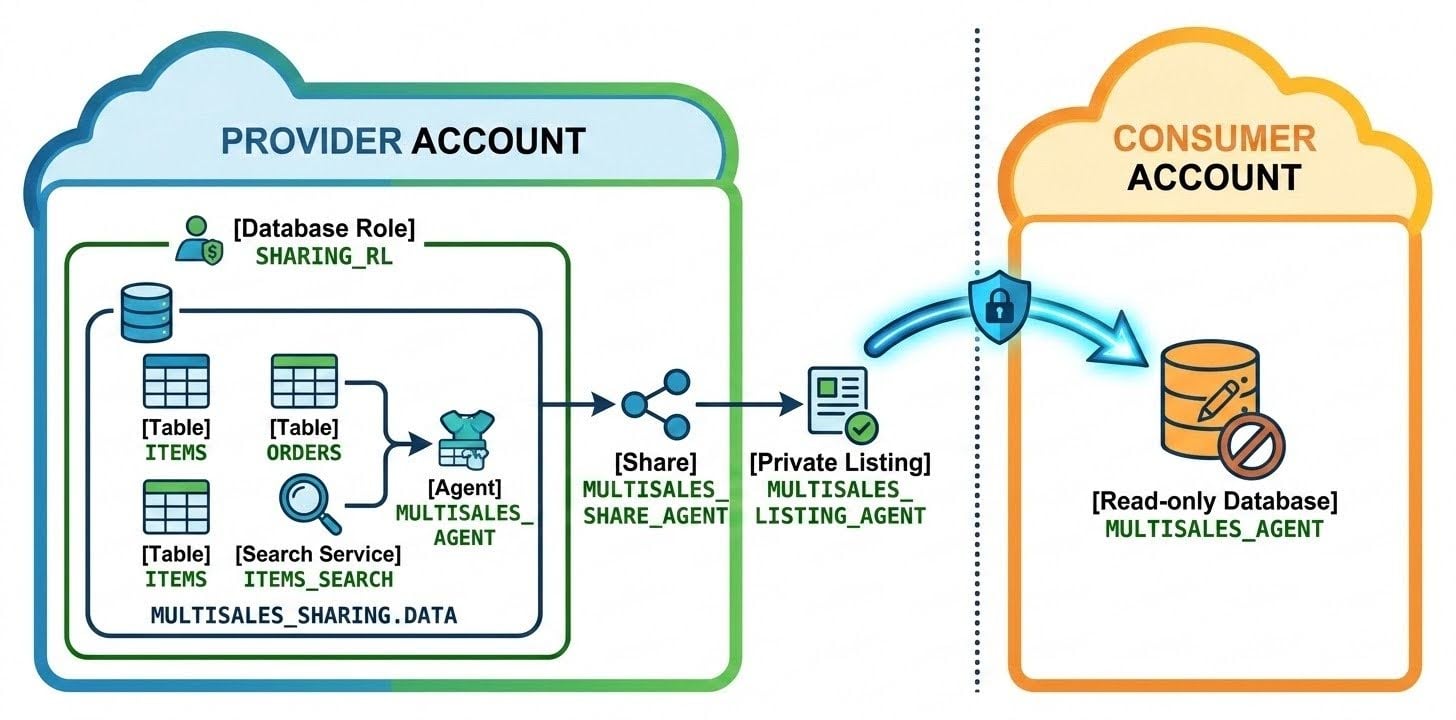
The example we will use is the restaurant-sales data from the previous post: menu items (ITEMS) and daily sales by store (ORDERS) for three restaurant chains, a Cortex Search Service (ITEMS_SEARCH) on the menu item names, a semantic view (MULTISALES_SV), and an agent (MULTISALES_AGENT) that uses them. The notebook creates all of them in MULTISALES_SHARING.DATA.
That last detail matters. The agent's tools point at the semantic view and search service in the same database, which is exactly what sharing requires:
"tool_resources": {
    "analyst1": {
        "execution_environment": {
            "type": "warehouse",
            "warehouse": "MULTISALES_WH"
        },
        "semantic_view" :"MULTISALES_SHARING.DATA.MULTISALES_SV"
    },
    "search1": {
        "id_column": "ITEM_ID",
        "max_results": 10,
        "search_service": "MULTISALES_SHARING.DATA.ITEMS_SEARCH",
        "title_column": "ITEM"
    }
}
Note: this agent can see every restaurant's data, so sharing it shares all of it. That's appropriate for an internal team or a trusted partner. If you want to give each restaurant chain only their own data — and an agent that can only see it — that's the subject of the next post.
Provider Side: Packaging and Publishing the Agent
A Database Role for the Shared Objects
We could grant each object directly to the share, but a database role is cleaner. It holds exactly the set of privileges we want to share, it's one thing to grant to the share, and it comes across to the Consumer as a role they can grant to their own users.
The database role gets usage on the database and schema, plus every object the agent needs:
CREATE DATABASE ROLE IF NOT EXISTS multisales_sharing.sharing_rl;
GRANT USAGE ON DATABASE              multisales_sharing                       TO DATABASE ROLE multisales_sharing.sharing_rl;
GRANT USAGE ON SCHEMA                multisales_sharing.data                  TO DATABASE ROLE multisales_sharing.sharing_rl;
GRANT SELECT ON TABLE                multisales_sharing.data.items            TO DATABASE ROLE multisales_sharing.sharing_rl;
GRANT SELECT ON TABLE                multisales_sharing.data.orders           TO DATABASE ROLE multisales_sharing.sharing_rl;
GRANT USAGE ON CORTEX SEARCH SERVICE multisales_sharing.data.items_search     TO DATABASE ROLE multisales_sharing.sharing_rl;
GRANT REFERENCES ON SEMANTIC VIEW    multisales_sharing.data.multisales_sv    TO DATABASE ROLE multisales_sharing.sharing_rl;
GRANT SELECT ON SEMANTIC VIEW        multisales_sharing.data.multisales_sv    TO DATABASE ROLE multisales_sharing.sharing_rl;
GRANT USAGE ON AGENT                 multisales_sharing.data.multisales_agent TO DATABASE ROLE multisales_sharing.sharing_rl;
Two things are easy to miss here. The semantic view needs both REFERENCES and SELECT. And the tables behind the semantic view (ITEMS and ORDERS) have to be granted too — sharing the semantic view doesn't bring its tables along on its own. Beyond that, the agent needs nothing special: USAGE ON AGENT plus the objects its tools use is the whole list.
Creating the Share
Creating the share requires ACCOUNTADMIN (or another role with the CREATE SHARE privilege). We grant usage on the database and then grant the database role to the share:
USE ROLE accountadmin;

CREATE SHARE IF NOT EXISTS multisales_share_agent;
GRANT USAGE ON DATABASE multisales_sharing TO SHARE multisales_share_agent;
GRANT DATABASE ROLE multisales_sharing.sharing_rl TO SHARE multisales_share_agent;
That last grant does most of the work. Granting the database role to the share brings along every object the role has privileges on — the agent, semantic view, search service, and tables — so we don't have to grant each one to the share individually.
Publishing a Private Listing
Now we wrap the share in a listing. A private listing needs at least one target account up front — that's how Snowflake knows it's private rather than a Marketplace listing. The listing is defined with a short YAML manifest that gives it a title and description and names the organization and account to share with:
USE ROLE accountadmin;

CREATE EXTERNAL LISTING multisales_listing_agent
    SHARE multisales_share_agent
    AS
$$
title: "Multisales Listing Agent"
description: "Sales agent that enables talk-to-your-data for sales data from multiple restaurant franchises."
listing_terms:
   type: "OFFLINE"
external_targets:
   access:
    - organization: <org>
      accounts: [ <acct> ]
$$
    PUBLISH = FALSE
    REVIEW = FALSE;
Marketplace listings go through a review before they're published, but private listings don't, so we can publish it right away:
ALTER LISTING multisales_listing_agent PUBLISH;
To share with another Consumer later, add it as a target (and REMOVE TARGETS works the same way):
ALTER LISTING multisales_listing_agent ADD TARGETS
$$
external_targets:
  access:
    - organization: <org>
      accounts: [ <acct> ]
$$;
Note: a free private listing like this one doesn't require accepting the Snowflake Marketplace Provider and Consumer Terms, as long as your account has accepted the Customer-Controlled Data Sharing Functionality Terms.
One more thing to keep in mind as the agent evolves: if you later add a tool to the agent, you have to grant the new object to the database role as well. Shared agents don't pick up new tools automatically, and a database role that's been granted to a share doesn't support future grants.
Consumer Side: Getting the Listing and Using the Agent
Now we flip over to the Consumer account. Using ACCOUNTADMIN (or another role that can work with listings), we can see the listings that have been shared with us:
SHOW AVAILABLE LISTINGS IS_SHARED_WITH_ME=TRUE;
The Multisales Listing Agent listing should be there. Note its global_name, and use it to create a database from the listing:
CREATE DATABASE multisales_agent FROM LISTING <global_name>;
The new database has a DATA schema with everything we shared. A quick check confirms it all came across:
SHOW TABLES IN SCHEMA multisales_agent.data;
SHOW CORTEX SEARCH SERVICES IN SCHEMA multisales_agent.data;
SHOW SEMANTIC VIEWS IN SCHEMA multisales_agent.data;
SHOW AGENTS IN SCHEMA multisales_agent.data;
Note that the agent's spec still refers to MULTISALES_SHARING.DATA.MULTISALES_SV and MULTISALES_SHARING.DATA.ITEMS_SEARCH — the Provider's names. That's fine. The shared agent works as-is, even though the Consumer's database has a different name.
To let users in the Consumer account use the agent, grant the shared database role to one of their roles:
GRANT DATABASE ROLE multisales_agent.sharing_rl TO ROLE <role>;
That role also needs the SNOWFLAKE.CORTEX_USER database role.
What about the warehouse? The agent's spec names MULTISALES_WH, but that's a Provider-side warehouse that doesn't exist in the Consumer account. On the Consumer side, the shared agent runs on the user's default warehouse, so make sure your users have one set.
At this point, the agent shows up in Snowsight under AI & ML → Agent Studio. If you navigate to the agent to the Preview tab, you can ask it something like "Which chicken sandwich sold the most in May 2024?"
To use the agent in CoWork, it depends on how the Consumer account is set up. If the account doesn't have a CoWork (Snowflake Intelligence) object, the agent appears automatically for users whose role has the database role. If it does, add the agent to that object (this takes the MODIFY privilege on the object, which ACCOUNTADMIN has):
ALTER SNOWFLAKE INTELLIGENCE SNOWFLAKE_INTELLIGENCE_OBJECT_DEFAULT ADD AGENT multisales_agent.data.multisales_agent;
Exposing the Shared Agent with an MCP Server
MCP servers aren't part of the share. The notebook creates one on the Provider side, but that's for the Provider's own users. If the Consumer wants to expose the shared agent to MCP clients, they create their own Snowflake-managed MCP server.
The MCP server has to live in a database and schema the Consumer owns — the database created from the listing is read-only. Its tool points at the agent by its Consumer-side name:
CREATE OR REPLACE MCP SERVER <DB>.<SCHEMA>.multisales_mcp
    FROM SPECIFICATION
$$
{
    "version":1,
    "tools": [
        {
            "title":"Multisales Agent",
            "name":"multisales_agent",
            "identifier":"MULTISALES_AGENT.DATA.MULTISALES_AGENT",
            "type":"CORTEX_AGENT_RUN",
            "description":"Agent that allows you to ask questions about restaurant sales for various restaurants franchises, each with multiple stores."
        }
    ]
}
$$;
Access to the MCP server doesn't grant access to its tools. The role your MCP users connect with needs USAGE on the MCP server itself, the shared database role (which covers the agent, semantic view, search service, and tables), and SNOWFLAKE.CORTEX_USER. MCP clients then connect at:
https://<account_url>/api/v2/databases/<DB>/schemas/<SCHEMA>/mcp-servers/multisales_mcp
A couple of best practices apply here, too. Keep the agent as the only tool on this server — adding a general SQL execution tool next to it would let clients bypass the agent and its semantic view. And if your MCP clients authenticate with a Programmatic Access Token (PAT), tie it to a least-privileged role that has just these grants.
Going Further
A private listing is just one kind of listing. You can also publish a public listing on the Snowflake Marketplace for anyone to discover, or use an organizational listing to share with other accounts in your own organization — a good fit for the internal-teams case. And if your Consumers are in other regions, the same listing can reach them with Cross-Cloud Auto-Fulfillment, which replicates the agent and its objects to the Consumer's region on a refresh schedule you set (with the Provider paying for the replication).
Wrapping Up
Sharing a Cortex Agent turns "talk to your data" from something you host into something you can hand to another Snowflake account, with the agent, its tools, and its data all governed by Snowflake. Bundle the agent and everything it uses in a database role, share it, and publish the share as a private listing — the Consumer can get it, grant it, and start asking questions.
To try it, run the notebook in your Provider account, publish the private listing to a second account, create a database from the listing, and ask the agent a question. Then create the Consumer-side MCP server and point an MCP client at it.
Sharing the whole agent works when the Consumer should see everything. In the next post, we'll look at sharing just one restaurant's data — and an agent that can only see it.
This content is provided as is, and is not maintained on an ongoing basis. It may be out of date with current Snowflake instances
