Oct 19, 2026/14 min readData Engineering
Achieving 41 GB/sec on 1 Table: Benchmarking Elastic Channels for Snowpipe Streaming


Legend has it that Snowflake got its name because the company’s founders just really loved hitting the slopes, so it only felt right to test out our new Elastic Channels by putting an entire ski season's worth of resort sales through the system.
As your applications grow and more devices come online, you need a simple way to bring data into Snowflake for analytics and AI. We recently announced the general availability of Elastic Channels for Snowpipe Streaming, which let you send events directly from applications, devices and services while Snowflake manages ingestion scale. But how does that simpler path perform as data volumes grow?
To explore that question, we created a synthetic resort-sales workload and increased the number of independent producers achieving a total throughput of 41 GB/sec. We ran this benchmark with the destination as a Snowflake FDN (native) table and repeated it for the Snowflake managed Apache Iceberg™ table. This post examines how throughput and data freshness changed as the load increased and what the results mean for your own workloads.
Background
Snowpipe Streaming delivers rigorous exactly-once semantics and strict message ordering. For mission-critical workloads such as change data capture (CDC), financial transactions and inventory management, that meticulous bookkeeping is nonnegotiable — complete with explicit channel management, offset tracking and client-side schema coordination.
But if you’re building telemetry pipelines, Internet of Things (IoT) device networks or high-volume log analytics where at-least-once delivery is entirely sufficient, all that extra overhead can become unnecessary friction. That’s precisely why we introduced Elastic Channels: to strip away the complexity of channel lifecycle management and offset bookkeeping. By letting Snowflake handle the scaling and channel distribution automatically, you get lightning-fast ingestion for your lighter-weight data streams without the engineering overhead.
The previous version of Snowpipe Streaming had clients generate columnar data and metadata for every batch of files, upload it and register it with Snowflake for processing. In 2025, Snowflake released the high-performance architecture: server-side PIPE objects, Rust-based SDK cores and a redesigned ingest path that removed much of the client-side burden. The high-performance architecture changed the client so now it only needs to generate and send JSON payloads to Snowflake. Snowflake accepts those JSON payloads and asynchronously processes this data with PIPEs running in our highly scalable Snowpipe infrastructure. These changes removed a substantial amount of the compute and memory overhead from the clients, simplifying deployments. Elastic Channels (client.get_elastic_channel()) build on the high-performance architecture — one SDK client opens a pooled channel automatically, with no channel names and no offset management — while writing into the same high-performance pipe.
The question we set out to answer in this test was straightforward: How fast can Elastic Channels actually go, and how efficiently?
The answer surprised us. With an optimal client-side design and a horizontally scaled Kubernetes fleet, we measured sustained aggregate throughput more than 3.5x previous versions, on fewer total cores, less memory and far fewer worker processes than comparable petabyte-scale ingest benchmarks published elsewhere in the industry.
At a glance
Snowpipe Streaming with Elastic Channels sustained 41.8 GB/sec (133.5 million rows per second) to a single FDN Snowflake table — more than 3.5x previous versions of Snowpipe Streaming — using 455 lightweight Kubernetes workers on 455 vCPU and 455 GiB of memory, with zero errors and linear scaling across every step tested.
Peak throughput (uncompressed) |
41.8 GB/sec |
Peak row rate |
133.5 million rows per second |
Workers |
455 (1 elastic channel) |
Compute footprint |
455 vCPU · 455 GiB memory |
Kubernetes nodes |
15 × m7g.8xlarge (Graviton) |
vs. previous Snowpipe Streaming |
>3.5x higher throughput |
What we tested
We built an open source benchmark harness (snowflake-elastic-channels) that exercises the snowpipe-streaming Python SDK directly:
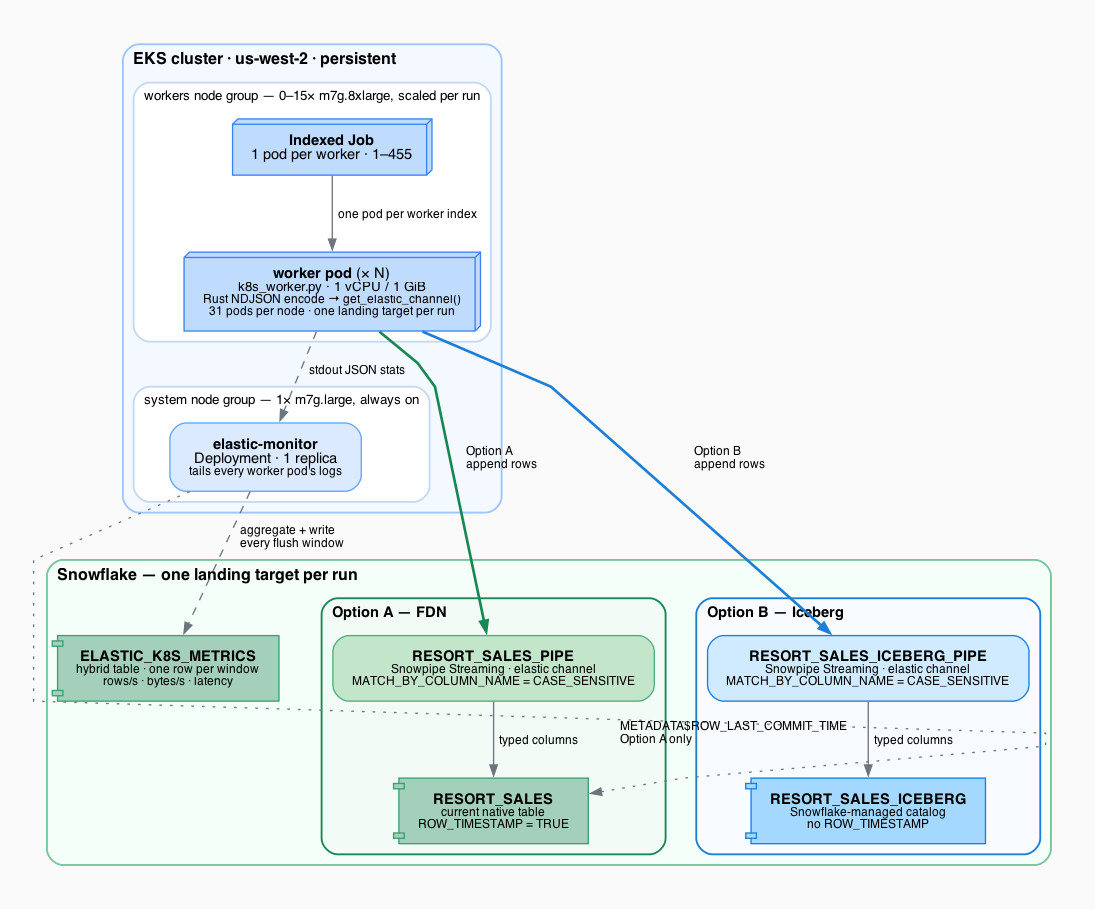
- Simple deployment: One worker pod = one SDK client = one Elastic Channel against a shared RESORT_SALES_PIPE.
- Rate and throughput configuration: Target rate per worker for a fixed duration; aggregate throughput is the sum across pods.
- Live observability: A cluster-resident monitor tails worker logs and writes throughput/latency windows to Snowflake (
ELASTIC_K8S_METRICS) while the run is still in progress. - Typed landing:
MATCH_BY_COLUMN_NAME = CASE_SENSITIVEmaps JSON keys straight to table columns (not a singleVARIANTblob). - Configurable destination: Data lands in FDN tables or Apache Iceberg tables.
Every measurement below is an actual number from a horizontal scale-out on Amazon EKS in us-west-2, in September 2026. We report uncompressed bytes and row counts as observed by the SDK and monitor — no extrapolation.
The workload: Synthetic resort sales at production scale
Reading from Kafka, S3 or a public data set introduces producer limits that obscure what Snowpipe Streaming itself can do. So we fabricated data in process to remove any external bottlenecks.
The use case we chose included point-of-sale (POS) transactions across a synthetic ski resort portfolio: 42 resorts, four product categories (season tickets, day tickets, food and drink, merchandise), payment methods, customer types and per-resort pricing tiers. Here is the model’s single-table schema:
TXID, RESORT, CATEGORY, ITEM, CUSTOMER_TYPE, PAYMENT_METHOD,
QUANTITY, UNIT_PRICE, AMOUNT, SALE_TIME, RUN_ID, WORKER_ID
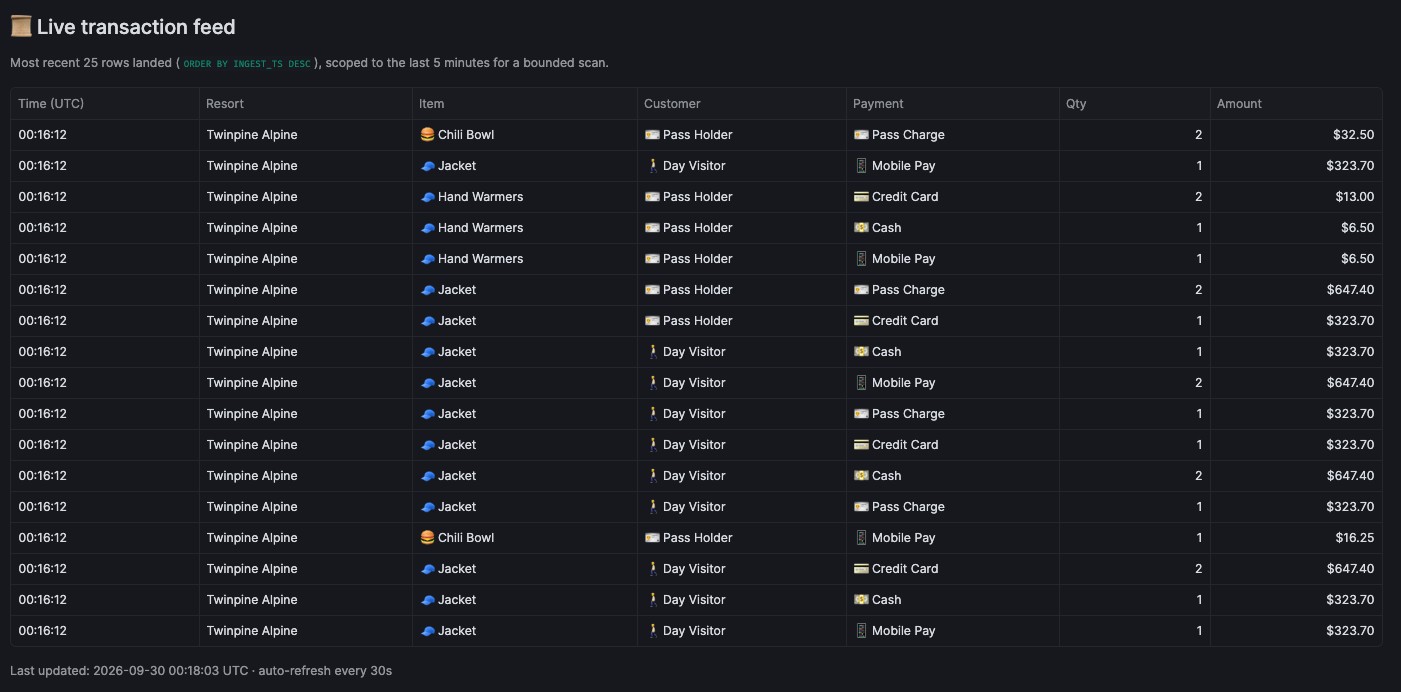
Each resort has a deterministic sales profile (relative volume, category mix, price tier, passholder share) so aggregate analytics look realistic — revenue by resort, mix shifts, geographic patterns — rather than like uniform random noise. A Streamlit dashboard in the repo visualizes the live feed as if you were watching a national resort chain on a busy holiday weekend.
We deliberately ran far above what any single resort POS would generate. That was the point: Isolate Snowflake ingest capacity, not POS realism. Rows averaged ~277 bytes uncompressed NDJSON. Generation was RNG-free on the hot path — a prebuilt weighted table is round-robin indexed — so the client never became the bottleneck at target throughput.
A Streamlit dashboard was also available for resort leadership to monitor sales and revenue across their resorts and to monitor customer behavior in real time. Point-of-sale transactions were included in the dashboard in well under a minute.

Kubernetes deployment
The benchmark ran on a persistent EKS cluster (snowflake-elastic-channels). Worker nodes scaled up for each run and back to zero afterward; only a small system node and monitor deployment stayed always on.
Architecture
Benchmark parameters
| Parameter | Value |
|---|---|
| Worker pods | 455 |
| Channels | 1 (shared, elastic) |
| Worker CPU request/limit | 1 vCPU |
| Worker memory request/limit | 1 GiB |
| Workers per node | 31 (m7g.8xlarge, Graviton arm64) |
| Worker nodes at peak | 15 |
| Total worker vCPU | 455 |
| Total worker memory | 455 GiB |
| Message format | NDJSON (typed column mapping) |
| Average row size (uncompressed) | ~277 bytes |
| Fast encode path | ELASTIC_FAST_JSON_ENCODE=true (default) |
| SDK | snowpipe-streaming Python package |
| Ingest pipe | RESORT_SALES_PIPE → RESORT_SALES |
Worker pods were right-sized from measured steady-state usage. CPU is the binding constraint of node packing needing ~240m-540m CPU where 1000m is 1 full vCPU which was allocated. Memory utilization was between 68-183 MiB RSS observed where 1Gi was allocated. An m7g.8xlarge schedules 31 workers per node with headroom to spare on memory.
Performance results
Peak sustained throughput on FDN
| Metric | Value |
|---|---|
| Sustained throughput (uncompressed) | 41.8 GB/sec |
| Sustained row rate | 133.5M rows per second |
| Workers at peak | 455 |
| Per-worker throughput | ~92 MB/sec (~293K rows per second), essentially flat from 15 to 455 workers |
| Throttling | None observed |
Comparison to Snowpipe Streaming
At Summit 2024, Snowflake demonstrated Snowpipe Streaming’s previous version ingesting at roughly 10 GB/sec aggregate to a single table — a landmark result at the time. Our benchmark runs on the high-performance Snowpipe Streaming using the newly released Elastic Channels feature, which produced throughput levels greater than 3.5x the previous benchmarks on both FDN and Snowflake managed Apache Iceberg tables.
| Summit 2024 original demo (approx.) | HP + Elastic Channels to FDN tables | HP + Elastic Channels to Snowflake managed Apache Iceberg tables | |
|---|---|---|---|
| Throughput (uncompressed) | ~10 GB/sec | 41.8 GB/sec | 39.0 GB/sec |
| Row rate | ~39M rows per second¹ | 133.5M rows per second | 121.6M rows per second |
| Speedup | — | > 3.5x |
¹ Estimated at ~277 bytes/row to match this workload's row shape.
Horizontal scaling (EKS scale-out)
Throughput tracked worker count almost exactly at every step — clean linear scaling with no plateau. Latency stayed in a bounded range even as throughput climbed: Batch ack (SDK future completion) held near 600 ms on average across all steps. The batch ack time is the total duration from the client sending the data into the SDK until the callback is received (data is durable). Ingest-to-visible latency (SALE_TIME → METADATA$ROW_LAST_COMMIT_TIME) remained in the ~12-29-second band — data queryable within seconds of landing, even at 133.5 million rows per second. This is the duration until data is included in queries.
| Workers | Nodes | Rows per second | Throughput | Average batch ack | Average ingest-to-visible² |
|---|---|---|---|---|---|
| 15 | 1 | 4.4M | 1.38 GB/sec | 582 ms | 11.7 s |
| 90 | 3 | 26.6M | 8.27 GB/sec | 595 ms | 14.0 s |
| 180 | 6 | 52.8M | 16.52 GB/sec | 611 ms | 16.7 s |
| 300 | 10 | 87.8M | 27.50 GB/sec | 572 ms | 17.7 s |
| 420 | 14 | 123.2M | 38.6 GB/sec | 587 ms | 28.9 s |
| 455 | 15 | 133.5M | 41.84 GB/sec | 570 ms | 19.9 s |
² Ingest-to-visible latency measured as TIMESTAMPDIFF(SALE_TIME, METADATA$ROW_LAST_COMMIT_TIME) from ELASTIC_K8S_METRICS by the cluster monitor.
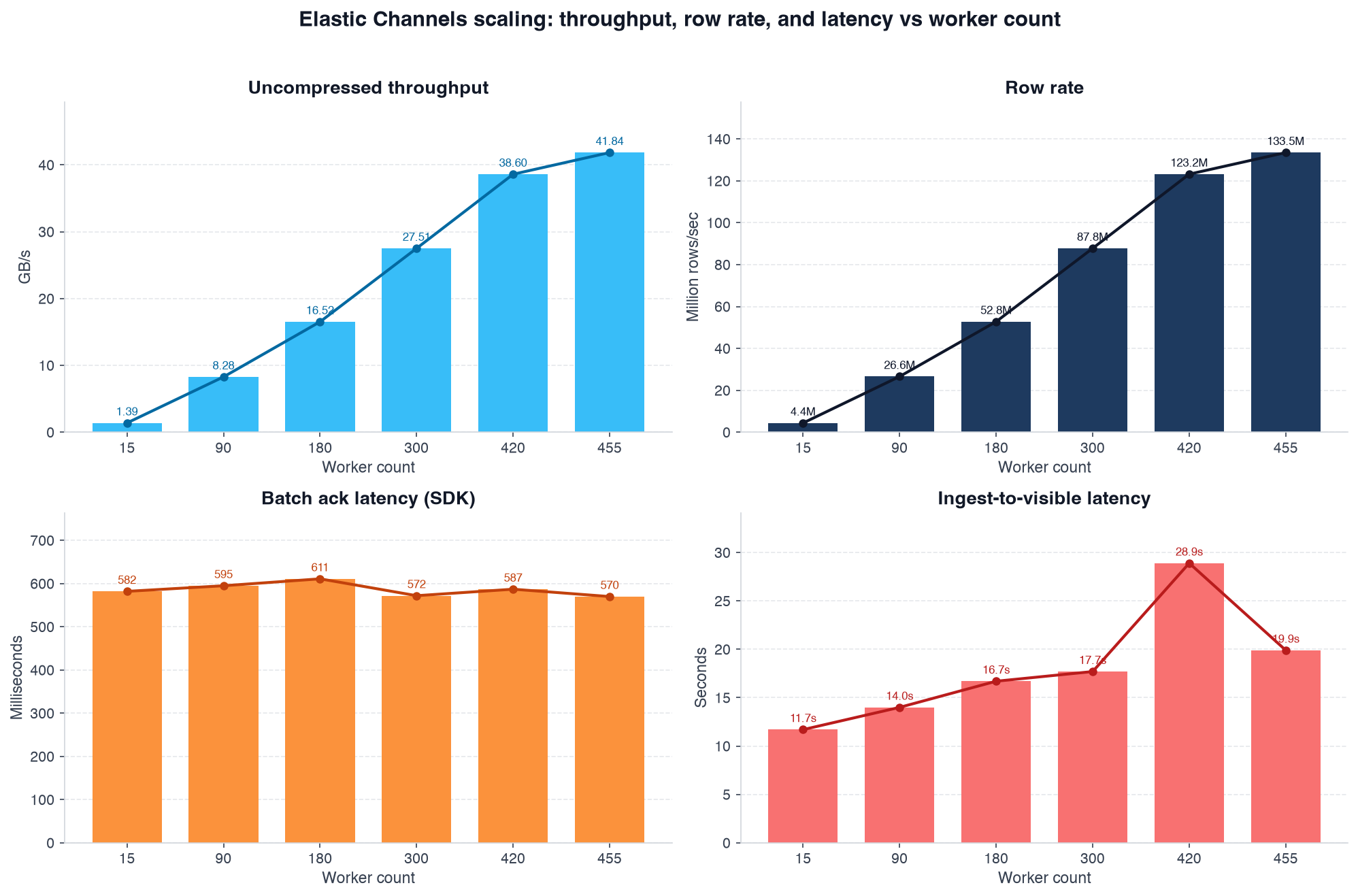
Two latency metrics answer two different questions:
- Batch ack latency (~570-611 ms on average) answers the question “How fast did the SDK accept my batch?” It’s measured client-side from
append_rows()until the SDK future completes. It barely moved across the full 15 → 455 worker range; the client was never waiting on Snowflake to absorb the next batch. - Ingest-to-visible latency (~12-29 s on average) answers the question “When can I query this row?” It’s measured server-side as
SALE_TIME→METADATA$ROW_LAST_COMMIT_TIME. This is the number that matters for dashboards and operational analytics. It did not grow in proportion to throughput — a 30x increase in row rate did not produce a 30x increase in time-to-queryable — and remained in a practical range for near-real-time resort-sales dashboards throughout the campaign.
The scaling lever is horizontal: Add lightweight worker pods, not bigger pods. Giving an individual worker more CPU did not raise its throughput in our tests; each 1 vCPU / 1 GiB pod contributed the same ~0.086 GiB/sec independently.
Resource efficiency at peak
Putting the headline numbers next to a typical industry petabyte-scale streaming benchmark layout makes the efficiency clear.
| Typical large-scale streaming benchmark³ | Snowpipe Streaming Elastic Channels to FDN table | Snowpipe Streaming Elastic Channels to Snowflake managed Apache Iceberg Table | |
|---|---|---|---|
| Concurrent workers | 2,048 | 455 | 455 |
| Cores per worker | 1.5 | 1.0 | 1.0 |
| Memory per worker | 2 GiB | 1 GiB | 1 GiB |
| Total worker cores | 3,072 | 455 | 455 |
| Total worker memory | 4,096 GiB | 455 GiB | 455 GiB |
| Sustained throughput | ~12 GB/sec | ~41.8 GB/sec | ~39.0 GB/sec |
| Sustained rows per second | ~12M | 133.5M | 121.6M |
³ Representative published parameters for a 24-hour, petabyte-scale single-table ingest benchmark using thousands of Kubernetes producer pods and a native binary row encoder.
We used roughly one-seventh the cores, one-ninth the memory and fewer than one-quarter the worker processes — and still delivered more than 3x the bytes per second and more than 10x the rows per second on both FDN and Apache Iceberg tables as the destination.
How we got here: Snowpipe Streaming evolution
This project started where many Snowflake streaming evaluations do — on large EC2 instances with dozens of workers per host, explicit channels and Python row dicts built on every batch. Those runs were valuable: They exposed client-side ceilings long before Snowflake did.
| Era | What we measured | What limited us |
|---|---|---|
| Snowpipe Streaming previous version (Summit 2024 demo) | ~10 GB/sec on-stage; sub-GB/sec per host in our early ramps | Channel/offset overhead, client-side columnarization and metadata, classic SDK architecture |
| High-performance architecture (released 2025) | ~2-8 GB/sec per large instance; ~16 GB/sec sustained multi-node on EC2 | Network per host, worker/channel management, Python encode path |
| Elastic Channels + EKS + Rust encode | 41.8 GB/sec at 455 workers | Nothing in this test — linear scaling through the supported range |
Three changes compounded:
- Elastic Channels:
get_elastic_channel()pools all channels under one client. Application code stops managing names and offsets. - Kubernetes at the right granularity: One pod per worker, 1 vCPU each, 31 pods per Graviton node. Scale the fleet, not the process.
- A Rust fast path for generation and encoding: Python is orchestration, not the hot loop, as described below.
The updates to Snowpipe Streaming, including adding Elastic Channels, make sending data into Snowflake better than ever. Snowpipe Streaming high-performance architecture allows for huge volumes of data to be ingested quickly and easily in scalable, serverless infrastructure and queried in seconds from the source. Billing is simple, based on gigabytes ingested. There isn’t an easier and more scalable way to query streaming data in the market today.
Why Rust for data encoding
At hundreds of thousands of rows per second per worker, Python dict allocation and JSON serialization dominate the CPU. The SDK's default path accepts row dicts and re-encodes them internally — correct, but redundant when you already know the schema.
In order to most efficiently use the worker’s CPU and memory, data was generated and serialized in Rust. This uses internal methods of the SDK. These methods may change in the future, complicating upgrades.
We added an optional native extension (native/, built with PyO3 + maturin into the worker Docker image) that does both row generation and NDJSON serialization in Rust:
- Skip per-row Python objects: No
dictper row, nomsgspecstruct round-trip on the hot path. - Skip the SDK's second encode:
fast_append.pyhands preserialized bytes directly to the Elastic Channel's FFI append, bypassingappend_rows_with_wait's internalencode_linespass. - Stay byte-identical to Python:
native/generate_tables.pyderives all weighted tables and preformatted price strings fromresort_sales.pyitself. Rust replays resolved data; it does not reimplement business logic. Unit tests assert the native and Python paths produce identical NDJSON.
UNIT_PRICE and AMOUNT are baked as decimal strings at codegen time (via Python's json.dumps formatting) so Rust never disagrees with Python float formatting on the finite set of (item, tier, quantity) combinations that occur.
When the wheel is not installed, the harness falls back to msgspec encoding in Python automatically. In production benchmark runs, Rust is on by default (ELASTIC_FAST_JSON_ENCODE=true).
The result: Each 1 vCPU worker sustains ~0.086 GiB/sec with CPU to spare for the SDK's network I/O — the per-worker throughput that makes linear 455-worker scaling possible.
What we learned
- Elastic Channels are simple to integrate: Call
get_elastic_channel(), append rows (or preencoded bytes), done. - Throughput scales linearly with worker count: With the ability to scale from 15 to 455 workers, there’s no knee in the curve and no throttling observed.
- Right-sized pods beat fat pods: 1 vCPU / 1 GiB is enough when encoding is not your bottleneck.
- Synthetic workloads are a feature, not a cheat: Deterministic in-process generation removes I/O skew and makes runs reproducible — critical when you are comparing architectures, not data sources.
- Client-side optimization still matters: Even with a Rust server core, halving client CPU roughly doubles how many streams you can afford per host.
Watch a demo of Elastic Channels
Watch a video demonstrating Elastic Channels in Snowflake for an IoT use case.
Try it yourself
Everything needed to reproduce a minimal end-to-end run is in the repository. You do not need 455 workers to validate the pipeline — a single Elastic Channel for one minute is enough to prove connectivity, pipe configuration and live metrics.
1. Clone and configure
git clone https://github.com/snowflake-labs/snowflake-elastic-channels.git
cd snowflake-elastic-channels
pip install -r requirements.txt
cp .env.example .env   # Snowflake account, user, key-pair auth
python scripts/setup_elastic_ramp.py --ingest-ip <YOUR_INGEST_IP>
2. Perform one-time EKS setup (or skip if you only want local micro-benchmarks)
./infra/eks/create_cluster.sh
./infra/eks/build_and_push.sh
./infra/eks/create_secret.sh
./infra/eks/allowlist_eks.sh
./infra/eks/deploy_monitor.sh
3. Run a single worker / single channel smoke test
./infra/eks/run_job.sh quicktest-$(date +%Y%m%d%H%M%S) \
    --target-bps 100000000 \
    --duration-seconds 60 \
    --workers 1
Watch live throughput in Snowflake:
SELECT *
FROM SC_DB.SC_SCHEMA.ELASTIC_K8S_METRICS
WHERE RUN_ID = '<your-run-id>'
ORDER BY WINDOW_START;
When you are ready to explore scale, --workers accepts any value from 1 to 455; the node group sizes itself automatically.
4. Run local client-only benchmark (no Snowflake required)
python scripts/benchmark_client_cpu.py --workers 1 --aggregate-mbps 100Repository
Available on GitHub.
| Path | Purpose |
|---|---|
src/elastic_channels/k8s_worker.py |
Worker pod entry point |
src/elastic_channels/resort_sales.py |
Synthetic POS row generator |
native/ |
Rust NDJSON fast encoder |
infra/eks/run_job.sh |
Scale-out benchmark orchestrator |
streamlit/Monitor_App.py |
Live throughput/latency dashboard |
docs/architecture.md |
Full system design |
Caveats
- Results reflect one Snowflake account, one region (
us-west-2) and one synthetic row shape (~277-byte NDJSON rows) on one unclustered table. Your row width, pipe definition and account limits may differ. - The > 3.5x comparison is against Snowpipe Streaming as demonstrated at Summit 2024 (~10 GB/sec); this benchmark uses the high-performance architecture released in 2025 with Elastic Channels. Same row-size assumption (~277 bytes); directional, not a controlled side-by-side replay.
- Most scale-out steps are single measurements rather than repeated trials.
- Cost analysis is out of scope for this post; throughput-based Snowpipe Streaming pricing applies to ingested uncompressed volume and can be calculated per use case.
- To reach these volumes, customer account teams or support would need to be contacted to increase account capacity.
