Sep 14, 2026/7 min readData Engineering
Zero-Copy Interactive: Bring Low-Latency Analytics to Your Existing Tables


TL;DR: Snowflake's Interactive warehouse can now query all your existing tables with low latency and high concurrency, no need to create Interactive Tables first.
Interactive applications, dashboards, data-powered APIs and AI experiences need analytical queries to feel immediate. That's why we recently released Snowflake Interactive Analytics, powered by Interactive Tables and Interactive warehouses.
While many companies were eager to leverage the high-concurrency and low-latency benefits of Interactive Analytics, achieving that meant creating dedicated Interactive Tables. That created friction: copying data into a separate table type, managing an additional pipeline, even when the source data was already in Snowflake.
We heard the feedback and we acted on it as quickly as possible: Zero-Copy Interactive is now here, generally available to everyone. See the updated documentation for all details.
Zero-Copy Interactive
Zero-Copy Interactive lets an Interactive warehouse query standard Snowflake tables and Apache Iceberg™ tables directly. You can use the tables you already have, without first transforming them into Interactive tables.
That makes Zero-Copy Interactive useful across many architectures. One especially compelling scenario is Postgres-backed applications. It allows customers to keep Postgres for online transaction processing (OLTP), make the data available in Snowflake and use Snowflake's analytical engine for interactive online analytical processing (OLAP) — all without forcing developers to redesign the application data model.
From transactional data to insight in seconds
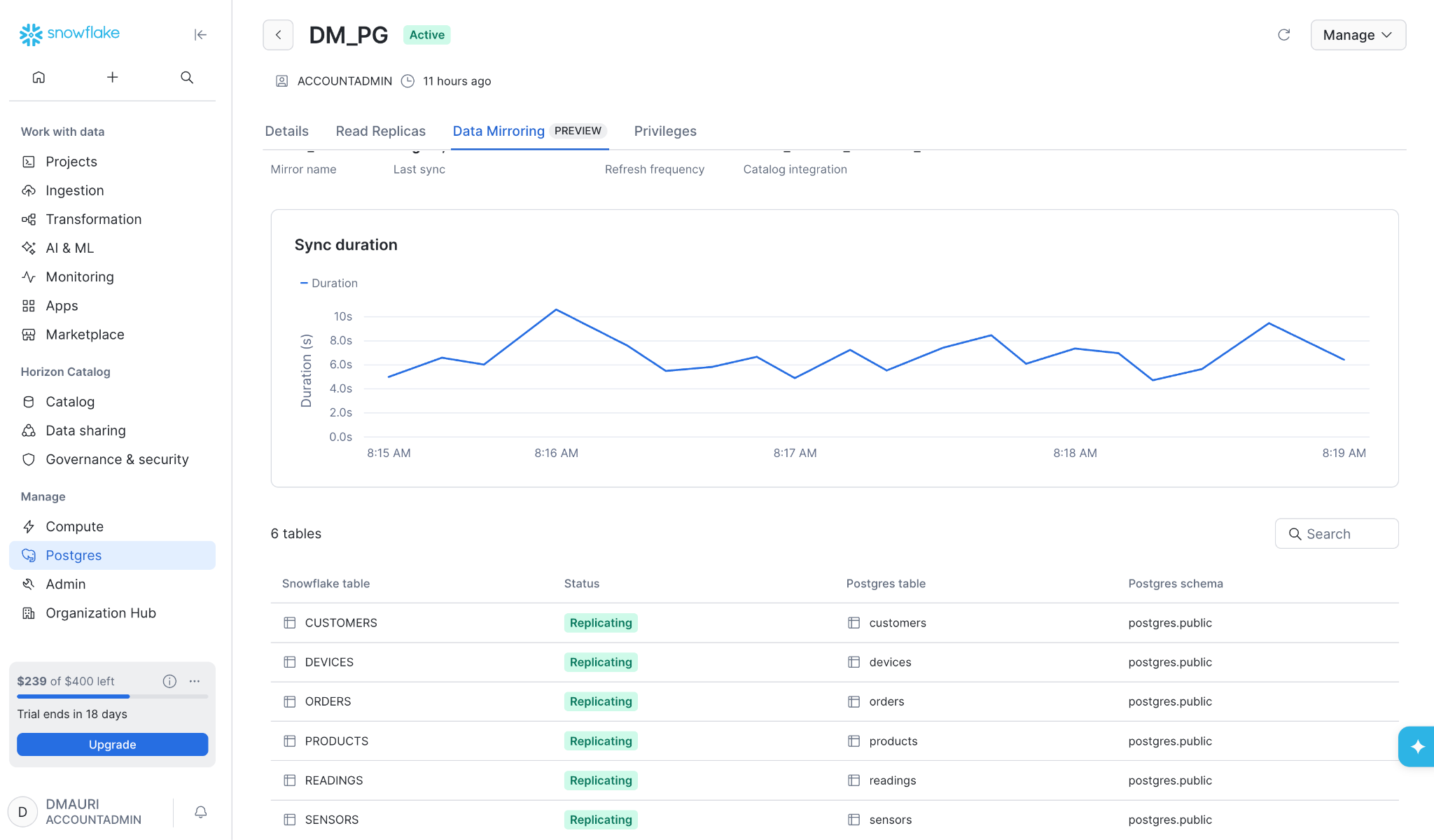
A good starting point for a full end-to-end experience is the seamless integration of transactional data in Postgres with Interactive Analytics via the "Mirror Data from Snowflake Postgres to Snowflake" guide.
The guide creates a simple Internet of Things (IoT) application in Snowflake Postgres with three related tables:
devicescontains the devices being monitored.sensorsdescribes the sensors attached to each device.readingsstores timestamped sensor values.
Snowflake Postgres data mirroring, recently released in preview, replicates the selected tables into Snowflake and keeps them synchronized. Once the mirror has completed its initial sync, you can use an interactive warehouse to query the mirrored tables with standard Snowflake SQL.
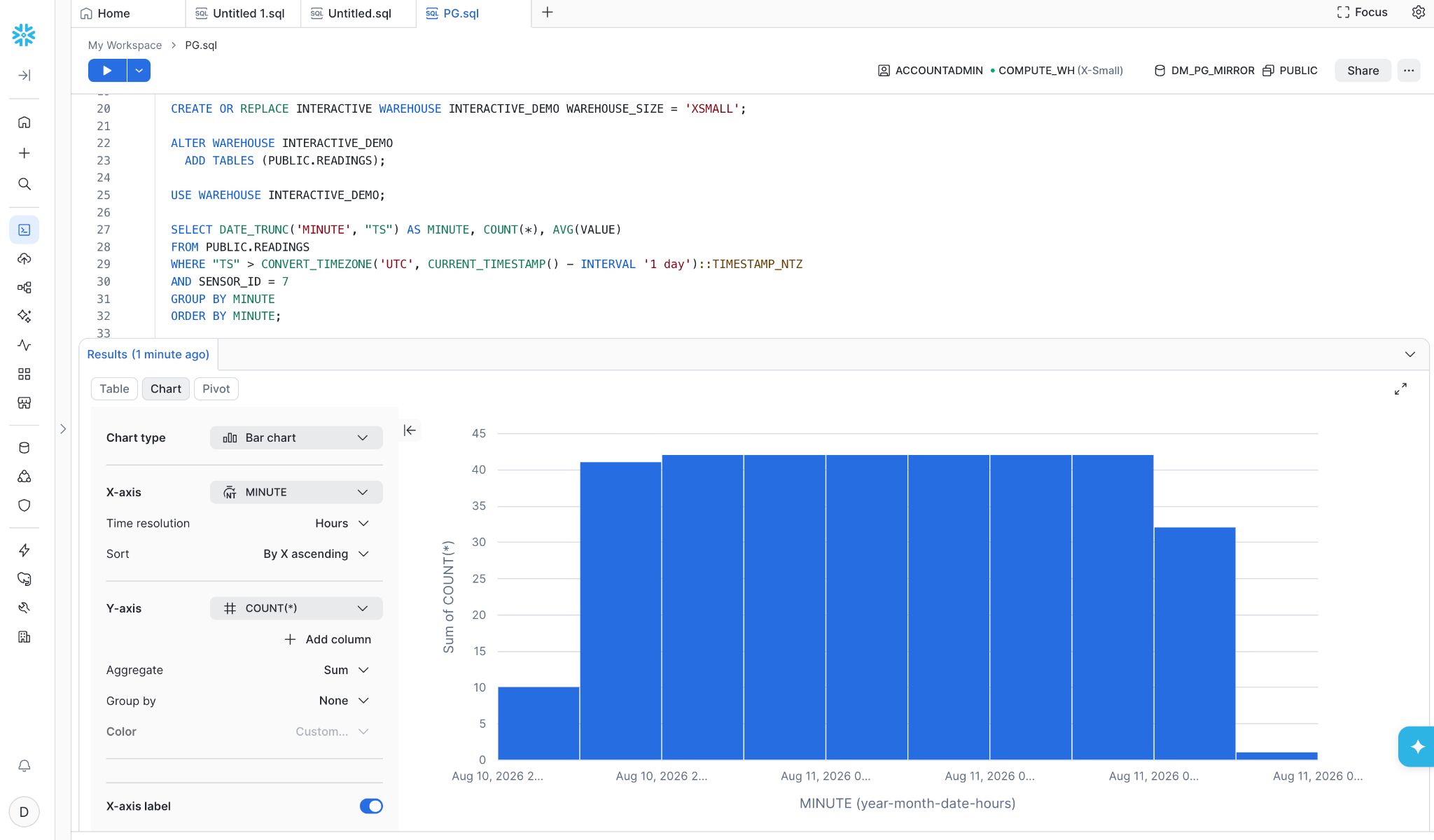
For example, the following query counts readings by sensor over the last 30 minutes.
First create an interactive warehouse, then attach the replicated table and use it:
CREATE OR REPLACE INTERACTIVE WAREHOUSE INTERACTIVE_DEMO
  WAREHOUSE_SIZE = 'XSMALL';

ALTER WAREHOUSE INTERACTIVE_DEMO
  ADD TABLES (PUBLIC.READINGS);

USE WAREHOUSE INTERACTIVE_DEMO;
Then run the query:
SELECT DATE_TRUNC('MINUTE', "TS") AS MINUTE, COUNT(*), AVG(VALUE)
FROM PUBLIC.READINGS
WHERE "TS" > CONVERT_TIMEZONE('UTC', CURRENT_TIMESTAMP() - INTERVAL '1 day')::TIMESTAMP_NTZ
AND SENSOR_ID = 7
GROUP BY MINUTE
ORDER BY MINUTE;
This is a natural interactive query: It filters on a recent time window, scans only the data relevant to the current operational view and returns a small aggregate result. It is the kind of query that can power a live monitoring dashboard, an operational API or an application experience that needs fresh answers without waiting for a batch analytics workflow.
The same pattern applies beyond IoT. You can mirror operational tables from Postgres, make existing Snowflake standard or Iceberg tables available to an interactive warehouse, and then serve the latency-sensitive analytical queries your application needs.
How does Zero-Copy Interactive work without creating new tables?
Zero-Copy Interactive lets an Interactive warehouse query standard and Iceberg tables directly. You can attach tables to the warehouse to indicate that their data should be maintained in the interactive warehouse cache:
ALTER WAREHOUSE INTERACTIVE_DEMO
  ADD TABLES (PUBLIC.READINGS);
Attaching a table is an optimization choice, not a prerequisite for querying it. Tables that are not attached can still be queried; their contents are moved into the cache as needed.
To see the full flow in action, generate another batch of mocked readings in Postgres:
INSERT INTO readings (sensor_id, value, ts)
SELECT
    (sample_id % 10) + 1, -- Cycles through the 10 sensors
    (random() * 40 + 10)::numeric(10,2), -- Generates a value between 10 and 50
    NOW() - (sample_id || ' minutes')::interval -- Offsets time into the past
FROM generate_series(1, 485) AS sample_id;
Then wait a few seconds for the mirror to apply the changes and rerun the analytical query in Snowflake. With mirroring latency as low as 30 seconds, the new readings can appear quickly in the result, while the query itself can complete in a handful of milliseconds, even on an XSMALL interactive warehouse. This makes the end-to-end experience tangible: Generate operational data in Postgres, mirror it into Snowflake and query the updated data interactively almost immediately.
Interactive warehouses are designed for short-running, highly concurrent queries and enforce a five-second query limit. Queries that exceed the limit can transparently fall back to a warehouse of your choice, protecting the response-time budget for the next interactive request.
One compelling end-to-end OLTP-to-OLAP scenario
Postgres-backed applications illustrate the value of Zero-Copy Interactive particularly well. Postgres remains the system that application developers use for transactions, constraints and the operational data model, while Snowflake becomes the analytical serving layer for the same business data.
The end-to-end flow is straightforward:
- Postgres handles application transactions and the data model developers already know.
- Snowflake Postgres data mirroring or another supported data path makes the data available in Snowflake.
- An Interactive warehouse serves fast, concurrent analytical queries against the mirrored tables.
- Snowflake SQL, governance and the broader analytics platform remain available for the analytical workload.
Developers do not need to redesign their application around a separate analytical database, maintain a custom serving-table pipeline or send analytical queries back to the OLTP system. They can use the Postgres ecosystem for the application and Snowflake for analytics, with Zero-Copy Interactive providing the low-latency query path on the Snowflake side.
This is especially powerful for customer-facing dashboards, data-powered APIs, operational views and AI-powered application experiences. A user can create new transactional data in Postgres, allow the mirror to make it available in Snowflake and query the latest analytical view moments later — without the application team having to build and operate a specialized real-time analytics stack.
Other great use cases for Interactive Analytics
Postgres is only one example. The same approach applies to standard Snowflake tables and Iceberg tables already populated by batch pipelines, streaming ingestion (for example, via Snowpipe Streaming or Snowflake Openflow), replication or other data integration workflows. Teams can add an interactive warehouse to the serving path for the most disparate use cases like:
- Customer-facing dashboards that need sub-second response times
- Postgres-backed applications where you want OLAP analytics on transactional data without redesigning the app.
- Data-powered APIs serving concurrent analytical queries behind an application experience.
- AI-powered experiences that generate analytical queries at runtime and need immediate answers.
Which queries are best suited for Zero-Copy Interactive
The best candidates are selective queries that return a relatively small result set and align with the table's data layout. Start with the application paths where latency matters most: recent sensor readings, device health summaries, operational alerts or the queries behind an embedded analytics view.
Then benchmark the real workload, including concurrency, result size and cache warm-up behavior. Interactive analytics is not about moving every query to a new warehouse. It is about giving the most latency-sensitive analytical queries a purpose-built execution path.
What about Interactive Tables?
For teams already utilizing Interactive Tables for their low-latency, high-concurrency workloads, there is no immediate pressure to migrate. Interactive Tables remain an ideal solution for scenarios requiring pre-aggregation, filtering or specific projections to optimize performance and cost for targeted dashboard views. However, building and managing these specialized serving tables is no longer a prerequisite. You now have the flexibility to choose the architectural pattern that best aligns with your specific operational requirements, whether that involves a dedicated serving layer or querying existing tables directly.
Key takeaways
- Zero-Copy Interactive lets Interactive warehouses query standard and Iceberg tables directly — no Interactive Tables required.
- Generally available now for all Snowflake accounts and editions.
- Attach tables to warm the cache for best performance, but attaching is optional — any table can be queried.
- Interactive Tables remain available for workloads that benefit from pre-aggregation or specific projections.
To learn more, see the updated Interactive tables and warehouses documentation and remember that you can use a 30-day Free Trial Account to test-drive everything, from Snowflake Postgres to Snowflake Interactive Analytics.
