

TL;DR: Snowflake® Optima Clustering replaces the behavior of Clustering Classic, previously known as Automatic Clustering. It is available regardless of warehouse type and is in effect for newly clustered tables starting September 2026.
When we launched Snowflake Optima last year, we started out with Optima Indexing which creates automatic Search Optimization indexes. Later on, we expanded to Optima Metadata to further optimize pruning with new column metadata. And a few months ago, we released Optima Planning, which learns from query executions and continuously works to improve query plans for recurring workload patterns. Snowflake provides all of these optimizations automatically on Gen2 and Adaptive warehouses, at no additional cost.
Today, we are thrilled to announce the general availability of Optima Clustering, Snowflake's next-generation autonomous storage optimization engine. Designed to replace our previous Automatic Clustering behavior (now known as Clustering Classic), Optima Clustering optimizes tables for query performance with near-zero manual maintenance and highly predictable, ingestion-based billing. Unlike existing Optima features, Optima Clustering is a table-level rather than warehouse-level optimization, so it doesn't require Gen2/Adaptive warehouses to take effect. Optima Clustering continues to be a paid version of Automatic Clustering.
Starting September 2026, newly clustered tables on most accounts will automatically use Optima Clustering. Existing clustered tables will remain on Clustering Classic indefinitely, ensuring a seamless transition with no required action on your part.
Why Optima Clustering?
Optima Clustering brings powerful new capabilities to help your queries run faster and your costs remain predictable:
- Faster time to cluster: Optima Clustering delivers faster time to cluster new data, leading to better query performance on clustered tables.1
- Predictable, volume-based billing: Instead of billing based on background compute hours, Optima Clustering bills based on the volume of data ingested that needs active clustering.
- Automatic Clustering key selection (private preview): You can set your clustering key to AUTO and let Snowflake select it, based on your historic workload patterns.
What our customers are saying
We've been working closely with early adopters, gathering both qualitative and quantitative feedback. For example, Block had cases where they saw a dramatic performance improvement due to better pruning.
"We are super pleased with Optima capabilities at Snowflake and how they've improved our cost and performance."
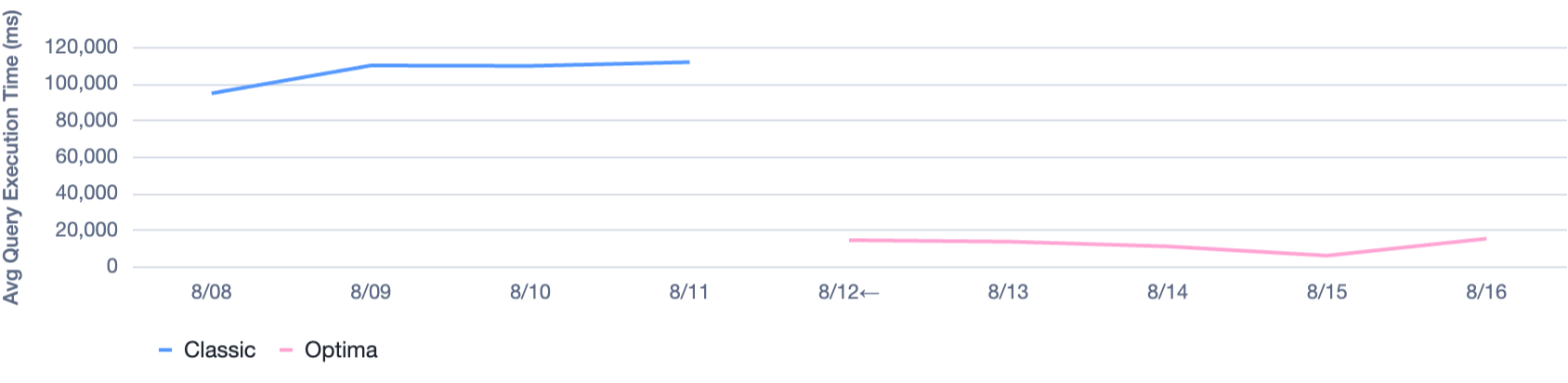
Block saw an over 90% decrease in query execution time on a specific table immediately after enabling Optima Clustering and recreating that table!2
Example benefit within Snowflake
Workloads within Snowflake, in addition to customer workloads, have also benefited from Optima Clustering. For example, a table on Snowflake's internal account saw a 99%+ reduction in partitions scanned after switching to Optima Clustering!
Average Partitions Scanned per Query:
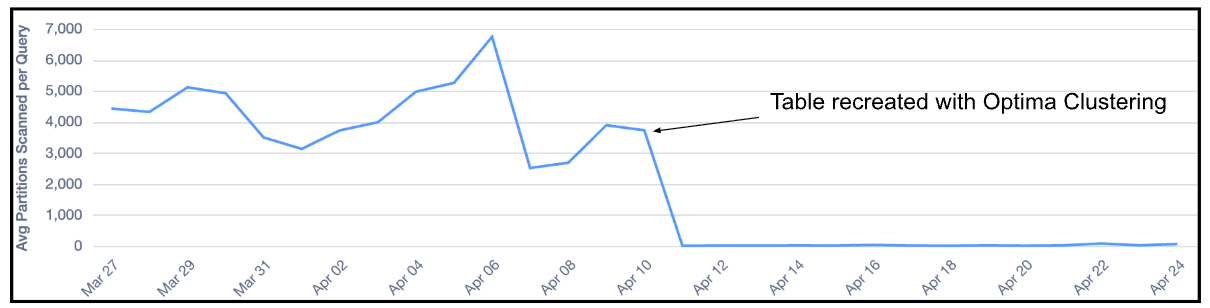
This workload had a clustering key set on test_selection_id, which all happened to start with the same five-character prefix: tsid_. Because this prefix was identical in every partition, it was not useful for pruning. Because Optima Clustering uses up to 1 KB, Snowflake now clusters the entire test_selection_id value.
Monitoring and observability
If you want to track your costs, Snowflake bills both versions under the existing AUTO_CLUSTERING service type. You can easily differentiate between them by querying the VERSION column (CLASSIC vs OPTIMA) in the AUTOMATIC_CLUSTERING_HISTORY view.
Here is a query to see your daily clustering spend split by version over the last 30 days:
SELECT
    DATE_TRUNC('DAY', START_TIME) AS USAGE_DATE,
    VERSION,
    SUM(CREDITS_USED) AS TOTAL_CREDITS
FROM SNOWFLAKE.ACCOUNT_USAGE.AUTOMATIC_CLUSTERING_HISTORY
WHERE START_TIME >= DATEADD('day', -30, CURRENT_DATE())
GROUP BY 1, 2
ORDER BY 1 DESC, 2;
Checking status and estimating costs. Beyond historical billing, existing clustering system functions work as-is:
- Check table status: You can call
SYSTEM$CLUSTERING_INFORMATIONon any table to see its current clustering metrics and confirm whether it is using Optima Clustering or Clustering Classic. - Estimate upcoming costs: You can still use the
SYSTEM$ESTIMATE_AUTOMATIC_CLUSTERING_COSTSfunction to predict the costs of initially clustering a table or changing a clustering key.
Next steps
Starting September 2026, newly clustered tables on most accounts will automatically use Optima Clustering. Learn more about Snowflake Optima.
Disclaimer
This article contains forward-looking statements, including about our future product offerings, and are not commitments to deliver any product offerings. Actual results and offerings may differ and are subject to known and unknown risk and uncertainties. See our latest 10-Q for more information.
- Based on internal benchmarking vs. Clustering Classic; results may vary.
- Results will vary based on workload, table structure, and clustering key configuration.
