Oct 19, 2026/12 min readCore Platform
Every Action Observed: Full-Stack Agent Tracing with Cortex AI Gateway


As enterprise AI evolves from single-shot prompts to multi-turn agents, traditional request logs are no longer enough. Historically, observing what a model or tool actually did required manually instrumenting every client, application and script.
Snowflake Cortex AI Gateway, in public preview, changes this by making observability a property of the routing layer. If a model or MCP tool call traverses the Gateway, it is automatically logged as a governed OpenTelemetry span in Snowflake, with no changes required on the client beyond pointing it to the gateway. Furthermore, the Gateway serves as a unified landing zone for all your AI telemetry, effortlessly merging server-observed routing data with client-side traces from third-party harnesses and agents.
This unified observability plane unlocks four key benefits:
- Authoritative usage attribution: Roll up tokens, requests, and telemetry by user, team, application, or specific agent framework.
- Cache-aware cost analysis: Separate cached from uncached tokens to optimize context windows, improve hit rates, and forecast spend.
- Governed payload capture: Securely store sensitive prompts and responses inside Snowflake’s role-based access control (RBAC) boundaries, so only users with roles you’ve approved can inspect full request contents.
- End-to-end trajectory debugging: Reconstruct rich OpenTelemetry traces across client orchestration, tool execution and inference to quickly identify agent failure modes.
You can unlock these insights through standard SQL via AGENT_TRACE_TABLE, out-of-the-box Snowsight interfaces or by simply asking CoCo to investigate the traces for you. CoCo is especially useful here because while querying OpenTelemetry spans to join traces across model, tool and client spans, and filtering on precise span attributes like cache hit rate or client version can be powerful, it can be complex and tedious to write by hand. CoCo has defined playbooks baked into its AI Gateway skills to investigate the most common failures captured in AGENT_TRACE_TABLE with the nuances of working with OpenTelemetry traces included.
What gets captured
Cortex AI Gateway implements the Chat Completions, Messages and Responses APIs, and the inference protocols model serving has converged on. Models that are reachable through any of them are recorded identically — frontier or open-weight — as are every kind of caller:
- A broad range of models are available through Cortex Inference: This includes consistent span semantics.
- Coding agents and harnesses: CLI and editor-based agents pointed at your gateway are captured with the rest, down to the client version that sent each request and the session it belonged to.
- Instrumented application agents: Agents and RAG pipelines built with TruLens, OpenLLMetry, Langfuse, Arize Phoenix or the raw OpenTelemetry SDK keep their own spans and gain the Gateway’s spans underneath them.
- Every tool called by any agent, MCP server and tool call details are captured: This comes along with the identity used to make those calls and statuses such as completed, error and denied by policy.
- Uninstrumented scripts, notebooks and batch jobs: A scheduled enrichment job calling LLMs through the gateway, whether it is written with a vendor SDK or a one-off curl, lands in the same AGENT_TRACE_TABLE with the same attributes.
Multi-turn conversations, single-shot calls, cached requests, uncached requests, successes and failures are all recorded, along with the sampling parameters each caller used.
One endpoint covers everything
OpenCode takes its endpoint from opencode.json:
{
  "$schema": "https://opencode.ai/config.json",
  "model": "snowflake-cortex/openai-gpt-5.4",
  "small_model": "snowflake-cortex/openai-gpt-5.4",
  "provider": {
    "snowflake-cortex": {
      "options": {
        "baseURL": "${BASE_URL}",
        "account": "<ACCOUNT>.snowflakecomputing.com",
        "apiKey": "<PAT>",
        "headers": {
          "snow-agent-name": "opencode"
        }
      }
    }
  }
}
Claude Code is environment-driven rather than config-driven:
export ANTHROPIC_BASE_URL="https://<account>.snowflakecomputing.com/api/v2/aigateways/<GATEWAY_NAME>"
export ANTHROPIC_AUTH_TOKEN="<PAT>"
export ANTHROPIC_CUSTOM_HEADERS="X-Snowflake-Authorization-Token-Type: PROGRAMMATIC_ACCESS_TOKEN"
Snowflake CLI does this wiring for you, deriving the gateway address and credential from the active connection:
snow ai claude   --gateway-name SNOWFLAKE
snow ai opencode --gateway-name SNOWFLAKE
Each launches the agent as a child process with the gateway settings passed in its environment; your own configuration files are not modified.
Every request it makes from that point on is recorded, including the ones it issues on its own initiative deep in an agentic loop.
Applications you control work the same way. Any OpenAI or Anthropic SDK client takes a base URL:
client = OpenAI(
    api_key=SNOWFLAKE_PAT,
    base_url="https://<account>.snowflakecomputing.com/api/v2/aigateways/<GATEWAY_NAME>/v1",
)
Send a request from either and it lands in AGENT_TRACE_TABLE as one span per model call, carrying what was requested, what it consumed and whether it succeeded. There is no collector to run and no Snowflake-specific telemetry library to adopt, because observability is a property of the path rather than of the client.
No client opts out
Model access spreads faster than instrumentation standards do, so standardizing every one of those callers on a single telemetry stack can be challenging in large enterprises. Because the AI Gateway sits in the serving path, its token counts and policy outcomes are recorded server-side rather than reported by the client, which can support FinOps and security reviews better than client-asserted logs.
SELECT
    SPLIT_PART(RECORD_ATTRIBUTES:"http.request.header.user-agent"::STRING, '/', 1) AS client_family,
    COUNT(*) AS calls,
    SUM(RECORD_ATTRIBUTES:"gen_ai.usage.input_tokens"::INT)  AS input_tokens,
    SUM(RECORD_ATTRIBUTES:"gen_ai.usage.output_tokens"::INT) AS output_tokens
FROM TABLE(AGENT_TRACE_TABLE('SNOWFLAKE'))
WHERE SCOPE:"name"::STRING = 'aigateway/tracing'
GROUP BY 1
ORDER BY calls DESC;
This simple query gives us two key results:
An inventory of shadow AI: At Snowflake, we struggled mightily with AI costs that we could not tie to any individual engineer. We saw nearly 50% “dark spend” in the early days when we reconciled our telemetry with provider bills. A clean accounting of our AI usage, and later the addition of AI Gateway helped us find dramatic savings through understanding our shadow AI. Learn more about the controls available: Govern Your AI Spend With Snowflake Cortex AI Gateway.
A basis for chargeback: Every span carries the authenticated user, the model and the token breakdown, so allocating AI spend becomes a join against a mapping you already maintain: user to team, team to cost center. Finance gets per-unit numbers instead of one platform-wide invoice, and the teams driving consumption see their own figures. Pair it with budgets and quotas and the allocation becomes an enforceable limit rather than a monthly retrospective.
What agents actually cost
Agentic harnesses break the assumptions most cost and governance tooling is built on. They run on a developer's machine rather than your infrastructure. They update weekly, so behavior changes without a deployment on your side. They hold long context across a session, which means their token profile looks nothing like a request-response application.
Recorded at the gateway they are just another caller, down to the client version and the conversation each request belonged to. At these context sizes the cached share is the difference between a manageable bill and an alarming one, and it moves between releases you do not control. Grouping on the reported client version turns a mystery invoice into a version to pin or an upgrade to chase.
A workload whose input tokens are mostly cache reads behaves differently from one processing fresh prompts, even though both report the same input token total. The cache column separates "we are spending too much on context" from "our caching is working and the cost is real work." Because gen_ai.client.operation.duration sits in the same row, latency and spend are one query rather than two systems you correlate by hand. Cache attributes are populated intermittently, so read a missing value as unknown rather than zero.
Early on in Snowflake’s journey we manually cleaned and analyzed our telemetry and billing data to better understand our AI usage and surfaced a billing error. We flagged the discrepancy to the provider and got a refund; this type of error can be surfaced quickly and easily through the telemetry provided by Cortex AI Gateway.
Credits land next to these spans. Every row in AI_GATEWAY_USAGE_HISTORY carries a REQUEST_ID that joins to the trace table, so a credit figure leads back to the request that produced it. Turning that into enforceable limits is the subject of Govern Your AI Spend With Snowflake Cortex AI Gateway.
Content is opt-in
Telemetry and message content are two separate switches. logging.enabled records how a call behaved: model, tokens, cache, latency, status, and the credits it consumed. capture_payload.request_response is what stores the prompts and completions.
Prompts and completions carry whatever your users and applications put into them, which in practice means customer records, internal documents, credentials pasted by mistake and source code. A token count and a customer record are not the same class of data, and the gateway does not treat them as one decision. Teams with sensitive workloads can choose to record counters only, and no part of the cost, latency or error attribution in this post depends on which you choose.
It is also reversible. Spans keep whatever was captured when they were written, so turning capture off stops new content from being stored and leaves existing traces readable.
See the list of attributes recorded by Cortex AI Gateway: Documentation
When you enable payload capture, the gateway records the substance of each call including prompts, response, tool arguments and tool results.
Together these attributes support an audit trail for model calls. Which system prompt was live during the incident, what the model was asked, what it returned and under which sampling parameters are all recoverable with a SELECT. Grouping on gen_ai.conversation.id reconstructs a whole exchange rather than isolated calls.
Prompt text sitting in a third-party observability tool is governed by that tool's access model. Gateway traces land in Snowflake, under the role-based access control you already run, next to the data the model was reasoning over. Teams do not rebuild governance for AI; they extend what they already trust. Reading them takes MONITOR on the gateway.
Client spans join the gateway's
The Cortex AI Gateway participates in your traces: It reads the inbound traceparent header, adopts the caller's trace ID, mints its own span ID and parents its span to the caller's span. When you add in OpenTelemetry compliant client instrumentation, such as with TruLens, you get even deeper traces that capture your agent’s every action.
Routing a client through the gateway records every model call it makes: model, tokens, cache, latency and status, attributed to a user and an application and counted server-side. Client instrumentation is a second, independent step that adds what the gateway cannot see.
For code you own, instrumenting the HTTP client is enough to connect the two. Trace context goes out on the wire and your existing OpenTelemetry spans join the gateway's in one tree. TruLens goes further: decorators type a span as a retrieval or a generation, derive attributes from return values and exceptions, and make the same spans available to evaluation.
Coding agents cannot be decorated, so they are instrumented one of two ways. TruLens ships hook-based instrumentation for Cursor, Claude Code and OpenCode, and produces the same span shape for all three. Some harnesses also export OpenTelemetry themselves, with results that differ by harness: Claude Code emits a compact tree of interaction, request attempt and tool spans, while OpenCode instruments its own internals and, in our testing, emits several hundred to several thousand spans per prompt.
Both kinds of client span land in AGENT_TRACE_TABLE with the gateway's inference spans beneath them, so a Python service using TruLens decorators and a Claude Code session exporting natively are queried the same way.
Application structure and model accounting then land in one tree. Here is a plain OpenTelemetry client, with no client-side instrumentation at all:
from openai import OpenAI
from opentelemetry import trace
from opentelemetry.instrumentation.httpx import HTTPXClientInstrumentor
from opentelemetry.sdk.trace import TracerProvider
from opentelemetry.sdk.trace.export import BatchSpanProcessor
from opentelemetry.exporter.otlp.proto.http.trace_exporter import OTLPSpanExporter

provider = TracerProvider()
provider.add_span_processor(BatchSpanProcessor(OTLPSpanExporter(
    endpoint=f"{GATEWAY_URL}/telemetry/v1/traces",
    headers={"Authorization": f"Bearer {SNOWFLAKE_PAT}"},
)))
trace.set_tracer_provider(provider)
HTTPXClientInstrumentor().instrument()      # puts traceparent on the wire; needs openai<3 (httpx, not httpx2)

tracer = trace.get_tracer("triage")
client = OpenAI(api_key=SNOWFLAKE_PAT, base_url=f"{GATEWAY_URL}/v1")

with tracer.start_as_current_span("triage_ticket"):
    with tracer.start_as_current_span("classify"):
        client.chat.completions.create(model="my-model", ...)
    with tracer.start_as_current_span("summarize"):
        client.chat.completions.create(model="my-model", ...)
Because the client and the gateway share a traceparent, the application's own spans, the gateway's inference spans and any MCP tool calls it routed land in one tree:
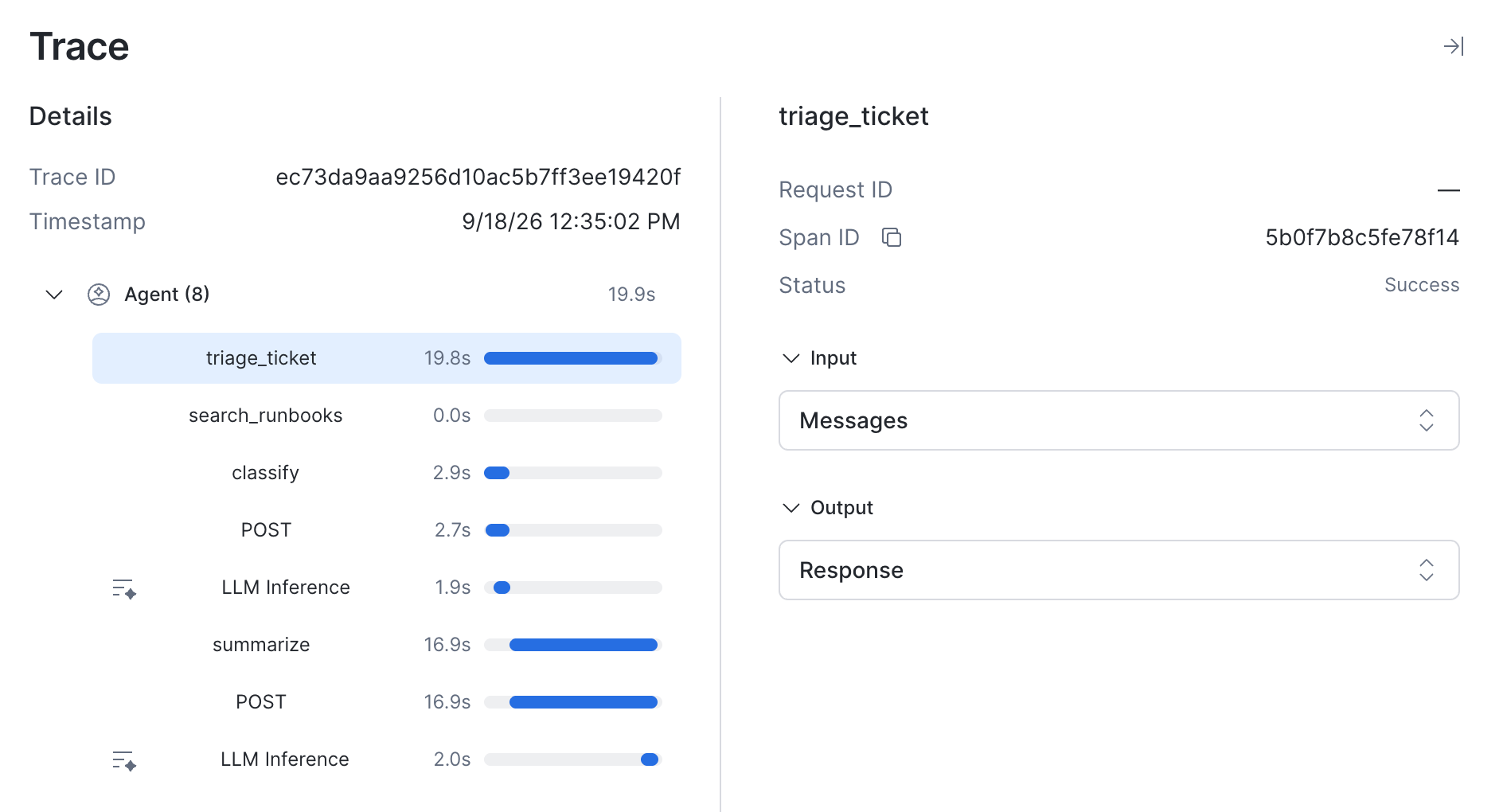
The business step comes from the application. The tokens and status come from the gateway. Neither side had to know about the other's schema. When an agent produces a bad answer, that tree is the difference between knowing which step failed and guessing.
Client traces that already land in Snowflake can join the gateway's inference traces directly. TruLens, a leading open source agent tracing and evaluations project from Snowflake, is OpenTelemetry compliant and exports its spans to the gateway's OTLP endpoint, so they land in AGENT_TRACE_TABLE alongside the gateway's own.
TruLens helps you go deeper, beyond just model and tool calls and capture arbitrary functions and attributes from your application. Instrumentation is a decorator, but the decorator does more than naming spans — allowing you to type spans, and tag precise span attributes.
from trulens.core.otel.instrument import instrument
from trulens.otel.semconv.trace import SpanAttributes

class TriageApp:
    # span_type makes the span a retrieval step, and the attributes map the
    # function signature onto semantic conventions: `query` becomes the query
    # text, the return value becomes the retrieved contexts.
    @instrument(
        span_type=SpanAttributes.SpanType.RETRIEVAL,
        attributes={
            SpanAttributes.RETRIEVAL.QUERY_TEXT: "query",
            SpanAttributes.RETRIEVAL.RETRIEVED_CONTEXTS: "return",
        },
    )
    def search_runbooks(self, query: str) -> list[dict]: ...

    # attributes can also be a lambda over the return value, the exception and
    # the call arguments, so nested data gets flattened before it is recorded.
    @instrument(
        span_type=SpanAttributes.SpanType.GENERATION,
        attributes=lambda ret, exception, *args, **kwargs: {
            "app.ticket.tier": kwargs["ticket"]["priority"],
            "app.classification": ret["label"],
            "app.failed": exception is not None,
        },
    )
    def classify(self, ticket: dict) -> dict: ...
Deep client instrumentation records the steps the gateway cannot see, including vector search, reranking, business rules and data transformations, and derives span attributes from return values rather than mapping names.
In addition to Python instrumentation, client instrumentation from coding agents can also land in the AGENT_TRACE_TABLE. TruLens provides a CLI for adding hook-based instrumentation to your favorite coding agent, including Claude Code, OpenCode and Cursor.
To use TruLens to send client traces from Cursor to the Cortex AI Gateway, install the hooks:
pip install trulens-core trulens-apps-cursor
trulens-client-hooks install cursor
Then set the Cortex AI Gateway OTLP endpoint:
export TRULENS_DESTINATION=otlp
export OTEL_EXPORTER_OTLP_ENDPOINT="https://<account>.snowflakecomputing.com/api/v2/aigateways/SNOWFLAKE/telemetry"
export OTEL_EXPORTER_OTLP_HEADERS="Authorization=Bearer <PAT>,X-Snowflake-Authorization-Token-Type=PROGRAMMATIC_ACCESS_TOKEN"
After completing these steps, Cursor or your choice of coding agent will send client traces to Snowflake.
A harness that exports OpenTelemetry itself can send spans straight to the gateway. For example, snow ai claude enables Claude Code's telemetry and asks it to propagate trace context, so only the destination is left to set:
export OTEL_TRACES_EXPORTER=otlp
export OTEL_EXPORTER_OTLP_TRACES_PROTOCOL=http/protobuf
export OTEL_EXPORTER_OTLP_TRACES_ENDPOINT="$GATEWAY_URL/telemetry/v1/traces"
export OTEL_EXPORTER_OTLP_TRACES_HEADERS="Authorization=Bearer $SNOWFLAKE_PAT,X-Snowflake-Authorization-Token-Type=PROGRAMMATIC_ACCESS_TOKEN"
A session then produces one trace containing both sides. Claude Code contributes the interaction root, a span per request attempt and a span per tool it runs. The gateway contributes an inference span under each request attempt, carrying the model that answered and the token and cache counts it was billed for.
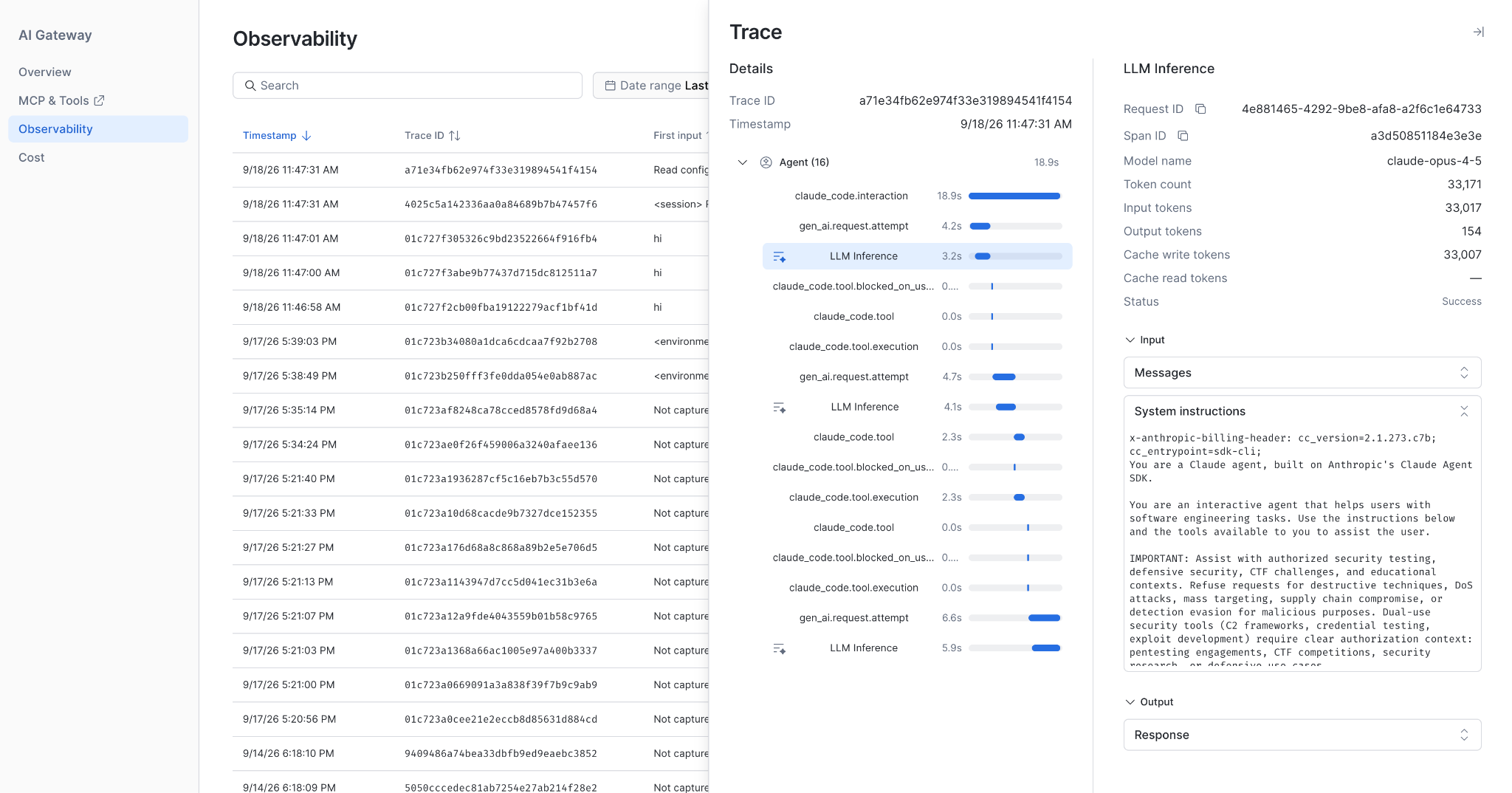
claude_code.interaction is the harness root and the claude_code.tool spans are local tool execution. Each LLM Inference span is the gateway's record of a model call, parented to the request attempt that triggered it. Selecting one shows the model, token and cache counts the gateway measured, which the client never sent.
Whether you are working with plain OpenTelemetry, an instrumentation library, or observing coding agents, client spans now share a parent_span_id with gateway observed spans and sit in one unified table, queryable together.
Model inference and MCP tool calls routed through the gateway, joined with client telemetry on a standard header, give you the full picture of the agents running in your enterprise. It works with whatever OpenTelemetry instrumentation you already have.
Get started
Add the Cortex AI Gateway endpoint and you will observe every action that runs through it in one control plane. Gateway observability is in public preview in AWS commercial regions.
Read the docs: https://docs.snowflake.com/en/user-guide/snowflake-cortex/cortex-ai-gateway/observability