
Claude Opus 5.5, Anthropic's most capable Opus model, is now available in public preview on Snowflake Cortex AI. It ships with same-day availability across Snowflake CoCo, Snowflake CoWork, Snowflake Cortex Agents, Snowflake Cortex AI Functions, and Snowflake Cortex Inference. All calls stay within Snowflake's security and governance perimeter.
Claude Opus 5.5
Claude Opus 5.5 is Anthropic's latest Opus model, with improvements over Opus 5 in complex coding and knowledge work.
Here are the numbers that matter for Snowflake users:
Coding: Anthropic reported that one early tester completed a 680,000-line code migration in less than a day. Another audited and fixed a 200,000-line codebase in under three hours, where Opus 5 took over 20 hours and used 2.5x as many tokens. On Terminal-Bench 4.0, Anthropic reports it scores 66.4% vs. 52.3% for Opus 5.
Knowledge work: In Anthropic's internal test, 16 of 18 Opus 5.5 research reports passed a quality bar that fails any report with an invented figure or quote. Neither Opus 5 nor Fable 5.1 passed that bar in any attempt. Walleye Capital reported that Opus 5.5 noticed an error in their evaluation instructions that no other model had caught.
Cost: Opus 5.5 costs 40% less than Opus 5 on typical workloads, with cache reads at $0.20/M tokens (down from $0.50) and output 30%+ faster.
Safety: Opus 5.5 scores better than any prior Claude model on Anthropic's automated behavioral audit across nearly 2,000 scenarios, and attempted to circumvent containment boundaries 85% less often than Opus 5.
For the full details, see Anthropic's announcement.
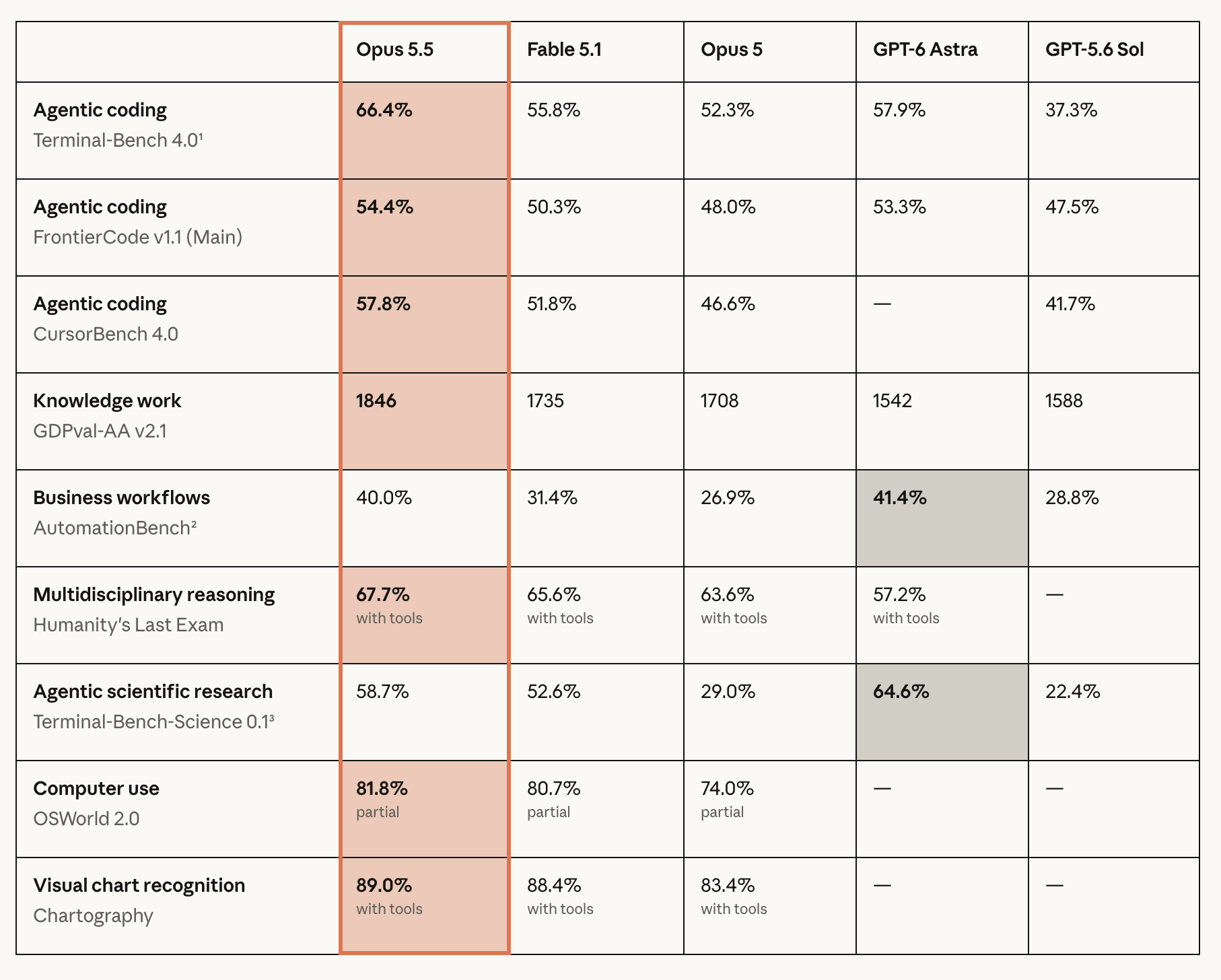
Source: Anthropic, Claude-opus-5-5
What you can do with Claude Opus 5.5 on Snowflake
Opus 5.5 gives teams another model option for development, analysis, and applications within Snowflake's security and governance perimeter.
Work through code changes with Snowflake CoCo
Snowflake CoCo is the first truly data-native AI coding agent, built to speed time to value across the modern data stack. Deeply aware of your enterprise's data, compute, governance, and operational semantics, CoCo turns complex data engineering, analytics, machine learning, and agent-building tasks into informed conversations with high accuracy and trust.
Opus 5.5 makes CoCo stronger at the tasks that matter most in this context. Where Opus 5 might handle a focused single-file change, Opus 5.5 can carry a refactor across multiple files, run checks, and explain what it changed in plain language. Because CoCo already understands your Snowflake environment, pairing it with a model that is better at multi-step reasoning and code review means fewer iterations and more reliable results.
Select the model with the /model command in CoCo CLI, then give it a concrete task: "Migrate this repository from the deprecated client library to its replacement. Inspect the current call sites and tests, preserve existing behavior, update the affected files, and run the relevant checks. Summarize the changes and flag anything you could not verify." Review the resulting diff and test results before merging.
Do more with Snowflake CoWork and Cortex Agents
Snowflake CoWork is the personal agent where you work smarter. It understands your data from day one, runs work on demand and on schedule inside Snowflake's governance perimeter, and delivers finished reports and briefs to knowledge workers.
Opus 5.5 raises the quality of what CoWork can deliver autonomously. Agent tasks are multi-step by nature: gathering data, cross-referencing sources, synthesizing findings, and producing a deliverable. Opus 5.5 sticks closer to its instructions over long runs (85% fewer boundary violations in Anthropic's testing) and produces research with fewer invented figures (16 of 18 reports passed a strict accuracy bar where Opus 5 passed none). Both matter when an agent is working on your behalf, whether you are watching or not.
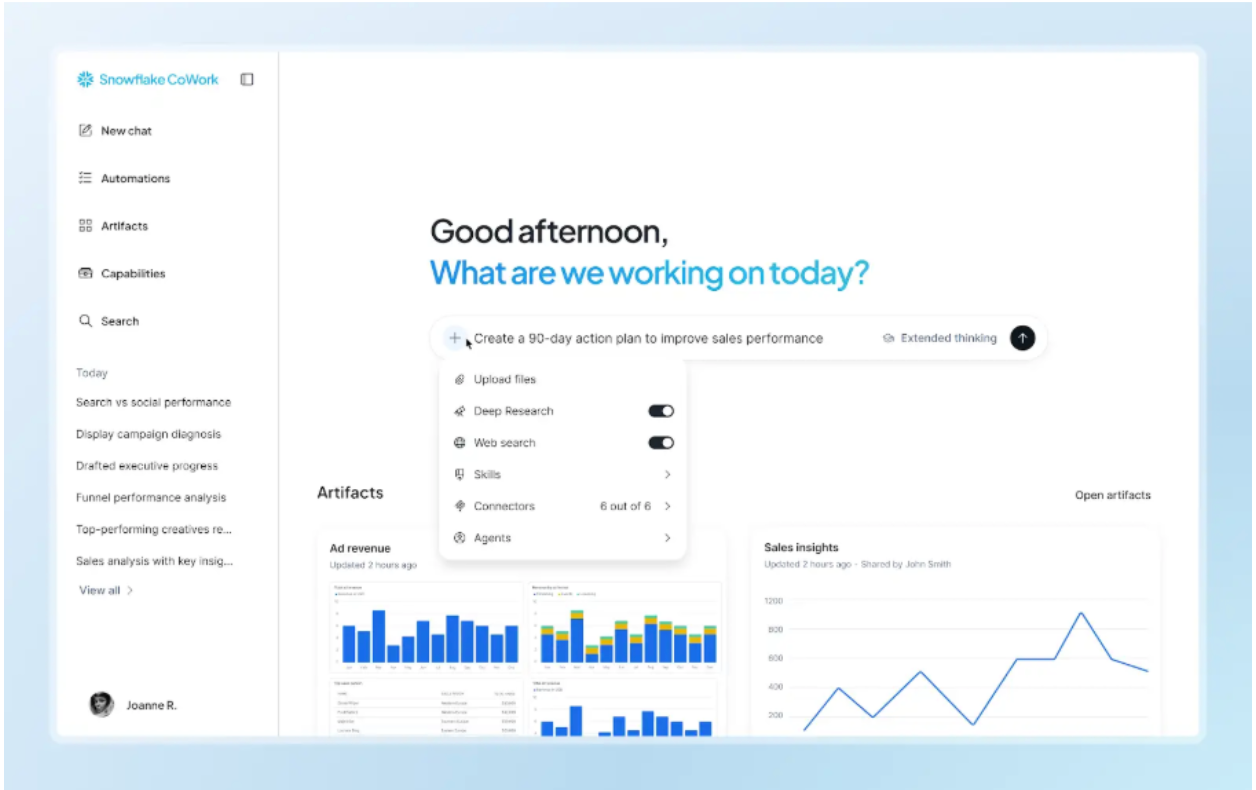
Cortex Agents provide the same model access via API for custom applications. Teams building their own agent workflows can call Opus 5.5 through the Cortex Agents framework and benefit from the same accuracy and safety improvements.
For example, ask an agent to review last week's support escalations, cross-reference them with product usage data, and draft a summary that flags accounts showing declining engagement. Or have an agent reconcile a quarterly financial report against its source documents and list every claim it cannot verify. Opus 5.5's improvements in source accuracy and multi-step reasoning are directly relevant to this kind of work. The underlying findings should still be checked before acting on them.
Run AI analysis directly in SQL
Cortex AI Functions let you apply AI instructions to data inside SQL queries without moving data out of Snowflake. With Opus 5.5, the model is better at distinguishing facts from inferences and catching inconsistencies in data.
The example below demonstrates this. It supplies a fictional financial table and management commentary where two claims are intentionally wrong: the commentary states 25% revenue growth (the actual figure is 20%) and says margins held steady (they fell). It asks Opus 5.5 to check each claim against the numbers.
SELECT AI_COMPLETE(
  'claude-opus-5-5',
  'Review these fictional sources. Source A, financial table: prior-year revenue 100 million dollars and operating profit 20 million; current-year revenue 120 million and operating profit 18 million. Source B, management commentary: revenue grew 25 percent, operating margin held steady, and expansion caused the growth. Check each claim against Source A. Show revenue growth, both operating margins, and the margin change in percentage points. Cite A or B for each finding, distinguish contradicted claims from unsupported explanations, and list evidence needed before concluding what caused the changes. Use only these sources.'
) AS financial_review;
This runs entirely within Snowflake. The model processes the text you pass in the prompt; it does not access other tables or account data.
Build applications with the Anthropic SDK
Developers can call Opus 5.5 through Cortex Inference using the Anthropic SDK and their Snowflake account endpoint. The example below uses a Snowflake programmatic access token and supplies the information to analyze in the request; a model call does not retrieve account data on its own.
Set SNOWFLAKE_PAT and SNOWFLAKE_ACCOUNT_URL in your environment, with the latter set to your account's HTTPS URL. Install the anthropic and httpx Python packages before running the example.
import base64
import os
from pathlib import Path

import anthropic
import httpx

token = os.environ["SNOWFLAKE_PAT"]
account_url = os.environ["SNOWFLAKE_ACCOUNT_URL"].rstrip("/")
image_data = base64.b64encode(
    Path("operations_dashboard.png").read_bytes()
).decode("ascii")

with httpx.Client(headers={"Authorization": f"Bearer {token}"}) as http_client:
    client = anthropic.Anthropic(
        api_key="not-used",
        base_url=f"{account_url}/api/v2/cortex",
        http_client=http_client,
        default_headers={"Authorization": f"Bearer {token}"},
    )
    response = client.messages.create(
        model="claude-opus-5-5",
        max_tokens=8192,
        messages=[{
            "role": "user",
            "content": [
                {
                    "type": "image",
                    "source": {
                        "type": "base64",
                        "media_type": "image/png",
                        "data": image_data,
                    },
                },
                {
                    "type": "text",
                    "text": (
                        "Review this operations dashboard screenshot. "
                        "Summarize the main trends and flag anomalies or "
                        "inconsistencies across the charts and KPI cards. "
                        "For each finding, identify the chart, time period, "
                        "and visible values that support it. Account for "
                        "axis scales and units. If a label or value is "
                        "unreadable, say so rather than guessing. "
                        "Separate observations from possible explanations."
                    ),
                },
            ],
        }],
    )
    for block in response.content:
        if block.type == "text":
            print(block.text)
Get started
Try Opus 5.5 on a development or analysis task where you can check the result against existing tests, source documents, or calculations. It is available in public preview across Snowflake CoCo, Cortex Agents, Cortex AI Functions, Cortex Inference, and Snowflake CoWork.
Learn more
Build agentic applications with Cortex Agents: Get started with Cortex Agents and learn how to build AI experiences grounded in your enterprise data.
Get started with Snowflake CoWork: Learn more about Snowflake CoWork and try it out with our getting started guide.
Start building with Snowflake CoCo: Learn more about Snowflake CoCo and get hands-on with the CoCo Desktop getting started guide.
Forward-looking statements
This article contains forward-looking statements, including about our future product offerings, and are not commitments to deliver any product offerings. Actual results and offerings may differ and are subject to known and unknown risk and uncertainties. See our latest 10-Q for more information.